Introduc)on	
  to
Harun Yardımcı
h_yardimci /in/harunyardimci
harun.yardimci@gmail.com
40.990022, 29.107436
hyardimci@ebay.com
https://about.me/harun.yardimci
AGENDA
~ 1 HOUR
IMMUTABLE INFRASTRUCTURE
DOCKER
IMAGES AND CONTAINERS
HUB & REGISTRY
BUILD & PULL
ORCHESTRATION
MACHINE
SWARM
COMPOSE
DEPLOYMENTS
MONITORING
“I know the solution is Docker, but I am not sure of
the problem.”
Immutable Infrastructure
Deployments
Environment Inconsistency
Developer Onboarding
Resources
Isolation
Security
Fast Shipment
Quickly Scale
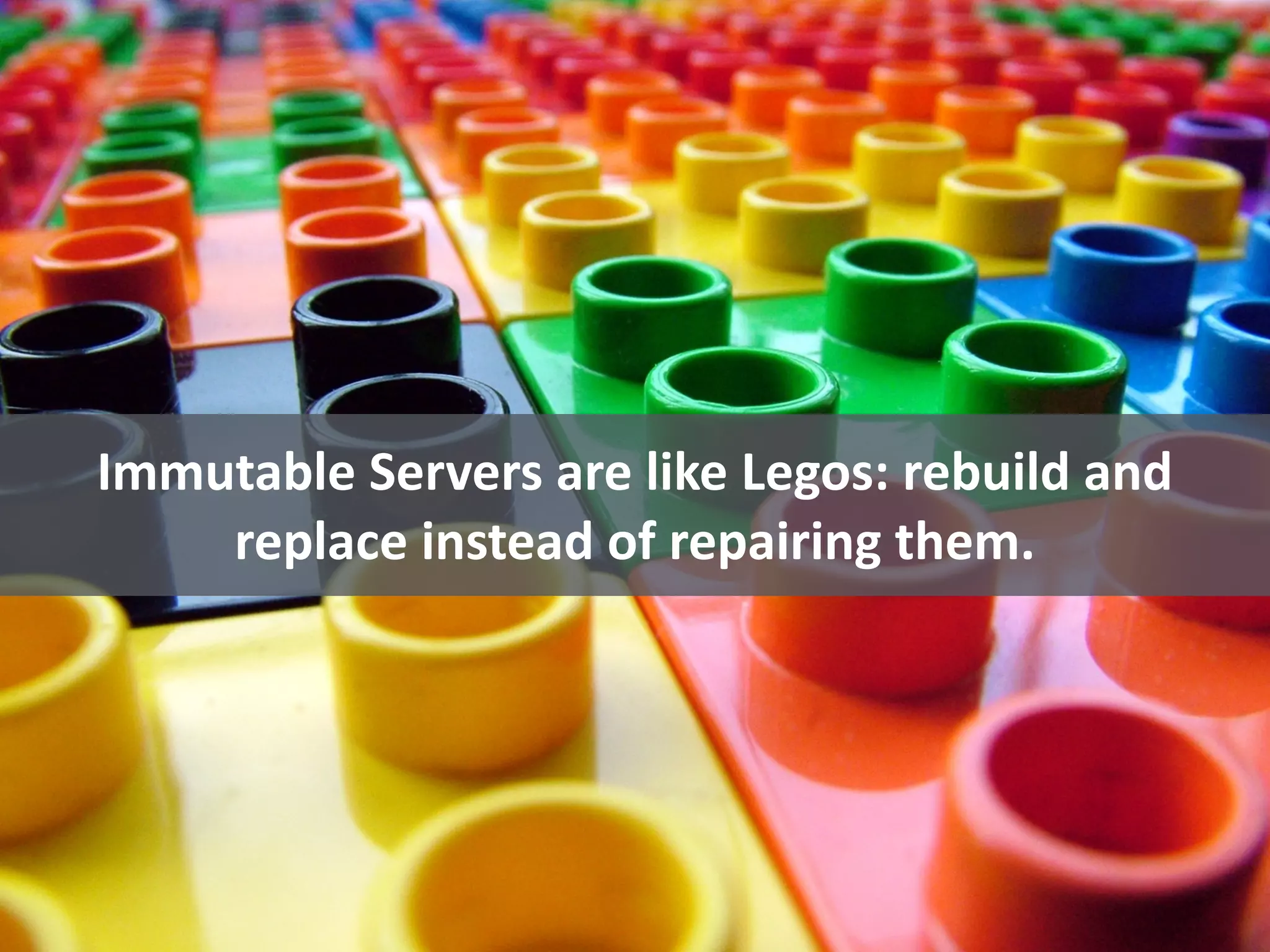
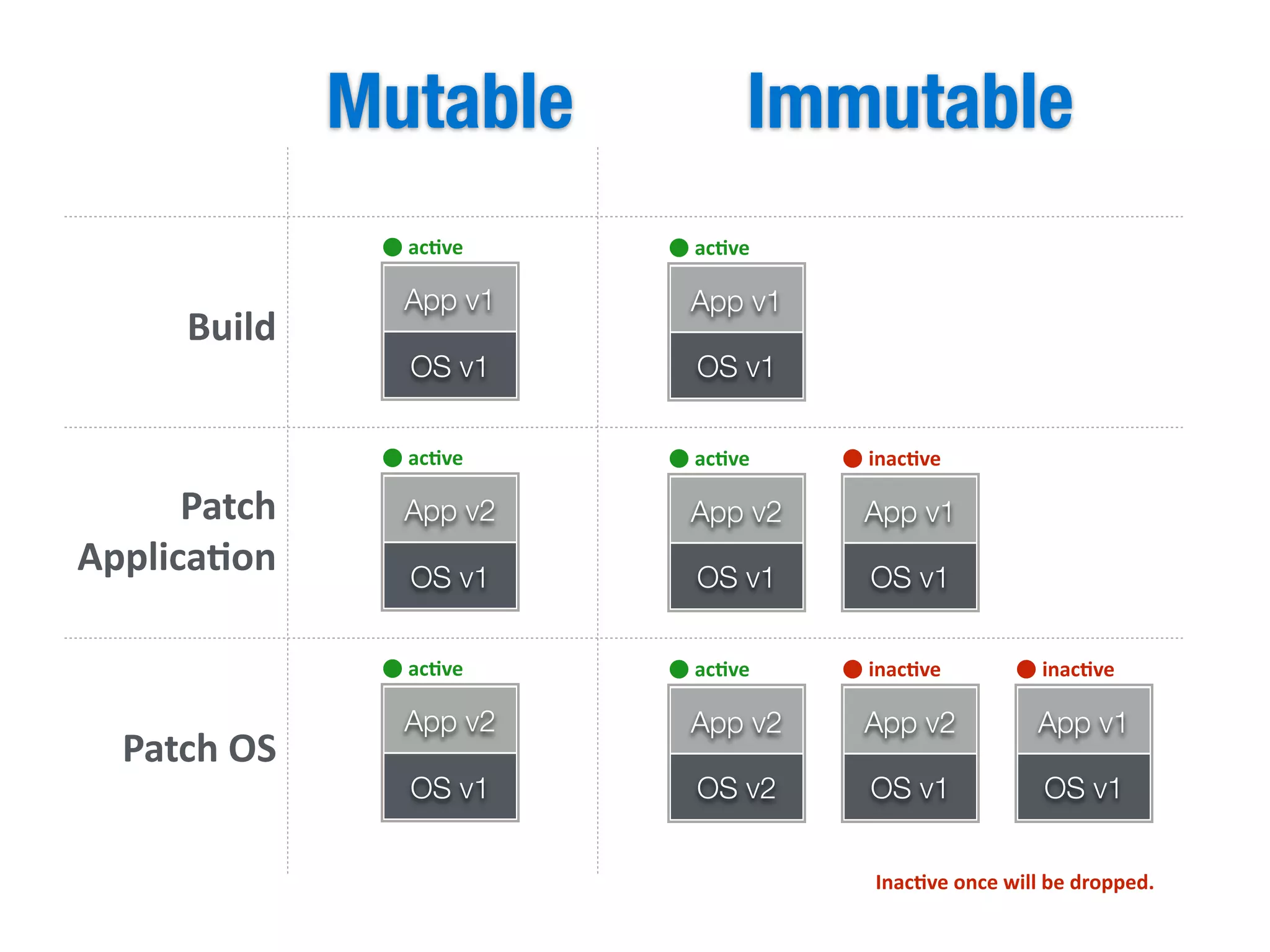
Immutable	
  Servers	
  are	
  like	
  Legos:	
  rebuild	
  and	
  
replace	
  instead	
  of	
  repairing	
  them.
OS v1
App v1
OS v1
App v1
ac)veac)ve
OS v1
App v2
ac)ve
OS v1
App v1
inac)ve
OS v1
App v2
ac)ve
OS v2
App v2
ac)ve
OS v1
App v2
inac)ve
OS v2
App v2
ac)ve
OS v1
App v1
inac)ve
Patch	
  
Applica)on
Patch	
  OS
Build
ImmutableMutable
Inac)ve	
  once	
  will	
  be	
  dropped.
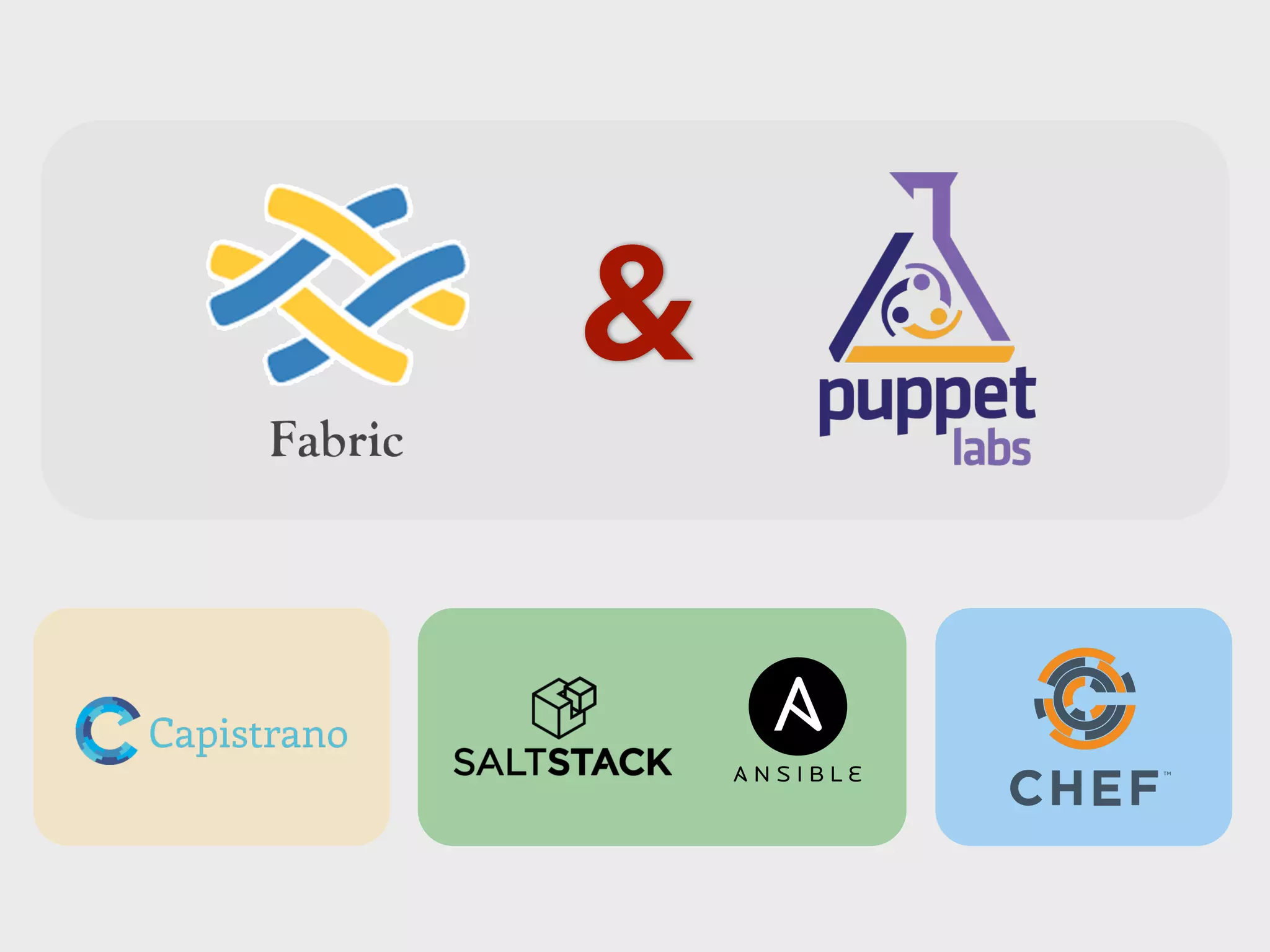
&
That is Enough!
BUT..
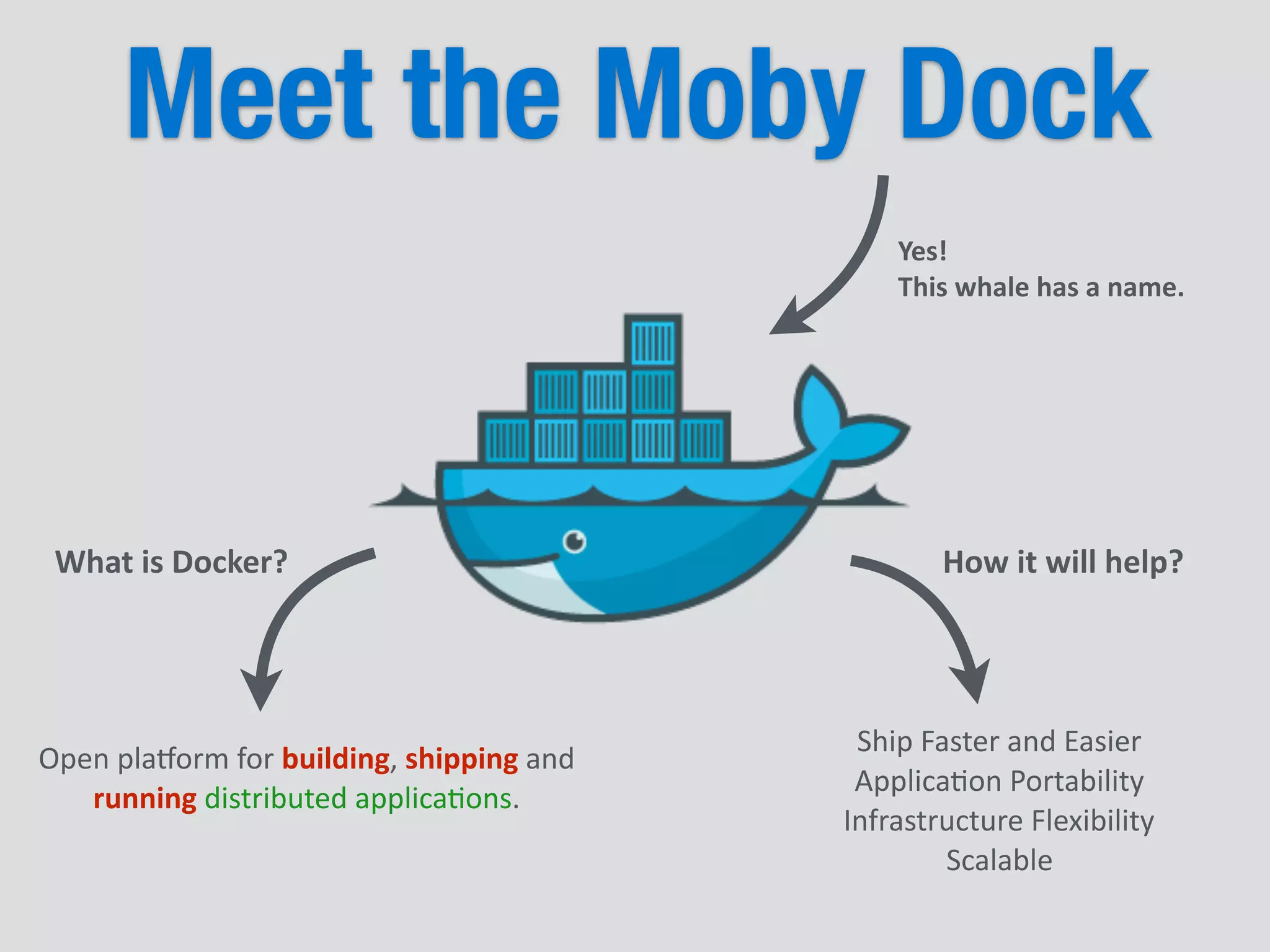
Meet the Moby Dock
Yes!	
  	
  
This	
  whale	
  has	
  a	
  name.
Open	
  pla(orm	
  for	
  building,	
  shipping	
  and	
  
running	
  distributed	
  applica5ons.
What	
  is	
  Docker?
Ship	
  Faster	
  and	
  Easier	
  
Applica5on	
  Portability	
  
Infrastructure	
  Flexibility	
  
Scalable
How	
  it	
  will	
  help?
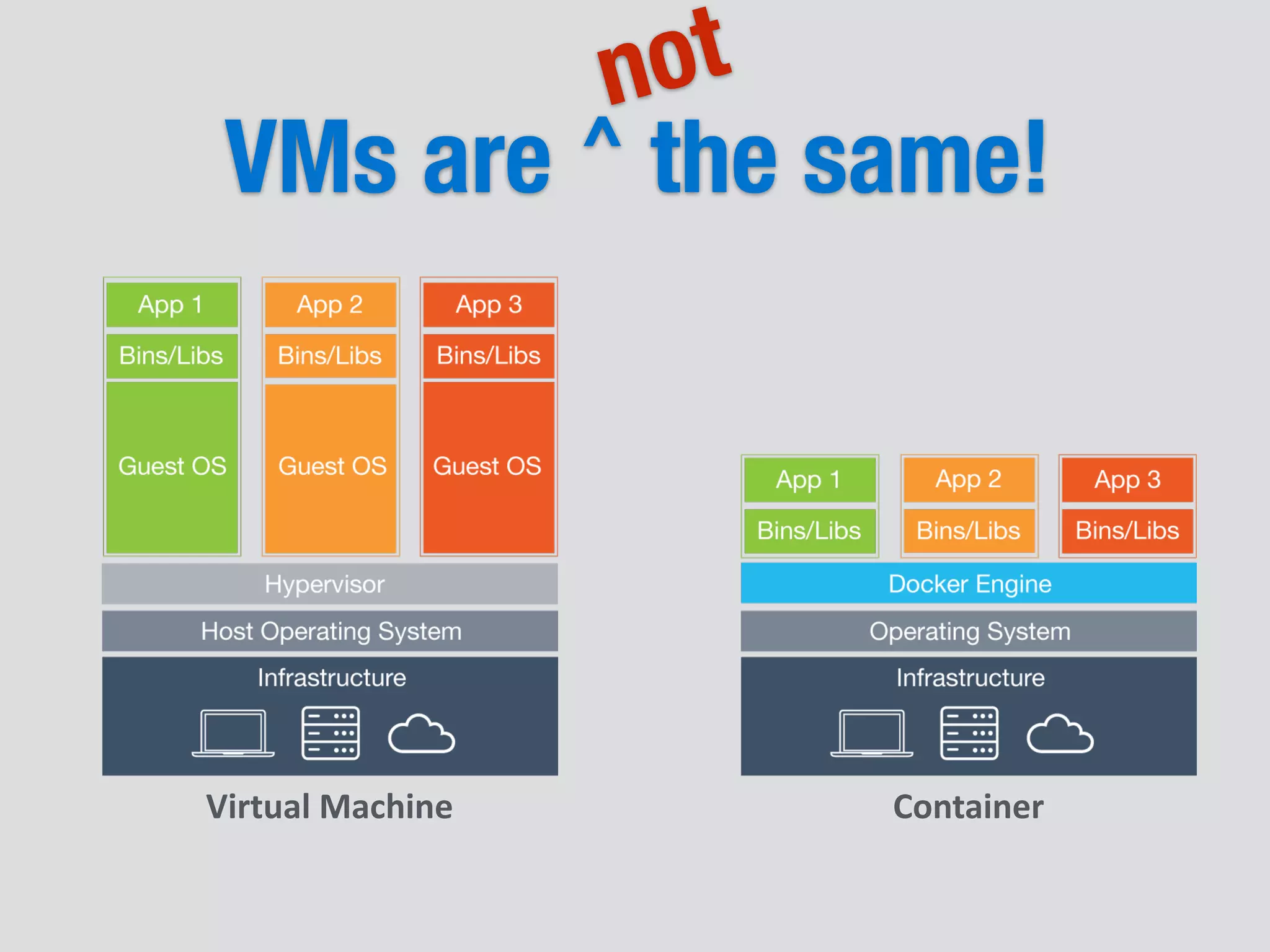
VMs are the same!
Virtual	
  Machine Container
not
^
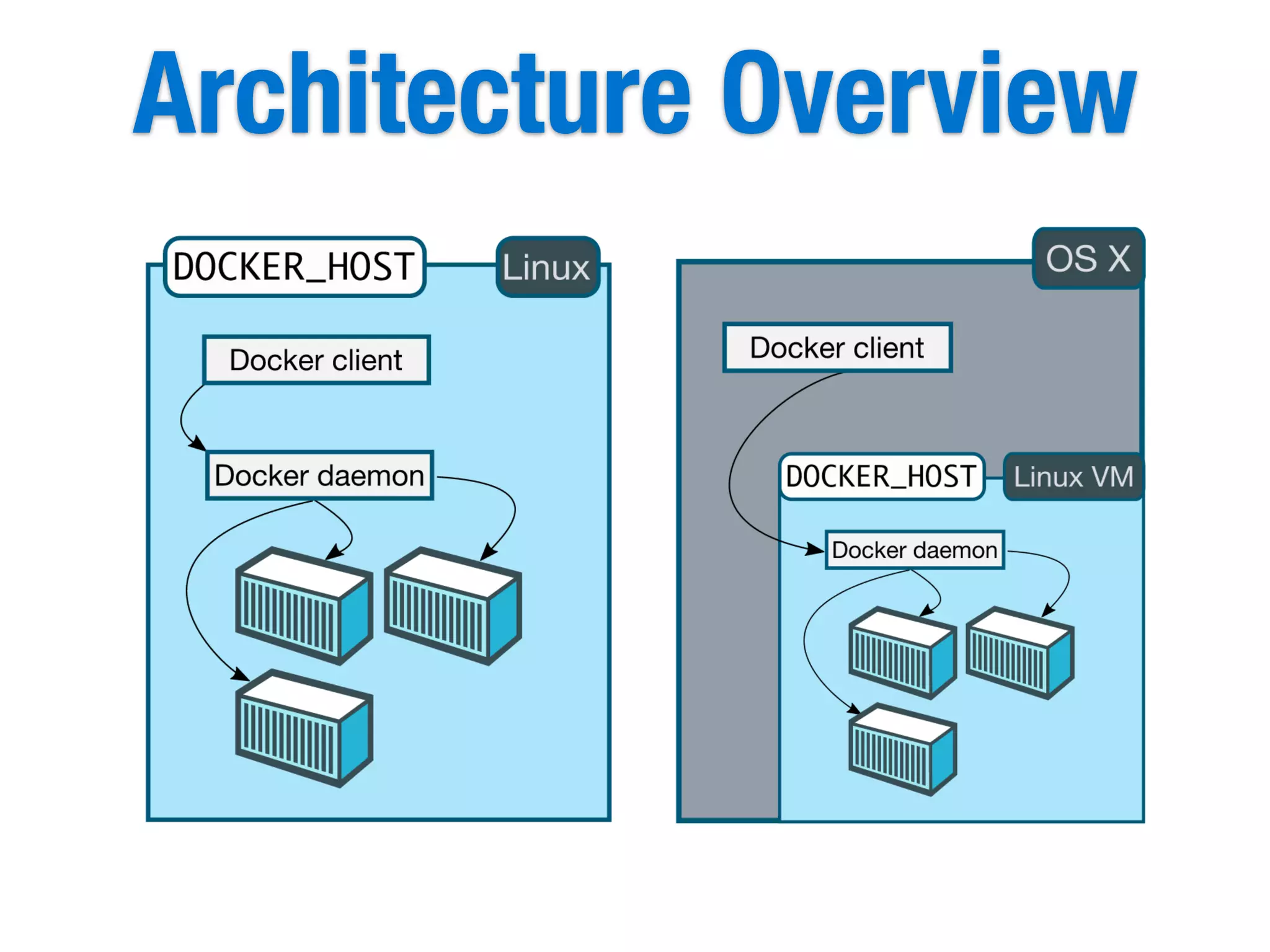
Architecture Overview
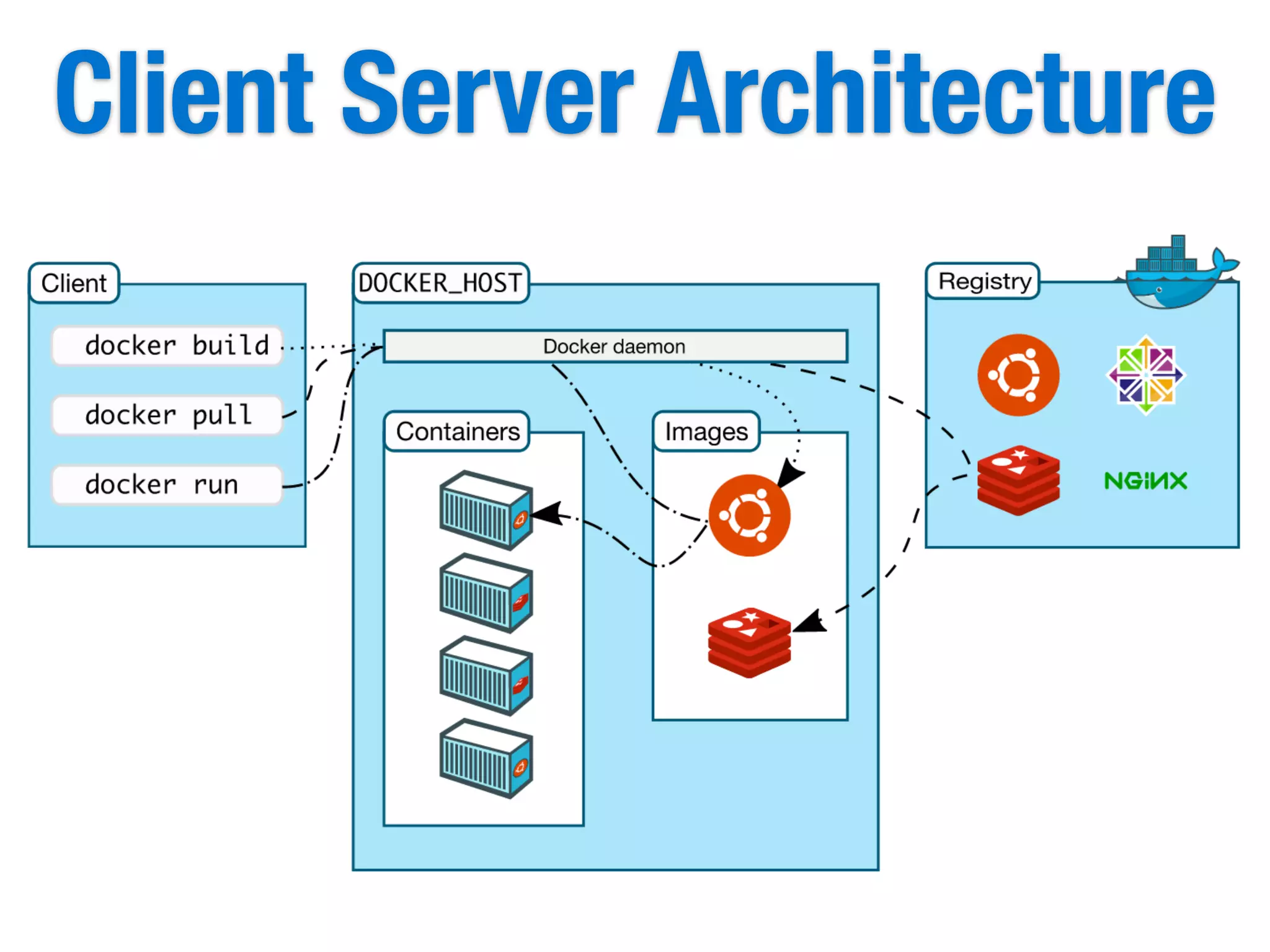
Client Server Architecture
&
+
Next couple of slides contains bash
commands and terminal outputs.
There is no need to read them all.
	
  	
  _	
  	
  	
  _	
  _____	
  ____	
  	
  ____	


  _	


  _	


  _____	
  ____	
  _____	
  _	


  |	
  	
  |	
  |	
  ____|	
  	
  _	
  |	
  	
  _	


  /	
  	
  	
  |	
  |	
  	
  	
  |	
  ____|	
  	
  _	
  _	
  	
  	
  _|	
  |	
  
	
  |	
  	
  |	
  |	
  	
  _|	
  |	
  |_)	
  |	
  |	
  |	
  |	


  /	
  _	
  	
  |	
  |	
  	
  	
  |	
  	
  _|	
  |	
  |_)	
  ||	
  |	
  |	
  |	
  
	
  |	
  |	
  	
  |	
  |___|	
  	
  _	
  <|	
  |_|	
  |	
  	
  	
  /	
  ___	
  |	
  |___|	
  |___|	
  	
  _	
  <	
  |	
  |	
  |_|	
  
	
  |_|	
  _|_____|_|	
  _____/	
  	
  	
  /_/	
  	
  	
  ______|_____|_|	
  _|_|	
  (_)
	
  	
  _	
  	
  	
  _	
  _____	
  ____	
  	
  ____	


  _	


  _	


  _____	
  ____	
  _____	
  _	


  |	
  	
  |	
  |	
  ____|	
  	
  _	
  |	
  	
  _	


  /	
  	
  	
  |	
  |	
  	
  	
  |	
  ____|	
  	
  _	
  _	
  	
  	
  _|	
  |	
  
	
  |	
  	
  |	
  |	
  	
  _|	
  |	
  |_)	
  |	
  |	
  |	
  |	


  /	
  _	
  	
  |	
  |	
  	
  	
  |	
  	
  _|	
  |	
  |_)	
  ||	
  |	
  |	
  |	
  
	
  |	
  |	
  	
  |	
  |___|	
  	
  _	
  <|	
  |_|	
  |	
  	
  	
  /	
  ___	
  |	
  |___|	
  |___|	
  	
  _	
  <	
  |	
  |	
  |_|	
  
	
  |_|	
  _|_____|_|	
  _____/	
  	
  	
  /_/	
  	
  	
  ______|_____|_|	
  _|_|	
  (_)
Docker Terminology
Image
Container
Dockerfile
Build
Registry
Images and Containers
[root@localhost01	
  ~]#	
  docker	
  images	
  
REPOSITORY	


  TAG	


  IMAGE	
  ID	


  CREATED	


  VIRTUAL	
  SIZE	
  
my-­‐registry.net:5000/gg-­‐jenkins	


  1.609.2	


  45d86b4e7cb2	


  5	
  days	
  ago	


  1.036	
  GB	
  
my-­‐registry.net:5000/gg-­‐ac5vemq	
  	
  	
  5.11.1	


  ea995e1e0547	


  11	
  days	
  ago	


  917.8	
  MB	
  
my-­‐registry.net:5000/gg-­‐ac5vemq	
  	
  	
  latest	


  ea995e1e0547	


  11	
  days	
  ago	


  917.8	
  MB	
  
harunyardimci/ac5vemq	


  latest	


  ea995e1e0547	


  11	
  days	
  ago	


  917.8	
  MB	
  
harunyardimci/ac5vemq	


  5.11.1	


  ea995e1e0547	


  11	
  days	
  ago	


  917.8	
  MB	
  
jenkins	


  1.625.1	


  0c79d0a394dc	


  3	
  weeks	
  ago	


  887.9	
  MB
[root@localhost01	
  ~]#	
  docker	
  ps	
  
CONTAINER	
  ID	


  IMAGE	


  COMMAND	


  CREATED	


  STATUS	


  PORTS	


  NAMES
List	
  of	
  Running	
  Containers
List	
  of	
  Images
Run a Container
docker	


  run	


  jenkins
run	
  =	
  start
[root@localhost01	
  ~]#	
  docker	
  ps	
  
CONTAINER	
  ID	


  IMAGE	


  COMMAND	


  CREATED	


  STATUS	


  PORTS	


  NAMES	
  
327a0bcc9fda	


  jenkins:latest	


  “sh	
  /usr/java/start.sh”	
  	
  	
  3	
  days	
  ago	


  Up	
  2	
  seconds	


  5000/tcp	


  berserk_wozniak
}
Name	
  of	
  the	
  image	
  to	
  
load	
  into	
  container
}
will	
  be	
  some	
  parameters
docker	
  	
  	
  stop	
  	
  	
  327a0bcc9fda	
  
docker	
  	
  	
  start	
  	
  	
  327a0bcc9fda
We	
  could	
  use	
  
this	
  name	
  here
Run a Container
docker	
  run	
  -­‐i	
  -­‐t	
  -­‐d	


  -­‐-­‐name	
  my-­‐jenkins-­‐master	


  -­‐p	
  8080:5000	


  jenkins:1.625.1
run	
  =	
  start
[root@localhost01	
  ~]#	
  docker	
  ps	
  
CONTAINER	
  ID	


  IMAGE	


  COMMAND	


  CREATED	


  STATUS	


  PORTS	


  NAMES	
  
327a0bcc9fda	


  jenkins:1.625.1	
  	
  	
  “sh	
  /usr/java/start.sh”	
  	
  	
  2	
  days	
  ago	


  Up	
  2	
  seconds	


  0.0.0.0:8080-­‐>5000/tcp	


  my-­‐jenkins-­‐master
docker	
  	
  	
  stop	
  	
  	
  my-­‐jenkins-­‐master	
  
docker	
  	
  	
  start	
  	
  	
  my-­‐jenkins-­‐master
Remove Container & Image
[root@localhost01	
  ~]#	
  docker	
  ps	
  
CONTAINER	
  ID	


  IMAGE	


  COMMAND	


  CREATED	


  STATUS	


  PORTS	


  NAMES	
  
327a0bcc9fda	


  jenkins:1.6.25.1	
  	
  	
  “sh	
  /usr/java/start.sh”	
  	
  	
  2	
  days	
  ago	


  Up	
  2	
  seconds	


  0.0.0.0:8080-­‐>5000/tcp	


  my-­‐jenkins-­‐master
[root@localhost01	
  ~]#	
  docker	
  images	
  
REPOSITORY	


  TAG	


  IMAGE	
  ID	


  CREATED	


  VIRTUAL	
  SIZE	
  
my-­‐registry.net:5000/gg-­‐jenkins	


  1.609.2	


  45d86b4e7cb2	


  5	
  days	
  ago	


  1.036	
  GB	
  
my-­‐registry.net:5000/gg-­‐ac5vemq	
  	
  	
  5.11.1	


  ea995e1e0547	


  11	
  days	
  ago	


  917.8	
  MB	
  
my-­‐registry.net:5000/gg-­‐ac5vemq	
  	
  	
  latest	


  ea995e1e0547	


  11	
  days	
  ago	


  917.8	
  MB	
  
harunyardimci/ac5vemq	


  latest	


  ea995e1e0547	


  11	
  days	
  ago	


  917.8	
  MB	
  
harunyardimci/ac5vemq	


  5.11.1	


  ea995e1e0547	


  11	
  days	
  ago	


  917.8	
  MB	
  
jenkins	


  1.625.1	


  0c79d0a394dc	


  3	
  weeks	
  ago	


  887.9	
  MB
docker	
  	
  rmi	
  	
  jenkins	
  
docker	
  	
  rmi	
  	
  0c79d0a394dc	
  
docker	
  rmi	


  `docker	
  images	


  -­‐q	
  -­‐f	
  "dangling=true"`
docker	
  	
  rm	
  	
  my-­‐jenkins-­‐master	
  
docker	
  	
  rm	
  	
  327a0bcc9fda	
  
docker	
  rm	
  `docker	
  ps	
  -­‐aq`
docker	
  rm docker	
  rmi
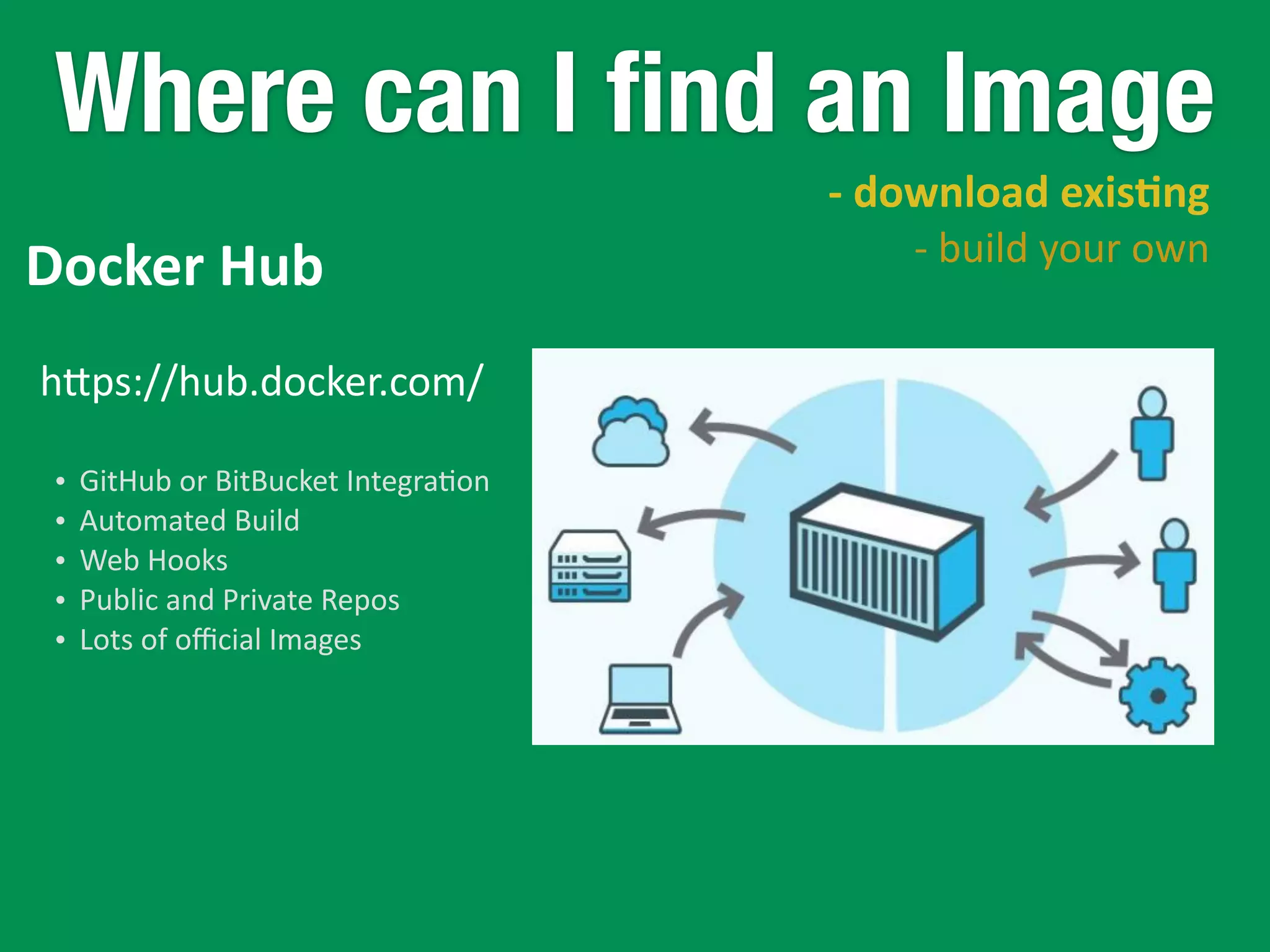
Where can I find an Image
	
  	
  -­‐	
  download	
  exis)ng	
  
-­‐	
  build	
  your	
  own
hkps://hub.docker.com/
• GitHub	
  or	
  BitBucket	
  Integra5on	
  
• Automated	
  Build	
  
• Web	
  Hooks	
  
• Public	
  and	
  Private	
  Repos	
  
• Lots	
  of	
  official	
  Images
Docker	
  Hub
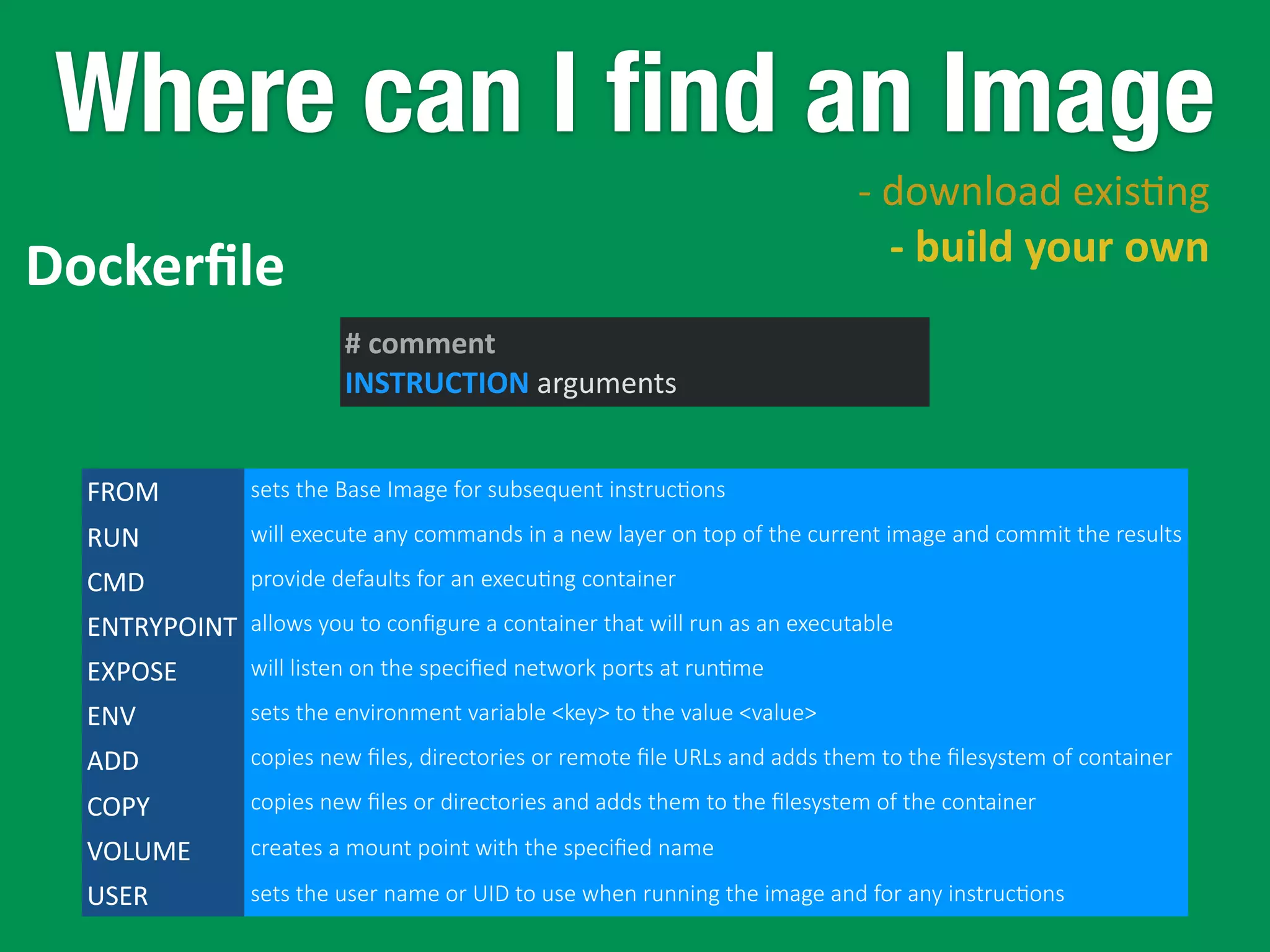
Where can I find an Image
Dockerfile
	
  	
  -­‐	
  download	
  exis5ng	
  
-­‐	
  build	
  your	
  own
#	
  comment	
  
INSTRUCTION	
  arguments
FROM	
   sets  the  Base  Image  for  subsequent  instruc5ons
RUN will  execute  any  commands  in  a  new  layer  on  top  of  the  current  image  and  commit  the  results
CMD provide  defaults  for  an  execu5ng  container
ENTRYPOINT allows  you  to  configure  a  container  that  will  run  as  an  executable
EXPOSE will  listen  on  the  specified  network  ports  at  run5me
ENV sets  the  environment  variable  <key>  to  the  value  <value>
ADD copies  new  files,  directories  or  remote  file  URLs  and  adds  them  to  the  filesystem  of  container
COPY copies  new  files  or  directories  and  adds  them  to  the  filesystem  of  the  container
VOLUME creates  a  mount  point  with  the  specified  name
USER	
   sets  the  user  name  or  UID  to  use  when  running  the  image  and  for  any  instruc5ons
Dockerfile Example
#	
  Node.js	
  Example	
  
#	
  Image	
  will	
  be	
  based	
  on	
  Centos6	
  
FROM	
  	
  centos:centos6	
  
#	
  Enable	
  EPEL	
  for	
  Node.js	
  
RUN	
  	
  rpm	
  -­‐Uvh	
  hkp://download.fedoraproject.org/pub/epel/6/i386/
epel-­‐release-­‐6-­‐8.noarch.rpm	
  
#	
  Install	
  Node.js	
  and	
  npm	
  
RUN	
  	
  yum	
  install	
  -­‐y	
  npm	
  
#	
  Bundle	
  app	
  source	
  
COPY	
  .	
  /src	
  
#	
  Install	
  app	
  dependencies	
  
RUN	
  cd	
  /src;	
  npm	
  install	
  
#	
  Map	
  the	
  port	
  8080	
  
EXPOSE	
  	
  8080	
  
#	
  Start	
  the	
  app	
  
CMD	
  ["node",	
  "/src/index.js"]
package.json
{	


  "name":	
  "docker-­‐centos-­‐hello",	


  "private":	
  true,	


  "version":	
  "0.0.1",	


  "descrip)on":	
  "Node.js	
  Hello	
  world	
  using	
  docker",	


  "dependencies":	
  {	


  "express":	
  "3.2.4"	


  }	
  
}
var	
  express	
  =	
  require('express');	
  
//	
  Constants	
  
var	
  PORT	
  =	
  8080;	
  
//	
  App	
  
var	
  app	
  =	
  express();	
  
app.get('/',	
  func)on	
  (req,	
  res)	
  {	


  res.send('Hello	
  worldn');	
  
});	
  
app.listen(PORT);	
  
console.log('Running	
  on	
  hnp://localhost:'	
  +	
  PORT);
index.js
Dockerfile
Build The Image[root@localhost01	
  ~]#	
  docker	
  build	
  -­‐t	
  gg-­‐node-­‐example	
  .	
  
Sending	
  build	
  context	
  to	
  Docker	
  daemon	
  200.2	
  kB	
  
Sending	
  build	
  context	
  to	
  Docker	
  daemon	
  
Step	
  0	
  :	
  FROM	
  centos:centos6	
  
Pulling	
  repository	
  centos	
  
a005304e4e74:	
  Download	
  complete	
  
….	
  spin	
  ….	
  
Status:	
  Downloaded	
  newer	
  image	
  for	
  centos:centos6	
  
	
  -­‐-­‐-­‐>	
  a005304e4e74	
  
Step	
  1	
  :	
  RUN	
  rpm	
  -­‐Uvh	
  hkp://download.fedoraproject.org/pub/epel/6/i386/epel-­‐release-­‐6-­‐8.noarch.rpm	
  
	
  -­‐-­‐-­‐>	
  Running	
  in	
  bf9df3009d99	
  
Retrieving	
  hkp://download.fedoraproject.org/pub/epel/6/i386/epel-­‐release-­‐6-­‐8.noarch.rpm	
  
	
  -­‐-­‐-­‐>	
  e3cef724d749	
  
Removing	
  intermediate	
  container	
  bf9df3009d99	
  
Step	
  2	
  :	
  RUN	
  yum	
  install	
  -­‐y	
  npm	
  
	
  -­‐-­‐-­‐>	
  Running	
  in	
  53833526eb72	
  
Setng	
  up	
  Install	
  Process	
  
Resolving	
  Dependencies	
  
Complete!	
  
	
  -­‐-­‐-­‐>	
  c2f62ff5335d	
  
Removing	
  intermediate	
  container	
  53833526eb72	
  
Step	
  3	
  :	
  COPY	
  .	
  /src	
  
	
  -­‐-­‐-­‐>	
  865de2a7ad61	
  
Removing	
  intermediate	
  container	
  e837a9c1038d	
  
Step	
  4	
  :	
  RUN	
  cd	
  /src;	
  npm	
  install	
  
	
  -­‐-­‐-­‐>	
  Running	
  in	
  7898163aaa6b	
  
….	
  spin	
  ….	
  
Step	
  5	
  :	
  EXPOSE	
  8080	
  
	
  -­‐-­‐-­‐>	
  Running	
  in	
  86560a6429a6	
  
	
  -­‐-­‐-­‐>	
  82d48b2e1d36	
  
Removing	
  intermediate	
  container	
  86560a6429a6	
  
Step	
  6	
  :	
  CMD	
  node	
  /src/index.js	
  
	
  -­‐-­‐-­‐>	
  Running	
  in	
  67e03c4ee83e	
  
	
  -­‐-­‐-­‐>	
  41c16d218d70	
  
Removing	
  intermediate	
  container	
  67e03c4ee83e	
  
Successfully	
  built	
  41c16d218d70
Build The Image
[root@localhost01	
  ~]#	
  docker	
  images	
  
REPOSITORY	


  TAG	


  IMAGE	
  ID	


  CREATED	


  VIRTUAL	
  SIZE	
  
centos	


  centos6	


  539c0211cd76	


  5	
  seconds	
  ago	


  203.1	
  MB	
  
gg-­‐node-­‐example	


  latest	


  d64d3505b0d2	


  2	
  hours	
  ago	


  539.3	
  MB
Second	
  Time
[root@localhost01	
  ~]#	
  docker	
  build	
  -­‐t	
  gg-­‐node-­‐example	
  .	
  
Sending	
  build	
  context	
  to	
  Docker	
  daemon	
  202.2	
  kB	
  
Sending	
  build	
  context	
  to	
  Docker	
  daemon	
  
Step	
  0	
  :	
  FROM	
  centos:centos6	
  
	
  -­‐-­‐-­‐>	
  a005304e4e74	
  
Step	
  1	
  :	
  RUN	
  rpm	
  -­‐Uvh	
  hkp://download.fedoraproject.org/pub/epel/6/i386/epel-­‐release-­‐6-­‐8.noarch.rpm	
  
	
  -­‐-­‐-­‐>	
  Using	
  cache	
  
	
  -­‐-­‐-­‐>	
  e3cef724d749	
  
Step	
  2	
  :	
  RUN	
  yum	
  install	
  -­‐y	
  npm	
  
	
  -­‐-­‐-­‐>	
  Using	
  cache	
  
	
  -­‐-­‐-­‐>	
  c2f62ff5335d	
  
Step	
  3	
  :	
  COPY	
  .	
  /src	
  
	
  -­‐-­‐-­‐>	
  31caf3a92acb	
  
Removing	
  intermediate	
  container	
  db10d432aa91	
  
Step	
  4	
  :	
  RUN	
  cd	
  /src;	
  npm	
  install	
  
	
  -­‐-­‐-­‐>	
  Running	
  in	
  9d4wd824d6b	
  
Step	
  5	
  :	
  EXPOSE	
  8080	
  
	
  -­‐-­‐-­‐>	
  Running	
  in	
  86560a6429a6	
  
	
  -­‐-­‐-­‐>	
  82d48b2e1d36	
  
Removing	
  intermediate	
  container	
  86560a6429a6	
  
Step	
  6	
  :	
  CMD	
  node	
  /src/index.js	
  
	
  -­‐-­‐-­‐>	
  Running	
  in	
  67e03c4ee83e	
  
	
  -­‐-­‐-­‐>	
  41c16d218d70	
  
Removing	
  intermediate	
  container	
  67e03c4ee83e	
  
Successfully	
  built	
  41c16d218d70
Hub and Registry
[root@localhost01	
  ~]#	
  docker	
  push	
  harunyardimci/ac)vemq	
  
The	
  push	
  refers	
  to	
  a	
  repository	
  [harunyardimci/ac5vemq]	
  (len:	
  1)	
  
ea995e1e0547:	
  Image	
  push	
  failed	
  
Please	
  login	
  prior	
  to	
  push:	
  
Username:	
  harunyardimci	
  
Password:	
  
Email:	
  email@myemail.com	
  
WARNING:	
  login	
  creden5als	
  saved	
  in	
  /root/.docker/config.json	
  
Login	
  Succeeded	
  
The	
  push	
  refers	
  to	
  a	
  repository	
  [harunyardimci/ac5vemq]	
  (len:	
  1)	
  
ea995e1e0547:	
  Image	
  already	
  exists	
  
a01e3f658b16:	
  Image	
  already	
  exists	
  
8209bd534a23:	
  Image	
  successfully	
  pushed	
  
61abcd2c1997:	
  Image	
  successfully	
  pushed	
  
47271e138907:	
  Image	
  already	
  exists	
  
9d39128059aa:	
  Image	
  successfully	
  pushed	
  
ad6b675a1518:	
  Image	
  already	
  exists	
  
49d630d58a4b:	
  Image	
  successfully	
  pushed	
  
b4cb24b0365b:	
  Image	
  already	
  exists	
  
49ebfec495e1:	
  Image	
  successfully	
  pushed	
  
bw63b0f4db1:	
  Image	
  successfully	
  pushed	
  
2262501f7b5a:	
  Image	
  already	
  exists	
  
a594f78c2a03:	
  Image	
  successfully	
  pushed	
  
682b997ad926:	
  Image	
  successfully	
  pushed	
  
607e965985c1:	
  Image	
  successfully	
  pushed	
  
1ff9f26f09w:	
  Image	
  successfully	
  pushed	
  
9a61b6b1315e:	
  Image	
  already	
  exists	
  
902b87aaaec9:	
  Image	
  successfully	
  pushed	
  
Digest:	
  sha256:349339cbb0d44af01b2822efede02df3f377f6fce774489dba2266847a193416
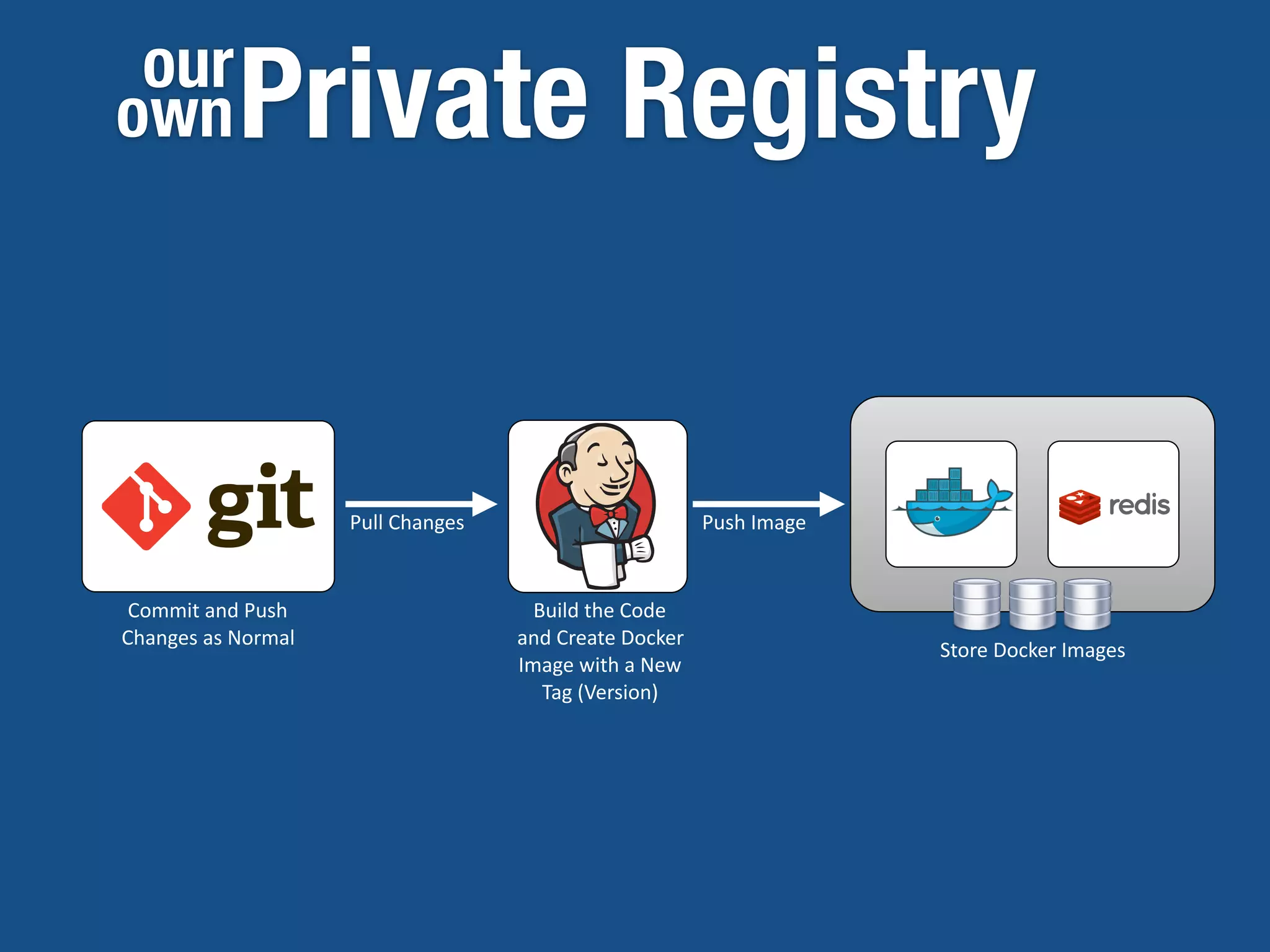
Private Registryour
own
Commit	
  and	
  Push	
  
Changes	
  as	
  Normal
Build	
  the	
  Code	
  
and	
  Create	
  Docker	
  
Image	
  with	
  a	
  New	
  
Tag	
  (Version)
Pull	
  Changes Push	
  Image
Store	
  Docker	
  Images
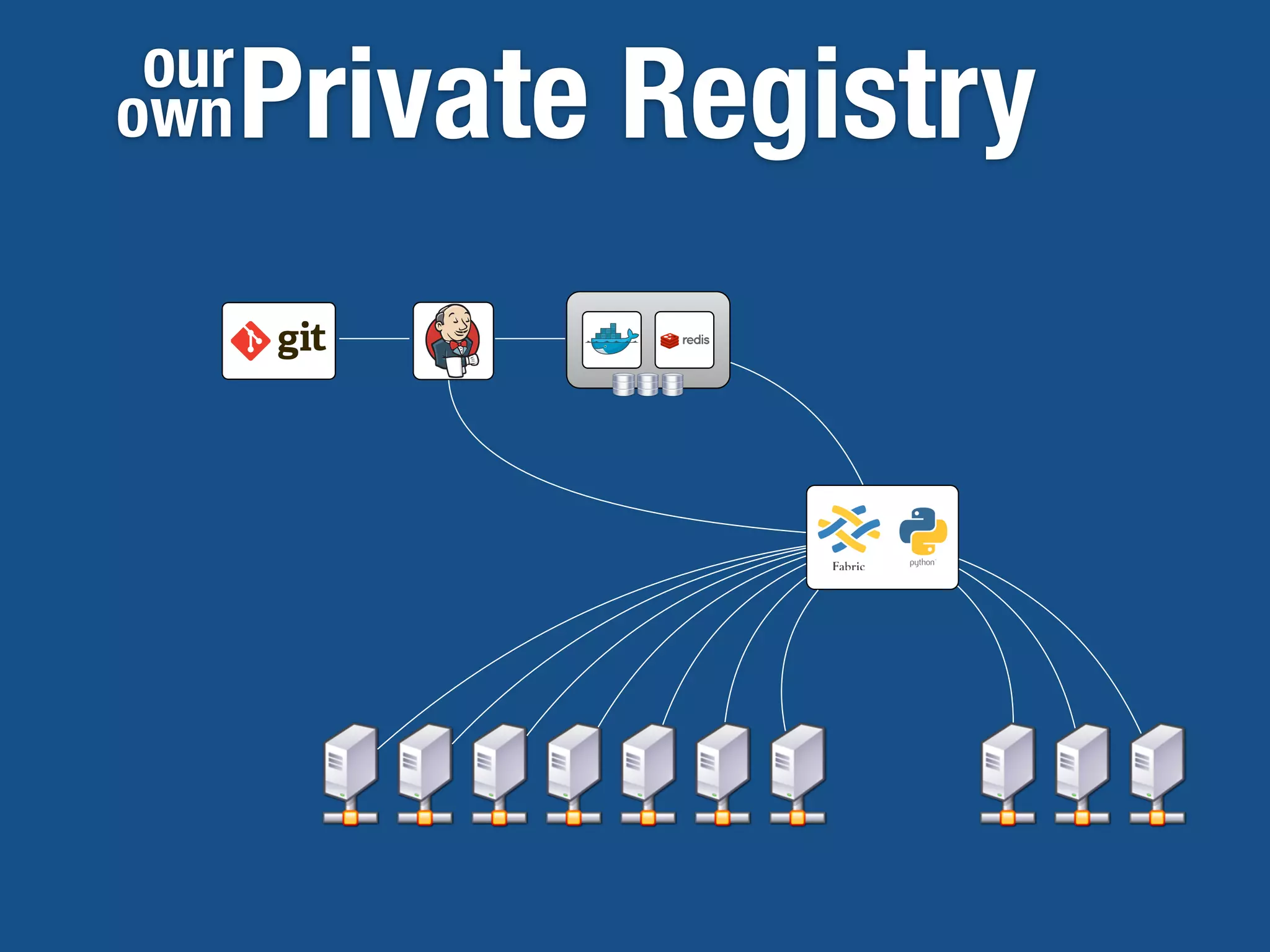
Private Registryour
own
Pull an Image
[root@localhost01	
  ~]#	
  docker	
  pull	
  my-­‐registry.net:5000/ac)vemq
[root@localhost01	
  ~]#	
  docker	
  pull	
  harunyardimci/ac)vemq
Pull	
  From	
  Docker	
  Hub
Pull	
  From	
  Private	
  Registry
Use	
  your	
  username	
  in	
  docker	
  hub	
  
Use	
  private	
  registry	
  hostname	
  and	
  
port	
  (and	
  username	
  if	
  
authen5ca5on	
  enabled)	
  
Pull an Image
[root@localhost01	
  ~]#	
  docker	
  pull	
  ubuntu	
  
Pulling	
  repository	
  ubuntu	
  
b7de3133ff98:	
  Pulling	
  dependent	
  layers	
  
5cc9e91966f7:	
  Pulling	
  fs	
  layer	
  
511136ea3c5a:	
  Download	
  complete	
  
ef52w1fe610:	
  Download	
  complete	
  
f5f2fe7ac31e:	
  Download	
  complete	
  
be55w7f26a5:	
  Download	
  complete	
  
3f42f9df3610:	
  Download	
  complete	
  
.	
  .	
  .	
  
Status:	
  Downloaded	
  newer	
  image	
  for	
  ubuntu	
  
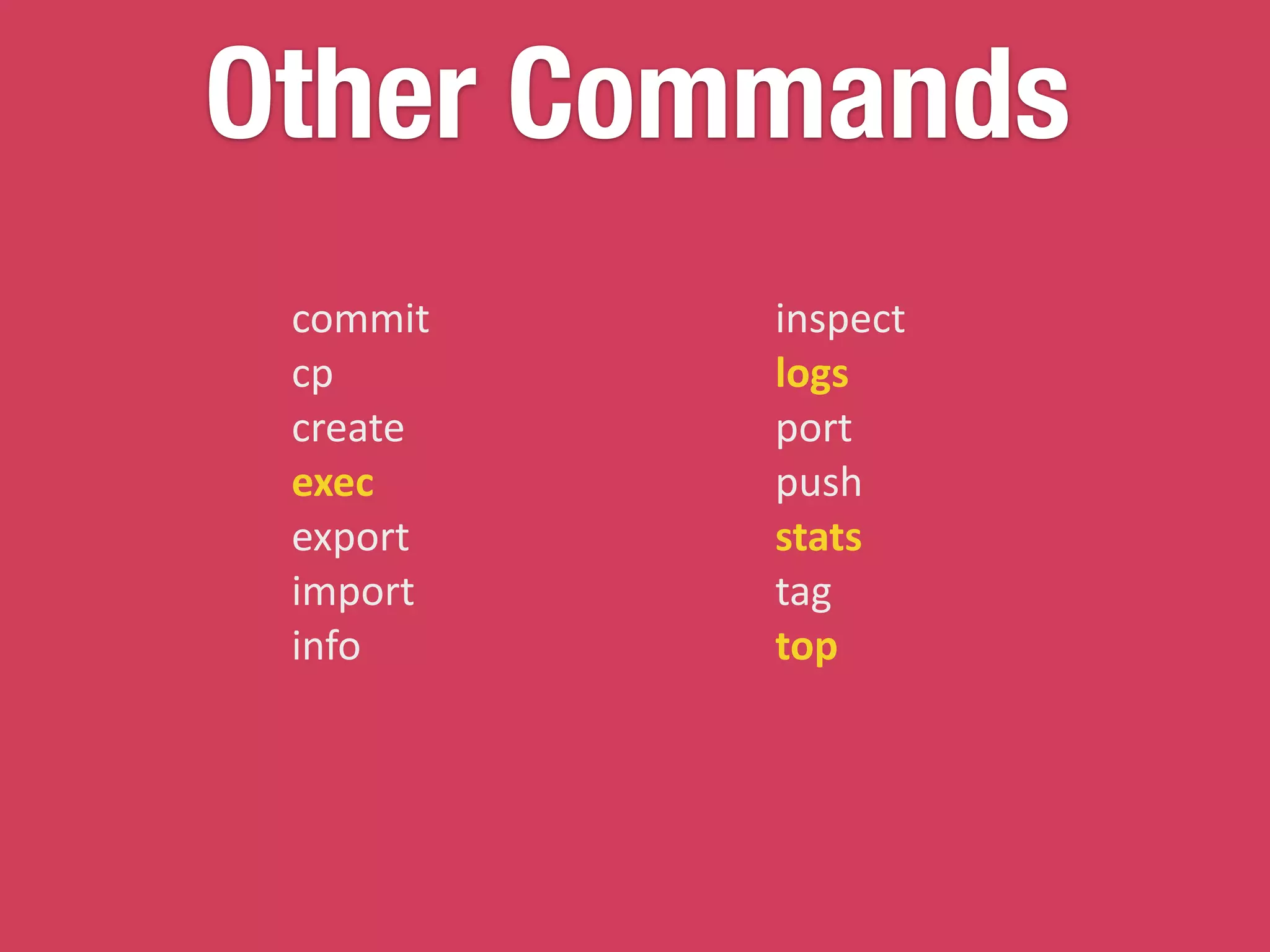
Other Commands
commit	
  
cp	
  
create	
  
exec	
  
export	
  
import	
  
info	
  
inspect	
  
logs	
  
port	
  
push	
  
stats	
  
tag	
  
top
Orchestration
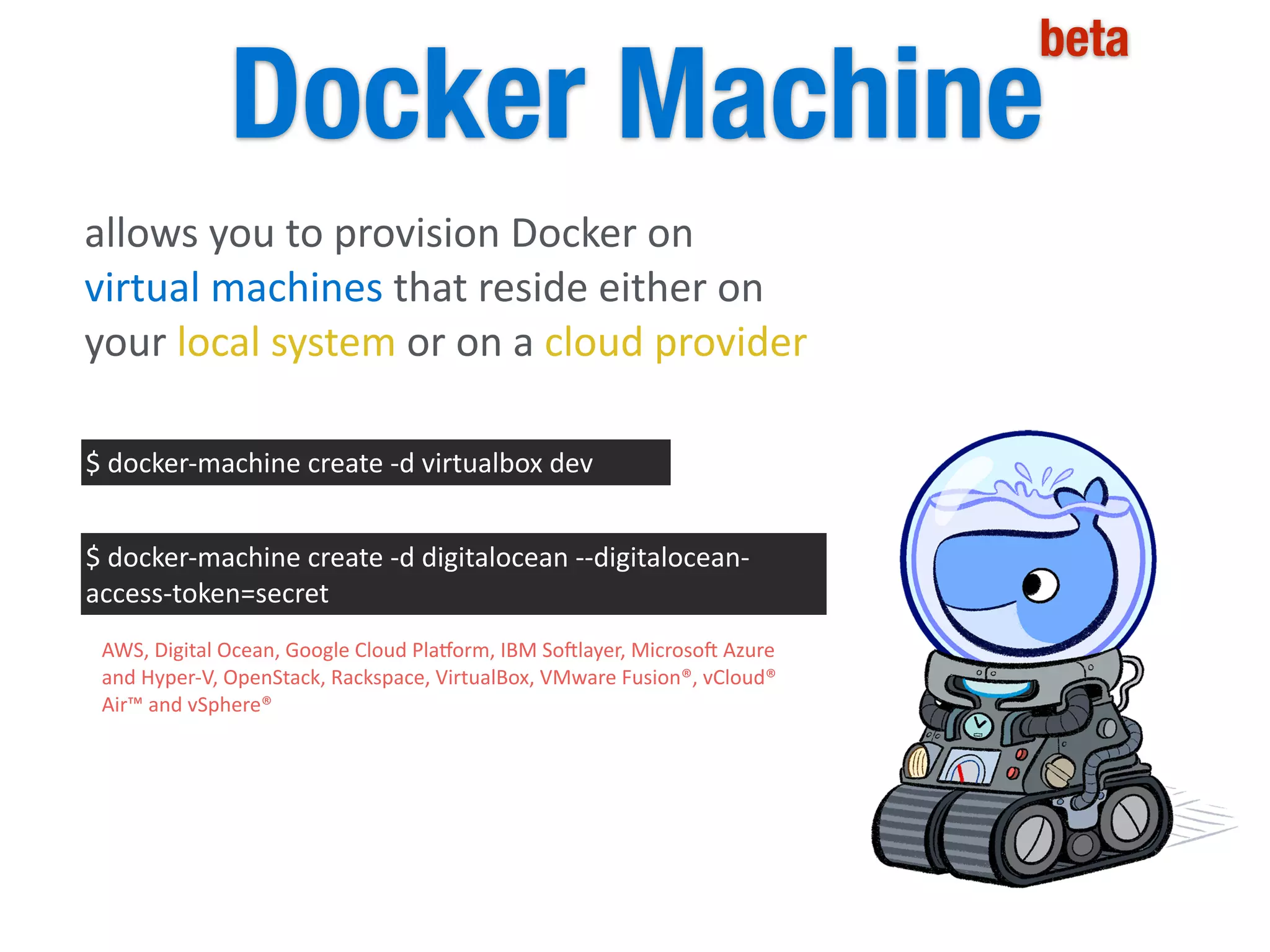
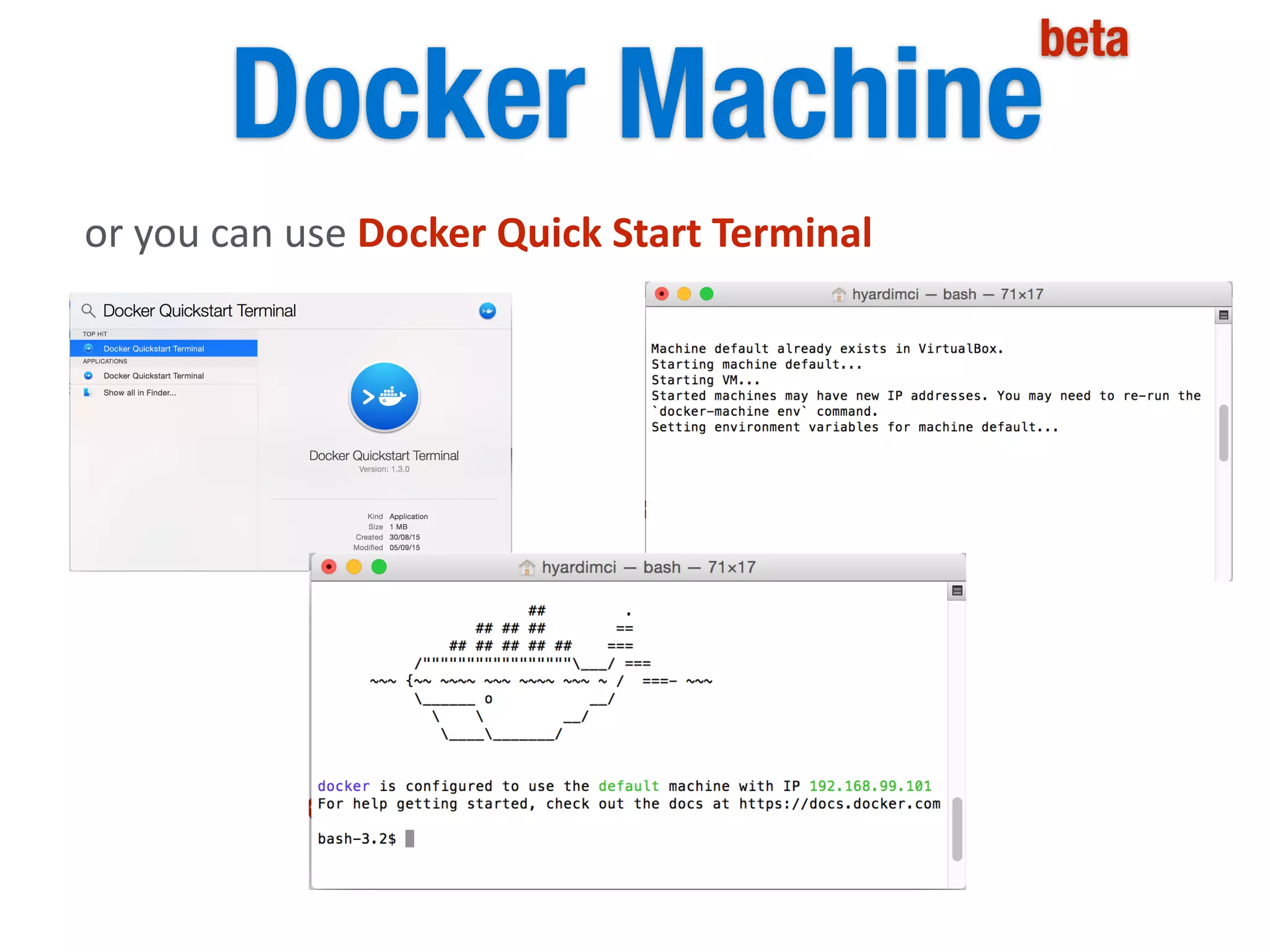
Docker Machine
beta
allows	
  you	
  to	
  provision	
  Docker	
  on	
  
virtual	
  machines	
  that	
  reside	
  either	
  on	
  
your	
  local	
  system	
  or	
  on	
  a	
  cloud	
  provider
$	
  docker-­‐machine	
  create	
  -­‐d	
  virtualbox	
  dev
$	
  docker-­‐machine	
  create	
  -­‐d	
  digitalocean	
  -­‐-­‐digitalocean-­‐
access-­‐token=secret
AWS,	
  Digital	
  Ocean,	
  Google	
  Cloud	
  Pla(orm,	
  IBM	
  So|layer,	
  Microso|	
  Azure	
  
and	
  Hyper-­‐V,	
  OpenStack,	
  Rackspace,	
  VirtualBox,	
  VMware	
  Fusion®,	
  vCloud®	
  
Air™	
  and	
  vSphere®
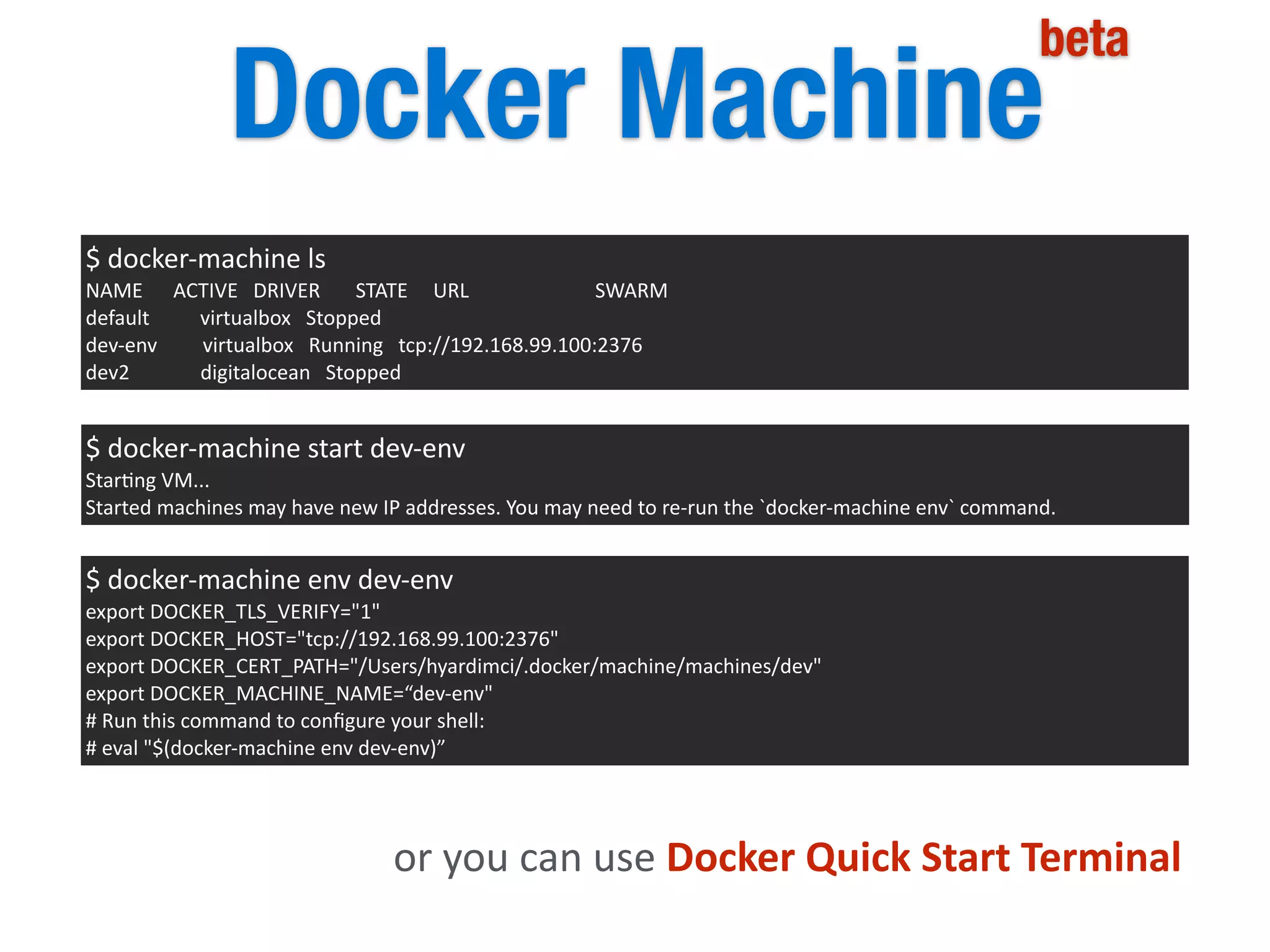
Docker Machine
beta
$	
  docker-­‐machine	
  ls	
  
NAME	


  ACTIVE	
  	
  	
  DRIVER	


  STATE	


  URL	


  SWARM	
  
default	


  virtualbox	
  	
  	
  Stopped	
  
dev-­‐env	


  virtualbox	
  	
  	
  Running	
  	
  	
  tcp://192.168.99.100:2376	
  
dev2	


  digitalocean	
  	
  	
  Stopped
$	
  docker-­‐machine	
  start	
  dev-­‐env	
  
Star5ng	
  VM...	
  
Started	
  machines	
  may	
  have	
  new	
  IP	
  addresses.	
  You	
  may	
  need	
  to	
  re-­‐run	
  the	
  `docker-­‐machine	
  env`	
  command.
$	
  docker-­‐machine	
  env	
  dev-­‐env	
  
export	
  DOCKER_TLS_VERIFY="1"	
  
export	
  DOCKER_HOST="tcp://192.168.99.100:2376"	
  
export	
  DOCKER_CERT_PATH="/Users/hyardimci/.docker/machine/machines/dev"	
  
export	
  DOCKER_MACHINE_NAME=“dev-­‐env"	
  
#	
  Run	
  this	
  command	
  to	
  configure	
  your	
  shell:	
  
#	
  eval	
  "$(docker-­‐machine	
  env	
  dev-­‐env)”
or	
  you	
  can	
  use	
  Docker	
  Quick	
  Start	
  Terminal
Docker Machine
beta
or	
  you	
  can	
  use	
  Docker	
  Quick	
  Start	
  Terminal
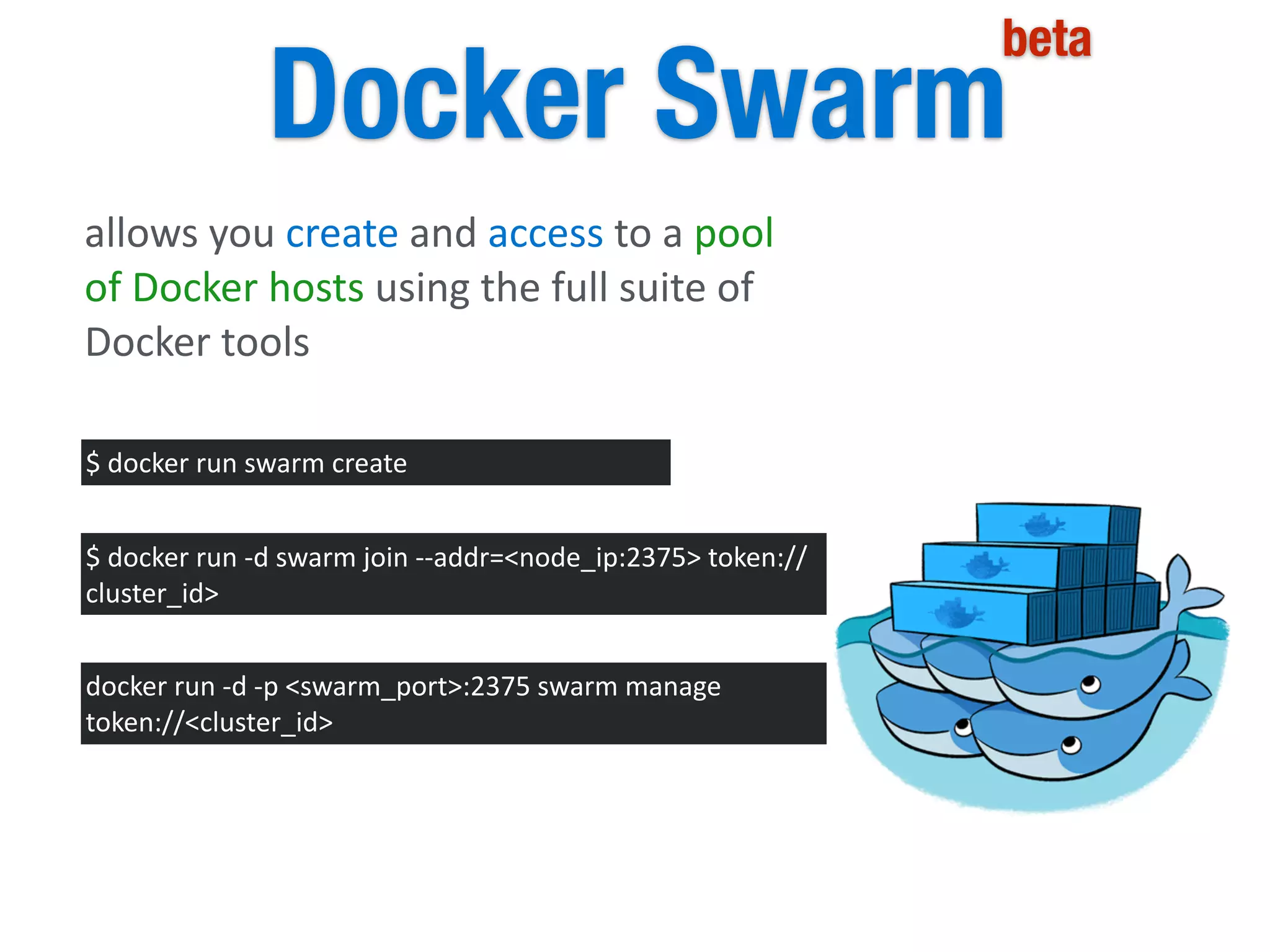
Docker Swarm
beta
allows	
  you	
  create	
  and	
  access	
  to	
  a	
  pool	
  
of	
  Docker	
  hosts	
  using	
  the	
  full	
  suite	
  of	
  
Docker	
  tools
$	
  docker	
  run	
  swarm	
  create
$	
  docker	
  run	
  -­‐d	
  swarm	
  join	
  -­‐-­‐addr=<node_ip:2375>	
  token://
cluster_id>
docker	
  run	
  -­‐d	
  -­‐p	
  <swarm_port>:2375	
  swarm	
  manage	
  
token://<cluster_id>
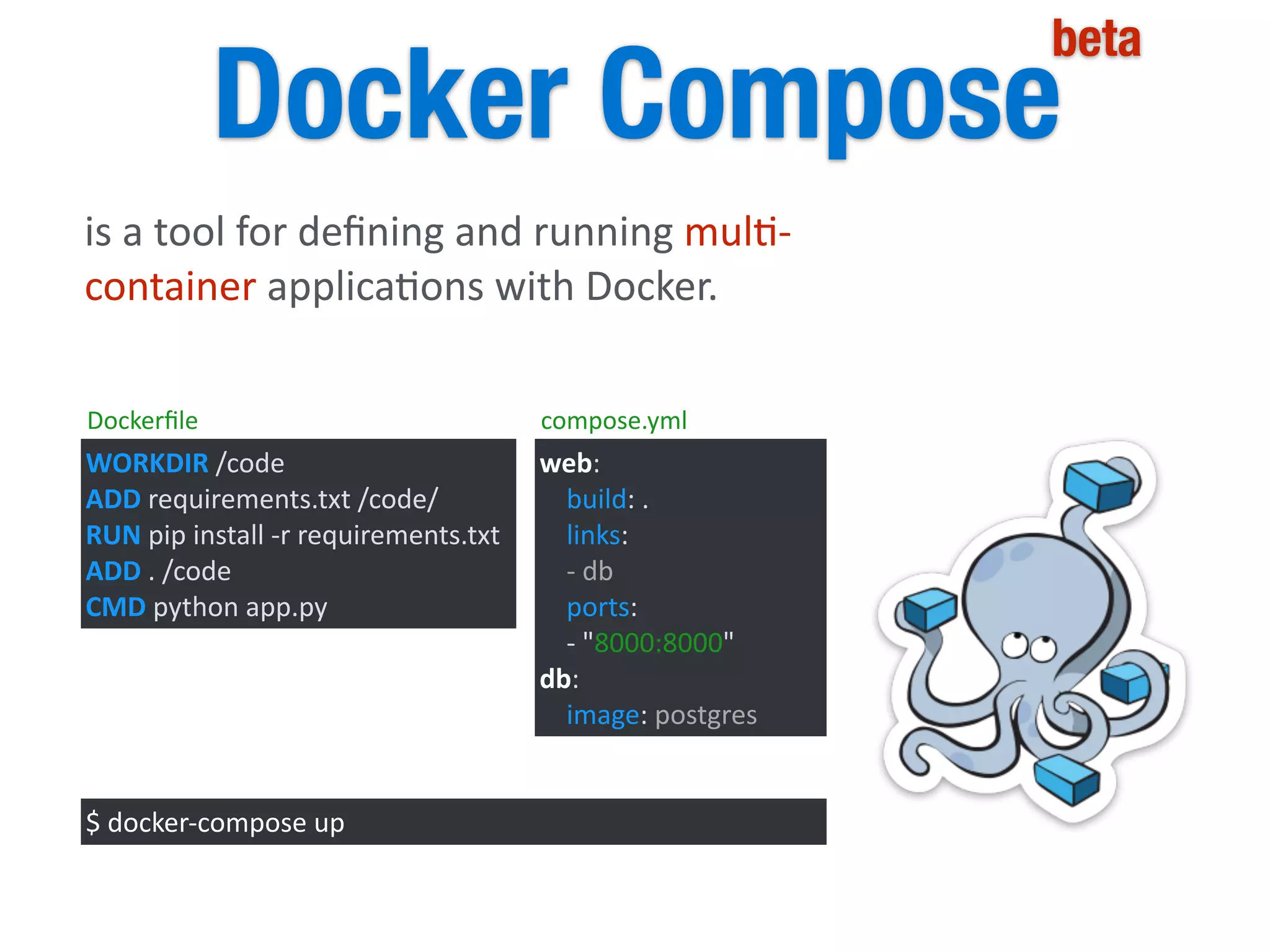
Docker Compose
beta
is	
  a	
  tool	
  for	
  defining	
  and	
  running	
  mul5-­‐
container	
  applica5ons	
  with	
  Docker.	
  
WORKDIR	
  /code	
  
ADD	
  requirements.txt	
  /code/	
  
RUN	
  pip	
  install	
  -­‐r	
  requirements.txt	
  
ADD	
  .	
  /code	
  
CMD	
  python	
  app.py
web:	


  build:	
  .	


  links:	


  -­‐	
  db	


  ports:	


  -­‐	
  "8000:8000"	
  
db:	


  image:	
  postgres
$	
  docker-­‐compose	
  up
Dockerfile compose.yml
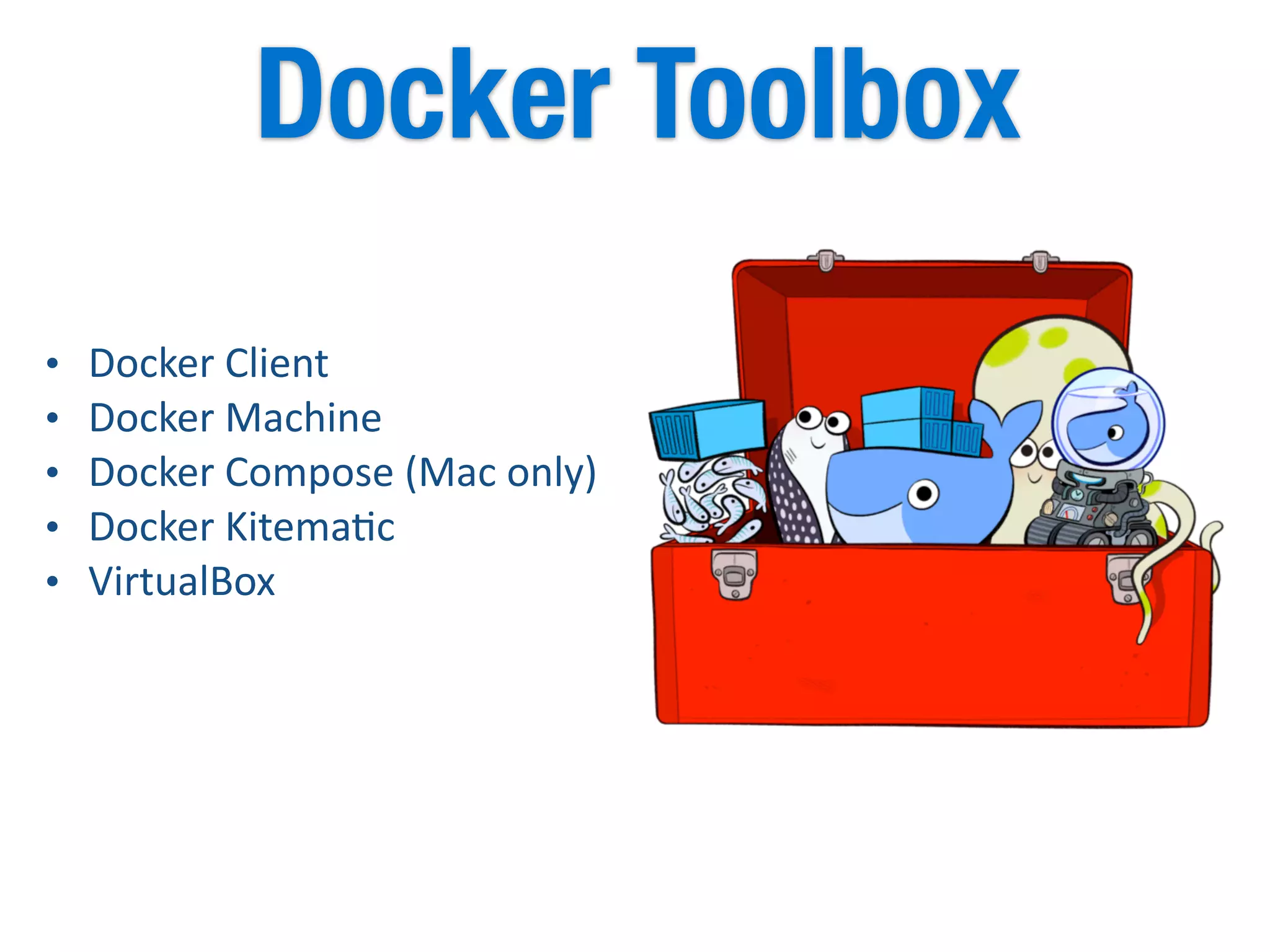
• Docker	
  Client	
  
• Docker	
  Machine	
  
• Docker	
  Compose	
  (Mac	
  only)	
  
• Docker	
  Kitema5c	
  
• VirtualBox
Docker Toolbox
There	
  are	
  lots	
  of	
  more	
  tools..
CentOS	
  
Atomic	
  
Consul	
  
Terraform	
  	
  
Serf	
  
Cloudify	
  
Helios	
  
too	
  many	
  of	
  them	
  are	
  available..	
  
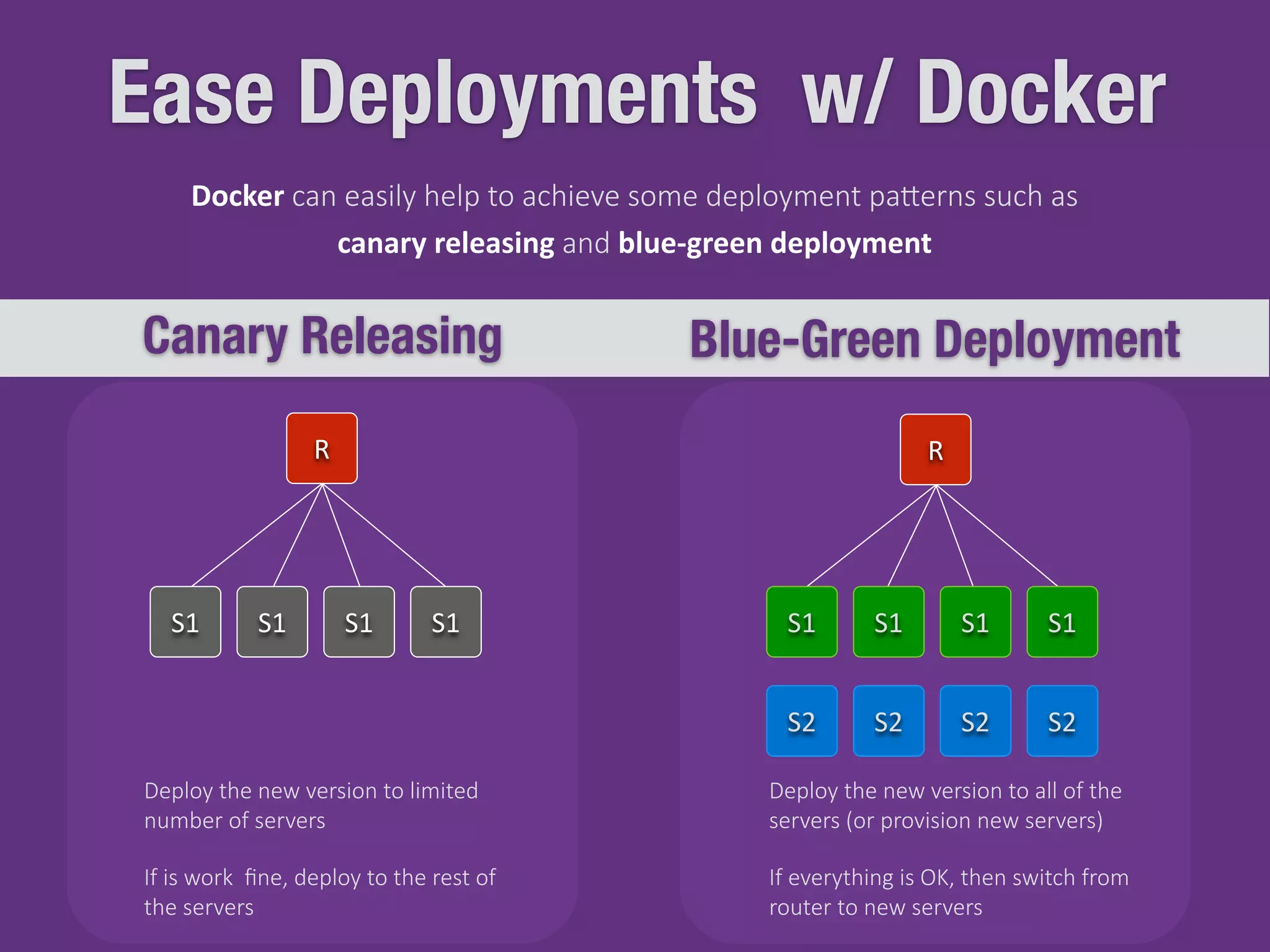
Ease Deployments w/ Docker
Canary Releasing Blue-Green Deployment
S1 S1 S1 S1
R R
S1 S1 S1 S1
S2 S2 S2 S2
Deploy  the  new  version  to  limited  
number  of  servers
Deploy  the  new  version  to  all  of  the  
servers  (or  provision  new  servers)
If  everything  is  OK,  then  switch  from  
router  to  new  servers
If  is  work    fine,  deploy  to  the  rest  of  
the  servers
Docker  can  easily  help  to  achieve  some  deployment  paJerns  such  as  
canary	
  releasing  and  blue-­‐green	
  deployment
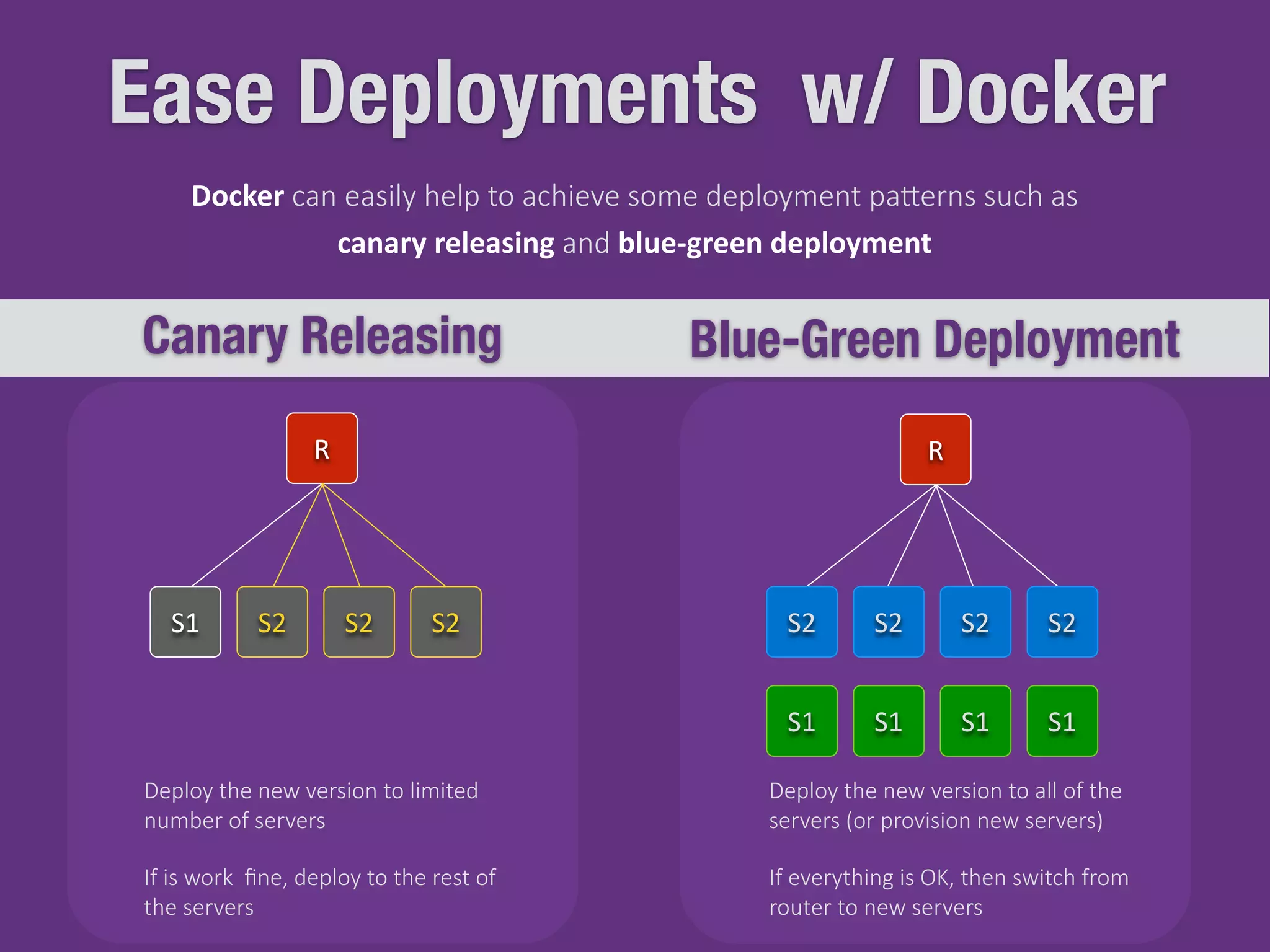
Ease Deployments w/ Docker
Canary Releasing Blue-Green Deployment
S1 S2 S2 S2
R R
S1 S1 S1 S1
S2 S2 S2 S2
Deploy  the  new  version  to  limited  
number  of  servers
Deploy  the  new  version  to  all  of  the  
servers  (or  provision  new  servers)
If  everything  is  OK,  then  switch  from  
router  to  new  servers
If  is  work    fine,  deploy  to  the  rest  of  
the  servers
Docker  can  easily  help  to  achieve  some  deployment  paJerns  such  as  
canary	
  releasing  and  blue-­‐green	
  deployment
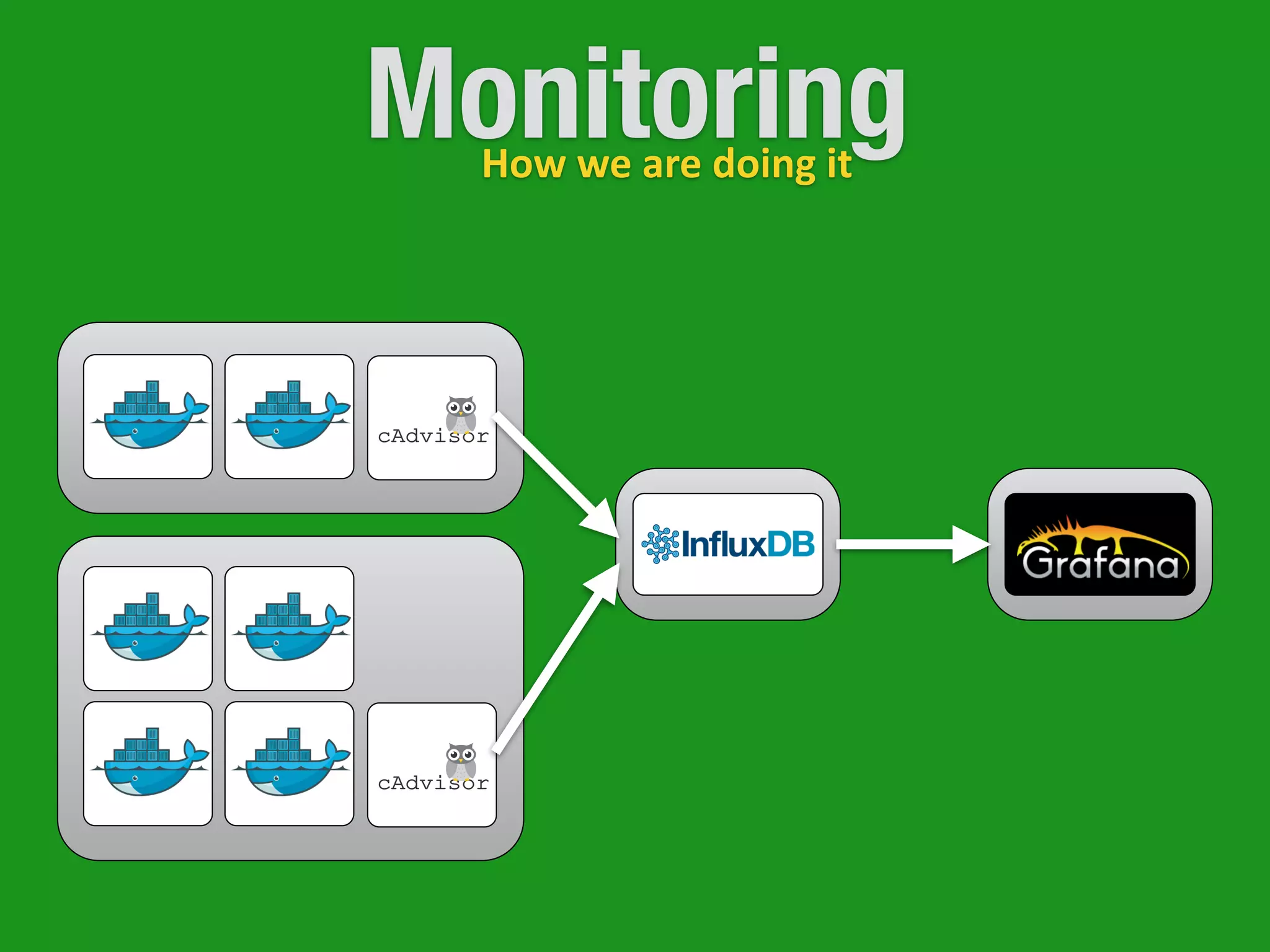
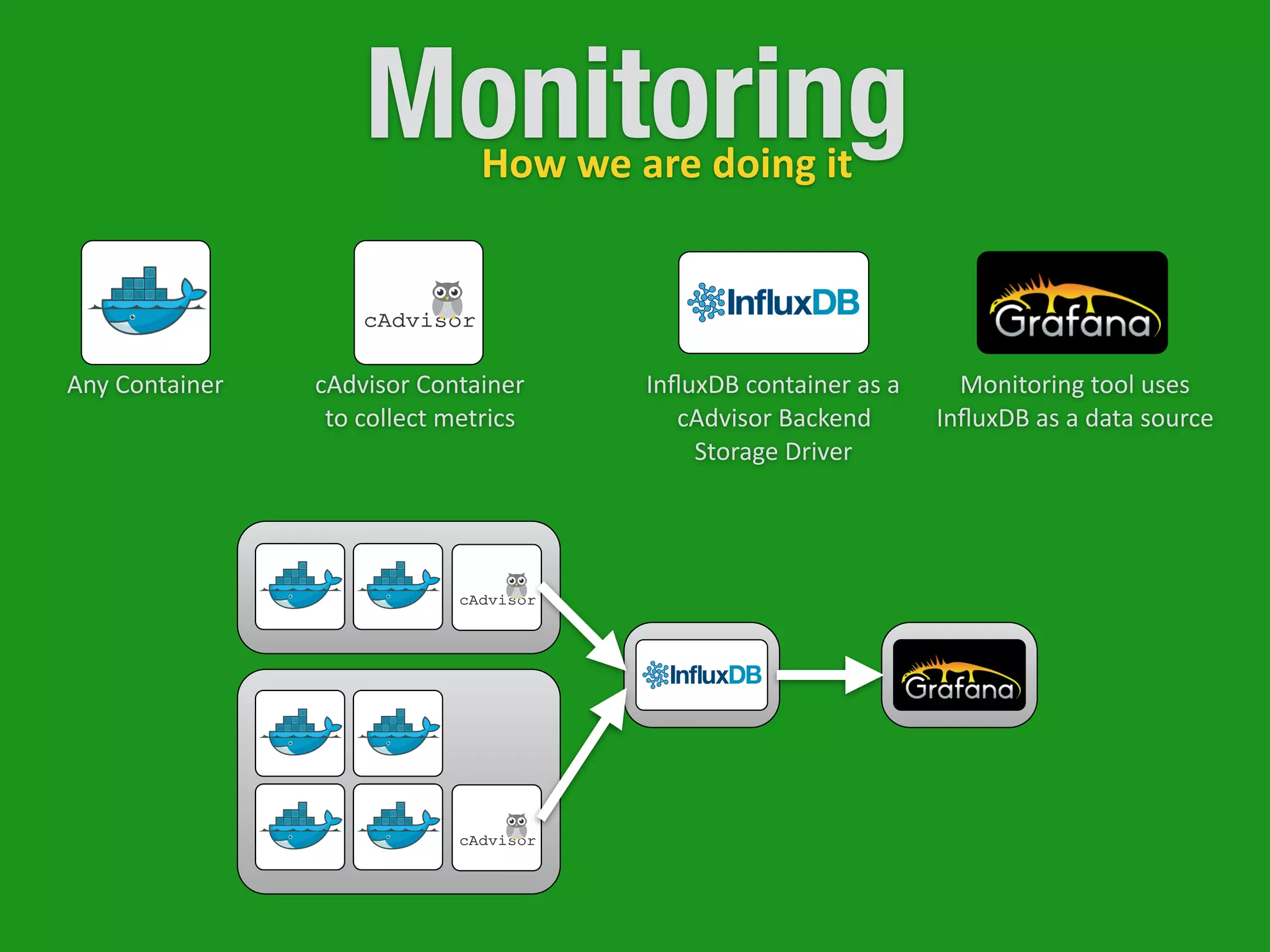
MonitoringHow	
  we	
  are	
  doing	
  it
MonitoringHow	
  we	
  are	
  doing	
  it
Any	
  Container cAdvisor	
  Container	
  
to	
  collect	
  metrics
InfluxDB	
  container	
  as	
  a	
  
cAdvisor	
  Backend	
  
Storage	
  Driver
Monitoring	
  tool	
  uses	
  
InfluxDB	
  as	
  a	
  data	
  source
Reminder
IMMUTABLE INFRASTRUCTURE
FABRIC AND PUPPET
DOCKER
IMAGES AND CONTAINERS
RUNNING A CONTAINER
REMOVE A CONTAINER OR A IMAGE
HUB & REGISTRY
BUILDING AN IMAGE
DOCKERFILE
PRIVATE REGISTRY
PULLING AN IMAGE
OTHER COMMANDS
ORCHESTRATION
MACHINE
SWARM
COMPOSE
DOCKER TOOLBOX
MESOS + KUBERNETES
DEPLOYMENTS
MONITORING
Thanks..
Questions?

Introduction to Docker

  • 1.
  • 2.
    Harun Yardımcı h_yardimci /in/harunyardimci harun.yardimci@gmail.com 40.990022,29.107436 hyardimci@ebay.com https://about.me/harun.yardimci
  • 3.
    AGENDA ~ 1 HOUR IMMUTABLEINFRASTRUCTURE DOCKER IMAGES AND CONTAINERS HUB & REGISTRY BUILD & PULL ORCHESTRATION MACHINE SWARM COMPOSE DEPLOYMENTS MONITORING
  • 4.
    “I know thesolution is Docker, but I am not sure of the problem.” Immutable Infrastructure Deployments Environment Inconsistency Developer Onboarding Resources Isolation Security Fast Shipment Quickly Scale
  • 5.
    Immutable  Servers  are  like  Legos:  rebuild  and   replace  instead  of  repairing  them.
  • 6.
    OS v1 App v1 OSv1 App v1 ac)veac)ve OS v1 App v2 ac)ve OS v1 App v1 inac)ve OS v1 App v2 ac)ve OS v2 App v2 ac)ve OS v1 App v2 inac)ve OS v2 App v2 ac)ve OS v1 App v1 inac)ve Patch   Applica)on Patch  OS Build ImmutableMutable Inac)ve  once  will  be  dropped.
  • 8.
  • 9.
  • 10.
    Meet the MobyDock Yes!     This  whale  has  a  name. Open  pla(orm  for  building,  shipping  and   running  distributed  applica5ons. What  is  Docker? Ship  Faster  and  Easier   Applica5on  Portability   Infrastructure  Flexibility   Scalable How  it  will  help?
  • 11.
    VMs are thesame! Virtual  Machine Container not ^
  • 12.
  • 13.
  • 14.
  • 15.
    Next couple ofslides contains bash commands and terminal outputs. There is no need to read them all.    _      _  _____  ____    ____                _        _          _____  ____  _____  _      |    |  |  ____|    _  |    _              /      |  |      |  ____|    _  _      _|  |    |    |  |    _|  |  |_)  |  |  |  |        /  _    |  |      |    _|  |  |_)  ||  |  |  |    |  |    |  |___|    _  <|  |_|  |      /  ___  |  |___|  |___|    _  <  |  |  |_|    |_|  _|_____|_|  _____/      /_/      ______|_____|_|  _|_|  (_)    _      _  _____  ____    ____                _        _          _____  ____  _____  _      |    |  |  ____|    _  |    _              /      |  |      |  ____|    _  _      _|  |    |    |  |    _|  |  |_)  |  |  |  |        /  _    |  |      |    _|  |  |_)  ||  |  |  |    |  |    |  |___|    _  <|  |_|  |      /  ___  |  |___|  |___|    _  <  |  |  |_|    |_|  _|_____|_|  _____/      /_/      ______|_____|_|  _|_|  (_)
  • 16.
  • 17.
    Images and Containers [root@localhost01  ~]#  docker  images   REPOSITORY                                                                                  TAG                                    IMAGE  ID                                  CREATED                          VIRTUAL  SIZE   my-­‐registry.net:5000/gg-­‐jenkins            1.609.2                        45d86b4e7cb2                5  days  ago                      1.036  GB   my-­‐registry.net:5000/gg-­‐ac5vemq      5.11.1                            ea995e1e0547                11  days  ago                  917.8  MB   my-­‐registry.net:5000/gg-­‐ac5vemq      latest                              ea995e1e0547                11  days  ago                  917.8  MB   harunyardimci/ac5vemq                                        latest                              ea995e1e0547                11  days  ago                  917.8  MB   harunyardimci/ac5vemq                                        5.11.1                            ea995e1e0547                11  days  ago                  917.8  MB   jenkins                                                                                                    1.625.1                          0c79d0a394dc                3  weeks  ago                887.9  MB [root@localhost01  ~]#  docker  ps   CONTAINER  ID                IMAGE                              COMMAND                          CREATED                          STATUS                            PORTS                              NAMES List  of  Running  Containers List  of  Images
  • 18.
    Run a Container docker              run              jenkins run  =  start [root@localhost01  ~]#  docker  ps   CONTAINER  ID                IMAGE                                  COMMAND                                          CREATED                  STATUS                                PORTS                    NAMES   327a0bcc9fda                jenkins:latest          “sh  /usr/java/start.sh”      3  days  ago            Up  2  seconds          5000/tcp            berserk_wozniak } Name  of  the  image  to   load  into  container } will  be  some  parameters docker      stop      327a0bcc9fda   docker      start      327a0bcc9fda We  could  use   this  name  here
  • 19.
    Run a Container docker  run  -­‐i  -­‐t  -­‐d              -­‐-­‐name  my-­‐jenkins-­‐master              -­‐p  8080:5000                  jenkins:1.625.1 run  =  start [root@localhost01  ~]#  docker  ps   CONTAINER  ID                IMAGE                                      COMMAND                                          CREATED                  STATUS                                PORTS                                                                          NAMES   327a0bcc9fda                jenkins:1.625.1      “sh  /usr/java/start.sh”      2  days  ago            Up  2  seconds          0.0.0.0:8080-­‐>5000/tcp            my-­‐jenkins-­‐master docker      stop      my-­‐jenkins-­‐master   docker      start      my-­‐jenkins-­‐master
  • 20.
    Remove Container &Image [root@localhost01  ~]#  docker  ps   CONTAINER  ID                IMAGE                                      COMMAND                                          CREATED                  STATUS                                PORTS                                                                          NAMES   327a0bcc9fda                jenkins:1.6.25.1      “sh  /usr/java/start.sh”      2  days  ago            Up  2  seconds          0.0.0.0:8080-­‐>5000/tcp            my-­‐jenkins-­‐master [root@localhost01  ~]#  docker  images   REPOSITORY                                                                                  TAG                                    IMAGE  ID                                  CREATED                          VIRTUAL  SIZE   my-­‐registry.net:5000/gg-­‐jenkins            1.609.2                        45d86b4e7cb2                5  days  ago                      1.036  GB   my-­‐registry.net:5000/gg-­‐ac5vemq      5.11.1                            ea995e1e0547                11  days  ago                  917.8  MB   my-­‐registry.net:5000/gg-­‐ac5vemq      latest                              ea995e1e0547                11  days  ago                  917.8  MB   harunyardimci/ac5vemq                                        latest                              ea995e1e0547                11  days  ago                  917.8  MB   harunyardimci/ac5vemq                                        5.11.1                            ea995e1e0547                11  days  ago                  917.8  MB   jenkins                                                                                                    1.625.1                          0c79d0a394dc                3  weeks  ago                887.9  MB docker    rmi    jenkins   docker    rmi    0c79d0a394dc   docker  rmi              `docker  images              -­‐q  -­‐f  "dangling=true"` docker    rm    my-­‐jenkins-­‐master   docker    rm    327a0bcc9fda   docker  rm  `docker  ps  -­‐aq` docker  rm docker  rmi
  • 21.
    Where can Ifind an Image    -­‐  download  exis)ng   -­‐  build  your  own hkps://hub.docker.com/ • GitHub  or  BitBucket  Integra5on   • Automated  Build   • Web  Hooks   • Public  and  Private  Repos   • Lots  of  official  Images Docker  Hub
  • 22.
    Where can Ifind an Image Dockerfile    -­‐  download  exis5ng   -­‐  build  your  own #  comment   INSTRUCTION  arguments FROM   sets  the  Base  Image  for  subsequent  instruc5ons RUN will  execute  any  commands  in  a  new  layer  on  top  of  the  current  image  and  commit  the  results CMD provide  defaults  for  an  execu5ng  container ENTRYPOINT allows  you  to  configure  a  container  that  will  run  as  an  executable EXPOSE will  listen  on  the  specified  network  ports  at  run5me ENV sets  the  environment  variable  <key>  to  the  value  <value> ADD copies  new  files,  directories  or  remote  file  URLs  and  adds  them  to  the  filesystem  of  container COPY copies  new  files  or  directories  and  adds  them  to  the  filesystem  of  the  container VOLUME creates  a  mount  point  with  the  specified  name USER   sets  the  user  name  or  UID  to  use  when  running  the  image  and  for  any  instruc5ons
  • 23.
    Dockerfile Example #  Node.js  Example   #  Image  will  be  based  on  Centos6   FROM    centos:centos6   #  Enable  EPEL  for  Node.js   RUN    rpm  -­‐Uvh  hkp://download.fedoraproject.org/pub/epel/6/i386/ epel-­‐release-­‐6-­‐8.noarch.rpm   #  Install  Node.js  and  npm   RUN    yum  install  -­‐y  npm   #  Bundle  app  source   COPY  .  /src   #  Install  app  dependencies   RUN  cd  /src;  npm  install   #  Map  the  port  8080   EXPOSE    8080   #  Start  the  app   CMD  ["node",  "/src/index.js"] package.json {      "name":  "docker-­‐centos-­‐hello",      "private":  true,      "version":  "0.0.1",      "descrip)on":  "Node.js  Hello  world  using  docker",        "dependencies":  {              "express":  "3.2.4"      }   } var  express  =  require('express');   //  Constants   var  PORT  =  8080;   //  App   var  app  =  express();   app.get('/',  func)on  (req,  res)  {          res.send('Hello  worldn');   });   app.listen(PORT);   console.log('Running  on  hnp://localhost:'  +  PORT); index.js Dockerfile
  • 24.
    Build The Image[root@localhost01  ~]#  docker  build  -­‐t  gg-­‐node-­‐example  .   Sending  build  context  to  Docker  daemon  200.2  kB   Sending  build  context  to  Docker  daemon   Step  0  :  FROM  centos:centos6   Pulling  repository  centos   a005304e4e74:  Download  complete   ….  spin  ….   Status:  Downloaded  newer  image  for  centos:centos6    -­‐-­‐-­‐>  a005304e4e74   Step  1  :  RUN  rpm  -­‐Uvh  hkp://download.fedoraproject.org/pub/epel/6/i386/epel-­‐release-­‐6-­‐8.noarch.rpm    -­‐-­‐-­‐>  Running  in  bf9df3009d99   Retrieving  hkp://download.fedoraproject.org/pub/epel/6/i386/epel-­‐release-­‐6-­‐8.noarch.rpm    -­‐-­‐-­‐>  e3cef724d749   Removing  intermediate  container  bf9df3009d99   Step  2  :  RUN  yum  install  -­‐y  npm    -­‐-­‐-­‐>  Running  in  53833526eb72   Setng  up  Install  Process   Resolving  Dependencies   Complete!    -­‐-­‐-­‐>  c2f62ff5335d   Removing  intermediate  container  53833526eb72   Step  3  :  COPY  .  /src    -­‐-­‐-­‐>  865de2a7ad61   Removing  intermediate  container  e837a9c1038d   Step  4  :  RUN  cd  /src;  npm  install    -­‐-­‐-­‐>  Running  in  7898163aaa6b   ….  spin  ….   Step  5  :  EXPOSE  8080    -­‐-­‐-­‐>  Running  in  86560a6429a6    -­‐-­‐-­‐>  82d48b2e1d36   Removing  intermediate  container  86560a6429a6   Step  6  :  CMD  node  /src/index.js    -­‐-­‐-­‐>  Running  in  67e03c4ee83e    -­‐-­‐-­‐>  41c16d218d70   Removing  intermediate  container  67e03c4ee83e   Successfully  built  41c16d218d70
  • 25.
    Build The Image [root@localhost01  ~]#  docker  images   REPOSITORY                                                                                  TAG                                    IMAGE  ID                                  CREATED                          VIRTUAL  SIZE   centos                                                                                                        centos6                    539c0211cd76                5  seconds  ago          203.1  MB   gg-­‐node-­‐example                                                                  latest                            d64d3505b0d2              2  hours  ago                  539.3  MB Second  Time [root@localhost01  ~]#  docker  build  -­‐t  gg-­‐node-­‐example  .   Sending  build  context  to  Docker  daemon  202.2  kB   Sending  build  context  to  Docker  daemon   Step  0  :  FROM  centos:centos6    -­‐-­‐-­‐>  a005304e4e74   Step  1  :  RUN  rpm  -­‐Uvh  hkp://download.fedoraproject.org/pub/epel/6/i386/epel-­‐release-­‐6-­‐8.noarch.rpm    -­‐-­‐-­‐>  Using  cache    -­‐-­‐-­‐>  e3cef724d749   Step  2  :  RUN  yum  install  -­‐y  npm    -­‐-­‐-­‐>  Using  cache    -­‐-­‐-­‐>  c2f62ff5335d   Step  3  :  COPY  .  /src    -­‐-­‐-­‐>  31caf3a92acb   Removing  intermediate  container  db10d432aa91   Step  4  :  RUN  cd  /src;  npm  install    -­‐-­‐-­‐>  Running  in  9d4wd824d6b   Step  5  :  EXPOSE  8080    -­‐-­‐-­‐>  Running  in  86560a6429a6    -­‐-­‐-­‐>  82d48b2e1d36   Removing  intermediate  container  86560a6429a6   Step  6  :  CMD  node  /src/index.js    -­‐-­‐-­‐>  Running  in  67e03c4ee83e    -­‐-­‐-­‐>  41c16d218d70   Removing  intermediate  container  67e03c4ee83e   Successfully  built  41c16d218d70
  • 26.
    Hub and Registry [root@localhost01  ~]#  docker  push  harunyardimci/ac)vemq   The  push  refers  to  a  repository  [harunyardimci/ac5vemq]  (len:  1)   ea995e1e0547:  Image  push  failed   Please  login  prior  to  push:   Username:  harunyardimci   Password:   Email:  email@myemail.com   WARNING:  login  creden5als  saved  in  /root/.docker/config.json   Login  Succeeded   The  push  refers  to  a  repository  [harunyardimci/ac5vemq]  (len:  1)   ea995e1e0547:  Image  already  exists   a01e3f658b16:  Image  already  exists   8209bd534a23:  Image  successfully  pushed   61abcd2c1997:  Image  successfully  pushed   47271e138907:  Image  already  exists   9d39128059aa:  Image  successfully  pushed   ad6b675a1518:  Image  already  exists   49d630d58a4b:  Image  successfully  pushed   b4cb24b0365b:  Image  already  exists   49ebfec495e1:  Image  successfully  pushed   bw63b0f4db1:  Image  successfully  pushed   2262501f7b5a:  Image  already  exists   a594f78c2a03:  Image  successfully  pushed   682b997ad926:  Image  successfully  pushed   607e965985c1:  Image  successfully  pushed   1ff9f26f09w:  Image  successfully  pushed   9a61b6b1315e:  Image  already  exists   902b87aaaec9:  Image  successfully  pushed   Digest:  sha256:349339cbb0d44af01b2822efede02df3f377f6fce774489dba2266847a193416
  • 27.
    Private Registryour own Commit  and  Push   Changes  as  Normal Build  the  Code   and  Create  Docker   Image  with  a  New   Tag  (Version) Pull  Changes Push  Image Store  Docker  Images
  • 28.
  • 29.
    Pull an Image [root@localhost01  ~]#  docker  pull  my-­‐registry.net:5000/ac)vemq [root@localhost01  ~]#  docker  pull  harunyardimci/ac)vemq Pull  From  Docker  Hub Pull  From  Private  Registry Use  your  username  in  docker  hub   Use  private  registry  hostname  and   port  (and  username  if   authen5ca5on  enabled)  
  • 30.
    Pull an Image [root@localhost01  ~]#  docker  pull  ubuntu   Pulling  repository  ubuntu   b7de3133ff98:  Pulling  dependent  layers   5cc9e91966f7:  Pulling  fs  layer   511136ea3c5a:  Download  complete   ef52w1fe610:  Download  complete   f5f2fe7ac31e:  Download  complete   be55w7f26a5:  Download  complete   3f42f9df3610:  Download  complete   .  .  .   Status:  Downloaded  newer  image  for  ubuntu  
  • 31.
    Other Commands commit   cp   create   exec   export   import   info   inspect   logs   port   push   stats   tag   top
  • 32.
  • 33.
    Docker Machine beta allows  you  to  provision  Docker  on   virtual  machines  that  reside  either  on   your  local  system  or  on  a  cloud  provider $  docker-­‐machine  create  -­‐d  virtualbox  dev $  docker-­‐machine  create  -­‐d  digitalocean  -­‐-­‐digitalocean-­‐ access-­‐token=secret AWS,  Digital  Ocean,  Google  Cloud  Pla(orm,  IBM  So|layer,  Microso|  Azure   and  Hyper-­‐V,  OpenStack,  Rackspace,  VirtualBox,  VMware  Fusion®,  vCloud®   Air™  and  vSphere®
  • 34.
    Docker Machine beta $  docker-­‐machine  ls   NAME            ACTIVE      DRIVER              STATE          URL                                                  SWARM   default                    virtualbox      Stopped   dev-­‐env                  virtualbox      Running      tcp://192.168.99.100:2376   dev2                            digitalocean      Stopped $  docker-­‐machine  start  dev-­‐env   Star5ng  VM...   Started  machines  may  have  new  IP  addresses.  You  may  need  to  re-­‐run  the  `docker-­‐machine  env`  command. $  docker-­‐machine  env  dev-­‐env   export  DOCKER_TLS_VERIFY="1"   export  DOCKER_HOST="tcp://192.168.99.100:2376"   export  DOCKER_CERT_PATH="/Users/hyardimci/.docker/machine/machines/dev"   export  DOCKER_MACHINE_NAME=“dev-­‐env"   #  Run  this  command  to  configure  your  shell:   #  eval  "$(docker-­‐machine  env  dev-­‐env)” or  you  can  use  Docker  Quick  Start  Terminal
  • 35.
    Docker Machine beta or  you  can  use  Docker  Quick  Start  Terminal
  • 36.
    Docker Swarm beta allows  you  create  and  access  to  a  pool   of  Docker  hosts  using  the  full  suite  of   Docker  tools $  docker  run  swarm  create $  docker  run  -­‐d  swarm  join  -­‐-­‐addr=<node_ip:2375>  token:// cluster_id> docker  run  -­‐d  -­‐p  <swarm_port>:2375  swarm  manage   token://<cluster_id>
  • 37.
    Docker Compose beta is  a  tool  for  defining  and  running  mul5-­‐ container  applica5ons  with  Docker.   WORKDIR  /code   ADD  requirements.txt  /code/   RUN  pip  install  -­‐r  requirements.txt   ADD  .  /code   CMD  python  app.py web:          build:  .          links:          -­‐  db          ports:          -­‐  "8000:8000"   db:          image:  postgres $  docker-­‐compose  up Dockerfile compose.yml
  • 38.
    • Docker  Client   • Docker  Machine   • Docker  Compose  (Mac  only)   • Docker  Kitema5c   • VirtualBox Docker Toolbox
  • 39.
    There  are  lots  of  more  tools.. CentOS   Atomic   Consul   Terraform     Serf   Cloudify   Helios   too  many  of  them  are  available..  
  • 40.
    Ease Deployments w/Docker Canary Releasing Blue-Green Deployment S1 S1 S1 S1 R R S1 S1 S1 S1 S2 S2 S2 S2 Deploy  the  new  version  to  limited   number  of  servers Deploy  the  new  version  to  all  of  the   servers  (or  provision  new  servers) If  everything  is  OK,  then  switch  from   router  to  new  servers If  is  work    fine,  deploy  to  the  rest  of   the  servers Docker  can  easily  help  to  achieve  some  deployment  paJerns  such  as   canary  releasing  and  blue-­‐green  deployment
  • 41.
    Ease Deployments w/Docker Canary Releasing Blue-Green Deployment S1 S2 S2 S2 R R S1 S1 S1 S1 S2 S2 S2 S2 Deploy  the  new  version  to  limited   number  of  servers Deploy  the  new  version  to  all  of  the   servers  (or  provision  new  servers) If  everything  is  OK,  then  switch  from   router  to  new  servers If  is  work    fine,  deploy  to  the  rest  of   the  servers Docker  can  easily  help  to  achieve  some  deployment  paJerns  such  as   canary  releasing  and  blue-­‐green  deployment
  • 42.
  • 43.
    MonitoringHow  we  are  doing  it Any  Container cAdvisor  Container   to  collect  metrics InfluxDB  container  as  a   cAdvisor  Backend   Storage  Driver Monitoring  tool  uses   InfluxDB  as  a  data  source
  • 44.
    Reminder IMMUTABLE INFRASTRUCTURE FABRIC ANDPUPPET DOCKER IMAGES AND CONTAINERS RUNNING A CONTAINER REMOVE A CONTAINER OR A IMAGE HUB & REGISTRY BUILDING AN IMAGE DOCKERFILE PRIVATE REGISTRY PULLING AN IMAGE OTHER COMMANDS ORCHESTRATION MACHINE SWARM COMPOSE DOCKER TOOLBOX MESOS + KUBERNETES DEPLOYMENTS MONITORING
  • 45.