Dive into CNI: 

Network Plugins for Kubernetes
林哲緯, Intern, Linker Networks
Who am I?
• Intern, Linker Networks Inc.
• github.com/John-Lin
• @johnlin__
2
Outline
• CNI
• CNI Introduction
• How to Build?
• How to Use?
• Linen CNI
• Linen CNI Introduction
• Kubernetes & Linen CNI
• Distinguish between OVN-Kubernetes and Linen CNI
3
CNI
4
What is CNI?
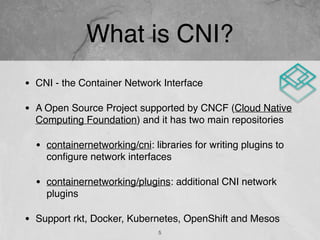
• CNI - the Container Network Interface
• A Open Source Project supported by CNCF (Cloud Native
Computing Foundation) and it has two main repositories
• containernetworking/cni: libraries for writing plugins to
configure network interfaces
• containernetworking/plugins: additional CNI network
plugins
• Support rkt, Docker, Kubernetes, OpenShift and Mesos
5
What is CNI?
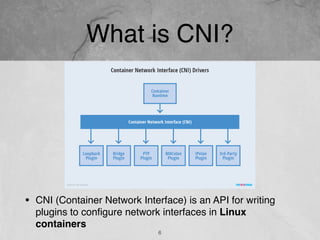
• CNI (Container Network Interface) is an API for writing
plugins to configure network interfaces in Linux
containers
6
CNI Spec
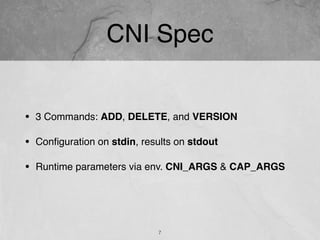
• 3 Commands: ADD, DELETE, and VERSION
• Configuration on stdin, results on stdout
• Runtime parameters via env. CNI_ARGS & CAP_ARGS
7
How to Build?
• parseConf: parses the network configuration from stdin
• cmdAdd is called for ADD requests 

(When pod is created)
• cmdDel is called for DELETE requests 

(When pod is deleted)
• Add your code to the cmdAdd and cmdDel functions.
• Simple CNI code sample at :

https://github.com/containernetworking/plugins/tree/master/plugins/sample
8
type PluginConf
func parseConfig(stdin []byte) (*PluginConf, error)
func cmdAdd(args *skel.CmdArgs) error
func cmdDel(args *skel.CmdArgs) error
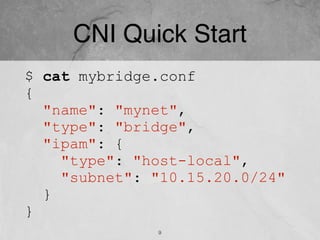
CNI Quick Start
$ cat mybridge.conf
{
"name": "mynet",
"type": "bridge",
"ipam": {
"type": "host-local",
"subnet": "10.15.20.0/24"
}
}
9
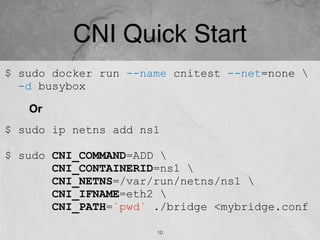
CNI Quick Start
$ sudo ip netns add ns1
$ sudo CNI_COMMAND=ADD 
CNI_CONTAINERID=ns1 
CNI_NETNS=/var/run/netns/ns1 
CNI_IFNAME=eth2 
CNI_PATH=`pwd` ./bridge <mybridge.conf
$ sudo docker run --name cnitest --net=none 
-d busybox
Or
10
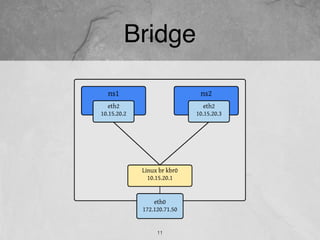
Bridge
11
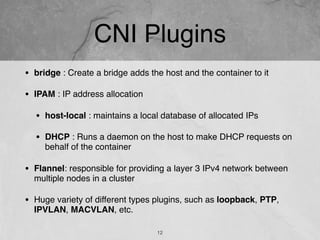
CNI Plugins
• bridge : Create a bridge adds the host and the container to it
• IPAM : IP address allocation
• host-local : maintains a local database of allocated IPs
• DHCP : Runs a daemon on the host to make DHCP requests on
behalf of the container
• Flannel: responsible for providing a layer 3 IPv4 network between
multiple nodes in a cluster
• Huge variety of different types plugins, such as loopback, PTP,
IPVLAN, MACVLAN, etc.
12
3rd Party Plugins
• Project Calico - a layer 3 virtual network
• Weave - a multi-host Docker network
• Multus - a Multi plugin
• CNI-Genie - generic CNI network plugin
• Silk - a CNI plugin designed for Cloud Foundry
• Linen - designed for overlay networks and compatible with
OpenFlow protocol through Open vSwitch
• More than 10 third-party party plugins !!
13
Linen CNI
14
What is Linen CNI?
A 3rd party CNI plugins designed for “Overlay Networks” and
compatible with “OpenFlow Protocol” through Open vSwitch
15
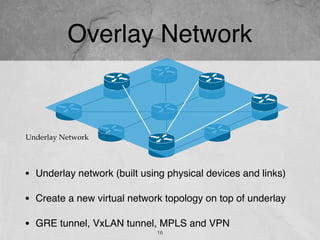
Overlay Network
16
• Underlay network (built using physical devices and links)
• Create a new virtual network topology on top of underlay
• GRE tunnel, VxLAN tunnel, MPLS and VPN
Underlay Network
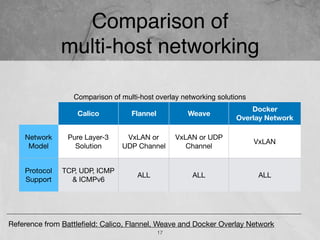
Comparison of 

multi-host networking
17
Comparison of multi-host overlay networking solutions
Calico Flannel Weave
Docker 

Overlay Network
Network
Model
Pure Layer-3
Solution
VxLAN or 

UDP Channel
VxLAN or UDP 

Channel
VxLAN
Protocol
Support
TCP, UDP, ICMP
& ICMPv6
ALL ALL ALL
Reference from Battlefield: Calico, Flannel, Weave and Docker Overlay Network
Why Open vSwitch?
18
• Multi-host overlay networking
• Provide flexible network management
• Boosts packet processing, performance and throughput
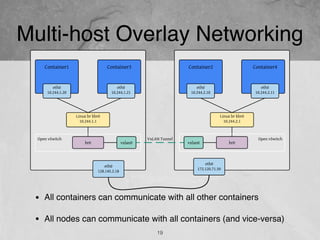
Multi-host Overlay Networking
19
• All containers can communicate with all other containers
• All nodes can communicate with all containers (and vice-versa)
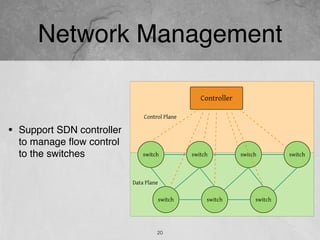
Network Management
20
• Support SDN controller
to manage flow control
to the switches
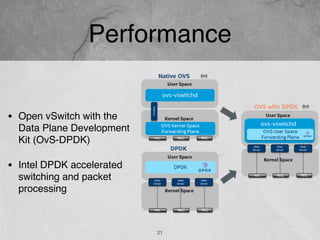
Performance
21
• Open vSwitch with the
Data Plane Development
Kit (OvS-DPDK)
• Intel DPDK accelerated
switching and packet
processing
Linen CNI Overview
22
Linen CNI is
• designed to meet the requirements of overlay networks
and compatible with OpenFlow protocol
• inspired by the document from Kubernetes OVS
networking
• a chained plugin and it depends on bridge plugin
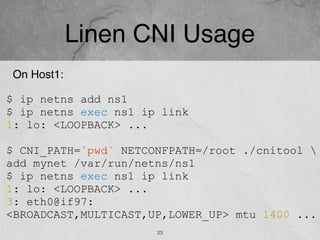
Linen CNI Usage
23
On Host1:
$ ip netns add ns1
$ ip netns exec ns1 ip link
1: lo: <LOOPBACK> ...
$ CNI_PATH=`pwd` NETCONFPATH=/root ./cnitool 
add mynet /var/run/netns/ns1
$ ip netns exec ns1 ip link
1: lo: <LOOPBACK> ...
3: eth0@if97:
<BROADCAST,MULTICAST,UP,LOWER_UP> mtu 1400 ...
24
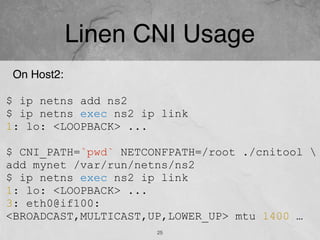
Linen CNI Usage
25
On Host2:
$ ip netns add ns2
$ ip netns exec ns2 ip link
1: lo: <LOOPBACK> ...
$ CNI_PATH=`pwd` NETCONFPATH=/root ./cnitool 
add mynet /var/run/netns/ns2
$ ip netns exec ns2 ip link
1: lo: <LOOPBACK> ...
3: eth0@if100:
<BROADCAST,MULTICAST,UP,LOWER_UP> mtu 1400 …
26
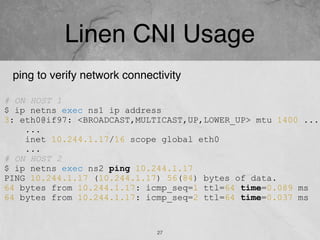
Linen CNI Usage
27
# ON HOST 1
$ ip netns exec ns1 ip address
3: eth0@if97: <BROADCAST,MULTICAST,UP,LOWER_UP> mtu 1400 ...
...
inet 10.244.1.17/16 scope global eth0
...
# ON HOST 2
$ ip netns exec ns2 ping 10.244.1.17
PING 10.244.1.17 (10.244.1.17) 56(84) bytes of data.
64 bytes from 10.244.1.17: icmp_seq=1 ttl=64 time=0.089 ms
64 bytes from 10.244.1.17: icmp_seq=2 ttl=64 time=0.037 ms
ping to verify network connectivity
Kubernetes & 

Linen CNI
28
Kubernetes & Linen CNI
29
• Management Workflow
• Packet Processing
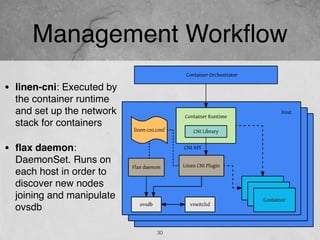
Management Workflow
30
• linen-cni: Executed by
the container runtime
and set up the network
stack for containers
• flax daemon:
DaemonSet. Runs on
each host in order to
discover new nodes
joining and manipulate
ovsdb
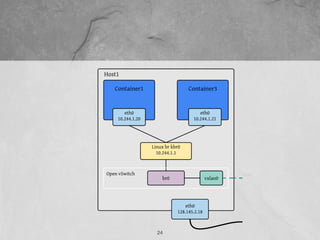
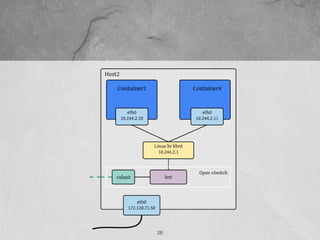
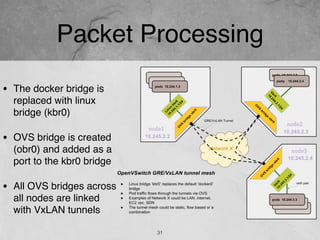
Packet Processing
31
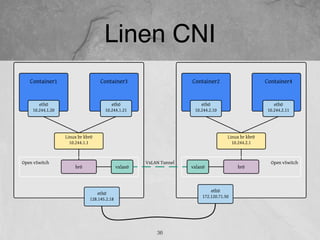
• The docker bridge is
replaced with linux
bridge (kbr0)
• OVS bridge is created
(obr0) and added as a
port to the kbr0 bridge
• All OVS bridges across
all nodes are linked
with VxLAN tunnels
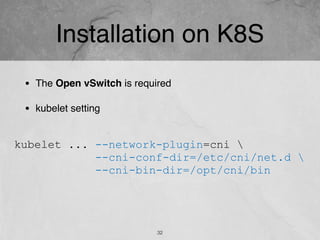
Installation on K8S
32
• The Open vSwitch is required
• kubelet setting
kubelet ... --network-plugin=cni 
--cni-conf-dir=/etc/cni/net.d 
--cni-bin-dir=/opt/cni/bin
Installation on K8S
33
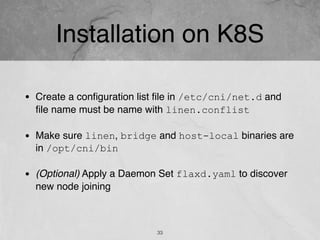
• Create a configuration list file in /etc/cni/net.d and
file name must be name with linen.conflist
• Make sure linen, bridge and host-local binaries are
in /opt/cni/bin
• (Optional) Apply a Daemon Set flaxd.yaml to discover
new node joining
Network configuration reference
34
• ovsBridge: name
of the ovs bridge to
use/create
• vtepIPs: list of the
VxLAN tunnel end
point IP addresses
• controller: sets
SDN controller,
assigns an IP
address, port
number
{
"name":"mynet",
"cniVersion": "0.3.1",
"plugins":[
{
//… bridge configurations
},
{
"type":"linen",
"runtimeConfig":{
"ovs":{
"ovsBridge":"br0",
"vtepIPs":[
"172.120.71.50"
],
"controller":"192.168.2.100:6653"
}
}
}
]
}
Distinguish between
OVN-Kubernetes and Linen CNI
35
Linen CNI
36
OVN-Kubernetes Overlay
37
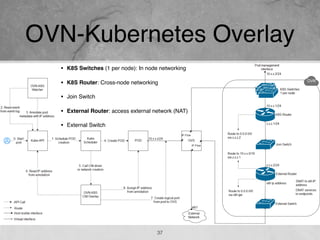
• K8S Switches (1 per node): In node networking
• K8S Router: Cross-node networking
• Join Switch
• External Router: access external network (NAT)
• External Switch
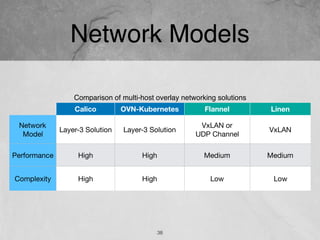
Network Models
38
Comparison of multi-host overlay networking solutions
Calico OVN-Kubernetes Flannel Linen
Network 

Model
Layer-3 Solution Layer-3 Solution
VxLAN or 

UDP Channel
VxLAN
Performance High High Medium Medium
Complexity High High Low Low
Takeaway
39
More network virtualization projects
https://github.com/John-Lin/linen-cni
@johnlin__
SDN-DS.TW: https://www.facebook.com/groups/sdnds.tw/
Contact me
https://github.com/John-Lin/tinynet
39

Network plugins for kubernetes

  • 1.
    Dive into CNI:
 Network Plugins for Kubernetes 林哲緯, Intern, Linker Networks
  • 2.
    Who am I? •Intern, Linker Networks Inc. • github.com/John-Lin • @johnlin__ 2
  • 3.
    Outline • CNI • CNIIntroduction • How to Build? • How to Use? • Linen CNI • Linen CNI Introduction • Kubernetes & Linen CNI • Distinguish between OVN-Kubernetes and Linen CNI 3
  • 4.
  • 5.
    What is CNI? •CNI - the Container Network Interface • A Open Source Project supported by CNCF (Cloud Native Computing Foundation) and it has two main repositories • containernetworking/cni: libraries for writing plugins to configure network interfaces • containernetworking/plugins: additional CNI network plugins • Support rkt, Docker, Kubernetes, OpenShift and Mesos 5
  • 6.
    What is CNI? •CNI (Container Network Interface) is an API for writing plugins to configure network interfaces in Linux containers 6
  • 7.
    CNI Spec • 3Commands: ADD, DELETE, and VERSION • Configuration on stdin, results on stdout • Runtime parameters via env. CNI_ARGS & CAP_ARGS 7
  • 8.
    How to Build? •parseConf: parses the network configuration from stdin • cmdAdd is called for ADD requests 
 (When pod is created) • cmdDel is called for DELETE requests 
 (When pod is deleted) • Add your code to the cmdAdd and cmdDel functions. • Simple CNI code sample at :
 https://github.com/containernetworking/plugins/tree/master/plugins/sample 8 type PluginConf func parseConfig(stdin []byte) (*PluginConf, error) func cmdAdd(args *skel.CmdArgs) error func cmdDel(args *skel.CmdArgs) error
  • 9.
    CNI Quick Start $cat mybridge.conf { "name": "mynet", "type": "bridge", "ipam": { "type": "host-local", "subnet": "10.15.20.0/24" } } 9
  • 10.
    CNI Quick Start $sudo ip netns add ns1 $ sudo CNI_COMMAND=ADD CNI_CONTAINERID=ns1 CNI_NETNS=/var/run/netns/ns1 CNI_IFNAME=eth2 CNI_PATH=`pwd` ./bridge <mybridge.conf $ sudo docker run --name cnitest --net=none -d busybox Or 10
  • 11.
  • 12.
    CNI Plugins • bridge: Create a bridge adds the host and the container to it • IPAM : IP address allocation • host-local : maintains a local database of allocated IPs • DHCP : Runs a daemon on the host to make DHCP requests on behalf of the container • Flannel: responsible for providing a layer 3 IPv4 network between multiple nodes in a cluster • Huge variety of different types plugins, such as loopback, PTP, IPVLAN, MACVLAN, etc. 12
  • 13.
    3rd Party Plugins •Project Calico - a layer 3 virtual network • Weave - a multi-host Docker network • Multus - a Multi plugin • CNI-Genie - generic CNI network plugin • Silk - a CNI plugin designed for Cloud Foundry • Linen - designed for overlay networks and compatible with OpenFlow protocol through Open vSwitch • More than 10 third-party party plugins !! 13
  • 14.
  • 15.
    What is LinenCNI? A 3rd party CNI plugins designed for “Overlay Networks” and compatible with “OpenFlow Protocol” through Open vSwitch 15
  • 16.
    Overlay Network 16 • Underlaynetwork (built using physical devices and links) • Create a new virtual network topology on top of underlay • GRE tunnel, VxLAN tunnel, MPLS and VPN Underlay Network
  • 17.
    Comparison of 
 multi-hostnetworking 17 Comparison of multi-host overlay networking solutions Calico Flannel Weave Docker 
 Overlay Network Network Model Pure Layer-3 Solution VxLAN or 
 UDP Channel VxLAN or UDP 
 Channel VxLAN Protocol Support TCP, UDP, ICMP & ICMPv6 ALL ALL ALL Reference from Battlefield: Calico, Flannel, Weave and Docker Overlay Network
  • 18.
    Why Open vSwitch? 18 •Multi-host overlay networking • Provide flexible network management • Boosts packet processing, performance and throughput
  • 19.
    Multi-host Overlay Networking 19 •All containers can communicate with all other containers • All nodes can communicate with all containers (and vice-versa)
  • 20.
    Network Management 20 • SupportSDN controller to manage flow control to the switches
  • 21.
    Performance 21 • Open vSwitchwith the Data Plane Development Kit (OvS-DPDK) • Intel DPDK accelerated switching and packet processing
  • 22.
    Linen CNI Overview 22 LinenCNI is • designed to meet the requirements of overlay networks and compatible with OpenFlow protocol • inspired by the document from Kubernetes OVS networking • a chained plugin and it depends on bridge plugin
  • 23.
    Linen CNI Usage 23 OnHost1: $ ip netns add ns1 $ ip netns exec ns1 ip link 1: lo: <LOOPBACK> ... $ CNI_PATH=`pwd` NETCONFPATH=/root ./cnitool add mynet /var/run/netns/ns1 $ ip netns exec ns1 ip link 1: lo: <LOOPBACK> ... 3: eth0@if97: <BROADCAST,MULTICAST,UP,LOWER_UP> mtu 1400 ...
  • 24.
  • 25.
    Linen CNI Usage 25 OnHost2: $ ip netns add ns2 $ ip netns exec ns2 ip link 1: lo: <LOOPBACK> ... $ CNI_PATH=`pwd` NETCONFPATH=/root ./cnitool add mynet /var/run/netns/ns2 $ ip netns exec ns2 ip link 1: lo: <LOOPBACK> ... 3: eth0@if100: <BROADCAST,MULTICAST,UP,LOWER_UP> mtu 1400 …
  • 26.
  • 27.
    Linen CNI Usage 27 #ON HOST 1 $ ip netns exec ns1 ip address 3: eth0@if97: <BROADCAST,MULTICAST,UP,LOWER_UP> mtu 1400 ... ... inet 10.244.1.17/16 scope global eth0 ... # ON HOST 2 $ ip netns exec ns2 ping 10.244.1.17 PING 10.244.1.17 (10.244.1.17) 56(84) bytes of data. 64 bytes from 10.244.1.17: icmp_seq=1 ttl=64 time=0.089 ms 64 bytes from 10.244.1.17: icmp_seq=2 ttl=64 time=0.037 ms ping to verify network connectivity
  • 28.
  • 29.
    Kubernetes & LinenCNI 29 • Management Workflow • Packet Processing
  • 30.
    Management Workflow 30 • linen-cni:Executed by the container runtime and set up the network stack for containers • flax daemon: DaemonSet. Runs on each host in order to discover new nodes joining and manipulate ovsdb
  • 31.
    Packet Processing 31 • Thedocker bridge is replaced with linux bridge (kbr0) • OVS bridge is created (obr0) and added as a port to the kbr0 bridge • All OVS bridges across all nodes are linked with VxLAN tunnels
  • 32.
    Installation on K8S 32 •The Open vSwitch is required • kubelet setting kubelet ... --network-plugin=cni --cni-conf-dir=/etc/cni/net.d --cni-bin-dir=/opt/cni/bin
  • 33.
    Installation on K8S 33 •Create a configuration list file in /etc/cni/net.d and file name must be name with linen.conflist • Make sure linen, bridge and host-local binaries are in /opt/cni/bin • (Optional) Apply a Daemon Set flaxd.yaml to discover new node joining
  • 34.
    Network configuration reference 34 •ovsBridge: name of the ovs bridge to use/create • vtepIPs: list of the VxLAN tunnel end point IP addresses • controller: sets SDN controller, assigns an IP address, port number { "name":"mynet", "cniVersion": "0.3.1", "plugins":[ { //… bridge configurations }, { "type":"linen", "runtimeConfig":{ "ovs":{ "ovsBridge":"br0", "vtepIPs":[ "172.120.71.50" ], "controller":"192.168.2.100:6653" } } } ] }
  • 35.
  • 36.
  • 37.
    OVN-Kubernetes Overlay 37 • K8SSwitches (1 per node): In node networking • K8S Router: Cross-node networking • Join Switch • External Router: access external network (NAT) • External Switch
  • 38.
    Network Models 38 Comparison ofmulti-host overlay networking solutions Calico OVN-Kubernetes Flannel Linen Network 
 Model Layer-3 Solution Layer-3 Solution VxLAN or 
 UDP Channel VxLAN Performance High High Medium Medium Complexity High High Low Low
  • 39.
    Takeaway 39 More network virtualizationprojects https://github.com/John-Lin/linen-cni @johnlin__ SDN-DS.TW: https://www.facebook.com/groups/sdnds.tw/ Contact me https://github.com/John-Lin/tinynet 39