CAN Network Development
Program @IoTShow.in
by
Prof. Nalini C. Iyer
Prof. Venkatesh Mane.
Prof. Vishal Pattenshetty
 Introduction to CAN.
 What is CAN and Why CAN ?
 CAN protocol overview
 CAN physical layer
 CAN data link layer
 Cortex-M3 programming
 Project on CAN communication
 Hands-on Exercises on Real World System
 Analysis of CAN data using BUSMASTER and CAN data
base creation
What is communication ?
Communication is nothing but exchange of
information or data.
Why there is need for communication in a
vehicle?
To reduce the cost.
To reduce size.
To reduce the complexity.
To improve the performance.
What are the different types of communications?
Serial Communication
Parallel Communication
Advantages and Disadvantages of Both
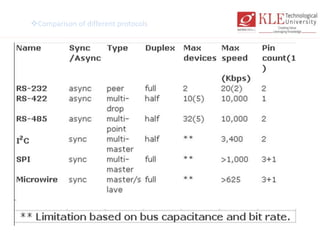
Comparison of different protocols
• In "multi-drop" communication, one device
communicates with multiple receivers.
Example: RS-422.
• Where in "multi-point" communication,
multiple devices communicates with
multiple receivers. Example: RS-485
What is CAN ?
Controller Area Network
It is a serial bus system used to communicate between several embedded 8-bit and
16-bit
It was originally designed for use in the automotive industry but is used today in
many other systems (e.g. home appliances and industrial machines).
It is asynchronous serial transmission protocol.
 Highest Baud Rate is 1Mbit.
 CAN uses a message oriented transmission protocol.
 There are no defined addresses, just defined messages.
 Non-destructive arbitration system by CSMA with collision detection.
 Multi-master / Broadcasting concept
 Sophisticated error detection & handling system
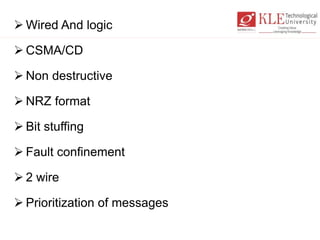
 Wired And logic
 CSMA/CD
 Non destructive
 NRZ format
 Bit stuffing
 Fault confinement
 2 wire
 Prioritization of messages
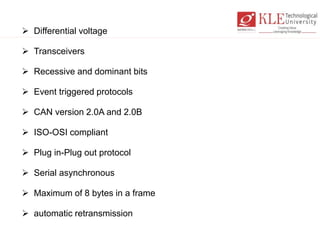
 Differential voltage
 Transceivers
 Recessive and dominant bits
 Event triggered protocols
 CAN version 2.0A and 2.0B
 ISO-OSI compliant
 Plug in-Plug out protocol
 Serial asynchronous
 Maximum of 8 bytes in a frame
 automatic retransmission
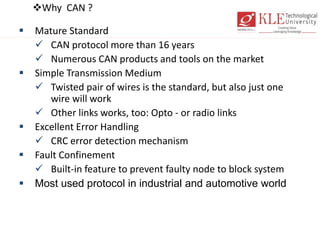
Why CAN ?
 Mature Standard
 CAN protocol more than 16 years
 Numerous CAN products and tools on the market
 Simple Transmission Medium
 Twisted pair of wires is the standard, but also just one
wire will work
 Other links works, too: Opto - or radio links
 Excellent Error Handling
 CRC error detection mechanism
 Fault Confinement
 Built-in feature to prevent faulty node to block system
 Most used protocol in industrial and automotive world
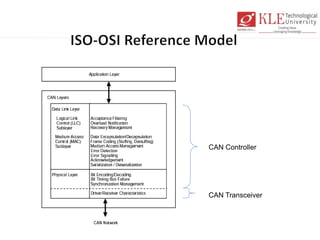
CAN Controller
CAN Transceiver
CAN Protocol
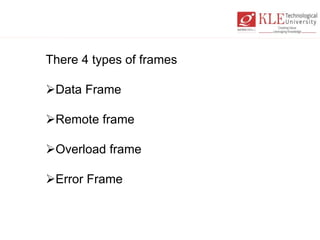
There 4 types of frames
Data Frame
Remote frame
Overload frame
Error Frame
CAN Protocol
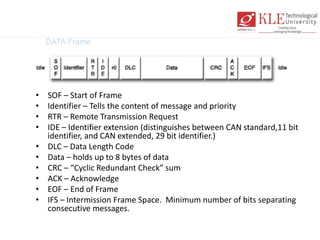
DATA Frame
• SOF – Start of Frame
• Identifier – Tells the content of message and priority
• RTR – Remote Transmission Request
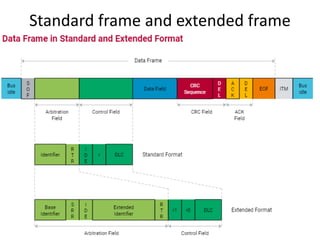
• IDE – Identifier extension (distinguishes between CAN standard,11 bit
identifier, and CAN extended, 29 bit identifier.)
• DLC – Data Length Code
• Data – holds up to 8 bytes of data
• CRC – “Cyclic Redundant Check” sum
• ACK – Acknowledge
• EOF – End of Frame
• IFS – Intermission Frame Space. Minimum number of bits separating
consecutive messages.
Standard frame and extended frame
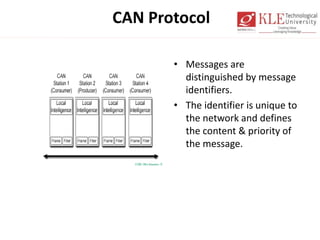
• Messages are
distinguished by message
identifiers.
• The identifier is unique to
the network and defines
the content & priority of
the message.
CAN Protocol
CAN Protocol
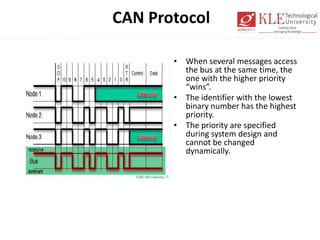
• When several messages access
the bus at the same time, the
one with the higher priority
“wins”.
• The identifier with the lowest
binary number has the highest
priority.
• The priority are specified
during system design and
cannot be changed
dynamically.
CAN Protocol
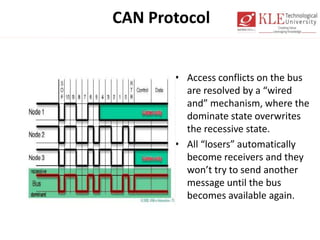
• Access conflicts on the bus
are resolved by a “wired
and” mechanism, where the
dominate state overwrites
the recessive state.
• All “losers” automatically
become receivers and they
won’t try to send another
message until the bus
becomes available again.
CAN Protocol
• If one or more errors are detected, the transmission is
aborted. This prevents all other stations or nodes from
accepting the message.
• Re-transmission is automatic. If errors continue, then the
station or node may switch itself off to prevent the bus
from being tied up.
• Error detection is done on two levels:
– Message level
– Bit level
CAN Protocol
• Message Level
– CRC = Cyclic Redundant Check sum
– Frame Check = compares message to fixed format and frame
size
– ACK errors = if transmitter does not receive an ACK signal
from the receivers
• Bit level
– Monitoring = The transmitter monitors the bus signal as it
sends the message and compares the bit sent to the bit
received.
– Bit Stuffing = After five consecutive equal bits, the
transmitter inserts a stuff bit with a compliment value into
the bit stream. The receivers remove this stuff bit.
CAN Protocol
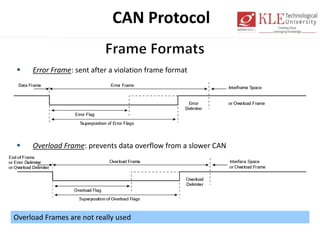
 Error Frame: sent after a violation frame format
 Overload Frame: prevents data overflow from a slower CAN
Overload Frames are not really used
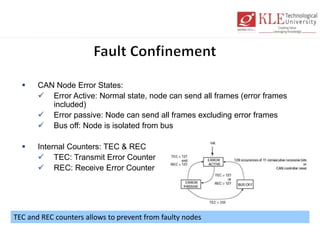
TEC and REC counters allows to prevent from faulty nodes
 CAN Node Error States:
 Error Active: Normal state, node can send all frames (error frames
included)
 Error passive: Node can send all frames excluding error frames
 Bus off: Node is isolated from bus
 Internal Counters: TEC & REC
 TEC: Transmit Error Counter
 REC: Receive Error Counter
CAN Protocol
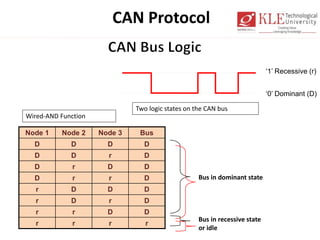
Node 1 Node 2 Node 3 Bus
D D D D
D D r D
D r D D
D r r D
r D D D
r D r D
r r D D
r r r r
‘1’ Recessive (r)
‘0’ Dominant (D)
Two logic states on the CAN bus
Bus in dominant state
Wired-AND Function
Bus in recessive state
or idle
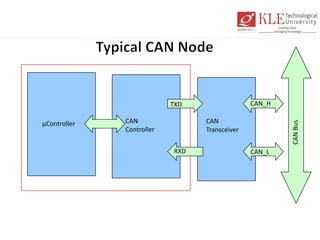
µController CAN
Controller
CAN
Transceiver
CANBus
CAN_H
CAN_LRXD
TXD
CAN_L
CAN_H
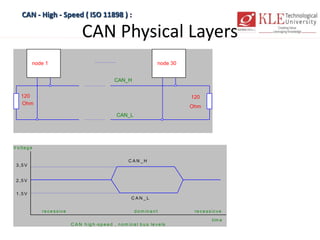
CAN Physical Layers
CAN - High - Speed ( ISO 11898 ) :
node 1 node 30
120
Ohm
120
Ohm
CAN_H
CAN_L
V o lta g e
tim e
2 ,5 V
3 ,5 V
1 ,5 V
C A N _ H
C A N _ L
re c e s s iv e d o m in a n t re c e s s ic v e
C A N h ig h -s p e e d , n o m in a l b u s le v e ls
Controller for CAN
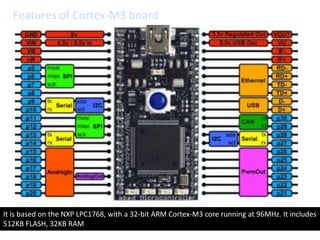
Features of Cortex-M3 board
It is based on the NXP LPC1768, with a 32-bit ARM Cortex-M3 core running at 96MHz. It includes
512KB FLASH, 32KB RAM
Cortex-M3 exercises
• Blink LED
• Build two bit counter
• Control LED based on switch
• Control the speed of the Motor based on
speed.
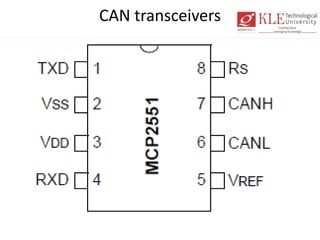
CAN transceivers
CAN project
• Build CAN networks to transmit counter
from one node to other.
• Interior lighting control over CAN bus
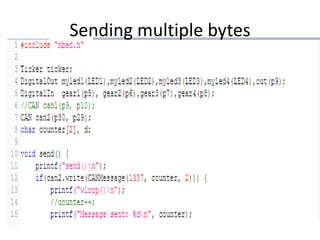
• Sending multiple bytes over CAN network
What is Ticker?
• Use the Ticker interface to set up a
recurring interrupt; it calls a function
repeatedly and at a specified rate.
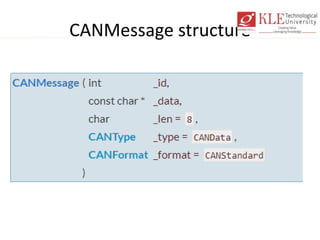
CANMessage structure
CAN Signal Analysis
CANalyzer and BUSMASTER
CANalyzer/CANoe
• CAN BUS analysis at signal
• CAN bus analysis at message level
• Send/Receive CAN data
• Simulate CAN node
• Simulate CAN network
• Test Automation using CAPL scripting
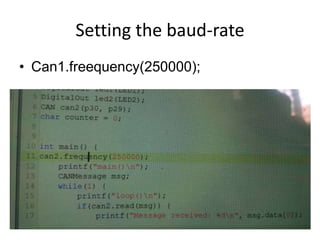
Setting the baud-rate
• Can1.freequency(250000);
Sending multiple bytes

Can network development using arm cortex m3

  • 1.
    CAN Network Development Program@IoTShow.in by Prof. Nalini C. Iyer Prof. Venkatesh Mane. Prof. Vishal Pattenshetty
  • 2.
     Introduction toCAN.  What is CAN and Why CAN ?  CAN protocol overview  CAN physical layer  CAN data link layer  Cortex-M3 programming  Project on CAN communication  Hands-on Exercises on Real World System  Analysis of CAN data using BUSMASTER and CAN data base creation
  • 3.
    What is communication? Communication is nothing but exchange of information or data. Why there is need for communication in a vehicle? To reduce the cost. To reduce size. To reduce the complexity. To improve the performance.
  • 4.
    What are thedifferent types of communications? Serial Communication Parallel Communication Advantages and Disadvantages of Both
  • 5.
  • 6.
    • In "multi-drop"communication, one device communicates with multiple receivers. Example: RS-422. • Where in "multi-point" communication, multiple devices communicates with multiple receivers. Example: RS-485
  • 7.
    What is CAN? Controller Area Network It is a serial bus system used to communicate between several embedded 8-bit and 16-bit It was originally designed for use in the automotive industry but is used today in many other systems (e.g. home appliances and industrial machines). It is asynchronous serial transmission protocol.  Highest Baud Rate is 1Mbit.  CAN uses a message oriented transmission protocol.  There are no defined addresses, just defined messages.  Non-destructive arbitration system by CSMA with collision detection.  Multi-master / Broadcasting concept  Sophisticated error detection & handling system
  • 8.
     Wired Andlogic  CSMA/CD  Non destructive  NRZ format  Bit stuffing  Fault confinement  2 wire  Prioritization of messages
  • 9.
     Differential voltage Transceivers  Recessive and dominant bits  Event triggered protocols  CAN version 2.0A and 2.0B  ISO-OSI compliant  Plug in-Plug out protocol  Serial asynchronous  Maximum of 8 bytes in a frame  automatic retransmission
  • 10.
    Why CAN ? Mature Standard  CAN protocol more than 16 years  Numerous CAN products and tools on the market  Simple Transmission Medium  Twisted pair of wires is the standard, but also just one wire will work  Other links works, too: Opto - or radio links  Excellent Error Handling  CRC error detection mechanism  Fault Confinement  Built-in feature to prevent faulty node to block system  Most used protocol in industrial and automotive world
  • 11.
  • 12.
    CAN Protocol There 4types of frames Data Frame Remote frame Overload frame Error Frame
  • 13.
    CAN Protocol DATA Frame •SOF – Start of Frame • Identifier – Tells the content of message and priority • RTR – Remote Transmission Request • IDE – Identifier extension (distinguishes between CAN standard,11 bit identifier, and CAN extended, 29 bit identifier.) • DLC – Data Length Code • Data – holds up to 8 bytes of data • CRC – “Cyclic Redundant Check” sum • ACK – Acknowledge • EOF – End of Frame • IFS – Intermission Frame Space. Minimum number of bits separating consecutive messages.
  • 14.
    Standard frame andextended frame
  • 15.
    • Messages are distinguishedby message identifiers. • The identifier is unique to the network and defines the content & priority of the message. CAN Protocol
  • 16.
    CAN Protocol • Whenseveral messages access the bus at the same time, the one with the higher priority “wins”. • The identifier with the lowest binary number has the highest priority. • The priority are specified during system design and cannot be changed dynamically.
  • 17.
    CAN Protocol • Accessconflicts on the bus are resolved by a “wired and” mechanism, where the dominate state overwrites the recessive state. • All “losers” automatically become receivers and they won’t try to send another message until the bus becomes available again.
  • 18.
    CAN Protocol • Ifone or more errors are detected, the transmission is aborted. This prevents all other stations or nodes from accepting the message. • Re-transmission is automatic. If errors continue, then the station or node may switch itself off to prevent the bus from being tied up. • Error detection is done on two levels: – Message level – Bit level
  • 19.
    CAN Protocol • MessageLevel – CRC = Cyclic Redundant Check sum – Frame Check = compares message to fixed format and frame size – ACK errors = if transmitter does not receive an ACK signal from the receivers • Bit level – Monitoring = The transmitter monitors the bus signal as it sends the message and compares the bit sent to the bit received. – Bit Stuffing = After five consecutive equal bits, the transmitter inserts a stuff bit with a compliment value into the bit stream. The receivers remove this stuff bit.
  • 20.
    CAN Protocol  ErrorFrame: sent after a violation frame format  Overload Frame: prevents data overflow from a slower CAN Overload Frames are not really used
  • 21.
    TEC and RECcounters allows to prevent from faulty nodes  CAN Node Error States:  Error Active: Normal state, node can send all frames (error frames included)  Error passive: Node can send all frames excluding error frames  Bus off: Node is isolated from bus  Internal Counters: TEC & REC  TEC: Transmit Error Counter  REC: Receive Error Counter
  • 22.
    CAN Protocol Node 1Node 2 Node 3 Bus D D D D D D r D D r D D D r r D r D D D r D r D r r D D r r r r ‘1’ Recessive (r) ‘0’ Dominant (D) Two logic states on the CAN bus Bus in dominant state Wired-AND Function Bus in recessive state or idle
  • 23.
  • 24.
    CAN Physical Layers CAN- High - Speed ( ISO 11898 ) : node 1 node 30 120 Ohm 120 Ohm CAN_H CAN_L V o lta g e tim e 2 ,5 V 3 ,5 V 1 ,5 V C A N _ H C A N _ L re c e s s iv e d o m in a n t re c e s s ic v e C A N h ig h -s p e e d , n o m in a l b u s le v e ls
  • 25.
  • 26.
    Features of Cortex-M3board It is based on the NXP LPC1768, with a 32-bit ARM Cortex-M3 core running at 96MHz. It includes 512KB FLASH, 32KB RAM
  • 27.
    Cortex-M3 exercises • BlinkLED • Build two bit counter • Control LED based on switch • Control the speed of the Motor based on speed.
  • 28.
  • 29.
    CAN project • BuildCAN networks to transmit counter from one node to other. • Interior lighting control over CAN bus • Sending multiple bytes over CAN network
  • 30.
    What is Ticker? •Use the Ticker interface to set up a recurring interrupt; it calls a function repeatedly and at a specified rate.
  • 31.
  • 32.
  • 33.
  • 34.
    CANalyzer/CANoe • CAN BUSanalysis at signal • CAN bus analysis at message level • Send/Receive CAN data • Simulate CAN node • Simulate CAN network • Test Automation using CAPL scripting
  • 36.
    Setting the baud-rate •Can1.freequency(250000);
  • 37.