Chapter 6C# .NET Loops
What will you be learning?For loopsWhile loopsDo loops
What is a loop?A loop is a way to execute a piece of code repeatedly Go round and round until an end condition is met
Why use loops?Eg: you need to add from 0 to 10   Solution not using loop:int answer;     answer = 0 + 1 + 2 + 3 + 4 + 5 + 6 + 7 + 8 + 9 + 10; The above solution not suitable for very large numbers (says from 0 to 10000) – programmers are lazy, what would be a faster way to solve?
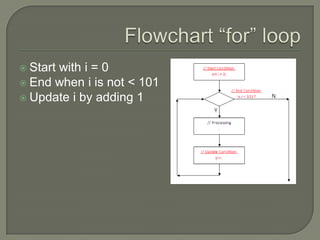
Flowchart ā€œforā€ loopStart with i = 0End when i is not < 101Update i by adding 1
for loopfor (      )   // start, end, update conditions{    // Processing}
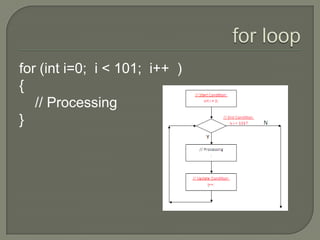
for loopfor (inti=0;  i < 101;  i++  )  {    // Processing}
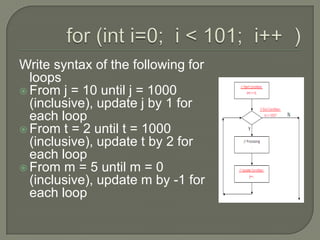
for (inti=0;  i < 101;  i++  )  Write syntax of the following for loopsFrom j = 10 until j = 1000 (inclusive), update j by 1 for each loopFrom t = 2 until t = 1000 (inclusive), update t by 2 for each loopFrom m = 5 until m = 0 (inclusive), update m by -1 for each loop
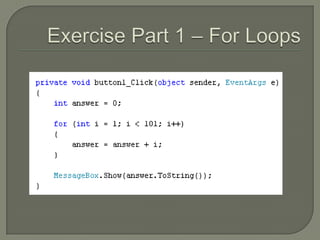
Exercise Part 1 – For LoopsAdd a new project to ā€œPart 1 For Loopsā€Put one button and add the following codes for its click method (pg 112):
Exercise Part 1 – For Loops
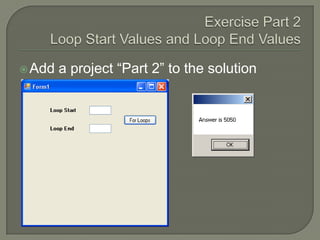
Exercise Part 2Loop Start Values and Loop End Values Add a project ā€œPart 2ā€ to the solution
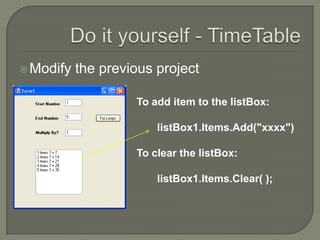
Do it yourself - TimeTableModify the previous projectTo add item to the listBox:       listBox1.Items.Add("xxxx")To clear the listBox:       listBox1.Items.Clear( );
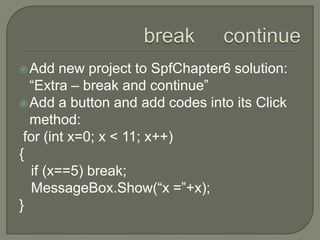
break     continueAdd new project to SpfChapter6 solution: ā€œExtra – break and continueā€Add a button and add codes into its Click method: for (int x=0; x < 11; x++){   if (x==5) break;MessageBox.Show(ā€œx =ā€+x);}
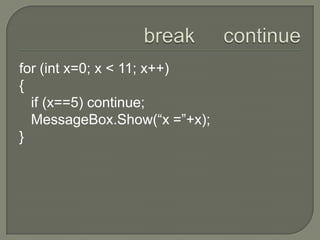
break     continuefor (int x=0; x < 11; x++){   if (x==5) continue;MessageBox.Show(ā€œx =ā€+x);}
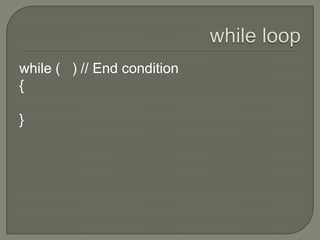
while loopwhile (   ) // End condition {}
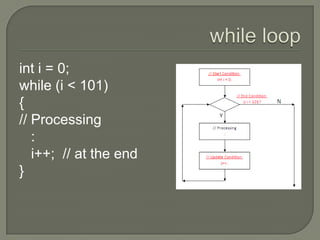
while loopinti = 0;while (i < 101){// Processing   :i++;  // at the end}
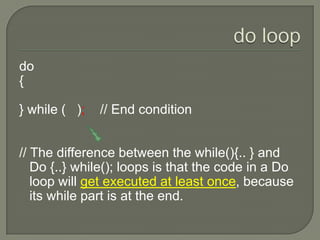
do loopdo{} while (   );    // End condition// The difference between the while(){.. } and Do {..} while(); loops is that the code in a Do loop will get executed at least once, because its while part is at the end.
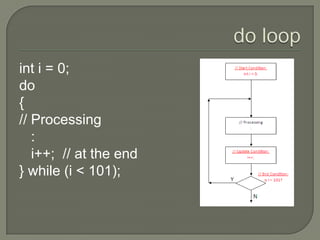
do loopinti = 0;do{// Processing   :i++;  // at the end} while (i < 101);
Part 3Modify the previous projectChange from "for" loop to ā€œwhileā€ and then to "do while" loop
SummaryA loop is a way to execute a piece of code repeatedly We shall be using loops again when we cover ArraysThere is also "foreach" loop that applies for string, array and objects

C# Loops

  • 1.
  • 2.
    What will yoube learning?For loopsWhile loopsDo loops
  • 3.
    What is aloop?A loop is a way to execute a piece of code repeatedly Go round and round until an end condition is met
  • 4.
    Why use loops?Eg:you need to add from 0 to 10 Solution not using loop:int answer; answer = 0 + 1 + 2 + 3 + 4 + 5 + 6 + 7 + 8 + 9 + 10; The above solution not suitable for very large numbers (says from 0 to 10000) – programmers are lazy, what would be a faster way to solve?
  • 5.
    Flowchart ā€œforā€ loopStartwith i = 0End when i is not < 101Update i by adding 1
  • 6.
    for loopfor ( ) // start, end, update conditions{ // Processing}
  • 7.
    for loopfor (inti=0; i < 101; i++ ) { // Processing}
  • 8.
    for (inti=0; i < 101; i++ ) Write syntax of the following for loopsFrom j = 10 until j = 1000 (inclusive), update j by 1 for each loopFrom t = 2 until t = 1000 (inclusive), update t by 2 for each loopFrom m = 5 until m = 0 (inclusive), update m by -1 for each loop
  • 9.
    Exercise Part 1– For LoopsAdd a new project to ā€œPart 1 For Loopsā€Put one button and add the following codes for its click method (pg 112):
  • 10.
    Exercise Part 1– For Loops
  • 11.
    Exercise Part 2LoopStart Values and Loop End Values Add a project ā€œPart 2ā€ to the solution
  • 12.
    Do it yourself- TimeTableModify the previous projectTo add item to the listBox: listBox1.Items.Add("xxxx")To clear the listBox: listBox1.Items.Clear( );
  • 13.
    break continueAdd new project to SpfChapter6 solution: ā€œExtra – break and continueā€Add a button and add codes into its Click method: for (int x=0; x < 11; x++){ if (x==5) break;MessageBox.Show(ā€œx =ā€+x);}
  • 14.
    break continuefor (int x=0; x < 11; x++){ if (x==5) continue;MessageBox.Show(ā€œx =ā€+x);}
  • 15.
    while loopwhile ( ) // End condition {}
  • 16.
    while loopinti =0;while (i < 101){// Processing :i++; // at the end}
  • 17.
    do loopdo{} while( ); // End condition// The difference between the while(){.. } and Do {..} while(); loops is that the code in a Do loop will get executed at least once, because its while part is at the end.
  • 18.
    do loopinti =0;do{// Processing :i++; // at the end} while (i < 101);
  • 19.
    Part 3Modify theprevious projectChange from "for" loop to ā€œwhileā€ and then to "do while" loop
  • 20.
    SummaryA loop isa way to execute a piece of code repeatedly We shall be using loops again when we cover ArraysThere is also "foreach" loop that applies for string, array and objects