Bhushan Mulmule
bhushan.mulmule@dotnetvideotutorial.com
www.dotnetvideotutorial.com
For video visit
www.dotnetvideotutorial.com
FlowControl
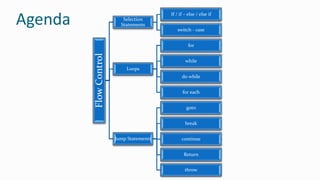
Selection
Statements
If / if – else / else if
switch - case
Loops
for
while
do while
for each
Jump Statements
goto
break
continue
Return
throw
Agenda
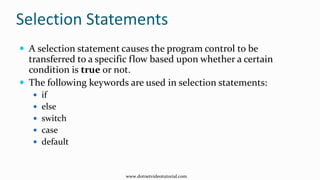
Selection Statements
 A selection statement causes the program control to be
transferred to a specific flow based upon whether a certain
condition is true or not.
 The following keywords are used in selection statements:
 if
 else
 switch
 case
 default
www.dotnetvideotutorial.com
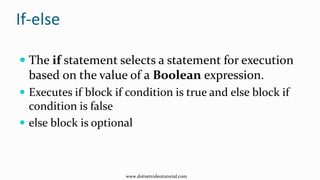
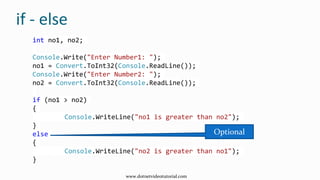
If-else
 The if statement selects a statement for execution
based on the value of a Boolean expression.
 Executes if block if condition is true and else block if
condition is false
 else block is optional
www.dotnetvideotutorial.com
int no1, no2;
Console.Write("Enter Number1: ");
no1 = Convert.ToInt32(Console.ReadLine());
Console.Write("Enter Number2: ");
no2 = Convert.ToInt32(Console.ReadLine());
if (no1 > no2)
{
Console.WriteLine("no1 is greater than no2");
}
else
{
Console.WriteLine("no2 is greater than no1");
}
if - else
Optional
www.dotnetvideotutorial.com
Nested if-else
 if-else can be nested either inside other if or
else block
www.dotnetvideotutorial.com
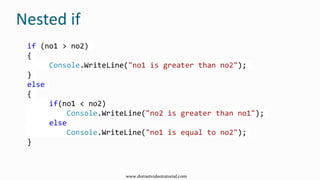
Nested if
if (no1 > no2)
{
Console.WriteLine("no1 is greater than no2");
}
else
{
if(no1 < no2)
Console.WriteLine("no2 is greater than no1");
else
Console.WriteLine("no1 is equal to no2");
}
www.dotnetvideotutorial.com
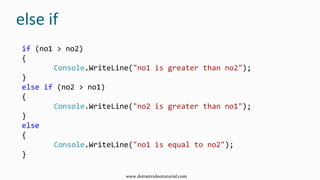
else-if
 else –if can be use to avoid deep nesting in case
of multiple conditions
www.dotnetvideotutorial.com
else if
if (no1 > no2)
{
Console.WriteLine("no1 is greater than no2");
}
else if (no2 > no1)
{
Console.WriteLine("no2 is greater than no1");
}
else
{
Console.WriteLine("no1 is equal to no2");
}
www.dotnetvideotutorial.com
switch-case
 The switch statement is a control statement that
handles multiple selections and enumerations by
passing control to one of the case statements within
its body
www.dotnetvideotutorial.com
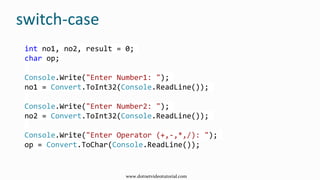
switch-case
int no1, no2, result = 0;
char op;
Console.Write("Enter Number1: ");
no1 = Convert.ToInt32(Console.ReadLine());
Console.Write("Enter Number2: ");
no2 = Convert.ToInt32(Console.ReadLine());
Console.Write("Enter Operator (+,-,*,/): ");
op = Convert.ToChar(Console.ReadLine());
www.dotnetvideotutorial.com
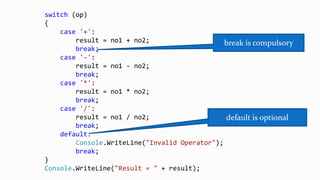
switch (op)
{
case '+':
result = no1 + no2;
break;
case '-':
result = no1 - no2;
break;
case '*':
result = no1 * no2;
break;
case '/':
result = no1 / no2;
break;
default:
Console.WriteLine("Invalid Operator");
break;
}
Console.WriteLine("Result = " + result);
break is compulsory
default is optional
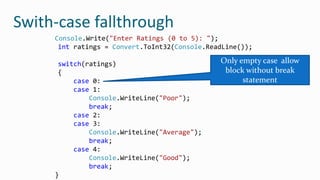
Swith-case fallthrough
 Swith-case fallthrough can be used to execute same
block for multiple cases.
 It can be achived using empty case block
www.dotnetvideotutorial.com
Console.Write("Enter Ratings (0 to 5): ");
int ratings = Convert.ToInt32(Console.ReadLine());
switch(ratings)
{
case 0:
case 1:
Console.WriteLine("Poor");
break;
case 2:
case 3:
Console.WriteLine("Average");
break;
case 4:
Console.WriteLine("Good");
break;
}
Only empty case allow
block without break
statement
Swith-case fallthrough
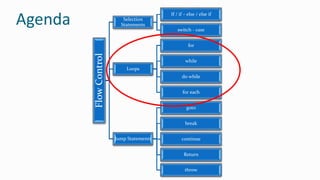
FlowControl
Selection
Statements
If / if – else / else if
switch - case
Loops
for
while
do while
for each
Jump Statements
goto
break
continue
Return
throw
Agenda
Loops
 Loop executes a block of code repeatedly until a
certain condition is met.
 C# provides four loops
 for
 while
 do. . .while
 foreach
www.dotnetvideotutorial.com
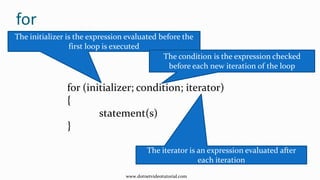
for
for (initializer; condition; iterator)
{
statement(s)
}
The initializer is the expression evaluated before the
first loop is executed
The condition is the expression checked
before each new iteration of the loop
The iterator is an expression evaluated after
each iteration
www.dotnetvideotutorial.com
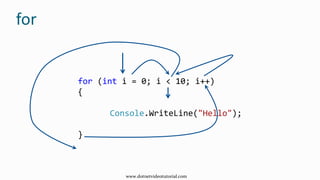
for
for (int i = 0; i < 10; i++)
{
Console.WriteLine("Hello");
}
www.dotnetvideotutorial.com
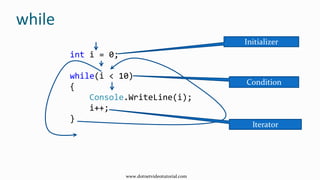
while
int i = 0;
while(i < 10)
{
Console.WriteLine(i);
i++;
}
Initializer
Condition
Iterator
www.dotnetvideotutorial.com
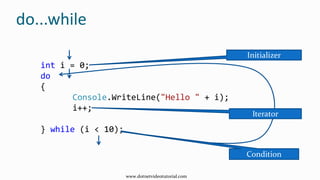
do...while
int i = 0;
do
{
Console.WriteLine("Hello " + i);
i++;
} while (i < 10);
Initializer
Condition
Iterator
www.dotnetvideotutorial.com
foreach
int[] marks = { 50, 35, 65, 43, 65 };
foreach (int m in marks)
{
Console.WriteLine(m);
} 50 35 65 43 65
m
marks
www.dotnetvideotutorial.com
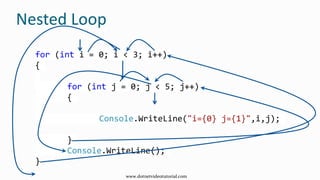
Nested Loop
for (int i = 0; i < 3; i++)
{
for (int j = 0; j < 5; j++)
{
Console.WriteLine("i={0} j={1}",i,j);
}
Console.WriteLine();
}
www.dotnetvideotutorial.com
FlowControl
Selection
Statements
If / if – else / else if
switch - case
Loops
for
while
do while
for each
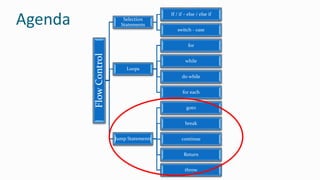
Jump Statements
goto
break
continue
Return
throw
Agenda
Jump Statements
 Branching is performed using jump statements, which
cause an immediate transfer of the program control.
The following keywords are used in jump statements:
 break
 continue
 goto
 return
 throw
www.dotnetvideotutorial.com
goto
static void Main(string[] args)
{
label1:
Console.WriteLine("Do you like this tutorial?");
Console.Write("Enter Y or N: ");
char response = Convert.ToChar(Console.ReadLine());
if (response == 'N' || response == 'n')
goto label1;
Console.WriteLine("O Thanks!!!");
}
www.dotnetvideotutorial.com
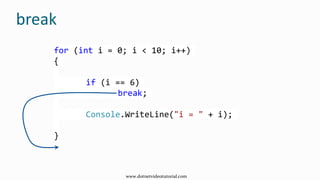
break
for (int i = 0; i < 10; i++)
{
if (i == 6)
break;
Console.WriteLine("i = " + i);
}
www.dotnetvideotutorial.com
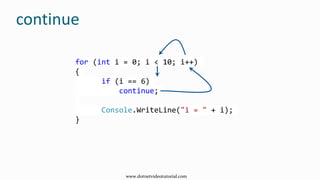
continue
for (int i = 0; i < 10; i++)
{
if (i == 6)
continue;
Console.WriteLine("i = " + i);
}
www.dotnetvideotutorial.com
Bhushan Mulmule
bhushan.mulmule@dotnetvideotutorial.com
www.dotnetvideotutorial.com

Flow Control (C#)

  • 1.
  • 2.
  • 3.
    FlowControl Selection Statements If / if– else / else if switch - case Loops for while do while for each Jump Statements goto break continue Return throw Agenda
  • 4.
    Selection Statements  Aselection statement causes the program control to be transferred to a specific flow based upon whether a certain condition is true or not.  The following keywords are used in selection statements:  if  else  switch  case  default www.dotnetvideotutorial.com
  • 5.
    If-else  The ifstatement selects a statement for execution based on the value of a Boolean expression.  Executes if block if condition is true and else block if condition is false  else block is optional www.dotnetvideotutorial.com
  • 6.
    int no1, no2; Console.Write("EnterNumber1: "); no1 = Convert.ToInt32(Console.ReadLine()); Console.Write("Enter Number2: "); no2 = Convert.ToInt32(Console.ReadLine()); if (no1 > no2) { Console.WriteLine("no1 is greater than no2"); } else { Console.WriteLine("no2 is greater than no1"); } if - else Optional www.dotnetvideotutorial.com
  • 7.
    Nested if-else  if-elsecan be nested either inside other if or else block www.dotnetvideotutorial.com
  • 8.
    Nested if if (no1> no2) { Console.WriteLine("no1 is greater than no2"); } else { if(no1 < no2) Console.WriteLine("no2 is greater than no1"); else Console.WriteLine("no1 is equal to no2"); } www.dotnetvideotutorial.com
  • 9.
    else-if  else –ifcan be use to avoid deep nesting in case of multiple conditions www.dotnetvideotutorial.com
  • 10.
    else if if (no1> no2) { Console.WriteLine("no1 is greater than no2"); } else if (no2 > no1) { Console.WriteLine("no2 is greater than no1"); } else { Console.WriteLine("no1 is equal to no2"); } www.dotnetvideotutorial.com
  • 11.
    switch-case  The switchstatement is a control statement that handles multiple selections and enumerations by passing control to one of the case statements within its body www.dotnetvideotutorial.com
  • 12.
    switch-case int no1, no2,result = 0; char op; Console.Write("Enter Number1: "); no1 = Convert.ToInt32(Console.ReadLine()); Console.Write("Enter Number2: "); no2 = Convert.ToInt32(Console.ReadLine()); Console.Write("Enter Operator (+,-,*,/): "); op = Convert.ToChar(Console.ReadLine()); www.dotnetvideotutorial.com
  • 13.
    switch (op) { case '+': result= no1 + no2; break; case '-': result = no1 - no2; break; case '*': result = no1 * no2; break; case '/': result = no1 / no2; break; default: Console.WriteLine("Invalid Operator"); break; } Console.WriteLine("Result = " + result); break is compulsory default is optional
  • 14.
    Swith-case fallthrough  Swith-casefallthrough can be used to execute same block for multiple cases.  It can be achived using empty case block www.dotnetvideotutorial.com
  • 15.
    Console.Write("Enter Ratings (0to 5): "); int ratings = Convert.ToInt32(Console.ReadLine()); switch(ratings) { case 0: case 1: Console.WriteLine("Poor"); break; case 2: case 3: Console.WriteLine("Average"); break; case 4: Console.WriteLine("Good"); break; } Only empty case allow block without break statement Swith-case fallthrough
  • 16.
    FlowControl Selection Statements If / if– else / else if switch - case Loops for while do while for each Jump Statements goto break continue Return throw Agenda
  • 17.
    Loops  Loop executesa block of code repeatedly until a certain condition is met.  C# provides four loops  for  while  do. . .while  foreach www.dotnetvideotutorial.com
  • 18.
    for for (initializer; condition;iterator) { statement(s) } The initializer is the expression evaluated before the first loop is executed The condition is the expression checked before each new iteration of the loop The iterator is an expression evaluated after each iteration www.dotnetvideotutorial.com
  • 19.
    for for (int i= 0; i < 10; i++) { Console.WriteLine("Hello"); } www.dotnetvideotutorial.com
  • 20.
    while int i =0; while(i < 10) { Console.WriteLine(i); i++; } Initializer Condition Iterator www.dotnetvideotutorial.com
  • 21.
    do...while int i =0; do { Console.WriteLine("Hello " + i); i++; } while (i < 10); Initializer Condition Iterator www.dotnetvideotutorial.com
  • 22.
    foreach int[] marks ={ 50, 35, 65, 43, 65 }; foreach (int m in marks) { Console.WriteLine(m); } 50 35 65 43 65 m marks www.dotnetvideotutorial.com
  • 23.
    Nested Loop for (inti = 0; i < 3; i++) { for (int j = 0; j < 5; j++) { Console.WriteLine("i={0} j={1}",i,j); } Console.WriteLine(); } www.dotnetvideotutorial.com
  • 24.
    FlowControl Selection Statements If / if– else / else if switch - case Loops for while do while for each Jump Statements goto break continue Return throw Agenda
  • 25.
    Jump Statements  Branchingis performed using jump statements, which cause an immediate transfer of the program control. The following keywords are used in jump statements:  break  continue  goto  return  throw www.dotnetvideotutorial.com
  • 26.
    goto static void Main(string[]args) { label1: Console.WriteLine("Do you like this tutorial?"); Console.Write("Enter Y or N: "); char response = Convert.ToChar(Console.ReadLine()); if (response == 'N' || response == 'n') goto label1; Console.WriteLine("O Thanks!!!"); } www.dotnetvideotutorial.com
  • 27.
    break for (int i= 0; i < 10; i++) { if (i == 6) break; Console.WriteLine("i = " + i); } www.dotnetvideotutorial.com
  • 28.
    continue for (int i= 0; i < 10; i++) { if (i == 6) continue; Console.WriteLine("i = " + i); } www.dotnetvideotutorial.com
  • 29.