http://eglobiotraining.com/
What is computer program?
 is a sequence of instruction written to perform a
 specified task with a computer. A computer requires
 programs to function, typically executing the
 program's instructions in central processor. The
 program has an executable form that the computer can
 use directly to execute the instructions. The same
 program in its human-readable source code
 form, from which executable programs are derived
 (e.g., compiled), enables a programmer to study and
 develop its algorithms.

                  http://eglobiotraining.com/
 Computer source code is often written
 by computer programmers. Source code is
 written in a programming language that
 usually follows one of two
 main paradigms: imperative
 programming or declarative programming.
 Source code may be converted into
 an executable file (sometimes called an
 executable program or a binary) by
 a compiler and later executed by a central
 processing unit.
                 http://eglobiotraining.com/
Computer Programmer
 is a person who writes computer software. The
 term computer programmer can refer to a specialist in
 one area of computer programming or to a generalist
 who writes code for many kinds of software. One who
 practices or professes a formal approach to
 programming may also be known as a programmer
 analyst.


                   http://eglobiotraining.com/
    Programmers are people who design the
    program of events that turns input data into
    output data. It has been proved that such a
    program of events can be designed using a
    structure composed of sequences, iterations
    and selections. Code is merely the way that
    the program is described.


                  http://eglobiotraining.com/
Programming is the iterative process of
 writing or editing source code. Editing source
 code involves testing, analyzing, and refining, and
 sometimes coordinating with other programmers
 on a jointly developed program. A person who
 practices this skill is referred to as a
 computer programmer, software developer or
 coder. The sometimes lengthy process of
 computer programming is usually referred to
 as software development. The term software
 engineering is becoming popular as the process is
 seen as an engineering discipline.

                  http://eglobiotraining.com/
Programming is instructing a computer to do
something for you with the help of a programming language.
The role of a programming language can be described in two
ways:
 Technical: It is a means for instructing a Computer to
  perform Tasks
 Conceptual: It is a framework within which we organize our
  ideas about things and processes.


                     http://eglobiotraining.com/
 A Programming             Language is
 an artificial language designed to
 communicate instructions to
 a machine, particularly a computer.
 Programming languages can be used to
 create programs that control the behavior of
 a machine and/or to
 express algorithms precisely.


               http://eglobiotraining.com/
 Programming language is usually split into the two
  components of syntax (form)
 and semantics(meaning). Some languages are
 defined by a specification document (for
 example, the C programming language is specified
 by an ISO Standard), while other languages, such
 as Perl 5 and earlier, have a
 dominant implementation that is used as
 a reference.


                  http://eglobiotraining.com/
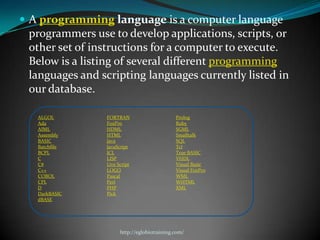
 A programming language is a computer language
 programmers use to develop applications, scripts, or
 other set of instructions for a computer to execute.
 Below is a listing of several different programming
 languages and scripting languages currently listed in
 our database.

   ALGOL        FORTRAN                      Prolog
   Ada          FoxPro                       Ruby
   AIML         HDML                         SGML
   Assembly     HTML                         Smalltalk
   BASIC        Java                         SQL
   Batchfile    JavaScript                   Tcl
   BCPL         JCL                          True BASIC
   C            LISP                         VHDL
   C#           Live Script                  Visual Basic
   C++          LOGO                         Visual FoxPro
   COBOL        Pascal                       WML
   CPL          Perl                         WHTML
   D            PHP                          XML
   DarkBASIC    Pick
   dBASE


                      http://eglobiotraining.com/
The most important aspect of programming is to analyze
 and adopt specific solution while solving any problem.
 This needs a programming approach that defines the
 modularity of program that one writes and how it is
 related to others in an application.


                   http://eglobiotraining.com/
C++ is a statically typed, free-form, multi-
 paradigm, compiled, general-purpose programming
 language. It is regarded as an intermediate-level
 language, as it comprises a combination of both high-level
 and low-level language features.

 C++ is one of the most popular programming languages
 and is implemented on a wide variety of hardware and
 operating system platforms.

 C++ has greatly influenced many other popular
  programming languages, most notably C# and Java. Other
  successful languages such as Objective-C use a very
  different syntax and approach to adding classes to C.


                    http://eglobiotraining.com/
 C++ is one of the most used programming languages
  in the world. Also known as "C with Classes".
 C++ is a general-purpose programming language with
  high-level and low-level capabilities. It is a statically
  typed, free-form, multi-paradigm, usually compiled
  language supporting procedural programming, data
  abstraction, object-oriented programming, and
  generic programming.


                     http://eglobiotraining.com/
Switch Case
 In programming, a switch, case, select or inspect sta
  tement is a type of selection control mechanism that
  exists in most imperative programming languages
  such as Pascal, Ada, C/C++, C#, Java, and so on.
 The main reasons for using a switch include improving
  clarity, by reducing otherwise repetitive coding, and (if
  the heuristics permit) also offering the potential for
  faster execution through easier compiler
  optimization in many cases.


                     http://eglobiotraining.com/
 The switch-case statement is a multi-way
 decision statement. Unlike the multiple
 decision statement that can be created
 using if-else, the switch statement
 evaluates the conditional expression and
 tests it against numerous constant values.


                http://eglobiotraining.com/
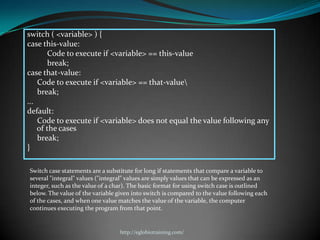
switch ( <variable> ) {
case this-value:
        Code to execute if <variable> == this-value
        break;
case that-value:
    Code to execute if <variable> == that-value
    break;
...
default:
    Code to execute if <variable> does not equal the value following any
    of the cases
    break;
}

Switch case statements are a substitute for long if statements that compare a variable to
several "integral" values ("integral" values are simply values that can be expressed as an
integer, such as the value of a char). The basic format for using switch case is outlined
below. The value of the variable given into switch is compared to the value following each
of the cases, and when one value matches the value of the variable, the computer
continues executing the program from that point.


                                  http://eglobiotraining.com/
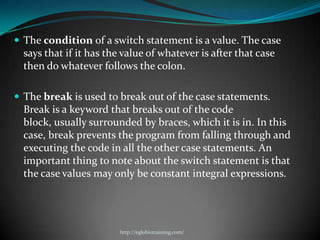
 The condition of a switch statement is a value. The case
  says that if it has the value of whatever is after that case
  then do whatever follows the colon.

 The break is used to break out of the case statements.
  Break is a keyword that breaks out of the code
  block, usually surrounded by braces, which it is in. In this
  case, break prevents the program from falling through and
  executing the code in all the other case statements. An
  important thing to note about the switch statement is that
  the case values may only be constant integral expressions.


                         http://eglobiotraining.com/
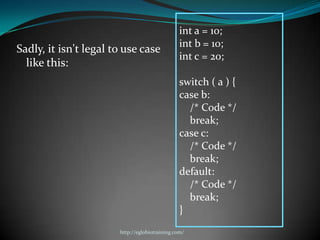
int a = 10;
                                                int b = 10;
Sadly, it isn't legal to use case
                                                int c = 20;
  like this:
                                                switch ( a ) {
                                                case b:
                                                  /* Code */
                                                  break;
                                                case c:
                                                  /* Code */
                                                  break;
                                                default:
                                                  /* Code */
                                                  break;
                                                }
                       http://eglobiotraining.com/
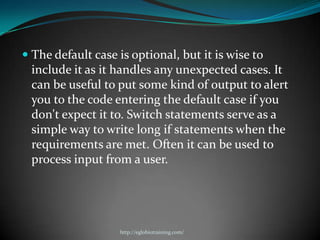
 The default case is optional, but it is wise to
  include it as it handles any unexpected cases. It
 can be useful to put some kind of output to alert
 you to the code entering the default case if you
 don't expect it to. Switch statements serve as a
 simple way to write long if statements when the
 requirements are met. Often it can be used to
 process input from a user.


                   http://eglobiotraining.com/
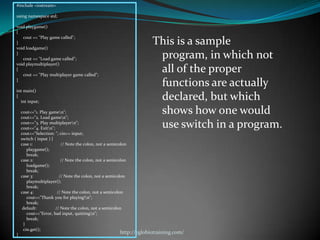
#include <iostream>

using namespace std;

void playgame()
{
   cout << "Play game called";
}
void loadgame()
                                                                     This is a sample
}
   cout << "Load game called";                                        program, in which not
void playmultiplayer()
{
   cout << "Play multiplayer game called";
                                                                      all of the proper
}
                                                                      functions are actually
int main()
{
  int input;
                                                                      declared, but which
    cout<<"1. Play gamen";
    cout<<"2. Load gamen";
                                                                      shows how one would
    cout<<"3. Play multiplayern";
    cout<<"4. Exitn";                                                use switch in a program.
    cout<<"Selection: "; cin>> input;
    switch ( input ) {
    case 1:               // Note the colon, not a semicolon
       playgame();
       break;
    case 2:               // Note the colon, not a semicolon
       loadgame();
       break;
    case 3:              // Note the colon, not a semicolon
       playmultiplayer();
       break;
    case 4:             // Note the colon, not a semicolon
       cout<<"Thank you for playing!n";
       break;
     default:          // Note the colon, not a semicolon
       cout<<"Error, bad input, quittingn";
       break;
     }
     cin.get();
}
                                                        http://eglobiotraining.com/
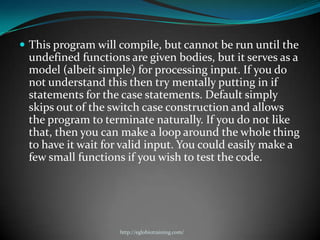
 This program will compile, but cannot be run until the
 undefined functions are given bodies, but it serves as a
 model (albeit simple) for processing input. If you do
 not understand this then try mentally putting in if
 statements for the case statements. Default simply
 skips out of the switch case construction and allows
 the program to terminate naturally. If you do not like
 that, then you can make a loop around the whole thing
 to have it wait for valid input. You could easily make a
 few small functions if you wish to test the code.


                    http://eglobiotraining.com/
Looping
In computer programming, a loop is a sequence
  of instructions that is continually repeated until a
  certain condition is reached. Typically, a certain
  process is done, such as getting an item of data and
  changing it, and then some condition is checked
  such as whether a counter has reached a
  prescribed number.


                   http://eglobiotraining.com/
If it hasn't, the next instruction in the sequence is
an instruction to return to the first instruction in
the sequence and repeat the sequence. If the
condition has been reached, the next instruction
"falls through" to the next sequential instruction
or branches outside the loop. A loop is a
fundamental programming idea that is commonly
used in writing programs.


                   http://eglobiotraining.com/
Loops are used to repeat a block of code. Being able to
have your program repeatedly execute a block of code
is one of the most basic but useful tasks in
programming -- many programs or websites that
produce extremely complex output (such as a message
board) are really only executing a single task many
times. (They may be executing a small number of
tasks, but in principle, to produce a list of messages
only requires repeating the operation of reading in
some data and displaying it.) Now, think about what
this means: a loop lets you write a very simple
statement to produce a significantly greater result
simply by repetition.


                   http://eglobiotraining.com/
One Caveat: before going further, you should
 understand the concept of C++'s true and
 false, because it will be necessary when working with
 loops (the conditions are the same as with if
 statements).

There are three types of loops:
 for
 While
 do..while


                    http://eglobiotraining.com/
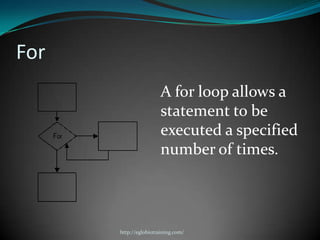
For
                       A for loop allows a
                       statement to be
                       executed a specified
                       number of times.


      http://eglobiotraining.com/
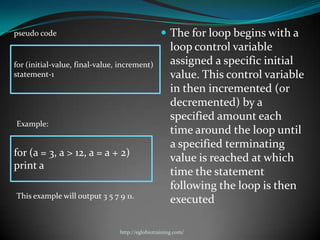
pseudo code                                       The for loop begins with a
                                                     loop control variable
for (initial-value, final-value, increment)          assigned a specific initial
statement-1                                          value. This control variable
                                                     in then incremented (or
                                                     decremented) by a
                                                     specified amount each
Example:
                                                     time around the loop until
                                                     a specified terminating
for (a = 3, a > 12, a = a + 2)
                                                     value is reached at which
print a
                                                     time the statement
                                                     following the loop is then
This example will output 3 5 7 9 11.
                                                     executed

                                http://eglobiotraining.com/
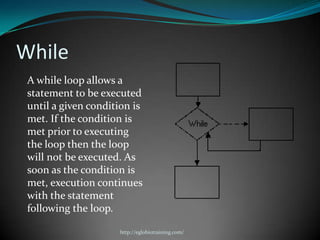
While
 A while loop allows a
 statement to be executed
 until a given condition is
 met. If the condition is
 met prior to executing
 the loop then the loop
 will not be executed. As
 soon as the condition is
 met, execution continues
 with the statement
 following the loop.

                     http://eglobiotraining.com/
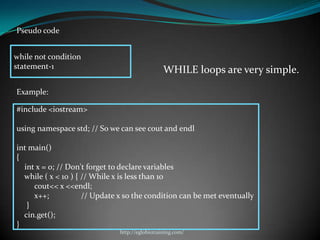
Pseudo code


while not condition
statement-1
                                                WHILE loops are very simple.

Example:

#include <iostream>

using namespace std; // So we can see cout and endl

int main()
{
  int x = 0; // Don't forget to declare variables
  while ( x < 10 ) { // While x is less than 10
     cout<< x <<endl;
     x++;            // Update x so the condition can be met eventually
   }
  cin.get();
}
                              http://eglobiotraining.com/
DO..WHILE
DO..WHILE loops are useful for things that want to loop at
 least once.

In most computer programming languages, a do while
  loop, sometimes just called a do loop, is a control flow
  statement that allows code to be executed repeatedly
  based on a given Boolean condition. Note though that
  unlike most languages, Fortran's do loop is actually
  analogous to the for loop.


                      http://eglobiotraining.com/
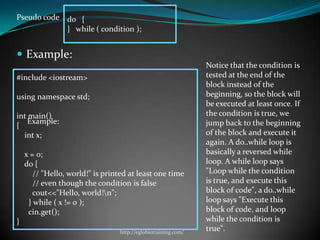
Pseudo code do {
            } while ( condition );


 Example:
                                                               Notice that the condition is
#include <iostream>                                            tested at the end of the
                                                               block instead of the
using namespace std;                                           beginning, so the block will
                                                               be executed at least once. If
int main()                                                     the condition is true, we
    Example:                                                   jump back to the beginning
{
  int x;                                                       of the block and execute it
                                                               again. A do..while loop is
    x = 0;                                                     basically a reversed while
    do {                                                       loop. A while loop says
       // "Hello, world!" is printed at least one time         "Loop while the condition
       // even though the condition is false                   is true, and execute this
       cout<<"Hello, world!n";                                block of code", a do..while
     } while ( x != 0 );                                       loop says "Execute this
     cin.get();                                                block of code, and loop
}                                                              while the condition is
                                 http://eglobiotraining.com/
                                                               true".
Codes and Explanations of the Program
have been tested


              http://eglobiotraining.com/
Switch Case

       http://eglobiotraining.com/
#include<stdio.h>
#include<conio.h>
main()
{
  int choice;
  float x,y;
                                                                      Switch case 1
  printf("Enter the value of 1st:");
  scanf("%f",&x);
  printf("Enter the value of 2nd :");
  scanf("%f",&y);

 printf("1.Addn");
 printf("2.Subtactn");
 printf("3.Multificationn");
 printf("4.Divisionn");
 printf("nnnEnter your choice[1-4]: ");
 scanf("%d",&choice);
 switch(choice)
 {
           case 1:
              printf("THE result is :%f",x+y);
              break;
           case 2:
              printf("The result is :%f",x-y);
              break;
           case 3:
              printf("The result is :%f",x*y);
              break;
            case 4:
               printf("The result is :%f",x/y);
               break;
             default:
                 printf("unknown");
                 }
        fflush(stdin);
        getchar();
        }
                                                  http://eglobiotraining.com/
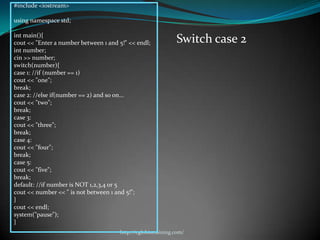
#include <iostream>

using namespace std;

int main(){
cout << "Enter a number between 1 and 5!" << endl;           Switch case 2
int number;
cin >> number;
switch(number){
case 1: //if (number == 1)
cout << "one";
break;
case 2: //else if(number == 2) and so on...
cout << "two";
break;
case 3:
cout << "three";
break;
case 4:
cout << "four";
break;
case 5:
cout << "five";
break;
default: //if number is NOT 1,2,3,4 or 5
cout << number << " is not between 1 and 5!";
}
cout << endl;
system("pause");
}
                                      http://eglobiotraining.com/
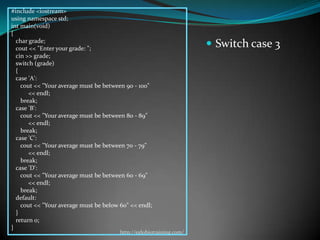
#include <iostream>
using namespace std;
int main(void)
{
  char grade;
  cout << "Enter your grade: ";
                                                                       Switch case 3
  cin >> grade;
  switch (grade)
  {
  case 'A':
    cout << "Your average must be between 90 - 100"
       << endl;
    break;
  case 'B':
    cout << "Your average must be between 80 - 89"
       << endl;
    break;
  case 'C':
    cout << "Your average must be between 70 - 79"
       << endl;
    break;
  case 'D':
    cout << "Your average must be between 60 - 69"
       << endl;
    break;
  default:
    cout << "Your average must be below 60" << endl;
  }
  return 0;
}
                                        http://eglobiotraining.com/
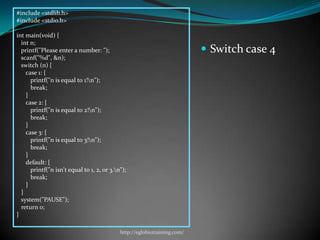
#include <stdlib.h>
#include <stdio.h>

int main(void) {
  int n;
  printf("Please enter a number: ");                                       Switch case 4
  scanf("%d", &n);
  switch (n) {
    case 1: {
      printf("n is equal to 1!n");
      break;
    }
    case 2: {
      printf("n is equal to 2!n");
      break;
    }
    case 3: {
      printf("n is equal to 3!n");
      break;
    }
    default: {
      printf("n isn't equal to 1, 2, or 3.n");
      break;
    }
  }
  system("PAUSE");
  return 0;
}

                                            http://eglobiotraining.com/
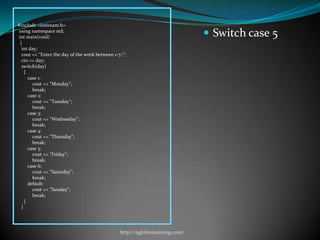
#include <iostream.h>
using namespace std;
int main(void)                                                                  Switch case 5
 {
  int day;
  cout << "Enter the day of the week between 1-7::";
  cin >> day;
  switch(day)
    {
      case 1:
        cout << "Monday";
        break;
      case 2:
        cout << "Tuesday";
        break;
      case 3:
        cout << "Wednesday";
        break;
      case 4:
        cout << "Thursday";
        break;
      case 5:
        cout << "Friday";
        break;
      case 6:
        cout << "Saturday";
        break;
      default:
        cout << "Sunday";
        break;
    }
  }


                                                 http://eglobiotraining.com/
Looping

          http://eglobiotraining.com/
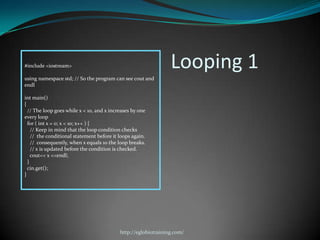
#include <iostream>                                             Looping 1
using namespace std; // So the program can see cout and
endl

int main()
{
  // The loop goes while x < 10, and x increases by one
every loop
  for ( int x = 0; x < 10; x++ ) {
    // Keep in mind that the loop condition checks
    // the conditional statement before it loops again.
    // consequently, when x equals 10 the loop breaks.
    // x is updated before the condition is checked.
    cout<< x <<endl;
  }
  cin.get();
}


                                           http://eglobiotraining.com/
#include <iostream>
#include <stdlib.h>
using namespace std;
int main()
{
int x, score, tnum_stud, t_score, ave_score;
char student_name[20];
tnum_stud = 0, t_score = 0, ave_score = 0;
cout<< "Enter student name: ";
                                                                             Looping 2
cin>>student_name;
cout<< "Enter score: ";
cin>> score;
t_score = t_score + score;
for (x = 1; x <= 4; x++)
{
cout<< "Enter score: ";
cin>> score;
t_score = t_score + score;
}
tnum_stud = x++;
ave_score = t_score/tnum_stud;
cout<< "Total no. of students: "
<<tnum_stud<<endl;
cout<< "Total score: " <<t_score<<endl;
cout<< "Total average score: "
<<ave_score<<endl;
tnum_stud = 0, t_score = 0, ave_score = 0;
cout<< "nnn";
system ("PAUSE");
return 0;
}


                                               http://eglobiotraining.com/
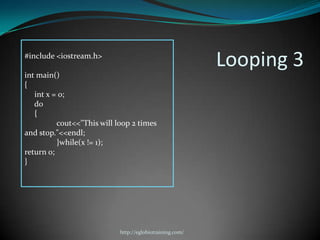
#include <iostream.h>
                                                          Looping 3
int main()
{
   int x = 0;
   do
   {
          cout<<"This will loop 2 times

and stop."<<endl;
          }while(x != 1);
return 0;
}


                            http://eglobiotraining.com/
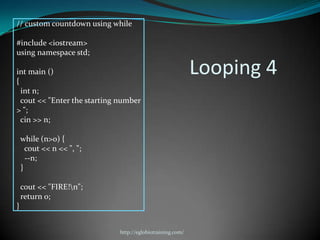
// custom countdown using while

#include <iostream>
using namespace std;

int main ()
{
                                                            Looping 4
  int n;
  cout << "Enter the starting number
> ";
  cin >> n;

    while (n>0) {
      cout << n << ", ";
      --n;
    }

    cout << "FIRE!n";
    return 0;
}


                              http://eglobiotraining.com/
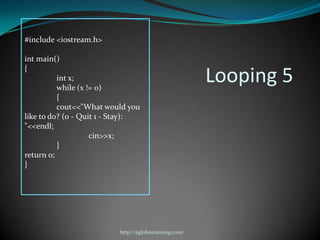
#include <iostream.h>

int main()
{
          int x;
          while (x != 0)
                                                        Looping 5
          {
          cout<<"What would you
like to do? (0 - Quit 1 - Stay):
"<<endl;
                    cin>>x;
          }
return 0;
}


                          http://eglobiotraining.com/
An output
program using Dev C++


             http://eglobiotraining.com/
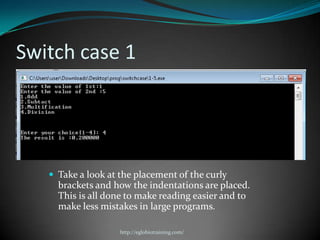
Switch case 1


    Take a look at the placement of the curly
     brackets and how the indentations are placed.
     This is all done to make reading easier and to
     make less mistakes in large programs.

                    http://eglobiotraining.com/
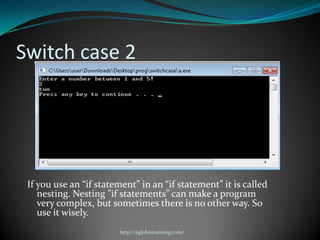
Switch case 2


 If you use an “if statement” in an “if statement” it is called
    nesting. Nesting ”if statements” can make a program
    very complex, but sometimes there is no other way. So
    use it wisely.
                        http://eglobiotraining.com/
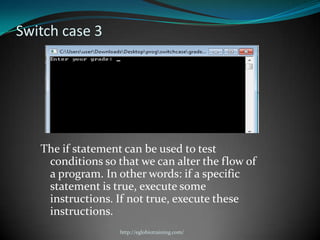
Switch case 3


   The if statement can be used to test
    conditions so that we can alter the flow of
    a program. In other words: if a specific
    statement is true, execute some
    instructions. If not true, execute these
    instructions.
                   http://eglobiotraining.com/
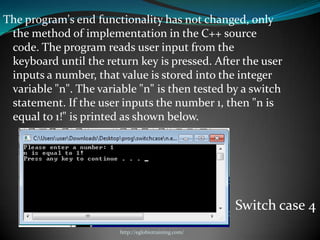
The program's end functionality has not changed, only
 the method of implementation in the C++ source
 code. The program reads user input from the
 keyboard until the return key is pressed. After the user
 inputs a number, that value is stored into the integer
 variable "n". The variable "n" is then tested by a switch
 statement. If the user inputs the number 1, then "n is
 equal to 1!" is printed as shown below.


                                                      Switch case 4
                        http://eglobiotraining.com/
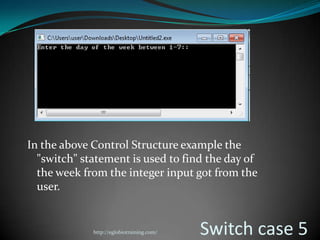
In the above Control Structure example the
  "switch" statement is used to find the day of
  the week from the integer input got from the
  user.


             http://eglobiotraining.com/   Switch case 5
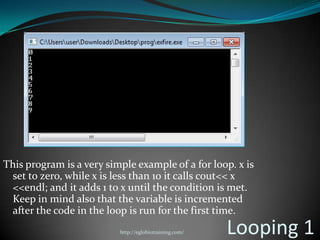
This program is a very simple example of a for loop. x is
 set to zero, while x is less than 10 it calls cout<< x
 <<endl; and it adds 1 to x until the condition is met.
 Keep in mind also that the variable is incremented
 after the code in the loop is run for the first time.
                          http://eglobiotraining.com/   Looping 1
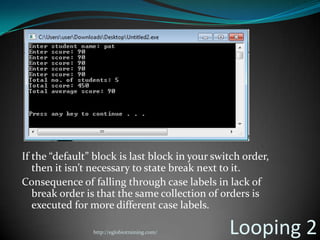
If the “default” block is last block in your switch order,
   then it isn’t necessary to state break next to it.
Consequence of falling through case labels in lack of
   break order is that the same collection of orders is
   executed for more different case labels.

                http://eglobiotraining.com/     Looping 2
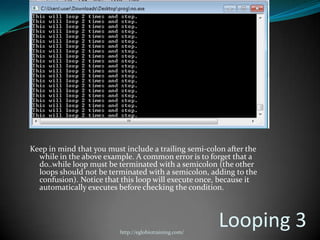
Keep in mind that you must include a trailing semi-colon after the
  while in the above example. A common error is to forget that a
  do..while loop must be terminated with a semicolon (the other
  loops should not be terminated with a semicolon, adding to the
  confusion). Notice that this loop will execute once, because it
  automatically executes before checking the condition.


                          http://eglobiotraining.com/
                                                        Looping 3
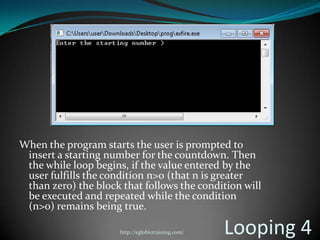
When the program starts the user is prompted to
 insert a starting number for the countdown. Then
 the while loop begins, if the value entered by the
 user fulfills the condition n>0 (that n is greater
 than zero) the block that follows the condition will
 be executed and repeated while the condition
 (n>0) remains being true.

                      http://eglobiotraining.com/   Looping 4
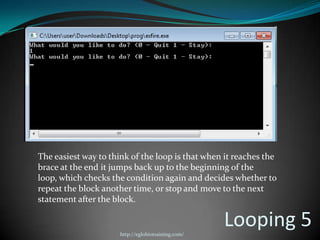
The easiest way to think of the loop is that when it reaches the
brace at the end it jumps back up to the beginning of the
loop, which checks the condition again and decides whether to
repeat the block another time, or stop and move to the next
statement after the block.


                      http://eglobiotraining.com/
                                                    Looping 5
Submitted to:
Prof. Erwin Globio
 http://eglobiotraining.com/


Submitted by:
Hidalgo, Patricia M.
BM10203


                         http://eglobiotraining.com/   56

Switch case and looping

  • 1.
  • 2.
    What is computerprogram? is a sequence of instruction written to perform a specified task with a computer. A computer requires programs to function, typically executing the program's instructions in central processor. The program has an executable form that the computer can use directly to execute the instructions. The same program in its human-readable source code form, from which executable programs are derived (e.g., compiled), enables a programmer to study and develop its algorithms. http://eglobiotraining.com/
  • 3.
     Computer sourcecode is often written by computer programmers. Source code is written in a programming language that usually follows one of two main paradigms: imperative programming or declarative programming. Source code may be converted into an executable file (sometimes called an executable program or a binary) by a compiler and later executed by a central processing unit. http://eglobiotraining.com/
  • 4.
    Computer Programmer  isa person who writes computer software. The term computer programmer can refer to a specialist in one area of computer programming or to a generalist who writes code for many kinds of software. One who practices or professes a formal approach to programming may also be known as a programmer analyst. http://eglobiotraining.com/
  • 5.
    Programmers are people who design the program of events that turns input data into output data. It has been proved that such a program of events can be designed using a structure composed of sequences, iterations and selections. Code is merely the way that the program is described. http://eglobiotraining.com/
  • 6.
    Programming is theiterative process of writing or editing source code. Editing source code involves testing, analyzing, and refining, and sometimes coordinating with other programmers on a jointly developed program. A person who practices this skill is referred to as a computer programmer, software developer or coder. The sometimes lengthy process of computer programming is usually referred to as software development. The term software engineering is becoming popular as the process is seen as an engineering discipline. http://eglobiotraining.com/
  • 7.
    Programming is instructinga computer to do something for you with the help of a programming language. The role of a programming language can be described in two ways:  Technical: It is a means for instructing a Computer to perform Tasks  Conceptual: It is a framework within which we organize our ideas about things and processes. http://eglobiotraining.com/
  • 8.
     A Programming Language is an artificial language designed to communicate instructions to a machine, particularly a computer. Programming languages can be used to create programs that control the behavior of a machine and/or to express algorithms precisely. http://eglobiotraining.com/
  • 9.
     Programming languageis usually split into the two components of syntax (form) and semantics(meaning). Some languages are defined by a specification document (for example, the C programming language is specified by an ISO Standard), while other languages, such as Perl 5 and earlier, have a dominant implementation that is used as a reference. http://eglobiotraining.com/
  • 10.
     A programminglanguage is a computer language programmers use to develop applications, scripts, or other set of instructions for a computer to execute. Below is a listing of several different programming languages and scripting languages currently listed in our database. ALGOL FORTRAN Prolog Ada FoxPro Ruby AIML HDML SGML Assembly HTML Smalltalk BASIC Java SQL Batchfile JavaScript Tcl BCPL JCL True BASIC C LISP VHDL C# Live Script Visual Basic C++ LOGO Visual FoxPro COBOL Pascal WML CPL Perl WHTML D PHP XML DarkBASIC Pick dBASE http://eglobiotraining.com/
  • 11.
    The most importantaspect of programming is to analyze and adopt specific solution while solving any problem. This needs a programming approach that defines the modularity of program that one writes and how it is related to others in an application. http://eglobiotraining.com/
  • 12.
    C++ is astatically typed, free-form, multi- paradigm, compiled, general-purpose programming language. It is regarded as an intermediate-level language, as it comprises a combination of both high-level and low-level language features.  C++ is one of the most popular programming languages and is implemented on a wide variety of hardware and operating system platforms. C++ has greatly influenced many other popular programming languages, most notably C# and Java. Other successful languages such as Objective-C use a very different syntax and approach to adding classes to C. http://eglobiotraining.com/
  • 13.
     C++ isone of the most used programming languages in the world. Also known as "C with Classes".  C++ is a general-purpose programming language with high-level and low-level capabilities. It is a statically typed, free-form, multi-paradigm, usually compiled language supporting procedural programming, data abstraction, object-oriented programming, and generic programming. http://eglobiotraining.com/
  • 14.
    Switch Case  Inprogramming, a switch, case, select or inspect sta tement is a type of selection control mechanism that exists in most imperative programming languages such as Pascal, Ada, C/C++, C#, Java, and so on.  The main reasons for using a switch include improving clarity, by reducing otherwise repetitive coding, and (if the heuristics permit) also offering the potential for faster execution through easier compiler optimization in many cases. http://eglobiotraining.com/
  • 15.
     The switch-casestatement is a multi-way decision statement. Unlike the multiple decision statement that can be created using if-else, the switch statement evaluates the conditional expression and tests it against numerous constant values. http://eglobiotraining.com/
  • 16.
    switch ( <variable>) { case this-value: Code to execute if <variable> == this-value break; case that-value: Code to execute if <variable> == that-value break; ... default: Code to execute if <variable> does not equal the value following any of the cases break; } Switch case statements are a substitute for long if statements that compare a variable to several "integral" values ("integral" values are simply values that can be expressed as an integer, such as the value of a char). The basic format for using switch case is outlined below. The value of the variable given into switch is compared to the value following each of the cases, and when one value matches the value of the variable, the computer continues executing the program from that point. http://eglobiotraining.com/
  • 17.
     The conditionof a switch statement is a value. The case says that if it has the value of whatever is after that case then do whatever follows the colon.  The break is used to break out of the case statements. Break is a keyword that breaks out of the code block, usually surrounded by braces, which it is in. In this case, break prevents the program from falling through and executing the code in all the other case statements. An important thing to note about the switch statement is that the case values may only be constant integral expressions. http://eglobiotraining.com/
  • 18.
    int a =10; int b = 10; Sadly, it isn't legal to use case int c = 20; like this: switch ( a ) { case b: /* Code */ break; case c: /* Code */ break; default: /* Code */ break; } http://eglobiotraining.com/
  • 19.
     The defaultcase is optional, but it is wise to include it as it handles any unexpected cases. It can be useful to put some kind of output to alert you to the code entering the default case if you don't expect it to. Switch statements serve as a simple way to write long if statements when the requirements are met. Often it can be used to process input from a user. http://eglobiotraining.com/
  • 20.
    #include <iostream> using namespacestd; void playgame() { cout << "Play game called"; } void loadgame() This is a sample } cout << "Load game called"; program, in which not void playmultiplayer() { cout << "Play multiplayer game called"; all of the proper } functions are actually int main() { int input; declared, but which cout<<"1. Play gamen"; cout<<"2. Load gamen"; shows how one would cout<<"3. Play multiplayern"; cout<<"4. Exitn"; use switch in a program. cout<<"Selection: "; cin>> input; switch ( input ) { case 1: // Note the colon, not a semicolon playgame(); break; case 2: // Note the colon, not a semicolon loadgame(); break; case 3: // Note the colon, not a semicolon playmultiplayer(); break; case 4: // Note the colon, not a semicolon cout<<"Thank you for playing!n"; break; default: // Note the colon, not a semicolon cout<<"Error, bad input, quittingn"; break; } cin.get(); } http://eglobiotraining.com/
  • 21.
     This programwill compile, but cannot be run until the undefined functions are given bodies, but it serves as a model (albeit simple) for processing input. If you do not understand this then try mentally putting in if statements for the case statements. Default simply skips out of the switch case construction and allows the program to terminate naturally. If you do not like that, then you can make a loop around the whole thing to have it wait for valid input. You could easily make a few small functions if you wish to test the code. http://eglobiotraining.com/
  • 22.
    Looping In computer programming,a loop is a sequence of instructions that is continually repeated until a certain condition is reached. Typically, a certain process is done, such as getting an item of data and changing it, and then some condition is checked such as whether a counter has reached a prescribed number. http://eglobiotraining.com/
  • 23.
    If it hasn't,the next instruction in the sequence is an instruction to return to the first instruction in the sequence and repeat the sequence. If the condition has been reached, the next instruction "falls through" to the next sequential instruction or branches outside the loop. A loop is a fundamental programming idea that is commonly used in writing programs. http://eglobiotraining.com/
  • 24.
    Loops are usedto repeat a block of code. Being able to have your program repeatedly execute a block of code is one of the most basic but useful tasks in programming -- many programs or websites that produce extremely complex output (such as a message board) are really only executing a single task many times. (They may be executing a small number of tasks, but in principle, to produce a list of messages only requires repeating the operation of reading in some data and displaying it.) Now, think about what this means: a loop lets you write a very simple statement to produce a significantly greater result simply by repetition. http://eglobiotraining.com/
  • 25.
    One Caveat: beforegoing further, you should understand the concept of C++'s true and false, because it will be necessary when working with loops (the conditions are the same as with if statements). There are three types of loops:  for  While  do..while http://eglobiotraining.com/
  • 26.
    For A for loop allows a statement to be executed a specified number of times. http://eglobiotraining.com/
  • 27.
    pseudo code  The for loop begins with a loop control variable for (initial-value, final-value, increment) assigned a specific initial statement-1 value. This control variable in then incremented (or decremented) by a specified amount each Example: time around the loop until a specified terminating for (a = 3, a > 12, a = a + 2) value is reached at which print a time the statement following the loop is then This example will output 3 5 7 9 11. executed http://eglobiotraining.com/
  • 28.
    While A whileloop allows a statement to be executed until a given condition is met. If the condition is met prior to executing the loop then the loop will not be executed. As soon as the condition is met, execution continues with the statement following the loop. http://eglobiotraining.com/
  • 29.
    Pseudo code while notcondition statement-1 WHILE loops are very simple. Example: #include <iostream> using namespace std; // So we can see cout and endl int main() { int x = 0; // Don't forget to declare variables while ( x < 10 ) { // While x is less than 10 cout<< x <<endl; x++; // Update x so the condition can be met eventually } cin.get(); } http://eglobiotraining.com/
  • 30.
    DO..WHILE DO..WHILE loops areuseful for things that want to loop at least once. In most computer programming languages, a do while loop, sometimes just called a do loop, is a control flow statement that allows code to be executed repeatedly based on a given Boolean condition. Note though that unlike most languages, Fortran's do loop is actually analogous to the for loop. http://eglobiotraining.com/
  • 31.
    Pseudo code do{ } while ( condition );  Example: Notice that the condition is #include <iostream> tested at the end of the block instead of the using namespace std; beginning, so the block will be executed at least once. If int main() the condition is true, we Example: jump back to the beginning { int x; of the block and execute it again. A do..while loop is x = 0; basically a reversed while do { loop. A while loop says // "Hello, world!" is printed at least one time "Loop while the condition // even though the condition is false is true, and execute this cout<<"Hello, world!n"; block of code", a do..while } while ( x != 0 ); loop says "Execute this cin.get(); block of code, and loop } while the condition is http://eglobiotraining.com/ true".
  • 32.
    Codes and Explanationsof the Program have been tested http://eglobiotraining.com/
  • 33.
    Switch Case http://eglobiotraining.com/
  • 34.
    #include<stdio.h> #include<conio.h> main() { intchoice; float x,y; Switch case 1 printf("Enter the value of 1st:"); scanf("%f",&x); printf("Enter the value of 2nd :"); scanf("%f",&y); printf("1.Addn"); printf("2.Subtactn"); printf("3.Multificationn"); printf("4.Divisionn"); printf("nnnEnter your choice[1-4]: "); scanf("%d",&choice); switch(choice) { case 1: printf("THE result is :%f",x+y); break; case 2: printf("The result is :%f",x-y); break; case 3: printf("The result is :%f",x*y); break; case 4: printf("The result is :%f",x/y); break; default: printf("unknown"); } fflush(stdin); getchar(); } http://eglobiotraining.com/
  • 35.
    #include <iostream> using namespacestd; int main(){ cout << "Enter a number between 1 and 5!" << endl; Switch case 2 int number; cin >> number; switch(number){ case 1: //if (number == 1) cout << "one"; break; case 2: //else if(number == 2) and so on... cout << "two"; break; case 3: cout << "three"; break; case 4: cout << "four"; break; case 5: cout << "five"; break; default: //if number is NOT 1,2,3,4 or 5 cout << number << " is not between 1 and 5!"; } cout << endl; system("pause"); } http://eglobiotraining.com/
  • 36.
    #include <iostream> using namespacestd; int main(void) { char grade; cout << "Enter your grade: ";  Switch case 3 cin >> grade; switch (grade) { case 'A': cout << "Your average must be between 90 - 100" << endl; break; case 'B': cout << "Your average must be between 80 - 89" << endl; break; case 'C': cout << "Your average must be between 70 - 79" << endl; break; case 'D': cout << "Your average must be between 60 - 69" << endl; break; default: cout << "Your average must be below 60" << endl; } return 0; } http://eglobiotraining.com/
  • 37.
    #include <stdlib.h> #include <stdio.h> intmain(void) { int n; printf("Please enter a number: ");  Switch case 4 scanf("%d", &n); switch (n) { case 1: { printf("n is equal to 1!n"); break; } case 2: { printf("n is equal to 2!n"); break; } case 3: { printf("n is equal to 3!n"); break; } default: { printf("n isn't equal to 1, 2, or 3.n"); break; } } system("PAUSE"); return 0; } http://eglobiotraining.com/
  • 38.
    #include <iostream.h> using namespacestd; int main(void)  Switch case 5 { int day; cout << "Enter the day of the week between 1-7::"; cin >> day; switch(day) { case 1: cout << "Monday"; break; case 2: cout << "Tuesday"; break; case 3: cout << "Wednesday"; break; case 4: cout << "Thursday"; break; case 5: cout << "Friday"; break; case 6: cout << "Saturday"; break; default: cout << "Sunday"; break; } } http://eglobiotraining.com/
  • 39.
    Looping http://eglobiotraining.com/
  • 40.
    #include <iostream> Looping 1 using namespace std; // So the program can see cout and endl int main() { // The loop goes while x < 10, and x increases by one every loop for ( int x = 0; x < 10; x++ ) { // Keep in mind that the loop condition checks // the conditional statement before it loops again. // consequently, when x equals 10 the loop breaks. // x is updated before the condition is checked. cout<< x <<endl; } cin.get(); } http://eglobiotraining.com/
  • 41.
    #include <iostream> #include <stdlib.h> usingnamespace std; int main() { int x, score, tnum_stud, t_score, ave_score; char student_name[20]; tnum_stud = 0, t_score = 0, ave_score = 0; cout<< "Enter student name: "; Looping 2 cin>>student_name; cout<< "Enter score: "; cin>> score; t_score = t_score + score; for (x = 1; x <= 4; x++) { cout<< "Enter score: "; cin>> score; t_score = t_score + score; } tnum_stud = x++; ave_score = t_score/tnum_stud; cout<< "Total no. of students: " <<tnum_stud<<endl; cout<< "Total score: " <<t_score<<endl; cout<< "Total average score: " <<ave_score<<endl; tnum_stud = 0, t_score = 0, ave_score = 0; cout<< "nnn"; system ("PAUSE"); return 0; } http://eglobiotraining.com/
  • 42.
    #include <iostream.h> Looping 3 int main() { int x = 0; do { cout<<"This will loop 2 times and stop."<<endl; }while(x != 1); return 0; } http://eglobiotraining.com/
  • 43.
    // custom countdownusing while #include <iostream> using namespace std; int main () { Looping 4 int n; cout << "Enter the starting number > "; cin >> n; while (n>0) { cout << n << ", "; --n; } cout << "FIRE!n"; return 0; } http://eglobiotraining.com/
  • 44.
    #include <iostream.h> int main() { int x; while (x != 0) Looping 5 { cout<<"What would you like to do? (0 - Quit 1 - Stay): "<<endl; cin>>x; } return 0; } http://eglobiotraining.com/
  • 45.
    An output program usingDev C++ http://eglobiotraining.com/
  • 46.
    Switch case 1  Take a look at the placement of the curly brackets and how the indentations are placed. This is all done to make reading easier and to make less mistakes in large programs. http://eglobiotraining.com/
  • 47.
    Switch case 2 If you use an “if statement” in an “if statement” it is called nesting. Nesting ”if statements” can make a program very complex, but sometimes there is no other way. So use it wisely. http://eglobiotraining.com/
  • 48.
    Switch case 3 The if statement can be used to test conditions so that we can alter the flow of a program. In other words: if a specific statement is true, execute some instructions. If not true, execute these instructions. http://eglobiotraining.com/
  • 49.
    The program's endfunctionality has not changed, only the method of implementation in the C++ source code. The program reads user input from the keyboard until the return key is pressed. After the user inputs a number, that value is stored into the integer variable "n". The variable "n" is then tested by a switch statement. If the user inputs the number 1, then "n is equal to 1!" is printed as shown below. Switch case 4 http://eglobiotraining.com/
  • 50.
    In the aboveControl Structure example the "switch" statement is used to find the day of the week from the integer input got from the user. http://eglobiotraining.com/ Switch case 5
  • 51.
    This program isa very simple example of a for loop. x is set to zero, while x is less than 10 it calls cout<< x <<endl; and it adds 1 to x until the condition is met. Keep in mind also that the variable is incremented after the code in the loop is run for the first time. http://eglobiotraining.com/ Looping 1
  • 52.
    If the “default”block is last block in your switch order, then it isn’t necessary to state break next to it. Consequence of falling through case labels in lack of break order is that the same collection of orders is executed for more different case labels. http://eglobiotraining.com/ Looping 2
  • 53.
    Keep in mindthat you must include a trailing semi-colon after the while in the above example. A common error is to forget that a do..while loop must be terminated with a semicolon (the other loops should not be terminated with a semicolon, adding to the confusion). Notice that this loop will execute once, because it automatically executes before checking the condition. http://eglobiotraining.com/ Looping 3
  • 54.
    When the programstarts the user is prompted to insert a starting number for the countdown. Then the while loop begins, if the value entered by the user fulfills the condition n>0 (that n is greater than zero) the block that follows the condition will be executed and repeated while the condition (n>0) remains being true. http://eglobiotraining.com/ Looping 4
  • 55.
    The easiest wayto think of the loop is that when it reaches the brace at the end it jumps back up to the beginning of the loop, which checks the condition again and decides whether to repeat the block another time, or stop and move to the next statement after the block. http://eglobiotraining.com/ Looping 5
  • 56.
    Submitted to: Prof. ErwinGlobio http://eglobiotraining.com/ Submitted by: Hidalgo, Patricia M. BM10203 http://eglobiotraining.com/ 56