C# LOOPS STATEMENTS
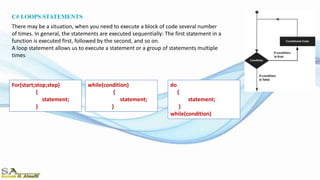
There may be a situation, when you need to execute a block of code several number
of times. In general, the statements are executed sequentially: The first statement in a
function is executed first, followed by the second, and so on.
A loop statement allows us to execute a statement or a group of statements multiple
times
do
{
statement;
}
while(condition)
For(start;stop;step)
{
statement;
}
while(condition)
{
statement;
}
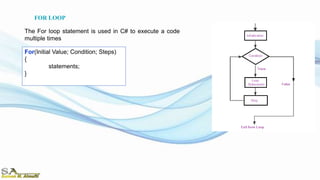
For(Initial Value; Condition; Steps)
{
statements;
}
The For loop statement is used in C# to execute a code
multiple times
FOR LOOP
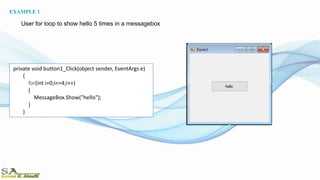
private void button1_Click(object sender, EventArgs e)
{
for(int i=0;i<=4;i++)
{
MessageBox.Show("hello");
}
}
EXAMPLE 1
User for loop to show hello 5 times in a messagebox
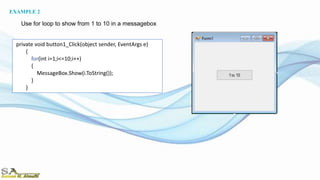
private void button1_Click(object sender, EventArgs e)
{
for(int i=1;i<=10;i++)
{
MessageBox.Show(i.ToString());
}
}
Use for loop to show from 1 to 10 in a messagebox
EXAMPLE 2
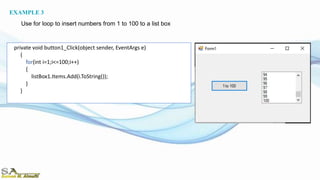
private void button1_Click(object sender, EventArgs e)
{
for(int i=1;i<=100;i++)
{
listBox1.Items.Add(i.ToString());
}
}
EXAMPLE 3
Use for loop to insert numbers from 1 to 100 to a list box
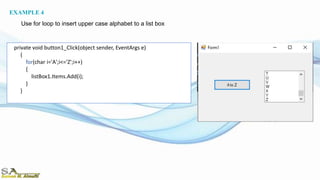
private void button1_Click(object sender, EventArgs e)
{
for(char i='A';i<='Z';i++)
{
listBox1.Items.Add(i);
}
}
EXAMPLE 4
Use for loop to insert upper case alphabet to a list box
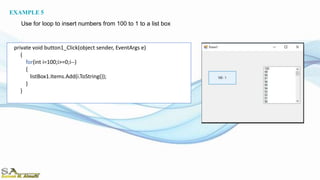
private void button1_Click(object sender, EventArgs e)
{
for(int i=100;i>=0;i--)
{
listBox1.Items.Add(i.ToString());
}
}
EXAMPLE 5
Use for loop to insert numbers from 100 to 1 to a list box
private void button1_Click(object sender, EventArgs e)
{
for (int i=1;i<=100;i++)
{
if(i%2==0)
{
listBox1.Items.Add(i.ToString());
}
}
}
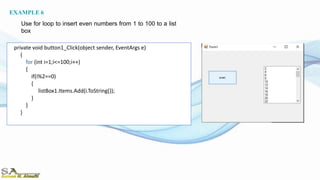
EXAMPLE 6
Use for loop to insert even numbers from 1 to 100 to a list
box
private void button1_Click(object sender, EventArgs e)
{
for (int i=0;i<=100;i++)
{
if(i%5==0)
{
listBox1.Items.Add(i.ToString());
}
}
}
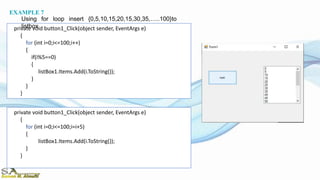
EXAMPLE 7
Using for loop insert {0,5,10,15,20,15,30,35,…..100}to
listbox
private void button1_Click(object sender, EventArgs e)
{
for (int i=0;i<=100;i=i+5)
{
listBox1.Items.Add(i.ToString());
}
}
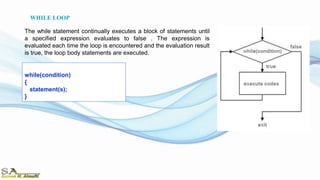
while(condition)
{
statement(s);
}
The while statement continually executes a block of statements until
a specified expression evaluates to false . The expression is
evaluated each time the loop is encountered and the evaluation result
is true, the loop body statements are executed.
WHILE LOOP
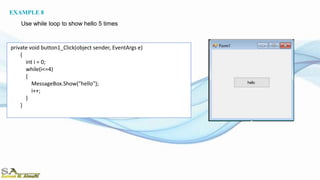
private void button1_Click(object sender, EventArgs e)
{
int i = 0;
while(i<=4)
{
MessageBox.Show("hello");
i++;
}
}
EXAMPLE 8
Use while loop to show hello 5 times
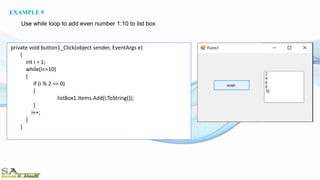
private void button1_Click(object sender, EventArgs e)
{
int i = 1;
while(i<=10)
{
if (i % 2 == 0)
{
listBox1.Items.Add(i.ToString());
}
i++;
}
}
EXAMPLE 9
Use while loop to add even number 1:10 to list box
Do
{
statement(s);
}
while(condition)
The Do while statement continually executes a block of statements
until a specified expression evaluates to false . The expression is
evaluated each time the loop is encountered and the evaluation result
is true, the loop body statements are executed.
DO WHILE LOOP
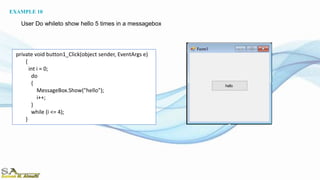
private void button1_Click(object sender, EventArgs e)
{
int i = 0;
do
{
MessageBox.Show("hello");
i++;
}
while (i <= 4);
}
EXAMPLE 10
User Do whileto show hello 5 times in a messagebox
Vp lecture 9 ararat

Vp lecture 9 ararat

  • 3.
    C# LOOPS STATEMENTS Theremay be a situation, when you need to execute a block of code several number of times. In general, the statements are executed sequentially: The first statement in a function is executed first, followed by the second, and so on. A loop statement allows us to execute a statement or a group of statements multiple times do { statement; } while(condition) For(start;stop;step) { statement; } while(condition) { statement; }
  • 4.
    For(Initial Value; Condition;Steps) { statements; } The For loop statement is used in C# to execute a code multiple times FOR LOOP
  • 5.
    private void button1_Click(objectsender, EventArgs e) { for(int i=0;i<=4;i++) { MessageBox.Show("hello"); } } EXAMPLE 1 User for loop to show hello 5 times in a messagebox
  • 6.
    private void button1_Click(objectsender, EventArgs e) { for(int i=1;i<=10;i++) { MessageBox.Show(i.ToString()); } } Use for loop to show from 1 to 10 in a messagebox EXAMPLE 2
  • 7.
    private void button1_Click(objectsender, EventArgs e) { for(int i=1;i<=100;i++) { listBox1.Items.Add(i.ToString()); } } EXAMPLE 3 Use for loop to insert numbers from 1 to 100 to a list box
  • 8.
    private void button1_Click(objectsender, EventArgs e) { for(char i='A';i<='Z';i++) { listBox1.Items.Add(i); } } EXAMPLE 4 Use for loop to insert upper case alphabet to a list box
  • 9.
    private void button1_Click(objectsender, EventArgs e) { for(int i=100;i>=0;i--) { listBox1.Items.Add(i.ToString()); } } EXAMPLE 5 Use for loop to insert numbers from 100 to 1 to a list box
  • 10.
    private void button1_Click(objectsender, EventArgs e) { for (int i=1;i<=100;i++) { if(i%2==0) { listBox1.Items.Add(i.ToString()); } } } EXAMPLE 6 Use for loop to insert even numbers from 1 to 100 to a list box
  • 11.
    private void button1_Click(objectsender, EventArgs e) { for (int i=0;i<=100;i++) { if(i%5==0) { listBox1.Items.Add(i.ToString()); } } } EXAMPLE 7 Using for loop insert {0,5,10,15,20,15,30,35,…..100}to listbox private void button1_Click(object sender, EventArgs e) { for (int i=0;i<=100;i=i+5) { listBox1.Items.Add(i.ToString()); } }
  • 12.
    while(condition) { statement(s); } The while statementcontinually executes a block of statements until a specified expression evaluates to false . The expression is evaluated each time the loop is encountered and the evaluation result is true, the loop body statements are executed. WHILE LOOP
  • 13.
    private void button1_Click(objectsender, EventArgs e) { int i = 0; while(i<=4) { MessageBox.Show("hello"); i++; } } EXAMPLE 8 Use while loop to show hello 5 times
  • 14.
    private void button1_Click(objectsender, EventArgs e) { int i = 1; while(i<=10) { if (i % 2 == 0) { listBox1.Items.Add(i.ToString()); } i++; } } EXAMPLE 9 Use while loop to add even number 1:10 to list box
  • 15.
    Do { statement(s); } while(condition) The Do whilestatement continually executes a block of statements until a specified expression evaluates to false . The expression is evaluated each time the loop is encountered and the evaluation result is true, the loop body statements are executed. DO WHILE LOOP
  • 16.
    private void button1_Click(objectsender, EventArgs e) { int i = 0; do { MessageBox.Show("hello"); i++; } while (i <= 4); } EXAMPLE 10 User Do whileto show hello 5 times in a messagebox