Renas R. Rekany Object-Oriented-Programming
1
Programming Language with
C_Sharp
Object-Oriented-Programming
Renas R. Rekany
Renas R. Rekany Object-Oriented-Programming
2
Loop control structure
1- Goals:
In this chapter you will learn:
 What is Loop Constructs in C#?
 How many types of looping statements in C sharp?
 How to use loop constructs in Programming?
H.M) Write a program in C# to enter 10 degrees, then find the Grade for each of
them.
2- Loop constructs
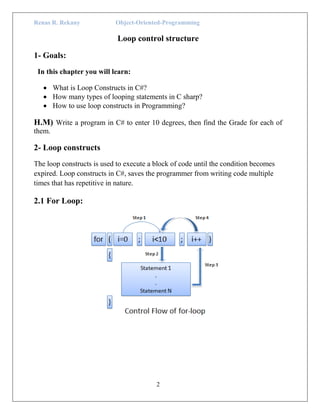
The loop constructs is used to execute a block of code until the condition becomes
expired. Loop constructs in C#, saves the programmer from writing code multiple
times that has repetitive in nature.
2.1 For Loop:
Renas R. Rekany Object-Oriented-Programming
3
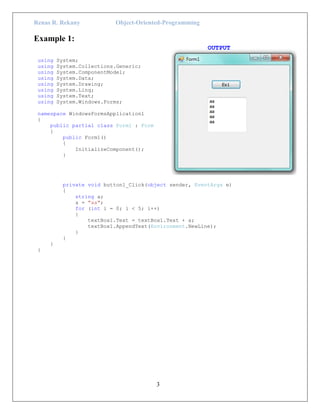
Example 1:
OUTPUT
using System;
using System.Collections.Generic;
using System.ComponentModel;
using System.Data;
using System.Drawing;
using System.Linq;
using System.Text;
using System.Windows.Forms;
namespace WindowsFormsApplication1
{
public partial class Form1 : Form
{
public Form1()
{
InitializeComponent();
}
private void button1_Click(object sender, EventArgs e)
{
string a;
a = "aa";
for (int i = 0; i < 5; i++)
{
textBox1.Text = textBox1.Text + a;
textBox1.AppendText(Environment.NewLine);
}
}
}
}
Renas R. Rekany Object-Oriented-Programming
4
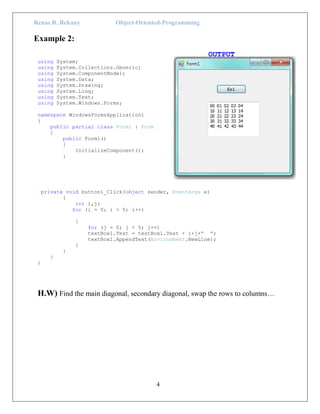
Example 2:
OUTPUT
using System;
using System.Collections.Generic;
using System.ComponentModel;
using System.Data;
using System.Drawing;
using System.Linq;
using System.Text;
using System.Windows.Forms;
namespace WindowsFormsApplication1
{
public partial class Form1 : Form
{
public Form1()
{
InitializeComponent();
}
private void button1_Click(object sender, EventArgs e)
{
int i,j;
for (i = 0; i < 5; i++)
{
for (j = 0; j < 5; j++)
textBox1.Text = textBox1.Text + i+j+" ";
textBox1.AppendText(Environment.NewLine);
}
}
}
}
H.W) Find the main diagonal, secondary diagonal, swap the rows to columns…
Renas R. Rekany Object-Oriented-Programming
5
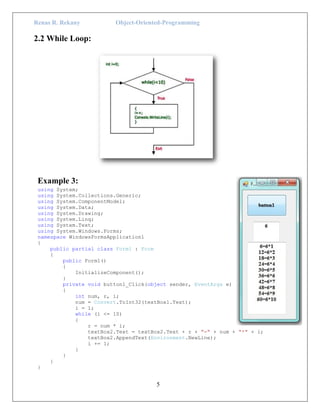
2.2 While Loop:
Example 3:
using System;
using System.Collections.Generic;
using System.ComponentModel;
using System.Data;
using System.Drawing;
using System.Linq;
using System.Text;
using System.Windows.Forms;
namespace WindowsFormsApplication1
{
public partial class Form1 : Form
{
public Form1()
{
InitializeComponent();
}
private void button1_Click(object sender, EventArgs e)
{
int num, r, i;
num = Convert.ToInt32(textBox1.Text);
i = 1;
while (i <= 10)
{
r = num * i;
textBox2.Text = textBox2.Text + r + "=" + num + "*" + i;
textBox2.AppendText(Environment.NewLine);
i += 1;
}
}
}
}
Renas R. Rekany Object-Oriented-Programming
6
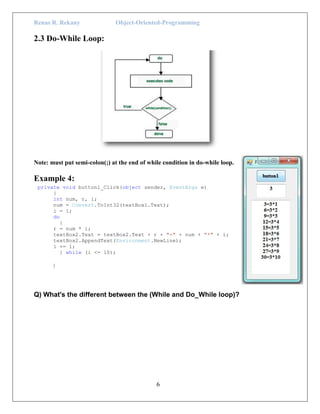
2.3 Do-While Loop:
Note: must put semi-colon(;) at the end of while condition in do-while loop.
Example 4:
private void button1_Click(object sender, EventArgs e)
{
int num, r, i;
num = Convert.ToInt32(textBox1.Text);
i = 1;
do
{
r = num * i;
textBox2.Text = textBox2.Text + r + "=" + num + "*" + i;
textBox2.AppendText(Environment.NewLine);
i += 1;
} while (i <= 10);
}
Q) What's the different between the (While and Do_While loop)?
Renas R. Rekany Object-Oriented-Programming
7
Break:
The break is use in for, while, do-while, switch case. Break statement is used to
terminating the current flow of program and transfer controls to the next execution.
Continue:
The continue is use in for, while, do-while. The continue statements enables you to
skip the loop and jump the loop to next iteration.
continue break
for (int i=0;i<=5;i++)
{
if(i<=3)
continue ;
textBox1.Text = textBox1.Text + i;
textBox1.AppendText(Environment.NewLine);
}
4
5
for (int j = 0; j <= 5; j++)
{
if (j >= 3)
break ;
textBox2.Text = textBox2.Text + j;
textBox2.AppendText(Environment.NewLine);
}
0
1
2
EX:
Break
for (int i=1; i<=7;i++)
{
If (i==5)
Break;
Textbox1.text=textbox1.text+ i;
}
Output
1 2 3 4
Continue
For (int i=1; i<=7;i++)
{ if (i==5)
Continue;
Textbox1.text=textbox1.text+ i;
}
Output
1234 678910

C# p7

  • 1.
    Renas R. RekanyObject-Oriented-Programming 1 Programming Language with C_Sharp Object-Oriented-Programming Renas R. Rekany
  • 2.
    Renas R. RekanyObject-Oriented-Programming 2 Loop control structure 1- Goals: In this chapter you will learn:  What is Loop Constructs in C#?  How many types of looping statements in C sharp?  How to use loop constructs in Programming? H.M) Write a program in C# to enter 10 degrees, then find the Grade for each of them. 2- Loop constructs The loop constructs is used to execute a block of code until the condition becomes expired. Loop constructs in C#, saves the programmer from writing code multiple times that has repetitive in nature. 2.1 For Loop:
  • 3.
    Renas R. RekanyObject-Oriented-Programming 3 Example 1: OUTPUT using System; using System.Collections.Generic; using System.ComponentModel; using System.Data; using System.Drawing; using System.Linq; using System.Text; using System.Windows.Forms; namespace WindowsFormsApplication1 { public partial class Form1 : Form { public Form1() { InitializeComponent(); } private void button1_Click(object sender, EventArgs e) { string a; a = "aa"; for (int i = 0; i < 5; i++) { textBox1.Text = textBox1.Text + a; textBox1.AppendText(Environment.NewLine); } } } }
  • 4.
    Renas R. RekanyObject-Oriented-Programming 4 Example 2: OUTPUT using System; using System.Collections.Generic; using System.ComponentModel; using System.Data; using System.Drawing; using System.Linq; using System.Text; using System.Windows.Forms; namespace WindowsFormsApplication1 { public partial class Form1 : Form { public Form1() { InitializeComponent(); } private void button1_Click(object sender, EventArgs e) { int i,j; for (i = 0; i < 5; i++) { for (j = 0; j < 5; j++) textBox1.Text = textBox1.Text + i+j+" "; textBox1.AppendText(Environment.NewLine); } } } } H.W) Find the main diagonal, secondary diagonal, swap the rows to columns…
  • 5.
    Renas R. RekanyObject-Oriented-Programming 5 2.2 While Loop: Example 3: using System; using System.Collections.Generic; using System.ComponentModel; using System.Data; using System.Drawing; using System.Linq; using System.Text; using System.Windows.Forms; namespace WindowsFormsApplication1 { public partial class Form1 : Form { public Form1() { InitializeComponent(); } private void button1_Click(object sender, EventArgs e) { int num, r, i; num = Convert.ToInt32(textBox1.Text); i = 1; while (i <= 10) { r = num * i; textBox2.Text = textBox2.Text + r + "=" + num + "*" + i; textBox2.AppendText(Environment.NewLine); i += 1; } } } }
  • 6.
    Renas R. RekanyObject-Oriented-Programming 6 2.3 Do-While Loop: Note: must put semi-colon(;) at the end of while condition in do-while loop. Example 4: private void button1_Click(object sender, EventArgs e) { int num, r, i; num = Convert.ToInt32(textBox1.Text); i = 1; do { r = num * i; textBox2.Text = textBox2.Text + r + "=" + num + "*" + i; textBox2.AppendText(Environment.NewLine); i += 1; } while (i <= 10); } Q) What's the different between the (While and Do_While loop)?
  • 7.
    Renas R. RekanyObject-Oriented-Programming 7 Break: The break is use in for, while, do-while, switch case. Break statement is used to terminating the current flow of program and transfer controls to the next execution. Continue: The continue is use in for, while, do-while. The continue statements enables you to skip the loop and jump the loop to next iteration. continue break for (int i=0;i<=5;i++) { if(i<=3) continue ; textBox1.Text = textBox1.Text + i; textBox1.AppendText(Environment.NewLine); } 4 5 for (int j = 0; j <= 5; j++) { if (j >= 3) break ; textBox2.Text = textBox2.Text + j; textBox2.AppendText(Environment.NewLine); } 0 1 2 EX: Break for (int i=1; i<=7;i++) { If (i==5) Break; Textbox1.text=textbox1.text+ i; } Output 1 2 3 4 Continue For (int i=1; i<=7;i++) { if (i==5) Continue; Textbox1.text=textbox1.text+ i; } Output 1234 678910