Algorithm and Flowchart
Dhanik Mahehswari
dhanikvikrant@gmail.com
Civil engineering department
QUEST Nawabshah
 In order to solve any problem by using computer, it is
very imperative to
 Detail the precise problem
 Itemizing the configuration
 The process of solving problem is known as “Problem
analysis”
Problem Solving Stages
 A problem solving process consists of eight stages as:
 Defining the problem
 Algorithm
 Flowchart
 Coding
 Input Preparation
 Compilation
 Debugging
 Testing
 This step has a great importance in obtaining the correct
solution of the problem
 The solution of the problem depends upon the description
and understanding the problem.
 This requires analysis of the problem to find the nature of
the problem analysis of the input data and planning of the
output result.
 This step achieves following goals:
Defining the Problem
 Problem description
 Determination of the objective
 Analysis of the input data
 Planning of output
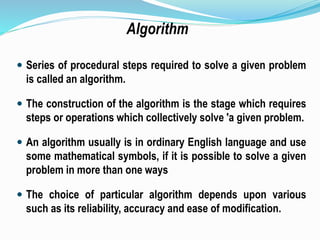
 Series of procedural steps required to solve a given problem
is called an algorithm.
 The construction of the algorithm is the stage which requires
steps or operations which collectively solve 'a given problem.
 An algorithm usually is in ordinary English language and use
some mathematical symbols, if it is possible to solve a given
problem in more than one ways
 The choice of particular algorithm depends upon various
such as its reliability, accuracy and ease of modification.
Algorithm
 One of the most important factor in the choice of an
algorithm is the time requirement to execute it (after it in
high level language) with the help of computer.
 The algorithm which will least time when executed by a
computer is considered the best.
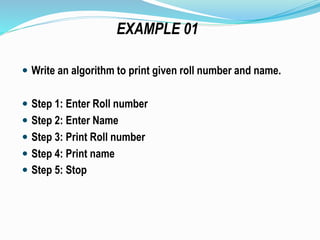
 Write an algorithm to print given roll number and name.
 Step 1: Enter Roll number
 Step 2: Enter Name
 Step 3: Print Roll number
 Step 4: Print name
 Step 5: Stop
EXAMPLE 01
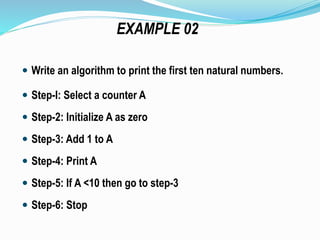
 Write an algorithm to print the first ten natural numbers.
 Step-I: Select a counter A
 Step-2: Initialize A as zero
 Step-3: Add 1 to A
 Step-4: Print A
 Step-5: If A <10 then go to step-3
 Step-6: Stop
EXAMPLE 02
 Write an algorithm to print the greatest number from two
given numbers.
 Step-I: Enter two numbers as A and B
 Step-2: If A > B then Print A and go to step 4
 Step-3: Print B
 Step-4: Stop
EXAMPLE 03
 Write an algorithm to print a table of a given number
 Step-1: Select two counters as B and C
 Step-2: Initialize the counters B and C as zero
 Step-3: Enter a, number of table as A
 Step-4: Add 1 to B
 Step-5: Multiply A to B and assign the result to C
 Step-6: Print A; B and C
 Step-7: Check the value of B; If B<1O then go to step-4
 Step-8: Stop
EXAMPLE 04
 Write-an algorithm to print square and cubes from 1 to 5
 Step-1: Select the counter A, B and C
 Step-2: Initialize B and C as zero
 Step-3: Initialize A as 1
 Step-4: Calculate B as A*A
 Step-5: Calculate C as A*A*A
 Step-6: Print A, B, and C.
 Step-7: Add 1 to A
 Step-8: Check the value of A; if A < 5 then go to step-3
 Step-9: Stop
EXAMPLE 05
 A flowchart is a pictorial representation of the steps of a
involved in the procedure of solving any problem.
 The first formal flowchart was designed by John Von
Neumann‘
 A flowchart is drawn before the program in written to
ensure the instructions will be logically integrated.
 A flowchart is not a complete program but It is an aid to
programming.
FLOWCHART
 There are two types of flowchart, which are
 System Flowchart
 Program Flowchart
 A system flowchart shows the flow of data throughout a
data process as well as the flow into and out system. The
system analyst will use such a design and to explain a
data processing system.
 Program flowchart is a pictorial representation of the
method and sequence, to be followed for solving a
particular problem.
 There are several sets of the symbols, which are
standardized by American National Standard Institute
International Standard Organization (ISO) to draw the
flowchart.
 Most commonly used symbols are Oval, Parallelogram,
Rectangle, Diamond, Arrows, Connectors.
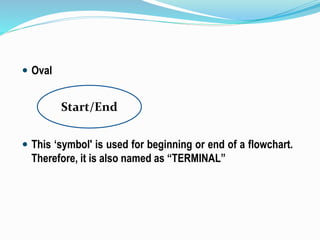
 Oval
 This ‘symbol' is used for beginning or end of a flowchart.
Therefore, it is also named as “TERMINAL”
Start/End
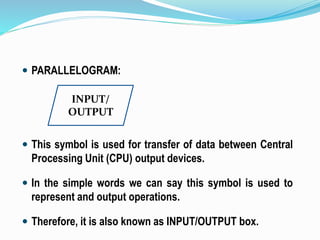
 PARALLELOGRAM:
 This symbol is used for transfer of data between Central
Processing Unit (CPU) output devices.
 In the simple words we can say this symbol is used to
represent and output operations.
 Therefore, it is also known as INPUT/OUTPUT box.
INPUT/
OUTPUT
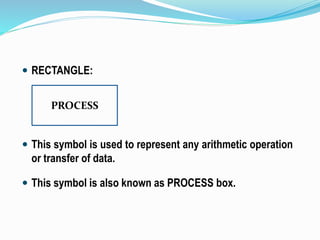
 RECTANGLE:
 This symbol is used to represent any arithmetic operation
or transfer of data.
 This symbol is also known as PROCESS box.
PROCESS
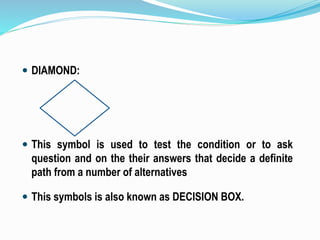
 DIAMOND:
 This symbol is used to test the condition or to ask
question and on the their answers that decide a definite
path from a number of alternatives
 This symbols is also known as DECISION BOX.
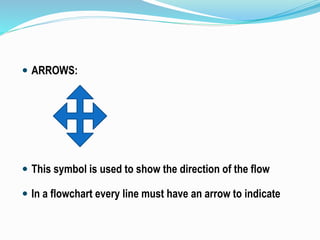
 ARROWS:
 This symbol is used to show the direction of the flow
 In a flowchart every line must have an arrow to indicate
 CONNECTORS:
 Connectors are used to join the different parts of a
flowchart.
 The use of connectors gives neat shape to the flowchart.
there are two types of connector which are known as:
(a) On page connector
(b) Off page connector
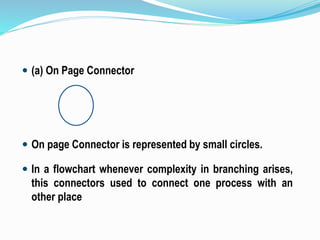
 (a) On Page Connector
 On page Connector is represented by small circles.
 In a flowchart whenever complexity in branching arises,
this connectors used to connect one process with an
other place
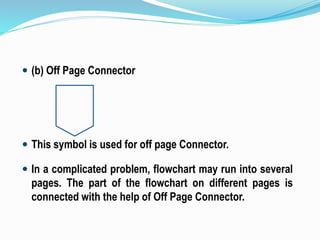
 (b) Off Page Connector
 This symbol is used for off page Connector.
 In a complicated problem, flowchart may run into several
pages. The part of the flowchart on different pages is
connected with the help of Off Page Connector.
 Write a program to read a number from
keyboard, calculate the square of the
number and display it on the screen.
 1: Beginning of the program
 2: Read the number from the keyboard
 3: Calculate square of the Number
 4: Print the Square of the Number
 5: Stop
END
START
READ
Number
CALCULATE
(Number)2
PRINT
(Number)2
EXAMPLE 01
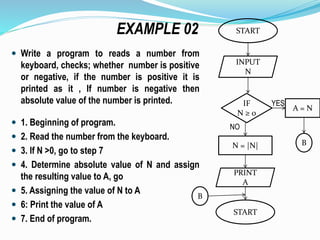
 Write a program to reads a number from
keyboard, checks; whether number is positive
or negative, if the number is positive it is
printed as it , If number is negative then
absolute value of the number is printed.
 1. Beginning of program.
 2. Read the number from the keyboard.
 3. If N >0, go to step 7
 4. Determine absolute value of N and assign
the resulting value to A, go
 5. Assigning the value of N to A
 6: Print the value of A
 7. End of program.
EXAMPLE 02 START
INPUT
N
PRINT
A
N = |N|
NO
IF
N ≥ 0
A = N
YES
B
START
B
 Draw flowchart to print given roll number and name.
 Draw flowchart to print the first ten natural numbers.
 Draw flowchart to print the greatest number from two
given numbers.
 Draw flowchart to print a table of a given number
 Draw flowchart to print square and cubes from 1 to 5
EXERCISE
 Draw flowchart to solve equation ax+b=0. Execute
flowchart using following data (i) a=3, b=6 (ii) a=0, b=52
 Draw flowchart to convert given temperature in Celsius
scale into Fahrenheit scale (i) 20oC (ii) 40oC (iii) 0oC
Flowchart and algorithm

Flowchart and algorithm

  • 1.
    Algorithm and Flowchart DhanikMahehswari dhanikvikrant@gmail.com Civil engineering department QUEST Nawabshah
  • 2.
     In orderto solve any problem by using computer, it is very imperative to  Detail the precise problem  Itemizing the configuration  The process of solving problem is known as “Problem analysis” Problem Solving Stages
  • 3.
     A problemsolving process consists of eight stages as:  Defining the problem  Algorithm  Flowchart  Coding  Input Preparation  Compilation  Debugging  Testing
  • 4.
     This stephas a great importance in obtaining the correct solution of the problem  The solution of the problem depends upon the description and understanding the problem.  This requires analysis of the problem to find the nature of the problem analysis of the input data and planning of the output result.  This step achieves following goals: Defining the Problem
  • 5.
     Problem description Determination of the objective  Analysis of the input data  Planning of output
  • 6.
     Series ofprocedural steps required to solve a given problem is called an algorithm.  The construction of the algorithm is the stage which requires steps or operations which collectively solve 'a given problem.  An algorithm usually is in ordinary English language and use some mathematical symbols, if it is possible to solve a given problem in more than one ways  The choice of particular algorithm depends upon various such as its reliability, accuracy and ease of modification. Algorithm
  • 7.
     One ofthe most important factor in the choice of an algorithm is the time requirement to execute it (after it in high level language) with the help of computer.  The algorithm which will least time when executed by a computer is considered the best.
  • 8.
     Write analgorithm to print given roll number and name.  Step 1: Enter Roll number  Step 2: Enter Name  Step 3: Print Roll number  Step 4: Print name  Step 5: Stop EXAMPLE 01
  • 9.
     Write analgorithm to print the first ten natural numbers.  Step-I: Select a counter A  Step-2: Initialize A as zero  Step-3: Add 1 to A  Step-4: Print A  Step-5: If A <10 then go to step-3  Step-6: Stop EXAMPLE 02
  • 10.
     Write analgorithm to print the greatest number from two given numbers.  Step-I: Enter two numbers as A and B  Step-2: If A > B then Print A and go to step 4  Step-3: Print B  Step-4: Stop EXAMPLE 03
  • 11.
     Write analgorithm to print a table of a given number  Step-1: Select two counters as B and C  Step-2: Initialize the counters B and C as zero  Step-3: Enter a, number of table as A  Step-4: Add 1 to B  Step-5: Multiply A to B and assign the result to C  Step-6: Print A; B and C  Step-7: Check the value of B; If B<1O then go to step-4  Step-8: Stop EXAMPLE 04
  • 12.
     Write-an algorithmto print square and cubes from 1 to 5  Step-1: Select the counter A, B and C  Step-2: Initialize B and C as zero  Step-3: Initialize A as 1  Step-4: Calculate B as A*A  Step-5: Calculate C as A*A*A  Step-6: Print A, B, and C.  Step-7: Add 1 to A  Step-8: Check the value of A; if A < 5 then go to step-3  Step-9: Stop EXAMPLE 05
  • 13.
     A flowchartis a pictorial representation of the steps of a involved in the procedure of solving any problem.  The first formal flowchart was designed by John Von Neumann‘  A flowchart is drawn before the program in written to ensure the instructions will be logically integrated.  A flowchart is not a complete program but It is an aid to programming. FLOWCHART
  • 14.
     There aretwo types of flowchart, which are  System Flowchart  Program Flowchart  A system flowchart shows the flow of data throughout a data process as well as the flow into and out system. The system analyst will use such a design and to explain a data processing system.
  • 15.
     Program flowchartis a pictorial representation of the method and sequence, to be followed for solving a particular problem.  There are several sets of the symbols, which are standardized by American National Standard Institute International Standard Organization (ISO) to draw the flowchart.  Most commonly used symbols are Oval, Parallelogram, Rectangle, Diamond, Arrows, Connectors.
  • 16.
     Oval  This‘symbol' is used for beginning or end of a flowchart. Therefore, it is also named as “TERMINAL” Start/End
  • 17.
     PARALLELOGRAM:  Thissymbol is used for transfer of data between Central Processing Unit (CPU) output devices.  In the simple words we can say this symbol is used to represent and output operations.  Therefore, it is also known as INPUT/OUTPUT box. INPUT/ OUTPUT
  • 18.
     RECTANGLE:  Thissymbol is used to represent any arithmetic operation or transfer of data.  This symbol is also known as PROCESS box. PROCESS
  • 19.
     DIAMOND:  Thissymbol is used to test the condition or to ask question and on the their answers that decide a definite path from a number of alternatives  This symbols is also known as DECISION BOX.
  • 20.
     ARROWS:  Thissymbol is used to show the direction of the flow  In a flowchart every line must have an arrow to indicate
  • 21.
     CONNECTORS:  Connectorsare used to join the different parts of a flowchart.  The use of connectors gives neat shape to the flowchart. there are two types of connector which are known as: (a) On page connector (b) Off page connector
  • 22.
     (a) OnPage Connector  On page Connector is represented by small circles.  In a flowchart whenever complexity in branching arises, this connectors used to connect one process with an other place
  • 23.
     (b) OffPage Connector  This symbol is used for off page Connector.  In a complicated problem, flowchart may run into several pages. The part of the flowchart on different pages is connected with the help of Off Page Connector.
  • 24.
     Write aprogram to read a number from keyboard, calculate the square of the number and display it on the screen.  1: Beginning of the program  2: Read the number from the keyboard  3: Calculate square of the Number  4: Print the Square of the Number  5: Stop END START READ Number CALCULATE (Number)2 PRINT (Number)2 EXAMPLE 01
  • 25.
     Write aprogram to reads a number from keyboard, checks; whether number is positive or negative, if the number is positive it is printed as it , If number is negative then absolute value of the number is printed.  1. Beginning of program.  2. Read the number from the keyboard.  3. If N >0, go to step 7  4. Determine absolute value of N and assign the resulting value to A, go  5. Assigning the value of N to A  6: Print the value of A  7. End of program. EXAMPLE 02 START INPUT N PRINT A N = |N| NO IF N ≥ 0 A = N YES B START B
  • 26.
     Draw flowchartto print given roll number and name.  Draw flowchart to print the first ten natural numbers.  Draw flowchart to print the greatest number from two given numbers.  Draw flowchart to print a table of a given number  Draw flowchart to print square and cubes from 1 to 5 EXERCISE
  • 27.
     Draw flowchartto solve equation ax+b=0. Execute flowchart using following data (i) a=3, b=6 (ii) a=0, b=52  Draw flowchart to convert given temperature in Celsius scale into Fahrenheit scale (i) 20oC (ii) 40oC (iii) 0oC