

Building	
  Web	
  Services	
  
Jussi	
  Pohjolainen	
  
Communica9on	
  between	
  Apps	
  
•  Implemen9ng	
  RPCs	
  can	
  be	
  a	
  difficult	
  task	
  
•  DCOM,	
  CORBA,	
  RMI	
  …	
  firewalls	
  and	
  proxy	
  
servers	
  can	
  block	
  binary	
  
•  Using	
  HTTP	
  for	
  RPCs	
  you	
  can	
  bypass	
  this	
  
problem	
  
Web	
  Service	
  
•  Communica9on	
  between	
  devices	
  over	
  Web	
  
– W3C	
  defines	
  "Web	
  Service"	
  as	
  a	
  technology	
  that	
  
uses	
  WSDL,	
  SOAP,	
  HTTP	
  and	
  XML	
  to	
  create	
  the	
  
communica9on	
  
•  Two	
  types	
  
– XML	
  Web	
  Services	
  
– Web	
  API	
  
XML	
  Web	
  Services	
  
•  XML	
  Web	
  services	
  uses	
  XML	
  messages	
  that	
  
follow	
  SOAP	
  standard	
  for	
  crea9ng	
  the	
  
communica9on	
  
•  Services	
  are	
  wriRen	
  using	
  WSDL	
  
– Web	
  Services	
  Descrip9on	
  Language	
  (WSDL)	
  
•  Web	
  Services	
  are	
  integrated	
  very	
  well	
  to	
  .NET	
  
and	
  Java	
  (6	
  -­‐>)	
  
Web	
  API	
  (Rest)	
  
•  Emphasis	
  to	
  simpler	
  communica9on	
  
– Representa)onal	
  state	
  transfer	
  (REST)	
  
•  Do	
  not	
  require	
  SOAP,	
  WSDL	
  
•  Simple	
  Web	
  API	
  
– hRp://www.something.com/twiRerthis.php?
msg=hello!	
  
•  If	
  the	
  Web	
  API	
  is	
  implemented	
  using	
  certain	
  
constraints,	
  it's	
  rest	
  API	
  
– hRp://www.something.com/clients/client17	
  
XML	
  WEB	
  SERVICE	
  
SOAP?	
  
•  SOAP	
  is	
  a	
  XML-­‐based	
  protocol	
  to	
  let	
  apps	
  
exchange	
  informa9on	
  over	
  HTTP	
  
•  SOAP	
  is	
  language	
  independent	
  and	
  it's	
  W3C	
  
recommenda9on	
  
•  Since	
  SOAP	
  is	
  XML	
  and	
  it's	
  text,	
  it	
  can	
  be	
  send	
  
easily	
  through	
  firewalls	
  
SOAP	
  Building	
  Blocks	
  
<?xml version="1.0"?>
<soap:Envelope
xmlns:soap="http://www.w3.org/2001/12/soap-envelope"
soap:encodingStyle="http://www.w3.org/2001/12/soap-encoding">
<soap:Header>
...
</soap:Header>
<soap:Body>
...
<soap:Fault>
...
</soap:Fault>
</soap:Body>
</soap:Envelope>
SOAP	
  Request	
  
<?xml version="1.0" encoding="UTF-8"?>
<SOAP-ENV:Envelope xmlns:SOAP-ENV="http://schemas.xmlsoap.org/soap/
envelope/" xmlns:ns1="http://hello/">
<SOAP-ENV:Body>
<ns1:getArea><arg0>5.6</arg0></ns1:getArea>
</SOAP-ENV:Body>
</SOAP-ENV:Envelope>
SOAP	
  Response	
  
<?xml version="1.0" ?>
<S:Envelope xmlns:S="http://schemas.xmlsoap.org/soap/envelope/">
<S:Body>
<ns2:getAreaResponse xmlns:ns2="http://hello/">
<return>98.5203456165759</return>
</ns2:getAreaResponse>
</S:Body>
</S:Envelope>
Client	
  and	
  Server	
  
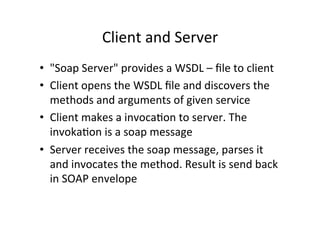
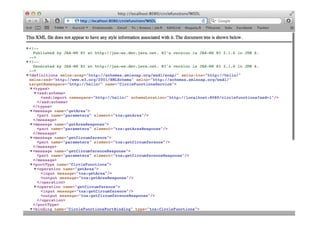
•  "Soap	
  Server"	
  provides	
  a	
  WSDL	
  –	
  file	
  to	
  client	
  
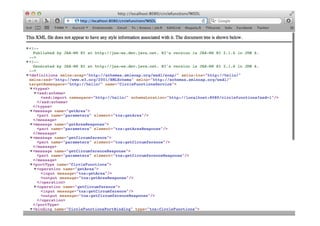
•  Client	
  opens	
  the	
  WSDL	
  file	
  and	
  discovers	
  the	
  
methods	
  and	
  arguments	
  of	
  given	
  service	
  
•  Client	
  makes	
  a	
  invoca9on	
  to	
  server.	
  The	
  
invoka9on	
  is	
  a	
  soap	
  message	
  
•  Server	
  receives	
  the	
  soap	
  message,	
  parses	
  it	
  
and	
  invocates	
  the	
  method.	
  Result	
  is	
  send	
  back	
  
in	
  SOAP	
  envelope	
  
Java	
  6:	
  XML	
  &	
  Web	
  Services	
  
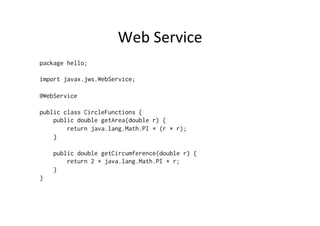
•  Easy	
  way	
  of	
  crea9ng	
  Web	
  Services	
  
•  Expose	
  web	
  service	
  with	
  a	
  simple	
  annota9on	


Web	
  Service	
  
package hello;
import javax.jws.WebService;
@WebService
public class CircleFunctions {
public double getArea(double r) {
return java.lang.Math.PI * (r * r);
}
public double getCircumference(double r) {
return 2 * java.lang.Math.PI * r;
}
}
Server	
  
package hello;
import javax.xml.ws.Endpoint;
class Publish {
public static void main(String[] args) {
Endpoint.publish(
"http://localhost:8080/circlefunctions",
new CircleFunctions());
}
}
Generate	
  Stub	
  Files	
  
•  Generate	
  stub	
  files:	
  
– wsgen –classpath . hello.CircleFunctions
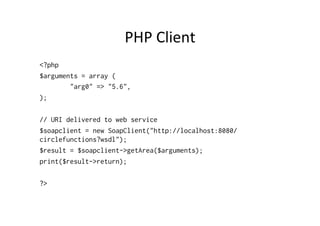
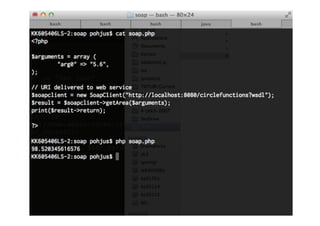
PHP	
  Client	
  
<?php
$arguments = array (
"arg0" => "5.6",
);
// URI delivered to web service
$soapclient = new SoapClient("http://localhost:8080/
circlefunctions?wsdl");
$result = $soapclient->getArea($arguments);
print($result->return);
?>
REST	
  
REST	
  Constraints	
  
•  Client	
  Server	
  
–  Interface	
  separates	
  clients	
  from	
  servers.	
  Server	
  and	
  client	
  can	
  be	
  
replaced	
  and	
  developed	
  independently	
  
–  Client?	
  Browser,	
  PHP	
  script,	
  Desktop	
  app,	
  Command	
  line	
  …	
  
•  Statelessness	
  
–  Each	
  request	
  from	
  any	
  client	
  contains	
  all	
  the	
  informa9on	
  necessary	
  
•  Cacheable	
  
–  Clients	
  can	
  cache	
  responses.	
  Response	
  indicate	
  whether	
  it	
  is	
  cacheable	
  
or	
  not	
  
•  Uniform	
  interface	
  
–  Uniform	
  interface	
  between	
  clients	
  and	
  servers.	
  Four	
  guiding	
  principles	
  
•  Layered	
  System	
  
–  Client	
  does	
  not	
  know	
  is	
  it	
  connected	
  directly	
  to	
  server	
  or	
  some	
  
middleware	
  
Guidelines	
  for	
  the	
  Interface	
  
•  Iden9fica9on	
  of	
  resources	
  
–  Resources	
  are	
  iden9fied	
  via	
  request	
  using	
  URIs	
  
–  Server	
  sends	
  to	
  client	
  HTML,	
  XML	
  or	
  JSON	
  as	
  result	
  (does	
  not	
  send	
  the	
  
database)	
  
•  Manipula9on	
  of	
  resources	
  	
  
–  Client	
  can	
  delete	
  or	
  modify	
  a	
  resource	
  when	
  it	
  holds	
  a	
  representa9on	
  
of	
  the	
  resource	
  
•  Self-­‐descrip9ve	
  messages	
  
–  Message	
  includes	
  enough	
  informa9on	
  to	
  describe	
  how	
  to	
  process	
  the	
  
message	
  
•  Hypermedia	
  as	
  the	
  engine	
  of	
  applica9on	
  state	
  
–  Client	
  enters	
  REST	
  app	
  using	
  simple	
  fixed	
  URL.	
  All	
  future	
  ac9ons	
  the	
  
client	
  may	
  take	
  can	
  be	
  discovered	
  from	
  the	
  returned	
  representa9on	
  
Resources	
  
•  Resource	
  can	
  be	
  anything:	
  ar9cle,	
  comment,	
  
user	
  …	
  
•  Resources	
  are	
  accessed	
  by	
  URI	
  
– hRp://example.com/ar9cle/1	
  
– hRp://example.com/comments/	
  
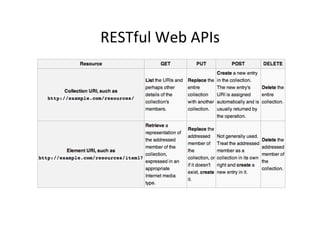
RESTful	
  Web	
  APIs	
  
PHP	
  REST	
  IMPLEMENTATION	
  
Rewrite	
  engine	
  
•  Rewrite	
  engine	
  is	
  a	
  sohware	
  that	
  modifies	
  
web	
  URL's	
  appearance	
  
– URL	
  rewri9ng	
  
•  Usage	
  
– hRp://example.com/index.php?clien9d=123	
  
•  Can	
  be	
  altered	
  
– hRp://example.com/clients/client/123	
  
•  Apache	
  HTTP	
  Server	
  has	
  URL	
  rewri9ng	
  
provided	
  by	
  mod_rewrite	
  module	
  
.htaccess	
  
# Let's use the mod_rewrite module
RewriteEngine On
# Set's the base URL for per-directory rewrites
RewriteBase /
# Defines a condition under which rewriting will
# take place
RewriteCond %{REQUEST_FILENAME} !-f
RewriteCond %{REQUEST_FILENAME} !-d
# Make the rule
RewriteRule ^(.*)$ /xampp/rest/index.php/$1 [L]
XAMPP	
  windows	
  
•  Open	
  apache/conf/extra/hRpd-­‐xampp.conf	
  
– set	
  AllowOverride	
  All	
  
Gekng	
  info	
  about	
  Request	
  and	
  Path	
  
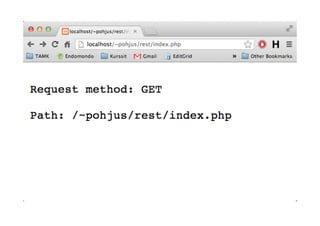
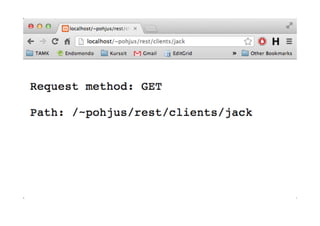
<?php
$requestMethod = $_SERVER['REQUEST_METHOD'];
print("Request method: " . $requestMethod . "nn");
$urlPaths = $_SERVER['REQUEST_URI'] ;
print("Path: " . $urlPaths);
?>
Modifica9on	
  
<?php
$requestMethod = $_SERVER['REQUEST_METHOD'];
$urlPaths = $_SERVER['REQUEST_URI'] ;
$paths = explode("/", $urlPaths);
$paths = array_splice($paths, 3);
print_r($paths);
?>
Encoding	
  and	
  decoding	
  
•  Encode	
  data	
  to	
  and	
  decode	
  from	
  JSON	
  
– json_encode()	
  
– json_decode()	
  
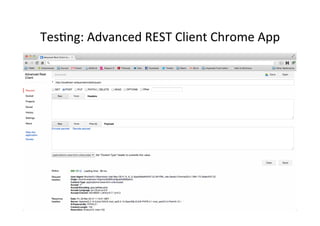
Tes9ng:	
  Advanced	
  REST	
  Client	
  Chrome	
  App	
  
Tes9ng	
  
•  PHP	
  Script	
  that	
  makes	
  hRp	
  requests	
  
•  CURL	
  
•  Telnet…	
  

Building Web Services

  • 1.
    Building  Web  Services   Jussi  Pohjolainen  
  • 2.
    Communica9on  between  Apps   •  Implemen9ng  RPCs  can  be  a  difficult  task   •  DCOM,  CORBA,  RMI  …  firewalls  and  proxy   servers  can  block  binary   •  Using  HTTP  for  RPCs  you  can  bypass  this   problem  
  • 3.
    Web  Service   • Communica9on  between  devices  over  Web   – W3C  defines  "Web  Service"  as  a  technology  that   uses  WSDL,  SOAP,  HTTP  and  XML  to  create  the   communica9on   •  Two  types   – XML  Web  Services   – Web  API  
  • 4.
    XML  Web  Services   •  XML  Web  services  uses  XML  messages  that   follow  SOAP  standard  for  crea9ng  the   communica9on   •  Services  are  wriRen  using  WSDL   – Web  Services  Descrip9on  Language  (WSDL)   •  Web  Services  are  integrated  very  well  to  .NET   and  Java  (6  -­‐>)  
  • 5.
    Web  API  (Rest)   •  Emphasis  to  simpler  communica9on   – Representa)onal  state  transfer  (REST)   •  Do  not  require  SOAP,  WSDL   •  Simple  Web  API   – hRp://www.something.com/twiRerthis.php? msg=hello!   •  If  the  Web  API  is  implemented  using  certain   constraints,  it's  rest  API   – hRp://www.something.com/clients/client17  
  • 6.
  • 7.
    SOAP?   •  SOAP  is  a  XML-­‐based  protocol  to  let  apps   exchange  informa9on  over  HTTP   •  SOAP  is  language  independent  and  it's  W3C   recommenda9on   •  Since  SOAP  is  XML  and  it's  text,  it  can  be  send   easily  through  firewalls  
  • 8.
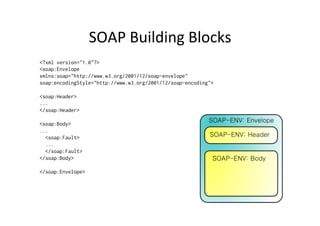
    SOAP  Building  Blocks   <?xml version="1.0"?> <soap:Envelope xmlns:soap="http://www.w3.org/2001/12/soap-envelope" soap:encodingStyle="http://www.w3.org/2001/12/soap-encoding"> <soap:Header> ... </soap:Header> <soap:Body> ... <soap:Fault> ... </soap:Fault> </soap:Body> </soap:Envelope>
  • 9.
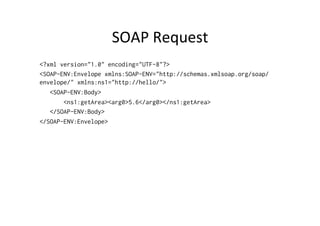
    SOAP  Request   <?xmlversion="1.0" encoding="UTF-8"?> <SOAP-ENV:Envelope xmlns:SOAP-ENV="http://schemas.xmlsoap.org/soap/ envelope/" xmlns:ns1="http://hello/"> <SOAP-ENV:Body> <ns1:getArea><arg0>5.6</arg0></ns1:getArea> </SOAP-ENV:Body> </SOAP-ENV:Envelope>
  • 10.
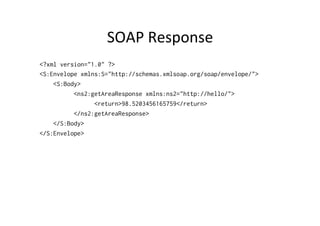
    SOAP  Response   <?xmlversion="1.0" ?> <S:Envelope xmlns:S="http://schemas.xmlsoap.org/soap/envelope/"> <S:Body> <ns2:getAreaResponse xmlns:ns2="http://hello/"> <return>98.5203456165759</return> </ns2:getAreaResponse> </S:Body> </S:Envelope>
  • 11.
    Client  and  Server   •  "Soap  Server"  provides  a  WSDL  –  file  to  client   •  Client  opens  the  WSDL  file  and  discovers  the   methods  and  arguments  of  given  service   •  Client  makes  a  invoca9on  to  server.  The   invoka9on  is  a  soap  message   •  Server  receives  the  soap  message,  parses  it   and  invocates  the  method.  Result  is  send  back   in  SOAP  envelope  
  • 13.
    Java  6:  XML  &  Web  Services   •  Easy  way  of  crea9ng  Web  Services   •  Expose  web  service  with  a  simple  annota9on    
  • 14.
    Web  Service   packagehello; import javax.jws.WebService; @WebService public class CircleFunctions { public double getArea(double r) { return java.lang.Math.PI * (r * r); } public double getCircumference(double r) { return 2 * java.lang.Math.PI * r; } }
  • 15.
    Server   package hello; importjavax.xml.ws.Endpoint; class Publish { public static void main(String[] args) { Endpoint.publish( "http://localhost:8080/circlefunctions", new CircleFunctions()); } }
  • 16.
    Generate  Stub  Files   •  Generate  stub  files:   – wsgen –classpath . hello.CircleFunctions
  • 18.
    PHP  Client   <?php $arguments= array ( "arg0" => "5.6", ); // URI delivered to web service $soapclient = new SoapClient("http://localhost:8080/ circlefunctions?wsdl"); $result = $soapclient->getArea($arguments); print($result->return); ?>
  • 20.
  • 21.
    REST  Constraints   • Client  Server   –  Interface  separates  clients  from  servers.  Server  and  client  can  be   replaced  and  developed  independently   –  Client?  Browser,  PHP  script,  Desktop  app,  Command  line  …   •  Statelessness   –  Each  request  from  any  client  contains  all  the  informa9on  necessary   •  Cacheable   –  Clients  can  cache  responses.  Response  indicate  whether  it  is  cacheable   or  not   •  Uniform  interface   –  Uniform  interface  between  clients  and  servers.  Four  guiding  principles   •  Layered  System   –  Client  does  not  know  is  it  connected  directly  to  server  or  some   middleware  
  • 22.
    Guidelines  for  the  Interface   •  Iden9fica9on  of  resources   –  Resources  are  iden9fied  via  request  using  URIs   –  Server  sends  to  client  HTML,  XML  or  JSON  as  result  (does  not  send  the   database)   •  Manipula9on  of  resources     –  Client  can  delete  or  modify  a  resource  when  it  holds  a  representa9on   of  the  resource   •  Self-­‐descrip9ve  messages   –  Message  includes  enough  informa9on  to  describe  how  to  process  the   message   •  Hypermedia  as  the  engine  of  applica9on  state   –  Client  enters  REST  app  using  simple  fixed  URL.  All  future  ac9ons  the   client  may  take  can  be  discovered  from  the  returned  representa9on  
  • 23.
    Resources   •  Resource  can  be  anything:  ar9cle,  comment,   user  …   •  Resources  are  accessed  by  URI   – hRp://example.com/ar9cle/1   – hRp://example.com/comments/  
  • 24.
  • 25.
  • 26.
    Rewrite  engine   • Rewrite  engine  is  a  sohware  that  modifies   web  URL's  appearance   – URL  rewri9ng   •  Usage   – hRp://example.com/index.php?clien9d=123   •  Can  be  altered   – hRp://example.com/clients/client/123   •  Apache  HTTP  Server  has  URL  rewri9ng   provided  by  mod_rewrite  module  
  • 27.
    .htaccess   # Let'suse the mod_rewrite module RewriteEngine On # Set's the base URL for per-directory rewrites RewriteBase / # Defines a condition under which rewriting will # take place RewriteCond %{REQUEST_FILENAME} !-f RewriteCond %{REQUEST_FILENAME} !-d # Make the rule RewriteRule ^(.*)$ /xampp/rest/index.php/$1 [L]
  • 28.
    XAMPP  windows   • Open  apache/conf/extra/hRpd-­‐xampp.conf   – set  AllowOverride  All  
  • 29.
    Gekng  info  about  Request  and  Path   <?php $requestMethod = $_SERVER['REQUEST_METHOD']; print("Request method: " . $requestMethod . "nn"); $urlPaths = $_SERVER['REQUEST_URI'] ; print("Path: " . $urlPaths); ?>
  • 32.
    Modifica9on   <?php $requestMethod =$_SERVER['REQUEST_METHOD']; $urlPaths = $_SERVER['REQUEST_URI'] ; $paths = explode("/", $urlPaths); $paths = array_splice($paths, 3); print_r($paths); ?>
  • 33.
    Encoding  and  decoding   •  Encode  data  to  and  decode  from  JSON   – json_encode()   – json_decode()  
  • 34.
    Tes9ng:  Advanced  REST  Client  Chrome  App  
  • 35.
    Tes9ng   •  PHP  Script  that  makes  hRp  requests   •  CURL   •  Telnet…