REST
Saeid Zebardast
http://zebardast.com
saeid.zebardast@gmail.com
WHAT’S A WEB SERVICE?

•A web service is just a web page meant for a computer to
 request and process.

• Web Services require an architectural style to make sense of
 them, because there’s no smart human being on the client end to
 keep track.

• The pre-Web techniques of computer interaction don't scale on
 the Internet.

• They   were designed for small scales and single trust domains.
                                   2
REST

•   REpresentational State Transfer (REST) is a style of software architecture for distributed
    systems such as the World Wide Web. REST has emerged as a predominant web API design model.

•   The term representational state transfer was introduced and defined in 2000 by Roy Fielding in his
    doctoral dissertation. Fielding is one of the principal authors of the Hypertext Transfer Protocol
    (HTTP) specification versions 1.0 and 1.1.

•   REST-style architectures consist of clients and servers. Clients initiate requests to servers; servers
    process requests and return appropriate responses. Requests and responses are built around the
    transfer of representations of resources.

•   REST facilitates the transaction between web servers by allowing loose coupling between different
    services. The REST language uses nouns and verbs, and has an emphasis on readability. Unlike
    SOAP, REST does not require XML parsing and does not require a message header to and from a
    service provider. This ultimately uses less bandwidth. REST error-handling also differs from that used
    by SOAP.

                                                       3
REST DEFINED
•   Everything is a resource

•   Resources are just concepts

•   Resources are manipulated through their representations (HTML, plain text, JPEG, or whatever)

•   Resources are retrieved not as character strings or BLOBs but as complete representations

•   Resources are identified by uniform resource identifiers (URIs). URIs tell a client that there's a concept
    somewhere

•   Clients can then request a specific representation of the concept from the representations the server makes
    available

•   Messages are self-descriptive and stateless

•   Multiple representations are accepted or sent but most resources have only a single representation

•   Hypertext (Hypermedia) is the engine of application state

                                                          4
REST DEFINED


• “State” means   application/session state

• Maintained as part of the content transferred from client to server
 back to client

• Thus any server can potentially continue transaction from the
 point where it was left off


                                    5
KEY GOALS OF REST

• Scalability   of component interactions

• Generality    of interfaces

• Independent     deployment of components

• Intermediary components to reduce latency, enforce security and
 encapsulate legacy systems


                                    6
CONSTRAINTS

The REST architectural style describes the following six constraints
applied to the architecture, while leaving the implementation of the
individual components free to design:

•Client–server
•Stateless
•Cacheable
•Layered system
•Code on demand (optional)
•Uniform interface
                                  7
ADVANTAGES OF REST

•   Separates server implementation from the client's perception of
    resources (“Cool URIs Don’t Change”)

•   Scales well to large numbers of clients

•   Enables transfer of data in streams of unlimited size and type

•   Supports intermediaries (proxies and gateways) as data
    transformation and caching components

•   Concentrates the application state within the user agent components,
    where the surplus disk and cycles are
                                       8
THE KEY INSIGHTS

• Discrete   resources should be given their own stable URIs

• HTTP, URIs, and the actual data resources acquired from URIs are
 sufficient to describe any complex transaction, including:

  • session   state

  • authentication/authorization


                                   9
ARGUMENTS AGAINST NON-REST DESIGNS


• They   break Web architecture, particularly caching

• They   don't scale well

• They   have significantly higher coordination costs


                                   10
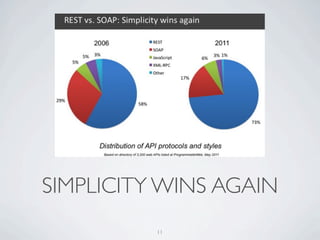
SIMPLICITY WINS AGAIN
          11
REST AND HTTP

• REST    is a post hoc description of the Web

• HTTP     1.1 was designed to conform to REST

• Its   methods are defined well enough to get work done

• Unsurprisingly, HTTP   is the most RESTful protocol

• But it's possible to apply REST concepts to other protocols and
  systems

                                   12
VERBS

• Verbs   (loosely) describe actions that are applicable to nouns

• Using
     different verbs for every noun would make widespread
 communication impossible

• In   programming we call this “polymorphism”

• Some    verbs only apply to a few nouns

• In   REST we use universal verbs only

                                    13
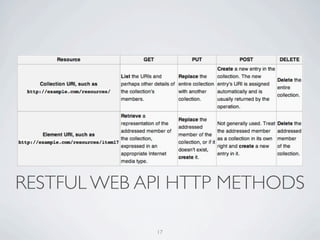
FOUR VERBS FOR EVERY NOUN


• GET   to retrieve information

• POST to add new information, showing its relation to old
 information

• PUT   to update information

• DELETE   to discard information


                                    14
WHAT IF REST IS NOT ENOUGH?


• What  happens when you need application semantics that don't fit
 into the GET / PUT / POST / DELETE generic interfaces and
 representational state model?

 • If   the problem doesn't fit HTTP, build another protocol

 • Extend    HTTP by adding new HTTP methods


                                  15
BUT IN FACT


• There  are no applications you can think of which cannot be made
 to fit into the GET / PUT / POST / DELETE resources /
 representations model of the world!

• These   interfaces are sufficiently general


                                    16
RESTFUL WEB API HTTP METHODS

             17
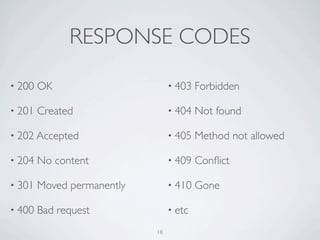
RESPONSE CODES

• 200   OK                       • 403   Forbidden

• 201   Created                  • 404   Not found

• 202 Accepted                   • 405   Method not allowed

• 204   No content               • 409   Conflict

• 301   Moved permanently        • 410   Gone

• 400   Bad request              • etc

                            18
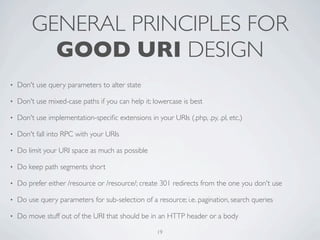
GENERAL PRINCIPLES FOR
           GOOD URI DESIGN
•   Don't use query parameters to alter state

•   Don't use mixed-case paths if you can help it; lowercase is best

•   Don't use implementation-specific extensions in your URIs (.php, .py, .pl, etc.)

•   Don't fall into RPC with your URIs

•   Do limit your URI space as much as possible

•   Do keep path segments short

•   Do prefer either /resource or /resource/; create 301 redirects from the one you don't use

•   Do use query parameters for sub-selection of a resource; i.e. pagination, search queries

•   Do move stuff out of the URI that should be in an HTTP header or a body

                                                     19
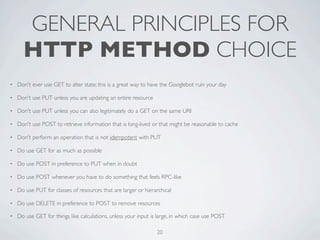
GENERAL PRINCIPLES FOR
      HTTP METHOD CHOICE
•   Don't ever use GET to alter state; this is a great way to have the Googlebot ruin your day

•   Don't use PUT unless you are updating an entire resource

•   Don't use PUT unless you can also legitimately do a GET on the same URI

•   Don't use POST to retrieve information that is long-lived or that might be reasonable to cache

•   Don't perform an operation that is not idempotent with PUT

•   Do use GET for as much as possible

•   Do use POST in preference to PUT when in doubt

•   Do use POST whenever you have to do something that feels RPC-like

•   Do use PUT for classes of resources that are larger or hierarchical

•   Do use DELETE in preference to POST to remove resources

•   Do use GET for things like calculations, unless your input is large, in which case use POST

                                                                 20
GENERAL PRINCIPLES OF
    WEB SERVICE DESIGN WITH HTTP
•   Don't put metadata in the body of a response that should be in a header

•   Don't put metadata in a separate resource unless including it would create significant overhead

•   Do use the appropriate status code

     •   201 Created after creating a resource; resource must exist at the time the response is sent

     •   202 Accepted after performing an operation successfully or creating a resource asynchronously

     •   400 Bad Request when someone does an operation on data that's clearly bogus; for your application this
         could be a validation error; generally reserve 500 for uncaught exceptions

     •   401 Unauthorized when someone accesses your API either without supplying a necessary Authorization
         header or when the credentials within the Authorization are invalid; don't use this response code if you aren't
         expecting credentials via an Authorization header.

     •   403 Forbidden when someone accesses your API in a way that might be malicious or if they aren't authorized

     •   405 Method Not Allowed when someone uses POST when they should have used PUT, etc

     •   413 Request Entity Too Large when someone attempts to send you an unacceptably large file
                                                            21
GENERAL PRINCIPLES OF
    WEB SERVICE DESIGN WITH HTTP
•   Do use caching headers whenever you can

    •   ETag headers are good when you can easily reduce a resource to a hash value

    •   Last-Modified should indicate to you that keeping around a timestamp of
        when resources are updated is a good idea

    •   Cache-Control and Expires should be given sensible values

•   Do everything you can to honor caching headers in a request (If-None-
    Modified, If-Modified-Since)

•   Do use redirects when they make sense, but these should be rare for a web
    service

                                          22
MORE INFORMATION?


• http://www.packetizer.com/ws/rest.html

• http://home.ccil.org/~cowan/restws.pdf

• https://www.ics.uci.edu/~fielding/pubs/dissertation/abstract.htm


                                 23

What is REST?

  • 1.
  • 2.
    WHAT’S A WEBSERVICE? •A web service is just a web page meant for a computer to request and process. • Web Services require an architectural style to make sense of them, because there’s no smart human being on the client end to keep track. • The pre-Web techniques of computer interaction don't scale on the Internet. • They were designed for small scales and single trust domains. 2
  • 3.
    REST • REpresentational State Transfer (REST) is a style of software architecture for distributed systems such as the World Wide Web. REST has emerged as a predominant web API design model. • The term representational state transfer was introduced and defined in 2000 by Roy Fielding in his doctoral dissertation. Fielding is one of the principal authors of the Hypertext Transfer Protocol (HTTP) specification versions 1.0 and 1.1. • REST-style architectures consist of clients and servers. Clients initiate requests to servers; servers process requests and return appropriate responses. Requests and responses are built around the transfer of representations of resources. • REST facilitates the transaction between web servers by allowing loose coupling between different services. The REST language uses nouns and verbs, and has an emphasis on readability. Unlike SOAP, REST does not require XML parsing and does not require a message header to and from a service provider. This ultimately uses less bandwidth. REST error-handling also differs from that used by SOAP. 3
  • 4.
    REST DEFINED • Everything is a resource • Resources are just concepts • Resources are manipulated through their representations (HTML, plain text, JPEG, or whatever) • Resources are retrieved not as character strings or BLOBs but as complete representations • Resources are identified by uniform resource identifiers (URIs). URIs tell a client that there's a concept somewhere • Clients can then request a specific representation of the concept from the representations the server makes available • Messages are self-descriptive and stateless • Multiple representations are accepted or sent but most resources have only a single representation • Hypertext (Hypermedia) is the engine of application state 4
  • 5.
    REST DEFINED • “State”means application/session state • Maintained as part of the content transferred from client to server back to client • Thus any server can potentially continue transaction from the point where it was left off 5
  • 6.
    KEY GOALS OFREST • Scalability of component interactions • Generality of interfaces • Independent deployment of components • Intermediary components to reduce latency, enforce security and encapsulate legacy systems 6
  • 7.
    CONSTRAINTS The REST architecturalstyle describes the following six constraints applied to the architecture, while leaving the implementation of the individual components free to design: •Client–server •Stateless •Cacheable •Layered system •Code on demand (optional) •Uniform interface 7
  • 8.
    ADVANTAGES OF REST • Separates server implementation from the client's perception of resources (“Cool URIs Don’t Change”) • Scales well to large numbers of clients • Enables transfer of data in streams of unlimited size and type • Supports intermediaries (proxies and gateways) as data transformation and caching components • Concentrates the application state within the user agent components, where the surplus disk and cycles are 8
  • 9.
    THE KEY INSIGHTS •Discrete resources should be given their own stable URIs • HTTP, URIs, and the actual data resources acquired from URIs are sufficient to describe any complex transaction, including: • session state • authentication/authorization 9
  • 10.
    ARGUMENTS AGAINST NON-RESTDESIGNS • They break Web architecture, particularly caching • They don't scale well • They have significantly higher coordination costs 10
  • 11.
  • 12.
    REST AND HTTP •REST is a post hoc description of the Web • HTTP 1.1 was designed to conform to REST • Its methods are defined well enough to get work done • Unsurprisingly, HTTP is the most RESTful protocol • But it's possible to apply REST concepts to other protocols and systems 12
  • 13.
    VERBS • Verbs (loosely) describe actions that are applicable to nouns • Using different verbs for every noun would make widespread communication impossible • In programming we call this “polymorphism” • Some verbs only apply to a few nouns • In REST we use universal verbs only 13
  • 14.
    FOUR VERBS FOREVERY NOUN • GET to retrieve information • POST to add new information, showing its relation to old information • PUT to update information • DELETE to discard information 14
  • 15.
    WHAT IF RESTIS NOT ENOUGH? • What happens when you need application semantics that don't fit into the GET / PUT / POST / DELETE generic interfaces and representational state model? • If the problem doesn't fit HTTP, build another protocol • Extend HTTP by adding new HTTP methods 15
  • 16.
    BUT IN FACT •There are no applications you can think of which cannot be made to fit into the GET / PUT / POST / DELETE resources / representations model of the world! • These interfaces are sufficiently general 16
  • 17.
    RESTFUL WEB APIHTTP METHODS 17
  • 18.
    RESPONSE CODES • 200 OK • 403 Forbidden • 201 Created • 404 Not found • 202 Accepted • 405 Method not allowed • 204 No content • 409 Conflict • 301 Moved permanently • 410 Gone • 400 Bad request • etc 18
  • 19.
    GENERAL PRINCIPLES FOR GOOD URI DESIGN • Don't use query parameters to alter state • Don't use mixed-case paths if you can help it; lowercase is best • Don't use implementation-specific extensions in your URIs (.php, .py, .pl, etc.) • Don't fall into RPC with your URIs • Do limit your URI space as much as possible • Do keep path segments short • Do prefer either /resource or /resource/; create 301 redirects from the one you don't use • Do use query parameters for sub-selection of a resource; i.e. pagination, search queries • Do move stuff out of the URI that should be in an HTTP header or a body 19
  • 20.
    GENERAL PRINCIPLES FOR HTTP METHOD CHOICE • Don't ever use GET to alter state; this is a great way to have the Googlebot ruin your day • Don't use PUT unless you are updating an entire resource • Don't use PUT unless you can also legitimately do a GET on the same URI • Don't use POST to retrieve information that is long-lived or that might be reasonable to cache • Don't perform an operation that is not idempotent with PUT • Do use GET for as much as possible • Do use POST in preference to PUT when in doubt • Do use POST whenever you have to do something that feels RPC-like • Do use PUT for classes of resources that are larger or hierarchical • Do use DELETE in preference to POST to remove resources • Do use GET for things like calculations, unless your input is large, in which case use POST 20
  • 21.
    GENERAL PRINCIPLES OF WEB SERVICE DESIGN WITH HTTP • Don't put metadata in the body of a response that should be in a header • Don't put metadata in a separate resource unless including it would create significant overhead • Do use the appropriate status code • 201 Created after creating a resource; resource must exist at the time the response is sent • 202 Accepted after performing an operation successfully or creating a resource asynchronously • 400 Bad Request when someone does an operation on data that's clearly bogus; for your application this could be a validation error; generally reserve 500 for uncaught exceptions • 401 Unauthorized when someone accesses your API either without supplying a necessary Authorization header or when the credentials within the Authorization are invalid; don't use this response code if you aren't expecting credentials via an Authorization header. • 403 Forbidden when someone accesses your API in a way that might be malicious or if they aren't authorized • 405 Method Not Allowed when someone uses POST when they should have used PUT, etc • 413 Request Entity Too Large when someone attempts to send you an unacceptably large file 21
  • 22.
    GENERAL PRINCIPLES OF WEB SERVICE DESIGN WITH HTTP • Do use caching headers whenever you can • ETag headers are good when you can easily reduce a resource to a hash value • Last-Modified should indicate to you that keeping around a timestamp of when resources are updated is a good idea • Cache-Control and Expires should be given sensible values • Do everything you can to honor caching headers in a request (If-None- Modified, If-Modified-Since) • Do use redirects when they make sense, but these should be rare for a web service 22
  • 23.
    MORE INFORMATION? • http://www.packetizer.com/ws/rest.html •http://home.ccil.org/~cowan/restws.pdf • https://www.ics.uci.edu/~fielding/pubs/dissertation/abstract.htm 23