
6
 Network &
 Web Services
 Anuchit Chalothorn
 anoochit@gmail.com

Licensed under a Creative Commons Attribution-NonCommercial-ShareAlike 3.0 Unported License.
Connecting to Network
Note that to perform the network operations
described in this lesson, your application
manifest must include the following permissions:

<uses-permission android:name="android.permission.INTERNET"
/>
<uses-permission android:name="android.permission.
ACCESS_NETWORK_STATE"/>


Ref: http://developer.android.com/training/basics/network-ops/connecting.html
StrictMode
Within an Android application you should avoid
performing long running operations on the user
interface thread. This includes file and network
access. StrictMode allows to setup policies in
your application to avoid doing incorrect things.
Turn StrictMode Off
If you are targeting Android 3.0 or higher, you can turn this
check off via the following code at the beginning of your
onCreate() method of your Activity. (Not recommend)


StrictMode.ThreadPolicy policy = new StrictMode.
ThreadPolicy.Builder().permitAll().build();
          StrictMode.setThreadPolicy(policy);
Manage Network Usage
A device can have various types of network connections.
This lesson focuses on using either a Wi-Fi or a mobile
network connection. To check the network connection, you
typically use the following classes:

● ConnectivityManager: Answers queries about the state of
  network connectivity. It also notifies applications when
  network connectivity changes.
● NetworkInfo: Describes the status of a network interface of a
  given type (currently either Mobile or Wi-Fi).
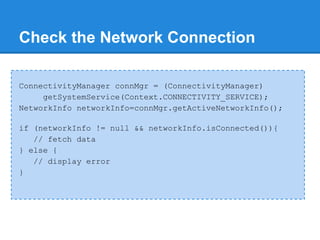
Check the Network Connection

ConnectivityManager connMgr = (ConnectivityManager)
     getSystemService(Context.CONNECTIVITY_SERVICE);
NetworkInfo networkInfo=connMgr.getActiveNetworkInfo();

if (networkInfo != null && networkInfo.isConnected()){
   // fetch data
} else {
   // display error
}
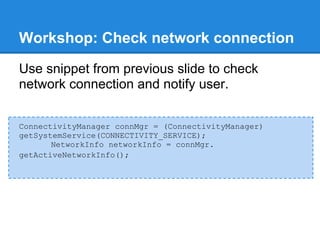
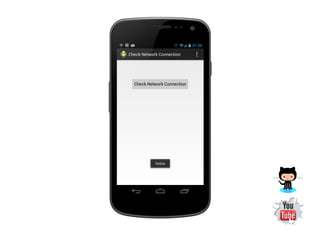
Workshop: Check network connection
Use snippet from previous slide to check
network connection and notify user.


ConnectivityManager connMgr = (ConnectivityManager)
getSystemService(CONNECTIVITY_SERVICE);
       NetworkInfo networkInfo = connMgr.
getActiveNetworkInfo();
Network Operations on a Separate Thread

Network operations can involve unpredictable
delays. To prevent this from causing a poor
user experience, always perform network
operations on a separate thread from the UI.
The AsyncTask class provides one of the
simplest ways to fire off a new task from the UI
thread.
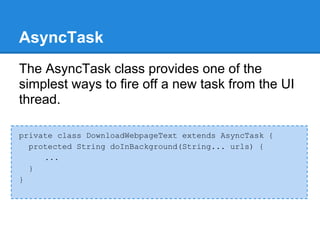
AsyncTask
The AsyncTask class provides one of the
simplest ways to fire off a new task from the UI
thread.

private class DownloadWebpageText extends AsyncTask {
  protected String doInBackground(String... urls) {
     ...
  }
}
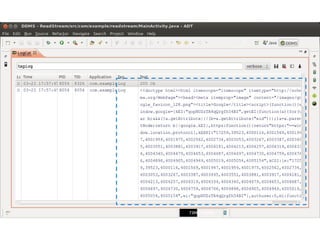
Workshop: Read text data from web
Read HTML data from web using
HTTPConnection. See snippet in GitHub.
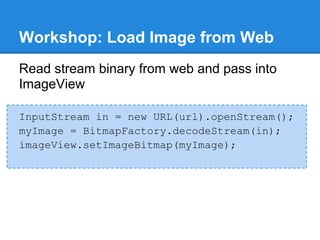
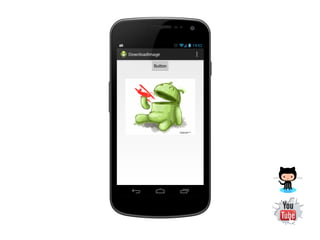
Workshop: Load Image from Web
Read stream binary from web and pass into
ImageView

InputStream in = new URL(url).openStream();
myImage = BitmapFactory.decodeStream(in);
imageView.setImageBitmap(myImage);
Web Services
A web service is a method of communication
between two electronic devices over the World
Wide Web. We can identify two major classes
of Web services
   ● REST-compliant Web services
   ● arbitrary Web services.
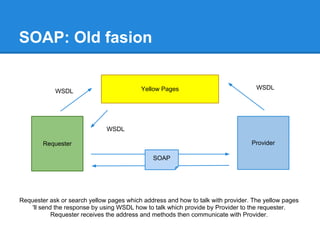
SOAP: Old fasion


                                          Yellow Pages                             WSDL
            WSDL


                              WSDL

        Requester                                                                Provider

                                              SOAP


Requester ask or search yellow pages which address and how to talk with provider. The yellow pages
    'll send the response by using WSDL how to talk which provide by Provider to the requester.
            Requester receives the address and methods then communicate with Provider.
Web APIs
A web API is a development in web services
where emphasis has been moving to simpler
representational state transfer (REST) based
communications. RESTful APIs do not require
XML-based web service protocols (SOAP and
WSDL) to support their light-weight interfaces.
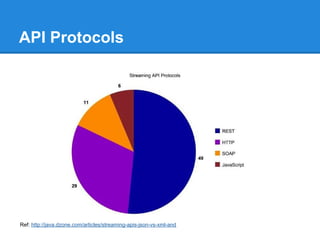
API Protocols


Ref: http://java.dzone.com/articles/streaming-apis-json-vs-xml-and
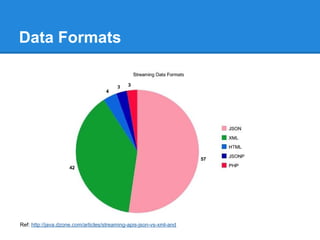
Data Formats


Ref: http://java.dzone.com/articles/streaming-apis-json-vs-xml-and
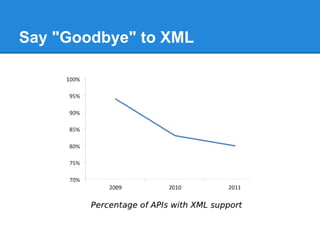
Say "Goodbye" to XML
RESTFul / REST API
a style of software architecture for distributed
systems such as the WWW. The REST
language uses nouns and verbs, and has an
emphasis on readability. Unlike SOAP, REST
does not require XML parsing and does not
require a message header to and from a
service provider.
Concept
● the base URI for the web service, such as
  http://example.com/resources/
● the Internet media type of the data
  supported by the web service.
● the set of operations supported by the web
  service using HTTP methods (e.g., GET,
  PUT, POST, or DELETE).
● The API must be hypertext driven.
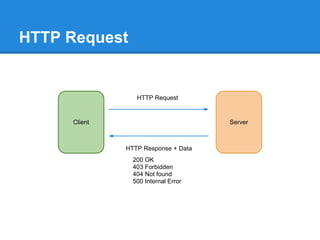
HTTP Request


                 HTTP Request


     Client                          Server


              HTTP Response + Data
                200 OK
                403 Forbidden
                404 Not found
                500 Internal Error
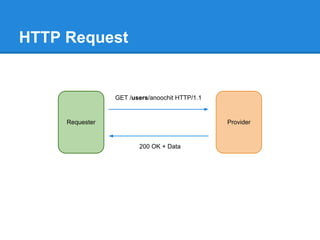
HTTP Request


                 GET /users/anoochit HTTP/1.1


     Requester                                  Provider


                        200 OK + Data
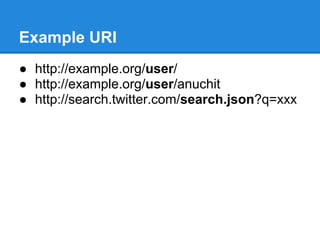
Example URI
● http://example.org/user/
● http://example.org/user/anuchit
● http://search.twitter.com/search.json?q=xxx
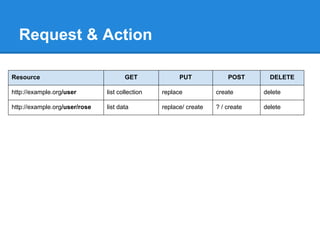
Request & Action

Resource                              GET              PUT             POST       DELETE

http://example.org/user        list collection   replace           create       delete

http://example.org/user/rose   list data         replace/ create   ? / create   delete
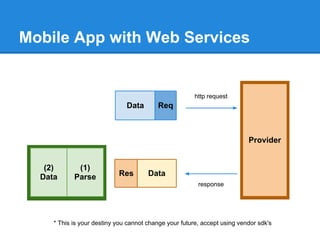
Mobile App with Web Services


                                                        http request
                               Data       Req


                                                                           Provider


   (2)       (1)
  Data      Parse           Res        Data
                                                         response


     * This is your destiny you cannot change your future, accept using vendor sdk's
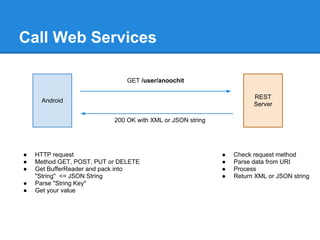
Call Web Services

                               GET /user/anoochit

                                                                      REST
     Android
                                                                      Server

                           200 OK with XML or JSON string


●   HTTP request                                            ●   Check request method
●   Method GET, POST, PUT or DELETE                         ●   Parse data from URI
●   Get BufferReader and pack into                          ●   Process
    "String" <= JSON String                                 ●   Return XML or JSON string
●   Parse "String Key"
●   Get your value
No "official" standard

There is no "official" standard for RESTful web
services, This is because REST is an
architectural style, unlike SOAP, which is a
protocol. Even though REST is not a standard,
a RESTful implementation such as the Web
can use standards like HTTP, URI, XML, etc.
RESTful API Design
But you should follow design guideline
● RESTful API Design
● Learn REST
Useful tools
if you want to test your RESTful web service by
sent another method, try this
● Advanced REST Client for Chrome
● JSONView and JSONLint for Chrome
● REST Client for Firefox
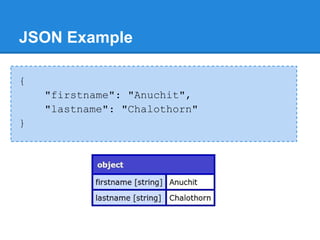
JSON Example

{
    "firstname": "Anuchit",
    "lastname": "Chalothorn"
}
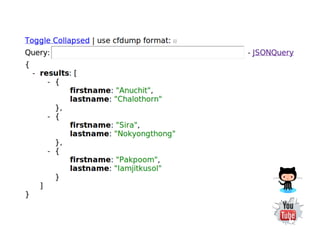
JSON Example
[
    {
        "firstname" : "Anuchit",
        "lastname" : "Chalothorn"
    },
    {
        "firstname" : "Sira",
        "lastname" : "Nokyongthong"
    }
]
Android & JSON
JSON is a very condense data exchange
format. Android includes the json.org libraries
which allow to work easily with JSON files.
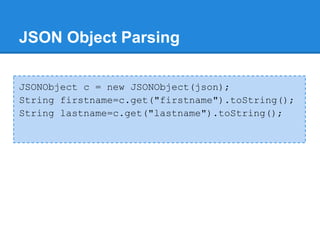
JSON Object Parsing

JSONObject c = new JSONObject(json);
String firstname=c.get("firstname").toString();
String lastname=c.get("lastname").toString();
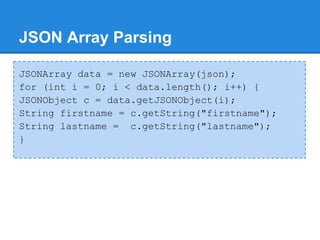
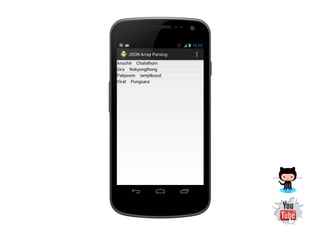
JSON Array Parsing

JSONArray data = new JSONArray(json);
for (int i = 0; i < data.length(); i++) {
JSONObject c = data.getJSONObject(i);
String firstname = c.getString("firstname");
String lastname = c.getString("lastname");
}
Simple RESTful with PHP
You can make a simple RESTful API with PHP
for routing, process and response JSON data.
The following tools you should have;
● Web Server with PHP support
● PHP Editor
● REST Client plugin for browser
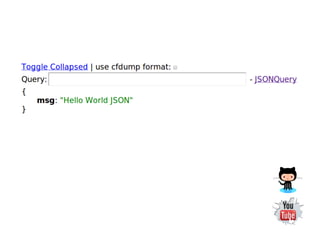
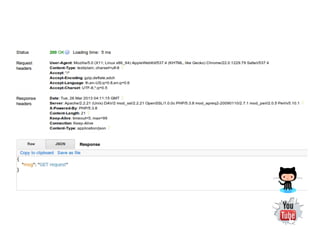
Workshop: JSON with PHP
PHP has a function json_encode to generate
JSON data from mix value. Create an App to
read JSON data in a web server.


header('Content-Type: application/json;
charset=utf-8');
$data = array("msg"=>"Hello World JSON");
echo json_encode($data);
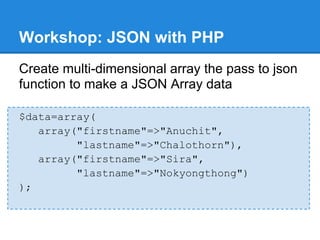
Workshop: JSON with PHP
Create multi-dimensional array the pass to json
function to make a JSON Array data

$data=array(
   array("firstname"=>"Anuchit",
         "lastname"=>"Chalothorn"),
   array("firstname"=>"Sira",
         "lastname"=>"Nokyongthong")
);
Workshop: Check request methods
PHP has $_SERVER variable to check HTTP
request methods of each request from client, so
you can check request from this variable.

$method = $_SERVER["REQUEST_METHOD"];
switch($method){
    case "GET":
        break;
    ...
}
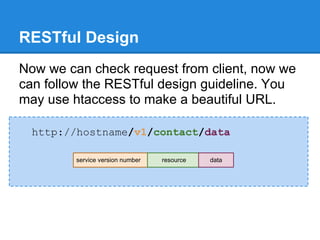
RESTful Design
Now we can check request from client, now we
can follow the RESTful design guideline. You
may use htaccess to make a beautiful URL.

  http://hostname/v1/contact/data

         service version number   resource   data
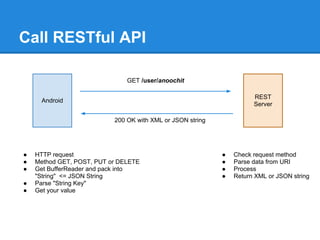
Call RESTful API

                               GET /user/anoochit

                                                                      REST
     Android
                                                                      Server

                           200 OK with XML or JSON string


●   HTTP request                                            ●   Check request method
●   Method GET, POST, PUT or DELETE                         ●   Parse data from URI
●   Get BufferReader and pack into                          ●   Process
    "String" <= JSON String                                 ●   Return XML or JSON string
●   Parse "String Key"
●   Get your value
Workshop: Simple RESTful
Make RESTful service of this
● Echo your name
  ○ sent your name with POST method and response
    with JSON result
● Asking for date and time
  ○ sent GET method response with JSON result
● Temperature unit converter
  ○ sent a degree number and type of unit with
    POST method and response JSON result
Workshop: RESTful Echo

$data = array("result"=>
              "Hello, ".$_POST["name"]);
echo json_encode($data);
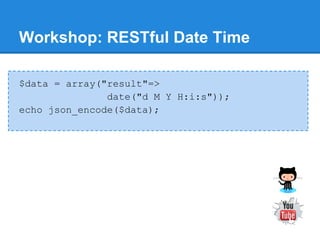
Workshop: RESTful Date Time

$data = array("result"=>
               date("d M Y H:i:s"));
echo json_encode($data);
Workshop: RESTful Temperature
if ($_POST["type"]=="c") {
   $result=(($_POST["degree"]-32)*5)/9;
} else {
   $result=(($_POST["degree"]*9)/5)+32;
}
$data = array("result"=>$result));
echo json_encode($data);
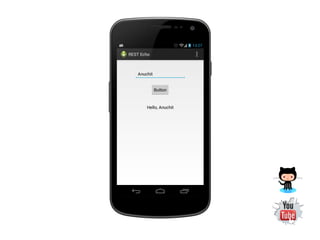
Workshop: App REST Echo
Make a mobile app call REST Echo API using
Http Post method to send value.
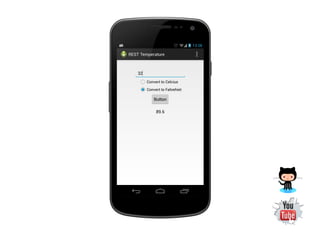
Workshop: App REST Temperature
Make a mobile app call REST temperature unit
converter API, using Http Post method to send
a degree value and unit type to convert.
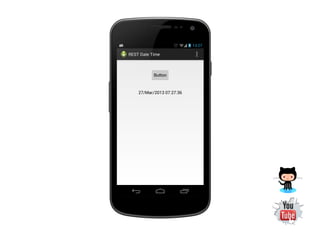
Workshop: App REST Date Time
Make a mobile app call REST date time, using
Http Get method to get a value of date and
time.
End

Android App Development 06 : Network &amp; Web Services

  • 1.
    6 Network & Web Services Anuchit Chalothorn anoochit@gmail.com Licensed under a Creative Commons Attribution-NonCommercial-ShareAlike 3.0 Unported License.
  • 2.
    Connecting to Network Notethat to perform the network operations described in this lesson, your application manifest must include the following permissions: <uses-permission android:name="android.permission.INTERNET" /> <uses-permission android:name="android.permission. ACCESS_NETWORK_STATE"/> Ref: http://developer.android.com/training/basics/network-ops/connecting.html
  • 3.
    StrictMode Within an Androidapplication you should avoid performing long running operations on the user interface thread. This includes file and network access. StrictMode allows to setup policies in your application to avoid doing incorrect things.
  • 4.
    Turn StrictMode Off Ifyou are targeting Android 3.0 or higher, you can turn this check off via the following code at the beginning of your onCreate() method of your Activity. (Not recommend) StrictMode.ThreadPolicy policy = new StrictMode. ThreadPolicy.Builder().permitAll().build(); StrictMode.setThreadPolicy(policy);
  • 5.
    Manage Network Usage Adevice can have various types of network connections. This lesson focuses on using either a Wi-Fi or a mobile network connection. To check the network connection, you typically use the following classes: ● ConnectivityManager: Answers queries about the state of network connectivity. It also notifies applications when network connectivity changes. ● NetworkInfo: Describes the status of a network interface of a given type (currently either Mobile or Wi-Fi).
  • 6.
    Check the NetworkConnection ConnectivityManager connMgr = (ConnectivityManager) getSystemService(Context.CONNECTIVITY_SERVICE); NetworkInfo networkInfo=connMgr.getActiveNetworkInfo(); if (networkInfo != null && networkInfo.isConnected()){ // fetch data } else { // display error }
  • 7.
    Workshop: Check networkconnection Use snippet from previous slide to check network connection and notify user. ConnectivityManager connMgr = (ConnectivityManager) getSystemService(CONNECTIVITY_SERVICE); NetworkInfo networkInfo = connMgr. getActiveNetworkInfo();
  • 9.
    Network Operations ona Separate Thread Network operations can involve unpredictable delays. To prevent this from causing a poor user experience, always perform network operations on a separate thread from the UI. The AsyncTask class provides one of the simplest ways to fire off a new task from the UI thread.
  • 10.
    AsyncTask The AsyncTask classprovides one of the simplest ways to fire off a new task from the UI thread. private class DownloadWebpageText extends AsyncTask { protected String doInBackground(String... urls) { ... } }
  • 11.
    Workshop: Read textdata from web Read HTML data from web using HTTPConnection. See snippet in GitHub.
  • 14.
    Workshop: Load Imagefrom Web Read stream binary from web and pass into ImageView InputStream in = new URL(url).openStream(); myImage = BitmapFactory.decodeStream(in); imageView.setImageBitmap(myImage);
  • 16.
    Web Services A webservice is a method of communication between two electronic devices over the World Wide Web. We can identify two major classes of Web services ● REST-compliant Web services ● arbitrary Web services.
  • 17.
    SOAP: Old fasion Yellow Pages WSDL WSDL WSDL Requester Provider SOAP Requester ask or search yellow pages which address and how to talk with provider. The yellow pages 'll send the response by using WSDL how to talk which provide by Provider to the requester. Requester receives the address and methods then communicate with Provider.
  • 18.
    Web APIs A webAPI is a development in web services where emphasis has been moving to simpler representational state transfer (REST) based communications. RESTful APIs do not require XML-based web service protocols (SOAP and WSDL) to support their light-weight interfaces.
  • 19.
  • 20.
  • 21.
  • 22.
    RESTFul / RESTAPI a style of software architecture for distributed systems such as the WWW. The REST language uses nouns and verbs, and has an emphasis on readability. Unlike SOAP, REST does not require XML parsing and does not require a message header to and from a service provider.
  • 23.
    Concept ● the baseURI for the web service, such as http://example.com/resources/ ● the Internet media type of the data supported by the web service. ● the set of operations supported by the web service using HTTP methods (e.g., GET, PUT, POST, or DELETE). ● The API must be hypertext driven.
  • 24.
    HTTP Request HTTP Request Client Server HTTP Response + Data 200 OK 403 Forbidden 404 Not found 500 Internal Error
  • 25.
    HTTP Request GET /users/anoochit HTTP/1.1 Requester Provider 200 OK + Data
  • 26.
    Example URI ● http://example.org/user/ ●http://example.org/user/anuchit ● http://search.twitter.com/search.json?q=xxx
  • 27.
    Request & Action Resource GET PUT POST DELETE http://example.org/user list collection replace create delete http://example.org/user/rose list data replace/ create ? / create delete
  • 28.
    Mobile App withWeb Services http request Data Req Provider (2) (1) Data Parse Res Data response * This is your destiny you cannot change your future, accept using vendor sdk's
  • 29.
    Call Web Services GET /user/anoochit REST Android Server 200 OK with XML or JSON string ● HTTP request ● Check request method ● Method GET, POST, PUT or DELETE ● Parse data from URI ● Get BufferReader and pack into ● Process "String" <= JSON String ● Return XML or JSON string ● Parse "String Key" ● Get your value
  • 30.
    No "official" standard Thereis no "official" standard for RESTful web services, This is because REST is an architectural style, unlike SOAP, which is a protocol. Even though REST is not a standard, a RESTful implementation such as the Web can use standards like HTTP, URI, XML, etc.
  • 31.
    RESTful API Design Butyou should follow design guideline ● RESTful API Design ● Learn REST
  • 32.
    Useful tools if youwant to test your RESTful web service by sent another method, try this ● Advanced REST Client for Chrome ● JSONView and JSONLint for Chrome ● REST Client for Firefox
  • 33.
    JSON Example { "firstname": "Anuchit", "lastname": "Chalothorn" }
  • 34.
    JSON Example [ { "firstname" : "Anuchit", "lastname" : "Chalothorn" }, { "firstname" : "Sira", "lastname" : "Nokyongthong" } ]
  • 35.
    Android & JSON JSONis a very condense data exchange format. Android includes the json.org libraries which allow to work easily with JSON files.
  • 36.
    JSON Object Parsing JSONObjectc = new JSONObject(json); String firstname=c.get("firstname").toString(); String lastname=c.get("lastname").toString();
  • 38.
    JSON Array Parsing JSONArraydata = new JSONArray(json); for (int i = 0; i < data.length(); i++) { JSONObject c = data.getJSONObject(i); String firstname = c.getString("firstname"); String lastname = c.getString("lastname"); }
  • 40.
    Simple RESTful withPHP You can make a simple RESTful API with PHP for routing, process and response JSON data. The following tools you should have; ● Web Server with PHP support ● PHP Editor ● REST Client plugin for browser
  • 41.
    Workshop: JSON withPHP PHP has a function json_encode to generate JSON data from mix value. Create an App to read JSON data in a web server. header('Content-Type: application/json; charset=utf-8'); $data = array("msg"=>"Hello World JSON"); echo json_encode($data);
  • 43.
    Workshop: JSON withPHP Create multi-dimensional array the pass to json function to make a JSON Array data $data=array( array("firstname"=>"Anuchit", "lastname"=>"Chalothorn"), array("firstname"=>"Sira", "lastname"=>"Nokyongthong") );
  • 45.
    Workshop: Check requestmethods PHP has $_SERVER variable to check HTTP request methods of each request from client, so you can check request from this variable. $method = $_SERVER["REQUEST_METHOD"]; switch($method){ case "GET": break; ... }
  • 47.
    RESTful Design Now wecan check request from client, now we can follow the RESTful design guideline. You may use htaccess to make a beautiful URL. http://hostname/v1/contact/data service version number resource data
  • 48.
    Call RESTful API GET /user/anoochit REST Android Server 200 OK with XML or JSON string ● HTTP request ● Check request method ● Method GET, POST, PUT or DELETE ● Parse data from URI ● Get BufferReader and pack into ● Process "String" <= JSON String ● Return XML or JSON string ● Parse "String Key" ● Get your value
  • 49.
    Workshop: Simple RESTful MakeRESTful service of this ● Echo your name ○ sent your name with POST method and response with JSON result ● Asking for date and time ○ sent GET method response with JSON result ● Temperature unit converter ○ sent a degree number and type of unit with POST method and response JSON result
  • 50.
    Workshop: RESTful Echo $data= array("result"=> "Hello, ".$_POST["name"]); echo json_encode($data);
  • 51.
    Workshop: RESTful DateTime $data = array("result"=> date("d M Y H:i:s")); echo json_encode($data);
  • 52.
    Workshop: RESTful Temperature if($_POST["type"]=="c") { $result=(($_POST["degree"]-32)*5)/9; } else { $result=(($_POST["degree"]*9)/5)+32; } $data = array("result"=>$result)); echo json_encode($data);
  • 53.
    Workshop: App RESTEcho Make a mobile app call REST Echo API using Http Post method to send value.
  • 55.
    Workshop: App RESTTemperature Make a mobile app call REST temperature unit converter API, using Http Post method to send a degree value and unit type to convert.
  • 57.
    Workshop: App RESTDate Time Make a mobile app call REST date time, using Http Get method to get a value of date and time.
  • 59.