Web Services
▪ Webservices are XML-centered data exchange systems that use the internet for
A2A(application-to-application) communication and interfacing. These
processes involve programs, messages, documents, and/or objects.
▪ Web Services are software programs that use XML to exchange information
with other software programs via common Internet protocols.
▪ It is also known as a collection of standards /Protocols for exchanging
information between two devices of application.
▪ A key feature of web services is that applications can be written in various languages and
are still able to communicate by exchanging data with one another via a web service
between clients and servers. A client summons a web service by sending a request via
XML, and the service then responses with an XML response. Web services are also often
associated with SOA (Service-Oriented Architecture).
▪ HTTP is the key protocol used for Web Services.
3.
Types of webservices
◼ Mainly Two types
1)SOAP
2)RESTFUL
1 ) SOAP: Simple Object Acess Protocol
◼ It is XML based protocol for accessing web services.
◼ It is platform Independent and language independent.
◼ By using SOAP we will able to interact with other communication language
application.
◼ Advantage:
1) WS security : define its own security called WS security.
2) Language and platform independent : SOAP programming can be written in any
programming language and executed in any platform.
◼ Disadvantage :
Slow : it uses XML format that must be parsed to be read.It define many standards that
followed while developing SOAP applications.so it consumes more bandwidth so it
becomes slow
4.
RESTFUL ( )
◼It stands for Presentation State Transfer .
◼ It is not a protocol but it is an architeture style.
◼ It is light weight, highly scalable and maintainable
◼ Commonly used to create API(Application programming Interface) for web based
applications.
◼ Advantage :
1. Fast : Web services are fast bcz there is no strict application like SOAP
2. Consumes less bandwidth
3. Language and Platform Independent: RESTFUL web services can be written in any
programming language and executed on any platform.
4. Can use SOAP : It can use SOAP web services as the implamentation.
5. Permit different data formats: IT Permit different data formats as text,HTML,XML
and JSON
5.
Characteristics of webservices
1) XML-Based :
◼ A web service uses XML at information representation and record
transportation layer. Using XML, there is no need of networking, operating
system, or platform binding. Web offering based application is highly
interoperable application at their middle level.
2) Coarse-Grained
Web services are typically coarse-grained because they handle broad, high-level
operations that combine multiple tasks into a single request. This is common in
SOAP-based services, though RESTful web services can also be coarse-grained if
they aggregate several actions into one resource.
3) Loosely Coupled :
A web service supports loosely coupled connections between systems. It
communicates by passing XML message to each other via a web API. Web API
adds a layer of abstraction to the environment that makes the connection
adaptable and flexible.
6.
Conti..
4) Capability tobe synchronous and asynchronous :
◼ Web Services are Synchronous and Asynchronous. In
synchronous web services, the client will wait for the response
until the server sends the response. Synchronous web service is
provided through RPC communication.
◼ In Asynchronous web services, the client will not wait for the
response and in the meantime, it can continue with other
operations processing.
5) Supports Remote Procedure Calls RPC :
Web Services supports RPCs (Remote Procedure Calls). Web services
that use the RPCs style are synchronous, which means the client has to
wait for the response after the request. RPCs allows a program to
invoke procedure and functions on remote objects.
7.
Creating and publishinga web service
◼ Creating and publishing a web service involves designing the service's
functionality, then making it accessible for external clients.
◼ This process typically includes choosing a web service type (like SOAP or
REST), developing the service logic, and making it available through a web
server or platform.
◼ It include following steps :
1. Designing the Web Service:
2. Developing the Web Service Logic:
3. Publishing the Web Service:
8.
1) Designing theWeb Service:
1) Choose a Web Service Type:
Determine if you need a SOAP, REST, or OData-based web service, depending on your
requirements and the target clients.
2) Define Functionality: Specify the operations (e.g., get data, update records) that the web
service will offer.
3) Data Structures: Define the input and output data formats (e.g., using XML, JSON).
2) Developing the Web Service Logic:
◼ Implement the Service: Write the code that handles the requests, processes data, and
returns results.
◼ Test Locally: Ensure the service functions as expected before deployment.
3) Publishing the Web Service:
◼ Deploy the Service: Place the web service code on a web server (like Tomcat, IIS, or a
cloud platform).
◼ Configure the Service: Set up the web server with appropriate configurations, such as
endpoints and authentication.
◼ Register the Service: If necessary, register the service with a UDDI registry or other
service registry to make it discoverable.
◼ Make it Accessible: Publish the service to make it available to other applications.
SOAP
◼ SOAP standsfor Simple Object Access Protocol. These protocols are based
on XML which is a lightweight data exchange language. These protocols are
independent of language and can be run on any platform.
◼ SOAP supports both stateful and stateless operations.
◼ Stateful means that the server keeps track of the information received from
the client on each request.
◼ While Stateless means that each request contains enough information about
the state of the client and thus server does not need to bother about saving
the state of the client thus increasing the speed of communication.
◼ Many companies such as IBM, Microsoft are producing an implementation
of SOAP into their systems.
11.
conti..
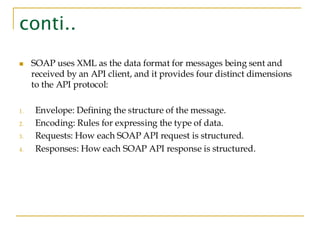
◼ SOAP usesXML as the data format for messages being sent and
received by an API client, and it provides four distinct dimensions
to the API protocol:
1. Envelope: Defining the structure of the message.
2. Encoding: Rules for expressing the type of data.
3. Requests: How each SOAP API request is structured.
4. Responses: How each SOAP API response is structured.
Components of theSOAP Architecture
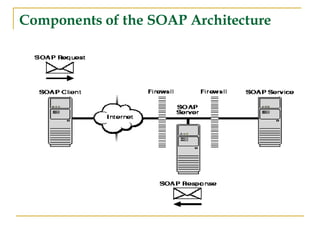
◼ Above diagram shows the path of a SOAP request and a SOAP response
between the SOAP Client and the SOAP Server.
◼ The SOAP request is sent from the system running the SOAP Client, going
out over the Internet as a SOAP request.
◼ The SOAP server receives the request, possibly through a firewall, and
passes the service request to the SOAP Service.
◼ The SOAP Server then sends the SOAP response over the Internet and back
to the SOAP client.
14.
WSDL : WebServices Description
Language
◼ WSDL stands for Web Services Description Language. It is the standard
format for describing a web service. WSDL was developed jointly by
Microsoft and IBM.
◼ It is XML based language format used to describe functionalities and
operations involved in web services.
◼ It basically tells the client application what the web services do. T
◼ he general structure of WSDL consists of Definition, target namespace,
Datatypes, Messages, Port-type, Bindings, and services
15.
WSDL Elements
◼ Definitions:It is the basic element of the WSDL document that contains the
definition of one or more servicessuch as method name..
◼ Types: The Type element is used to give information about the complicated
data types used within the WSDL document.
◼ Message: It contains abstract data that is being used in communication
between client and web server. It also defines the data elements for each
operation.
◼ portType: It contains the collection of abstract operation supported by one
or more endpoints.
◼ Port: It is used to define the single endpoint as an address for the binding.
◼ Services: It is a collection of endpoint networks that specify the port
address for the binding.
◼ Binding: It specifies how operations are implemented by concrete protocols
and data format features for operation and messaging.
16.
Structure of WSDLDocument
<definitions>
<types>
Definition of types goes here.
</types>
<message>
Definition of a message goes here.
</message>
<portType>
<operation>
Definition of an operation goes here.
</operation>
</portType>
<binding>
Definition of a binding goes here.
</binding>
<service>
Definition of service goes here.
</service>
</definition>
17.
UDDI
◼ It isuniversal Description Discovery and Integration .
◼ A directory Service facilating the discovery and publishing of web services .
◼ It is XMLbased framework for describing ,discovery and integrating web
services .
◼ It contains information about web servies .
18.
RSS(Rich Summary Site)or
Really Simple Syndication
◼ It is a web feed format that allows users to access updated content from
websites in a standardized and easily readable manner.
◼ RSS allows users to stay informed about their favorite websites, blogs, news
sources, and more, without having to manually check each one.
◼ Blog posts, news headlines, podcasts, and other regularly updated content
can be syndicated through RSS feeds.
19.
The Importance ofRSS
◼ Automated Content Delivery:
Instead of users having to remember to check a website for new content, RSS
feeds bring this content directly to them.
◼ Time-Saving:
Readers can get a quick snapshot of new content from multiple sources in one
centralized location.
◼ Increased Engagement:
By offering content through RSS, publishers can maintain a consistent
connection with their audience, leading to increased loyalty and repeat visits.
◼ Simplifies Content Sharing:
Other websites or apps can republish or feature content through an RSS feed,
potentially expanding its reach.
20.
Advantages of RSS:
◼Time Efficiency:
RSS streamlines the process of content consumption, saving time by
presenting updates in a centralized location.
◼ Customization:
Users have the flexibility to subscribe to specific feeds based on
their interests, creating a personalized and tailored content
experience.
◼ Reduced Information Overload:
By aggregating content in one place, RSS helps users avoid
information overload and focus on what matters most to them.
◼ Consistent Format:
RSS feeds follow a standardized format, making it easier for
developers to integrate and manipulate the data programmatically.
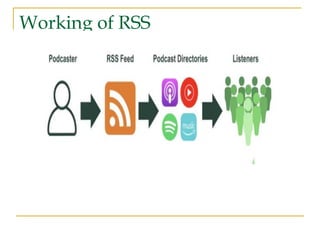
WORKING OF RSS
1.Website publishes an RSS feed:
Websites create an XML file (the RSS feed) that contains details
about their content, like titles, descriptions, links, and publication
dates.
2. User subscribes to the feed:
A user, using an RSS reader (like an app or browser extension),
subscribes to the website's RSS feed by providing the feed's URL.
3. RSS reader checks for updates:
The RSS reader periodically checks the subscribed RSS feeds for
new content.
4. Content is delivered to the reader:
When a new article or post is published, the RSS reader pulls the
details from the feed and displays them to the user in their chosen
RSS reader.
23.
WEB APPLICATION
◼ Aweb application (web app) is an application program
that is stored on a remote server and delivered over the
internet through a browser interface.
◼ A web application, often called a web app, is a software
program accessed through a web browser over a
network like the internet or an intranet.
◼ Examples:
◼ Online shopping platforms (e.g., Amazon, Shopify).
◼ Webmail services (e.g., Gmail, Outlook).
◼ Social media networks (e.g., Facebook, Twitter).
◼ Online banking and financial applications.
24.
Types of webApplications
1) Single-Page Web Applications
◼ Single-Page Web Applications load a single HTML page and dynamically update
content as users interact with the application.
◼ They use JavaScript frameworks like React.js to create a seamless and responsive user
experience. Gmail and Facebook are examples of SPAs.
2) Progressive Web Applications
◼ Progressive Web Applications aim to provide a native app-like experience in a web
browser.
◼ They can work offline, offer push notifications, and provide fast performance.
3) E-commerce Web Applications
◼ E-commerce Web Applications facilitate online shopping and transactions.
◼ They include features such as shopping carts and payment gateway. Examples
include Amazon, eBay, and Shopify.
4) Social Web Applications
◼ Social web applications allow users to create profiles, connect with others, and share
content.
◼ Facebook, Twitter, and LinkedIn are prominent examples of social web apps.
25.
Conti..
5) Multi-Page Applications(MPAs)
◼ MPAs load a new HTML page for each interaction or route. Each page requires a
separate request to the server.
◼
Examples:
◼ Amazon – each category, product, and checkout step is a separate page
◼ BBC News – individual article pages with distinct URLs and metadata.
6) Portal Web Applications
◼ Portals aggregate content and tools in one interface, typically requiring user login to
access personalised dashboards.
◼ Examples:
◼ MyChart – health portal for managing appointments and records
◼ Google Workspace Admin Console – access to organisation tools via role-based
login.
7)Content mgmt. System :
CMS platforms allow users to create, edit, and manage website content without coding.
◼ Examples:
◼ WordPress – powers over 40% of the web with intuitive editing and plugin flexibility
◼ Contentful – modern headless CMS for structured content delivery across channels
26.
examples of webapplications
◼ 1. Google Docs
◼ Google Docs is a cloud-based word processing app that allows users to write, edit, and
collaborate in real time.
◼ As part of Google Workspace, it’s widely used for everything from school assignments
to business reports, making it an essential tool for students, professionals, and teams.
◼ Docs is powered by Google’s cloud infrastructure. Automatic saving to Google Drive
allows multiple users to collaborate seamlessly, and ensures no progress is lost if your
internet connection drops.
◼ Why it’s a great web app:
◼ Real-time collaboration. Users can write and edit in the same document simultaneously,
with changes instantly visible.
◼ Cloud storage integration. Eliminates the need to save files manually or worry about
losing documents.
◼ Cross-platform accessibility. Works on desktops, tablets, and smartphones, making it
available to all users on any platform.
◼ Template gallery. A collection of ready-made templates to help you create professional-
looking documents.
27.
2. Canva
◼ Canvais a web-based graphic design tool for creating social media posts,
presentations, posters, and more. It offers free and pro versions for both
beginners and professionals.
◼ Canva is a great example of how web apps can simplify complex tasks like
graphic design. You can take inspiration from its easy-to-use interface to
help enhance usability.
◼ Why it’s a great web app:
◼ User-friendly design tools. Canva’s drag-and-drop interface ensures you
can design your projects with ease.
◼ Extensive template library. Ready-made layouts for social media, business,
and personal projects.
◼ Cloud storage integration. Work on projects across devices without losing
progress.
◼ Supports digital product creation. Users can design and sell templates,
ebooks, planners, and more.
28.
3. Spotify
◼ Spotifyis a cloud-based music streaming service that gives users
access to millions of songs, podcasts, and playlists.
◼ It’s widely used by music lovers and podcast listeners worldwide,
offering free and premium subscriptions.
◼ Why it’s a great web app:
1. On-demand streaming. Instant access to a massive library of songs
and podcasts.
2. Personalized recommendations. AI curates playlists based on
listening history.
3. Offline listening. Premium users can download songs for offline
playback.
4. Cross-device syncing. Start listening on one device and continue on
another without interruption.
29.
4Netflix
◼ Netflix isa subscription-based streaming service that offers access to
thousands of movies, TV shows, and documentaries. Thanks to a high-
quality content collection and an intelligent recommendation system, it has
become one of the most popular on-demand entertainment providers.
◼ What makes it a great web app:
1. Efficient video streaming. Uses a CDN to deliver smooth, high-quality
playback with minimal lag globally.
2. AI-powered recommendations. Analyzes user behavior to suggest
personalized content.
3. Cross-device synchronization. Seamlessly continues playback across
different devices.
4. Scalable infrastructure. Handles millions of simultaneous streams without
interruptions.