TECHNOLOGY
PRESENTED BY :
ROHIT KUMAR (S.I.T., JAIPUR)
SHRUTI NARAYAN (S.I.T., JAIPUR)
Introduction
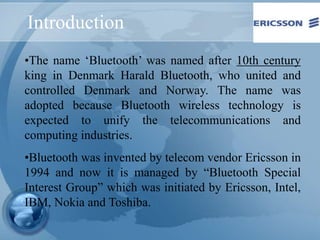
•The name ‘Bluetooth’ was named after 10th century
king in Denmark Harald Bluetooth, who united and
controlled Denmark and Norway. The name was
adopted because Bluetooth wireless technology is
expected to unify the telecommunications and
computing industries.
•Bluetooth was invented by telecom vendor Ericsson in
1994 and now it is managed by “Bluetooth Special
Interest Group” which was initiated by Ericsson, Intel,
IBM, Nokia and Toshiba.
What Is Bluetooth?
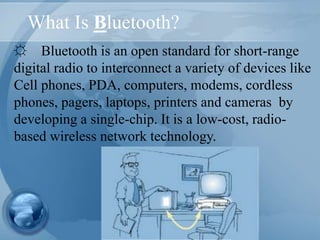
☼ Bluetooth is an open standard for short-range
digital radio to interconnect a variety of devices like
Cell phones, PDA, computers, modems, cordless
phones, pagers, laptops, printers and cameras by
developing a single-chip. It is a low-cost, radio-
based wireless network technology.
How Does It Work?
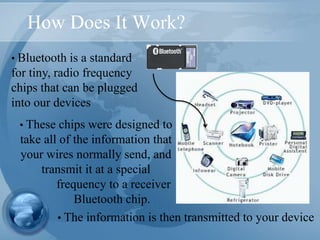
• Bluetooth is a standard
for tiny, radio frequency
chips that can be plugged
into our devices
• The information is then transmitted to your device
• These chips were designed to
take all of the information that
your wires normally send, and
transmit it at a special
frequency to a receiver
Bluetooth chip.
Bluetooth
• Simplifying communications between:
- devices and the internet
- data synchronization
• Operates in licensed exempt ISM(Industrial Scientific
Medical) band at 2.4ghz
• Uses frequency hoping spread spectrum
• Omni directional, no requiring line of sight
• Bluetooth offers data speeds of up to 1 Mbps up to 10
meters.
• Unlike IRDA, Bluetooth supports a LAN-like mode
where multiple devices can interact with each other.
• Short range wireless radio technology
• Bluetooth-enabled devices can automatically locate
each other
Bluetooth
• Bluetooth is a PAN Technology
– Offers fast and reliable transmission for both voice and
data communication.
– Can support either one data channel with up to three
simultaneous speech channels or one channel that
transfers data and speech simultaneously
– Support both packet-switching and circuit-switching
– Eliminate wires and cables between both stationary and
mobile devices
– Offer the possibility of ad hoc networks and deliver
synchronicity between personal devices
Bluetooth Topology
• Topology is established on a temporary and random basis
• One device is master, which controls and setup the network
• All devices operate on the same channel and follow the same
frequency hopping sequence.
• Because a three-bit MAC adress is used, up to eight Bluetooth
devices may be networked together in a master-slave
relationship to form a Piconet.
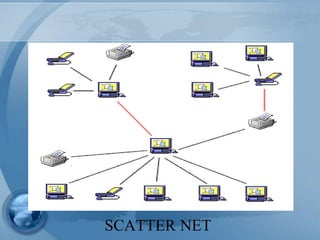
• Two or more piconets are interconnected to form a scatter net.
• For each piconet there can only be one master device.
• A device can’t be masters for two piconets
• The slave of one piconet can be the master of another piconet
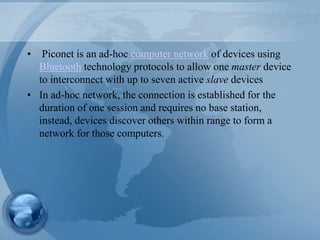
• Piconet is an ad-hoc computer network of devices using
Bluetooth technology protocols to allow one master device
to interconnect with up to seven active slave devices
• In ad-hoc network, the connection is established for the
duration of one session and requires no base station,
instead, devices discover others within range to form a
network for those computers.
SCATTER NET
Advantages
• Wireless (No Cables)
• No Setup Needed
• Low Power Consumption (1 Milliwat)
• Industry Wide Support
• Short range (10 meters)
• Small throughput rates - Data Rate 1.0 Mbps
• Can’t interference with wireless LANs
• Mostly for personal use (PANs)
• Fairly Expensive
Disadvantages
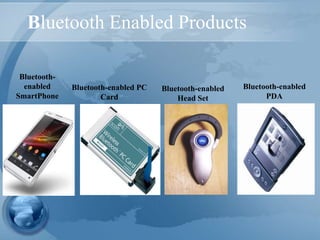
Bluetooth Enabled Products
Bluetooth-enabled PC
Card
Bluetooth-enabled
PDA
Bluetooth-
enabled
SmartPhone
Bluetooth-enabled
Head Set
Bluetooth’s Future
•The future of this technology becoming a standard is likely
•With a strong industry pushing behind it, success is inevitable.
•Often, with new technology, early changes mean
reconstruction. Not With Bluetooth, instead, there will be
an improvement to the existing standard.
•The latest version Bluetooth is now known as Bluetooth 4.2 as they
are trying to develop the product to better fulfill the needs of
consumers
THANKS

Bluetooth technology

  • 1.
    TECHNOLOGY PRESENTED BY : ROHITKUMAR (S.I.T., JAIPUR) SHRUTI NARAYAN (S.I.T., JAIPUR)
  • 2.
    Introduction •The name ‘Bluetooth’was named after 10th century king in Denmark Harald Bluetooth, who united and controlled Denmark and Norway. The name was adopted because Bluetooth wireless technology is expected to unify the telecommunications and computing industries. •Bluetooth was invented by telecom vendor Ericsson in 1994 and now it is managed by “Bluetooth Special Interest Group” which was initiated by Ericsson, Intel, IBM, Nokia and Toshiba.
  • 3.
    What Is Bluetooth? ☼Bluetooth is an open standard for short-range digital radio to interconnect a variety of devices like Cell phones, PDA, computers, modems, cordless phones, pagers, laptops, printers and cameras by developing a single-chip. It is a low-cost, radio- based wireless network technology.
  • 4.
    How Does ItWork? • Bluetooth is a standard for tiny, radio frequency chips that can be plugged into our devices • The information is then transmitted to your device • These chips were designed to take all of the information that your wires normally send, and transmit it at a special frequency to a receiver Bluetooth chip.
  • 5.
    Bluetooth • Simplifying communicationsbetween: - devices and the internet - data synchronization • Operates in licensed exempt ISM(Industrial Scientific Medical) band at 2.4ghz • Uses frequency hoping spread spectrum • Omni directional, no requiring line of sight • Bluetooth offers data speeds of up to 1 Mbps up to 10 meters. • Unlike IRDA, Bluetooth supports a LAN-like mode where multiple devices can interact with each other. • Short range wireless radio technology • Bluetooth-enabled devices can automatically locate each other
  • 6.
    Bluetooth • Bluetooth isa PAN Technology – Offers fast and reliable transmission for both voice and data communication. – Can support either one data channel with up to three simultaneous speech channels or one channel that transfers data and speech simultaneously – Support both packet-switching and circuit-switching – Eliminate wires and cables between both stationary and mobile devices – Offer the possibility of ad hoc networks and deliver synchronicity between personal devices
  • 7.
    Bluetooth Topology • Topologyis established on a temporary and random basis • One device is master, which controls and setup the network • All devices operate on the same channel and follow the same frequency hopping sequence. • Because a three-bit MAC adress is used, up to eight Bluetooth devices may be networked together in a master-slave relationship to form a Piconet. • Two or more piconets are interconnected to form a scatter net. • For each piconet there can only be one master device. • A device can’t be masters for two piconets • The slave of one piconet can be the master of another piconet
  • 8.
    • Piconet isan ad-hoc computer network of devices using Bluetooth technology protocols to allow one master device to interconnect with up to seven active slave devices • In ad-hoc network, the connection is established for the duration of one session and requires no base station, instead, devices discover others within range to form a network for those computers.
  • 9.
  • 10.
    Advantages • Wireless (NoCables) • No Setup Needed • Low Power Consumption (1 Milliwat) • Industry Wide Support • Short range (10 meters) • Small throughput rates - Data Rate 1.0 Mbps • Can’t interference with wireless LANs • Mostly for personal use (PANs) • Fairly Expensive Disadvantages
  • 11.
    Bluetooth Enabled Products Bluetooth-enabledPC Card Bluetooth-enabled PDA Bluetooth- enabled SmartPhone Bluetooth-enabled Head Set
  • 12.
    Bluetooth’s Future •The futureof this technology becoming a standard is likely •With a strong industry pushing behind it, success is inevitable. •Often, with new technology, early changes mean reconstruction. Not With Bluetooth, instead, there will be an improvement to the existing standard. •The latest version Bluetooth is now known as Bluetooth 4.2 as they are trying to develop the product to better fulfill the needs of consumers
  • 13.