UNIX Shell-Scripting Basics
Agenda What is a shell?  A shell script? Introduction to  bash Running Commands Applied Shell Programming
What is a shell? % ā–Œ
What is a shell? /bin/bash
What is a shell? #!/bin/bash
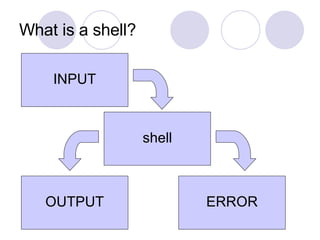
What is a shell? INPUT shell OUTPUT ERROR
What is a shell? Any Program But there are a few popular shells…
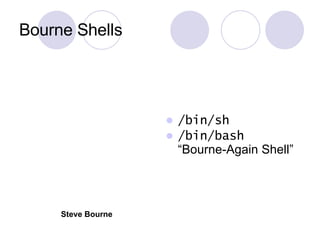
Bourne Shells /bin/sh /bin/bash ā€œBourne-Again Shellā€ Steve Bourne
Other Common Shells C Shell ( /bin/csh ) Turbo C Shell ( /bin/tcsh ) Korn Shell ( /bin/ksh )
An aside: What do I mean by /bin ? C Shell ( /bin/csh ) Turbo C Shell ( /bin/tcsh ) Korn Shell ( /bin/ksh )
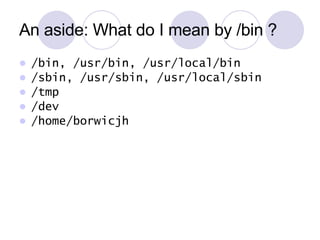
An aside: What do I mean by /bin ? /bin, /usr/bin, /usr/local/bin /sbin, /usr/sbin, /usr/local/sbin /tmp /dev /home/borwicjh
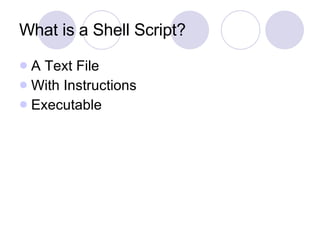
What is a Shell Script? A Text File With Instructions Executable
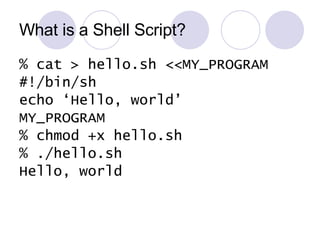
What is a Shell Script? % cat > hello.sh <<MY_PROGRAM #!/bin/sh echo ā€˜Hello, world’ MY_PROGRAM % chmod +x hello.sh % ./hello.sh Hello, world
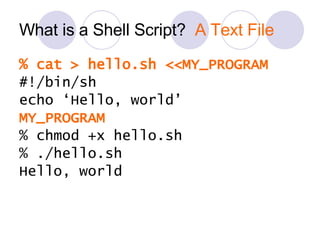
What is a Shell Script?  A Text File % cat > hello.sh <<MY_PROGRAM #!/bin/sh echo ā€˜Hello, world’ MY_PROGRAM % chmod +x hello.sh % ./hello.sh Hello, world
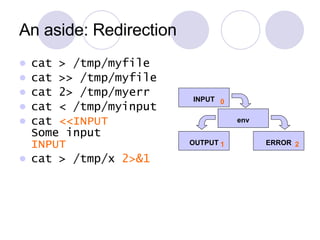
An aside: Redirection cat > /tmp/myfile cat >> /tmp/myfile cat 2> /tmp/myerr cat < /tmp/myinput cat  <<INPUT Some input INPUT cat > /tmp/x  2>&1 0 1 2 INPUT env OUTPUT ERROR
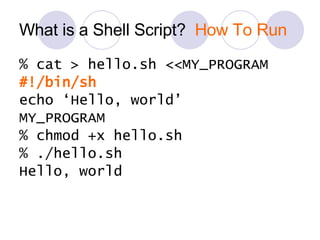
What is a Shell Script?  How To Run % cat > hello.sh <<MY_PROGRAM #!/bin/sh echo ā€˜Hello, world’ MY_PROGRAM % chmod +x hello.sh % ./hello.sh Hello, world
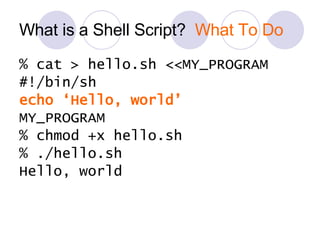
What is a Shell Script?  What To Do % cat > hello.sh <<MY_PROGRAM #!/bin/sh echo ā€˜Hello, world’ MY_PROGRAM % chmod +x hello.sh % ./hello.sh Hello, world
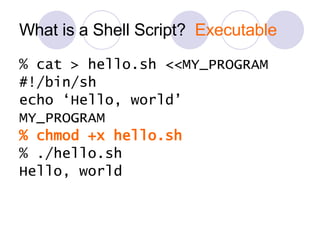
What is a Shell Script?  Executable % cat > hello.sh <<MY_PROGRAM #!/bin/sh echo ā€˜Hello, world’ MY_PROGRAM % chmod +x hello.sh % ./hello.sh Hello, world
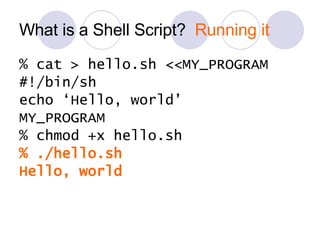
What is a Shell Script?  Running it % cat > hello.sh <<MY_PROGRAM #!/bin/sh echo ā€˜Hello, world’ MY_PROGRAM % chmod +x hello.sh % ./hello.sh Hello, world
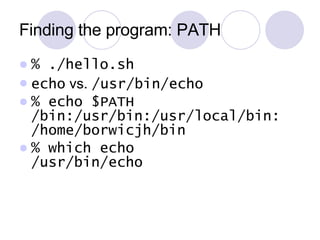
Finding the program: PATH % ./hello.sh echo  vs.  /usr/bin/echo % echo $PATH /bin:/usr/bin:/usr/local/bin: /home/borwicjh/bin % which echo /usr/bin/echo
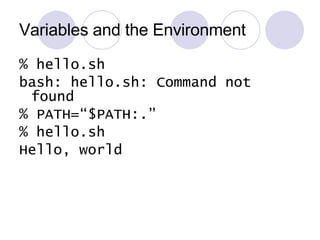
Variables and the Environment % hello.sh bash: hello.sh: Command not found % PATH=ā€œ$PATH:.ā€ % hello.sh Hello, world
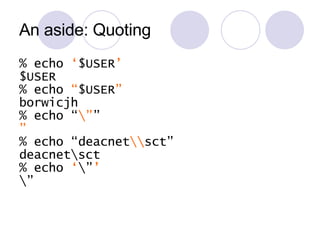
An aside: Quoting % echo  ā€˜ $USER ’ $USER % echo  ā€œ $USER ā€ borwicjh % echo ā€œ \ā€ ā€ ā€ % echo ā€œdeacnet \\ sctā€ deacnet\sct % echo  ā€˜ \ā€ ’ \ā€
Variables and the Environment % env […variables passed to sub-programs…] % NEW_VAR=ā€œYesā€ % echo $NEW_VAR Yes % env […PATH but not NEW_VAR…] % export NEW_VAR % env […PATH and NEW_VAR…]
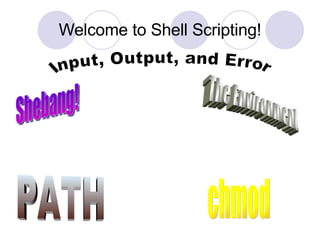
Welcome to Shell Scripting! Shebang! The Environment PATH Input, Output, and Error chmod
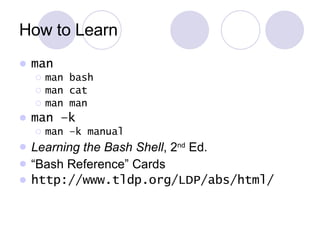
How to Learn man man bash man cat man man man –k man –k manual Learning the Bash Shell , 2 nd  Ed. ā€œ Bash Referenceā€ Cards http://www.tldp.org/LDP/abs/html/
Introduction to  bash
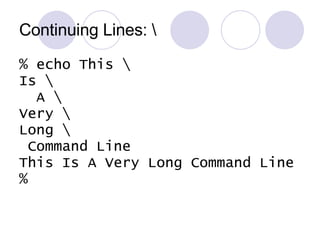
Continuing Lines: \ % echo This \ Is \ A \ Very \ Long \ Command Line This Is A Very Long Command Line %
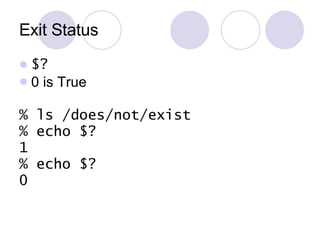
Exit Status $? 0 is True % ls /does/not/exist % echo $? 1 % echo $? 0
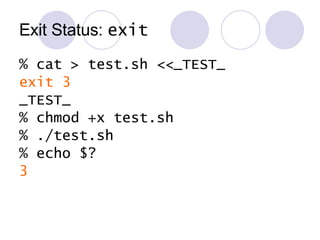
Exit Status:  exit % cat > test.sh <<_TEST_ exit 3 _TEST_ % chmod +x test.sh % ./test.sh % echo $? 3
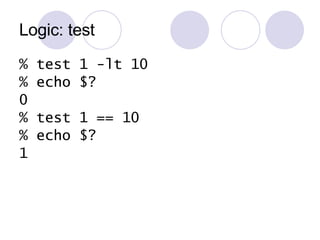
Logic: test % test 1 -lt 10 % echo $? 0 % test 1 == 10 % echo $? 1
Logic: test test [ ] [ 1 –lt 10 ]  [[ ]] [[ ā€œthis stringā€ =~ ā€œthisā€ ]] (( )) (( 1 < 10 ))
Logic: test [ -f /etc/passwd ] [ ! –f /etc/passwd ] [ -f /etc/passwd –a –f /etc/shadow ] [ -f /etc/passwd –o –f /etc/shadow ]
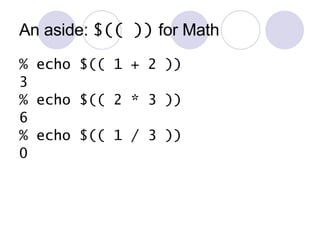
An aside:  $(( ))  for Math % echo $(( 1 + 2 )) 3 % echo $(( 2 * 3 )) 6 % echo $(( 1 / 3 )) 0
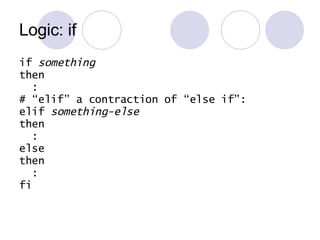
Logic: if if  something then : # ā€œelifā€ a contraction of ā€œelse ifā€: elif  something-else then : else then : fi
Logic: if if  [ $USER –eq ā€œborwicjhā€ ] then : # ā€œelifā€ a contraction of ā€œelse ifā€: elif  ls /etc/oratab then : else then : fi
Logic: if # see if a file exists if  [ -e /etc/passwd ] then echo ā€œ/etc/passwd existsā€ else echo ā€œ/etc/passwd not found!ā€ fi
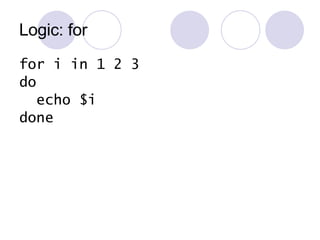
Logic: for for i in 1 2 3 do echo $i done
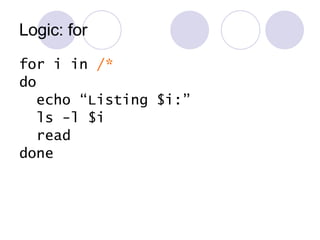
Logic: for for i in  /* do echo ā€œListing $i:ā€ ls -l $i read done
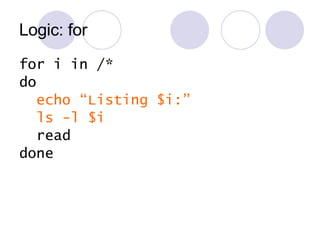
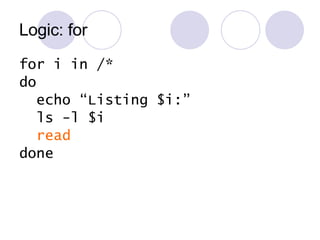
Logic: for for i in /* do echo ā€œListing $i:ā€ ls -l $i read done
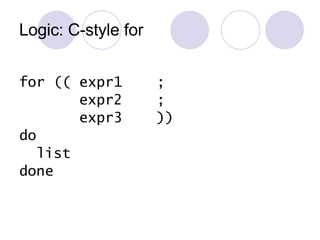
Logic: C-style for for (( expr1  ; expr2  ; expr3  )) do list done
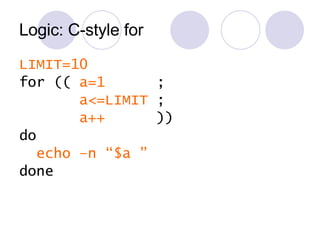
Logic: C-style for LIMIT=10 for ((  a=1   ; a<=LIMIT  ; a++  )) do echo –n ā€œ$a ā€ done
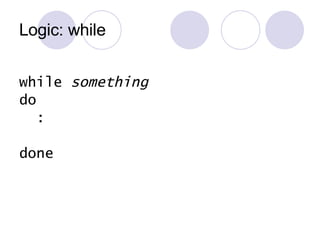
Logic: while while  something do : done
Logic: while a=0; LIMIT=10 while [  &quot;$a&quot; -lt &quot;$LIMIT&quot;  ] do echo -n &quot;$a ā€ a=$(( a + 1 )) done
Counters COUNTER=0 while [ -e ā€œ$FILE.COUNTERā€ ] do COUNTER=$(( COUNTER + 1)) done Note: race condition
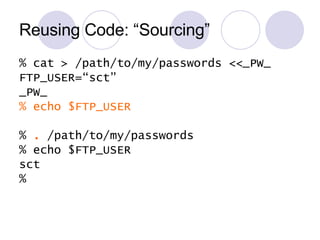
Reusing Code: ā€œSourcingā€ % cat > /path/to/my/passwords <<_PW_ FTP_USER=ā€œsctā€ _PW_ % echo $FTP_USER %  .  /path/to/my/passwords % echo $FTP_USER sct %
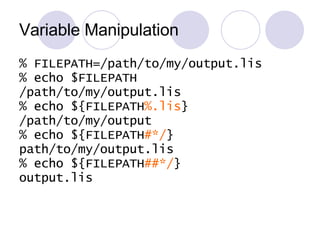
Variable Manipulation % FILEPATH=/path/to/my/output.lis % echo $FILEPATH /path/to/my/output.lis % echo ${FILEPATH %.lis } /path/to/my/output % echo ${FILEPATH #*/ } path/to/my/output.lis % echo ${FILEPATH ##*/ } output.lis
It takes a long time to become a bash guru…
Running Programs
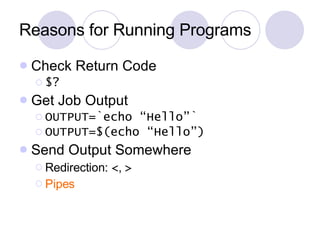
Reasons for Running Programs Check Return Code $? Get Job Output OUTPUT=`echo ā€œHelloā€` OUTPUT=$(echo ā€œHelloā€) Send Output Somewhere Redirection:  < ,  > Pipes
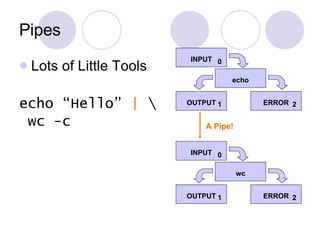
Pipes Lots of Little Tools echo ā€œHelloā€  |  \ wc -c INPUT echo OUTPUT ERROR 0 1 2 INPUT wc OUTPUT ERROR 0 1 2 A Pipe!
Email Notification % echo ā€œMessageā€ | \ mail –s ā€œHere’s your messageā€ \ [email_address]
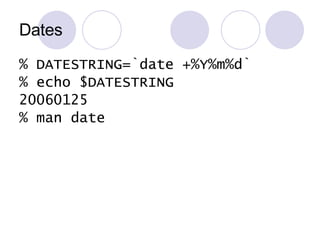
Dates % DATESTRING=`date +%Y%m%d` % echo $DATESTRING 20060125 % man date
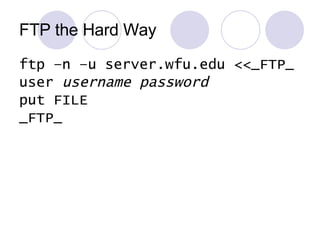
FTP the Hard Way ftp –n –u server.wfu.edu <<_FTP_ user  username password put FILE _FTP_
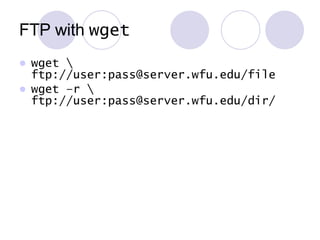
FTP with  wget wget \ ftp://user:pass@server.wfu.edu/file wget –r \ ftp://user:pass@server.wfu.edu/dir/
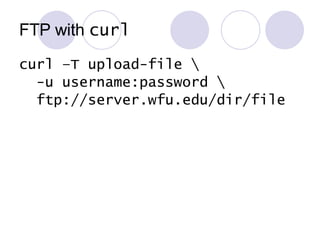
FTP with  curl curl –T upload-file \ -u username:password \ ftp://server.wfu.edu/dir/file
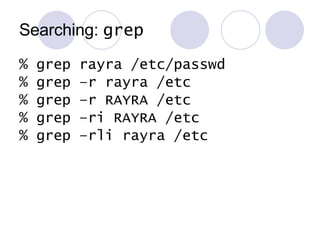
Searching:  grep % grep rayra /etc/passwd % grep –r rayra /etc % grep –r RAYRA /etc % grep –ri RAYRA /etc % grep –rli rayra /etc
Searching:  find %  find /home/borwicjh \ -name ā€˜*.lis’ [all files matching *.lis] % find /home/borwicjh \ -mtime -1 –name ā€˜*.lis’ [*.lis, if modified within 24h] % man find
Searching:  locate % locate .lis [files with .lis in path] % locate log [also finds ā€œ/var/log/messagesā€]
Applied Shell Programming
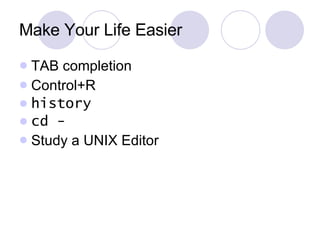
Make Your Life Easier TAB completion Control+R history cd - Study a UNIX Editor
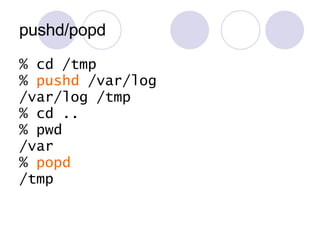
pushd/popd % cd /tmp %  pushd  /var/log /var/log /tmp % cd .. % pwd /var %  popd /tmp
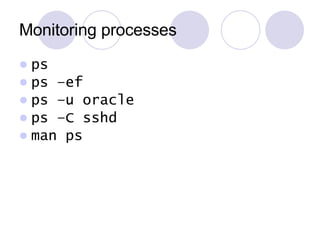
Monitoring processes ps ps –ef ps –u oracle ps –C sshd man ps
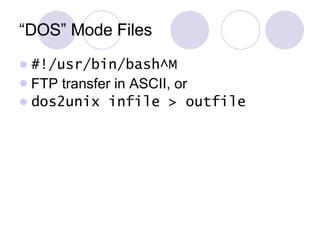
ā€œDOSā€ Mode Files #!/usr/bin/bash^M FTP transfer in ASCII, or dos2unix infile > outfile
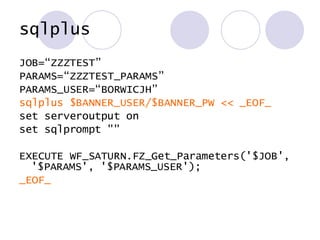
sqlplus JOB=ā€œZZZTESTā€ PARAMS=ā€œZZZTEST_PARAMSā€ PARAMS_USER=ā€œBORWICJHā€ sqlplus $BANNER_USER/$BANNER_PW << _EOF_ set serveroutput on set sqlprompt &quot;&quot; EXECUTE WF_SATURN.FZ_Get_Parameters('$JOB', '$PARAMS', '$PARAMS_USER'); _EOF_
sqlplus sqlplus $USER/$PASS @$FILE_SQL \ $ARG1 $ARG2 $ARG3 if [ $? –ne 0 ] then exit 1 fi if [  -e /file/sql/should/create  ] then […use SQL-created file…] fi Ask Amy Lamy!  
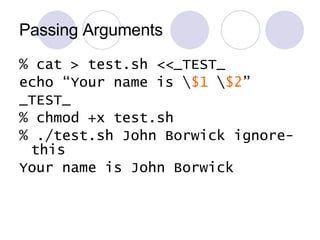
Passing Arguments % cat > test.sh <<_TEST_ echo ā€œYour name is \ $1  \ $2 ā€ _TEST_ % chmod +x test.sh % ./test.sh John Borwick ignore-this Your name is John Borwick
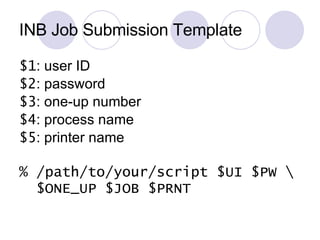
INB Job Submission Template $1 : user ID $2 : password $3 : one-up number $4 : process name $5 : printer name % /path/to/your/script $UI $PW \ $ONE_UP $JOB $PRNT
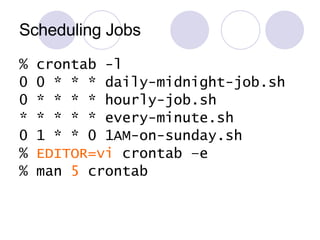
Scheduling Jobs % crontab -l 0 0 * * * daily-midnight-job.sh 0 * * * * hourly-job.sh * * * * * every-minute.sh 0 1 * * 0 1AM-on-sunday.sh %  EDITOR=vi  crontab –e % man  5  crontab
It's Over!
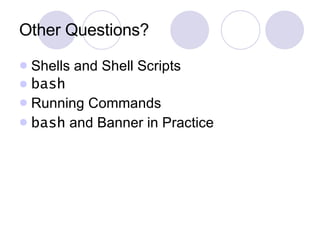
Other Questions? Shells and Shell Scripts bash Running Commands bash  and Banner in Practice

Unix Shell Scripting Basics

  • 1.
  • 2.
    Agenda What isa shell? A shell script? Introduction to bash Running Commands Applied Shell Programming
  • 3.
    What is ashell? % ā–Œ
  • 4.
    What is ashell? /bin/bash
  • 5.
    What is ashell? #!/bin/bash
  • 6.
    What is ashell? INPUT shell OUTPUT ERROR
  • 7.
    What is ashell? Any Program But there are a few popular shells…
  • 8.
    Bourne Shells /bin/sh/bin/bash ā€œBourne-Again Shellā€ Steve Bourne
  • 9.
    Other Common ShellsC Shell ( /bin/csh ) Turbo C Shell ( /bin/tcsh ) Korn Shell ( /bin/ksh )
  • 10.
    An aside: Whatdo I mean by /bin ? C Shell ( /bin/csh ) Turbo C Shell ( /bin/tcsh ) Korn Shell ( /bin/ksh )
  • 11.
    An aside: Whatdo I mean by /bin ? /bin, /usr/bin, /usr/local/bin /sbin, /usr/sbin, /usr/local/sbin /tmp /dev /home/borwicjh
  • 12.
    What is aShell Script? A Text File With Instructions Executable
  • 13.
    What is aShell Script? % cat > hello.sh <<MY_PROGRAM #!/bin/sh echo ā€˜Hello, world’ MY_PROGRAM % chmod +x hello.sh % ./hello.sh Hello, world
  • 14.
    What is aShell Script? A Text File % cat > hello.sh <<MY_PROGRAM #!/bin/sh echo ā€˜Hello, world’ MY_PROGRAM % chmod +x hello.sh % ./hello.sh Hello, world
  • 15.
    An aside: Redirectioncat > /tmp/myfile cat >> /tmp/myfile cat 2> /tmp/myerr cat < /tmp/myinput cat <<INPUT Some input INPUT cat > /tmp/x 2>&1 0 1 2 INPUT env OUTPUT ERROR
  • 16.
    What is aShell Script? How To Run % cat > hello.sh <<MY_PROGRAM #!/bin/sh echo ā€˜Hello, world’ MY_PROGRAM % chmod +x hello.sh % ./hello.sh Hello, world
  • 17.
    What is aShell Script? What To Do % cat > hello.sh <<MY_PROGRAM #!/bin/sh echo ā€˜Hello, world’ MY_PROGRAM % chmod +x hello.sh % ./hello.sh Hello, world
  • 18.
    What is aShell Script? Executable % cat > hello.sh <<MY_PROGRAM #!/bin/sh echo ā€˜Hello, world’ MY_PROGRAM % chmod +x hello.sh % ./hello.sh Hello, world
  • 19.
    What is aShell Script? Running it % cat > hello.sh <<MY_PROGRAM #!/bin/sh echo ā€˜Hello, world’ MY_PROGRAM % chmod +x hello.sh % ./hello.sh Hello, world
  • 20.
    Finding the program:PATH % ./hello.sh echo vs. /usr/bin/echo % echo $PATH /bin:/usr/bin:/usr/local/bin: /home/borwicjh/bin % which echo /usr/bin/echo
  • 21.
    Variables and theEnvironment % hello.sh bash: hello.sh: Command not found % PATH=ā€œ$PATH:.ā€ % hello.sh Hello, world
  • 22.
    An aside: Quoting% echo ā€˜ $USER ’ $USER % echo ā€œ $USER ā€ borwicjh % echo ā€œ \ā€ ā€ ā€ % echo ā€œdeacnet \\ sctā€ deacnet\sct % echo ā€˜ \ā€ ’ \ā€
  • 23.
    Variables and theEnvironment % env […variables passed to sub-programs…] % NEW_VAR=ā€œYesā€ % echo $NEW_VAR Yes % env […PATH but not NEW_VAR…] % export NEW_VAR % env […PATH and NEW_VAR…]
  • 24.
    Welcome to ShellScripting! Shebang! The Environment PATH Input, Output, and Error chmod
  • 25.
    How to Learnman man bash man cat man man man –k man –k manual Learning the Bash Shell , 2 nd Ed. ā€œ Bash Referenceā€ Cards http://www.tldp.org/LDP/abs/html/
  • 26.
  • 27.
    Continuing Lines: \% echo This \ Is \ A \ Very \ Long \ Command Line This Is A Very Long Command Line %
  • 28.
    Exit Status $?0 is True % ls /does/not/exist % echo $? 1 % echo $? 0
  • 29.
    Exit Status: exit % cat > test.sh <<_TEST_ exit 3 _TEST_ % chmod +x test.sh % ./test.sh % echo $? 3
  • 30.
    Logic: test %test 1 -lt 10 % echo $? 0 % test 1 == 10 % echo $? 1
  • 31.
    Logic: test test[ ] [ 1 –lt 10 ] [[ ]] [[ ā€œthis stringā€ =~ ā€œthisā€ ]] (( )) (( 1 < 10 ))
  • 32.
    Logic: test [-f /etc/passwd ] [ ! –f /etc/passwd ] [ -f /etc/passwd –a –f /etc/shadow ] [ -f /etc/passwd –o –f /etc/shadow ]
  • 33.
    An aside: $(( )) for Math % echo $(( 1 + 2 )) 3 % echo $(( 2 * 3 )) 6 % echo $(( 1 / 3 )) 0
  • 34.
    Logic: if if something then : # ā€œelifā€ a contraction of ā€œelse ifā€: elif something-else then : else then : fi
  • 35.
    Logic: if if [ $USER –eq ā€œborwicjhā€ ] then : # ā€œelifā€ a contraction of ā€œelse ifā€: elif ls /etc/oratab then : else then : fi
  • 36.
    Logic: if #see if a file exists if [ -e /etc/passwd ] then echo ā€œ/etc/passwd existsā€ else echo ā€œ/etc/passwd not found!ā€ fi
  • 37.
    Logic: for fori in 1 2 3 do echo $i done
  • 38.
    Logic: for fori in /* do echo ā€œListing $i:ā€ ls -l $i read done
  • 39.
    Logic: for fori in /* do echo ā€œListing $i:ā€ ls -l $i read done
  • 40.
    Logic: for fori in /* do echo ā€œListing $i:ā€ ls -l $i read done
  • 41.
    Logic: C-style forfor (( expr1 ; expr2 ; expr3 )) do list done
  • 42.
    Logic: C-style forLIMIT=10 for (( a=1 ; a<=LIMIT ; a++ )) do echo –n ā€œ$a ā€ done
  • 43.
    Logic: while while something do : done
  • 44.
    Logic: while a=0;LIMIT=10 while [ &quot;$a&quot; -lt &quot;$LIMIT&quot; ] do echo -n &quot;$a ā€ a=$(( a + 1 )) done
  • 45.
    Counters COUNTER=0 while[ -e ā€œ$FILE.COUNTERā€ ] do COUNTER=$(( COUNTER + 1)) done Note: race condition
  • 46.
    Reusing Code: ā€œSourcingā€% cat > /path/to/my/passwords <<_PW_ FTP_USER=ā€œsctā€ _PW_ % echo $FTP_USER % . /path/to/my/passwords % echo $FTP_USER sct %
  • 47.
    Variable Manipulation %FILEPATH=/path/to/my/output.lis % echo $FILEPATH /path/to/my/output.lis % echo ${FILEPATH %.lis } /path/to/my/output % echo ${FILEPATH #*/ } path/to/my/output.lis % echo ${FILEPATH ##*/ } output.lis
  • 48.
    It takes along time to become a bash guru…
  • 49.
  • 50.
    Reasons for RunningPrograms Check Return Code $? Get Job Output OUTPUT=`echo ā€œHelloā€` OUTPUT=$(echo ā€œHelloā€) Send Output Somewhere Redirection: < , > Pipes
  • 51.
    Pipes Lots ofLittle Tools echo ā€œHelloā€ | \ wc -c INPUT echo OUTPUT ERROR 0 1 2 INPUT wc OUTPUT ERROR 0 1 2 A Pipe!
  • 52.
    Email Notification %echo ā€œMessageā€ | \ mail –s ā€œHere’s your messageā€ \ [email_address]
  • 53.
    Dates % DATESTRING=`date+%Y%m%d` % echo $DATESTRING 20060125 % man date
  • 54.
    FTP the HardWay ftp –n –u server.wfu.edu <<_FTP_ user username password put FILE _FTP_
  • 55.
    FTP with wget wget \ ftp://user:pass@server.wfu.edu/file wget –r \ ftp://user:pass@server.wfu.edu/dir/
  • 56.
    FTP with curl curl –T upload-file \ -u username:password \ ftp://server.wfu.edu/dir/file
  • 57.
    Searching: grep% grep rayra /etc/passwd % grep –r rayra /etc % grep –r RAYRA /etc % grep –ri RAYRA /etc % grep –rli rayra /etc
  • 58.
    Searching: find% find /home/borwicjh \ -name ā€˜*.lis’ [all files matching *.lis] % find /home/borwicjh \ -mtime -1 –name ā€˜*.lis’ [*.lis, if modified within 24h] % man find
  • 59.
    Searching: locate% locate .lis [files with .lis in path] % locate log [also finds ā€œ/var/log/messagesā€]
  • 60.
  • 61.
    Make Your LifeEasier TAB completion Control+R history cd - Study a UNIX Editor
  • 62.
    pushd/popd % cd/tmp % pushd /var/log /var/log /tmp % cd .. % pwd /var % popd /tmp
  • 63.
    Monitoring processes psps –ef ps –u oracle ps –C sshd man ps
  • 64.
    ā€œDOSā€ Mode Files#!/usr/bin/bash^M FTP transfer in ASCII, or dos2unix infile > outfile
  • 65.
    sqlplus JOB=ā€œZZZTESTā€ PARAMS=ā€œZZZTEST_PARAMSā€PARAMS_USER=ā€œBORWICJHā€ sqlplus $BANNER_USER/$BANNER_PW << _EOF_ set serveroutput on set sqlprompt &quot;&quot; EXECUTE WF_SATURN.FZ_Get_Parameters('$JOB', '$PARAMS', '$PARAMS_USER'); _EOF_
  • 66.
    sqlplus sqlplus $USER/$PASS@$FILE_SQL \ $ARG1 $ARG2 $ARG3 if [ $? –ne 0 ] then exit 1 fi if [ -e /file/sql/should/create ] then […use SQL-created file…] fi Ask Amy Lamy! 
  • 67.
    Passing Arguments %cat > test.sh <<_TEST_ echo ā€œYour name is \ $1 \ $2 ā€ _TEST_ % chmod +x test.sh % ./test.sh John Borwick ignore-this Your name is John Borwick
  • 68.
    INB Job SubmissionTemplate $1 : user ID $2 : password $3 : one-up number $4 : process name $5 : printer name % /path/to/your/script $UI $PW \ $ONE_UP $JOB $PRNT
  • 69.
    Scheduling Jobs %crontab -l 0 0 * * * daily-midnight-job.sh 0 * * * * hourly-job.sh * * * * * every-minute.sh 0 1 * * 0 1AM-on-sunday.sh % EDITOR=vi crontab –e % man 5 crontab
  • 70.
  • 71.
    Other Questions? Shellsand Shell Scripts bash Running Commands bash and Banner in Practice