

BGP update source
www.netprotocolxpert.in
 For BGP, a neighbor relationship to be established,
source IP address of BGP packets sent by a router must
be the same as neighbor ip-address set on the
neighboring router.
 By default, packet’s source IP address is outgoing
interface.
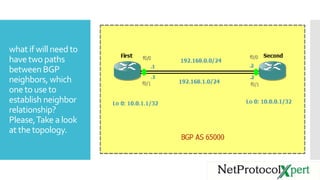
what if will need to
have two paths
between BGP
neighbors, which
one to use to
establish neighbor
relationship?
Please,Take a look
at the topology.
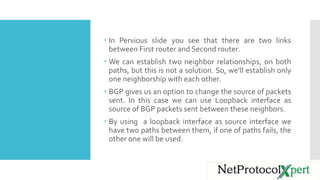
 In Pervious slide you see that there are two links
between First router and Second router.
 We can establish two neighbor relationships, on both
paths, but this is not a solution. So, we’ll establish only
one neighborship with each other.
 BGP gives us an option to change the source of packets
sent. In this case we can use Loopback interface as
source of BGP packets sent between these neighbors.
 By using a loopback interface as source interface we
have two paths between them, if one of paths fails, the
other one will be used.
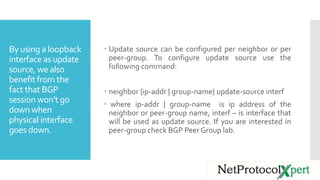
By using a loopback
interface as update
source, we also
benefit from the
fact that BGP
session won’t go
down when
physical interface
goes down.
 Update source can be configured per neighbor or per
peer-group. To configure update source use the
following command:
 neighbor {ip-addr | group-name} update-source interf
 where ip-addr | group-name is ip address of the
neighbor or peer-group name, interf – is interface that
will be used as update source. If you are interested in
peer-group check BGP Peer Group lab.
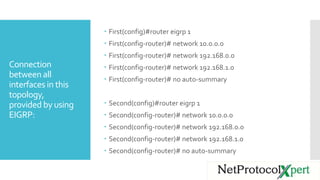
Connection
between all
interfaces in this
topology,
provided by using
EIGRP:
 First(config)#router eigrp 1
 First(config-router)# network 10.0.0.0
 First(config-router)# network 192.168.0.0
 First(config-router)# network 192.168.1.0
 First(config-router)# no auto-summary
 Second(config)#router eigrp 1
 Second(config-router)# network 10.0.0.0
 Second(config-router)# network 192.168.0.0
 Second(config-router)# network 192.168.1.0
 Second(config-router)# no auto-summary
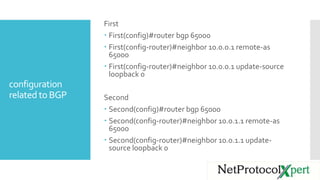
configuration
related to BGP
First
 First(config)#router bgp 65000
 First(config-router)#neighbor 10.0.0.1 remote-as
65000
 First(config-router)#neighbor 10.0.0.1 update-source
loopback 0
Second
 Second(config)#router bgp 65000
 Second(config-router)#neighbor 10.0.1.1 remote-as
65000
 Second(config-router)#neighbor 10.0.1.1 update-
source loopback 0
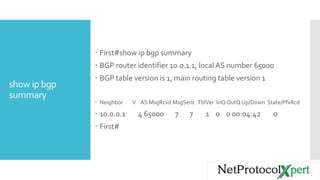
show ip bgp
summary
 First#show ip bgp summary
 BGP router identifier 10.0.1.1, local AS number 65000
 BGP table version is 1, main routing table version 1
 Neighbor V AS MsgRcvd MsgSent TblVer InQ OutQ Up/Down State/PfxRcd
 10.0.0.1 4 65000 7 7 1 0 0 00:04:42 0
 First#
Follow us
https://www.facebook.com/Ne
tProtocolXpert/
https://www.linkedin.com/co
mpany/netprotocol-xpert
https://plus.google.com/u/0/c
ollection/AYQ-EB
https://www.instagram.com/n
etprotocol_xpert/
https://twitter.com/NPX_cisco
https://branded.me/netprotoc
olxpert

BGP Update Source

  • 1.
  • 2.
     For BGP,a neighbor relationship to be established, source IP address of BGP packets sent by a router must be the same as neighbor ip-address set on the neighboring router.  By default, packet’s source IP address is outgoing interface.
  • 3.
    what if willneed to have two paths between BGP neighbors, which one to use to establish neighbor relationship? Please,Take a look at the topology.
  • 4.
     In Perviousslide you see that there are two links between First router and Second router.  We can establish two neighbor relationships, on both paths, but this is not a solution. So, we’ll establish only one neighborship with each other.  BGP gives us an option to change the source of packets sent. In this case we can use Loopback interface as source of BGP packets sent between these neighbors.  By using a loopback interface as source interface we have two paths between them, if one of paths fails, the other one will be used.
  • 5.
    By using aloopback interface as update source, we also benefit from the fact that BGP session won’t go down when physical interface goes down.  Update source can be configured per neighbor or per peer-group. To configure update source use the following command:  neighbor {ip-addr | group-name} update-source interf  where ip-addr | group-name is ip address of the neighbor or peer-group name, interf – is interface that will be used as update source. If you are interested in peer-group check BGP Peer Group lab.
  • 6.
    Connection between all interfaces inthis topology, provided by using EIGRP:  First(config)#router eigrp 1  First(config-router)# network 10.0.0.0  First(config-router)# network 192.168.0.0  First(config-router)# network 192.168.1.0  First(config-router)# no auto-summary  Second(config)#router eigrp 1  Second(config-router)# network 10.0.0.0  Second(config-router)# network 192.168.0.0  Second(config-router)# network 192.168.1.0  Second(config-router)# no auto-summary
  • 7.
    configuration related to BGP First First(config)#router bgp 65000  First(config-router)#neighbor 10.0.0.1 remote-as 65000  First(config-router)#neighbor 10.0.0.1 update-source loopback 0 Second  Second(config)#router bgp 65000  Second(config-router)#neighbor 10.0.1.1 remote-as 65000  Second(config-router)#neighbor 10.0.1.1 update- source loopback 0
  • 8.
    show ip bgp summary First#show ip bgp summary  BGP router identifier 10.0.1.1, local AS number 65000  BGP table version is 1, main routing table version 1  Neighbor V AS MsgRcvd MsgSent TblVer InQ OutQ Up/Down State/PfxRcd  10.0.0.1 4 65000 7 7 1 0 0 00:04:42 0  First#
  • 9.