Segment Routing Lab
Santiago Alvarez
Maan Al Bachari
Thierry Couture
Thank you for attending Cisco Connect Toronto 2015, here are a few
housekeeping notes to ensure we all enjoy the session today.
§  Please ensure your cellphones / laptops are set on silent to ensure no
one is disturbed during the session
§  A power bar is available under each desk in case you need to charge
your laptop (Labs only)
House Keeping Notes
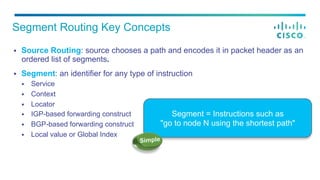
§  Source Routing: source chooses a path and encodes it in packet header as an
ordered list of segments.
§  Segment: an identifier for any type of instruction
§  Service
§  Context
§  Locator
§  IGP-based forwarding construct
§  BGP-based forwarding construct
§  Local value or Global Index
Segment Routing Key Concepts
Segment = Instructions such as
"go to node N using the shortest path"
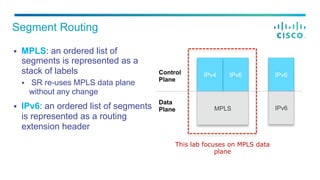
§  MPLS: an ordered list of
segments is represented as a
stack of labels
§  SR re-uses MPLS data plane
without any change
§  IPv6: an ordered list of segments
is represented as a routing
extension header
Segment Routing
This lab focuses on MPLS data
plane
IPv6 IPv6
IPv6
Control
Plane
IPv4
MPLS
Data
Plane
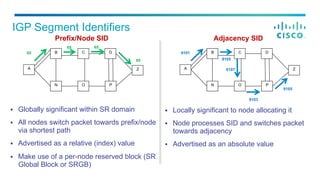
§  Locally significant to node allocating it
§  Node processes SID and switches packet
towards adjacency
§  Advertised as an absolute value
IGP Segment Identifiers
§  Globally significant within SR domain
§  All nodes switch packet towards prefix/node
via shortest path
§  Advertised as a relative (index) value
§  Make use of a per-node reserved block (SR
Global Block or SRGB)
B C
N O
Z
D
P
A
9101
9105
9107
9103
9105
B C
N O
Z
D
P
A
65
65
65 65
Prefix/Node SID Adjacency SID
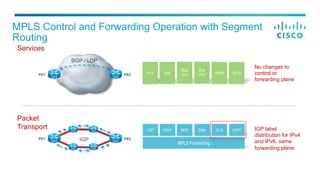
MPLS Control and Forwarding Operation with Segment
Routing
PE1 PE2
IGPPE1 PE2
Services
IPv4 IPv6
IPv4
VPN
IPv6
VPN VPWS VPLS
Packet
Transport LDP
MPLS Forwarding
RSVP BGP Static IS-IS OSPF
No changes to
control or
forwarding plane
IGP label
distribution for IPv4
and IPv6, same
forwarding plane
BGP / LDP
§  Prefix SID
§  SID encoded as an index
§  Index represents an offset from SRGB base
§  Index globally unique
§  SRGB may vary across LSRs
§  SRGB (base and range) advertised with router
capabilities
§  Adjacency SID
§  SID encoded as absolute (i.e. not indexed)
value
§  Locally significant
§  Automatically allocated for each adjacency
SID Encoding
SRGB = [ 16000 - 23999 ]. Advertised as base = 16,000, range = 7999
Prefix SID = 16041. Advertised as Prefix SID Index = 41
Adjacency SID = 24000. Advertised as Adjacency SID = 24000
SR-enabled Node
§  Each pod has a dedicated test bed that has been partially pre-
configured
§  The devices dedicated to a pod are isolated from the devices assigned
to other pods
§  Follow the tasks and steps in the order provided
§  Explore the entire test bed and verify operation beyond the sample
output provided
Lab General Instructions
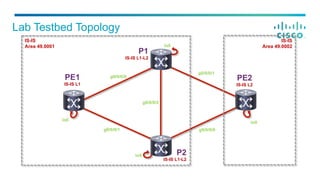
Lab Testbed Topology
g0/0/0/1
g0/0/0/1 g0/0/0/0
g0/0/0/2
lo0
lo0
g0/0/0/0
lo0
lo0
IS-IS
Area 49.0002
IS-IS
Area 49.0001
P1
IS-IS L1-L2
P2
IS-IS L1-L2
PE1
IS-IS L1
PE2
IS-IS L2
P1
IS-IS L1-L2
P2
IS-IS L1-L2
PE1
IS-IS L1
PE2
IS-IS L2
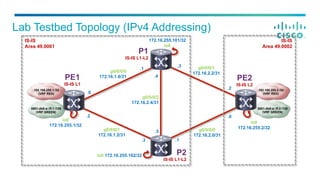
192.168.255.2 /32
(VRF RED)
g0/0/0/0
172.16.1.0/31
Lab Testbed Topology (IPv4 Addressing)
g0/0/0/1
172.16.2.2/31
g0/0/0/1
172.16.1.2/31
g0/0/0/0
172.16.2.0/31
g0/0/0/2
172.16.2.4/31
lo0
172.16.255.1/32
lo0
172.16.255.2/32
172.16.255.101/32
lo0
lo0 172.16.255.102/32
.4
.5
.0
.1
.2
.3
.2
.3
.0
.1
IS-IS
Area 49.0002
IS-IS
Area 49.0001
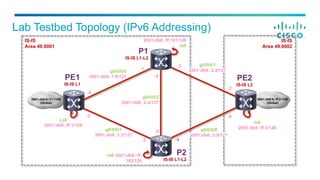
2001:db8:a::ff:2 /128
(VRF GREEN)
192.168.255.1 /32
(VRF RED)
2001:db8:a::ff:1 /128
(VRF GREEN)
Lab Testbed Topology (IPv6 Addressing)
g0/0/0/0
2001:db8::1:0/127
g0/0/0/1
2001:db8::1:2/127
g0/0/0/2
2001:db8::2:4/127
Lo0
2001:db8::ff:1/128
2001:db8::ff:101/128
lo0
lo0 2001:db8::ff:
102/128
:4
:5
:0
:1
:2
:3
:2
:3
:0
:1
g0/0/0/1
2001:db8::2:2/127
g0/0/0/0
2001:db8::2:0/127
IS-IS
Area 49.0002
IS-IS
Area 49.0001
lo0
2001:db8::ff:2/128
2001:db8:b::ff:2 /128
(Global)
2001:db8:b::f:1 /128
(Global)
P1
IS-IS L1-L2
P2
IS-IS L1-L2
PE1
IS-IS L1
PE2
IS-IS L2
§  When a node is LDP capable but its next-hop
along the SPT to the destination is not LDP
capable
§  no LDP outgoing label
§  In this case, the LDP LSP is connected to the
prefix segment
§  C installs the following LDP-to-SR FIB entry:
§  incoming label: label bound by LDP for FEC Z
§  outgoing label: prefix segment bound to Z
§  outgoing interface: D
§  This entry is derived automatically at the routing
layer
LDP/SR Interworking - LDP to SR
A
CB D
Z
16066
LDP SR
Input Label
(LDP)
Out Label
(SID), Interface
32 16066, 1
Prefix
Out Label (LDP),
Interface
Z 16, 0
§  When a node is SR capable but
its next-hop along the SPT to the
destination is not SR capable
§  no SR outgoing label available
§  In this case, the prefix segment is
connected to the LDP LSP
§  Any node on the SR/LDP border
installs SR-to-LDP FIB entry(ies)
LDP/SR Interworking - SR to LDP
A
CB D
Z
16066
SR LDP
Input Label
(SID)
Out Label (LDP),
Interface
? 16, 1
Prefix
Out Label (SID),
Interface
Z ?, 0
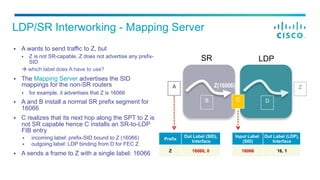
§  A wants to send traffic to Z, but
§  Z is not SR-capable, Z does not advertise any prefix-
SID
à which label does A have to use?
§  The Mapping Server advertises the SID
mappings for the non-SR routers
§  for example, it advertises that Z is 16066
§  A and B install a normal SR prefix segment for
16066
§  C realizes that its next hop along the SPT to Z is
not SR capable hence C installs an SR-to-LDP
FIB entry
§  incoming label: prefix-SID bound to Z (16066)
§  outgoing label: LDP binding from D for FEC Z
§  A sends a frame to Z with a single label: 16066
LDP/SR Interworking - Mapping Server
A
CB D
ZZ(16066)
Input Label
(SID)
Out Label (LDP),
Interface
16066 16, 1
Prefix
Out Label (SID),
Interface
Z 16066, 0
SR LDP
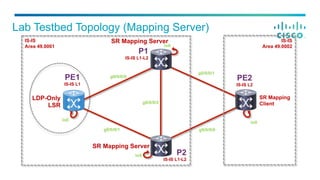
Lab Testbed Topology (Mapping Server)
g0/0/0/1
g0/0/0/1 g0/0/0/0
g0/0/0/2
lo0
lo0
g0/0/0/0
lo0
lo0
IS-IS
Area 49.0002
IS-IS
Area 49.0001
LDP-Only
LSR
SR Mapping Server
SR Mapping Server
SR Mapping
Client
P1
IS-IS L1-L2
P2
IS-IS L1-L2
PE1
IS-IS L1
PE2
IS-IS L2
§  Leverages existing and proven LFA technology
§  P space - set of nodes reachable from node S (PLR) without using protected link L
§  Q space - set of nodes that can reach destination D without using protected link L
§  Enforcing loop-freeness on post-convergence path
§  Where can I release the packet?
At the intersection between the post-convergence shortest path and the Q space
§  How do I reach the release point?
By chaining intermediate segments that are assessed to be loop-free
Topology Independent LFA – Implementation
1000
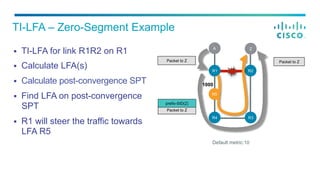
§  TI-LFA for link R1R2 on R1
§  Calculate LFA(s)
§  Calculate post-convergence SPT
§  Find LFA on post-convergence
SPT
§  R1 will steer the traffic towards
LFA R5
TI-LFA – Zero-Segment Example
Packet to Z
Default metric:10
R5
R2R1
A Z
R3
Packet to Z
R4
R5
Packet to Z
prefix-SID(Z)
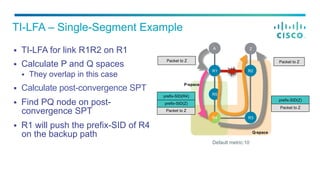
§  TI-LFA for link R1R2 on R1
§  Calculate P and Q spaces
§  They overlap in this case
§  Calculate post-convergence SPT
§  Find PQ node on post-
convergence SPT
§  R1 will push the prefix-SID of R4
on the backup path
TI-LFA – Single-Segment Example
Q-space
P-space
Packet to Z
prefix-SID(Z)
Packet to Z
Packet to Z
prefix-SID(Z)
prefix-SID(R4)
Default metric:10
R5
R2R1
A Z
R3
Packet to Z
R4
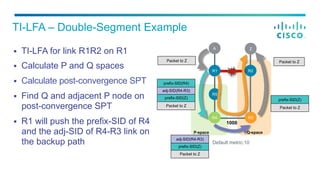
§  TI-LFA for link R1R2 on R1
§  Calculate P and Q spaces
§  Calculate post-convergence SPT
§  Find Q and adjacent P node on
post-convergence SPT
§  R1 will push the prefix-SID of R4
and the adj-SID of R4-R3 link on
the backup path
TI-LFA – Double-Segment Example
P-space Q-space
1000
Packet to Z
prefix-SID(Z)
Packet to Z
Packet to Z
prefix-SID(Z)
adj-SID(R4-R3)
prefix-SID(R4)
Packet to Z
prefix-SID(Z)
adj-SID(R4-R3)
Default metric:10
R5
R2R1
A Z
R3R4 R3R4
Packet to Z
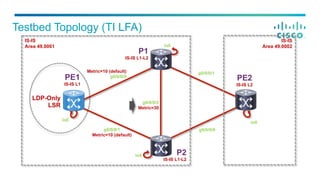
g0/0/0/1
Metric=10 (default)
Testbed Topology (TI LFA)
g0/0/0/1
g0/0/0/0
g0/0/0/2
Metric=30
lo0
lo0
Metric=10 (default)
g0/0/0/0
lo0
IS-IS
Area 49.0002
IS-IS
Area 49.0001
lo0
LDP-Only
LSR
P1
IS-IS L1-L2
P2
IS-IS L1-L2
PE1
IS-IS L1
PE2
IS-IS L2
§  Give us your feedback and you could win
a Plantronics headset. Complete the
session survey on your Cisco Connect
Toronto Mobile app at the end of your
session for a chance to win
§  Winners will be announced and posted at
the Information desk and on Twitter at the
end of the day (You must be present to win!)
Complete your session evaluation
§  Cisco dCloud is a self-service platform that can be accessed via a browser, a high-speed
Internet connection, and a cisco.com account
§  Customers will have direct access to a subset of dCloud demos and labs
§  Restricted content must be brokered by an authorized user (Cisco or Partner) and then shared
with the customers (cisco.com user).
§  Go to dcloud.cisco.com, select the location closest to you, and log in with your cisco.com
credentials
§  Review the getting started videos and try Cisco dCloud today: https://dcloud-cms.cisco.com/help
dCloud
Customers now get full dCloud experience!
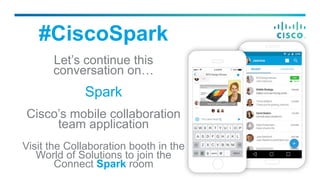
#CiscoSpark
Let’s continue this
conversation on…
Spark
Cisco’s mobile collaboration
team application
Visit the Collaboration booth in the
World of Solutions to join the
Connect Spark room
Thank you

Segment Routing Lab

  • 1.
    Segment Routing Lab SantiagoAlvarez Maan Al Bachari Thierry Couture
  • 2.
    Thank you forattending Cisco Connect Toronto 2015, here are a few housekeeping notes to ensure we all enjoy the session today. §  Please ensure your cellphones / laptops are set on silent to ensure no one is disturbed during the session §  A power bar is available under each desk in case you need to charge your laptop (Labs only) House Keeping Notes
  • 3.
    §  Source Routing:source chooses a path and encodes it in packet header as an ordered list of segments. §  Segment: an identifier for any type of instruction §  Service §  Context §  Locator §  IGP-based forwarding construct §  BGP-based forwarding construct §  Local value or Global Index Segment Routing Key Concepts Segment = Instructions such as "go to node N using the shortest path"
  • 4.
    §  MPLS: anordered list of segments is represented as a stack of labels §  SR re-uses MPLS data plane without any change §  IPv6: an ordered list of segments is represented as a routing extension header Segment Routing This lab focuses on MPLS data plane IPv6 IPv6 IPv6 Control Plane IPv4 MPLS Data Plane
  • 5.
    §  Locally significantto node allocating it §  Node processes SID and switches packet towards adjacency §  Advertised as an absolute value IGP Segment Identifiers §  Globally significant within SR domain §  All nodes switch packet towards prefix/node via shortest path §  Advertised as a relative (index) value §  Make use of a per-node reserved block (SR Global Block or SRGB) B C N O Z D P A 9101 9105 9107 9103 9105 B C N O Z D P A 65 65 65 65 Prefix/Node SID Adjacency SID
  • 6.
    MPLS Control andForwarding Operation with Segment Routing PE1 PE2 IGPPE1 PE2 Services IPv4 IPv6 IPv4 VPN IPv6 VPN VPWS VPLS Packet Transport LDP MPLS Forwarding RSVP BGP Static IS-IS OSPF No changes to control or forwarding plane IGP label distribution for IPv4 and IPv6, same forwarding plane BGP / LDP
  • 7.
    §  Prefix SID § SID encoded as an index §  Index represents an offset from SRGB base §  Index globally unique §  SRGB may vary across LSRs §  SRGB (base and range) advertised with router capabilities §  Adjacency SID §  SID encoded as absolute (i.e. not indexed) value §  Locally significant §  Automatically allocated for each adjacency SID Encoding SRGB = [ 16000 - 23999 ]. Advertised as base = 16,000, range = 7999 Prefix SID = 16041. Advertised as Prefix SID Index = 41 Adjacency SID = 24000. Advertised as Adjacency SID = 24000 SR-enabled Node
  • 8.
    §  Each podhas a dedicated test bed that has been partially pre- configured §  The devices dedicated to a pod are isolated from the devices assigned to other pods §  Follow the tasks and steps in the order provided §  Explore the entire test bed and verify operation beyond the sample output provided Lab General Instructions
  • 9.
    Lab Testbed Topology g0/0/0/1 g0/0/0/1g0/0/0/0 g0/0/0/2 lo0 lo0 g0/0/0/0 lo0 lo0 IS-IS Area 49.0002 IS-IS Area 49.0001 P1 IS-IS L1-L2 P2 IS-IS L1-L2 PE1 IS-IS L1 PE2 IS-IS L2
  • 10.
    P1 IS-IS L1-L2 P2 IS-IS L1-L2 PE1 IS-ISL1 PE2 IS-IS L2 192.168.255.2 /32 (VRF RED) g0/0/0/0 172.16.1.0/31 Lab Testbed Topology (IPv4 Addressing) g0/0/0/1 172.16.2.2/31 g0/0/0/1 172.16.1.2/31 g0/0/0/0 172.16.2.0/31 g0/0/0/2 172.16.2.4/31 lo0 172.16.255.1/32 lo0 172.16.255.2/32 172.16.255.101/32 lo0 lo0 172.16.255.102/32 .4 .5 .0 .1 .2 .3 .2 .3 .0 .1 IS-IS Area 49.0002 IS-IS Area 49.0001 2001:db8:a::ff:2 /128 (VRF GREEN) 192.168.255.1 /32 (VRF RED) 2001:db8:a::ff:1 /128 (VRF GREEN)
  • 11.
    Lab Testbed Topology(IPv6 Addressing) g0/0/0/0 2001:db8::1:0/127 g0/0/0/1 2001:db8::1:2/127 g0/0/0/2 2001:db8::2:4/127 Lo0 2001:db8::ff:1/128 2001:db8::ff:101/128 lo0 lo0 2001:db8::ff: 102/128 :4 :5 :0 :1 :2 :3 :2 :3 :0 :1 g0/0/0/1 2001:db8::2:2/127 g0/0/0/0 2001:db8::2:0/127 IS-IS Area 49.0002 IS-IS Area 49.0001 lo0 2001:db8::ff:2/128 2001:db8:b::ff:2 /128 (Global) 2001:db8:b::f:1 /128 (Global) P1 IS-IS L1-L2 P2 IS-IS L1-L2 PE1 IS-IS L1 PE2 IS-IS L2
  • 12.
    §  When anode is LDP capable but its next-hop along the SPT to the destination is not LDP capable §  no LDP outgoing label §  In this case, the LDP LSP is connected to the prefix segment §  C installs the following LDP-to-SR FIB entry: §  incoming label: label bound by LDP for FEC Z §  outgoing label: prefix segment bound to Z §  outgoing interface: D §  This entry is derived automatically at the routing layer LDP/SR Interworking - LDP to SR A CB D Z 16066 LDP SR Input Label (LDP) Out Label (SID), Interface 32 16066, 1 Prefix Out Label (LDP), Interface Z 16, 0
  • 13.
    §  When anode is SR capable but its next-hop along the SPT to the destination is not SR capable §  no SR outgoing label available §  In this case, the prefix segment is connected to the LDP LSP §  Any node on the SR/LDP border installs SR-to-LDP FIB entry(ies) LDP/SR Interworking - SR to LDP A CB D Z 16066 SR LDP Input Label (SID) Out Label (LDP), Interface ? 16, 1 Prefix Out Label (SID), Interface Z ?, 0
  • 14.
    §  A wantsto send traffic to Z, but §  Z is not SR-capable, Z does not advertise any prefix- SID à which label does A have to use? §  The Mapping Server advertises the SID mappings for the non-SR routers §  for example, it advertises that Z is 16066 §  A and B install a normal SR prefix segment for 16066 §  C realizes that its next hop along the SPT to Z is not SR capable hence C installs an SR-to-LDP FIB entry §  incoming label: prefix-SID bound to Z (16066) §  outgoing label: LDP binding from D for FEC Z §  A sends a frame to Z with a single label: 16066 LDP/SR Interworking - Mapping Server A CB D ZZ(16066) Input Label (SID) Out Label (LDP), Interface 16066 16, 1 Prefix Out Label (SID), Interface Z 16066, 0 SR LDP
  • 15.
    Lab Testbed Topology(Mapping Server) g0/0/0/1 g0/0/0/1 g0/0/0/0 g0/0/0/2 lo0 lo0 g0/0/0/0 lo0 lo0 IS-IS Area 49.0002 IS-IS Area 49.0001 LDP-Only LSR SR Mapping Server SR Mapping Server SR Mapping Client P1 IS-IS L1-L2 P2 IS-IS L1-L2 PE1 IS-IS L1 PE2 IS-IS L2
  • 16.
    §  Leverages existingand proven LFA technology §  P space - set of nodes reachable from node S (PLR) without using protected link L §  Q space - set of nodes that can reach destination D without using protected link L §  Enforcing loop-freeness on post-convergence path §  Where can I release the packet? At the intersection between the post-convergence shortest path and the Q space §  How do I reach the release point? By chaining intermediate segments that are assessed to be loop-free Topology Independent LFA – Implementation
  • 17.
    1000 §  TI-LFA forlink R1R2 on R1 §  Calculate LFA(s) §  Calculate post-convergence SPT §  Find LFA on post-convergence SPT §  R1 will steer the traffic towards LFA R5 TI-LFA – Zero-Segment Example Packet to Z Default metric:10 R5 R2R1 A Z R3 Packet to Z R4 R5 Packet to Z prefix-SID(Z)
  • 18.
    §  TI-LFA forlink R1R2 on R1 §  Calculate P and Q spaces §  They overlap in this case §  Calculate post-convergence SPT §  Find PQ node on post- convergence SPT §  R1 will push the prefix-SID of R4 on the backup path TI-LFA – Single-Segment Example Q-space P-space Packet to Z prefix-SID(Z) Packet to Z Packet to Z prefix-SID(Z) prefix-SID(R4) Default metric:10 R5 R2R1 A Z R3 Packet to Z R4
  • 19.
    §  TI-LFA forlink R1R2 on R1 §  Calculate P and Q spaces §  Calculate post-convergence SPT §  Find Q and adjacent P node on post-convergence SPT §  R1 will push the prefix-SID of R4 and the adj-SID of R4-R3 link on the backup path TI-LFA – Double-Segment Example P-space Q-space 1000 Packet to Z prefix-SID(Z) Packet to Z Packet to Z prefix-SID(Z) adj-SID(R4-R3) prefix-SID(R4) Packet to Z prefix-SID(Z) adj-SID(R4-R3) Default metric:10 R5 R2R1 A Z R3R4 R3R4 Packet to Z
  • 20.
    g0/0/0/1 Metric=10 (default) Testbed Topology(TI LFA) g0/0/0/1 g0/0/0/0 g0/0/0/2 Metric=30 lo0 lo0 Metric=10 (default) g0/0/0/0 lo0 IS-IS Area 49.0002 IS-IS Area 49.0001 lo0 LDP-Only LSR P1 IS-IS L1-L2 P2 IS-IS L1-L2 PE1 IS-IS L1 PE2 IS-IS L2
  • 21.
    §  Give usyour feedback and you could win a Plantronics headset. Complete the session survey on your Cisco Connect Toronto Mobile app at the end of your session for a chance to win §  Winners will be announced and posted at the Information desk and on Twitter at the end of the day (You must be present to win!) Complete your session evaluation
  • 22.
    §  Cisco dCloudis a self-service platform that can be accessed via a browser, a high-speed Internet connection, and a cisco.com account §  Customers will have direct access to a subset of dCloud demos and labs §  Restricted content must be brokered by an authorized user (Cisco or Partner) and then shared with the customers (cisco.com user). §  Go to dcloud.cisco.com, select the location closest to you, and log in with your cisco.com credentials §  Review the getting started videos and try Cisco dCloud today: https://dcloud-cms.cisco.com/help dCloud Customers now get full dCloud experience!
  • 23.
    #CiscoSpark Let’s continue this conversationon… Spark Cisco’s mobile collaboration team application Visit the Collaboration booth in the World of Solutions to join the Connect Spark room
  • 24.