@RHARBRIDGE
This is a community for process, forms and workflow enthusiasts!
WELCOMETOOURFIRSTMEETUP!
We plan to meet quarterly.
Next meetup “Real World” themed. We would love a
customer story/case study to present (or many). Are you,
or would someone you know be a good fit?
We are aiming for our next meeting to be around…
Office 365 & SharePoint Roadmap
WHATWEWILLTALKABOUTTODAY…
Nintex Led Future On Workflow & Forms
Microsoft Flow & PowerApps
@RHARBRIDGE
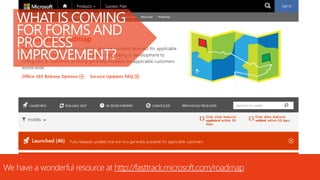
WHAT IS COMING
FOR FORMS AND
PROCESS
IMPROVEMENT?
We have a wonderful resource at http://fasttrack.microsoft.com/roadmap
@RHARBRIDGE
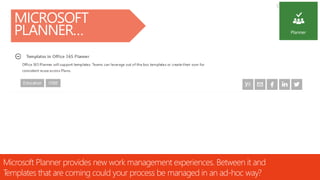
MICROSOFT
PLANNER…
Microsoft Planner provides new work management experiences. Between it and
Templates that are coming could your process be managed in an ad-hoc way?
@RHARBRIDGE
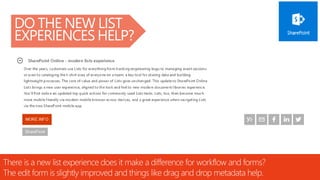
DO THE NEW LIST
EXPERIENCES HELP?
There is a new list experience does it make a difference for workflow and forms?
The edit form is slightly improved and things like drag and drop metadata help.
@RHARBRIDGE
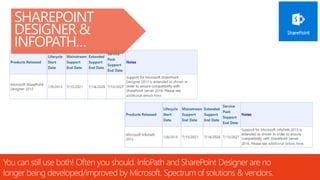
SHAREPOINT
DESIGNER &
INFOPATH…
You can still use both! Often you should. InfoPath and SharePoint Designer are no
longer being developed/improved by Microsoft. Spectrum of solutions & vendors.
@RHARBRIDGE
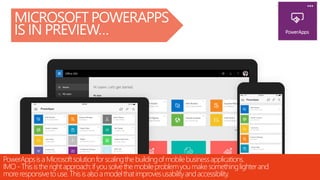
MICROSOFT POWERAPPS
IS IN PREVIEW…
PowerAppsisa Microsoftsolutionforscalingthebuildingofmobilebusinessapplications.
IMO- Thisistherightapproach:ifyousolvethemobileproblemyoumakesomethinglighterand
moreresponsivetouse.Thisisalsoamodelthatimprovesusabilityandaccessibility.
@RHARBRIDGE
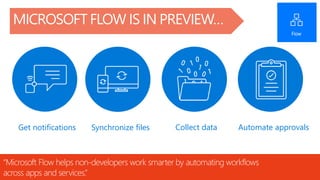
MICROSOFT FLOW IS IN PREVIEW…
“Microsoft Flow helps non-developers work smarter by automating workflows
across apps and services.”
Get notifications Synchronize files Collect data Automate approvals
@RHARBRIDGE
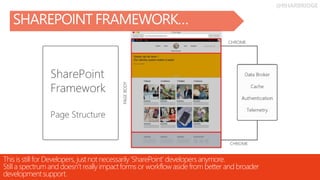
SHAREPOINT FRAMEWORK…
This is still for Developers, justnot necessarily‘SharePoint’ developersanymore.
Still a spectrum and doesn’t really impactforms or workflow aside from better and broader
developmentsupport.
Office 365 & SharePoint Roadmap
WHATWEWILLTALKABOUTTODAY…
Nintex Led Future On Workflow & Forms
Microsoft Flow & PowerApps
Office 365 & SharePoint Roadmap
WHATWEWILLTALKABOUTTODAY…
Nintex Led Future On Workflow & Forms
Microsoft Flow & PowerApps
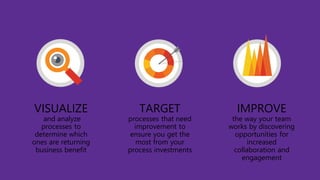
Visibility is critical
TARGET
processes that need
improvement to
ensure you get the
most from your
process investments
IMPROVE
the way your team
works by discovering
opportunities for
increased
collaboration and
engagement
VISUALIZE
and analyze
processes to
determine which
ones are returning
business benefit
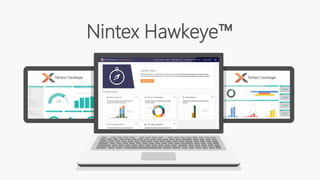
Nintex Hawkeye™
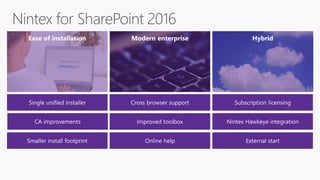
Nintex for SharePoint 2016
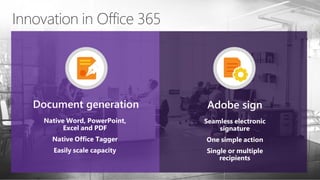
Innovation in Office 365
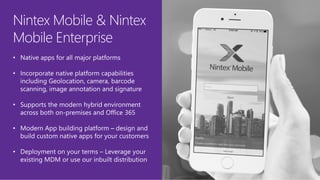
Nintex Mobile & Nintex
Mobile Enterprise
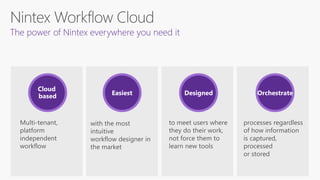
The power of Nintex everywhere you need it
Multi-tenant,
platform
independent
workflow
with the most
intuitive
workflow designer in
the market
to meet users where
they do their work,
not force them to
learn new tools
processes regardless
of how information
is captured,
processed
or stored
Cloud
based Easiest Designed Orchestrate
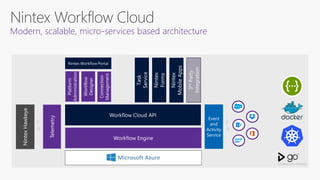
Platform
Administration
Workflow
Designer
Connection
Management
Modern, scalable, micro-services based architecture
Office 365 & SharePoint Roadmap
WHATWEWILLTALKABOUTTODAY…
Nintex Led Future On Workflow & Forms
Microsoft Flow & PowerApps
Office 365 & SharePoint Roadmap
WHATWEWILLTALKABOUTTODAY…
Nintex Led Future On Workflow & Forms
Microsoft Flow & PowerApps
@RHARBRIDGE
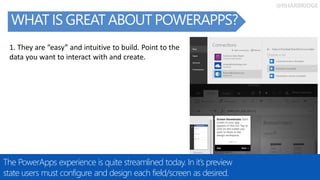
WHAT IS GREAT ABOUT POWERAPPS?
The PowerApps experience is quite streamlined today. In it’s preview
state users must configure and design each field/screen as desired.
1. They are “easy” and intuitive to build. Point to the
data you want to interact with and create.
@RHARBRIDGE
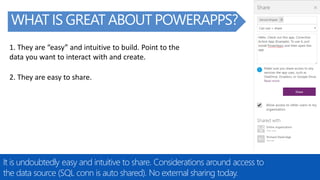
WHAT IS GREAT ABOUT POWERAPPS?
It is undoubtedly easy and intuitive to share. Considerations around access to
the data source (SQL conn is auto shared). No external sharing today.
2. They are easy to share.
1. They are “easy” and intuitive to build. Point to the
data you want to interact with and create.
@RHARBRIDGE
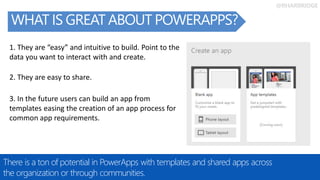
WHAT IS GREAT ABOUT POWERAPPS?
There is a ton of potential in PowerApps with templates and shared apps across
the organization or through communities.
2. They are easy to share.
1. They are “easy” and intuitive to build. Point to the
data you want to interact with and create.
3. In the future users can build an app from
templates easing the creation of an app process for
common app requirements.
@RHARBRIDGE
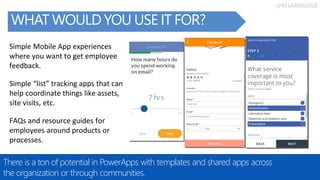
WHAT WOULD YOU USE IT FOR?
There is a ton of potential in PowerApps with templates and shared apps across
the organization or through communities.
Simple “list” tracking apps that can
help coordinate things like assets,
site visits, etc.
Simple Mobile App experiences
where you want to get employee
feedback.
FAQs and resource guides for
employees around products or
processes.
@RHARBRIDGE
Share ideas and
docs in OneDrive
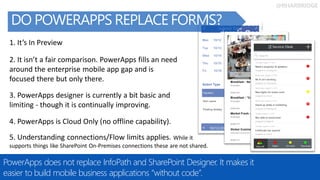
DO POWERAPPS REPLACE FORMS?
PowerApps does not replace InfoPath and SharePoint Designer. It makes it
easier to build mobile business applications “without code”.
4. PowerApps is Cloud Only (no offline capability).
1. It’s In Preview
2. It isn’t a fair comparison. PowerApps fills an need
around the enterprise mobile app gap and is
focused there but only there.
3. PowerApps designer is currently a bit basic and
limiting - though it is continually improving.
5. Understanding connections/Flow limits applies. While it
supports things like SharePoint On-Premises connections these are not shared.
@RHARBRIDGE
POWERAPPS RESOURCES…
There are MANY updates that come to PowerApps in it’s preview state.
Service Website:
https://powerapps.microsoft.com/en-us/
Browse Documentation:
https://powerapps.microsoft.com/en-us/tutorials/getting-started/
Blog (with multiple posts each week):
https://powerapps.microsoft.com/en-us/blog/
Community User Group:
http://powerusers.microsoft.com/
Videos:
https://www.youtube.com/watch?v=-3LIWX1lE5k&list=PL8nfc9haGeb5W1x0-fS0eZhVQkPwiepAb
Twitter:
@PowerApps
@RHARBRIDGE
Share ideas and
docs in OneDrive
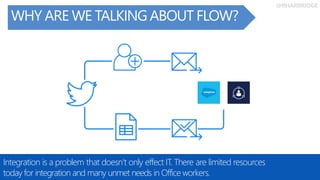
WHY ARE WE TALKING ABOUT FLOW?
Integration is a problem that doesn’t only effect IT. There are limited resources
today for integration and many unmet needs in Office workers.
@RHARBRIDGE
Share ideas and
docs in OneDrive
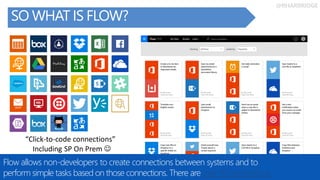
SO WHAT IS FLOW?
Flow allows non-developers to create connections between systems and to
perform simple tasks based on those connections. There are over 40 connections.
“Click-to-code connections”
Including SP On Prem 
@RHARBRIDGE
Share ideas and
docs in OneDrive
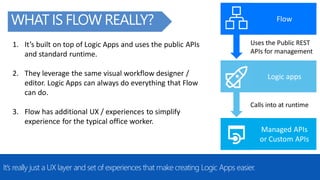
WHAT IS FLOW REALLY?
It’s really just a UX layer and set of experiences that make creating Logic Apps easier.
Flow
Logic apps
Managed APIs
or Custom APIs
Uses the Public REST
APIs for management
Calls into at runtime
1. It’s built on top of Logic Apps and uses the public APIs
and standard runtime.
2. They leverage the same visual workflow designer /
editor. Logic Apps can always do everything that Flow
can do.
3. Flow has additional UX / experiences to simplify
experience for the typical office worker.
@RHARBRIDGE
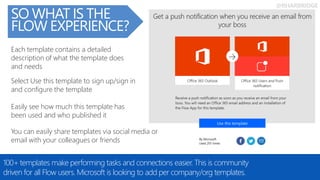
You can easily share templates via social media or
email with your colleagues or friends
Easily see how much this template has
been used and who published it
Each template contains a detailed
description of what the template does
and needs
Select Use this template to sign up/sign in
and configure the template
SO WHAT IS THE
FLOW EXPERIENCE?
100+ templates make performing tasks and connections easier. This is community
driven for all Flow users. Microsoft is looking to add per company/org templates.
@RHARBRIDGE
SO WHAT IS THE
FLOW EXPERIENCE?
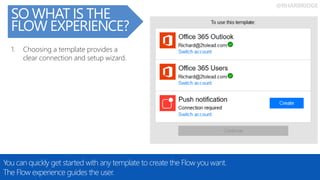
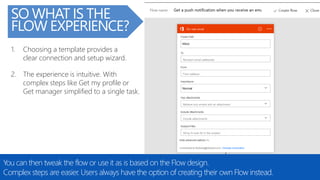
You can quickly get started with any template to create the Flow you want.
The Flow experience guides the user.
1. Choosing a template provides a
clear connection and setup wizard.
@RHARBRIDGE
SO WHAT IS THE
FLOW EXPERIENCE?
You can then tweak the flow or use it as is based on the Flow design.
Complex steps are easier. Users always have the option of creating their own Flow instead.
1. Choosing a template provides a
clear connection and setup wizard.
2. The experience is intuitive. With
complex steps like Get my profile or
Get manager simplified to a single task.
@RHARBRIDGE
SO WHAT IS THE
FLOW EXPERIENCE?
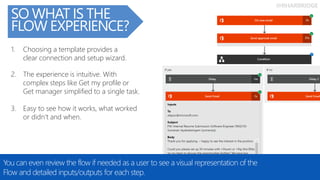
You can even review the flow if needed as a user to see a visual representation of the
Flow and detailed inputs/outputs for each step.
3. Easy to see how it works, what worked
or didn’t and when.
1. Choosing a template provides a
clear connection and setup wizard.
2. The experience is intuitive. With
complex steps like Get my profile or
Get manager simplified to a single task.
@RHARBRIDGE
SO WHAT IS THE
FLOW EXPERIENCE?
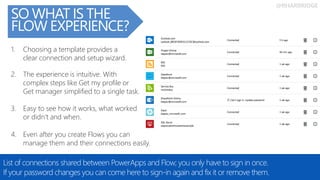
List of connections shared between PowerApps and Flow; you only have to sign in once.
If your password changes you can come here to sign-in again and fix it or remove them.
4. Even after you create Flows you can
manage them and their connections easily.
3. Easy to see how it works, what worked
or didn’t and when.
2. The experience is intuitive. With
complex steps like Get my profile or
Get manager simplified to a single task.
1. Choosing a template provides a
clear connection and setup wizard.
@RHARBRIDGE
SO WHAT IS THE
FLOW EXPERIENCE?
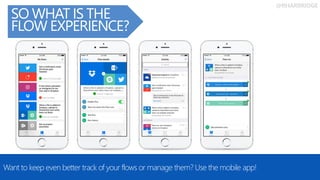
Want to keep even better track of your flows or manage them? Use the mobile app!
@RHARBRIDGE
Share ideas and
docs in OneDrive
WHY SHOULD WE CONSIDER FLOW?
Flow has some focus areas that SharePoint Workflow does not have which compliment
process and task automation needs, especially across systems and services.
Flow has some focus areas that SharePoint Workflow does not have which compliments
process and task automation needs, especially across systems and services (like IFTTT or
Zapier).
• Flow includes a focus on platforms outside of SharePoint (cross site, tenant, or app flows!).
• Has a recurring flows feature or a Flow can be triggered by web hooks into external systems. Flows
can take actions and events from outside your environment and automate the movement of this
data into your systems.
• Flow allows users without list management rights to still create flows.
• Many flows are within an individual users context. Triggering a flow for a user based on an event
that happens in their Office 365 mailbox as an example only targets that user.
• Flow includes a focus on the personal technologies of an individual end user allowing them to
automate personal and professional processes/tasks (facebook, twitter, etc.).
@RHARBRIDGE
Share ideas and
docs in OneDrive
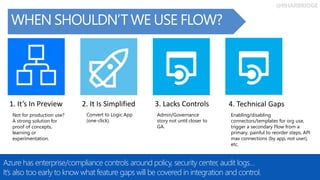
WHEN SHOULDN’T WE USE FLOW?
Azure has enterprise/compliance controls around policy, security center, audit logs…
It’s also too early to know what feature gaps will be covered in integration and control.
1. It’s In Preview 2. It Is Simplified 3. Lacks Controls
Not for production use?
A strong solution for
proof of concepts,
learning or
experimentation.
Convert to Logic App
(one-click).
Admin/Governance
story not until closer to
GA.
4. Technical Gaps
Enabling/disabling
connectors/templates for org use,
trigger a secondary Flow from a
primary, painful to reorder steps, API
max connections (by app, not user),
etc.
@RHARBRIDGE
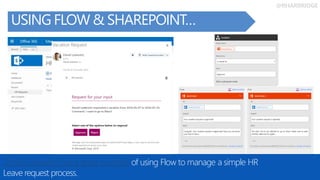
USING FLOW & SHAREPOINT…
Daniel Laskewitz has a great example of using Flow to manage a simple HR
Leave request process.
@RHARBRIDGE
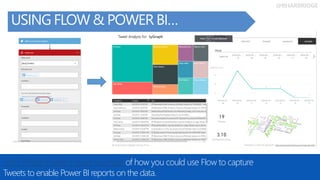
USING FLOW & POWER BI…
John White shared a great example of how you could use Flow to capture
Tweets to enable Power BI reports on the data.
@RHARBRIDGE
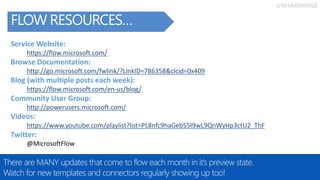
FLOW RESOURCES…
There are MANY updates that come to flow each month in it’s preview state.
Watch for new templates and connectors regularly showing up too!
Service Website:
https://flow.microsoft.com/
Browse Documentation:
http://go.microsoft.com/fwlink/?LinkID=786358&clcid=0x409
Blog (with multiple posts each week):
https://flow.microsoft.com/en-us/blog/
Community User Group:
http://powerusers.microsoft.com/
Videos:
https://www.youtube.com/playlist?list=PL8nfc9haGeb55I9wL9QnWyHp3ctU2_ThF
Twitter:
@MicrosoftFlow
Thank You!
SponsorsandYouformakingthispossible.
WhenToUseWhatWhitepaper.. WhenToUseWhat.com
IntranetsonO365Whitepaper.. Office365Intranets.com
ExternalSharingWhitepaper.. Office365Extranets.com
Message Us or Email
Richard@2toLead.com @RHarbridge
Kanwal@2toLead.com @KKhipple
Haniel@2toLead.com @HCroitoru
More to come on our blog at http://2toLead.com.

Nintex, SharePoint, & Office 365 Roadmap for Workflow and Forms

  • 1.
  • 2.
    This is acommunity for process, forms and workflow enthusiasts! WELCOMETOOURFIRSTMEETUP! We plan to meet quarterly. Next meetup “Real World” themed. We would love a customer story/case study to present (or many). Are you, or would someone you know be a good fit? We are aiming for our next meeting to be around…
  • 3.
    Office 365 &SharePoint Roadmap WHATWEWILLTALKABOUTTODAY… Nintex Led Future On Workflow & Forms Microsoft Flow & PowerApps
  • 4.
    @RHARBRIDGE WHAT IS COMING FORFORMS AND PROCESS IMPROVEMENT? We have a wonderful resource at http://fasttrack.microsoft.com/roadmap
  • 5.
    @RHARBRIDGE MICROSOFT PLANNER… Microsoft Planner providesnew work management experiences. Between it and Templates that are coming could your process be managed in an ad-hoc way?
  • 6.
    @RHARBRIDGE DO THE NEWLIST EXPERIENCES HELP? There is a new list experience does it make a difference for workflow and forms? The edit form is slightly improved and things like drag and drop metadata help.
  • 7.
    @RHARBRIDGE SHAREPOINT DESIGNER & INFOPATH… You canstill use both! Often you should. InfoPath and SharePoint Designer are no longer being developed/improved by Microsoft. Spectrum of solutions & vendors.
  • 8.
    @RHARBRIDGE MICROSOFT POWERAPPS IS INPREVIEW… PowerAppsisa Microsoftsolutionforscalingthebuildingofmobilebusinessapplications. IMO- Thisistherightapproach:ifyousolvethemobileproblemyoumakesomethinglighterand moreresponsivetouse.Thisisalsoamodelthatimprovesusabilityandaccessibility.
  • 9.
    @RHARBRIDGE MICROSOFT FLOW ISIN PREVIEW… “Microsoft Flow helps non-developers work smarter by automating workflows across apps and services.” Get notifications Synchronize files Collect data Automate approvals
  • 10.
    @RHARBRIDGE SHAREPOINT FRAMEWORK… This isstill for Developers, justnot necessarily‘SharePoint’ developersanymore. Still a spectrum and doesn’t really impactforms or workflow aside from better and broader developmentsupport.
  • 11.
    Office 365 &SharePoint Roadmap WHATWEWILLTALKABOUTTODAY… Nintex Led Future On Workflow & Forms Microsoft Flow & PowerApps
  • 12.
    Office 365 &SharePoint Roadmap WHATWEWILLTALKABOUTTODAY… Nintex Led Future On Workflow & Forms Microsoft Flow & PowerApps
  • 16.
  • 17.
    TARGET processes that need improvementto ensure you get the most from your process investments IMPROVE the way your team works by discovering opportunities for increased collaboration and engagement VISUALIZE and analyze processes to determine which ones are returning business benefit
  • 18.
  • 20.
  • 22.
  • 24.
    Nintex Mobile &Nintex Mobile Enterprise
  • 30.
    The power ofNintex everywhere you need it Multi-tenant, platform independent workflow with the most intuitive workflow designer in the market to meet users where they do their work, not force them to learn new tools processes regardless of how information is captured, processed or stored Cloud based Easiest Designed Orchestrate
  • 31.
  • 38.
    Office 365 &SharePoint Roadmap WHATWEWILLTALKABOUTTODAY… Nintex Led Future On Workflow & Forms Microsoft Flow & PowerApps
  • 39.
    Office 365 &SharePoint Roadmap WHATWEWILLTALKABOUTTODAY… Nintex Led Future On Workflow & Forms Microsoft Flow & PowerApps
  • 40.
    @RHARBRIDGE WHAT IS GREATABOUT POWERAPPS? The PowerApps experience is quite streamlined today. In it’s preview state users must configure and design each field/screen as desired. 1. They are “easy” and intuitive to build. Point to the data you want to interact with and create.
  • 41.
    @RHARBRIDGE WHAT IS GREATABOUT POWERAPPS? It is undoubtedly easy and intuitive to share. Considerations around access to the data source (SQL conn is auto shared). No external sharing today. 2. They are easy to share. 1. They are “easy” and intuitive to build. Point to the data you want to interact with and create.
  • 42.
    @RHARBRIDGE WHAT IS GREATABOUT POWERAPPS? There is a ton of potential in PowerApps with templates and shared apps across the organization or through communities. 2. They are easy to share. 1. They are “easy” and intuitive to build. Point to the data you want to interact with and create. 3. In the future users can build an app from templates easing the creation of an app process for common app requirements.
  • 43.
    @RHARBRIDGE WHAT WOULD YOUUSE IT FOR? There is a ton of potential in PowerApps with templates and shared apps across the organization or through communities. Simple “list” tracking apps that can help coordinate things like assets, site visits, etc. Simple Mobile App experiences where you want to get employee feedback. FAQs and resource guides for employees around products or processes.
  • 44.
    @RHARBRIDGE Share ideas and docsin OneDrive DO POWERAPPS REPLACE FORMS? PowerApps does not replace InfoPath and SharePoint Designer. It makes it easier to build mobile business applications “without code”. 4. PowerApps is Cloud Only (no offline capability). 1. It’s In Preview 2. It isn’t a fair comparison. PowerApps fills an need around the enterprise mobile app gap and is focused there but only there. 3. PowerApps designer is currently a bit basic and limiting - though it is continually improving. 5. Understanding connections/Flow limits applies. While it supports things like SharePoint On-Premises connections these are not shared.
  • 45.
    @RHARBRIDGE POWERAPPS RESOURCES… There areMANY updates that come to PowerApps in it’s preview state. Service Website: https://powerapps.microsoft.com/en-us/ Browse Documentation: https://powerapps.microsoft.com/en-us/tutorials/getting-started/ Blog (with multiple posts each week): https://powerapps.microsoft.com/en-us/blog/ Community User Group: http://powerusers.microsoft.com/ Videos: https://www.youtube.com/watch?v=-3LIWX1lE5k&list=PL8nfc9haGeb5W1x0-fS0eZhVQkPwiepAb Twitter: @PowerApps
  • 46.
    @RHARBRIDGE Share ideas and docsin OneDrive WHY ARE WE TALKING ABOUT FLOW? Integration is a problem that doesn’t only effect IT. There are limited resources today for integration and many unmet needs in Office workers.
  • 47.
    @RHARBRIDGE Share ideas and docsin OneDrive SO WHAT IS FLOW? Flow allows non-developers to create connections between systems and to perform simple tasks based on those connections. There are over 40 connections. “Click-to-code connections” Including SP On Prem 
  • 48.
    @RHARBRIDGE Share ideas and docsin OneDrive WHAT IS FLOW REALLY? It’s really just a UX layer and set of experiences that make creating Logic Apps easier. Flow Logic apps Managed APIs or Custom APIs Uses the Public REST APIs for management Calls into at runtime 1. It’s built on top of Logic Apps and uses the public APIs and standard runtime. 2. They leverage the same visual workflow designer / editor. Logic Apps can always do everything that Flow can do. 3. Flow has additional UX / experiences to simplify experience for the typical office worker.
  • 49.
    @RHARBRIDGE You can easilyshare templates via social media or email with your colleagues or friends Easily see how much this template has been used and who published it Each template contains a detailed description of what the template does and needs Select Use this template to sign up/sign in and configure the template SO WHAT IS THE FLOW EXPERIENCE? 100+ templates make performing tasks and connections easier. This is community driven for all Flow users. Microsoft is looking to add per company/org templates.
  • 50.
    @RHARBRIDGE SO WHAT ISTHE FLOW EXPERIENCE? You can quickly get started with any template to create the Flow you want. The Flow experience guides the user. 1. Choosing a template provides a clear connection and setup wizard.
  • 51.
    @RHARBRIDGE SO WHAT ISTHE FLOW EXPERIENCE? You can then tweak the flow or use it as is based on the Flow design. Complex steps are easier. Users always have the option of creating their own Flow instead. 1. Choosing a template provides a clear connection and setup wizard. 2. The experience is intuitive. With complex steps like Get my profile or Get manager simplified to a single task.
  • 52.
    @RHARBRIDGE SO WHAT ISTHE FLOW EXPERIENCE? You can even review the flow if needed as a user to see a visual representation of the Flow and detailed inputs/outputs for each step. 3. Easy to see how it works, what worked or didn’t and when. 1. Choosing a template provides a clear connection and setup wizard. 2. The experience is intuitive. With complex steps like Get my profile or Get manager simplified to a single task.
  • 53.
    @RHARBRIDGE SO WHAT ISTHE FLOW EXPERIENCE? List of connections shared between PowerApps and Flow; you only have to sign in once. If your password changes you can come here to sign-in again and fix it or remove them. 4. Even after you create Flows you can manage them and their connections easily. 3. Easy to see how it works, what worked or didn’t and when. 2. The experience is intuitive. With complex steps like Get my profile or Get manager simplified to a single task. 1. Choosing a template provides a clear connection and setup wizard.
  • 54.
    @RHARBRIDGE SO WHAT ISTHE FLOW EXPERIENCE? Want to keep even better track of your flows or manage them? Use the mobile app!
  • 55.
    @RHARBRIDGE Share ideas and docsin OneDrive WHY SHOULD WE CONSIDER FLOW? Flow has some focus areas that SharePoint Workflow does not have which compliment process and task automation needs, especially across systems and services. Flow has some focus areas that SharePoint Workflow does not have which compliments process and task automation needs, especially across systems and services (like IFTTT or Zapier). • Flow includes a focus on platforms outside of SharePoint (cross site, tenant, or app flows!). • Has a recurring flows feature or a Flow can be triggered by web hooks into external systems. Flows can take actions and events from outside your environment and automate the movement of this data into your systems. • Flow allows users without list management rights to still create flows. • Many flows are within an individual users context. Triggering a flow for a user based on an event that happens in their Office 365 mailbox as an example only targets that user. • Flow includes a focus on the personal technologies of an individual end user allowing them to automate personal and professional processes/tasks (facebook, twitter, etc.).
  • 56.
    @RHARBRIDGE Share ideas and docsin OneDrive WHEN SHOULDN’T WE USE FLOW? Azure has enterprise/compliance controls around policy, security center, audit logs… It’s also too early to know what feature gaps will be covered in integration and control. 1. It’s In Preview 2. It Is Simplified 3. Lacks Controls Not for production use? A strong solution for proof of concepts, learning or experimentation. Convert to Logic App (one-click). Admin/Governance story not until closer to GA. 4. Technical Gaps Enabling/disabling connectors/templates for org use, trigger a secondary Flow from a primary, painful to reorder steps, API max connections (by app, not user), etc.
  • 57.
    @RHARBRIDGE USING FLOW &SHAREPOINT… Daniel Laskewitz has a great example of using Flow to manage a simple HR Leave request process.
  • 58.
    @RHARBRIDGE USING FLOW &POWER BI… John White shared a great example of how you could use Flow to capture Tweets to enable Power BI reports on the data.
  • 59.
    @RHARBRIDGE FLOW RESOURCES… There areMANY updates that come to flow each month in it’s preview state. Watch for new templates and connectors regularly showing up too! Service Website: https://flow.microsoft.com/ Browse Documentation: http://go.microsoft.com/fwlink/?LinkID=786358&clcid=0x409 Blog (with multiple posts each week): https://flow.microsoft.com/en-us/blog/ Community User Group: http://powerusers.microsoft.com/ Videos: https://www.youtube.com/playlist?list=PL8nfc9haGeb55I9wL9QnWyHp3ctU2_ThF Twitter: @MicrosoftFlow
  • 60.
    Thank You! SponsorsandYouformakingthispossible. WhenToUseWhatWhitepaper.. WhenToUseWhat.com IntranetsonO365Whitepaper..Office365Intranets.com ExternalSharingWhitepaper.. Office365Extranets.com Message Us or Email Richard@2toLead.com @RHarbridge Kanwal@2toLead.com @KKhipple Haniel@2toLead.com @HCroitoru More to come on our blog at http://2toLead.com.