Behavioral ModelingBehavioral Modeling
Gookyi Dennis A. N.Gookyi Dennis A. N.
SoC Design Lab.SoC Design Lab.
June.13.2014
ContentsContents
 Procedural Constructs
 Procedural Assignments
 Timing Control
 Selection Statements
 Iterative (Loop) Statements
2
Procedural ConstructsProcedural Constructs
 Behavioral modeling uses two main blocks:
The initial block
The always block
 Initial and always blocks cannot be nested
 Each initial and always block must form its own
block
3
Initial BlockInitial Block
 An initial block starts at simulation time 0 and
executes exactly once during simulation
 It is used to initialize signals or to monitor
waveforms
 The syntax is as follows:
initial [timing_control] procedural_statement
 The procedural statement could be any of the
following:
Selection_statement
Case_statement
Loop_statement
4
Initial BlockInitial Block
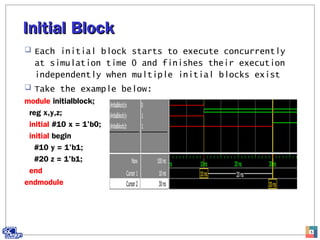
 Each initial block starts to execute concurrently
at simulation time 0 and finishes their execution
independently when multiple initial blocks exist
 Take the example below:
module initialblock;
reg x,y,z;
initial #10 x = 1'b0;
initial begin
#10 y = 1'b1;
#20 z = 1'b1;
end
endmodule
5
Always BlockAlways Block
 The always statement starts at simulation time 0
and repeatedly executes the statements within it in
a loop fashion during simulation
 The syntax is as below:
always [timing_control] procedural_statement
 An always block is used to model a block of
activities that are continuously repeated in a
digital circuit
6
Always BlockAlways Block
 A model of a clock generator is shown below:
 Code
module alwaysblock;
reg clock; //a clock generator
initial clock = 1'b0;//initialize clk to 0
always #5 clock = ~clock;//period = 10
endmodule
 waveform
7
4-to-1 Multiplexer4-to-1 Multiplexer
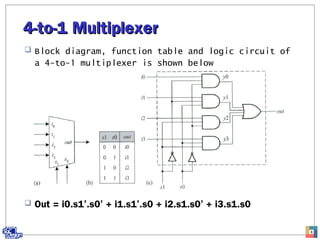
 Block diagram, function table and logic circuit of
a 4-to-1 multiplexer is shown below
 Out = i0.s1’.s0’ + i1.s1’.s0 + i2.s1.s0’ + i3.s1.s0
8
4-to-1 MUX4-to-1 MUX
 Code and testbench
9
4-to-1 MUX4-to-1 MUX
 Waveform
10
Procedural AssignmentProcedural Assignment
 A continuous assignment is used to assign values
onto a net
 Procedural assignment puts values in a variable
 Procedural assignments are placed inside an initial
or always statements
 They update values of variable data types
 The syntax is as follows:
variable_lvalue = [timing_control] expression
11
Procedural vs ContinuousProcedural vs Continuous
Two types of procedural assignments are available in
Verilog
Blocking assignment
Non-blocking assignment
12
Continuous procedural
Drive nets Update variables
Left hand side is of net data type Left hand side is of variable data
type
Use the assign keyword No assign keyword
Not used in initial and always
blocks
Located in initial and always
statements
Blocking AssignmentBlocking Assignment
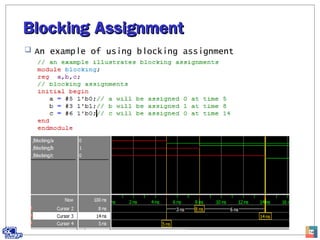
 Uses the “=” operator
 Executed in the order that they are specified
 In sequential blocks (begin/end), blocking
assignment is executed before the statements
following it
 In parallel block (fork/join), there is no blocking
13
Blocking AssignmentBlocking Assignment
 An example of using blocking assignment
14
Non-blocking AssignmentNon-blocking Assignment
 Use the “<=” operator
 Executed without blocking the other statements in a
sequential block
 Non-blocking assignment statement is used whenever
several variable assignments within the same time
step need to be made regardless of the order
15
Non-blocking AssignmentNon-blocking Assignment
 Example of using non-blocking assignment
16
Non-blocking AssignmentNon-blocking Assignment
 In general, the simulators perform the following
three steps when executing non-blocking statements
Read: read the values of all right-hand-side
variables
Evaluation: evaluate the right-hand-side expression
and store in a temporary variables that are scheduled
to assign to the left-hand-side variable later
Assignment: assign the values stored in the temporary
variables to the left hand side variables
17
Mixed Use of Blocking and Non-Mixed Use of Blocking and Non-
blockingblocking
 An example of a mixture of blocking and non-
blocking
18
Race ProblemsRace Problems
 If we want to swap the contents of two registers,
we might be tempted to use two always blocks with
blocking assignment as below:
 The code above will result in a race condition
 The final result will be that both registers x and
y will have the same content as the original y 19
Race ProblemRace Problem
 Waveform
20
Race ProblemRace Problem
 The race problem can be solved by using non-
blocking assignment as below:
21
Coding StylesCoding Styles
 Do not mix blocking and non-blocking assignments in
the same always block
 It is good to use non-blocking assignment when
modeling sequential logic
 It is a good to use blocking assignment when
modeling combinational logic
22
Timing ControlTiming Control
 Timing control provide a way to specify the
simulation time at which procedural statements will
execute
 If there is no timing control statements, the
simulation time will not advance
 There are two timing control methods provided in
verilog
Delay timing control
Event timing control
23
Delay Timing ControlDelay Timing Control
 Delay timing control specifies the time duration
when the statement is encountered and when the
statement is executed
 It is specified by “#” and has the following form:
#delay_value
 Delay timing control can be divided into two types
depending on the position of the delay specifier in
the statement
Regular delay control
Intra-assignment delay control
24
Regular Delay ControlRegular Delay Control
 Defers the execution of the entire statement by a
specified number of time units
 Its syntax is as follows:
#delay procedural_statement
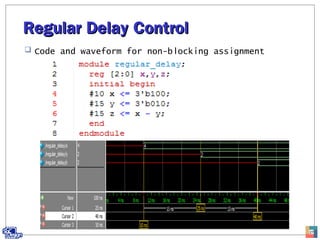
 When regular delay control statement is
initialized, the results is always the same for
blocking and non-blocking assignment
25
Regular Delay ControlRegular Delay Control
 Code and waveform for blocking assignment
26
Regular Delay ControlRegular Delay Control
 Code and waveform for non-blocking assignment
27
Intra-assignment delay controlIntra-assignment delay control
 Defers the assignment to the left-hand-side
variable by a specified number of time units but
the right-hand-side expression is evaluated at the
current simulation time
 The syntax is as follows:
variable_lvalue = #delay expression
 Depending on which kind of assignment, blocking or
non-blocking, the effect is different
28
Intra-assignment delay controlIntra-assignment delay control
 Code and waveform for blocking
29
Intra-assignment delay controlIntra-assignment delay control
 Code and waveform for non-blocking
30
Event Timing ControlEvent Timing Control
 An event is a value change on a net or variable or
the occurrence of a declared event
 Event control with a procedural statement defers
the execution of the statement until the occurrence
of the specified event
 There are two kinds of event control:
Edge-triggered event control
Level-sensitive event control
31
Edge-triggered Event ControlEdge-triggered Event Control
 A procedural statement defers its execution until a
specified transition of a given signal occurs
 The symbol @ is used to specify an edge triggered
event
 The syntax is as follows:
@event procedural_statement;
 Negedge: transition from 1 to x, z or 0 and from x
or z to 0
 Posedge: transition from 0 to x, z or 1 and from x
or z to 1
32
Edge-triggered Event ControlEdge-triggered Event Control
 Code and waveform for edge-triggered example
33
Named Event ControlNamed Event Control
 In Verilog, a new data type called event can be
declared in addition to nets and variables
 This provides users a capability to declare an event
and to trigger and recognize it
 A named event is triggered by using the symbol “->”
 There are three steps involved in using named
events:
Declaration
Triggering
Recognition
 An example is a counter that counts by one every
2ns. It triggers an event ready whenever its value
is a multiple of 5. Once the event ready is
triggered, we display the count value
34
Named Event ControlNamed Event Control
 Code and simulation of named event example
35
Selection StatementsSelection Statements
 Selection statements are used to make a selection
based on a given condition
 There are two types of selection statements in
Verilog:
If-else
Case
36
If-else StatementIf-else Statement
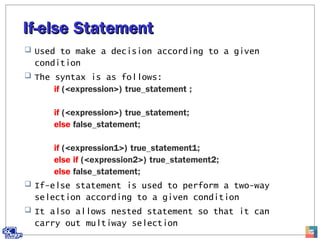
 Used to make a decision according to a given
condition
 The syntax is as follows:
if (<expression>) true_statement ;
if (<expression>) true_statement;
else false_statement;
if (<expression1>) true_statement1;
else if (<expression2>) true_statement2;
else false_statement;
 If-else statement is used to perform a two-way
selection according to a given condition
 It also allows nested statement so that it can
carry out multiway selection
37
If-else StatementIf-else Statement
 A 4-to-1 Mux using selection statement
38
If-else StatementIf-else Statement
 Testbench and waveform
39
Case StatementCase Statement
 A case statement is used to perform a multiway
selection according to a given input condition
 It has the following general form:
case (case_expression)
case_item1 {,case_item1}: procedural_statement1
case_item2 {,case_item2}: procedural_statement2
...
case_itemn {,case_itemn}: procedural_statementn
[default: procedural_statement]
endcase
40
Case StatementCase Statement
 A 4-to-1 Mux using case statement
41
Case StatementCase Statement
 Waveform
42
Casex and casez statementsCasex and casez statements
 Both casex and casez are used to perform multiway
selection
 Casez treats all z values as don’t cares
 Casex treats all x and z values as don’t cares
 The two statements only compare the non-x or z
positions in the case_expression and the case_item
expression
43
Casex and casez statementsCasex and casez statements
 The code below illustrates how to count trailing zeros
in a nibble
44
Casex and casez statementsCasex and casez statements
 Waveform
45
Iterative (loop) StatementsIterative (loop) Statements
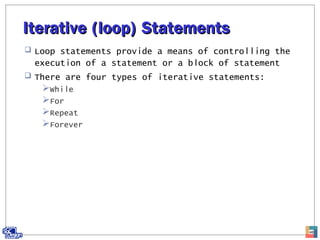
 Loop statements provide a means of controlling the
execution of a statement or a block of statement
 There are four types of iterative statements:
While
For
Repeat
Forever
46
While Loop StatementWhile Loop Statement
 It executes the procedural statement until the
given condition becomes false
 It takes the form:
while (condition_expr) procedural_statement
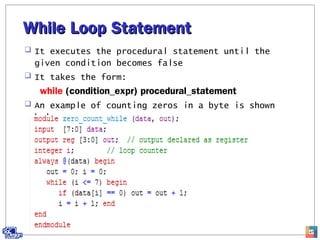
 An example of counting zeros in a byte is shown
below:
47
While Loop StatementWhile Loop Statement
 Testbench and waveform
48
For Loop StatementFor Loop Statement
 The for loop is used as a counting loop
 Its syntax is as below:
for (init_expr; condition_expr; update_expr)
procedural_statement
 Below is an example of counting the zeros in a byte
49
For Loop StatementFor Loop Statement
 Testbench and waveform
50
Repeat Loop StatementRepeat Loop Statement
 It is used to perform a procedural statement a
specified number of times
 The syntax is as below:
repeat (counter_expr) procedural_statement
 An example of a simple count down timer is shown
below:
51
Repeat Loop StatementRepeat Loop Statement
 Simulation results
52
Forever Loop StatementForever Loop Statement
 The forever loop continuously performs a procedural
statement until the $finish system task is
encountered
 Its syntax is as below:
forever procedural_statement
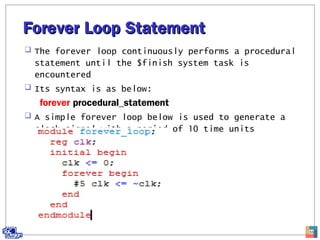
 A simple forever loop below is used to generate a
clock signal with a period of 10 time units
53
Forever Loop StatementForever Loop Statement
 Waveform
54

Behavioral modeling

  • 1.
    Behavioral ModelingBehavioral Modeling GookyiDennis A. N.Gookyi Dennis A. N. SoC Design Lab.SoC Design Lab. June.13.2014
  • 2.
    ContentsContents  Procedural Constructs Procedural Assignments  Timing Control  Selection Statements  Iterative (Loop) Statements 2
  • 3.
    Procedural ConstructsProcedural Constructs Behavioral modeling uses two main blocks: The initial block The always block  Initial and always blocks cannot be nested  Each initial and always block must form its own block 3
  • 4.
    Initial BlockInitial Block An initial block starts at simulation time 0 and executes exactly once during simulation  It is used to initialize signals or to monitor waveforms  The syntax is as follows: initial [timing_control] procedural_statement  The procedural statement could be any of the following: Selection_statement Case_statement Loop_statement 4
  • 5.
    Initial BlockInitial Block Each initial block starts to execute concurrently at simulation time 0 and finishes their execution independently when multiple initial blocks exist  Take the example below: module initialblock; reg x,y,z; initial #10 x = 1'b0; initial begin #10 y = 1'b1; #20 z = 1'b1; end endmodule 5
  • 6.
    Always BlockAlways Block The always statement starts at simulation time 0 and repeatedly executes the statements within it in a loop fashion during simulation  The syntax is as below: always [timing_control] procedural_statement  An always block is used to model a block of activities that are continuously repeated in a digital circuit 6
  • 7.
    Always BlockAlways Block A model of a clock generator is shown below:  Code module alwaysblock; reg clock; //a clock generator initial clock = 1'b0;//initialize clk to 0 always #5 clock = ~clock;//period = 10 endmodule  waveform 7
  • 8.
    4-to-1 Multiplexer4-to-1 Multiplexer Block diagram, function table and logic circuit of a 4-to-1 multiplexer is shown below  Out = i0.s1’.s0’ + i1.s1’.s0 + i2.s1.s0’ + i3.s1.s0 8
  • 9.
    4-to-1 MUX4-to-1 MUX Code and testbench 9
  • 10.
  • 11.
    Procedural AssignmentProcedural Assignment A continuous assignment is used to assign values onto a net  Procedural assignment puts values in a variable  Procedural assignments are placed inside an initial or always statements  They update values of variable data types  The syntax is as follows: variable_lvalue = [timing_control] expression 11
  • 12.
    Procedural vs ContinuousProceduralvs Continuous Two types of procedural assignments are available in Verilog Blocking assignment Non-blocking assignment 12 Continuous procedural Drive nets Update variables Left hand side is of net data type Left hand side is of variable data type Use the assign keyword No assign keyword Not used in initial and always blocks Located in initial and always statements
  • 13.
    Blocking AssignmentBlocking Assignment Uses the “=” operator  Executed in the order that they are specified  In sequential blocks (begin/end), blocking assignment is executed before the statements following it  In parallel block (fork/join), there is no blocking 13
  • 14.
    Blocking AssignmentBlocking Assignment An example of using blocking assignment 14
  • 15.
    Non-blocking AssignmentNon-blocking Assignment Use the “<=” operator  Executed without blocking the other statements in a sequential block  Non-blocking assignment statement is used whenever several variable assignments within the same time step need to be made regardless of the order 15
  • 16.
    Non-blocking AssignmentNon-blocking Assignment Example of using non-blocking assignment 16
  • 17.
    Non-blocking AssignmentNon-blocking Assignment In general, the simulators perform the following three steps when executing non-blocking statements Read: read the values of all right-hand-side variables Evaluation: evaluate the right-hand-side expression and store in a temporary variables that are scheduled to assign to the left-hand-side variable later Assignment: assign the values stored in the temporary variables to the left hand side variables 17
  • 18.
    Mixed Use ofBlocking and Non-Mixed Use of Blocking and Non- blockingblocking  An example of a mixture of blocking and non- blocking 18
  • 19.
    Race ProblemsRace Problems If we want to swap the contents of two registers, we might be tempted to use two always blocks with blocking assignment as below:  The code above will result in a race condition  The final result will be that both registers x and y will have the same content as the original y 19
  • 20.
  • 21.
    Race ProblemRace Problem The race problem can be solved by using non- blocking assignment as below: 21
  • 22.
    Coding StylesCoding Styles Do not mix blocking and non-blocking assignments in the same always block  It is good to use non-blocking assignment when modeling sequential logic  It is a good to use blocking assignment when modeling combinational logic 22
  • 23.
    Timing ControlTiming Control Timing control provide a way to specify the simulation time at which procedural statements will execute  If there is no timing control statements, the simulation time will not advance  There are two timing control methods provided in verilog Delay timing control Event timing control 23
  • 24.
    Delay Timing ControlDelayTiming Control  Delay timing control specifies the time duration when the statement is encountered and when the statement is executed  It is specified by “#” and has the following form: #delay_value  Delay timing control can be divided into two types depending on the position of the delay specifier in the statement Regular delay control Intra-assignment delay control 24
  • 25.
    Regular Delay ControlRegularDelay Control  Defers the execution of the entire statement by a specified number of time units  Its syntax is as follows: #delay procedural_statement  When regular delay control statement is initialized, the results is always the same for blocking and non-blocking assignment 25
  • 26.
    Regular Delay ControlRegularDelay Control  Code and waveform for blocking assignment 26
  • 27.
    Regular Delay ControlRegularDelay Control  Code and waveform for non-blocking assignment 27
  • 28.
    Intra-assignment delay controlIntra-assignmentdelay control  Defers the assignment to the left-hand-side variable by a specified number of time units but the right-hand-side expression is evaluated at the current simulation time  The syntax is as follows: variable_lvalue = #delay expression  Depending on which kind of assignment, blocking or non-blocking, the effect is different 28
  • 29.
    Intra-assignment delay controlIntra-assignmentdelay control  Code and waveform for blocking 29
  • 30.
    Intra-assignment delay controlIntra-assignmentdelay control  Code and waveform for non-blocking 30
  • 31.
    Event Timing ControlEventTiming Control  An event is a value change on a net or variable or the occurrence of a declared event  Event control with a procedural statement defers the execution of the statement until the occurrence of the specified event  There are two kinds of event control: Edge-triggered event control Level-sensitive event control 31
  • 32.
    Edge-triggered Event ControlEdge-triggeredEvent Control  A procedural statement defers its execution until a specified transition of a given signal occurs  The symbol @ is used to specify an edge triggered event  The syntax is as follows: @event procedural_statement;  Negedge: transition from 1 to x, z or 0 and from x or z to 0  Posedge: transition from 0 to x, z or 1 and from x or z to 1 32
  • 33.
    Edge-triggered Event ControlEdge-triggeredEvent Control  Code and waveform for edge-triggered example 33
  • 34.
    Named Event ControlNamedEvent Control  In Verilog, a new data type called event can be declared in addition to nets and variables  This provides users a capability to declare an event and to trigger and recognize it  A named event is triggered by using the symbol “->”  There are three steps involved in using named events: Declaration Triggering Recognition  An example is a counter that counts by one every 2ns. It triggers an event ready whenever its value is a multiple of 5. Once the event ready is triggered, we display the count value 34
  • 35.
    Named Event ControlNamedEvent Control  Code and simulation of named event example 35
  • 36.
    Selection StatementsSelection Statements Selection statements are used to make a selection based on a given condition  There are two types of selection statements in Verilog: If-else Case 36
  • 37.
    If-else StatementIf-else Statement Used to make a decision according to a given condition  The syntax is as follows: if (<expression>) true_statement ; if (<expression>) true_statement; else false_statement; if (<expression1>) true_statement1; else if (<expression2>) true_statement2; else false_statement;  If-else statement is used to perform a two-way selection according to a given condition  It also allows nested statement so that it can carry out multiway selection 37
  • 38.
    If-else StatementIf-else Statement A 4-to-1 Mux using selection statement 38
  • 39.
    If-else StatementIf-else Statement Testbench and waveform 39
  • 40.
    Case StatementCase Statement A case statement is used to perform a multiway selection according to a given input condition  It has the following general form: case (case_expression) case_item1 {,case_item1}: procedural_statement1 case_item2 {,case_item2}: procedural_statement2 ... case_itemn {,case_itemn}: procedural_statementn [default: procedural_statement] endcase 40
  • 41.
    Case StatementCase Statement A 4-to-1 Mux using case statement 41
  • 42.
  • 43.
    Casex and casezstatementsCasex and casez statements  Both casex and casez are used to perform multiway selection  Casez treats all z values as don’t cares  Casex treats all x and z values as don’t cares  The two statements only compare the non-x or z positions in the case_expression and the case_item expression 43
  • 44.
    Casex and casezstatementsCasex and casez statements  The code below illustrates how to count trailing zeros in a nibble 44
  • 45.
    Casex and casezstatementsCasex and casez statements  Waveform 45
  • 46.
    Iterative (loop) StatementsIterative(loop) Statements  Loop statements provide a means of controlling the execution of a statement or a block of statement  There are four types of iterative statements: While For Repeat Forever 46
  • 47.
    While Loop StatementWhileLoop Statement  It executes the procedural statement until the given condition becomes false  It takes the form: while (condition_expr) procedural_statement  An example of counting zeros in a byte is shown below: 47
  • 48.
    While Loop StatementWhileLoop Statement  Testbench and waveform 48
  • 49.
    For Loop StatementForLoop Statement  The for loop is used as a counting loop  Its syntax is as below: for (init_expr; condition_expr; update_expr) procedural_statement  Below is an example of counting the zeros in a byte 49
  • 50.
    For Loop StatementForLoop Statement  Testbench and waveform 50
  • 51.
    Repeat Loop StatementRepeatLoop Statement  It is used to perform a procedural statement a specified number of times  The syntax is as below: repeat (counter_expr) procedural_statement  An example of a simple count down timer is shown below: 51
  • 52.
    Repeat Loop StatementRepeatLoop Statement  Simulation results 52
  • 53.
    Forever Loop StatementForeverLoop Statement  The forever loop continuously performs a procedural statement until the $finish system task is encountered  Its syntax is as below: forever procedural_statement  A simple forever loop below is used to generate a clock signal with a period of 10 time units 53
  • 54.
    Forever Loop StatementForeverLoop Statement  Waveform 54