
FIRST CYCLE – PROGRAMMING USING VERILOG
E-CAD & VLSI - LAB
What is Verilog HDL?
 Why using Hardware Description Language?
 Design abstraction: HDL layout by human←→
 Hardware modeling(design a hardware)
 Reduce cost and time to design hardware
 Two Popular HDLs
 VHDL
 Verilog
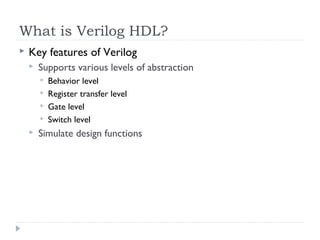
What is Verilog HDL?
 Key features of Verilog
 Supports various levels of abstraction
 Behavior level
 Register transfer level
 Gate level
 Switch level
 Simulate design functions
4
Description of digital systems only
Basic Limitation of Verilog
Different Levels of Abstraction
 Architectural / Algorithmic Level
 Implement a design algorithm in
high-level language constructs.
 Register Transfer Level
 Describes the flow of data
between registers and
how a design process
these data.
System
Algorithm
Architecture
Register Transfer Level
Gate Level
Transistor Level
Different Levels of Abstraction
 Gate Level
 Describe the logic gates and the
interconnections between them.
 Switch (Transistor) Level
 Describe the transistors and
the interconnections
between them.
System
Algorithm
Architecture
Register Transfer Level
Gate Level
Transistor Level
7
Verilog Value Set
 0 represents low logic level or false condition
 1 represents high logic level or true condition
 x represents unknown logic level
 z represents high impedance logic level
8
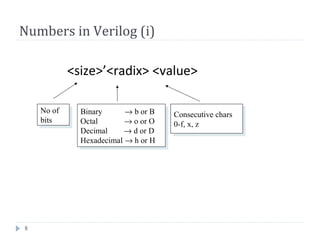
Numbers in Verilog (i)
<size>’<radix> <value>
No of
bits
No of
bits
Binary → b or B
Octal → o or O
Decimal → d or D
Hexadecimal → h or H
Binary → b or B
Octal → o or O
Decimal → d or D
Hexadecimal → h or H
Consecutive chars
0-f, x, z
Consecutive chars
0-f, x, z
9
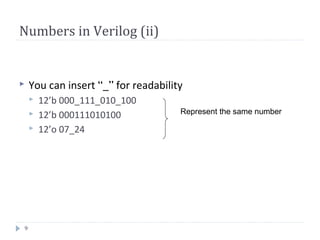
Numbers in Verilog (ii)
 You can insert “_” for readability
 12’b 000_111_010_100
 12’b 000111010100
 12’o 07_24
Represent the same number
Number Representation
 Examples:
 6’b010_111 gives 010111
 8’b0110 gives 00000110
 4’bx01 gives xx01
 16’H3AB gives 0000001110101011
 24 gives 0…0011000
 5’O36 gives 11110
 16’Hx gives xxxxxxxxxxxxxxxx
 8’hz gives zzzzzzzz
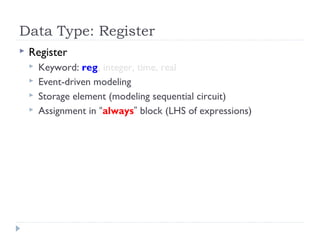
Data Type: Register
 Register
 Keyword: reg, integer, time, real
 Event-driven modeling
 Storage element (modeling sequential circuit)
 Assignment in “always” block (LHS of expressions)
Data Type: Net
 Net
 Keyword: wire, wand, wor, tri, triand, trior, supply0, supply1
 Doesn’t store value, just a connection
 Input, output and inout ports are default “wire”
13
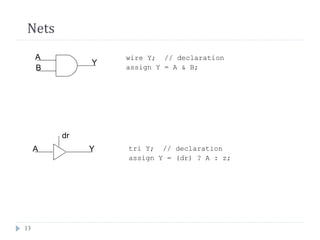
Nets
A
B
Y
wire Y; // declaration
assign Y = A & B;
A Y
dr
tri Y; // declaration
assign Y = (dr) ? A : z;
14
Vectors
 Represent buses
wire [3:0] busA;
reg [1:4] busB;
reg [1:0] busC;
 Left number is MS bit
 Slice management
busC[1] = busA[2];
busC[0] = busA[1];
busC = busA[2:1]; ⇔
15
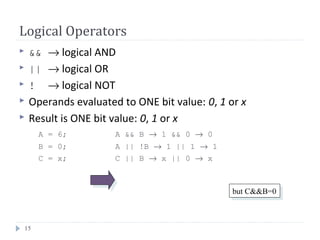
Logical Operators
 && → logical AND
 || → logical OR
 ! → logical NOT
 Operands evaluated to ONE bit value: 0, 1 or x
 Result is ONE bit value: 0, 1 or x
A = 6; A && B → 1 && 0 → 0
B = 0; A || !B → 1 || 1 → 1
C = x; C || B → x || 0 → x
but C&&B=0but C&&B=0
16
Bitwise Operators (i)
 & → bitwise AND
 | → bitwise OR
 ~ → bitwise NOT
 ^ → bitwise XOR
 ~^ or ^~ → bitwise XNOR
 Operation on bit by bit basis
17
Bitwise Operators (ii)
c = ~a; c = a & b;
 a = 4’b1010;
b = 4’b1100;
 a = 4’b1010;
b = 2’b11;
18
Reduction Operators
 & → AND
 | → OR
 ^ → XOR
 ~& → NAND
 ~| → NOR
 ~^ or ^~ → XNOR
 One multi-bit operand → One single-bit result
a = 4’b1001;
..
c = |a; // c = 1|0|0|1 = 1
19
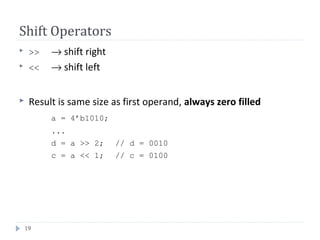
Shift Operators
 >> → shift right
 << → shift left
 Result is same size as first operand, always zero filled
a = 4’b1010;
...
d = a >> 2; // d = 0010
c = a << 1; // c = 0100
20
Concatenation Operator
 {op1, op2, ..} → concatenates op1, op2, .. to single number
 Operands must be sized !!
reg a;
reg [2:0] b, c;
..
a = 1’b 1;
b = 3’b 010;
c = 3’b 101;
catx = {a, b, c}; // catx = 1_010_101
caty = {b, 2’b11, a}; // caty = 010_11_1
catz = {b, 1}; // WRONG !!
 Replication ..
catr = {4{a}, b, 2{c}}; // catr = 1111_010_101101
21
Relational Operators
 > → greater than
 < → less than
 >= → greater or equal than
 <= → less or equal than
 Result is one bit value: 0, 1 or x
1 > 0 → 1
’b1x1 <= 0 → x
10 < z → x
22
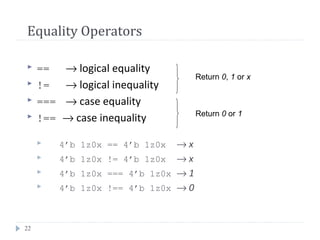
Equality Operators
 == → logical equality
 != → logical inequality
 === → case equality
 !== → case inequality
 4’b 1z0x == 4’b 1z0x → x
 4’b 1z0x != 4’b 1z0x → x
 4’b 1z0x === 4’b 1z0x → 1
 4’b 1z0x !== 4’b 1z0x → 0
Return 0, 1 or x
Return 0 or 1
23
Conditional Operator
 cond_expr ? true_expr : false_expr
 Like a 2-to-1 mux ..
A
B
Y
sel
Y = (sel)? A : B;
0
1
24
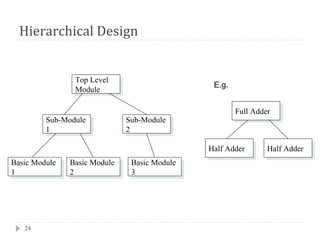
Hierarchical Design
Top Level
Module
Top Level
Module
Sub-Module
1
Sub-Module
1
Sub-Module
2
Sub-Module
2
Basic Module
3
Basic Module
3
Basic Module
2
Basic Module
2
Basic Module
1
Basic Module
1
Full AdderFull Adder
Half AdderHalf Adder Half AdderHalf Adder
E.g.
25
Module
f
in1
in2
inN
out1
out2
outM
my_module
module my_module(out1, .., inN);
output out1, .., outM;
input in1, .., inN;
.. // declarations
.. // description of f (maybe
.. // sequential)
endmodule
Everything you write in Verilog must be inside a module
exception: compiler directives
26
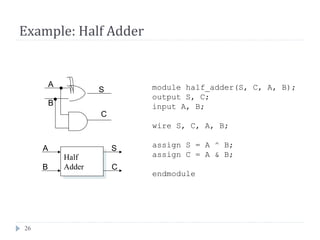
Example: Half Adder
module half_adder(S, C, A, B);
output S, C;
input A, B;
wire S, C, A, B;
assign S = A ^ B;
assign C = A & B;
endmodule
Half
Adder
Half
Adder
A
B
S
C
A
B
S
C
27
Example: Full Adder
module full_adder(sum, cout, in1, in2, cin);
output sum, cout;
input in1, in2, cin;
wire sum, cout, in1, in2, cin;
wire I1, I2, I3;
half_adder ha1(I1, I2, in1, in2);
half_adder ha2(sum, I3, I1, cin);
assign cout = I2 || I3;
endmodule
Instance
name
Module
name
Half
Adder
ha2
Half
Adder
ha2
A
B
S
C
Half
Adder 1
ha1
Half
Adder 1
ha1
A
B
S
C
in1
in2
cin
cout
sumI1
I2 I3
28
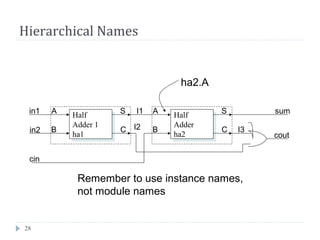
Hierarchical Names
ha2.A
Remember to use instance names,
not module names
Half
Adder
ha2
Half
Adder
ha2
A
B
S
C
Half
Adder 1
ha1
Half
Adder 1
ha1
A
B
S
C
in1
in2
cin
cout
sumI1
I2 I3
29
Structural Model (Gate Level)
 Built-in gate primitives:
and, nand, nor, or, xor, xnor, buf, not, bufif0,
bufif1, notif0, notif1
 Usage:
nand (out, in1, in2); 2-input NAND without delay
and #2 (out, in1, in2, in3); 3-input AND with 2 t.u. delay
not #1 N1(out, in); NOT with 1 t.u. delay and instance name
xor X1(out, in1, in2); 2-input XOR with instance name
 Write them inside module, outside procedures
30
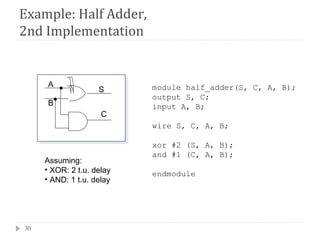
Example: Half Adder,
2nd Implementation
Assuming:
• XOR: 2 t.u. delay
• AND: 1 t.u. delay
module half_adder(S, C, A, B);
output S, C;
input A, B;
wire S, C, A, B;
xor #2 (S, A, B);
and #1 (C, A, B);
endmodule
A
B
S
C
31
Behavioral Model - Procedures (i)
 Procedures = sections of code that we know they
execute sequentially
 Procedural statements = statements inside a
procedure (they execute sequentially)
 e.g. another 2-to-1 mux implem:
begin
if (sel == 0)
Y = B;
else
Y = A;
end
Execution
Flow Procedural assignments:
Y must be reg !!
Procedural assignments:
Y must be reg !!
32
Behavioral Model - Procedures (ii)
 Modules can contain any number of procedures
 Procedures execute in parallel (in respect to each other)
and ..
 .. can be expressed in two types of blocks:
 initial → they execute only once
 always → they execute for ever (until simulation finishes)
33
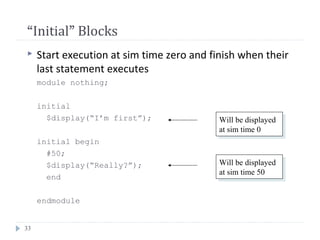
“Initial” Blocks
 Start execution at sim time zero and finish when their
last statement executes
module nothing;
initial
$display(“I’m first”);
initial begin
#50;
$display(“Really?”);
end
endmodule
Will be displayed
at sim time 0
Will be displayed
at sim time 0
Will be displayed
at sim time 50
Will be displayed
at sim time 50
34
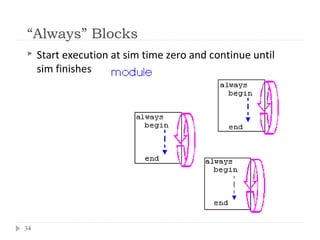
“Always” Blocks
 Start execution at sim time zero and continue until
sim finishes
35
Events (i)
 @
always @(signal1 or signal2 or ..) begin
..
end
always @(posedge clk) begin
..
end
always @(negedge clk) begin
..
end
execution triggers every
time any signal changes
execution triggers every
time any signal changes
execution triggers every
time clk changes
from 0 to 1
execution triggers every
time clk changes
from 0 to 1
execution triggers every
time clk changes
from 1 to 0
execution triggers every
time clk changes
from 1 to 0
36
Examples
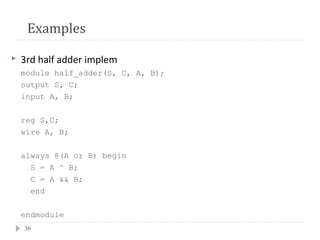
 3rd half adder implem
module half_adder(S, C, A, B);
output S, C;
input A, B;
reg S,C;
wire A, B;
always @(A or B) begin
S = A ^ B;
C = A && B;
end
endmodule
37
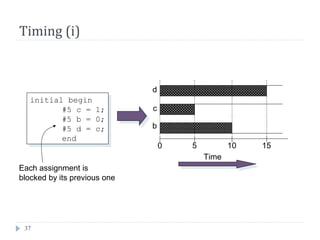
Timing (i)
initial begin
#5 c = 1;
#5 b = 0;
#5 d = c;
end
initial begin
#5 c = 1;
#5 b = 0;
#5 d = c;
end
0 5 10 15
Time
b
c
d
Each assignment is
blocked by its previous one
38
Timing (ii)
initial begin
fork
#5 c = 1;
#5 b = 0;
#5 d = c;
join
end
initial begin
fork
#5 c = 1;
#5 b = 0;
#5 d = c;
join
end
0 5 10 15
Time
b
c
d
Assignments are
not blocked here
39
Procedural Statements: if
if (expr1)
true_stmt1;
else if (expr2)
true_stmt2;
..
else
def_stmt;
E.g. 4-to-1 mux:
module mux4_1(out, in, sel);
output out;
input [3:0] in;
input [1:0] sel;
reg out;
wire [3:0] in;
wire [1:0] sel;
always @(in or sel)
if (sel == 0)
out = in[0];
else if (sel == 1)
out = in[1];
else if (sel == 2)
out = in[2];
else
out = in[3];
endmodule
40
Procedural Statements: case
case (expr)
item_1, .., item_n: stmt1;
item_n+1, .., item_m: stmt2;
..
default: def_stmt;
endcase
E.g. 4-to-1 mux:
module mux4_1(out, in, sel);
output out;
input [3:0] in;
input [1:0] sel;
reg out;
wire [3:0] in;
wire [1:0] sel;
always @(in or sel)
case (sel)
0: out = in[0];
1: out = in[1];
2: out = in[2];
3: out = in[3];
endcase
endmodule
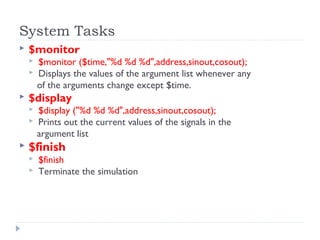
System Tasks
 $monitor
 $monitor ($time,"%d %d %d",address,sinout,cosout);
 Displays the values of the argument list whenever any
of the arguments change except $time.
 $display
 $display ("%d %d %d",address,sinout,cosout);
 Prints out the current values of the signals in the
argument list
 $finish
 $finish
 Terminate the simulation
Thanasis OikonomouVerilog HDL Basics42
Compiler Directives
 `include “filename” → inserts contents of file into current file; write it
anywhere in code ..
 `define <text1> <text2> → text1 substitutes text2;
 e.g. `define BUS reg [31:0] in declaration part: `BUS data;
 `timescale <time unit>/<precision>
 e.g. `timescale 10ns/1ns later: #5 a = b;
50ns50ns
Test MethodologyTest Methodology
 Systematically verify the functionality of a model.
 Procedure of simulation
 Detect syntax violations in source code
 Simulate behavior
 Monitor results
43
Test MethodologyTest Methodology
44
Testbench for Full AdderTestbench for Full Adder
45
module t_full_add();
reg a, b, cin; // for stimulus waveforms
wire sum, c_out;
full_add M1 (sum, c_out, a, b, cin); //DUT
initial #200 $finish; // Stopwatch
initial begin // Stimulus patterns
#10 a = 0; b = 0; cin = 0; // Execute in sequence
#10 a = 0; b = 1; cin = 0;
#10 a = 1; b = 0; cin = 0;
#10 a = 1; b = 1; cin = 0;
#10 a = 0; b = 0; cin = 1;
#10 a = 0; b = 1; cin = 1;
#10 a = 1; b = 0; cin = 1;
#10 a = 1; b = 1; cin = 1;
end
endmodule
bin2gray.v
module bin2gray ( B ,G );
input [3:0] B ;
wire [3:0] B ;
output [3:0] G ;
wire [3:0] G ;
assign G[3] = B[3];
assign G[2:0] = B[3:1] ^ B[2:0];
endmodule
Convert Binary to Gray:
Copy the most significant bit.
For each smaller i
G[i] = B[i+1] ^ B[i]
Binary coding {0...7}: {000, 001, 010, 011, 100, 101, 110, 111}
Gray coding {0...7}: {000, 001, 011, 010, 110, 111, 101, 100}
Binary - Gray Code
ConversionsGray code: G[i], i = n – 1 : 0
Binary code: B[i], i = n – 1 : 0
Convert Binary to Gray:
Copy the most significant bit.
For each smaller i
G[i] = B[i+1] ^ B[i]
Convert Gray to Binary:
Copy the most significant bit.
For each smaller i
B[i] = B[i+1] ^ G[i]
Gray Code
000 000
001 001
010 011
011 010
100 110
101 111
110 101
111 100
Binary
B[2:0]
Gray Code
G[2:0]
Gray code to Binary
B[2] = G[2];
B[1:0] = B[2:1] ^ G[1:0];
module gray2bin6 ( G ,B );
input [5:0] G ;
wire [5:0] G ;
output [5:0] B ;
wire [5:0] B ;
assign B[5] = G[5];
assign B[4:0] = B[5:1] ^ G[4:0];
endmodule
B(msb) = G(msb);
for(j = msb-1; j >= 0; j=j-1)
B(j) = B(j+1) ^ G(j);
Gray code to Binary
gray2bin.v
module gray2bin ( G ,B );
input [3:0] G ;
wire [3:0] G ;
output [3:0] B ;
reg [3:0] B ;
integer i;
always @(G)
begin
B[3] = G[3];
for(i=2; i >= 0; i = i-1)
B[i] = B[i+1] ^ G[i];
end
endmodule
Convert Gray to Binary:
Copy the most significant bit.
For each smaller i
B[i] = B[i+1] ^ G[i]

Verilogforlab

  • 1.
    FIRST CYCLE –PROGRAMMING USING VERILOG E-CAD & VLSI - LAB
  • 2.
    What is VerilogHDL?  Why using Hardware Description Language?  Design abstraction: HDL layout by human←→  Hardware modeling(design a hardware)  Reduce cost and time to design hardware  Two Popular HDLs  VHDL  Verilog
  • 3.
    What is VerilogHDL?  Key features of Verilog  Supports various levels of abstraction  Behavior level  Register transfer level  Gate level  Switch level  Simulate design functions
  • 4.
    4 Description of digitalsystems only Basic Limitation of Verilog
  • 5.
    Different Levels ofAbstraction  Architectural / Algorithmic Level  Implement a design algorithm in high-level language constructs.  Register Transfer Level  Describes the flow of data between registers and how a design process these data. System Algorithm Architecture Register Transfer Level Gate Level Transistor Level
  • 6.
    Different Levels ofAbstraction  Gate Level  Describe the logic gates and the interconnections between them.  Switch (Transistor) Level  Describe the transistors and the interconnections between them. System Algorithm Architecture Register Transfer Level Gate Level Transistor Level
  • 7.
    7 Verilog Value Set 0 represents low logic level or false condition  1 represents high logic level or true condition  x represents unknown logic level  z represents high impedance logic level
  • 8.
    8 Numbers in Verilog(i) <size>’<radix> <value> No of bits No of bits Binary → b or B Octal → o or O Decimal → d or D Hexadecimal → h or H Binary → b or B Octal → o or O Decimal → d or D Hexadecimal → h or H Consecutive chars 0-f, x, z Consecutive chars 0-f, x, z
  • 9.
    9 Numbers in Verilog(ii)  You can insert “_” for readability  12’b 000_111_010_100  12’b 000111010100  12’o 07_24 Represent the same number
  • 10.
    Number Representation  Examples: 6’b010_111 gives 010111  8’b0110 gives 00000110  4’bx01 gives xx01  16’H3AB gives 0000001110101011  24 gives 0…0011000  5’O36 gives 11110  16’Hx gives xxxxxxxxxxxxxxxx  8’hz gives zzzzzzzz
  • 11.
    Data Type: Register Register  Keyword: reg, integer, time, real  Event-driven modeling  Storage element (modeling sequential circuit)  Assignment in “always” block (LHS of expressions)
  • 12.
    Data Type: Net Net  Keyword: wire, wand, wor, tri, triand, trior, supply0, supply1  Doesn’t store value, just a connection  Input, output and inout ports are default “wire”
  • 13.
    13 Nets A B Y wire Y; //declaration assign Y = A & B; A Y dr tri Y; // declaration assign Y = (dr) ? A : z;
  • 14.
    14 Vectors  Represent buses wire[3:0] busA; reg [1:4] busB; reg [1:0] busC;  Left number is MS bit  Slice management busC[1] = busA[2]; busC[0] = busA[1]; busC = busA[2:1]; ⇔
  • 15.
    15 Logical Operators  &&→ logical AND  || → logical OR  ! → logical NOT  Operands evaluated to ONE bit value: 0, 1 or x  Result is ONE bit value: 0, 1 or x A = 6; A && B → 1 && 0 → 0 B = 0; A || !B → 1 || 1 → 1 C = x; C || B → x || 0 → x but C&&B=0but C&&B=0
  • 16.
    16 Bitwise Operators (i) & → bitwise AND  | → bitwise OR  ~ → bitwise NOT  ^ → bitwise XOR  ~^ or ^~ → bitwise XNOR  Operation on bit by bit basis
  • 17.
    17 Bitwise Operators (ii) c= ~a; c = a & b;  a = 4’b1010; b = 4’b1100;  a = 4’b1010; b = 2’b11;
  • 18.
    18 Reduction Operators  &→ AND  | → OR  ^ → XOR  ~& → NAND  ~| → NOR  ~^ or ^~ → XNOR  One multi-bit operand → One single-bit result a = 4’b1001; .. c = |a; // c = 1|0|0|1 = 1
  • 19.
    19 Shift Operators  >>→ shift right  << → shift left  Result is same size as first operand, always zero filled a = 4’b1010; ... d = a >> 2; // d = 0010 c = a << 1; // c = 0100
  • 20.
    20 Concatenation Operator  {op1,op2, ..} → concatenates op1, op2, .. to single number  Operands must be sized !! reg a; reg [2:0] b, c; .. a = 1’b 1; b = 3’b 010; c = 3’b 101; catx = {a, b, c}; // catx = 1_010_101 caty = {b, 2’b11, a}; // caty = 010_11_1 catz = {b, 1}; // WRONG !!  Replication .. catr = {4{a}, b, 2{c}}; // catr = 1111_010_101101
  • 21.
    21 Relational Operators  >→ greater than  < → less than  >= → greater or equal than  <= → less or equal than  Result is one bit value: 0, 1 or x 1 > 0 → 1 ’b1x1 <= 0 → x 10 < z → x
  • 22.
    22 Equality Operators  ==→ logical equality  != → logical inequality  === → case equality  !== → case inequality  4’b 1z0x == 4’b 1z0x → x  4’b 1z0x != 4’b 1z0x → x  4’b 1z0x === 4’b 1z0x → 1  4’b 1z0x !== 4’b 1z0x → 0 Return 0, 1 or x Return 0 or 1
  • 23.
    23 Conditional Operator  cond_expr? true_expr : false_expr  Like a 2-to-1 mux .. A B Y sel Y = (sel)? A : B; 0 1
  • 24.
    24 Hierarchical Design Top Level Module TopLevel Module Sub-Module 1 Sub-Module 1 Sub-Module 2 Sub-Module 2 Basic Module 3 Basic Module 3 Basic Module 2 Basic Module 2 Basic Module 1 Basic Module 1 Full AdderFull Adder Half AdderHalf Adder Half AdderHalf Adder E.g.
  • 25.
    25 Module f in1 in2 inN out1 out2 outM my_module module my_module(out1, ..,inN); output out1, .., outM; input in1, .., inN; .. // declarations .. // description of f (maybe .. // sequential) endmodule Everything you write in Verilog must be inside a module exception: compiler directives
  • 26.
    26 Example: Half Adder modulehalf_adder(S, C, A, B); output S, C; input A, B; wire S, C, A, B; assign S = A ^ B; assign C = A & B; endmodule Half Adder Half Adder A B S C A B S C
  • 27.
    27 Example: Full Adder modulefull_adder(sum, cout, in1, in2, cin); output sum, cout; input in1, in2, cin; wire sum, cout, in1, in2, cin; wire I1, I2, I3; half_adder ha1(I1, I2, in1, in2); half_adder ha2(sum, I3, I1, cin); assign cout = I2 || I3; endmodule Instance name Module name Half Adder ha2 Half Adder ha2 A B S C Half Adder 1 ha1 Half Adder 1 ha1 A B S C in1 in2 cin cout sumI1 I2 I3
  • 28.
    28 Hierarchical Names ha2.A Remember touse instance names, not module names Half Adder ha2 Half Adder ha2 A B S C Half Adder 1 ha1 Half Adder 1 ha1 A B S C in1 in2 cin cout sumI1 I2 I3
  • 29.
    29 Structural Model (GateLevel)  Built-in gate primitives: and, nand, nor, or, xor, xnor, buf, not, bufif0, bufif1, notif0, notif1  Usage: nand (out, in1, in2); 2-input NAND without delay and #2 (out, in1, in2, in3); 3-input AND with 2 t.u. delay not #1 N1(out, in); NOT with 1 t.u. delay and instance name xor X1(out, in1, in2); 2-input XOR with instance name  Write them inside module, outside procedures
  • 30.
    30 Example: Half Adder, 2ndImplementation Assuming: • XOR: 2 t.u. delay • AND: 1 t.u. delay module half_adder(S, C, A, B); output S, C; input A, B; wire S, C, A, B; xor #2 (S, A, B); and #1 (C, A, B); endmodule A B S C
  • 31.
    31 Behavioral Model -Procedures (i)  Procedures = sections of code that we know they execute sequentially  Procedural statements = statements inside a procedure (they execute sequentially)  e.g. another 2-to-1 mux implem: begin if (sel == 0) Y = B; else Y = A; end Execution Flow Procedural assignments: Y must be reg !! Procedural assignments: Y must be reg !!
  • 32.
    32 Behavioral Model -Procedures (ii)  Modules can contain any number of procedures  Procedures execute in parallel (in respect to each other) and ..  .. can be expressed in two types of blocks:  initial → they execute only once  always → they execute for ever (until simulation finishes)
  • 33.
    33 “Initial” Blocks  Startexecution at sim time zero and finish when their last statement executes module nothing; initial $display(“I’m first”); initial begin #50; $display(“Really?”); end endmodule Will be displayed at sim time 0 Will be displayed at sim time 0 Will be displayed at sim time 50 Will be displayed at sim time 50
  • 34.
    34 “Always” Blocks  Startexecution at sim time zero and continue until sim finishes
  • 35.
    35 Events (i)  @ always@(signal1 or signal2 or ..) begin .. end always @(posedge clk) begin .. end always @(negedge clk) begin .. end execution triggers every time any signal changes execution triggers every time any signal changes execution triggers every time clk changes from 0 to 1 execution triggers every time clk changes from 0 to 1 execution triggers every time clk changes from 1 to 0 execution triggers every time clk changes from 1 to 0
  • 36.
    36 Examples  3rd halfadder implem module half_adder(S, C, A, B); output S, C; input A, B; reg S,C; wire A, B; always @(A or B) begin S = A ^ B; C = A && B; end endmodule
  • 37.
    37 Timing (i) initial begin #5c = 1; #5 b = 0; #5 d = c; end initial begin #5 c = 1; #5 b = 0; #5 d = c; end 0 5 10 15 Time b c d Each assignment is blocked by its previous one
  • 38.
    38 Timing (ii) initial begin fork #5c = 1; #5 b = 0; #5 d = c; join end initial begin fork #5 c = 1; #5 b = 0; #5 d = c; join end 0 5 10 15 Time b c d Assignments are not blocked here
  • 39.
    39 Procedural Statements: if if(expr1) true_stmt1; else if (expr2) true_stmt2; .. else def_stmt; E.g. 4-to-1 mux: module mux4_1(out, in, sel); output out; input [3:0] in; input [1:0] sel; reg out; wire [3:0] in; wire [1:0] sel; always @(in or sel) if (sel == 0) out = in[0]; else if (sel == 1) out = in[1]; else if (sel == 2) out = in[2]; else out = in[3]; endmodule
  • 40.
    40 Procedural Statements: case case(expr) item_1, .., item_n: stmt1; item_n+1, .., item_m: stmt2; .. default: def_stmt; endcase E.g. 4-to-1 mux: module mux4_1(out, in, sel); output out; input [3:0] in; input [1:0] sel; reg out; wire [3:0] in; wire [1:0] sel; always @(in or sel) case (sel) 0: out = in[0]; 1: out = in[1]; 2: out = in[2]; 3: out = in[3]; endcase endmodule
  • 41.
    System Tasks  $monitor $monitor ($time,"%d %d %d",address,sinout,cosout);  Displays the values of the argument list whenever any of the arguments change except $time.  $display  $display ("%d %d %d",address,sinout,cosout);  Prints out the current values of the signals in the argument list  $finish  $finish  Terminate the simulation
  • 42.
    Thanasis OikonomouVerilog HDLBasics42 Compiler Directives  `include “filename” → inserts contents of file into current file; write it anywhere in code ..  `define <text1> <text2> → text1 substitutes text2;  e.g. `define BUS reg [31:0] in declaration part: `BUS data;  `timescale <time unit>/<precision>  e.g. `timescale 10ns/1ns later: #5 a = b; 50ns50ns
  • 43.
    Test MethodologyTest Methodology Systematically verify the functionality of a model.  Procedure of simulation  Detect syntax violations in source code  Simulate behavior  Monitor results 43
  • 44.
  • 45.
    Testbench for FullAdderTestbench for Full Adder 45 module t_full_add(); reg a, b, cin; // for stimulus waveforms wire sum, c_out; full_add M1 (sum, c_out, a, b, cin); //DUT initial #200 $finish; // Stopwatch initial begin // Stimulus patterns #10 a = 0; b = 0; cin = 0; // Execute in sequence #10 a = 0; b = 1; cin = 0; #10 a = 1; b = 0; cin = 0; #10 a = 1; b = 1; cin = 0; #10 a = 0; b = 0; cin = 1; #10 a = 0; b = 1; cin = 1; #10 a = 1; b = 0; cin = 1; #10 a = 1; b = 1; cin = 1; end endmodule
  • 46.
    bin2gray.v module bin2gray (B ,G ); input [3:0] B ; wire [3:0] B ; output [3:0] G ; wire [3:0] G ; assign G[3] = B[3]; assign G[2:0] = B[3:1] ^ B[2:0]; endmodule Convert Binary to Gray: Copy the most significant bit. For each smaller i G[i] = B[i+1] ^ B[i]
  • 47.
    Binary coding {0...7}:{000, 001, 010, 011, 100, 101, 110, 111} Gray coding {0...7}: {000, 001, 011, 010, 110, 111, 101, 100} Binary - Gray Code ConversionsGray code: G[i], i = n – 1 : 0 Binary code: B[i], i = n – 1 : 0 Convert Binary to Gray: Copy the most significant bit. For each smaller i G[i] = B[i+1] ^ B[i] Convert Gray to Binary: Copy the most significant bit. For each smaller i B[i] = B[i+1] ^ G[i]
  • 48.
    Gray Code 000 000 001001 010 011 011 010 100 110 101 111 110 101 111 100 Binary B[2:0] Gray Code G[2:0] Gray code to Binary B[2] = G[2]; B[1:0] = B[2:1] ^ G[1:0];
  • 49.
    module gray2bin6 (G ,B ); input [5:0] G ; wire [5:0] G ; output [5:0] B ; wire [5:0] B ; assign B[5] = G[5]; assign B[4:0] = B[5:1] ^ G[4:0]; endmodule B(msb) = G(msb); for(j = msb-1; j >= 0; j=j-1) B(j) = B(j+1) ^ G(j); Gray code to Binary
  • 50.
    gray2bin.v module gray2bin (G ,B ); input [3:0] G ; wire [3:0] G ; output [3:0] B ; reg [3:0] B ; integer i; always @(G) begin B[3] = G[3]; for(i=2; i >= 0; i = i-1) B[i] = B[i+1] ^ G[i]; end endmodule Convert Gray to Binary: Copy the most significant bit. For each smaller i B[i] = B[i+1] ^ G[i]