Revolution in Writing From Word Processing to Paperless Publishing
Topics The Word Processing Process The Wordsmith’s Toolbox The Desktop Publishing Story Tomorrow’s Word Tools “ I …cannot imagine now that I ever wrote with a typewriter.” Arthur C. Clarke, author and scientist
The Word Processing Process Word processing involves the following steps: Entering text Editing text Formatting & proofreading the document Saving the document on disk Printing the document
Entering Text As you enter text using a word processor, your text is displayed on the screen and stored in the computer’s RAM. Save your work periodically because RAM is not permanent memory.
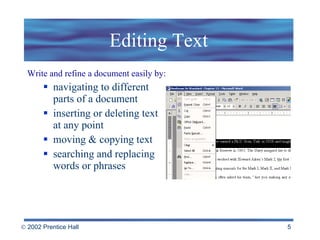
Editing Text Write and refine a document easily by: navigating to different  parts of a document inserting or deleting text  at any point moving & copying text searching and replacing words or phrases
Formatting Text Formatting refers to how the words look on a page. WYSIWIG (“What you see is what you get”) What you see on the screen is a close approximation of what you will see on paper Types of formatting: Character  Line & Paragraph Entire Document
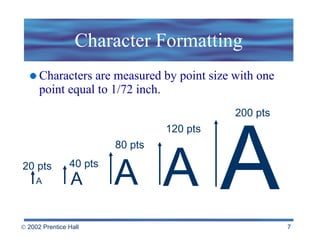
Character Formatting Characters are measured by point size with one point equal to 1/72 inch. 20 pts 40 pts 80 pts 120 pts 200 pts A A A A A
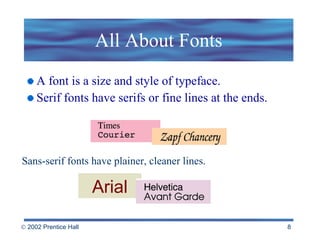
All About Fonts A font is a size and style of typeface. Serif fonts have serifs or fine lines at the ends. Sans-serif fonts have plainer, cleaner lines. Arial
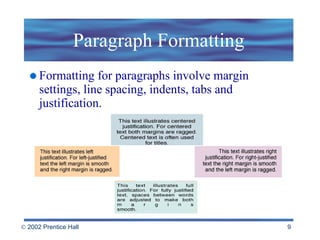
Paragraph Formatting Formatting for paragraphs involve margin settings, line spacing, indents, tabs and justification.
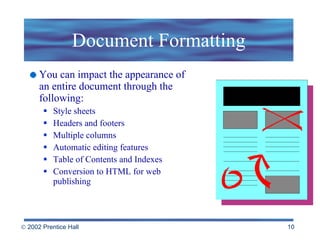
Document Formatting You can impact the appearance of an entire document through the following: Style sheets Headers and footers Multiple columns Automatic editing features Table of Contents and Indexes Conversion to HTML for web publishing
The Wordsmith’s Toolbox Outliners and Idea Processors Synonym Finders Digital References Spelling Checkers Grammar and Style Checkers Form Letter Generators Collaborative Writing Tools
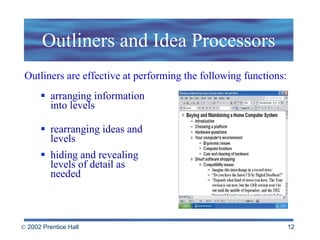
Outliners and Idea Processors arranging information into levels rearranging ideas and levels hiding and revealing levels of detail as needed Outliners are effective at performing the following functions:
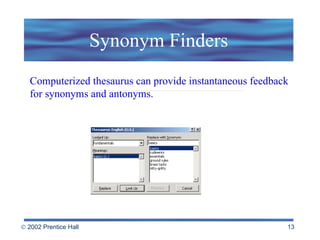
Synonym Finders Computerized thesaurus can provide instantaneous feedback for synonyms and antonyms.
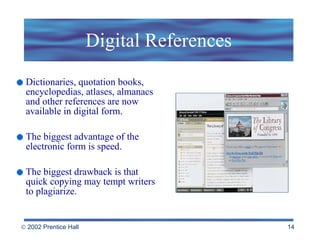
Digital References Dictionaries, quotation books, encyclopedias, atlases, almanacs and other references are now available in digital form. The biggest advantage of the electronic form is speed. The biggest drawback is that quick copying may tempt writers to plagiarize.
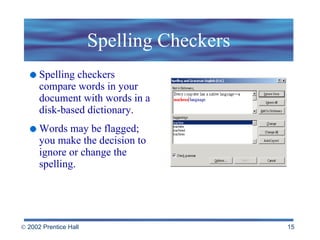
Spelling Checkers Spelling checkers compare words in your document with words in a disk-based dictionary. Words may be flagged; you make the decision to ignore or change the spelling.
Collaborative Writing Tools Groupware   - software designed to be used by a workgroup  Provides for collaborative writing and editing Tracks changes and identifies by the originator’s name Compares document versions and highlights differences in documents
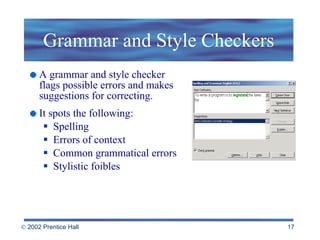
Grammar and Style Checkers A grammar and style checker flags possible errors and makes suggestions for correcting. It spots the following: Spelling Errors of context Common grammatical errors Stylistic foibles
Form Letter Generators The Mail Merge feature in word processors generates personalized form letters and mailing labels. Create a database with names Create a form letter Merge the database with the form letter    to create a personalized letter
The Desktop Publishing Story The process of producing a book, magazine or other publications includes several steps: Writing text Editing text Producing drawings, photographs, and other    graphics to accompany text Designing a basic format for the publication
What is Desktop Publishing? With modern desktop publishing technology, the production process can be accomplished with sophisticated tools that are affordable and easy to use. Typesetting text. Arranging text and graphics on images. Typesetting and printing pages. Binding pages into a finished publication.
Desktop Publishing Tools Scanners transform photographs and hand-drawn images into computer-readable documents.  Page-layout software combine the various source documents into a coherent, visually appealing publication  QuarkXpress PageMaker Adobe InDesign
What does the future hold? Despite predictions, written media isn’t going away. Yet… Electronic mail messages now out number post office deliveries of letters. CD-ROM encyclopedias briskly outsell their paper versions. The Internet provides for self-publishing to millions of users.
Tomorrow’s Word Tools Word processors are growing in sophistication and absorbing the features of page-layout software. Paperless electronic media will replace desktop publishing. Groupware for writing and editing Electronic dictation Intelligent Word Processors
Electronic Books and Digital Paper The electronic book , or  ebook   is   a handheld device that can contain anything from today’s top news stories to lengthy novels. Digital paper , or  epaper  is a flexible, portable, paper-like material that can dynamically display black-and-white text and images on its surface.
Electronic Dictation & Intelligent Word Processors The bottleneck continues to be in the input side of desktop publishing systems. For the future:  Speech-recognition software systems that can reliably recognize human speech. Intelligent word processors that anticipate a writer’s needs, acting as an electronic editor or co-author.
 

Beekman5 std ppt_05

  • 1.
    Revolution in WritingFrom Word Processing to Paperless Publishing
  • 2.
    Topics The WordProcessing Process The Wordsmith’s Toolbox The Desktop Publishing Story Tomorrow’s Word Tools “ I …cannot imagine now that I ever wrote with a typewriter.” Arthur C. Clarke, author and scientist
  • 3.
    The Word ProcessingProcess Word processing involves the following steps: Entering text Editing text Formatting & proofreading the document Saving the document on disk Printing the document
  • 4.
    Entering Text Asyou enter text using a word processor, your text is displayed on the screen and stored in the computer’s RAM. Save your work periodically because RAM is not permanent memory.
  • 5.
    Editing Text Writeand refine a document easily by: navigating to different parts of a document inserting or deleting text at any point moving & copying text searching and replacing words or phrases
  • 6.
    Formatting Text Formattingrefers to how the words look on a page. WYSIWIG (“What you see is what you get”) What you see on the screen is a close approximation of what you will see on paper Types of formatting: Character Line & Paragraph Entire Document
  • 7.
    Character Formatting Charactersare measured by point size with one point equal to 1/72 inch. 20 pts 40 pts 80 pts 120 pts 200 pts A A A A A
  • 8.
    All About FontsA font is a size and style of typeface. Serif fonts have serifs or fine lines at the ends. Sans-serif fonts have plainer, cleaner lines. Arial
  • 9.
    Paragraph Formatting Formattingfor paragraphs involve margin settings, line spacing, indents, tabs and justification.
  • 10.
    Document Formatting Youcan impact the appearance of an entire document through the following: Style sheets Headers and footers Multiple columns Automatic editing features Table of Contents and Indexes Conversion to HTML for web publishing
  • 11.
    The Wordsmith’s ToolboxOutliners and Idea Processors Synonym Finders Digital References Spelling Checkers Grammar and Style Checkers Form Letter Generators Collaborative Writing Tools
  • 12.
    Outliners and IdeaProcessors arranging information into levels rearranging ideas and levels hiding and revealing levels of detail as needed Outliners are effective at performing the following functions:
  • 13.
    Synonym Finders Computerizedthesaurus can provide instantaneous feedback for synonyms and antonyms.
  • 14.
    Digital References Dictionaries,quotation books, encyclopedias, atlases, almanacs and other references are now available in digital form. The biggest advantage of the electronic form is speed. The biggest drawback is that quick copying may tempt writers to plagiarize.
  • 15.
    Spelling Checkers Spellingcheckers compare words in your document with words in a disk-based dictionary. Words may be flagged; you make the decision to ignore or change the spelling.
  • 16.
    Collaborative Writing ToolsGroupware - software designed to be used by a workgroup Provides for collaborative writing and editing Tracks changes and identifies by the originator’s name Compares document versions and highlights differences in documents
  • 17.
    Grammar and StyleCheckers A grammar and style checker flags possible errors and makes suggestions for correcting. It spots the following: Spelling Errors of context Common grammatical errors Stylistic foibles
  • 18.
    Form Letter GeneratorsThe Mail Merge feature in word processors generates personalized form letters and mailing labels. Create a database with names Create a form letter Merge the database with the form letter to create a personalized letter
  • 19.
    The Desktop PublishingStory The process of producing a book, magazine or other publications includes several steps: Writing text Editing text Producing drawings, photographs, and other graphics to accompany text Designing a basic format for the publication
  • 20.
    What is DesktopPublishing? With modern desktop publishing technology, the production process can be accomplished with sophisticated tools that are affordable and easy to use. Typesetting text. Arranging text and graphics on images. Typesetting and printing pages. Binding pages into a finished publication.
  • 21.
    Desktop Publishing ToolsScanners transform photographs and hand-drawn images into computer-readable documents. Page-layout software combine the various source documents into a coherent, visually appealing publication QuarkXpress PageMaker Adobe InDesign
  • 22.
    What does thefuture hold? Despite predictions, written media isn’t going away. Yet… Electronic mail messages now out number post office deliveries of letters. CD-ROM encyclopedias briskly outsell their paper versions. The Internet provides for self-publishing to millions of users.
  • 23.
    Tomorrow’s Word ToolsWord processors are growing in sophistication and absorbing the features of page-layout software. Paperless electronic media will replace desktop publishing. Groupware for writing and editing Electronic dictation Intelligent Word Processors
  • 24.
    Electronic Books andDigital Paper The electronic book , or ebook is a handheld device that can contain anything from today’s top news stories to lengthy novels. Digital paper , or epaper is a flexible, portable, paper-like material that can dynamically display black-and-white text and images on its surface.
  • 25.
    Electronic Dictation &Intelligent Word Processors The bottleneck continues to be in the input side of desktop publishing systems. For the future: Speech-recognition software systems that can reliably recognize human speech. Intelligent word processors that anticipate a writer’s needs, acting as an electronic editor or co-author.
  • 26.