Chapter 13 Systems Design & Development
Topics How People Make Programs From Idea to Algorithm From Algorithm to Program Programming Languages and Methodologies System Analysis and the System Life Cycle The State of Software
How People Make Programs Programming is a specialized form of problem solving and involves: Defining the problem  Devising, refining, and testing the algorithm Writing the program  Testing and debugging the program
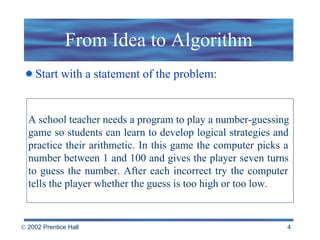
From Idea to Algorithm Start with a statement of the problem: A school teacher needs a program to play a number-guessing  game so students can learn to develop logical strategies and  practice their arithmetic. In this game the computer picks a  number between 1 and 100 and gives the player seven turns  to guess the number. After each incorrect try the computer  tells the player whether the guess is too high or too low.
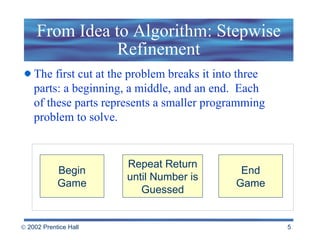
From Idea to Algorithm: Stepwise Refinement The first cut at the problem breaks it into three parts: a beginning, a middle, and an end.  Each  of these parts represents a smaller programming problem to solve. Begin Game Repeat Return until Number is Guessed End Game
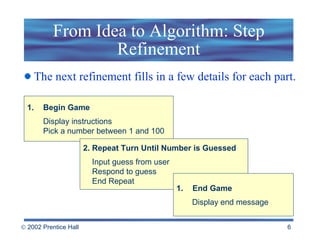
From Idea to Algorithm: Step Refinement The next refinement fills in a few details for each part. Begin Game Display instructions Pick a number between 1 and 100 2. Repeat Turn Until Number is Guessed Input guess from user   Respond to guess   End Repeat End Game Display end message
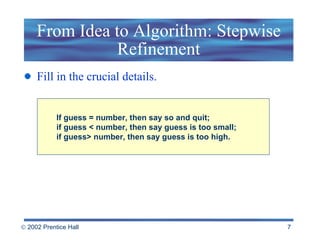
From Idea to Algorithm: Stepwise Refinement Fill in the crucial details. If guess = number, then say so and quit; if guess < number, then say guess is too small; if guess> number, then say guess is too high.
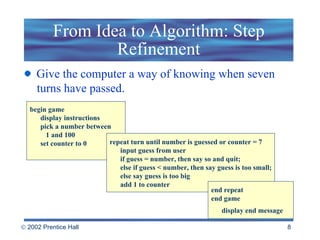
From Idea to Algorithm: Step Refinement Give the computer a way of knowing when seven   turns have passed.  begin game display instructions pick a number between  1 and 100 set counter to 0 repeat turn until number is guessed or counter = 7 input guess from user if guess = number, then say so and quit; else if guess < number, then say guess is too small; else say guess is too big add 1 to counter   end repeat end game display end message
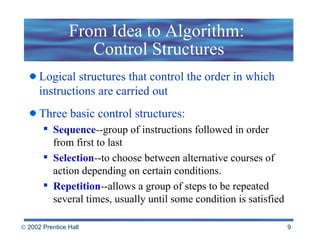
From Idea to Algorithm:  Control Structures Logical structures that control the order in which instructions are carried out  Three basic control structures: Sequence - -group of instructions followed in order from first to last Selection - -to choose between alternative courses of action depending on certain conditions.  Repetition - -allows a group of steps to be repeated several times, usually until some condition is satisfied
From Idea to Algorithm: Testing This round of testing is designed to check the logic of the algorithm  Test the algorithm by following the instructions using different sets of numbers.
From Algorithm to Program A simple program contains: The program heading The declarations and definition The body
Into the Computer A  text editor  is used to enter and save the program. Use either a  translator  or  compiler  to translate the program into machine language.
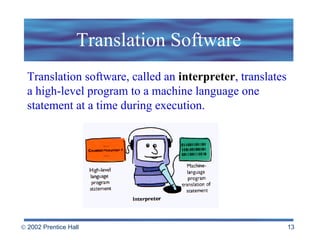
Translation Software Translation software, called an  interpreter , translates a high-level program to a machine language one statement at a time during execution.
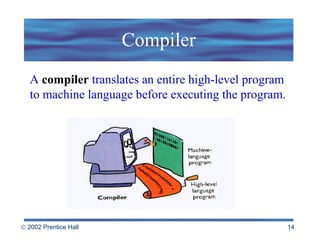
Compiler A  compiler  translates an entire high-level program to machine language before executing the program.
Programming Languages & Methodologies Machine language  is the native language of a computer. Instructions for the four basic arithmetic operations,    for comparing pairs of numbers, for repeating    instructions, and so on  all binary Instructions, memory locations, numbers, and    characters are all represented by strings of zeros and ones
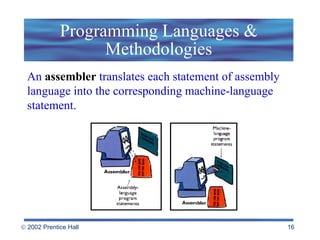
Programming Languages & Methodologies An  assembler  translates each statement of assembly language into the corresponding machine-language statement.
High Level Languages High level languages fall somewhere between natural human languages and precise machine languages  Examples:  C++, Java, Basic, FORTRAN, COBOL  They are easier to write, debug and are transportable between machines.
Structured Programming Structured programming is a technique to make the programming process easier and more productive. A program is well structured if: -  It’s made up of logically cohesive modules - The modules are arranged in a hierarchy - It’s straightforward and readable.
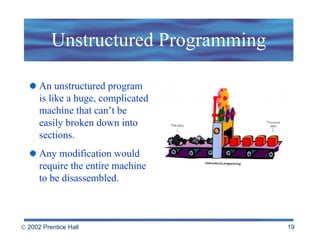
Unstructured Programming An unstructured program is like a huge, complicated machine that can’t be easily broken down into sections.  Any modification would require the entire machine to be disassembled.
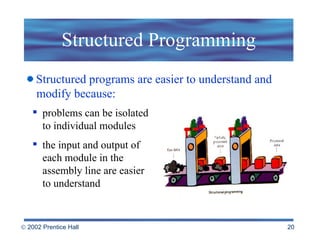
Structured Programming problems can be isolated to individual modules  the input and output of each module in the assembly line are easier to understand Structured programs are easier to understand and   modify because:
Object-Oriented Programming In  object-oriented programming  a program is not just a collection of step-by-step instructions or procedures; it’s a collection of objects.  Objects contain both data and instructions and can send and receive messages.
The Three Faces of Basic Early BASIC  -  The program with numbered lines. Statements are executed in numerical order unless control is transferred to another statement with a GoTo statement. 2. Structured BASIC  -  The modular program with many structured programming features.  The main program has been reduced to a handful of statements at the top of the listing.  These statements display the overall logic of the program.  As it is running, the main program uses Call statements to transfer control to each subprogram. 3. Visual BASIC -  A modern programming environment that includes many of the ideas and tools of object-oriented programming.
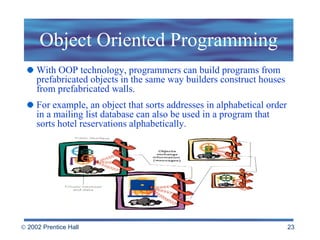
Object Oriented Programming With OOP technology, programmers can build programs from prefabricated objects in the same way builders construct houses from prefabricated walls.  For example, an object that sorts addresses in alphabetical order in a mailing list database can also be used in a program that sorts hotel reservations alphabetically.
Visual Programming Visual programming  tools allow programmers to create large portions of their programs by drawing pictures and pointing to on-screen objects, eliminating much of the tedious coding of traditional programming.  Apple’s HyperCard was probably the first popular example of a visual programming environment.  Today Microsoft’s Visual Basic is widely used by professionals and hobbyists alike because of its visual approach to programming.
Languages for Users User-oriented macro languages  or scripting   languages that allow users to create programs,    called macros, that automate repetitive tasks Fourth-generation languages   (4GL)  -  English-like    phrases and sentences to issue instructions Nonprocedural;    focus on what needs to be done, not on how to do it
Component Software Construct small custom applications from software components  Customizability is possible only if applications are programmed to allow it. More and more software programs, including operating systems, are designed with extensibility in mind.
Programming for the Web HTML JavaScript Java Perl XML Programmers can, and do, use a variety of languages,  including C and C++, to write Web applications.  But some programming tools are particularly useful for developing Web applications:
The Future of Programming Programming languages will continue to evolve in the direction of natural languages like English.  The line between programmer and user is likely to grow hazy.  Computers will play an ever-increasing role in programming themselves
 
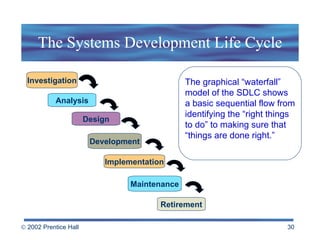
The Systems Development Life Cycle The graphical “waterfall” model of the SDLC shows a basic sequential flow from identifying the “right things  to do” to making sure that “things are done right.” Investigation Analysis Design Development Implementation Maintenance Retirement
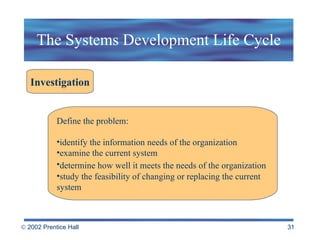
The Systems Development Life Cycle Investigation Define the problem:  identify the information needs of the organization  examine the current system determine how well it meets the needs of the organization   study the feasibility of changing or replacing the current  system
The Systems Development Life Cycle Analysis During the analysis phase the systems analyst : gathers documents interviews users of the current system observes the system in action  generally gathers and analyzes data to understand  the current system and identify new requirements
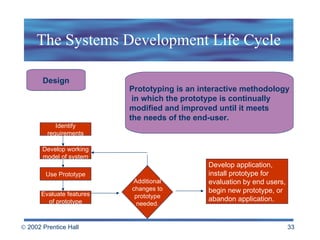
The Systems Development Life Cycle Prototyping is an interactive methodology in which the prototype is continually  modified and improved until it meets  the needs of the end-user. Design Identify requirements Develop working model of system Use Prototype Evaluate features of prototype Develop application,  install prototype for evaluation by end users, begin new prototype, or abandon application. Additional changes to prototype needed.
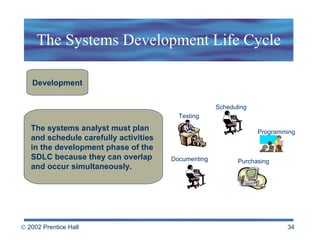
The Systems Development Life Cycle The systems analyst must plan  and schedule carefully activities  in the development phase of the  SDLC because they can overlap  and occur simultaneously. Development Testing Documenting Scheduling Programming Purchasing
The Systems Development Life Cycle Implementation Direct cutover approach Parallel systems approach Phase-in approach Pilot approach
The Systems Development Life Cycle Maintenance The maintenance phase involves monitoring,  evaluating, repairing, and enhancing the system  throughout the lifetime of the system.
The Systems Development Life Cycle Retirement Systems are often used for many years,  but at some point in the life of a system,  ongoing maintenance is not enough. .
The Science of Computing Many computer scientists prefer to call the field  computing science  because it focuses on the process of computing rather than on computer hardware.  Computer science includes a number of focus areas: Computer theory Algorithms Data structures Programming concepts and languages Computer architecture Management information systems Software engineering
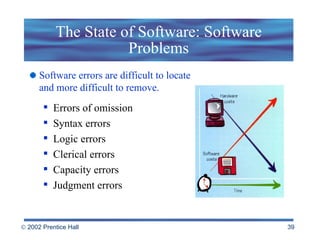
The State of Software: Software Problems Software errors are difficult to locate  and more difficult to remove. Errors of omission Syntax errors Logic errors Clerical errors Capacity errors  Judgment errors
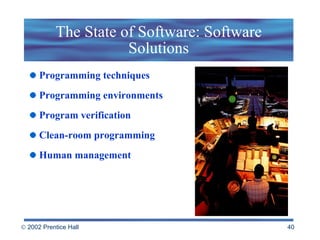
The State of Software: Software Solutions Programming techniques Programming environments Program verification Clean-room programming Human management
 

Beekman5 std ppt_13

  • 1.
    Chapter 13 SystemsDesign & Development
  • 2.
    Topics How PeopleMake Programs From Idea to Algorithm From Algorithm to Program Programming Languages and Methodologies System Analysis and the System Life Cycle The State of Software
  • 3.
    How People MakePrograms Programming is a specialized form of problem solving and involves: Defining the problem Devising, refining, and testing the algorithm Writing the program Testing and debugging the program
  • 4.
    From Idea toAlgorithm Start with a statement of the problem: A school teacher needs a program to play a number-guessing game so students can learn to develop logical strategies and practice their arithmetic. In this game the computer picks a number between 1 and 100 and gives the player seven turns to guess the number. After each incorrect try the computer tells the player whether the guess is too high or too low.
  • 5.
    From Idea toAlgorithm: Stepwise Refinement The first cut at the problem breaks it into three parts: a beginning, a middle, and an end. Each of these parts represents a smaller programming problem to solve. Begin Game Repeat Return until Number is Guessed End Game
  • 6.
    From Idea toAlgorithm: Step Refinement The next refinement fills in a few details for each part. Begin Game Display instructions Pick a number between 1 and 100 2. Repeat Turn Until Number is Guessed Input guess from user Respond to guess End Repeat End Game Display end message
  • 7.
    From Idea toAlgorithm: Stepwise Refinement Fill in the crucial details. If guess = number, then say so and quit; if guess < number, then say guess is too small; if guess> number, then say guess is too high.
  • 8.
    From Idea toAlgorithm: Step Refinement Give the computer a way of knowing when seven turns have passed. begin game display instructions pick a number between 1 and 100 set counter to 0 repeat turn until number is guessed or counter = 7 input guess from user if guess = number, then say so and quit; else if guess < number, then say guess is too small; else say guess is too big add 1 to counter end repeat end game display end message
  • 9.
    From Idea toAlgorithm: Control Structures Logical structures that control the order in which instructions are carried out Three basic control structures: Sequence - -group of instructions followed in order from first to last Selection - -to choose between alternative courses of action depending on certain conditions. Repetition - -allows a group of steps to be repeated several times, usually until some condition is satisfied
  • 10.
    From Idea toAlgorithm: Testing This round of testing is designed to check the logic of the algorithm Test the algorithm by following the instructions using different sets of numbers.
  • 11.
    From Algorithm toProgram A simple program contains: The program heading The declarations and definition The body
  • 12.
    Into the ComputerA text editor is used to enter and save the program. Use either a translator or compiler to translate the program into machine language.
  • 13.
    Translation Software Translationsoftware, called an interpreter , translates a high-level program to a machine language one statement at a time during execution.
  • 14.
    Compiler A compiler translates an entire high-level program to machine language before executing the program.
  • 15.
    Programming Languages &Methodologies Machine language is the native language of a computer. Instructions for the four basic arithmetic operations, for comparing pairs of numbers, for repeating instructions, and so on all binary Instructions, memory locations, numbers, and characters are all represented by strings of zeros and ones
  • 16.
    Programming Languages &Methodologies An assembler translates each statement of assembly language into the corresponding machine-language statement.
  • 17.
    High Level LanguagesHigh level languages fall somewhere between natural human languages and precise machine languages Examples: C++, Java, Basic, FORTRAN, COBOL They are easier to write, debug and are transportable between machines.
  • 18.
    Structured Programming Structuredprogramming is a technique to make the programming process easier and more productive. A program is well structured if: - It’s made up of logically cohesive modules - The modules are arranged in a hierarchy - It’s straightforward and readable.
  • 19.
    Unstructured Programming Anunstructured program is like a huge, complicated machine that can’t be easily broken down into sections. Any modification would require the entire machine to be disassembled.
  • 20.
    Structured Programming problemscan be isolated to individual modules the input and output of each module in the assembly line are easier to understand Structured programs are easier to understand and modify because:
  • 21.
    Object-Oriented Programming In object-oriented programming a program is not just a collection of step-by-step instructions or procedures; it’s a collection of objects. Objects contain both data and instructions and can send and receive messages.
  • 22.
    The Three Facesof Basic Early BASIC - The program with numbered lines. Statements are executed in numerical order unless control is transferred to another statement with a GoTo statement. 2. Structured BASIC - The modular program with many structured programming features. The main program has been reduced to a handful of statements at the top of the listing. These statements display the overall logic of the program. As it is running, the main program uses Call statements to transfer control to each subprogram. 3. Visual BASIC - A modern programming environment that includes many of the ideas and tools of object-oriented programming.
  • 23.
    Object Oriented ProgrammingWith OOP technology, programmers can build programs from prefabricated objects in the same way builders construct houses from prefabricated walls. For example, an object that sorts addresses in alphabetical order in a mailing list database can also be used in a program that sorts hotel reservations alphabetically.
  • 24.
    Visual Programming Visualprogramming tools allow programmers to create large portions of their programs by drawing pictures and pointing to on-screen objects, eliminating much of the tedious coding of traditional programming. Apple’s HyperCard was probably the first popular example of a visual programming environment. Today Microsoft’s Visual Basic is widely used by professionals and hobbyists alike because of its visual approach to programming.
  • 25.
    Languages for UsersUser-oriented macro languages or scripting languages that allow users to create programs, called macros, that automate repetitive tasks Fourth-generation languages (4GL) - English-like phrases and sentences to issue instructions Nonprocedural; focus on what needs to be done, not on how to do it
  • 26.
    Component Software Constructsmall custom applications from software components Customizability is possible only if applications are programmed to allow it. More and more software programs, including operating systems, are designed with extensibility in mind.
  • 27.
    Programming for theWeb HTML JavaScript Java Perl XML Programmers can, and do, use a variety of languages, including C and C++, to write Web applications. But some programming tools are particularly useful for developing Web applications:
  • 28.
    The Future ofProgramming Programming languages will continue to evolve in the direction of natural languages like English. The line between programmer and user is likely to grow hazy. Computers will play an ever-increasing role in programming themselves
  • 29.
  • 30.
    The Systems DevelopmentLife Cycle The graphical “waterfall” model of the SDLC shows a basic sequential flow from identifying the “right things to do” to making sure that “things are done right.” Investigation Analysis Design Development Implementation Maintenance Retirement
  • 31.
    The Systems DevelopmentLife Cycle Investigation Define the problem: identify the information needs of the organization examine the current system determine how well it meets the needs of the organization study the feasibility of changing or replacing the current system
  • 32.
    The Systems DevelopmentLife Cycle Analysis During the analysis phase the systems analyst : gathers documents interviews users of the current system observes the system in action generally gathers and analyzes data to understand the current system and identify new requirements
  • 33.
    The Systems DevelopmentLife Cycle Prototyping is an interactive methodology in which the prototype is continually modified and improved until it meets the needs of the end-user. Design Identify requirements Develop working model of system Use Prototype Evaluate features of prototype Develop application, install prototype for evaluation by end users, begin new prototype, or abandon application. Additional changes to prototype needed.
  • 34.
    The Systems DevelopmentLife Cycle The systems analyst must plan and schedule carefully activities in the development phase of the SDLC because they can overlap and occur simultaneously. Development Testing Documenting Scheduling Programming Purchasing
  • 35.
    The Systems DevelopmentLife Cycle Implementation Direct cutover approach Parallel systems approach Phase-in approach Pilot approach
  • 36.
    The Systems DevelopmentLife Cycle Maintenance The maintenance phase involves monitoring, evaluating, repairing, and enhancing the system throughout the lifetime of the system.
  • 37.
    The Systems DevelopmentLife Cycle Retirement Systems are often used for many years, but at some point in the life of a system, ongoing maintenance is not enough. .
  • 38.
    The Science ofComputing Many computer scientists prefer to call the field computing science because it focuses on the process of computing rather than on computer hardware. Computer science includes a number of focus areas: Computer theory Algorithms Data structures Programming concepts and languages Computer architecture Management information systems Software engineering
  • 39.
    The State ofSoftware: Software Problems Software errors are difficult to locate and more difficult to remove. Errors of omission Syntax errors Logic errors Clerical errors Capacity errors Judgment errors
  • 40.
    The State ofSoftware: Software Solutions Programming techniques Programming environments Program verification Clean-room programming Human management
  • 41.