1
MS Word
is a popular word-processing program used primarily for
creating documents such as letters, brochures, learning activities, tests,
quizzes and students' homework assignments. There are many simple but
useful features available in Microsoft Word to make it easier for study
and work.
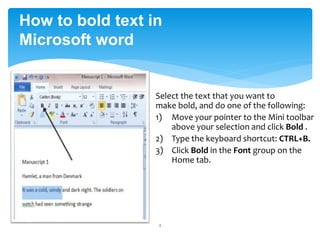
Select the text that you want to
make bold, and do one of the following:
1) Move your pointer to the Mini toolbar
above your selection and click Bold .
2) Type the keyboard shortcut: CTRL+B.
3) Click Bold in the Font group on the
Home tab.
2
How to bold text in
Microsoft word
3
How to insert image in
Microsoft word
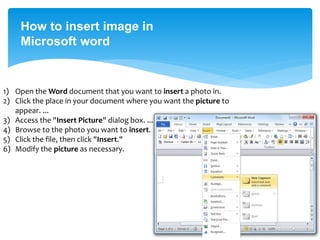
1) Open the Word document that you want to insert a photo in.
2) Click the place in your document where you want the picture to
appear. ...
3) Access the "Insert Picture" dialog box. ...
4) Browse to the photo you want to insert.
5) Click the file, then click "Insert."
6) Modify the picture as necessary.

MS word

  • 1.
    1 MS Word is apopular word-processing program used primarily for creating documents such as letters, brochures, learning activities, tests, quizzes and students' homework assignments. There are many simple but useful features available in Microsoft Word to make it easier for study and work.
  • 2.
    Select the textthat you want to make bold, and do one of the following: 1) Move your pointer to the Mini toolbar above your selection and click Bold . 2) Type the keyboard shortcut: CTRL+B. 3) Click Bold in the Font group on the Home tab. 2 How to bold text in Microsoft word
  • 3.
    3 How to insertimage in Microsoft word 1) Open the Word document that you want to insert a photo in. 2) Click the place in your document where you want the picture to appear. ... 3) Access the "Insert Picture" dialog box. ... 4) Browse to the photo you want to insert. 5) Click the file, then click "Insert." 6) Modify the picture as necessary.