BAIT1003 IT
Fundamentals
Chapter 1
Introduction to Computers
Objectives
What’s computer?

Computer
applications in
business & society

Categories of
computers

Components of a
computer

Advantages &
disadvantages of using
computer
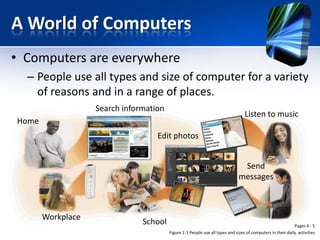
A World of Computers
• Computers are everywhere
– People use all types and size of computer for a variety
of reasons and in a range of places.
Search information

Listen to music

Home
Edit photos

Send
messages

Workplace

School

Pages 4 - 5
Figure 1-1 People use all types and sizes of computers in their daily activities
What is a computer?
• A computer is an electronic device, operating
under the control of instructions stored in its
own memory, that can accept data, process the
data according to specific rules, produce results,
and store results for future use.
Produce
results
Accept
data

Process
Store
results

Pages 6
Data and Information
Data
• Data is a collection of unprocessed items, which can
include text, numbers, images, audio and video.
Information
• Information conveys meaning and is useful to
people.
Data
Sally, 32, 24, 32

Computers
Process

Information
Sally Exam Results
Chinese 32 marks
Malay 24 marks
English 32 marks
Data and Information
Information Processing Cycle

Collects data
(input)

Processing

(instructions)

Produces
information
(output)
Information Processing Cycle
1. Accepts raw data

Input

2. Process data into information 3. Produces results

Processing

Output

Storage

4. Stores results for
future use

Communications

Sending or retrieving data

Internet

5. Communicate with
other computers
The Components of a Computer
• A computer contains many electric, electronic, and
mechanical components known as hardware.
• These components include:
1.
2.
3.
4.
5.

Input devices
Output devices
System unit
Storage devices
Communication devices
The Components of a Computer
Input Device

• Allows you to enter data and instructions into a computer

Output Device

• Hardware component that conveys information to one or
more people

System Unit

Storage Device

Communications
Device

• Case that contains the electronic components of the
computer that are used to process data

• Holds data, instructions, and information for future use

• Enables a computer to send and receive data, instructions,
and information to and from one or more computers or
mobile devices
Input Devices
• It is a hardware component that allows people to
enter data and instructions into a computer.
• 5 widely used input devices are as below:
1.
2.
3.
4.
5.

Keyboard
Mouse
Microphone
Scanner
Webcam
Examples: Input Devices
Flatbed Scanner

Handheld Scanner
Output Devices
• It is a hardware component that conveys
information to people.
• 3 commonly used output devices are below:
– Printer (produce text and graphics on a paper)
– Monitor (display text, graphics, video on a screen)
– Speakers (to hear music, voice, and other audio)
Examples: Output Devices

Monitor

Printer

Speakers
System Unit
• The system unit is a case that contains the
electronic components of the computer that are
used to process data.
• The circuitry of the system unit is connected to a
circuit board called the motherboard.
• 2 main components on the motherboard:
1. Processor (CPU – central processing unit)
2. Memory (E.g. RAM)
Examples: System Unit

Slim Tower
Mini Tower

Small Form Factor
Storage Devices and Media
• Storage holds data, instructions, and information for
future use.
• Computers can store hundreds or millions of customer
names and address. Storage holds these items
permanently.
• Examples of storage media:
– USB flash drive, hard disk, optical disk, and memory cards.

• Examples of storage devices:
– DVD drive and CD ROM drive
Examples: Storage Devices
Storage Device VS Storage Media
CD/DVD Drive

Storage device
Records and retrieves items to
and from storage media

Storage media
Physical material on which data,
instructions, and information
are stored

CD/DVD
Communication Devices
• It is a hardware components that enables a
computer to send and receive data, instructions,
and information to and from one or more
computer.
• Widely used communication device is a modem.
Examples: Communication Devices

Wireless
Modem

USB
Broadband
Modem
Advantages and Disadvantages
of using computers
• Advantages of
Using Computers

• Disadvantages of
Using Computers

Speed

Health Risks

Reliability

Violation of Privacy

Consistency

Public Safety

Storage

Impact on Labor Force

Communications

Impact on Environment
Advantages of using computers
Speed
Reliability
Consistency

Travel at incredibly fast speed
Have low failure rate
Given the a same input and process,
will produce the same results. This
phase called “garbage in, garbage out”

Storage

Store enormous amount of data and
make this data available for processing
anytime

Communication

Can share the store data, instructions,
and information
Disadvantages of using computers
• Health risks
– Prolonged or improper computer use can lead to injuries or disorder
of the hand, wrists, elbows, eyes, neck, and back.
– Repetitive strain injury: pain to arms, elbows, fingers and wrists due
to repetitive motion of typing and sitting in fixed position
– Prevention: proper workplace design, good posture sitting at work
desk and timely work break.

• Violation of privacy
– Personal and confidential records were not protected properly,
individuals have found their privacy violated and identities stolen.

• Public safety
– Unsuspecting, innocent computer users have fallen victim to crimes
committed by dangerous strangers.
Disadvantages of using computers
• Impact on labor force
– The skills of millions of employees have been
replaced by computers.

• Impact on environment
– Computer manufacturing processes and computer
waste are depleting natural resources and polluting
the environment.
– When computers are discarded in landfills, they
release toxic materials.
Green Computing
• Green computing involves reducing the electricity
consumed and environmental waste generated when
using a computer
• Strategies include:
– Recycling
– Regulating manufacturing processes
– Extending the life of computers
– Immediately donating or properly disposing of
replaced computers
Categories of Computers
Category
Personal computer
Mobile computer & mobile
devices
Game consoles
Servers
Mainframes
Supercomputers
Embedded computers

Physical Size
Fits on desk
Fits on lap or in hand
Small box or handheld
device
Small cabinet
Partial room to a full room of
equipment
Full room of equipment
Miniature
Personal Computers (PCs)
• A personal computer can
perform all of its input,
processing, output, and storage
activities by itself
• 2 popular architectures are the
PC and the Apple
• 2 types of PC are desktop and
notebook computers.
Mobile Computers & Mobile Devices

Mobile
Computer

Personal computer
you can carry from
place to place
Examples include
notebook
computers, laptop
computers, and
Tablet PCs

Mobile
Device

Computing device
small enough to
hold in your hand
Examples include
smart phones,
PDAs, handheld
computers,
portable media
players, and
digital cameras
Mobile Computer: Notebook
•
•
•

•

Also called laptop computer.
It is portable, personal computer
designed to fit on your lap.
Size is thin and lightweight, yet
they can be as powerful as the
average desktop computer.
More expensive than desktop
computer with equal capabilities.
Mobile Computer: Tablets PCs
•
•

•

Resembling a letter-sized
slate
You can interact with by
touching the screen with
your finger or a digital pen
Useful for taking notes in
lectures, at meeting, and
conferences
Mobile Device: Smart Phones
• It is an internet enabled phone that usually
also provided personal information
management functions such as a calendar,
an appointment book, an address book, a
calculator, and a notepad.
• It also allow you to send and receive email
massages, and access to the Web.
• Communicate wirelessly with other
devices.
• As a portable media player and build in
digital cameras.
Mobile Device: PDAs
• Personal digital assistant (PDA)
provides personal information
management functions such as a
calendar, an appointment book, an
address book, a calculator, and a
notepad.
• The primary input device of a PDA is a
stylus.
• Many PDAs are Internet-enabled so
that users can check email and access
the Web.
• Some also provide phone capabilities.
Mobile Device: E-book Reader
• Handheld device that is
used primarily for
reading e-books.
• Have a touch screen and
are Internet-enabled.
• Size smaller than tablet
computers but larger
than smart phone.
Mobile Device: Handheld Computer
• Sometimes referred to as a Ultra Mobile PC.
• Is a computer small enough to fit in one hand.
• Can communicate wirelessly with other devices or
computers and also include a digital pen/ stylus.
• For mobile employees:
– Meter reader and parcel delivery people, whose jobs
require them to move from place to place.
Mobile Device: Portable Media Player
• It is a mobile device on
which you can store,
organize, and play digital
media.
• For example:
– Listen to music
– Watch video, movie, and
television shows
– View photos
The iPod is a popular portable media player
Mobile Device: Digital Cameras
• It is a device that allows users to take pictures
and store the photographed images digitally,
instead of on traditional film.
Game Consoles
• It is a mobile computing device designed for single
player or multiplayer video games.
• Standard game consoles use a handheld controllers
as an input device; a television screen as an output
device; and hard disk, optical disk / memory for
storage.
• Small enough to fit in one hand, portable.
• Example:
– Sony’s PlayStation Portable (PSP)
– Nintendo Wii
Servers
• A server controls access to the hardware,
software, and other resources on a network
and provides a centralized storage area for
programs, data, and information.
• It can support several thousand connected
computer at the same time.
Mainframes
• A mainframe is a large,
expensive, powerful computer
that can handle hundreds or
thousands of connected users
simultaneously.
• It can store tremendous
amount of data, instructions,
and information.
Supercomputers
• A supercomputer is the fastest, most powerful computer.
• Fastest supercomputers are capable of processing more than one
quadrillion instructions in a single second.
• Applications requiring complex, sophisticated mathematical
calculations use supercomputers.
– Online banking
– Weather forecasting
– Nuclear energy research
Embedded Computers
• An embedded computer is a specialpurpose computer that functions as a
component in a larger product
Consumer
Electronics
• Mobile and
digital
telephones
• Digital
televisions
• Cameras
• Video
recorders
• DVD players
and recorders
• Answering
machines

•
•
•
•
•

Home
Automation
Devices
Thermostats
Sprinkling
systems
Security
monitoring
systems
Appliances
Lights

Automobiles
• Antilock
brakes
• Engine control
modules
• Airbag
controller
• Cruise control

Process
Controllers and
Robotics
• Remote
monitoring
systems
• Power
monitors
• Machine
controllers
• Medical
devices

Computer
Devices and
Office Machines
• Keyboards
• Printers
• Faxes
• Copiers
Computer Applications in
Business and Society

Education

Business

Students have notebook
computers on their desks
during classroom lectures

Business users use computers
to generate business reports,
do presentations, business
planning, etc.
Computer Applications in
Business and Society
Finance

Health
Care
Government

Users access account balances, pay
bills, & copy monthly transactions
from the bank’s computer right
into their PC.

Medical staffs use computers
& computerized devices to
assist with medical tests

Law enforcement officials
have in-vehicle computers
& mobile devices to access
emergency, criminal records
in computer networks
Computer Applications in
Business and Society
Science

Scientists use computers to assist
them with collecting, analyzing, &
Modeling data.

Publishing

Many magazine & newspaper
publisher make the content of their
Publications available online

Travel

GPS gives users prompted directions to a
destination

Manufacturing

Automobile factories use
Industrial robots to weld
car bodies
Summary
Data vs. Information
Information Processing Cycle
What’s computer?

Education, business,
healthcare, etc.
Computer
applications in
business & society

Personal Computer
Mobile computer & device
Game console
Categories of
Server
computers
Mainframe
Supercomputer
Embedded computer

Input devices
Output devices
System Unit
Communication devices
Storage devices
Components of a
computer

Advantages &
disadvantages of using
computer

Speed, reliable,
consistent, etc.
Health risks,
violation of
privacy, etc.

BAIT1003 Chapter 1

  • 1.
  • 2.
    Objectives What’s computer? Computer applications in business& society Categories of computers Components of a computer Advantages & disadvantages of using computer
  • 3.
    A World ofComputers • Computers are everywhere – People use all types and size of computer for a variety of reasons and in a range of places. Search information Listen to music Home Edit photos Send messages Workplace School Pages 4 - 5 Figure 1-1 People use all types and sizes of computers in their daily activities
  • 4.
    What is acomputer? • A computer is an electronic device, operating under the control of instructions stored in its own memory, that can accept data, process the data according to specific rules, produce results, and store results for future use. Produce results Accept data Process Store results Pages 6
  • 5.
    Data and Information Data •Data is a collection of unprocessed items, which can include text, numbers, images, audio and video. Information • Information conveys meaning and is useful to people. Data Sally, 32, 24, 32 Computers Process Information Sally Exam Results Chinese 32 marks Malay 24 marks English 32 marks
  • 6.
  • 7.
    Information Processing Cycle Collectsdata (input) Processing (instructions) Produces information (output)
  • 8.
    Information Processing Cycle 1.Accepts raw data Input 2. Process data into information 3. Produces results Processing Output Storage 4. Stores results for future use Communications Sending or retrieving data Internet 5. Communicate with other computers
  • 9.
    The Components ofa Computer • A computer contains many electric, electronic, and mechanical components known as hardware. • These components include: 1. 2. 3. 4. 5. Input devices Output devices System unit Storage devices Communication devices
  • 10.
    The Components ofa Computer Input Device • Allows you to enter data and instructions into a computer Output Device • Hardware component that conveys information to one or more people System Unit Storage Device Communications Device • Case that contains the electronic components of the computer that are used to process data • Holds data, instructions, and information for future use • Enables a computer to send and receive data, instructions, and information to and from one or more computers or mobile devices
  • 11.
    Input Devices • Itis a hardware component that allows people to enter data and instructions into a computer. • 5 widely used input devices are as below: 1. 2. 3. 4. 5. Keyboard Mouse Microphone Scanner Webcam
  • 12.
  • 13.
    Examples: Input Devices FlatbedScanner Handheld Scanner
  • 14.
    Output Devices • Itis a hardware component that conveys information to people. • 3 commonly used output devices are below: – Printer (produce text and graphics on a paper) – Monitor (display text, graphics, video on a screen) – Speakers (to hear music, voice, and other audio)
  • 15.
  • 16.
    System Unit • Thesystem unit is a case that contains the electronic components of the computer that are used to process data. • The circuitry of the system unit is connected to a circuit board called the motherboard. • 2 main components on the motherboard: 1. Processor (CPU – central processing unit) 2. Memory (E.g. RAM)
  • 17.
    Examples: System Unit SlimTower Mini Tower Small Form Factor
  • 18.
    Storage Devices andMedia • Storage holds data, instructions, and information for future use. • Computers can store hundreds or millions of customer names and address. Storage holds these items permanently. • Examples of storage media: – USB flash drive, hard disk, optical disk, and memory cards. • Examples of storage devices: – DVD drive and CD ROM drive
  • 19.
  • 20.
    Storage Device VSStorage Media CD/DVD Drive Storage device Records and retrieves items to and from storage media Storage media Physical material on which data, instructions, and information are stored CD/DVD
  • 21.
    Communication Devices • Itis a hardware components that enables a computer to send and receive data, instructions, and information to and from one or more computer. • Widely used communication device is a modem.
  • 22.
  • 23.
    Advantages and Disadvantages ofusing computers • Advantages of Using Computers • Disadvantages of Using Computers Speed Health Risks Reliability Violation of Privacy Consistency Public Safety Storage Impact on Labor Force Communications Impact on Environment
  • 24.
    Advantages of usingcomputers Speed Reliability Consistency Travel at incredibly fast speed Have low failure rate Given the a same input and process, will produce the same results. This phase called “garbage in, garbage out” Storage Store enormous amount of data and make this data available for processing anytime Communication Can share the store data, instructions, and information
  • 25.
    Disadvantages of usingcomputers • Health risks – Prolonged or improper computer use can lead to injuries or disorder of the hand, wrists, elbows, eyes, neck, and back. – Repetitive strain injury: pain to arms, elbows, fingers and wrists due to repetitive motion of typing and sitting in fixed position – Prevention: proper workplace design, good posture sitting at work desk and timely work break. • Violation of privacy – Personal and confidential records were not protected properly, individuals have found their privacy violated and identities stolen. • Public safety – Unsuspecting, innocent computer users have fallen victim to crimes committed by dangerous strangers.
  • 26.
    Disadvantages of usingcomputers • Impact on labor force – The skills of millions of employees have been replaced by computers. • Impact on environment – Computer manufacturing processes and computer waste are depleting natural resources and polluting the environment. – When computers are discarded in landfills, they release toxic materials.
  • 27.
    Green Computing • Greencomputing involves reducing the electricity consumed and environmental waste generated when using a computer • Strategies include: – Recycling – Regulating manufacturing processes – Extending the life of computers – Immediately donating or properly disposing of replaced computers
  • 28.
    Categories of Computers Category Personalcomputer Mobile computer & mobile devices Game consoles Servers Mainframes Supercomputers Embedded computers Physical Size Fits on desk Fits on lap or in hand Small box or handheld device Small cabinet Partial room to a full room of equipment Full room of equipment Miniature
  • 29.
    Personal Computers (PCs) •A personal computer can perform all of its input, processing, output, and storage activities by itself • 2 popular architectures are the PC and the Apple • 2 types of PC are desktop and notebook computers.
  • 30.
    Mobile Computers &Mobile Devices Mobile Computer Personal computer you can carry from place to place Examples include notebook computers, laptop computers, and Tablet PCs Mobile Device Computing device small enough to hold in your hand Examples include smart phones, PDAs, handheld computers, portable media players, and digital cameras
  • 31.
    Mobile Computer: Notebook • • • • Alsocalled laptop computer. It is portable, personal computer designed to fit on your lap. Size is thin and lightweight, yet they can be as powerful as the average desktop computer. More expensive than desktop computer with equal capabilities.
  • 32.
    Mobile Computer: TabletsPCs • • • Resembling a letter-sized slate You can interact with by touching the screen with your finger or a digital pen Useful for taking notes in lectures, at meeting, and conferences
  • 33.
    Mobile Device: SmartPhones • It is an internet enabled phone that usually also provided personal information management functions such as a calendar, an appointment book, an address book, a calculator, and a notepad. • It also allow you to send and receive email massages, and access to the Web. • Communicate wirelessly with other devices. • As a portable media player and build in digital cameras.
  • 34.
    Mobile Device: PDAs •Personal digital assistant (PDA) provides personal information management functions such as a calendar, an appointment book, an address book, a calculator, and a notepad. • The primary input device of a PDA is a stylus. • Many PDAs are Internet-enabled so that users can check email and access the Web. • Some also provide phone capabilities.
  • 35.
    Mobile Device: E-bookReader • Handheld device that is used primarily for reading e-books. • Have a touch screen and are Internet-enabled. • Size smaller than tablet computers but larger than smart phone.
  • 36.
    Mobile Device: HandheldComputer • Sometimes referred to as a Ultra Mobile PC. • Is a computer small enough to fit in one hand. • Can communicate wirelessly with other devices or computers and also include a digital pen/ stylus. • For mobile employees: – Meter reader and parcel delivery people, whose jobs require them to move from place to place.
  • 37.
    Mobile Device: PortableMedia Player • It is a mobile device on which you can store, organize, and play digital media. • For example: – Listen to music – Watch video, movie, and television shows – View photos The iPod is a popular portable media player
  • 38.
    Mobile Device: DigitalCameras • It is a device that allows users to take pictures and store the photographed images digitally, instead of on traditional film.
  • 39.
    Game Consoles • Itis a mobile computing device designed for single player or multiplayer video games. • Standard game consoles use a handheld controllers as an input device; a television screen as an output device; and hard disk, optical disk / memory for storage. • Small enough to fit in one hand, portable. • Example: – Sony’s PlayStation Portable (PSP) – Nintendo Wii
  • 40.
    Servers • A servercontrols access to the hardware, software, and other resources on a network and provides a centralized storage area for programs, data, and information. • It can support several thousand connected computer at the same time.
  • 41.
    Mainframes • A mainframeis a large, expensive, powerful computer that can handle hundreds or thousands of connected users simultaneously. • It can store tremendous amount of data, instructions, and information.
  • 42.
    Supercomputers • A supercomputeris the fastest, most powerful computer. • Fastest supercomputers are capable of processing more than one quadrillion instructions in a single second. • Applications requiring complex, sophisticated mathematical calculations use supercomputers. – Online banking – Weather forecasting – Nuclear energy research
  • 43.
    Embedded Computers • Anembedded computer is a specialpurpose computer that functions as a component in a larger product Consumer Electronics • Mobile and digital telephones • Digital televisions • Cameras • Video recorders • DVD players and recorders • Answering machines • • • • • Home Automation Devices Thermostats Sprinkling systems Security monitoring systems Appliances Lights Automobiles • Antilock brakes • Engine control modules • Airbag controller • Cruise control Process Controllers and Robotics • Remote monitoring systems • Power monitors • Machine controllers • Medical devices Computer Devices and Office Machines • Keyboards • Printers • Faxes • Copiers
  • 44.
    Computer Applications in Businessand Society Education Business Students have notebook computers on their desks during classroom lectures Business users use computers to generate business reports, do presentations, business planning, etc.
  • 45.
    Computer Applications in Businessand Society Finance Health Care Government Users access account balances, pay bills, & copy monthly transactions from the bank’s computer right into their PC. Medical staffs use computers & computerized devices to assist with medical tests Law enforcement officials have in-vehicle computers & mobile devices to access emergency, criminal records in computer networks
  • 46.
    Computer Applications in Businessand Society Science Scientists use computers to assist them with collecting, analyzing, & Modeling data. Publishing Many magazine & newspaper publisher make the content of their Publications available online Travel GPS gives users prompted directions to a destination Manufacturing Automobile factories use Industrial robots to weld car bodies
  • 47.
    Summary Data vs. Information InformationProcessing Cycle What’s computer? Education, business, healthcare, etc. Computer applications in business & society Personal Computer Mobile computer & device Game console Categories of Server computers Mainframe Supercomputer Embedded computer Input devices Output devices System Unit Communication devices Storage devices Components of a computer Advantages & disadvantages of using computer Speed, reliable, consistent, etc. Health risks, violation of privacy, etc.

Editor's Notes

  • #3 Define the term computer, and describe the relationship between data and information.Describe the five components of a computer.Discuss the advantages and disadvantages that users experience when working with computersDifferentiate among types, sizes, and functions of computers in each categoryDiscuss how society uses computers in education, finance, government,, health care, science, publishing, travel, and manufacturing
  • #9 A computer is a programmable electronic device that accepts input; performs processing operations; outputs the results; and provides storage for data, programs, or output when needed. This progression of input, processing, output and storage is called the information processing cycle. Most computers today also have communications capabilities, such as sending or receiving data via the Internet, accessing information located in a shared company database or exchanging data or email with others. Therefore, communications – technically an input or output operation, depending on which direction the information is going – is often considered the fifth primary computer operation.