www.techsailor.com
Engaging Your Customers Online
by Fisher Yu
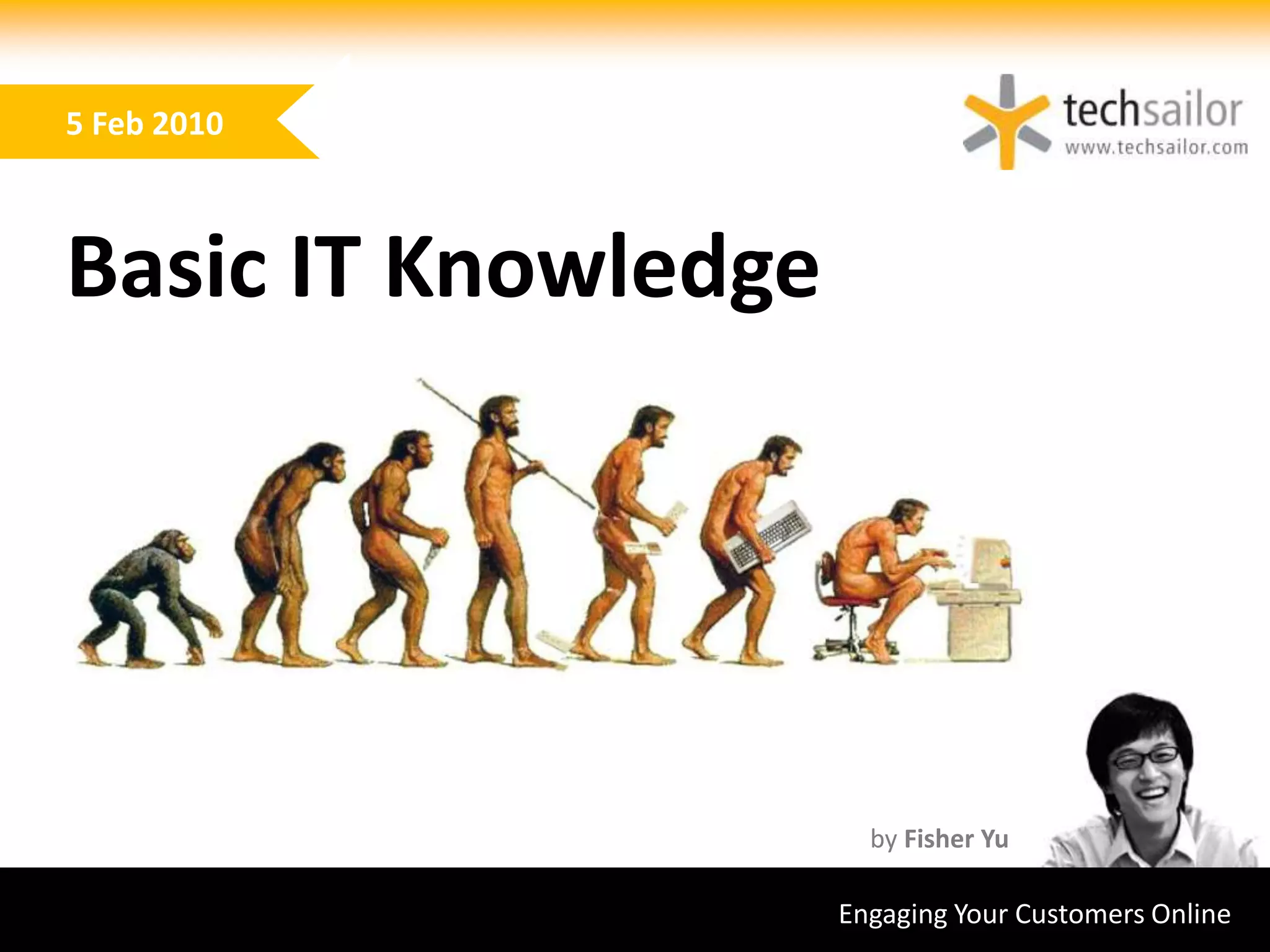
Basic IT Knowledge
5 Feb 2010
Basic IT Knowledge
• essentially a multi-functional
calculator
• a programmable machine that
receives input
• stores and manipulates data
• provides output in a useful format
• history:
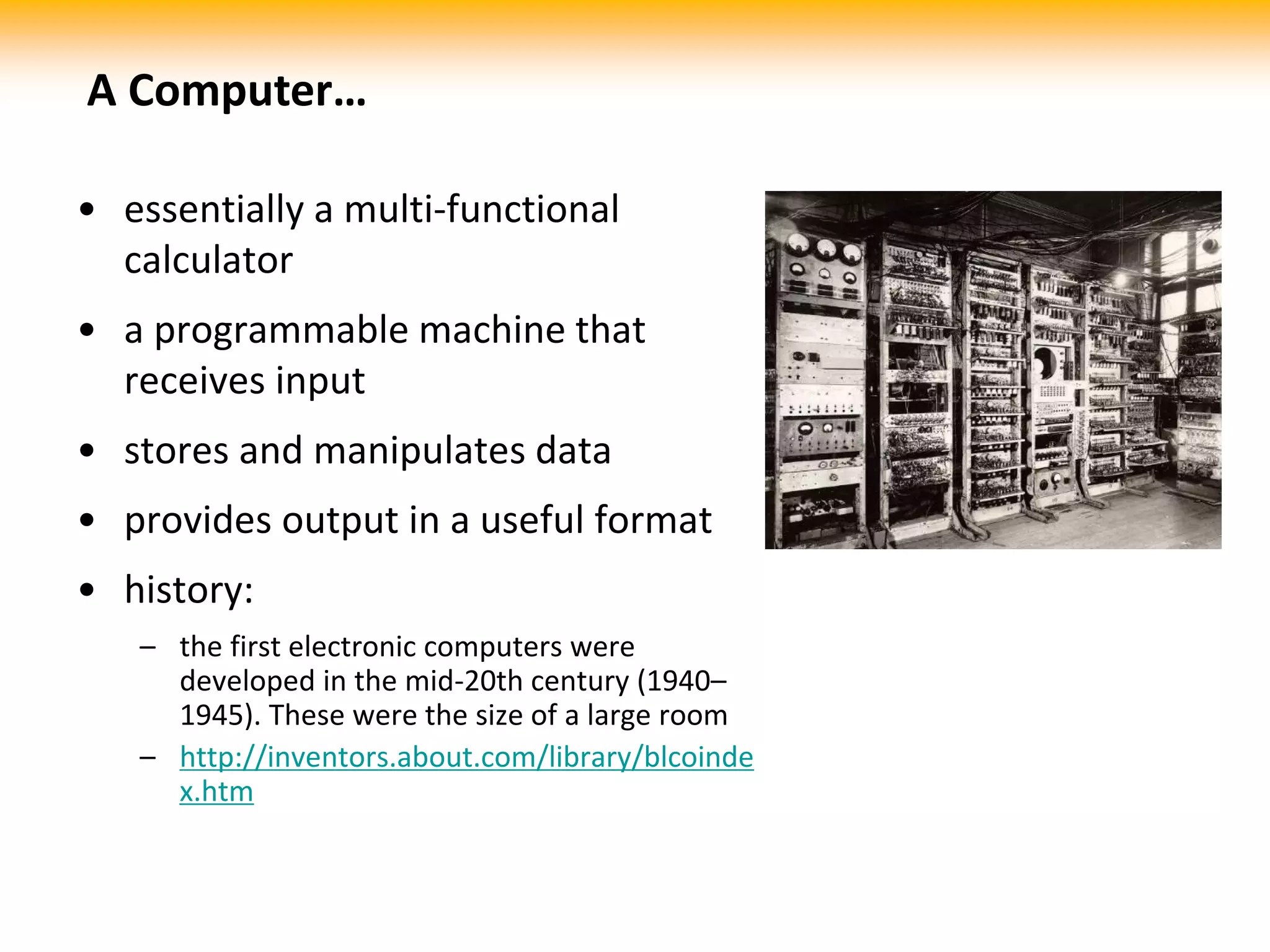
– the first electronic computers were
developed in the mid-20th century (1940–
1945). These were the size of a large room
– http://inventors.about.com/library/blcoinde
x.htm
A Computer…
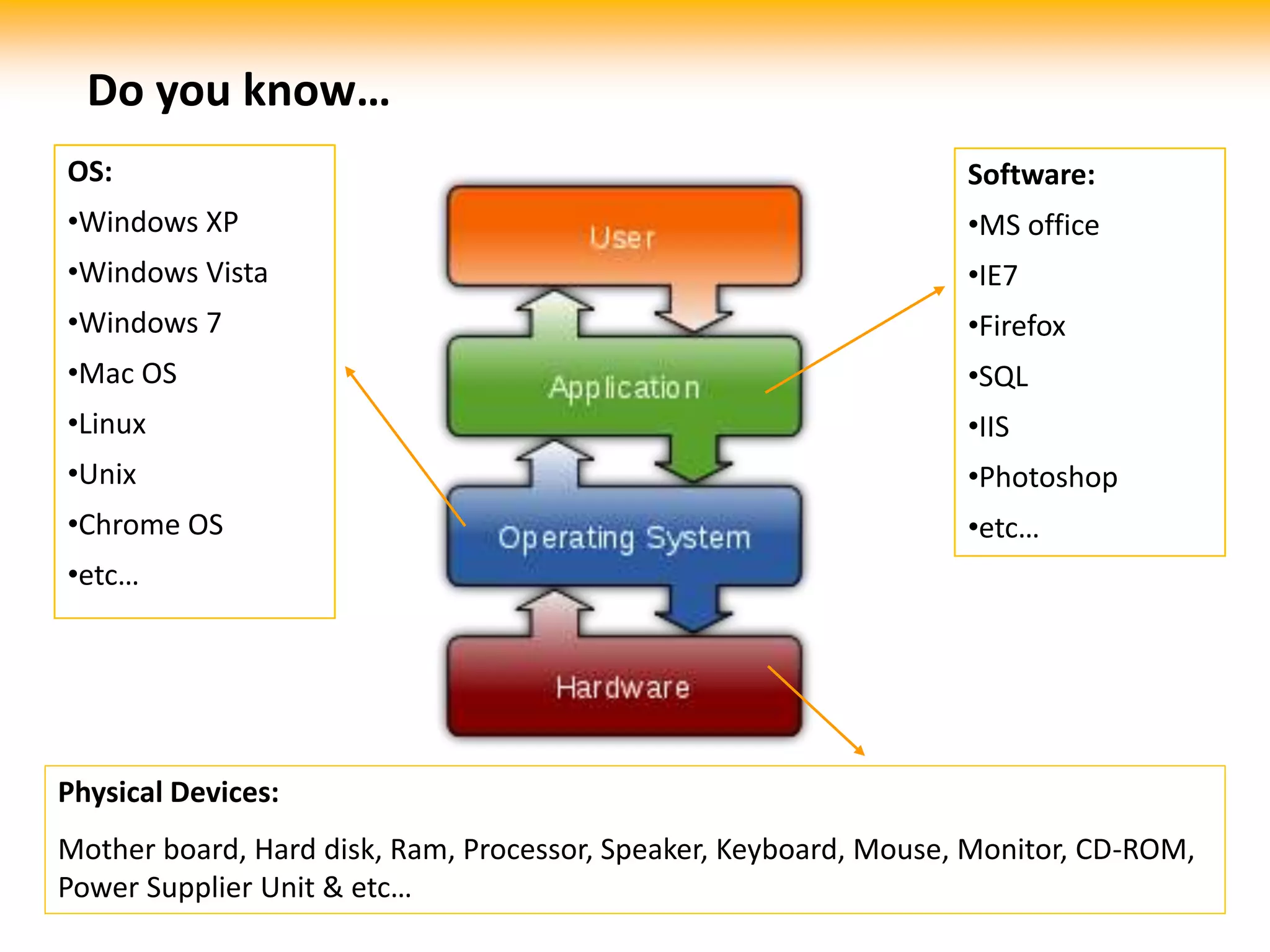
Software:
•MS office
•IE7
•Firefox
•SQL
•IIS
•Photoshop
•etc…
OS:
•Windows XP
•Windows Vista
•Windows 7
•Mac OS
•Linux
•Unix
•Chrome OS
•etc…
Physical Devices:
Mother board, Hard disk, Ram, Processor, Speaker, Keyboard, Mouse, Monitor, CD-ROM,
Power Supplier Unit & etc…
Do you know…
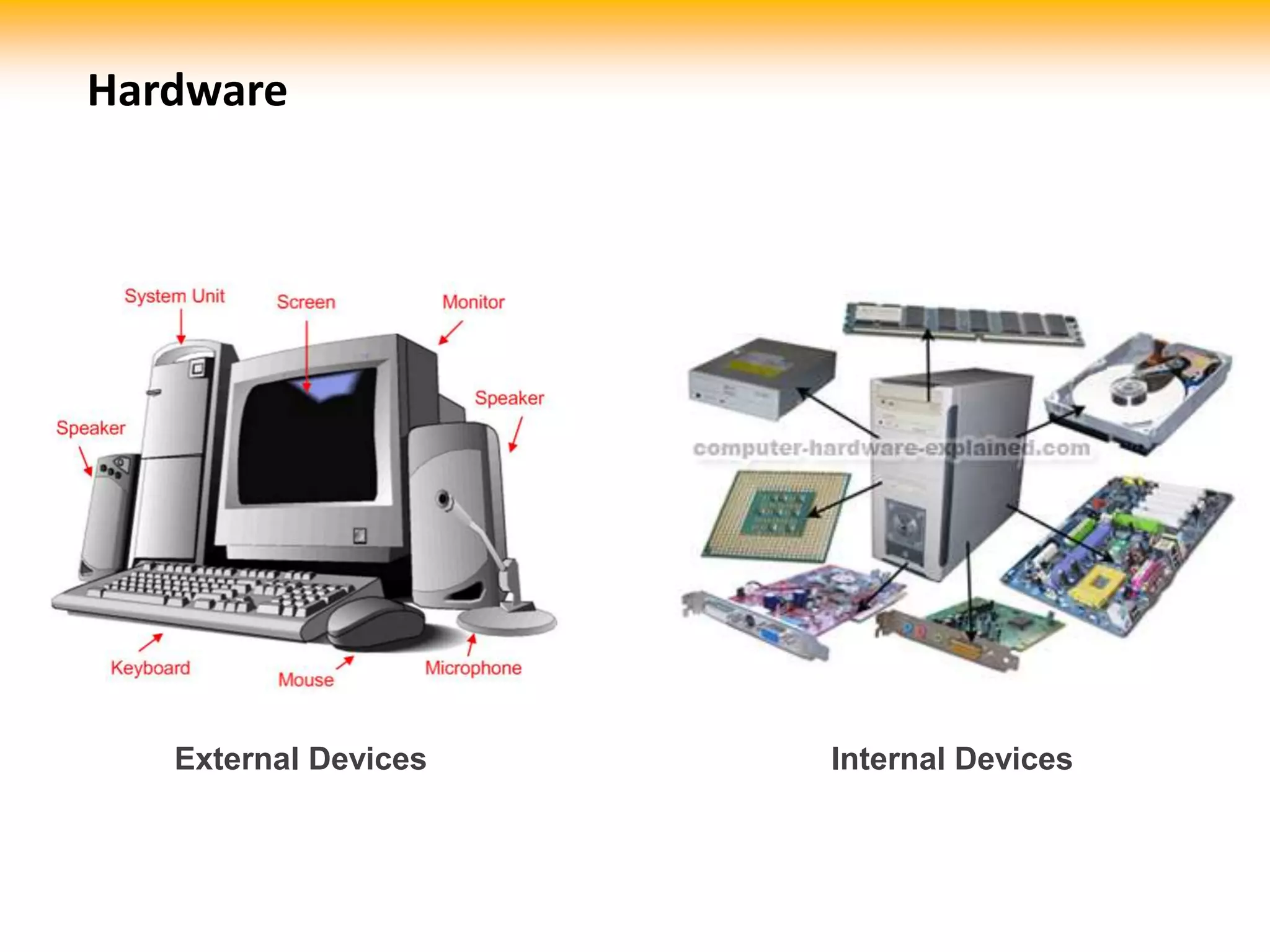
External Devices Internal Devices
Hardware
PC Peripherals
 Monitor
 Speaker
 Keyboard
 Mouse
 Joystick
 Printer
 Photocopier
 Scanner
 …
Network Device
 Router
 Switch
 Hub
 Modem
 Wireless adapter
 Blue-tooth
adapter
 …
Storage Device
 External HDD (Hard
Disk)
 Thumb drive ; flash
disk; SD/Mini-SD card,
Memory Stick, etc…
 External Floppy Disk
 …
* A lot of different kind of slots/ports are available on motherboard to connect those external devices
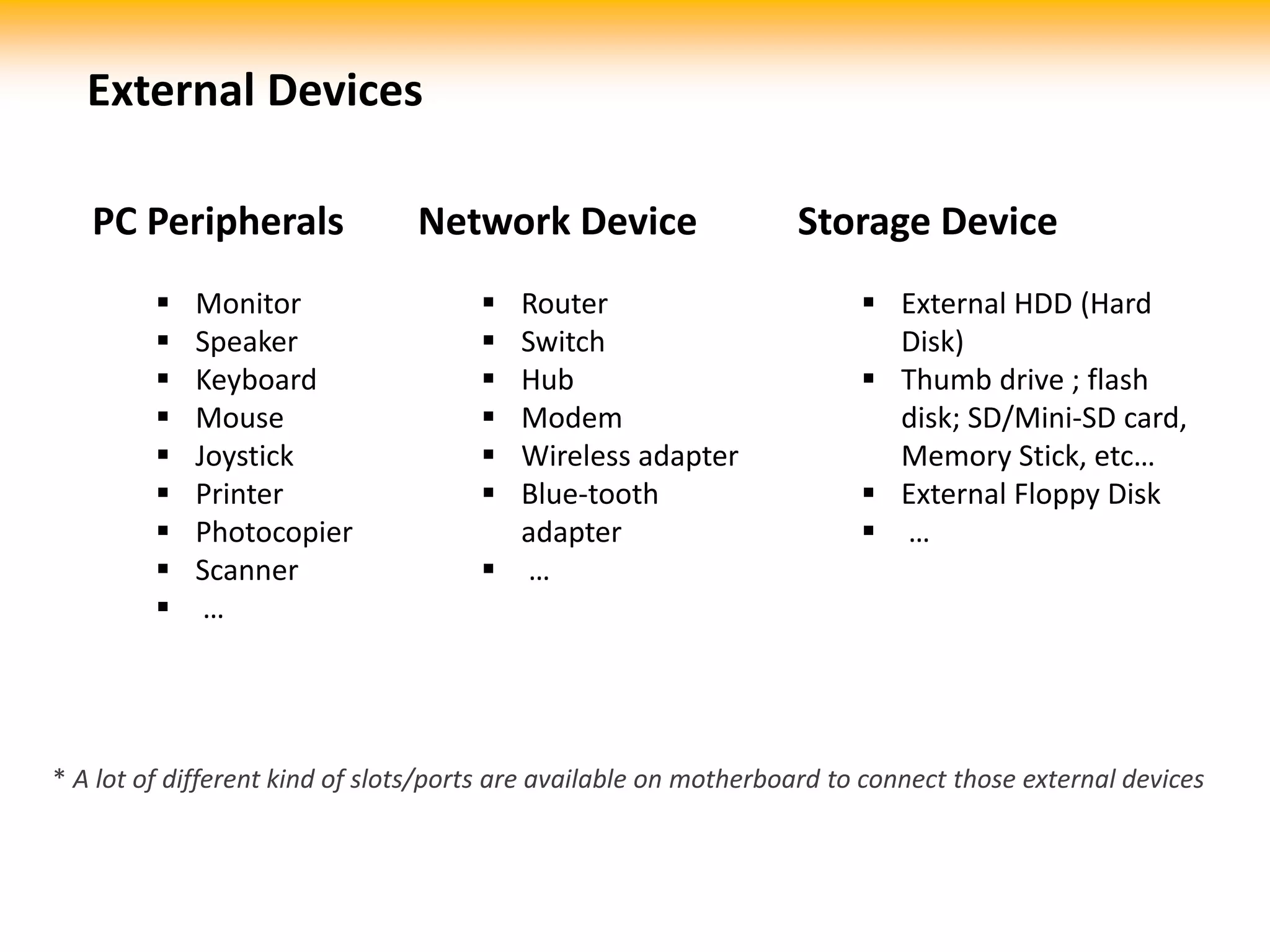
External Devices
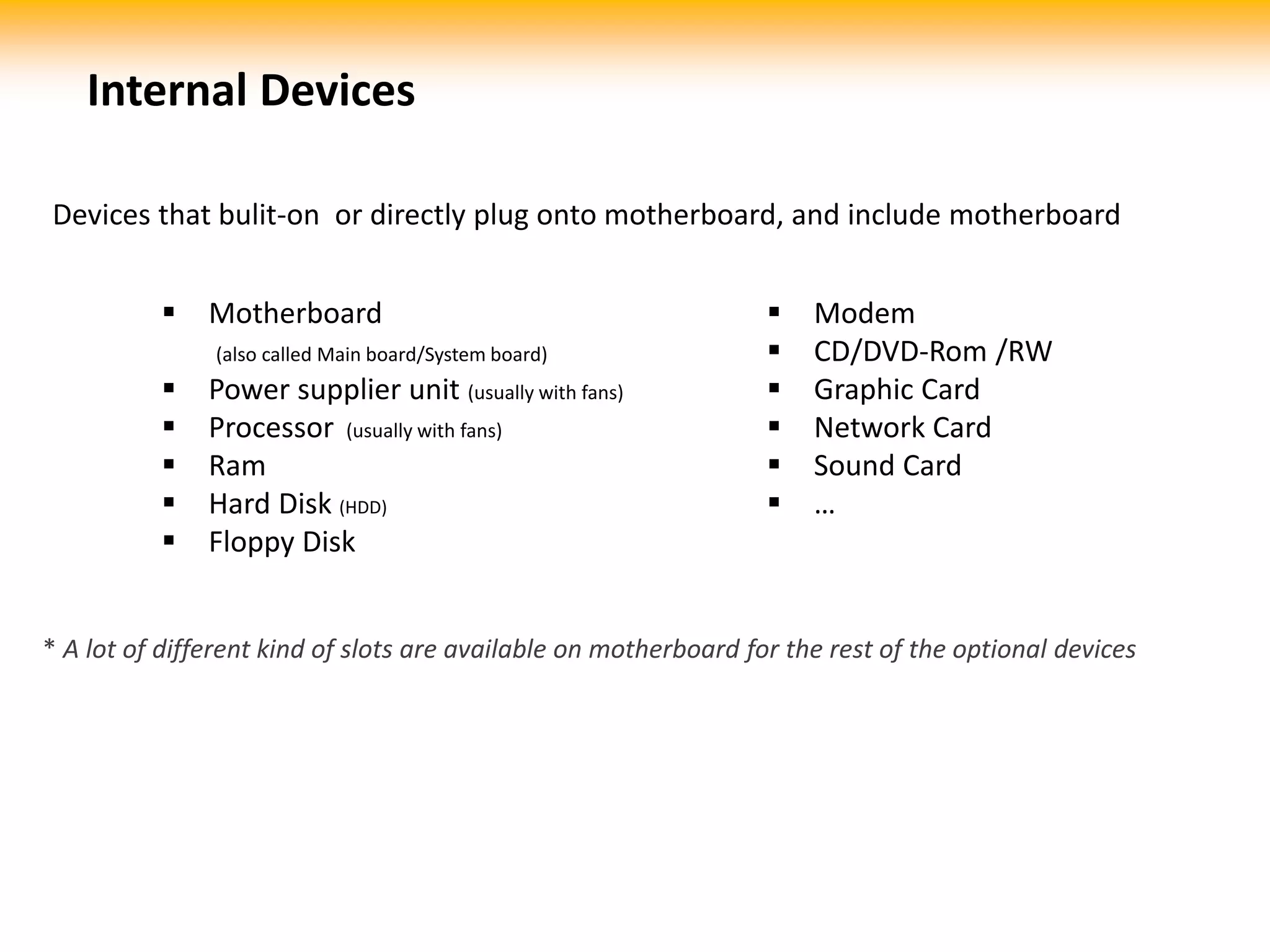
Devices that bulit-on or directly plug onto motherboard, and include motherboard
 Motherboard
(also called Main board/System board)
 Power supplier unit (usually with fans)
 Processor (usually with fans)
 Ram
 Hard Disk (HDD)
 Floppy Disk
* A lot of different kind of slots are available on motherboard for the rest of the optional devices
 Modem
 CD/DVD-Rom /RW
 Graphic Card
 Network Card
 Sound Card
 …
Internal Devices
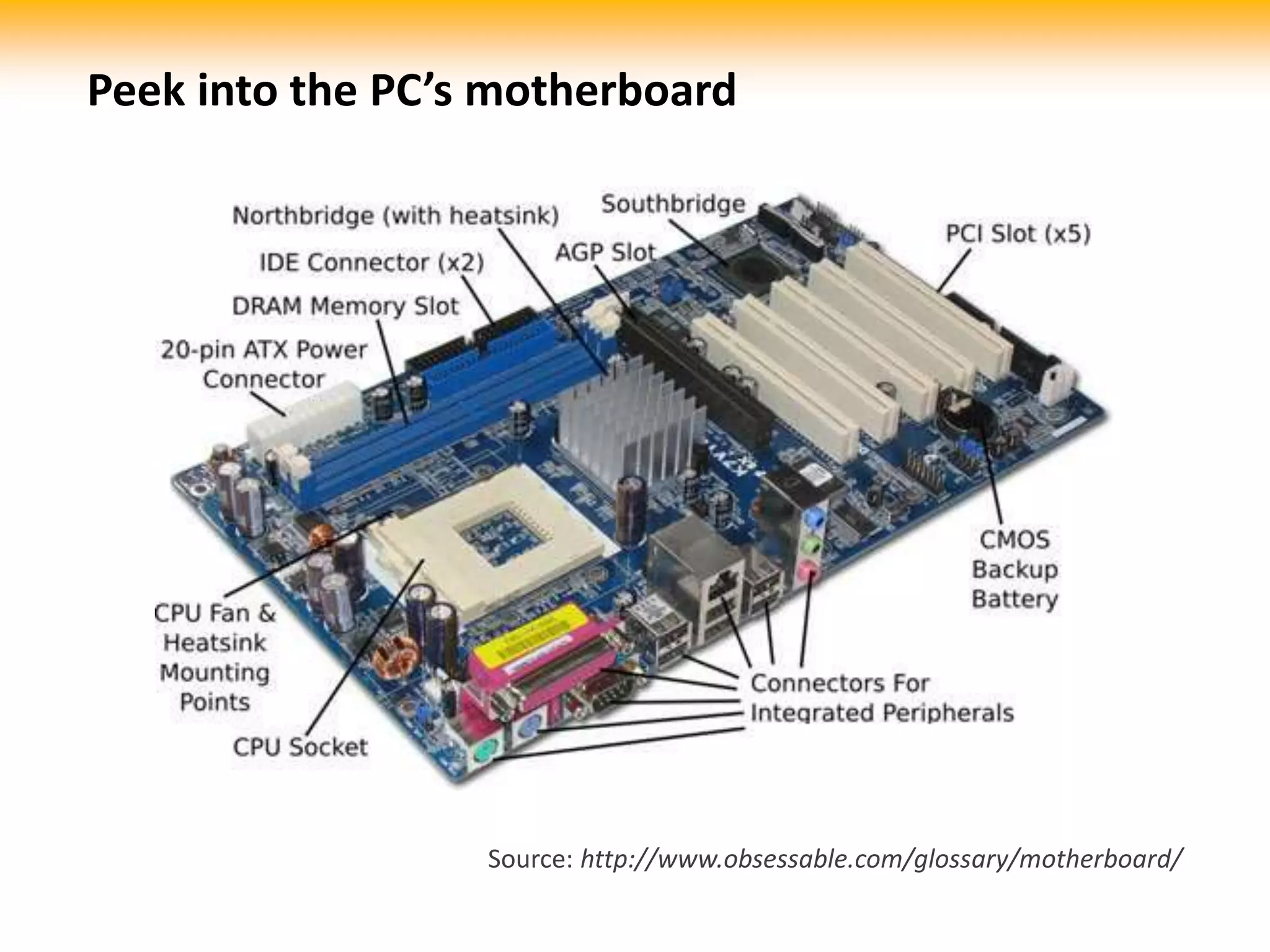
Peek into the PC’s motherboard
Source: http://www.obsessable.com/glossary/motherboard/
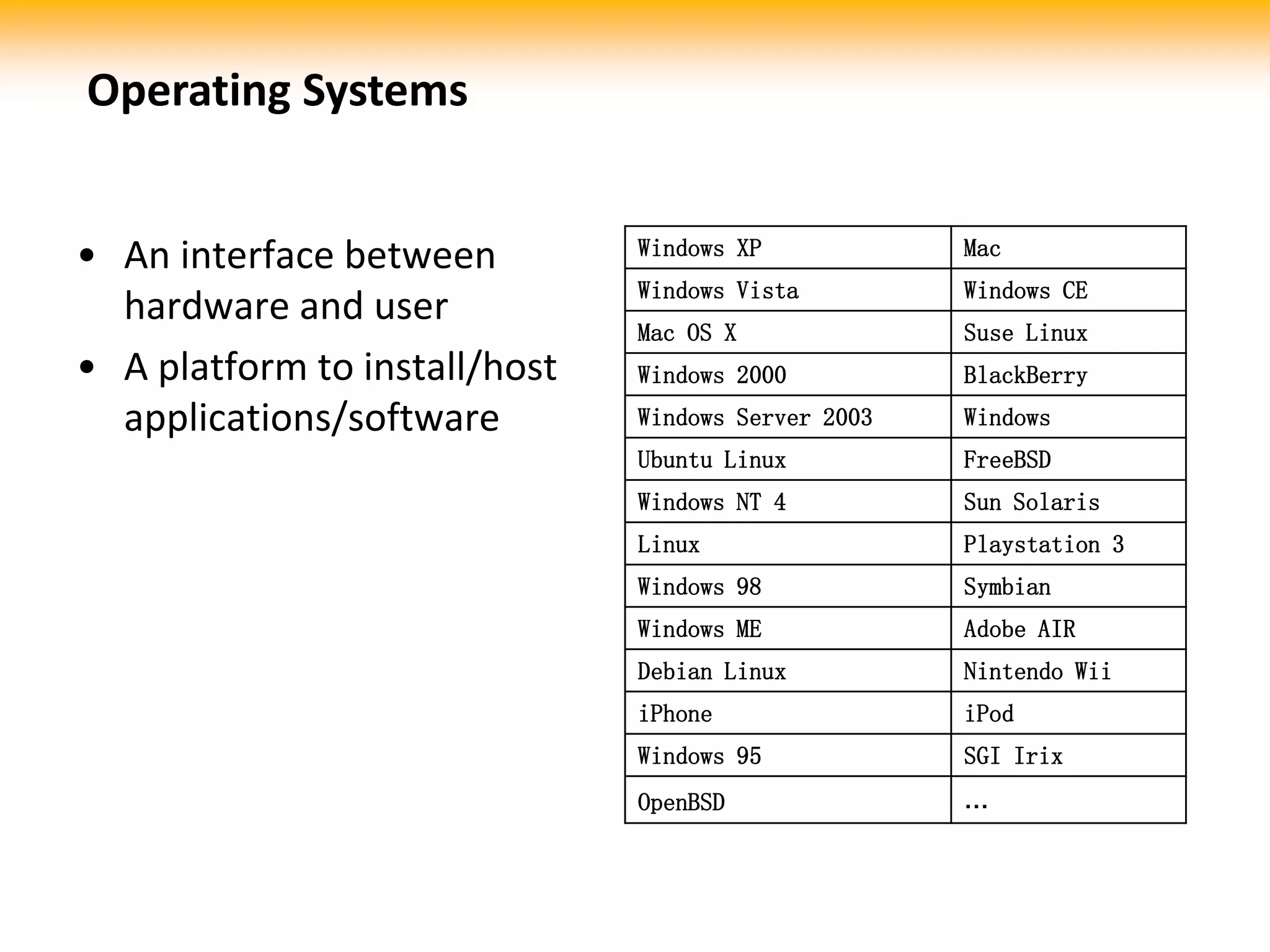
• An interface between
hardware and user
• A platform to install/host
applications/software
Windows XP Mac
Windows Vista Windows CE
Mac OS X Suse Linux
Windows 2000 BlackBerry
Windows Server 2003 Windows
Ubuntu Linux FreeBSD
Windows NT 4 Sun Solaris
Linux Playstation 3
Windows 98 Symbian
Windows ME Adobe AIR
Debian Linux Nintendo Wii
iPhone iPod
Windows 95 SGI Irix
OpenBSD …
Operating Systems
• Computer software is a general term primarily used for digitally stored data such as
computer programs and other kinds of information read and written by computers.
• Today, this includes data that has not traditionally been associated with computers, such as
film, tapes and records.
• in contrast to hardware, software is intangible, meaning it "cannot be touched
• Software is also sometimes used in a more narrow sense, meaning application software only.
Examples:
 Application software, such as word processors which perform productive tasks for users.
 Firmware, which is software programmed resident to electrically programmable memory devices on board
mainboards or other types of integrated hardware carriers.
 Middleware, which controls and co-ordinates distributed systems.
 System software such as operating systems, which govern computing resources and provide convenience for users.
 Software testing is a domain dependent of development and programming. Software testing consists of various
methods to test and declare a software product fit before it can be launched for use by either an individual or a group.
 Testware, which is an umbrella term or container term for all utilities and application software that serve in
combination for testing a software package but not necessarily may optionally contribute to operational purposes. As
such, testware is not a standing configuration but merely a working environment for application software or subsets
thereof.
 Video games (except the hardware part)
 Websites
Software
Source: http://www.wikipedia.com
• System software helps run the computer hardware and
computer system. It includes a combination of the following:
 device drivers
 operating systems
 servers
 utilities
 windowing systems
System Software
• Programming software usually provides tools to assist a
programmer in writing computer programs, and software
using different programming languages in a more convenient
way. The tools include:
 compilers
 debuggers
 interpreters
 linkers
 text editors
Programming Software
• Application software allows end users to accomplish one or
more specific (not directly computer development related)
tasks. Typical applications include:
 industrial automation
 business software
 video games
 quantum chemistry and solid state physics software
 telecommunications (i.e., the Internet and everything that flows on it)
 databases
 educational software
 medical software
 military software
 molecular modeling software
 image editing
 spreadsheet
 simulation software
 Word processing
 Decision making software
Application Software
• A collection of related web pages, images, videos or other
digital assets.
• Addressed relative to a common Uniform Resource
Locator (URL).
• Webpage
– formatting instructions of Hypertext Markup
Language (HTML, XHTML)
– accessed and transported with the Hypertext Transfer
Protocol (HTTP / HTTPS)
Website
www.techsailor.com
Thank you
Singapore
156 Macpherson Road,
#08-01, Singapore 348528
Tel: +65 6748 8522
Fax: +65 6836 4963
Malaysia
Lot 2-1A, Support Services, Technology
Park Malaysia, Lebuhraya Puchong-Sg.
Besi, Bukit Jalil, 57000 Kuala Lumpur,
Malaysia.
Tel: +60 38994 1750 / 1751
Fax: +60 32297 5390
China
中国广东省广州市天河区黄埔大道中
207号海景花园C栋1801
邮编:510665
电话 : +86 020 8567 0704
传真 : +86 020 8567 0704
Email : info@techsailor.com
Website : http://www.techsailor.com

Basic IT knowledge

  • 1.
    www.techsailor.com Engaging Your CustomersOnline by Fisher Yu Basic IT Knowledge 5 Feb 2010 Basic IT Knowledge
  • 2.
    • essentially amulti-functional calculator • a programmable machine that receives input • stores and manipulates data • provides output in a useful format • history: – the first electronic computers were developed in the mid-20th century (1940– 1945). These were the size of a large room – http://inventors.about.com/library/blcoinde x.htm A Computer…
  • 3.
    Software: •MS office •IE7 •Firefox •SQL •IIS •Photoshop •etc… OS: •Windows XP •WindowsVista •Windows 7 •Mac OS •Linux •Unix •Chrome OS •etc… Physical Devices: Mother board, Hard disk, Ram, Processor, Speaker, Keyboard, Mouse, Monitor, CD-ROM, Power Supplier Unit & etc… Do you know…
  • 4.
    External Devices InternalDevices Hardware
  • 5.
    PC Peripherals  Monitor Speaker  Keyboard  Mouse  Joystick  Printer  Photocopier  Scanner  … Network Device  Router  Switch  Hub  Modem  Wireless adapter  Blue-tooth adapter  … Storage Device  External HDD (Hard Disk)  Thumb drive ; flash disk; SD/Mini-SD card, Memory Stick, etc…  External Floppy Disk  … * A lot of different kind of slots/ports are available on motherboard to connect those external devices External Devices
  • 6.
    Devices that bulit-onor directly plug onto motherboard, and include motherboard  Motherboard (also called Main board/System board)  Power supplier unit (usually with fans)  Processor (usually with fans)  Ram  Hard Disk (HDD)  Floppy Disk * A lot of different kind of slots are available on motherboard for the rest of the optional devices  Modem  CD/DVD-Rom /RW  Graphic Card  Network Card  Sound Card  … Internal Devices
  • 7.
    Peek into thePC’s motherboard Source: http://www.obsessable.com/glossary/motherboard/
  • 8.
    • An interfacebetween hardware and user • A platform to install/host applications/software Windows XP Mac Windows Vista Windows CE Mac OS X Suse Linux Windows 2000 BlackBerry Windows Server 2003 Windows Ubuntu Linux FreeBSD Windows NT 4 Sun Solaris Linux Playstation 3 Windows 98 Symbian Windows ME Adobe AIR Debian Linux Nintendo Wii iPhone iPod Windows 95 SGI Irix OpenBSD … Operating Systems
  • 9.
    • Computer softwareis a general term primarily used for digitally stored data such as computer programs and other kinds of information read and written by computers. • Today, this includes data that has not traditionally been associated with computers, such as film, tapes and records. • in contrast to hardware, software is intangible, meaning it "cannot be touched • Software is also sometimes used in a more narrow sense, meaning application software only. Examples:  Application software, such as word processors which perform productive tasks for users.  Firmware, which is software programmed resident to electrically programmable memory devices on board mainboards or other types of integrated hardware carriers.  Middleware, which controls and co-ordinates distributed systems.  System software such as operating systems, which govern computing resources and provide convenience for users.  Software testing is a domain dependent of development and programming. Software testing consists of various methods to test and declare a software product fit before it can be launched for use by either an individual or a group.  Testware, which is an umbrella term or container term for all utilities and application software that serve in combination for testing a software package but not necessarily may optionally contribute to operational purposes. As such, testware is not a standing configuration but merely a working environment for application software or subsets thereof.  Video games (except the hardware part)  Websites Software Source: http://www.wikipedia.com
  • 10.
    • System softwarehelps run the computer hardware and computer system. It includes a combination of the following:  device drivers  operating systems  servers  utilities  windowing systems System Software
  • 11.
    • Programming softwareusually provides tools to assist a programmer in writing computer programs, and software using different programming languages in a more convenient way. The tools include:  compilers  debuggers  interpreters  linkers  text editors Programming Software
  • 12.
    • Application softwareallows end users to accomplish one or more specific (not directly computer development related) tasks. Typical applications include:  industrial automation  business software  video games  quantum chemistry and solid state physics software  telecommunications (i.e., the Internet and everything that flows on it)  databases  educational software  medical software  military software  molecular modeling software  image editing  spreadsheet  simulation software  Word processing  Decision making software Application Software
  • 13.
    • A collectionof related web pages, images, videos or other digital assets. • Addressed relative to a common Uniform Resource Locator (URL). • Webpage – formatting instructions of Hypertext Markup Language (HTML, XHTML) – accessed and transported with the Hypertext Transfer Protocol (HTTP / HTTPS) Website
  • 14.
    www.techsailor.com Thank you Singapore 156 MacphersonRoad, #08-01, Singapore 348528 Tel: +65 6748 8522 Fax: +65 6836 4963 Malaysia Lot 2-1A, Support Services, Technology Park Malaysia, Lebuhraya Puchong-Sg. Besi, Bukit Jalil, 57000 Kuala Lumpur, Malaysia. Tel: +60 38994 1750 / 1751 Fax: +60 32297 5390 China 中国广东省广州市天河区黄埔大道中 207号海景花园C栋1801 邮编:510665 电话 : +86 020 8567 0704 传真 : +86 020 8567 0704 Email : info@techsailor.com Website : http://www.techsailor.com

Editor's Notes

  • #2 Hi, I’m Fisher Yu from Techsailor Group. Today, we’ll be running through some basics of IT.
  • #3 A computer is essentially a very sophisticated calculator that can perform many complex functions. It is a programmable machine that receives input, stores and manipulates data and provides output in a useful format The first electronic computers were developed in the mid-20th century (1940-1945). It occupies one large room. More info: http://inventors.about.com/library/blcoindex.htm
  • #4 Do you know what constitutes hardware, operating system and applications? Here are some common examples listed.
  • #5 Hardware consists of external devices and internal devices. Here are some common examples.
  • #6 Devices that are outside of the casing are usually classified as “external”. These devices are usually easy to connect and disconnect.
  • #7 Devices that are housed within the PC casing are usually classified as “internal”. These devices are usually harder to install and remove as screws and brackets may be used.
  • #8 Here’s how a simple PC motherboard looks like what some of the slots are for. Note that for most newer motherboards, there’s already an built-in sound and graphic chip.
  • #9 The Operating System is a complex software that acts as the interface between the hardware and the user. It is also the platform on which most software runs on.
  • #10 Computer software is a general term primarily used for digitally stored data such as computer programs and other kinds of information read and written by computers. Today, this includes data that has not traditionally been associated with computers, such as film, tapes and records. in contrast to hardware, software is intangible, meaning it "cannot be touched”. Software is also sometimes used in a more narrow sense, meaning application software only.
  • #11 System software is a special class of software that communicates directly with the hardware. They help run the computer hardware and computer system.
  • #12 Programming software are software to help the user create / write other software or programs.
  • #13 Application Software
  • #14 A website is collection of related web pages, images, videos or other digital assets A website can be located using a common Uniform Resource Locator (URL) that looks like www.yourwebsite.com. Prior to the existance of URLs, websites can only be located through IP addresses, which is a combination of numbers, such as 114.129.33.160. A webpage is built on a standard Hypertext Markup Language (HTML, XHTML) and can be accessed and transported with the Hypertext Transfer Protocol (HTTP / HTTPS)
  • #15 Thank you. We hope you find this helpful. If you have any more questions, do not hesitate to contact us!