Chapter 8
Firewalls
objectives
• Explain the role of firewalls as part of a computer
and network security strategy.
• List the key characteristics of firewalls.
• Discuss the various basing options for firewalls.
• Understand the relative merits of various choices
for firewall location and configurations.
The Need for firewalls
• Internet connectivity is no longer optional for organizations
• Individual users within the organization want and need Internet access
• While Internet access provides benefits to the organization, it enables the
outside world to reach and interact with local network assets
• This creates a threat to the organization
• While it is possible to equip each workstation and server on the premises
network with strong security features, this may not be sufficient and in some
cases is not cost-effective
• Firewall
• An alternative, or at least complement, to host-based security services
• Is inserted between the premises network and the Internet to establish a
controlled link and to erect an outer security wall or perimeter
• The aim of this perimeter is to protect the premises network from Internet-
based attacks and to provide a single choke point where security and auditing
can be imposed
• May be a single computer system or a set of two or more systems that
cooperate to perform the firewall function
Firewall characteristics
• Design goals for a firewall:
• All traffic from inside to outside, and vice versa, must pass through the
firewall
• Only authorized traffic, as defined by the local security policy, will be
allowed to pass
• The firewall itself is immune to penetration
• Techniques that firewalls use to control access and enforce the site’s
security policy:
Service control
• Determines the types of Internet services that can be accessed, inbound or outbound
Direction control
• Determines the direction in which particular service requests may be initiated and allowed to
flow through the firewall
User control
• Controls access to a service according to which user is attempting to access it
Behavior control
• Controls how particular services are used
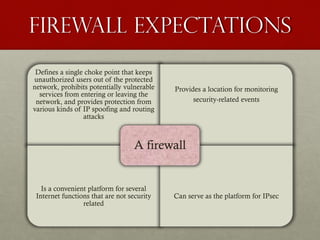
Firewall expectations
Defines a single choke point that keeps
unauthorized users out of the protected
network, prohibits potentially vulnerable
services from entering or leaving the
network, and provides protection from
various kinds of IP spoofing and routing
attacks
Provides a location for monitoring
security-related events
Is a convenient platform for several
Internet functions that are not security
related
Can serve as the platform for IPsec
A firewall
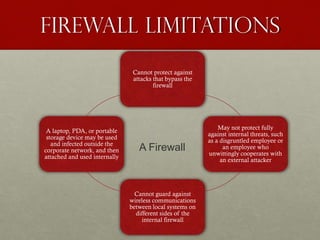
Firewall limitations
Cannot protect against
attacks that bypass the
firewall
May not protect fully
against internal threats, such
as a disgruntled employee or
an employee who
unwittingly cooperates with
an external attacker
Cannot guard against
wireless communications
between local systems on
different sides of the
internal firewall
A laptop, PDA, or portable
storage device may be used
and infected outside the
corporate network, and then
attached and used internally
A Firewall
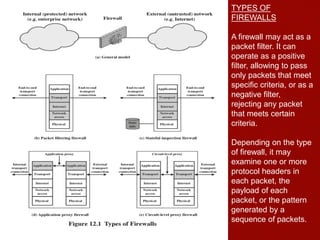
TYPES OF
FIREWALLS
A firewall may act as a
packet filter. It can
operate as a positive
filter, allowing to pass
only packets that meet
specific criteria, or as a
negative filter,
rejecting any packet
that meets certain
criteria.
Depending on the type
of firewall, it may
examine one or more
protocol headers in
each packet, the
payload of each
packet, or the pattern
generated by a
sequence of packets.
A packet filtering firewall applies a set of rules to each incoming and outgoing IP packet
and then forwards or discards the packet (Figure 12.1b). The firewall
is typically configured to filter packets going in both directions (from and to the internal
network).
The packet filter is typically set up as a list of rules based on matches to fields in the IP
or TCP header. If there is a match to one of the rules, that rule is invoked to determine
whether to forward or discard the packet. If there is no match to any rule, then a default
action is taken. Two default policies are possible:
• Default discard: That which is not expressly permitted is prohibited.
• Default forward: That which is not expressly prohibited is permitted.
Table 12.1 Packet-Filtering Example
A. Inbound mail from an external source is allowed (port 25 is for
SMTP incoming).
B. This rule is intended to allow a response to an inbound SMTP
connection.
C. Outbound mail to an external source is allowed.
D. This rule is intended to allow a response to an inbound SMTP
connection.
E. This is an explicit statement of the default policy. All rulesets
include this rule implicitly as the last rule.
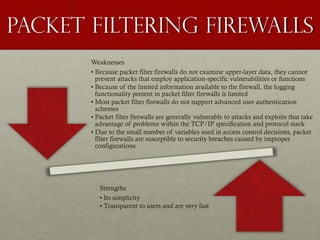
Packet Filtering firewalls
Weaknesses
• Because packet filter firewalls do not examine upper-layer data, they cannot
prevent attacks that employ application-specific vulnerabilities or functions
• Because of the limited information available to the firewall, the logging
functionality present in packet filter firewalls is limited
• Most packet filter firewalls do not support advanced user authentication
schemes
• Packet filter firewalls are generally vulnerable to attacks and exploits that take
advantage of problems within the TCP/IP specification and protocol stack
• Due to the small number of variables used in access control decisions, packet
filter firewalls are susceptible to security breaches caused by improper
configurations
Strengths
• Its simplicity
• Transparent to users and are very fast
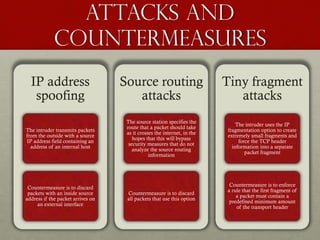
Attacks and
countermeasures
IP address
spoofing
The intruder transmits packets
from the outside with a source
IP address field containing an
address of an internal host
Countermeasure is to discard
packets with an inside source
address if the packet arrives on
an external interface
Source routing
attacks
The source station specifies the
route that a packet should take
as it crosses the internet, in the
hopes that this will bypass
security measures that do not
analyze the source routing
information
Countermeasure is to discard
all packets that use this option
Tiny fragment
attacks
The intruder uses the IP
fragmentation option to create
extremely small fragments and
force the TCP header
information into a separate
packet fragment
Countermeasure is to enforce
a rule that the first fragment of
a packet must contain a
predefined minimum amount
of the transport header
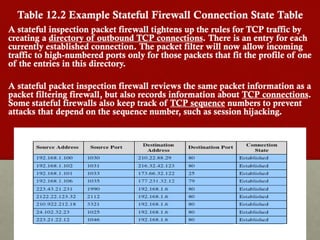
Table 12.2 Example Stateful Firewall Connection State Table
A stateful inspection packet firewall tightens up the rules for TCP traffic by
creating a directory of outbound TCP connections. There is an entry for each
currently established connection. The packet filter will now allow incoming
traffic to high-numbered ports only for those packets that fit the profile of one
of the entries in this directory.
A stateful packet inspection firewall reviews the same packet information as a
packet filtering firewall, but also records information about TCP connections.
Some stateful firewalls also keep track of TCP sequence numbers to prevent
attacks that depend on the sequence number, such as session hijacking.
Application Level Gateway
• Also called an application proxy
• Acts as a relay of application-level traffic
• If the gateway does not implement the
proxy code for a specific application, the
service is not supported and cannot be
forwarded across the firewall
• The gateway can be configured to support
only specific features of an application that
the network administrator considers
acceptable while denying all other features
• Tend to be more secure than packet filters
• Disadvantage:
• The additional processing overhead on each
connection
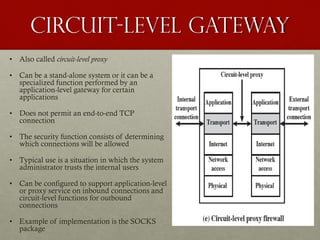
Circuit-Level Gateway
• Also called circuit-level proxy
• Can be a stand-alone system or it can be a
specialized function performed by an
application-level gateway for certain
applications
• Does not permit an end-to-end TCP
connection
• The security function consists of determining
which connections will be allowed
• Typical use is a situation in which the system
administrator trusts the internal users
• Can be configured to support application-level
or proxy service on inbound connections and
circuit-level functions for outbound
connections
• Example of implementation is the SOCKS
package
Bastion Host
• A system identified by the firewall administrator as a critical strong point in the
network’s security
• Typically serves as a platform for an application-level or circuit-level gateway
• Common characteristics:
• Executes a secure version of its operating system, making it a hardened system
• Only the services that the network administrator considers essential are installed. These
could include proxy applications for DNS, FTP, HTTP, and SMTP.
• May require additional authentication before a user is allowed access to the proxy services
• Each proxy is configured to support only a subset of the standard application’s command set
• Each proxy is configured to allow access only to specific host systems
• Each proxy maintains detailed audit information by logging all traffic, each connection, and
the duration of each connection
• Each proxy module is a very small software package specifically designed for network
security
• Each proxy is independent of other proxies on the bastion host
• A proxy generally performs no disk access other than to read its initial configuration file
• Each proxy runs as a nonprivileged user in a private and secured directory on the bastion
host
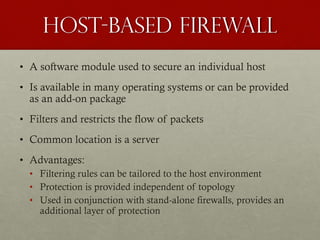
Host-Based Firewall
• A software module used to secure an individual host
• Is available in many operating systems or can be provided
as an add-on package
• Filters and restricts the flow of packets
• Common location is a server
• Advantages:
• Filtering rules can be tailored to the host environment
• Protection is provided independent of topology
• Used in conjunction with stand-alone firewalls, provides an
additional layer of protection
Personal Firewall
• Controls the traffic between a personal computer or workstation on
one side and the Internet or enterprise network on the other side
• Can be used in the home environment and on corporate intranets
• Typically is a software module on the personal computer
• Can also be housed in a router that connects all of the home
computers to a DSL, cable modem, or other Internet interface
• Primary role is to deny unauthorized remote access to the
computer
• Can also monitor outgoing activity in an attempt to detect and
block worms and other malware
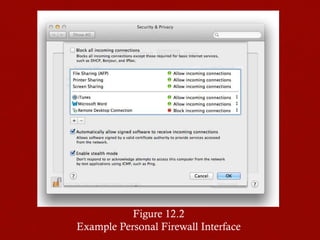
Figure 12.2
Example Personal Firewall Interface
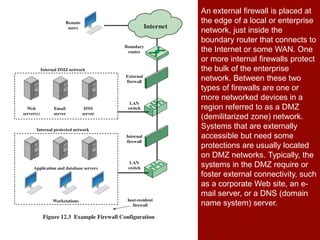
An external firewall is placed at
the edge of a local or enterprise
network, just inside the
boundary router that connects to
the Internet or some WAN. One
or more internal firewalls protect
the bulk of the enterprise
network. Between these two
types of firewalls are one or
more networked devices in a
region referred to as a DMZ
(demilitarized zone) network.
Systems that are externally
accessible but need some
protections are usually located
on DMZ networks. Typically, the
systems in the DMZ require or
foster external connectivity, such
as a corporate Web site, an e-
mail server, or a DNS (domain
name system) server.
The external firewall provides a measure of
access control and protection for the DMZ
systems consistent with their need for external
connectivity. The external firewall also provides
a basic level of protection for the remainder of
the enterprise network. In this type of
configuration, internal firewalls serve three
purposes:
1. The internal firewall adds more stringent
filtering capability, compared to the external
firewall, in order to protect enterprise servers
and workstations from external attack.
2. The internal firewall provides two-way
protection with respect to the DMZ. First, the
internal firewall protects the remainder of the
network from attacks launched from DMZ
systems. Such attacks might originate from
worms, rootkits, bots, or other malware
lodged in a DMZ system. Second, an
internal firewall can protect the DMZ
systems from attack from the internal
protected network.
3. Multiple internal firewalls can be used to
protect portions of the internal network from
each other. For example, firewalls can be
configured so that internal servers are
protected from internal workstations and
vice versa. A common practice is to place
the DMZ on a different network interface on
the external firewall from that used to access
the internal networks.
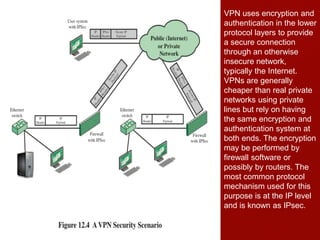
VPN uses encryption and
authentication in the lower
protocol layers to provide
a secure connection
through an otherwise
insecure network,
typically the Internet.
VPNs are generally
cheaper than real private
networks using private
lines but rely on having
the same encryption and
authentication system at
both ends. The encryption
may be performed by
firewall software or
possibly by routers. The
most common protocol
mechanism used for this
purpose is at the IP level
and is known as IPsec.
Virtual private networks
• An organization maintains LANs at dispersed locations. Nonsecure IP traffic is conducted on each
LAN. For traffic off site, through some sort of private or public WAN, IPSec protocols are used.
These protocols operate in networking devices, such as a router or firewall, that connect each LAN
to the outside world.
• The IPSec networking device will typically encrypt and compress all traffic going into the WAN and
decrypt and uncompress traffic coming from the WAN; authentication may also be provided. These
operations are transparent to workstations and servers on the LAN.
• Secure transmission is also possible with individual users who dial into the WAN. Such user
workstations must implement the IPSec protocols to provide security. They must also implement
high levels of host security, as they are directly connected to the wider Internet. This makes them an
attractive target for attackers attempting to access the corporate network.
• A logical means of implementing an IPSec is in a firewall, as shown in Figure 12.4. If IPSec is
implemented in a separate box behind (internal to) the firewall, then VPN traffic passing through the
firewall in both directions is encrypted. In this case, the firewall is unable to perform its filtering
function or other security functions, such as access control, logging, or scanning for viruses.
• IPSec could be implemented in the boundary router, outside the firewall. However, this device is
likely to be less secure than the firewall and thus less desirable as an IPSec platform.
A distributed firewall
configuration involves stand-
alone firewall devices plus
host-based firewalls working
together under a central
administrative control.
Administrators can configure
host-resident firewalls on
hundreds of servers and
workstations as well as
configure personal firewalls
on local and remote user
systems. Tools let the
network administrator set
policies and monitor security
across the entire network.
These firewalls protect
against internal attacks and
provide protection tailored to
specific machines and
applications. Stand-alone
firewalls provide global
protection, including internal
firewalls and an external
firewall, as discussed
previously.
Distributed firewalls
• With distributed firewalls, it may make sense to establish both an internal
and an external DMZ. Web servers that need less protection because they
have less critical information on them could be placed in an external DMZ,
outside the external firewall. What protection is needed is provided by host-
based firewalls on these servers.
• An important aspect of a distributed firewall configuration is security
monitoring. Such monitoring typically includes log aggregation and
analysis, firewall statistics, and fine-grained remote monitoring of
individual hosts if needed.
Summary of Firewall Locations
and Topologies
• Host-resident firewall
• This category includes personal firewall
software and firewall software on servers
• Can be used alone or as part of an in-depth
firewall deployment
• Screening router
• A single router between internal and external
networks with stateless or full packet filtering
• This arrangement is typical for small
office/home office (SOHO) applications
• Single bastion inline
• A single firewall device between an internal
and external router
• This is the typical firewall appliance
configuration for small-to-medium sized
organizations
• Single bastion T
• Similar to single bastion inline but
has a third network interface on
bastion to a DMZ where externally
visible servers are placed
• Double bastion inline
• DMZ is sandwiched between
bastion firewalls
• Double bastion T
• DMZ is on a separate network
interface on the bastion firewall
• Distributed firewall configuration
• Used by some large businesses and
government organizations
Summary
• The need for firewalls
• Firewall characteristics
• Types of firewalls
• Packet filtering
firewall
• Stateful inspection
firewalls
• Application level
gateway
• Circuit level gateway
• Firewall basing
• Bastion host
• Host based firewalls
• Personal firewall
• Firewall locations and
configurations
• DMZ networks
• Virtual private networks
• Distributed firewalls
• Firewall location and
topologies summary

BAIT1103 Chapter 8

  • 1.
  • 2.
    objectives • Explain therole of firewalls as part of a computer and network security strategy. • List the key characteristics of firewalls. • Discuss the various basing options for firewalls. • Understand the relative merits of various choices for firewall location and configurations.
  • 3.
    The Need forfirewalls • Internet connectivity is no longer optional for organizations • Individual users within the organization want and need Internet access • While Internet access provides benefits to the organization, it enables the outside world to reach and interact with local network assets • This creates a threat to the organization • While it is possible to equip each workstation and server on the premises network with strong security features, this may not be sufficient and in some cases is not cost-effective • Firewall • An alternative, or at least complement, to host-based security services • Is inserted between the premises network and the Internet to establish a controlled link and to erect an outer security wall or perimeter • The aim of this perimeter is to protect the premises network from Internet- based attacks and to provide a single choke point where security and auditing can be imposed • May be a single computer system or a set of two or more systems that cooperate to perform the firewall function
  • 4.
    Firewall characteristics • Designgoals for a firewall: • All traffic from inside to outside, and vice versa, must pass through the firewall • Only authorized traffic, as defined by the local security policy, will be allowed to pass • The firewall itself is immune to penetration • Techniques that firewalls use to control access and enforce the site’s security policy: Service control • Determines the types of Internet services that can be accessed, inbound or outbound Direction control • Determines the direction in which particular service requests may be initiated and allowed to flow through the firewall User control • Controls access to a service according to which user is attempting to access it Behavior control • Controls how particular services are used
  • 5.
    Firewall expectations Defines asingle choke point that keeps unauthorized users out of the protected network, prohibits potentially vulnerable services from entering or leaving the network, and provides protection from various kinds of IP spoofing and routing attacks Provides a location for monitoring security-related events Is a convenient platform for several Internet functions that are not security related Can serve as the platform for IPsec A firewall
  • 6.
    Firewall limitations Cannot protectagainst attacks that bypass the firewall May not protect fully against internal threats, such as a disgruntled employee or an employee who unwittingly cooperates with an external attacker Cannot guard against wireless communications between local systems on different sides of the internal firewall A laptop, PDA, or portable storage device may be used and infected outside the corporate network, and then attached and used internally A Firewall
  • 7.
    TYPES OF FIREWALLS A firewallmay act as a packet filter. It can operate as a positive filter, allowing to pass only packets that meet specific criteria, or as a negative filter, rejecting any packet that meets certain criteria. Depending on the type of firewall, it may examine one or more protocol headers in each packet, the payload of each packet, or the pattern generated by a sequence of packets.
  • 8.
    A packet filteringfirewall applies a set of rules to each incoming and outgoing IP packet and then forwards or discards the packet (Figure 12.1b). The firewall is typically configured to filter packets going in both directions (from and to the internal network). The packet filter is typically set up as a list of rules based on matches to fields in the IP or TCP header. If there is a match to one of the rules, that rule is invoked to determine whether to forward or discard the packet. If there is no match to any rule, then a default action is taken. Two default policies are possible: • Default discard: That which is not expressly permitted is prohibited. • Default forward: That which is not expressly prohibited is permitted.
  • 9.
    Table 12.1 Packet-FilteringExample A. Inbound mail from an external source is allowed (port 25 is for SMTP incoming). B. This rule is intended to allow a response to an inbound SMTP connection. C. Outbound mail to an external source is allowed. D. This rule is intended to allow a response to an inbound SMTP connection. E. This is an explicit statement of the default policy. All rulesets include this rule implicitly as the last rule.
  • 10.
    Packet Filtering firewalls Weaknesses •Because packet filter firewalls do not examine upper-layer data, they cannot prevent attacks that employ application-specific vulnerabilities or functions • Because of the limited information available to the firewall, the logging functionality present in packet filter firewalls is limited • Most packet filter firewalls do not support advanced user authentication schemes • Packet filter firewalls are generally vulnerable to attacks and exploits that take advantage of problems within the TCP/IP specification and protocol stack • Due to the small number of variables used in access control decisions, packet filter firewalls are susceptible to security breaches caused by improper configurations Strengths • Its simplicity • Transparent to users and are very fast
  • 11.
    Attacks and countermeasures IP address spoofing Theintruder transmits packets from the outside with a source IP address field containing an address of an internal host Countermeasure is to discard packets with an inside source address if the packet arrives on an external interface Source routing attacks The source station specifies the route that a packet should take as it crosses the internet, in the hopes that this will bypass security measures that do not analyze the source routing information Countermeasure is to discard all packets that use this option Tiny fragment attacks The intruder uses the IP fragmentation option to create extremely small fragments and force the TCP header information into a separate packet fragment Countermeasure is to enforce a rule that the first fragment of a packet must contain a predefined minimum amount of the transport header
  • 12.
    Table 12.2 ExampleStateful Firewall Connection State Table A stateful inspection packet firewall tightens up the rules for TCP traffic by creating a directory of outbound TCP connections. There is an entry for each currently established connection. The packet filter will now allow incoming traffic to high-numbered ports only for those packets that fit the profile of one of the entries in this directory. A stateful packet inspection firewall reviews the same packet information as a packet filtering firewall, but also records information about TCP connections. Some stateful firewalls also keep track of TCP sequence numbers to prevent attacks that depend on the sequence number, such as session hijacking.
  • 13.
    Application Level Gateway •Also called an application proxy • Acts as a relay of application-level traffic • If the gateway does not implement the proxy code for a specific application, the service is not supported and cannot be forwarded across the firewall • The gateway can be configured to support only specific features of an application that the network administrator considers acceptable while denying all other features • Tend to be more secure than packet filters • Disadvantage: • The additional processing overhead on each connection
  • 14.
    Circuit-Level Gateway • Alsocalled circuit-level proxy • Can be a stand-alone system or it can be a specialized function performed by an application-level gateway for certain applications • Does not permit an end-to-end TCP connection • The security function consists of determining which connections will be allowed • Typical use is a situation in which the system administrator trusts the internal users • Can be configured to support application-level or proxy service on inbound connections and circuit-level functions for outbound connections • Example of implementation is the SOCKS package
  • 15.
    Bastion Host • Asystem identified by the firewall administrator as a critical strong point in the network’s security • Typically serves as a platform for an application-level or circuit-level gateway • Common characteristics: • Executes a secure version of its operating system, making it a hardened system • Only the services that the network administrator considers essential are installed. These could include proxy applications for DNS, FTP, HTTP, and SMTP. • May require additional authentication before a user is allowed access to the proxy services • Each proxy is configured to support only a subset of the standard application’s command set • Each proxy is configured to allow access only to specific host systems • Each proxy maintains detailed audit information by logging all traffic, each connection, and the duration of each connection • Each proxy module is a very small software package specifically designed for network security • Each proxy is independent of other proxies on the bastion host • A proxy generally performs no disk access other than to read its initial configuration file • Each proxy runs as a nonprivileged user in a private and secured directory on the bastion host
  • 16.
    Host-Based Firewall • Asoftware module used to secure an individual host • Is available in many operating systems or can be provided as an add-on package • Filters and restricts the flow of packets • Common location is a server • Advantages: • Filtering rules can be tailored to the host environment • Protection is provided independent of topology • Used in conjunction with stand-alone firewalls, provides an additional layer of protection
  • 17.
    Personal Firewall • Controlsthe traffic between a personal computer or workstation on one side and the Internet or enterprise network on the other side • Can be used in the home environment and on corporate intranets • Typically is a software module on the personal computer • Can also be housed in a router that connects all of the home computers to a DSL, cable modem, or other Internet interface • Primary role is to deny unauthorized remote access to the computer • Can also monitor outgoing activity in an attempt to detect and block worms and other malware
  • 18.
    Figure 12.2 Example PersonalFirewall Interface
  • 19.
    An external firewallis placed at the edge of a local or enterprise network, just inside the boundary router that connects to the Internet or some WAN. One or more internal firewalls protect the bulk of the enterprise network. Between these two types of firewalls are one or more networked devices in a region referred to as a DMZ (demilitarized zone) network. Systems that are externally accessible but need some protections are usually located on DMZ networks. Typically, the systems in the DMZ require or foster external connectivity, such as a corporate Web site, an e- mail server, or a DNS (domain name system) server.
  • 20.
    The external firewallprovides a measure of access control and protection for the DMZ systems consistent with their need for external connectivity. The external firewall also provides a basic level of protection for the remainder of the enterprise network. In this type of configuration, internal firewalls serve three purposes: 1. The internal firewall adds more stringent filtering capability, compared to the external firewall, in order to protect enterprise servers and workstations from external attack. 2. The internal firewall provides two-way protection with respect to the DMZ. First, the internal firewall protects the remainder of the network from attacks launched from DMZ systems. Such attacks might originate from worms, rootkits, bots, or other malware lodged in a DMZ system. Second, an internal firewall can protect the DMZ systems from attack from the internal protected network. 3. Multiple internal firewalls can be used to protect portions of the internal network from each other. For example, firewalls can be configured so that internal servers are protected from internal workstations and vice versa. A common practice is to place the DMZ on a different network interface on the external firewall from that used to access the internal networks.
  • 21.
    VPN uses encryptionand authentication in the lower protocol layers to provide a secure connection through an otherwise insecure network, typically the Internet. VPNs are generally cheaper than real private networks using private lines but rely on having the same encryption and authentication system at both ends. The encryption may be performed by firewall software or possibly by routers. The most common protocol mechanism used for this purpose is at the IP level and is known as IPsec.
  • 22.
    Virtual private networks •An organization maintains LANs at dispersed locations. Nonsecure IP traffic is conducted on each LAN. For traffic off site, through some sort of private or public WAN, IPSec protocols are used. These protocols operate in networking devices, such as a router or firewall, that connect each LAN to the outside world. • The IPSec networking device will typically encrypt and compress all traffic going into the WAN and decrypt and uncompress traffic coming from the WAN; authentication may also be provided. These operations are transparent to workstations and servers on the LAN. • Secure transmission is also possible with individual users who dial into the WAN. Such user workstations must implement the IPSec protocols to provide security. They must also implement high levels of host security, as they are directly connected to the wider Internet. This makes them an attractive target for attackers attempting to access the corporate network. • A logical means of implementing an IPSec is in a firewall, as shown in Figure 12.4. If IPSec is implemented in a separate box behind (internal to) the firewall, then VPN traffic passing through the firewall in both directions is encrypted. In this case, the firewall is unable to perform its filtering function or other security functions, such as access control, logging, or scanning for viruses. • IPSec could be implemented in the boundary router, outside the firewall. However, this device is likely to be less secure than the firewall and thus less desirable as an IPSec platform.
  • 23.
    A distributed firewall configurationinvolves stand- alone firewall devices plus host-based firewalls working together under a central administrative control. Administrators can configure host-resident firewalls on hundreds of servers and workstations as well as configure personal firewalls on local and remote user systems. Tools let the network administrator set policies and monitor security across the entire network. These firewalls protect against internal attacks and provide protection tailored to specific machines and applications. Stand-alone firewalls provide global protection, including internal firewalls and an external firewall, as discussed previously.
  • 24.
    Distributed firewalls • Withdistributed firewalls, it may make sense to establish both an internal and an external DMZ. Web servers that need less protection because they have less critical information on them could be placed in an external DMZ, outside the external firewall. What protection is needed is provided by host- based firewalls on these servers. • An important aspect of a distributed firewall configuration is security monitoring. Such monitoring typically includes log aggregation and analysis, firewall statistics, and fine-grained remote monitoring of individual hosts if needed.
  • 25.
    Summary of FirewallLocations and Topologies • Host-resident firewall • This category includes personal firewall software and firewall software on servers • Can be used alone or as part of an in-depth firewall deployment • Screening router • A single router between internal and external networks with stateless or full packet filtering • This arrangement is typical for small office/home office (SOHO) applications • Single bastion inline • A single firewall device between an internal and external router • This is the typical firewall appliance configuration for small-to-medium sized organizations • Single bastion T • Similar to single bastion inline but has a third network interface on bastion to a DMZ where externally visible servers are placed • Double bastion inline • DMZ is sandwiched between bastion firewalls • Double bastion T • DMZ is on a separate network interface on the bastion firewall • Distributed firewall configuration • Used by some large businesses and government organizations
  • 26.
    Summary • The needfor firewalls • Firewall characteristics • Types of firewalls • Packet filtering firewall • Stateful inspection firewalls • Application level gateway • Circuit level gateway • Firewall basing • Bastion host • Host based firewalls • Personal firewall • Firewall locations and configurations • DMZ networks • Virtual private networks • Distributed firewalls • Firewall location and topologies summary