PRINCIPLES OF INFORMATION TECHNOLOGY
What is Information Technology	The use of computers and telecommunications to retrieve and store and transmit information
The role of ITIt is accepted that telecommunication is a basic infrastructure necessary for economic and social development of a country.Information technology may be described as the support of the central nervous system of complex societies, transmitting and processing information and commands among the various parts of such societies. Internet plays a fundamental function in ICT role.
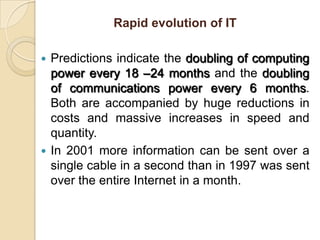
Rapid evolution of ITPredictions indicate the doubling of computing power every 18 –24 months and the doubling of communications power every 6 months. Both are accompanied by huge reductions in costs and massive increases in speed and quantity.In 2001 more information can be sent over a single cable in a second than in 1997 was sent over the entire Internet in a month.
Benefits from ITBenefits could be obtained in:EducationJob training Health careGovernment efficiency
INTRODUCTION TO COMPUTERS	A computer is an Automatic Electronic Data Processing System. Computers can process information automatically as they can store programs or instructions in the computer and execute them automatically. Charles Babbage is known as the father of computer.Computer Programs:	A computer program is a set of instructions written in a particular computer language to perform a specific task by the computer system.
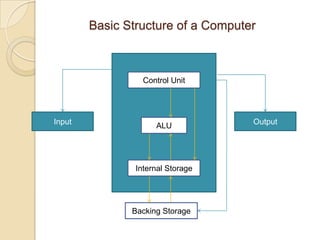
Basic Structure of a ComputerControl UnitOutputInputALUInternal StorageBacking Storage
Computer has mainly three parts:Input DevicesProcessorOutput Devices
Hardware ComponentsINPUT DEVICESThe Mouse Used to ‘drive’ Microsoft Windows.The Keyboard	The keyboard is still the commonest way of entering information into a computer.Tracker BallsAn alternative to the traditional mouse and often used by graphic designers.
ScannersA scanner allows you to scan printed material and convert it into a file format that may be used within the PC.Touch PadsA device that lays on the desktop and responds	to pressure.Light PensUsed to allow users to point to areas on a screen.
JoysticksMany games require a joystick for the proper	playing of the game.OUTPUT DEVICESMonitor	The computer screen is used for outputting information in an understandable format,Printers	There are many different types of printers. In large organizations laser printers are most commonly used due to the fact that they can print very fast and give a very high quality output.
Plotters	A plotter is an output device similar to a printer, but normally allows you to print larger images.Speakers	Enhances the value of educational and presentation products.Speech synthesizers	Gives you the ability to not only to display text on a monitor but also to read the text to you.
Optical Mark Reader (OMR)Mark: A mark in a particular position on the document will trigger off a response. It is a device used for the detection of ordinary pencil or pen marks.Optical Character Reader (OCR)Characters: A scanning device recognizes each character by amount of reflected light. These devices can read machine printed characters as well as defined, carefully formed handwritten characters.
Barcode Scanner – Barcode Reader	The barcodes are recorded on the products by the manufactures and usually carry the item code. The barcode reader identifies the items code by analyzing the light and dark bars.
CPU ORGANIZATION	A computer system has one unit that executes instructions. This unit communicates with and often control the operation of other subsystems within the computer. Because of its central role, this unit is called central processing unit.To execute the program, the CPU fetches one instructions at a time and performs the functions specified.
Instructions are fetched from successive memory locations.
CPU keep track of the address of the memory location.
Carry out the actions specified by the instruction.First three steps are fetch phase, Fourth step is execution phase.
FUNCTIONAL UNITS	The computer system is divided into three separate units for its operation.	They are,	1) Arithmetic logical unit (ALU)	2) Control unit (CU)	3) Memory unit (MU)Arithmetic Logical Unit (ALU)After you enter data through the input device it is stored in the primary storage unit. The actual processing of the data and instruction are performed by Arithmetic Logical Unit.
The major operations performed by the ALU are addition, subtraction, multiplication, division.Control Unit (CU)Which acts like the supervisor seeing that things are done in proper fashion. The control unit determines the sequence in which computer programs and instructions are executedIt also acts as a switch board operator when several users access the computer simultaneously.Therefore it is the manager of all operations.
Memory Unit	The memory unit stores data and information within a computer.Two types of storage devices:Fixed Data Storage:	These types of storage devices are provided with the computer and they are in built devices.2. Removable Data Storage:	These types of storage devices are used when we want to increase the storage capacity as well as keep some data way which are not frequently used.
Backing Storage:There are many media for backing storage:Magnetic Disk UnitMagnetic Diskette Unit (Floppy Disk)Optical Disk UnitMagnetic Tape UnitMagnetic Tape Catridges and CassettesSolid state storage DevicesMass Storage Devices and Media
Magnetic DiskMagnetic storage uses different patterns of magnetization on a magnetically coated surface to store information. Magnetic storage is non-volatile.Magnetic storage will take these forms:Floppy disk, used for off-line storageHard disk drive, used for secondary storage
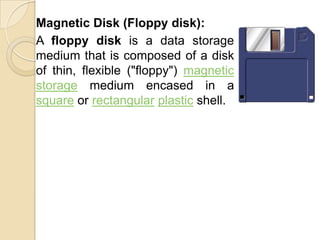
Magnetic Disk (Floppy disk):A floppy disk is a data storage medium that is composed of a disk of thin, flexible ("floppy") magnetic storage medium encased in a square or rectangularplastic shell.
Optical diskOptical storage, the typical optical disc, stores information in deformities on the surface of a circular disc and reads this information by illuminating the surface with a laser diode and observing the reflection. Optical disc storage is non-volatile. The deformities may be permanent (read only media ), formed once (write once media) or reversible (recordable or read/write media). The following forms are currently in common use:CD, CD-ROM, DVD: Read only storageCD-R, DVD-R (Digital Versatile Disk) Write once storageCD-RW, DVD-RW: Slow write, fast read storage
Magnetic tapeMagnetic tape is a medium for magnetic recording, made of a thin magnetizable coating on a long, narrow strip of plastic. Most audio, video and computer data storage is this type. A device that stores computer data on magnetic tape is a tape drive.Magnetic tape Types:Tape cartridgesBackup tape for microcomputer Capacities range from 120 MB to 5 GBTape reelsMinicomputer and mainframe1/2 inch wide and 1/2 mile long
Solid State:Flash memory cardsMass storage:Mass storage refers to the storage of large amounts of data in a persisting and machine-readable fashion. Devices and/or systems that have been described as mass storage include tape libraries ,hard disk drives.
Storage CapacitiesStorage capacity of a computer depends on the no. of bytes that can be stored in its memory. It can be increased by adding enhancement boards.Cache Memory:Cache (pronounced cash) memory is extremely fast memory that is built into a computer’s central processing unit (CPU), or located next to it on a separate chip. The CPU uses cache memory to store instructions that are repeatedly required to run programs, improving overall system speed.
Random-access memoryRandom-access memory (RAM) is a form of computer data storage. Today, it takes the form of integrated circuits that allow stored data to be accessed in any order (i.e., at random).Volatility:Depending on its physical characteristics, main storage may be either volatile, in which case data is lost once the power is turned off or no-volatile where no such data loss occurs.Read Only Memory(ROM):It is also used frequently used to store data or instructions which the computer needs all the time from the moment it is switched on. Because data stored in ROM cannot be modified. it is mainly used to distribute software.
Other Types of ROM1. Programmable read-only memory (PROM):A programmable read-only memory (PROM) or field programmable read-only memory (FPROM) or one-time programmable non-volatile memory (OTP NVM) is a form of digital memory where the setting of each bit is locked by a fuse or antifuse. Such PROMs are used to store programs permanently.These types of memories are frequently seen in video game consoles, mobile phones, etc.,
EPROM(Erasable Programmable Read Memory)Once programmed, an EPROM can be erased by exposing it to strong ultraviolet light from a mercury-vapor light source.EEPROM(Electrically Erasable Programmable Read-Only Memory)It is used in computers and other electronic devices to store small amounts of data that must be saved when power is removed.
Data OrganizationFile: A file is collection of related logical records.Record: A record is a collection of fields.Field: A field is an item of data and is a collection of characters.Character: Character is a collection of bits.Computer File Concept:Two common ways of viewing files:Logical filesPhysical files
Number SystemsDecimal Number system (0 – 9)Binary Number System (0 and 1)Octal Number System (0 – 7)Hexa Decimal Number System (0 – 15)Coding Systems:Each location of the main storage is made up of a tiny two state devices which can be used to represent a binary 1 or 0. A binary digits is also known as a bit. A group of 8 bits is known as a byte.
The units used to measure the size of the internal storage are as follows:1. Kilo Byte		= 1024 Bytes2 Mega Byte= 1024 KB3 Giga Byte		= 1024 MB4 TeraByte		= 1024 GB
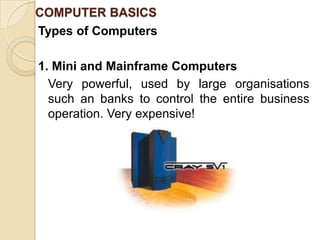
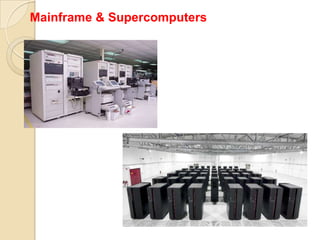
COMPUTER BASICSTypes of Computers1. Mini and Mainframe Computers	Very powerful, used by large organisations such an banks to control the entire business operation. Very expensive!
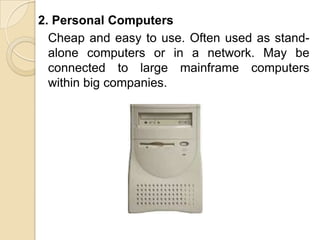
2. Personal Computers	Cheap and easy to use. Often used as stand-alone computers or in a network. May be connected to large mainframe computers within big companies.
Videogame Console
Server & Client
Mainframe & Supercomputers
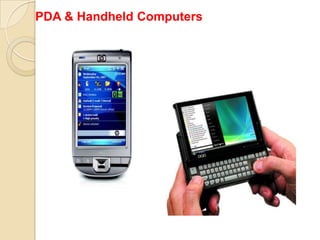
PDA & Handheld Computers
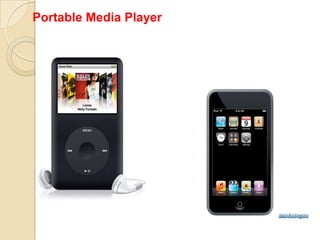
Portable Media Player
Uses of ComputerPC at Home	Common uses for the computer within the home  Computer games Working from Home Banking from Home Connecting to the Web.Computers in EducationCBT (Computer Based Training) Computer Based Training (CBT) offers a low costsolution to training needs where you need to traina large amount of people on a single subject. These programs are normally supplied on CD-ROM and combine text, graphics and sound.
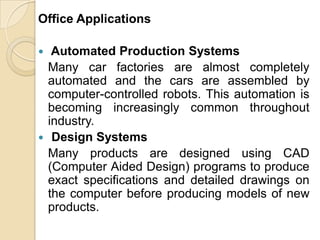
Office Applications Automated Production Systems	Many car factories are almost completely automated and the cars are assembled by computer-controlled robots. This automation is becoming increasingly common throughout industry. Design Systems	Many products are designed using CAD (Computer Aided Design) programs to produce exact specifications and detailed drawings on the computer before producing models of new products.
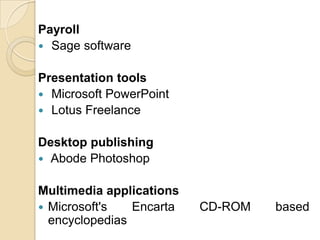
Office Applications Stock Control	Stock control is ideal for automation and in many companies it is now completely computerized. The stock control system keeps track of the number of items in stock and can automatically order replacement items when required. Accounts / Payroll	In most large organizations the accounts are maintained by a computerized system.
Value of BackupThe most important thing that you store on your computer is information.Often the contents of a hard disk can represent years of work.If the hard disk stops working one day you could lose all those years of work.For this reason it is VITAL that you take regular backups of the information that is stored on the computer. Use passwords. Understand the Importance of shutting down your computer properly Use a UPS (Un-interruptible Power Supply)
Computer VirusWhat are computer viruses?Viruses are small programs that hide themselves on your disks (both diskettes and	your hard disk).Unless you use virus detection software the first	time that you know that you have a virus is when it activates. Different viruses are activated in different ways.
How do viruses infect PCs?Viruses hide on a disk and when you access the disk (either a diskette or another hard disk over a network) the virus program will start and infect your computer.The worst thing about a computer virus is that they can spread from one computer to another, either via use of infected floppy disk, or over a	computer network, including the Internet.
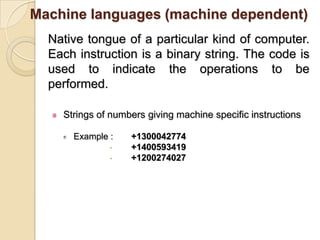
Generations of ComputerFIRST GENERATION (1945-1956)	First generation computers were characterized by the fact that operating instructions were made-to-order for the specific task for which the computer was to be used. Each computer had a different binary-coded program called a machine language that told it how to operate. This made the computer difficult to program and limited its versatility and speed. Other distinctive features of first generation computers were the use of vacuum tubes (responsible for their breathtaking size) and magnetic drums for data storage.
SECOND GENERATION (1956-1965)Throughout the early 1960's, there were a number of commercially successful second generation computers used in business, universities, and government from companies. These second generation computers were also of solid state design, and contained transistors in place of vacuum tubes. They also contained all the components we associate with the modern day computer: printers, tape storage, disk storage, memory, operating systems, and stored programs.
THIRD GENERATION (1965-1971)	Though transistors were clearly an improvement over the vacuum tube, they still generated a great deal of heat, which damaged the computer's sensitive internal parts. The quartz rock eliminated this problem.developed the integrated circuit (IC) in 1958.	The IC combined three electronic components onto a small silicon disc, which was made from quartz.As a result, computers became ever smaller as more components were squeezed onto the chip.
FOURTH GENERATION (1971-Present)In 1981, IBM introduced its personal computer (PC) for use in the home, office and schools.	The number of personal computers in use more than doubled from 2 million in 1981 to 5.5 million in 1982.	Ten years later, 65 million PCs were being used. Computers continued their trend toward a smaller size, working their way down from desktop to laptop computers
FIFTH GENERATION(Future)Many advances in the science of computer design and technology are coming together to enable the creation of fifth-generation computers.	Two such engineering advances are parallel processing, which replaces von Neumann's single central processing unit design with a system harnessing the power of many CPUs to work as one. 	Computers today have some attributes of fifth generation computers. For example, expert systems assist doctors in making diagnoses by applying the problem-solving steps a doctor might use in assessing a patient's needs. It will take several more years of development
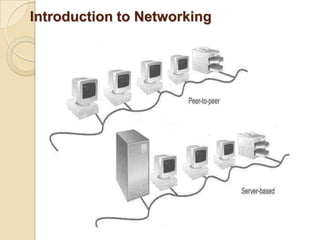
Introduction to Networking
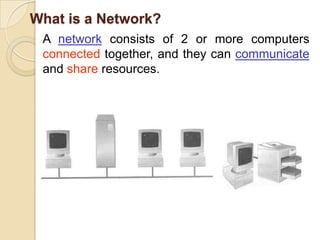
What is a Network?A network consists of 2 or more computers connected together, and they can communicate and share resources.
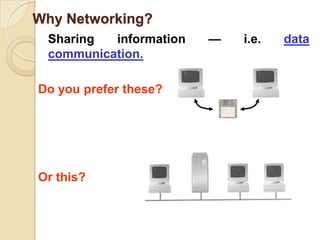
Why Networking?	Sharing information — i.e. data communication.Do you prefer these?Or this?
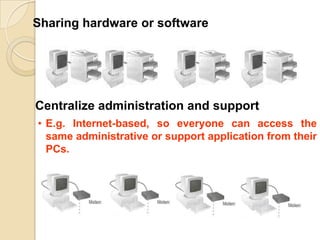
Sharing hardware or softwareCentralize administration and supportE.g. Internet-based, so everyone can access the same administrative or support application from their PCs.How many kinds of Networks?Based on transmission media: Wired (UTP, coaxial cables, fiber-optic cables) and Wireless
Based on network size: LAN and WAN (and MAN)
Based on management method: Peer-to-peer and Client/Server
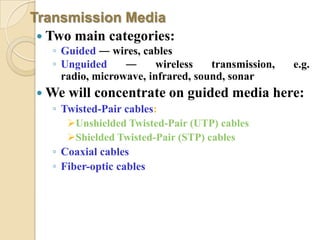
Based on topology (connectivity): Bus, Star, Ring …Transmission MediaTwo main categories:Guided ― wires, cablesUnguided ― wireless transmission, e.g. radio, microwave, infrared, sound, sonarWe will concentrate on guided media here:Twisted-Pair cables: Unshielded Twisted-Pair (UTP) cables
Shielded Twisted-Pair (STP) cablesCoaxial cablesFiber-optic cables
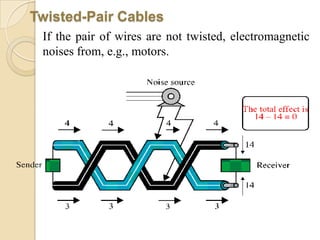
Twisted-Pair Cables	If the pair of wires are not twisted, electromagnetic noises from, e.g., motors.
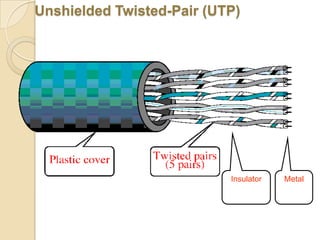
MetalInsulatorUnshielded Twisted-Pair (UTP)
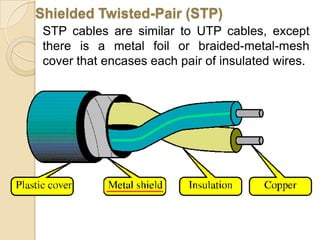
Shielded Twisted-Pair (STP)	STP cables are similar to UTP cables, except there is a metal foil or braided-metal-mesh cover that encases each pair of insulated wires.
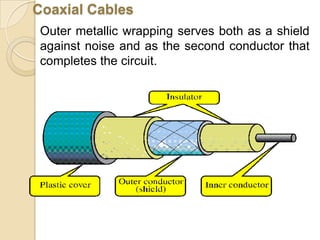
Coaxial CablesOuter metallic wrapping serves both as a shield against noise and as the second conductor that completes the circuit.
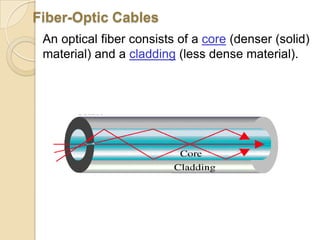
Fiber-Optic Cables	An optical fiber consists of a core (denser (solid) material) and a cladding (less dense material).
Types of Network1.) Internet2.) Intranet 3.) Extranet
InternetWas created in the 1960s.
The world’s largest computer network which connects millions of computers all over the world.
Internet transmits dataUsages of the Internet are:Information Research and exchange.
E-Commerce.
Banking
Entertainment
Education
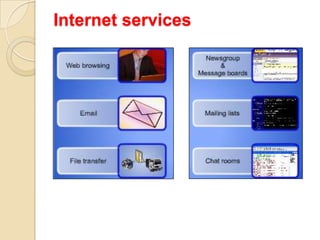
GamingInternet services
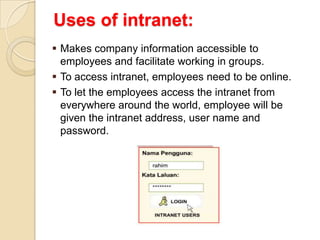
IntranetIntranet technology allows sharing of valuable information,Intranet is an internal network that uses Internet technologies. It is a small version of the Internet that exists within an organization.Uses of intranet:Makes company information accessible to employees and facilitate working in groups.
To access intranet, employees need to be online.
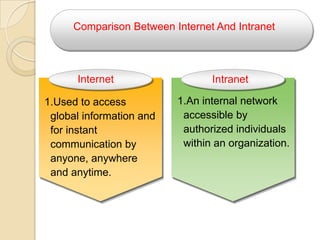
To let the employees access the intranet from everywhere around the world, employee will be given the intranet address, user name and password.InternetIntranetComparison Between Internet And IntranetAn internal network accessible by authorized individuals within an organization.Used to access global information and for instant communication by anyone, anywhere and anytime.
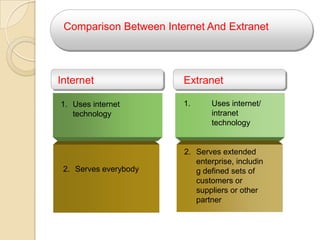
ExtranetAn extranet is a private network - uses Internet technology and public telecommunications system to securely share relevant information with authorized parties. InternetExtranetComparison Between Internet And ExtranetUses internet/ intranet technologyUses internet technologyServes extended enterprise, including defined sets of customers or suppliers or other partnerServes everybody
LAN (Local Area Network)Small network, short distanceA room, a floor, a buildingLimited by no. of computers and distance covered.Examples:Network inside the Student Computer Room.
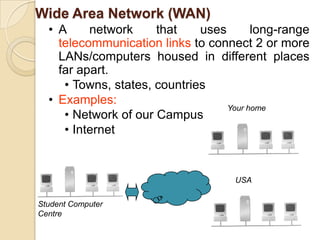
Wide Area Network (WAN)A network that uses long-range telecommunication links to connect 2 or more LANs/computers housed in different places far apart.
Towns, states, countries
Examples:
Network of our Campus
InternetYour homeUSAStudent Computer Centre
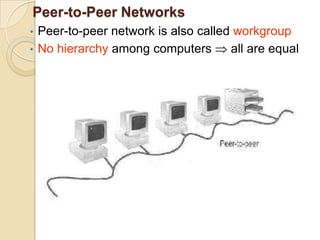
Peer-to-Peer NetworksPeer-to-peer network is also called workgroup
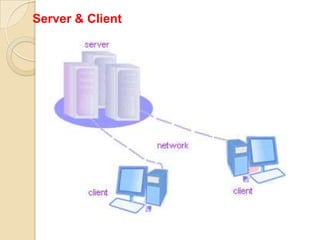
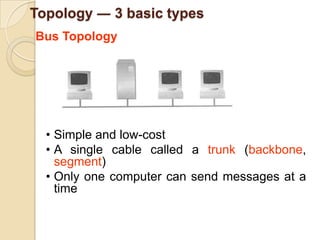
No hierarchy among computers  all are equalClients and ServersNetwork Clients(Workstation)Computers that request network resources or services.Network ServersComputers that manage and provide network resources and services to clients.Topology ― 3 basic typesBus TopologySimple and low-cost
A single cable called a trunk (backbone, segment)
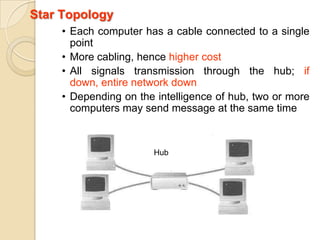
Only one computer can send messages at a timeHubStar TopologyEach computer has a cable connected to a single point
More cabling, hence higher cost
All signals transmission through the hub;if down, entire network down
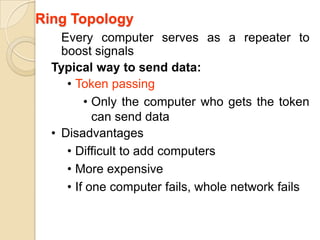
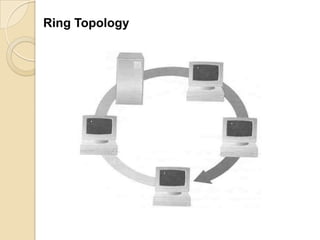
Depending on the intelligence of hub, two or more  computers may send message at the same timeRing Topology	Every computer serves as a repeater to boost signalsTypical way to send data: Token passing

Principles of Information Technology

  • 1.
  • 2.
    What is InformationTechnology The use of computers and telecommunications to retrieve and store and transmit information
  • 3.
    The role ofITIt is accepted that telecommunication is a basic infrastructure necessary for economic and social development of a country.Information technology may be described as the support of the central nervous system of complex societies, transmitting and processing information and commands among the various parts of such societies. Internet plays a fundamental function in ICT role.
  • 4.
    Rapid evolution ofITPredictions indicate the doubling of computing power every 18 –24 months and the doubling of communications power every 6 months. Both are accompanied by huge reductions in costs and massive increases in speed and quantity.In 2001 more information can be sent over a single cable in a second than in 1997 was sent over the entire Internet in a month.
  • 5.
    Benefits from ITBenefitscould be obtained in:EducationJob training Health careGovernment efficiency
  • 6.
    INTRODUCTION TO COMPUTERS Acomputer is an Automatic Electronic Data Processing System. Computers can process information automatically as they can store programs or instructions in the computer and execute them automatically. Charles Babbage is known as the father of computer.Computer Programs: A computer program is a set of instructions written in a particular computer language to perform a specific task by the computer system.
  • 7.
    Basic Structure ofa ComputerControl UnitOutputInputALUInternal StorageBacking Storage
  • 8.
    Computer has mainlythree parts:Input DevicesProcessorOutput Devices
  • 9.
    Hardware ComponentsINPUT DEVICESTheMouse Used to ‘drive’ Microsoft Windows.The Keyboard The keyboard is still the commonest way of entering information into a computer.Tracker BallsAn alternative to the traditional mouse and often used by graphic designers.
  • 10.
    ScannersA scanner allowsyou to scan printed material and convert it into a file format that may be used within the PC.Touch PadsA device that lays on the desktop and responds to pressure.Light PensUsed to allow users to point to areas on a screen.
  • 11.
    JoysticksMany games requirea joystick for the proper playing of the game.OUTPUT DEVICESMonitor The computer screen is used for outputting information in an understandable format,Printers There are many different types of printers. In large organizations laser printers are most commonly used due to the fact that they can print very fast and give a very high quality output.
  • 12.
    Plotters A plotter isan output device similar to a printer, but normally allows you to print larger images.Speakers Enhances the value of educational and presentation products.Speech synthesizers Gives you the ability to not only to display text on a monitor but also to read the text to you.
  • 13.
    Optical Mark Reader(OMR)Mark: A mark in a particular position on the document will trigger off a response. It is a device used for the detection of ordinary pencil or pen marks.Optical Character Reader (OCR)Characters: A scanning device recognizes each character by amount of reflected light. These devices can read machine printed characters as well as defined, carefully formed handwritten characters.
  • 14.
    Barcode Scanner –Barcode Reader The barcodes are recorded on the products by the manufactures and usually carry the item code. The barcode reader identifies the items code by analyzing the light and dark bars.
  • 15.
    CPU ORGANIZATION A computersystem has one unit that executes instructions. This unit communicates with and often control the operation of other subsystems within the computer. Because of its central role, this unit is called central processing unit.To execute the program, the CPU fetches one instructions at a time and performs the functions specified.
  • 16.
    Instructions are fetchedfrom successive memory locations.
  • 17.
    CPU keep trackof the address of the memory location.
  • 18.
    Carry out theactions specified by the instruction.First three steps are fetch phase, Fourth step is execution phase.
  • 19.
    FUNCTIONAL UNITS The computersystem is divided into three separate units for its operation. They are, 1) Arithmetic logical unit (ALU) 2) Control unit (CU) 3) Memory unit (MU)Arithmetic Logical Unit (ALU)After you enter data through the input device it is stored in the primary storage unit. The actual processing of the data and instruction are performed by Arithmetic Logical Unit.
  • 20.
    The major operationsperformed by the ALU are addition, subtraction, multiplication, division.Control Unit (CU)Which acts like the supervisor seeing that things are done in proper fashion. The control unit determines the sequence in which computer programs and instructions are executedIt also acts as a switch board operator when several users access the computer simultaneously.Therefore it is the manager of all operations.
  • 21.
    Memory Unit The memoryunit stores data and information within a computer.Two types of storage devices:Fixed Data Storage: These types of storage devices are provided with the computer and they are in built devices.2. Removable Data Storage: These types of storage devices are used when we want to increase the storage capacity as well as keep some data way which are not frequently used.
  • 22.
    Backing Storage:There aremany media for backing storage:Magnetic Disk UnitMagnetic Diskette Unit (Floppy Disk)Optical Disk UnitMagnetic Tape UnitMagnetic Tape Catridges and CassettesSolid state storage DevicesMass Storage Devices and Media
  • 23.
    Magnetic DiskMagnetic storageuses different patterns of magnetization on a magnetically coated surface to store information. Magnetic storage is non-volatile.Magnetic storage will take these forms:Floppy disk, used for off-line storageHard disk drive, used for secondary storage
  • 24.
    Magnetic Disk (Floppydisk):A floppy disk is a data storage medium that is composed of a disk of thin, flexible ("floppy") magnetic storage medium encased in a square or rectangularplastic shell.
  • 25.
    Optical diskOptical storage,the typical optical disc, stores information in deformities on the surface of a circular disc and reads this information by illuminating the surface with a laser diode and observing the reflection. Optical disc storage is non-volatile. The deformities may be permanent (read only media ), formed once (write once media) or reversible (recordable or read/write media). The following forms are currently in common use:CD, CD-ROM, DVD: Read only storageCD-R, DVD-R (Digital Versatile Disk) Write once storageCD-RW, DVD-RW: Slow write, fast read storage
  • 26.
    Magnetic tapeMagnetic tapeis a medium for magnetic recording, made of a thin magnetizable coating on a long, narrow strip of plastic. Most audio, video and computer data storage is this type. A device that stores computer data on magnetic tape is a tape drive.Magnetic tape Types:Tape cartridgesBackup tape for microcomputer Capacities range from 120 MB to 5 GBTape reelsMinicomputer and mainframe1/2 inch wide and 1/2 mile long
  • 27.
    Solid State:Flash memorycardsMass storage:Mass storage refers to the storage of large amounts of data in a persisting and machine-readable fashion. Devices and/or systems that have been described as mass storage include tape libraries ,hard disk drives.
  • 28.
    Storage CapacitiesStorage capacityof a computer depends on the no. of bytes that can be stored in its memory. It can be increased by adding enhancement boards.Cache Memory:Cache (pronounced cash) memory is extremely fast memory that is built into a computer’s central processing unit (CPU), or located next to it on a separate chip. The CPU uses cache memory to store instructions that are repeatedly required to run programs, improving overall system speed.
  • 29.
    Random-access memoryRandom-access memory(RAM) is a form of computer data storage. Today, it takes the form of integrated circuits that allow stored data to be accessed in any order (i.e., at random).Volatility:Depending on its physical characteristics, main storage may be either volatile, in which case data is lost once the power is turned off or no-volatile where no such data loss occurs.Read Only Memory(ROM):It is also used frequently used to store data or instructions which the computer needs all the time from the moment it is switched on. Because data stored in ROM cannot be modified. it is mainly used to distribute software.
  • 30.
    Other Types ofROM1. Programmable read-only memory (PROM):A programmable read-only memory (PROM) or field programmable read-only memory (FPROM) or one-time programmable non-volatile memory (OTP NVM) is a form of digital memory where the setting of each bit is locked by a fuse or antifuse. Such PROMs are used to store programs permanently.These types of memories are frequently seen in video game consoles, mobile phones, etc.,
  • 31.
    EPROM(Erasable Programmable ReadMemory)Once programmed, an EPROM can be erased by exposing it to strong ultraviolet light from a mercury-vapor light source.EEPROM(Electrically Erasable Programmable Read-Only Memory)It is used in computers and other electronic devices to store small amounts of data that must be saved when power is removed.
  • 32.
    Data OrganizationFile: Afile is collection of related logical records.Record: A record is a collection of fields.Field: A field is an item of data and is a collection of characters.Character: Character is a collection of bits.Computer File Concept:Two common ways of viewing files:Logical filesPhysical files
  • 33.
    Number SystemsDecimal Numbersystem (0 – 9)Binary Number System (0 and 1)Octal Number System (0 – 7)Hexa Decimal Number System (0 – 15)Coding Systems:Each location of the main storage is made up of a tiny two state devices which can be used to represent a binary 1 or 0. A binary digits is also known as a bit. A group of 8 bits is known as a byte.
  • 34.
    The units usedto measure the size of the internal storage are as follows:1. Kilo Byte = 1024 Bytes2 Mega Byte= 1024 KB3 Giga Byte = 1024 MB4 TeraByte = 1024 GB
  • 35.
    COMPUTER BASICSTypes ofComputers1. Mini and Mainframe Computers Very powerful, used by large organisations such an banks to control the entire business operation. Very expensive!
  • 36.
    2. Personal Computers Cheapand easy to use. Often used as stand-alone computers or in a network. May be connected to large mainframe computers within big companies.
  • 37.
  • 38.
  • 39.
  • 40.
  • 41.
  • 42.
    Uses of ComputerPCat Home Common uses for the computer within the home Computer games Working from Home Banking from Home Connecting to the Web.Computers in EducationCBT (Computer Based Training) Computer Based Training (CBT) offers a low costsolution to training needs where you need to traina large amount of people on a single subject. These programs are normally supplied on CD-ROM and combine text, graphics and sound.
  • 43.
    Office Applications AutomatedProduction Systems Many car factories are almost completely automated and the cars are assembled by computer-controlled robots. This automation is becoming increasingly common throughout industry. Design Systems Many products are designed using CAD (Computer Aided Design) programs to produce exact specifications and detailed drawings on the computer before producing models of new products.
  • 44.
    Office Applications StockControl Stock control is ideal for automation and in many companies it is now completely computerized. The stock control system keeps track of the number of items in stock and can automatically order replacement items when required. Accounts / Payroll In most large organizations the accounts are maintained by a computerized system.
  • 45.
    Value of BackupThemost important thing that you store on your computer is information.Often the contents of a hard disk can represent years of work.If the hard disk stops working one day you could lose all those years of work.For this reason it is VITAL that you take regular backups of the information that is stored on the computer. Use passwords. Understand the Importance of shutting down your computer properly Use a UPS (Un-interruptible Power Supply)
  • 46.
    Computer VirusWhat arecomputer viruses?Viruses are small programs that hide themselves on your disks (both diskettes and your hard disk).Unless you use virus detection software the first time that you know that you have a virus is when it activates. Different viruses are activated in different ways.
  • 47.
    How do virusesinfect PCs?Viruses hide on a disk and when you access the disk (either a diskette or another hard disk over a network) the virus program will start and infect your computer.The worst thing about a computer virus is that they can spread from one computer to another, either via use of infected floppy disk, or over a computer network, including the Internet.
  • 48.
    Generations of ComputerFIRSTGENERATION (1945-1956) First generation computers were characterized by the fact that operating instructions were made-to-order for the specific task for which the computer was to be used. Each computer had a different binary-coded program called a machine language that told it how to operate. This made the computer difficult to program and limited its versatility and speed. Other distinctive features of first generation computers were the use of vacuum tubes (responsible for their breathtaking size) and magnetic drums for data storage.
  • 49.
    SECOND GENERATION (1956-1965)Throughoutthe early 1960's, there were a number of commercially successful second generation computers used in business, universities, and government from companies. These second generation computers were also of solid state design, and contained transistors in place of vacuum tubes. They also contained all the components we associate with the modern day computer: printers, tape storage, disk storage, memory, operating systems, and stored programs.
  • 50.
    THIRD GENERATION (1965-1971) Thoughtransistors were clearly an improvement over the vacuum tube, they still generated a great deal of heat, which damaged the computer's sensitive internal parts. The quartz rock eliminated this problem.developed the integrated circuit (IC) in 1958. The IC combined three electronic components onto a small silicon disc, which was made from quartz.As a result, computers became ever smaller as more components were squeezed onto the chip.
  • 51.
    FOURTH GENERATION (1971-Present)In1981, IBM introduced its personal computer (PC) for use in the home, office and schools. The number of personal computers in use more than doubled from 2 million in 1981 to 5.5 million in 1982. Ten years later, 65 million PCs were being used. Computers continued their trend toward a smaller size, working their way down from desktop to laptop computers
  • 52.
    FIFTH GENERATION(Future)Many advancesin the science of computer design and technology are coming together to enable the creation of fifth-generation computers. Two such engineering advances are parallel processing, which replaces von Neumann's single central processing unit design with a system harnessing the power of many CPUs to work as one. Computers today have some attributes of fifth generation computers. For example, expert systems assist doctors in making diagnoses by applying the problem-solving steps a doctor might use in assessing a patient's needs. It will take several more years of development
  • 53.
  • 54.
    What is aNetwork?A network consists of 2 or more computers connected together, and they can communicate and share resources.
  • 55.
    Why Networking? Sharing information— i.e. data communication.Do you prefer these?Or this?
  • 56.
    Sharing hardware orsoftwareCentralize administration and supportE.g. Internet-based, so everyone can access the same administrative or support application from their PCs.How many kinds of Networks?Based on transmission media: Wired (UTP, coaxial cables, fiber-optic cables) and Wireless
  • 57.
    Based on networksize: LAN and WAN (and MAN)
  • 58.
    Based on managementmethod: Peer-to-peer and Client/Server
  • 59.
    Based on topology(connectivity): Bus, Star, Ring …Transmission MediaTwo main categories:Guided ― wires, cablesUnguided ― wireless transmission, e.g. radio, microwave, infrared, sound, sonarWe will concentrate on guided media here:Twisted-Pair cables: Unshielded Twisted-Pair (UTP) cables
  • 60.
    Shielded Twisted-Pair (STP)cablesCoaxial cablesFiber-optic cables
  • 61.
    Twisted-Pair Cables If thepair of wires are not twisted, electromagnetic noises from, e.g., motors.
  • 62.
  • 63.
    Shielded Twisted-Pair (STP) STPcables are similar to UTP cables, except there is a metal foil or braided-metal-mesh cover that encases each pair of insulated wires.
  • 64.
    Coaxial CablesOuter metallicwrapping serves both as a shield against noise and as the second conductor that completes the circuit.
  • 65.
    Fiber-Optic Cables An opticalfiber consists of a core (denser (solid) material) and a cladding (less dense material).
  • 66.
    Types of Network1.)Internet2.) Intranet 3.) Extranet
  • 67.
  • 68.
    The world’s largestcomputer network which connects millions of computers all over the world.
  • 69.
    Internet transmits dataUsagesof the Internet are:Information Research and exchange.
  • 70.
  • 71.
  • 72.
  • 73.
  • 74.
  • 75.
    IntranetIntranet technology allowssharing of valuable information,Intranet is an internal network that uses Internet technologies. It is a small version of the Internet that exists within an organization.Uses of intranet:Makes company information accessible to employees and facilitate working in groups.
  • 76.
    To access intranet,employees need to be online.
  • 77.
    To let theemployees access the intranet from everywhere around the world, employee will be given the intranet address, user name and password.InternetIntranetComparison Between Internet And IntranetAn internal network accessible by authorized individuals within an organization.Used to access global information and for instant communication by anyone, anywhere and anytime.
  • 78.
    ExtranetAn extranet isa private network - uses Internet technology and public telecommunications system to securely share relevant information with authorized parties. InternetExtranetComparison Between Internet And ExtranetUses internet/ intranet technologyUses internet technologyServes extended enterprise, including defined sets of customers or suppliers or other partnerServes everybody
  • 79.
    LAN (Local AreaNetwork)Small network, short distanceA room, a floor, a buildingLimited by no. of computers and distance covered.Examples:Network inside the Student Computer Room.
  • 80.
    Wide Area Network(WAN)A network that uses long-range telecommunication links to connect 2 or more LANs/computers housed in different places far apart.
  • 81.
  • 82.
  • 83.
  • 84.
  • 85.
  • 86.
    No hierarchy amongcomputers  all are equalClients and ServersNetwork Clients(Workstation)Computers that request network resources or services.Network ServersComputers that manage and provide network resources and services to clients.Topology ― 3 basic typesBus TopologySimple and low-cost
  • 87.
    A single cablecalled a trunk (backbone, segment)
  • 88.
    Only one computercan send messages at a timeHubStar TopologyEach computer has a cable connected to a single point
  • 89.
  • 90.
    All signals transmissionthrough the hub;if down, entire network down
  • 91.
    Depending on theintelligence of hub, two or more computers may send message at the same timeRing Topology Every computer serves as a repeater to boost signalsTypical way to send data: Token passing