Introduction to  Computers
Objectives Define the term computer Identify the components   of a computer Explain why a computer is a powerful tool Differentiate among the various categories of software Describe the categories of computers and their uses Identify the various types of computer users p. 1.2
The Digital Revolution Where can you find computers? Computers are everywhere p. 1.2 Fig. 1-1
What Is a Computer? What is a computer? An electronic machine, operating under the control of instructions stored in its own memory accepts data manipulates the data according to specified rules produces results stores the results for future use p. 1.4
What is a Computer? What are hardware and software? p. 1.4 Software The series of instructions that tells the hardware how to perform tasks Hardware The electric, electronic,  and mechanical equipment that makes up a computer
What is the information  processing  cycle? What is a Computer? p. 1.5 Input Any data or instructions you enter into a computer Output Data that has been processed into information Storage Area in a computer that can hold data and information for future use Communication The capability of communicating with other computers Process Manipulate the input (data) to produce output  (information)
The Components of a Computer What are common computer hardware components? speaker p. 1.5 Fig. 1-3 printer scanner speaker PC camera microphone digital camera system unit keyboard modem monitor mouse
The Components of a Computer What is an  input device? Any hardware component that allows a user to enter data and instructions into a computer p. 1.5 Fig. 1-3 Click to view Web Link then click Input Devices scanner microphone keyboard mouse PC camera digital camera
The Components of a Computer What is an output device? Any hardware component that can convey information to a user p. 1.6 Fig. 1-3 Click to view Web Link then click Output Devices printer monitor speakers
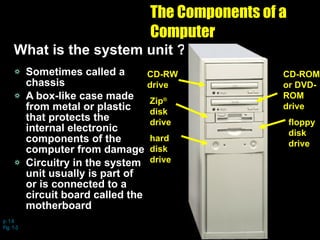
The Components of a Computer What is the system unit ? Sometimes called a chassis A   box-like case made from metal or plastic that protects the internal electronic components of the computer from damage Circuitry in the system unit usually is part of or is connected to a circuit board called the motherboard p. 1.6  Fig. 1-3 CD-RW drive CD-ROM or DVD-ROM drive hard disk drive floppy disk drive Zip ®   disk drive
The Components of a Computer What are internal components and external devices? p. 1.6 External Device Also called a peripheral Attaches to the system unit Internal Component Resides inside the system unit
The Components of a Computer What is storage? Holds data, instructions, and information for future use p. 1.7 Click to view  Web Link then click  Storage Devices Storage Device Records and retrieves items to and from a storage medium Devices often function as source of input because they transfer items from storage into memory Storage Medium Physical material on which a computer keeps the data, instructions and information
The Components of a Computer What are common storage devices or drives? p. 1.7 Fig. 1-3 CD-RW drive hard disk drive CD-ROM or DVD-ROM drive ZIP ®  drive floppy disk drive
Why Is a Computer So Powerful? What characteristics make a computer powerful? p. 1.8 Speed Billions of operations can be carried out in a single second Reliability Dependable because components have a low failure rate so they produce consistent results Communications Two connected computers can share stored data, instructions, and information Storage Enormous amounts of data can be stored and made available for processing anytime it is needed Accuracy If data is entered correctly and program works properly, the results are error-free —  garbage in, garbage out (GIGO)  accuracy of output depends on accuracy of input
Categories of Computers What are the categories of computers? p. 1.19 Fig. 1-20
Personal Computers What is a personal computer? A computer that can perform all of its input, processing, output, and storage activities by itself p. 1.19 Two major categories Desktop Notebook Microprocessor The single chip that performs all the processing functions on a personal computer Contains at least One Input device One output device One storage device Memory A processor
Personal Computers What are the two most popular series of personal computers? p. 1.19 Fig. 1-21 & 22 p. 1.19 Fig. 1-21 & 22 The PC and compatibles use the Windows operating system The Apple Macintosh uses the Macintosh operating system (Mac OS)
Personal Computers What is a desktop computer? Designed so the system unit, input devices, output devices, and any other devices fit entirely on or under a desk or table p. 1.20 Fig. 1-23 Click to view Web Link then click Personal Computers
Personal Computers What are some desktop computer variations? Tower model Tall and narrow system unit that can sit on the floor vertically p. 1.20 Fig. 1-23
Personal Computers What are some desktop computer variations? All-in-one computer Less expensive desktop that combines he monitor and system unit  into a single  device p. 1.21 Fig. 1-24
Personal Computers What are some desktop computer variations? Workstation More expensive and powerful desktop designed for work that requires intense calculations  and graphics capabilities Stand-alone Can perform the information processing cycle operations without being connected to a network p. 1.21
Personal Computers What are some desktop computer variations? Server Powerful desktop that manages the resources on a network Clients or workstations Other computers on network that access the contents of the storage area on the servers p. 1.22 Fig. 1-25
Personal Computers What is a notebook computer? Also called  a laptop Portable, personal computer small enough to fit on your lap Generally more expensive than a desktop computer with equal capabilities Click to view video p. 1.22 Fig. 1-26
Handheld Computers What is a handheld computer? Also called a palmtop computer Small computer that fits in your hand p. 1.23 Fig. 1-27 Click to view Web Link then click Handheld Computers
Handheld Computers How do you input data with a handheld computer? p. 1.23 Some support voice input Others use a stylus A stylus looks like a ballpoint pen, but uses pressure, instead of ink to write Some have small keyboards
Handheld Computers What is a personal digital assistant (PDA)? One of the most popular handheld computers in use today Provides personal organizer functions  Calendar Appointment book Address book Calculator Notepad p. 1.23 Fig. 1-28
Handheld Computers What are Web-enabled handheld computers? Allow you to access the Internet wirelessly p. 1.24 Fig. 1-29 Web-enabled two-way pager Web-enabled cellular telephone Web-enabled handheld computer
Internet Appliances What is an Internet appliance or information appliance? Computer with limited functionality whose main purpose is to connect to the Internet from home p. 1.24 Fig. 1-30
Mid-Range Servers What is a mid-range server? More powerful and larger than a workstation computer Supports up to 4,000 users Often connected via a personal computer or terminal Once  known as a minicomputer p. 1.25 Fig. 1-32
Mid-Range Servers What is a terminal? p. 1.25 Sometimes called dumb terminals No processing power Cannot stand alone Must be connected to a server to operate Device   with a monitor and keyboard used to access a server
Mainframes What is a mainframe? Large, expensive, very powerful computer Can handle hundreds or thousands of connected users simultaneously Stores tremendous amounts of data, instructions, and information p. 1.26 Fig. 1-33
Supercomputers What is a supercomputer? Fastest, most powerful computer p. 1.26 Fig. 1-34 Able to process more than 12 trillion instructions per second
Computer Software What is a computer program? A series of instructions that tells the hardware of a computer what  to do Click to view Web Link then click Computer Programs p. 1.10 Directs computer to perform alternative operations Prints a report Stores information on disk Allows you to input data and stores it in memory Uses data in memory in calculations Displays information on monitor Compares values stored in memory
Computer Software What is system software? Programs that control the operations of the computer and its devices p. 1.12 Operating System (OS) Set of programs containing instructions that coordinate all the activities among computer hardware devices Utility program Type of system software that performs a specific task, usually related to managing a computer, its devices, or its programs
Computer Software What is application software? Programs that perform specific tasks for users Click to view Web Link then click Application Software p. 1.13 Word processing software Spreadsheet software Database software Presentation graphics software Suite Four popular software applications bundled together as a single unit Spreadsheet software Database software Presentation graphics software Word processing software
Elements of an Information System What is an information system? For an information system to provide accurate, timely, and useful information, each element must be present and all of the elements  must  work together p. 1.27 Fig. 1-35 Click to view Web Link then click Minorities in Technology Click to view  Web Link then click  Women in  Technology 1. Hardware 2. Software 1. Hardware 3. Data 1. Hardware 2. Software 4a. People (IT personnel) 1. Hardware 2. Software 3. Data 4b. People (users) 1. Hardware 2. Software 3. Data 4a. People (IT personnel) 5. Procedures 1. Hardware 2. Software 3. Data 4a. People (IT personnel) 4b. People (users)
What is a Computer? Who is a user? Someone that communicates with a computer Someone who uses the information it generates p. 1.4
Examples of Computer Usage What are five categories of computer users? p. 1.28 Fig. 1-36 Large Business Home Mobile Small Office/Home Office Power
Examples of Computer Usage What software is available for a home user? p. 1.29 Fig. 1-37 research finance and business management Web access entertainment
Examples of Computer Usage How do computer companies accommodate  children? Many manufacturers design special hardware for children p. 1.30 Fig. 1-38
Examples of Computer Usage What is the digital divide? Idea that you can separate people of the world into two distinct groups Those who have access to technology with the ability to use it Those who do not have access to technology or are without the ability to use it p. 1.30 Click to view  video
What hardware and software is available for a small office/home office (SOHO) user? Examples of Computer Usage Web access spreadsheet Desktop usage Local Area Network (Lan) Productivity software Specialty software Web usage p. 1.31  Fig. 1-39
Examples of Computer Usage What new computer trends concern a small office/home office (SOHO) user? E-mail Communicate with others E-commerce Conduct financial business on the Web Web cam Allows a SOHO user to show the world a live view of some aspect of their business p. 1.31
Examples of Computer Usage What is a mobile user? Travel to and from a main office to conduct business Hardware Notebook computers Handheld computers Web-enabled cellular telephones Software Productivity Presentation p. 1.32  Fig. 1-40
Examples of Computer Usage What are the needs of the  large business user? Network Local area network (LAN) Wide Area Network (WAN) Large business Web site  Sales management Accounting Desktop publishing Information systems department Productivity software Scheduling Web access p. 1.33  Fig. 1-41
Examples of Computer Usage What is a kiosk? A freestanding computer Usually has multimedia capability and a touch screen Used by a large business to provide information to the public p. 1.34 Fig. 1-43 Click to view video
Examples of Computer Usage What is telecommuting? A work arrangement in which employees work away from a company’s standard workplace Often communicate with the office using some communications technology p. 1.34 Fig. 1-44
Examples of Computer Usage What are the needs of a power user? Requires the capabilities of a workstation or other powerful computer Types of power users Engineers Architects Desktop publishers Graphic artists Typically work with multimedia Combines text, graphics, sound, video, an other media elements into one application p. 1.35  Fig. 1-45
What are data and information? p. 1.4 Fig. 1-2 Data Collection of raw unprocessed facts, figures, and symbols Information Data that is organized, meaningful, and useful
Summary of Introduction to Computers What is a computer? The components of a computer Why is a computer so powerful? Computer software Categories of computers Personal computers
Summary of Introduction to Computers (cont.) Handheld computers Internet appliances Mid-range servers Mainframes Supercomputers

m,ia

  • 1.
  • 2.
    Objectives Define theterm computer Identify the components of a computer Explain why a computer is a powerful tool Differentiate among the various categories of software Describe the categories of computers and their uses Identify the various types of computer users p. 1.2
  • 3.
    The Digital RevolutionWhere can you find computers? Computers are everywhere p. 1.2 Fig. 1-1
  • 4.
    What Is aComputer? What is a computer? An electronic machine, operating under the control of instructions stored in its own memory accepts data manipulates the data according to specified rules produces results stores the results for future use p. 1.4
  • 5.
    What is aComputer? What are hardware and software? p. 1.4 Software The series of instructions that tells the hardware how to perform tasks Hardware The electric, electronic, and mechanical equipment that makes up a computer
  • 6.
    What is theinformation processing cycle? What is a Computer? p. 1.5 Input Any data or instructions you enter into a computer Output Data that has been processed into information Storage Area in a computer that can hold data and information for future use Communication The capability of communicating with other computers Process Manipulate the input (data) to produce output (information)
  • 7.
    The Components ofa Computer What are common computer hardware components? speaker p. 1.5 Fig. 1-3 printer scanner speaker PC camera microphone digital camera system unit keyboard modem monitor mouse
  • 8.
    The Components ofa Computer What is an input device? Any hardware component that allows a user to enter data and instructions into a computer p. 1.5 Fig. 1-3 Click to view Web Link then click Input Devices scanner microphone keyboard mouse PC camera digital camera
  • 9.
    The Components ofa Computer What is an output device? Any hardware component that can convey information to a user p. 1.6 Fig. 1-3 Click to view Web Link then click Output Devices printer monitor speakers
  • 10.
    The Components ofa Computer What is the system unit ? Sometimes called a chassis A box-like case made from metal or plastic that protects the internal electronic components of the computer from damage Circuitry in the system unit usually is part of or is connected to a circuit board called the motherboard p. 1.6 Fig. 1-3 CD-RW drive CD-ROM or DVD-ROM drive hard disk drive floppy disk drive Zip ® disk drive
  • 11.
    The Components ofa Computer What are internal components and external devices? p. 1.6 External Device Also called a peripheral Attaches to the system unit Internal Component Resides inside the system unit
  • 12.
    The Components ofa Computer What is storage? Holds data, instructions, and information for future use p. 1.7 Click to view Web Link then click Storage Devices Storage Device Records and retrieves items to and from a storage medium Devices often function as source of input because they transfer items from storage into memory Storage Medium Physical material on which a computer keeps the data, instructions and information
  • 13.
    The Components ofa Computer What are common storage devices or drives? p. 1.7 Fig. 1-3 CD-RW drive hard disk drive CD-ROM or DVD-ROM drive ZIP ® drive floppy disk drive
  • 14.
    Why Is aComputer So Powerful? What characteristics make a computer powerful? p. 1.8 Speed Billions of operations can be carried out in a single second Reliability Dependable because components have a low failure rate so they produce consistent results Communications Two connected computers can share stored data, instructions, and information Storage Enormous amounts of data can be stored and made available for processing anytime it is needed Accuracy If data is entered correctly and program works properly, the results are error-free — garbage in, garbage out (GIGO) accuracy of output depends on accuracy of input
  • 15.
    Categories of ComputersWhat are the categories of computers? p. 1.19 Fig. 1-20
  • 16.
    Personal Computers Whatis a personal computer? A computer that can perform all of its input, processing, output, and storage activities by itself p. 1.19 Two major categories Desktop Notebook Microprocessor The single chip that performs all the processing functions on a personal computer Contains at least One Input device One output device One storage device Memory A processor
  • 17.
    Personal Computers Whatare the two most popular series of personal computers? p. 1.19 Fig. 1-21 & 22 p. 1.19 Fig. 1-21 & 22 The PC and compatibles use the Windows operating system The Apple Macintosh uses the Macintosh operating system (Mac OS)
  • 18.
    Personal Computers Whatis a desktop computer? Designed so the system unit, input devices, output devices, and any other devices fit entirely on or under a desk or table p. 1.20 Fig. 1-23 Click to view Web Link then click Personal Computers
  • 19.
    Personal Computers Whatare some desktop computer variations? Tower model Tall and narrow system unit that can sit on the floor vertically p. 1.20 Fig. 1-23
  • 20.
    Personal Computers Whatare some desktop computer variations? All-in-one computer Less expensive desktop that combines he monitor and system unit into a single device p. 1.21 Fig. 1-24
  • 21.
    Personal Computers Whatare some desktop computer variations? Workstation More expensive and powerful desktop designed for work that requires intense calculations and graphics capabilities Stand-alone Can perform the information processing cycle operations without being connected to a network p. 1.21
  • 22.
    Personal Computers Whatare some desktop computer variations? Server Powerful desktop that manages the resources on a network Clients or workstations Other computers on network that access the contents of the storage area on the servers p. 1.22 Fig. 1-25
  • 23.
    Personal Computers Whatis a notebook computer? Also called a laptop Portable, personal computer small enough to fit on your lap Generally more expensive than a desktop computer with equal capabilities Click to view video p. 1.22 Fig. 1-26
  • 24.
    Handheld Computers Whatis a handheld computer? Also called a palmtop computer Small computer that fits in your hand p. 1.23 Fig. 1-27 Click to view Web Link then click Handheld Computers
  • 25.
    Handheld Computers Howdo you input data with a handheld computer? p. 1.23 Some support voice input Others use a stylus A stylus looks like a ballpoint pen, but uses pressure, instead of ink to write Some have small keyboards
  • 26.
    Handheld Computers Whatis a personal digital assistant (PDA)? One of the most popular handheld computers in use today Provides personal organizer functions Calendar Appointment book Address book Calculator Notepad p. 1.23 Fig. 1-28
  • 27.
    Handheld Computers Whatare Web-enabled handheld computers? Allow you to access the Internet wirelessly p. 1.24 Fig. 1-29 Web-enabled two-way pager Web-enabled cellular telephone Web-enabled handheld computer
  • 28.
    Internet Appliances Whatis an Internet appliance or information appliance? Computer with limited functionality whose main purpose is to connect to the Internet from home p. 1.24 Fig. 1-30
  • 29.
    Mid-Range Servers Whatis a mid-range server? More powerful and larger than a workstation computer Supports up to 4,000 users Often connected via a personal computer or terminal Once known as a minicomputer p. 1.25 Fig. 1-32
  • 30.
    Mid-Range Servers Whatis a terminal? p. 1.25 Sometimes called dumb terminals No processing power Cannot stand alone Must be connected to a server to operate Device with a monitor and keyboard used to access a server
  • 31.
    Mainframes What isa mainframe? Large, expensive, very powerful computer Can handle hundreds or thousands of connected users simultaneously Stores tremendous amounts of data, instructions, and information p. 1.26 Fig. 1-33
  • 32.
    Supercomputers What isa supercomputer? Fastest, most powerful computer p. 1.26 Fig. 1-34 Able to process more than 12 trillion instructions per second
  • 33.
    Computer Software Whatis a computer program? A series of instructions that tells the hardware of a computer what to do Click to view Web Link then click Computer Programs p. 1.10 Directs computer to perform alternative operations Prints a report Stores information on disk Allows you to input data and stores it in memory Uses data in memory in calculations Displays information on monitor Compares values stored in memory
  • 34.
    Computer Software Whatis system software? Programs that control the operations of the computer and its devices p. 1.12 Operating System (OS) Set of programs containing instructions that coordinate all the activities among computer hardware devices Utility program Type of system software that performs a specific task, usually related to managing a computer, its devices, or its programs
  • 35.
    Computer Software Whatis application software? Programs that perform specific tasks for users Click to view Web Link then click Application Software p. 1.13 Word processing software Spreadsheet software Database software Presentation graphics software Suite Four popular software applications bundled together as a single unit Spreadsheet software Database software Presentation graphics software Word processing software
  • 36.
    Elements of anInformation System What is an information system? For an information system to provide accurate, timely, and useful information, each element must be present and all of the elements must work together p. 1.27 Fig. 1-35 Click to view Web Link then click Minorities in Technology Click to view Web Link then click Women in Technology 1. Hardware 2. Software 1. Hardware 3. Data 1. Hardware 2. Software 4a. People (IT personnel) 1. Hardware 2. Software 3. Data 4b. People (users) 1. Hardware 2. Software 3. Data 4a. People (IT personnel) 5. Procedures 1. Hardware 2. Software 3. Data 4a. People (IT personnel) 4b. People (users)
  • 37.
    What is aComputer? Who is a user? Someone that communicates with a computer Someone who uses the information it generates p. 1.4
  • 38.
    Examples of ComputerUsage What are five categories of computer users? p. 1.28 Fig. 1-36 Large Business Home Mobile Small Office/Home Office Power
  • 39.
    Examples of ComputerUsage What software is available for a home user? p. 1.29 Fig. 1-37 research finance and business management Web access entertainment
  • 40.
    Examples of ComputerUsage How do computer companies accommodate children? Many manufacturers design special hardware for children p. 1.30 Fig. 1-38
  • 41.
    Examples of ComputerUsage What is the digital divide? Idea that you can separate people of the world into two distinct groups Those who have access to technology with the ability to use it Those who do not have access to technology or are without the ability to use it p. 1.30 Click to view video
  • 42.
    What hardware andsoftware is available for a small office/home office (SOHO) user? Examples of Computer Usage Web access spreadsheet Desktop usage Local Area Network (Lan) Productivity software Specialty software Web usage p. 1.31 Fig. 1-39
  • 43.
    Examples of ComputerUsage What new computer trends concern a small office/home office (SOHO) user? E-mail Communicate with others E-commerce Conduct financial business on the Web Web cam Allows a SOHO user to show the world a live view of some aspect of their business p. 1.31
  • 44.
    Examples of ComputerUsage What is a mobile user? Travel to and from a main office to conduct business Hardware Notebook computers Handheld computers Web-enabled cellular telephones Software Productivity Presentation p. 1.32 Fig. 1-40
  • 45.
    Examples of ComputerUsage What are the needs of the large business user? Network Local area network (LAN) Wide Area Network (WAN) Large business Web site Sales management Accounting Desktop publishing Information systems department Productivity software Scheduling Web access p. 1.33 Fig. 1-41
  • 46.
    Examples of ComputerUsage What is a kiosk? A freestanding computer Usually has multimedia capability and a touch screen Used by a large business to provide information to the public p. 1.34 Fig. 1-43 Click to view video
  • 47.
    Examples of ComputerUsage What is telecommuting? A work arrangement in which employees work away from a company’s standard workplace Often communicate with the office using some communications technology p. 1.34 Fig. 1-44
  • 48.
    Examples of ComputerUsage What are the needs of a power user? Requires the capabilities of a workstation or other powerful computer Types of power users Engineers Architects Desktop publishers Graphic artists Typically work with multimedia Combines text, graphics, sound, video, an other media elements into one application p. 1.35 Fig. 1-45
  • 49.
    What are dataand information? p. 1.4 Fig. 1-2 Data Collection of raw unprocessed facts, figures, and symbols Information Data that is organized, meaningful, and useful
  • 50.
    Summary of Introductionto Computers What is a computer? The components of a computer Why is a computer so powerful? Computer software Categories of computers Personal computers
  • 51.
    Summary of Introductionto Computers (cont.) Handheld computers Internet appliances Mid-range servers Mainframes Supercomputers