B-Can System
ELS68-70
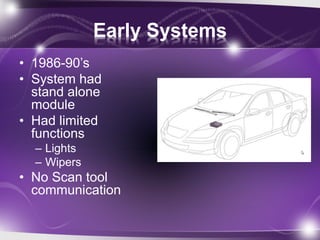
Early Systems
• 1986-90’s
• System had
stand alone
module
• Had limited
functions
– Lights
– Wipers
• No Scan tool
communication
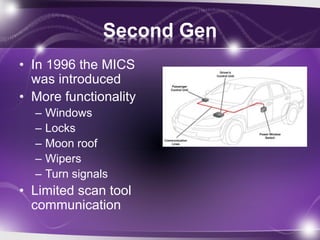
Second Gen
• In 1996 the MICS
was introduced
• More functionality
– Windows
– Locks
– Moon roof
– Wipers
– Turn signals
• Limited scan tool
communication
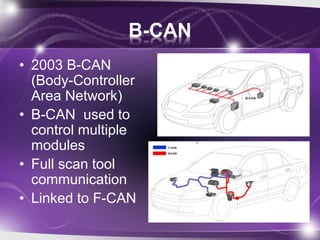
B-CAN
• 2003 B-CAN
(Body-Controller
Area Network)
• B-CAN used to
control multiple
modules
• Full scan tool
communication
• Linked to F-CAN
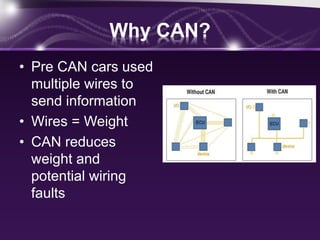
Why CAN?
• Pre CAN cars used
multiple wires to
send information
• Wires = Weight
• CAN reduces
weight and
potential wiring
faults
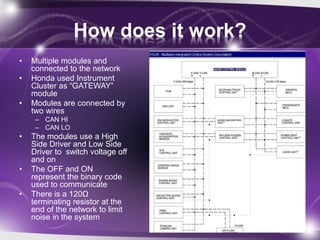
How does it work?
• Multiple modules and
connected to the network
• Honda used Instrument
Cluster as “GATEWAY”
module
• Modules are connected by
two wires
– CAN HI
– CAN LO
• The modules use a High
Side Driver and Low Side
Driver to switch voltage off
and on
• The OFF and ON
represent the binary code
used to communicate
• There is a 120Ω
terminating resistor at the
end of the network to limit
noise in the system
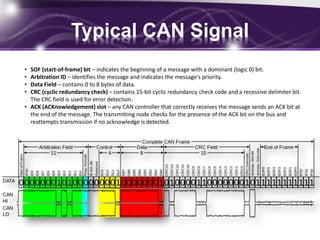
Typical CAN Signal
• SOF (start-of-frame) bit – indicates the beginning of a message with a dominant (logic 0) bit.
• Arbitration ID – identifies the message and indicates the message's priority.
• Data Field – contains 0 to 8 bytes of data.
• CRC (cyclic redundancy check) – contains 15-bit cyclic redundancy check code and a recessive delimiter bit.
The CRC field is used for error detection.
• ACK (ACKnowledgement) slot – any CAN controller that correctly receives the message sends an ACK bit at
the end of the message. The transmitting node checks for the presence of the ACK bit on the bus and
reattempts transmission if no acknowledge is detected.
BCAN Diagnosis
• Verify symptom first
• Safety related system will be hard wired
– Wipers
– Head lamps
– Turn indicators
• Self test with HDS
• Mode 1 and 2 tests
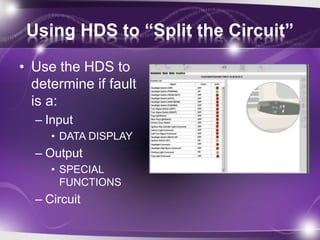
Using HDS to “Split the Circuit”
• Use the HDS to
determine if fault
is a:
– Input
• DATA DISPLAY
– Output
• SPECIAL
FUNCTIONS
– Circuit
Using HDS
• Connect MVCI and pull DTC’s related to the
network.
• In you can’t pull codes…
• TEST MODE A
– Mode A will verify the units connected to the
network
– You must reboot HDS to see if there are any
changes.
• TEST MODE B
– Modules that don’t show connected can be
diagnosed here
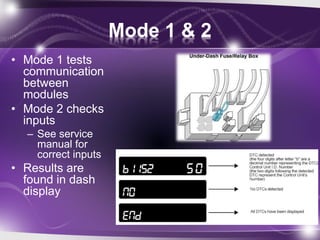
Mode 1 & 2
• Mode 1 tests
communication
between
modules
• Mode 2 checks
inputs
– See service
manual for
correct inputs
• Results are
found in dash
display
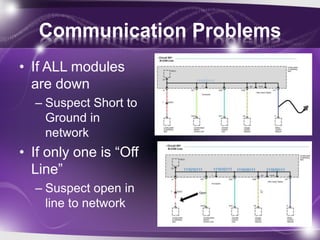
Communication Problems
• If ALL modules
are down
– Suspect Short to
Ground in
network
• If only one is “Off
Line”
– Suspect open in
line to network
Other Networks
• F CAN
– Fast “real time” network used for VSA, ABS,
PGMFI, and AT
– K Line
• Diagnostic line used between modules and HDS
– S NET
• Remote starter network
End of B-CAN

B can system

  • 1.
  • 2.
    Early Systems • 1986-90’s •System had stand alone module • Had limited functions – Lights – Wipers • No Scan tool communication
  • 3.
    Second Gen • In1996 the MICS was introduced • More functionality – Windows – Locks – Moon roof – Wipers – Turn signals • Limited scan tool communication
  • 4.
    B-CAN • 2003 B-CAN (Body-Controller AreaNetwork) • B-CAN used to control multiple modules • Full scan tool communication • Linked to F-CAN
  • 5.
    Why CAN? • PreCAN cars used multiple wires to send information • Wires = Weight • CAN reduces weight and potential wiring faults
  • 6.
    How does itwork? • Multiple modules and connected to the network • Honda used Instrument Cluster as “GATEWAY” module • Modules are connected by two wires – CAN HI – CAN LO • The modules use a High Side Driver and Low Side Driver to switch voltage off and on • The OFF and ON represent the binary code used to communicate • There is a 120Ω terminating resistor at the end of the network to limit noise in the system
  • 7.
    Typical CAN Signal •SOF (start-of-frame) bit – indicates the beginning of a message with a dominant (logic 0) bit. • Arbitration ID – identifies the message and indicates the message's priority. • Data Field – contains 0 to 8 bytes of data. • CRC (cyclic redundancy check) – contains 15-bit cyclic redundancy check code and a recessive delimiter bit. The CRC field is used for error detection. • ACK (ACKnowledgement) slot – any CAN controller that correctly receives the message sends an ACK bit at the end of the message. The transmitting node checks for the presence of the ACK bit on the bus and reattempts transmission if no acknowledge is detected.
  • 8.
    BCAN Diagnosis • Verifysymptom first • Safety related system will be hard wired – Wipers – Head lamps – Turn indicators • Self test with HDS • Mode 1 and 2 tests
  • 9.
    Using HDS to“Split the Circuit” • Use the HDS to determine if fault is a: – Input • DATA DISPLAY – Output • SPECIAL FUNCTIONS – Circuit
  • 10.
    Using HDS • ConnectMVCI and pull DTC’s related to the network. • In you can’t pull codes… • TEST MODE A – Mode A will verify the units connected to the network – You must reboot HDS to see if there are any changes. • TEST MODE B – Modules that don’t show connected can be diagnosed here
  • 11.
    Mode 1 &2 • Mode 1 tests communication between modules • Mode 2 checks inputs – See service manual for correct inputs • Results are found in dash display
  • 12.
    Communication Problems • IfALL modules are down – Suspect Short to Ground in network • If only one is “Off Line” – Suspect open in line to network
  • 13.
    Other Networks • FCAN – Fast “real time” network used for VSA, ABS, PGMFI, and AT – K Line • Diagnostic line used between modules and HDS – S NET • Remote starter network
  • 14.