Automatic Data Capture:
                Bar Code Technology


Presented by:

LavaKush Verma
M.C.A. 2nd Year
Roll No. 770057
KIIT University,
Bhubaneswar                           © lavakush2oct.kiit@gmail.com
Structure

    Automatic Data Capturing
    Bar codes and its types
    UPC bar code
    Working of UPC bar code
    How to decode a UPC bar code
    Devices used for Auto-ID
    Benefits of using Bar codes
    Conclusion


                        © lavakush2oct.kiit@gmail.com
What is Automatic Data Capturing?

   Data input without key punching or typing
   An automatic Data identification technology
   Also known as ‘Auto-ID’
   Encompasses automatic recognition and recording of Data
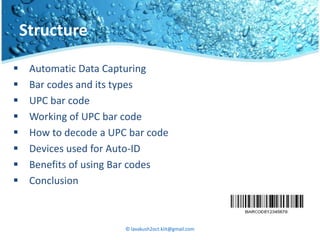
   Data capturing is done by Bar code readers
   Bar code readers read encoded data in form of bar codes
   Used to eliminate the risk of human error


                         © lavakush2oct.kiit@gmail.com
What is Bar code?

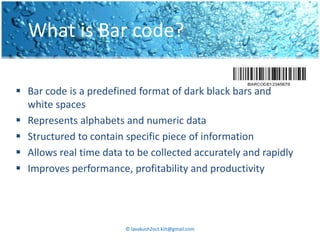
 Bar code is a predefined format of dark black bars and
  white spaces
 Represents alphabets and numeric data
 Structured to contain specific piece of information
 Allows real time data to be collected accurately and rapidly
 Improves performance, profitability and productivity


                        © lavakush2oct.kiit@gmail.com
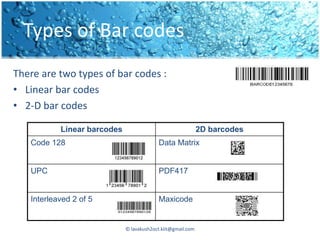
Types of Bar codes
There are two types of bar codes :
• Linear bar codes
• 2-D bar codes

           Linear barcodes                                   2D barcodes
   Code 128                               Data Matrix


   UPC                                    PDF417


   Interleaved 2 of 5                     Maxicode


                             © lavakush2oct.kiit@gmail.com
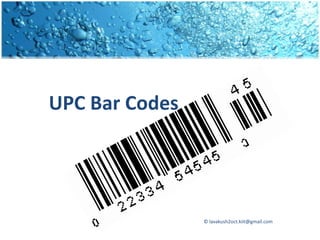
UPC Bar Codes


                © lavakush2oct.kiit@gmail.com
What is UPC?

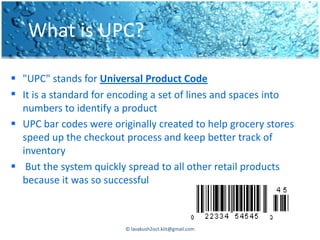
 "UPC" stands for Universal Product Code
 It is a standard for encoding a set of lines and spaces into
  numbers to identify a product
 UPC bar codes were originally created to help grocery stores
  speed up the checkout process and keep better track of
  inventory
 But the system quickly spread to all other retail products
  because it was so successful


                         © lavakush2oct.kiit@gmail.com
Example of UPC…
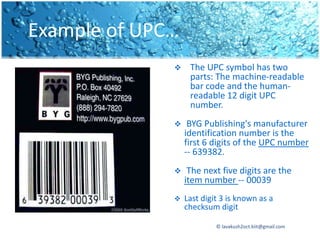
                  The UPC symbol has two
                   parts: The machine-readable
                   bar code and the human-
                   readable 12 digit UPC
                   number.
                  BYG Publishing's manufacturer
                  identification number is the
                  first 6 digits of the UPC number
                  -- 639382.
                  The next five digits are the
                  item number -- 00039
                 Last digit 3 is known as a
                  checksum digit

                           © lavakush2oct.kiit@gmail.com
How does UPC bar code work ?
 The last digit of the UPC code is called a check digit. It lets the
  scanner determine if it scanned the number correctly or not.
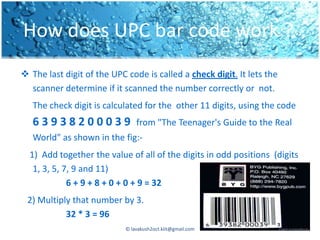
   The check digit is calculated for the other 11 digits, using the code
   63938200039                  from "The Teenager's Guide to the Real
   World" as shown in the fig:-
  1) Add together the value of all of the digits in odd positions (digits
   1, 3, 5, 7, 9 and 11)
             6 + 9 + 8 + 0 + 0 + 9 = 32
 2) Multiply that number by 3.
           32 * 3 = 96
                            © lavakush2oct.kiit@gmail.com
How does UPC bar code works ?
3) Add together the value of all of the digits in even positions (digits 2,
     4, 6, 8 and 10) .
          3 + 3 + 2 + 0 + 3 = 11
4) Add this sum to the value in step 2.
         96 + 11 = 107
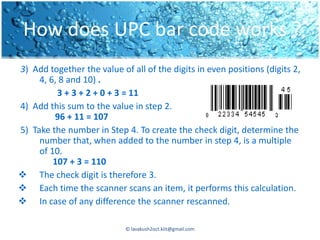
5) Take the number in Step 4. To create the check digit, determine the
     number that, when added to the number in step 4, is a multiple
     of 10.
         107 + 3 = 110
 The check digit is therefore 3.
 Each time the scanner scans an item, it performs this calculation.
 In case of any difference the scanner rescanned.

                            © lavakush2oct.kiit@gmail.com
How is the price determined ?

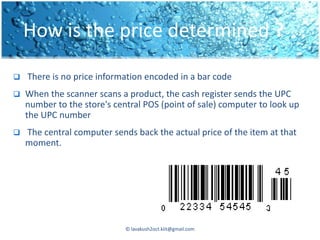
   There is no price information encoded in a bar code
   When the scanner scans a product, the cash register sends the UPC
    number to the store's central POS (point of sale) computer to look up
    the UPC number
   The central computer sends back the actual price of the item at that
    moment.


                             © lavakush2oct.kiit@gmail.com
Example……


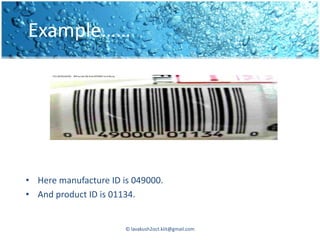
• Here manufacture ID is 049000.
• And product ID is 01134.


                       © lavakush2oct.kiit@gmail.com
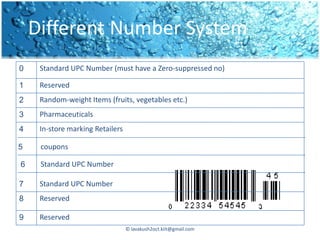
Different Number System
0    Standard UPC Number (must have a Zero-suppressed no)

1    Reserved
2    Random-weight Items (fruits, vegetables etc.)
3    Pharmaceuticals
4    In-store marking Retailers

5    coupons

6    Standard UPC Number

7    Standard UPC Number
8    Reserved

9    Reserved
                                  © lavakush2oct.kiit@gmail.com
How to decode the bars ?
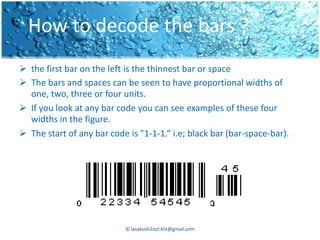
 the first bar on the left is the thinnest bar or space
 The bars and spaces can be seen to have proportional widths of
  one, two, three or four units.
 If you look at any bar code you can see examples of these four
  widths in the figure.
 The start of any bar code is "1-1-1.“ i.e; black bar (bar-space-bar).


                           © lavakush2oct.kiit@gmail.com
How to decode the bar? (cont..)
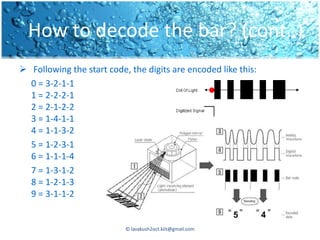
 Following the start code, the digits are encoded like this:
  0 = 3-2-1-1
  1 = 2-2-2-1
  2 = 2-1-2-2
  3 = 1-4-1-1
  4 = 1-1-3-2
  5 = 1-2-3-1
  6 = 1-1-1-4
  7 = 1-3-1-2
  8 = 1-2-1-3
  9 = 3-1-1-2


                           © lavakush2oct.kiit@gmail.com
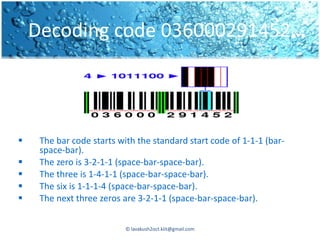
Decoding code 036000291452…


    The bar code starts with the standard start code of 1-1-1 (bar-
     space-bar).
    The zero is 3-2-1-1 (space-bar-space-bar).
    The three is 1-4-1-1 (space-bar-space-bar).
    The six is 1-1-1-4 (space-bar-space-bar).
    The next three zeros are 3-2-1-1 (space-bar-space-bar).


                           © lavakush2oct.kiit@gmail.com
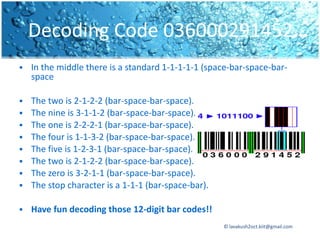
Decoding Code 036000291452…
   In the middle there is a standard 1-1-1-1-1 (space-bar-space-bar-
    space

   The two is 2-1-2-2 (bar-space-bar-space).
   The nine is 3-1-1-2 (bar-space-bar-space).
   The one is 2-2-2-1 (bar-space-bar-space).
   The four is 1-1-3-2 (bar-space-bar-space).
   The five is 1-2-3-1 (bar-space-bar-space).
   The two is 2-1-2-2 (bar-space-bar-space).
   The zero is 3-2-1-1 (bar-space-bar-space).
   The stop character is a 1-1-1 (bar-space-bar).

   Have fun decoding those 12-digit bar codes!!
                                                     © lavakush2oct.kiit@gmail.com
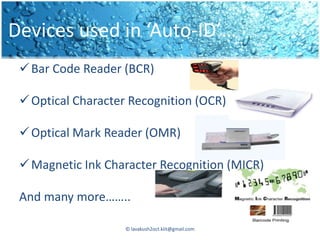
Devices used in ‘Auto-ID’…
  Bar Code Reader (BCR)

  Optical Character Recognition (OCR)

  Optical Mark Reader (OMR)

  Magnetic Ink Character Recognition (MICR)

 And many more……..

                    © lavakush2oct.kiit@gmail.com
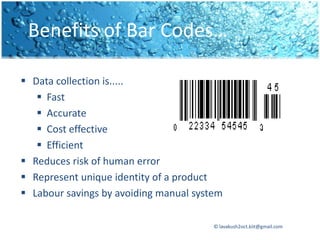
Benefits of Bar Codes…

 Data collection is.....
    Fast
    Accurate
    Cost effective
    Efficient
 Reduces risk of human error
 Represent unique identity of a product
 Labour savings by avoiding manual system

                                        © lavakush2oct.kiit@gmail.com
Conclusion

Bar code technique is the best way
• For speedy checkouts
• error free data collection

For an organization
       “ USE BAR CODES TO GROW IN AN INDUSTRY”


                       © lavakush2oct.kiit@gmail.com
© lavakush2oct.kiit@gmail.com
Any Questions?????


    © lavakush2oct.kiit@gmail.com

Automatic data capture

  • 1.
    Automatic Data Capture: Bar Code Technology Presented by: LavaKush Verma M.C.A. 2nd Year Roll No. 770057 KIIT University, Bhubaneswar © lavakush2oct.kiit@gmail.com
  • 2.
    Structure  Automatic Data Capturing  Bar codes and its types  UPC bar code  Working of UPC bar code  How to decode a UPC bar code  Devices used for Auto-ID  Benefits of using Bar codes  Conclusion © lavakush2oct.kiit@gmail.com
  • 3.
    What is AutomaticData Capturing?  Data input without key punching or typing  An automatic Data identification technology  Also known as ‘Auto-ID’  Encompasses automatic recognition and recording of Data  Data capturing is done by Bar code readers  Bar code readers read encoded data in form of bar codes  Used to eliminate the risk of human error © lavakush2oct.kiit@gmail.com
  • 4.
    What is Barcode?  Bar code is a predefined format of dark black bars and white spaces  Represents alphabets and numeric data  Structured to contain specific piece of information  Allows real time data to be collected accurately and rapidly  Improves performance, profitability and productivity © lavakush2oct.kiit@gmail.com
  • 5.
    Types of Barcodes There are two types of bar codes : • Linear bar codes • 2-D bar codes Linear barcodes 2D barcodes Code 128 Data Matrix UPC PDF417 Interleaved 2 of 5 Maxicode © lavakush2oct.kiit@gmail.com
  • 6.
    UPC Bar Codes © lavakush2oct.kiit@gmail.com
  • 7.
    What is UPC? "UPC" stands for Universal Product Code  It is a standard for encoding a set of lines and spaces into numbers to identify a product  UPC bar codes were originally created to help grocery stores speed up the checkout process and keep better track of inventory  But the system quickly spread to all other retail products because it was so successful © lavakush2oct.kiit@gmail.com
  • 8.
    Example of UPC…  The UPC symbol has two parts: The machine-readable bar code and the human- readable 12 digit UPC number.  BYG Publishing's manufacturer identification number is the first 6 digits of the UPC number -- 639382.  The next five digits are the item number -- 00039  Last digit 3 is known as a checksum digit © lavakush2oct.kiit@gmail.com
  • 9.
    How does UPCbar code work ?  The last digit of the UPC code is called a check digit. It lets the scanner determine if it scanned the number correctly or not. The check digit is calculated for the other 11 digits, using the code 63938200039 from "The Teenager's Guide to the Real World" as shown in the fig:- 1) Add together the value of all of the digits in odd positions (digits 1, 3, 5, 7, 9 and 11) 6 + 9 + 8 + 0 + 0 + 9 = 32 2) Multiply that number by 3. 32 * 3 = 96 © lavakush2oct.kiit@gmail.com
  • 10.
    How does UPCbar code works ? 3) Add together the value of all of the digits in even positions (digits 2, 4, 6, 8 and 10) . 3 + 3 + 2 + 0 + 3 = 11 4) Add this sum to the value in step 2. 96 + 11 = 107 5) Take the number in Step 4. To create the check digit, determine the number that, when added to the number in step 4, is a multiple of 10. 107 + 3 = 110  The check digit is therefore 3.  Each time the scanner scans an item, it performs this calculation.  In case of any difference the scanner rescanned. © lavakush2oct.kiit@gmail.com
  • 11.
    How is theprice determined ?  There is no price information encoded in a bar code  When the scanner scans a product, the cash register sends the UPC number to the store's central POS (point of sale) computer to look up the UPC number  The central computer sends back the actual price of the item at that moment. © lavakush2oct.kiit@gmail.com
  • 12.
    Example…… • Here manufactureID is 049000. • And product ID is 01134. © lavakush2oct.kiit@gmail.com
  • 13.
    Different Number System 0 Standard UPC Number (must have a Zero-suppressed no) 1 Reserved 2 Random-weight Items (fruits, vegetables etc.) 3 Pharmaceuticals 4 In-store marking Retailers 5 coupons 6 Standard UPC Number 7 Standard UPC Number 8 Reserved 9 Reserved © lavakush2oct.kiit@gmail.com
  • 14.
    How to decodethe bars ?  the first bar on the left is the thinnest bar or space  The bars and spaces can be seen to have proportional widths of one, two, three or four units.  If you look at any bar code you can see examples of these four widths in the figure.  The start of any bar code is "1-1-1.“ i.e; black bar (bar-space-bar). © lavakush2oct.kiit@gmail.com
  • 15.
    How to decodethe bar? (cont..)  Following the start code, the digits are encoded like this: 0 = 3-2-1-1 1 = 2-2-2-1 2 = 2-1-2-2 3 = 1-4-1-1 4 = 1-1-3-2 5 = 1-2-3-1 6 = 1-1-1-4 7 = 1-3-1-2 8 = 1-2-1-3 9 = 3-1-1-2 © lavakush2oct.kiit@gmail.com
  • 16.
    Decoding code 036000291452…  The bar code starts with the standard start code of 1-1-1 (bar- space-bar).  The zero is 3-2-1-1 (space-bar-space-bar).  The three is 1-4-1-1 (space-bar-space-bar).  The six is 1-1-1-4 (space-bar-space-bar).  The next three zeros are 3-2-1-1 (space-bar-space-bar). © lavakush2oct.kiit@gmail.com
  • 17.
    Decoding Code 036000291452…  In the middle there is a standard 1-1-1-1-1 (space-bar-space-bar- space  The two is 2-1-2-2 (bar-space-bar-space).  The nine is 3-1-1-2 (bar-space-bar-space).  The one is 2-2-2-1 (bar-space-bar-space).  The four is 1-1-3-2 (bar-space-bar-space).  The five is 1-2-3-1 (bar-space-bar-space).  The two is 2-1-2-2 (bar-space-bar-space).  The zero is 3-2-1-1 (bar-space-bar-space).  The stop character is a 1-1-1 (bar-space-bar).  Have fun decoding those 12-digit bar codes!! © lavakush2oct.kiit@gmail.com
  • 18.
    Devices used in‘Auto-ID’…  Bar Code Reader (BCR)  Optical Character Recognition (OCR)  Optical Mark Reader (OMR)  Magnetic Ink Character Recognition (MICR) And many more…….. © lavakush2oct.kiit@gmail.com
  • 19.
    Benefits of BarCodes…  Data collection is.....  Fast  Accurate  Cost effective  Efficient  Reduces risk of human error  Represent unique identity of a product  Labour savings by avoiding manual system © lavakush2oct.kiit@gmail.com
  • 20.
    Conclusion Bar code techniqueis the best way • For speedy checkouts • error free data collection For an organization “ USE BAR CODES TO GROW IN AN INDUSTRY” © lavakush2oct.kiit@gmail.com
  • 21.
  • 22.
    Any Questions????? © lavakush2oct.kiit@gmail.com