1
MATLAB Programming
2
MATLAB
a flagship software which was originally developed as a
matrix library. A variety of numerical functions, symbolic
computations, and visualization tools have been added to the
matrix manipulations.
Demo programs:
http://web.mst.edu/~ercal/228/MATLAB/1-2/analpara.m
http://web.mst.edu/~ercal/228/MATLAB/1-2/analpara2.m
http://web.mst.edu/~ercal/228/MATLAB/1-2/analpara4.m
))](([)()( 11 iiiii tttv
m
c
gtvtv  
3
Sample Program
• g=9.8;
• cd=12.5;
• m = 68.1;
• dt = input('time increment (s):');
• tf = input('final time (s):');
• ti=0;
• vi=0;
• while (1)
• dvdt = g-(cd/m)*vi;
• vi = vi + dvdt*dt;
• ti = ti + dt;
• if ti >= tf, break, end
• end
• disp('velocity (m/s):')
• disp(vi)
t (sec.) V (m/s)
0 0
2 19.60
4 32.00
8 44.82
10 47.97
12 49.96
∞ 53.39
m=68.1 kg; c=12.5 kg/s; g=9.8 m/s
))](([)()( 11 iiiii tttv
m
c
gtvtv  
4
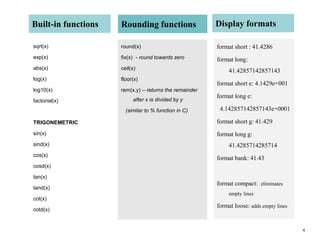
Built-in functions
sqrt(x)
exp(x)
abs(x)
log(x)
log10(x)
factorial(x)
TRIGONEMETRIC
sin(x)
sind(x)
cos(x)
cosd(x)
tan(x)
tand(x)
cot(x)
cotd(x)
Rounding functions
round(x)
fix(x) - round towards zero
ceil(x)
floor(x)
rem(x,y) – returns the remainder
after x is divided by y
(similar to % function in C)
Display formats
format short : 41.4286
format long:
41.42857142857143
format short e: 4.1429e+001
format long e:
4.142857142857143e+0001
format short g: 41.429
format long g:
41.4285714285714
format bank: 41.43
format compact: eliminates
empty lines
format loose: adds empty lines
5
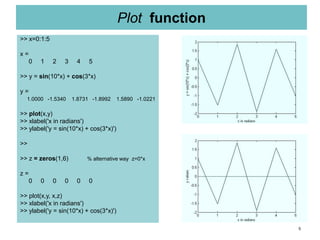
Plot function
>> x=0:1:5
x =
0 1 2 3 4 5
>> y = sin(10*x) + cos(3*x)
y =
1.0000 -1.5340 1.8731 -1.8992 1.5890 -1.0221
>> plot(x,y)
>> xlabel('x in radians')
>> ylabel('y = sin(10*x) + cos(3*x)')
>>
>> z = zeros(1,6) % alternative way z=0*x
z =
0 0 0 0 0 0
>> plot(x,y, x,z)
>> xlabel('x in radians')
>> ylabel('y = sin(10*x) + cos(3*x)')
6
Roots of polynomials
>> r = [1, -2, 4]
r =
1 -2 4
>> poly(r)
ans =
1 -3 -6 8
>> p = poly(r)
p =
1 -3 -6 8
>> solve = roots(p)
solve =
4.0000
-2.0000
1.0000
System of equations
>> x=[-1, 5]
x =
-1 5
>> A = [2, 3; -1, 4]
A =
2 3
-1 4
>> b = A*x'
b =
13
21
>> solveX = inv(A)*b
solveX =
-1.0000
5.0000
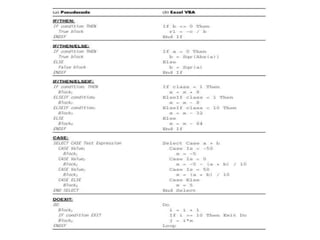
**here Fundamental control structures in MATLAB
Managing Variables
clear – removes all variables from memory clear x y – removes only x and y from memory
who – displays a list of variables in the memory whos – displays a list of variables in the
memory along with their size and class
FOR-Loop sum = 0;
DOFOR i = start, step, final for i = 2:1:25
(Loop Body) sum = sum + A[i];
ENDDO end
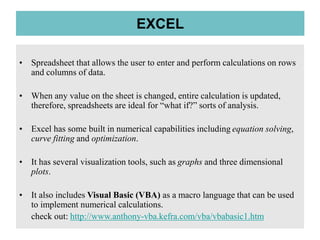
• Spreadsheet that allows the user to enter and perform calculations on rows
and columns of data.
• When any value on the sheet is changed, entire calculation is updated,
therefore, spreadsheets are ideal for “what if?” sorts of analysis.
• Excel has some built in numerical capabilities including equation solving,
curve fitting and optimization.
• It has several visualization tools, such as graphs and three dimensional
plots.
• It also includes Visual Basic (VBA) as a macro language that can be used
to implement numerical calculations.
check out: http://www.anthony-vba.kefra.com/vba/vbabasic1.htm
EXCEL
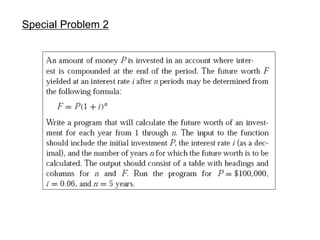
Special Problem 2

Applied numerical methods lec2

  • 1.
  • 2.
    2 MATLAB a flagship softwarewhich was originally developed as a matrix library. A variety of numerical functions, symbolic computations, and visualization tools have been added to the matrix manipulations. Demo programs: http://web.mst.edu/~ercal/228/MATLAB/1-2/analpara.m http://web.mst.edu/~ercal/228/MATLAB/1-2/analpara2.m http://web.mst.edu/~ercal/228/MATLAB/1-2/analpara4.m ))](([)()( 11 iiiii tttv m c gtvtv  
  • 3.
    3 Sample Program • g=9.8; •cd=12.5; • m = 68.1; • dt = input('time increment (s):'); • tf = input('final time (s):'); • ti=0; • vi=0; • while (1) • dvdt = g-(cd/m)*vi; • vi = vi + dvdt*dt; • ti = ti + dt; • if ti >= tf, break, end • end • disp('velocity (m/s):') • disp(vi) t (sec.) V (m/s) 0 0 2 19.60 4 32.00 8 44.82 10 47.97 12 49.96 ∞ 53.39 m=68.1 kg; c=12.5 kg/s; g=9.8 m/s ))](([)()( 11 iiiii tttv m c gtvtv  
  • 4.
    4 Built-in functions sqrt(x) exp(x) abs(x) log(x) log10(x) factorial(x) TRIGONEMETRIC sin(x) sind(x) cos(x) cosd(x) tan(x) tand(x) cot(x) cotd(x) Rounding functions round(x) fix(x)- round towards zero ceil(x) floor(x) rem(x,y) – returns the remainder after x is divided by y (similar to % function in C) Display formats format short : 41.4286 format long: 41.42857142857143 format short e: 4.1429e+001 format long e: 4.142857142857143e+0001 format short g: 41.429 format long g: 41.4285714285714 format bank: 41.43 format compact: eliminates empty lines format loose: adds empty lines
  • 5.
    5 Plot function >> x=0:1:5 x= 0 1 2 3 4 5 >> y = sin(10*x) + cos(3*x) y = 1.0000 -1.5340 1.8731 -1.8992 1.5890 -1.0221 >> plot(x,y) >> xlabel('x in radians') >> ylabel('y = sin(10*x) + cos(3*x)') >> >> z = zeros(1,6) % alternative way z=0*x z = 0 0 0 0 0 0 >> plot(x,y, x,z) >> xlabel('x in radians') >> ylabel('y = sin(10*x) + cos(3*x)')
  • 6.
    6 Roots of polynomials >>r = [1, -2, 4] r = 1 -2 4 >> poly(r) ans = 1 -3 -6 8 >> p = poly(r) p = 1 -3 -6 8 >> solve = roots(p) solve = 4.0000 -2.0000 1.0000 System of equations >> x=[-1, 5] x = -1 5 >> A = [2, 3; -1, 4] A = 2 3 -1 4 >> b = A*x' b = 13 21 >> solveX = inv(A)*b solveX = -1.0000 5.0000
  • 7.
    **here Fundamental controlstructures in MATLAB Managing Variables clear – removes all variables from memory clear x y – removes only x and y from memory who – displays a list of variables in the memory whos – displays a list of variables in the memory along with their size and class FOR-Loop sum = 0; DOFOR i = start, step, final for i = 2:1:25 (Loop Body) sum = sum + A[i]; ENDDO end
  • 8.
    • Spreadsheet thatallows the user to enter and perform calculations on rows and columns of data. • When any value on the sheet is changed, entire calculation is updated, therefore, spreadsheets are ideal for “what if?” sorts of analysis. • Excel has some built in numerical capabilities including equation solving, curve fitting and optimization. • It has several visualization tools, such as graphs and three dimensional plots. • It also includes Visual Basic (VBA) as a macro language that can be used to implement numerical calculations. check out: http://www.anthony-vba.kefra.com/vba/vbabasic1.htm EXCEL
  • 10.