
Created by :- Master Team
Outline
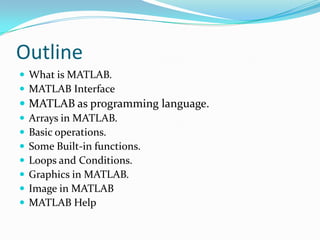
 What is MATLAB.
 MATLAB Interface
 MATLAB as programming language.
 Arrays in MATLAB.
 Basic operations.
 Some Built-in functions.
 Loops and Conditions.
 Graphics in MATLAB.
 Image in MATLAB
 MATLAB Help
What is MATLAB
 High –level, data structured, technical computing
  programming language.
 Stands for Matrix Laboratory.
 The basic data type is the Array (every thing is a matrix)
          Scale n=1 is 1 x 1 array.
          Vector a = [1 2 3] is 1 x 3 array (1-Dim).
          Matrix A = [1 2 3 ; 4 5 6] is 2 x 3 array (2-Dim).
 Used in linear algebra, graphic, image, simulation,.. Etc
MATLAB Interface
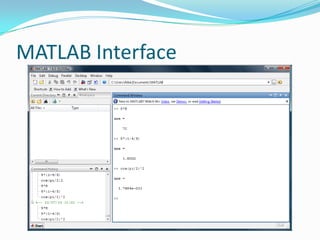
MATLAB Interface
 Menu bar.
 Tool bar.
 Command window.
 Command History.
 Current directory.
 Workspace.
MATLAB as programming language
 Like any other programming language MATLAB
 contains variables , functions , loops , conditions ,,,
 And so on.

 As any other programming language , MATLAB can call
 function of another language , and Also MATLAB ’s
 functions can be called by any language.
Arrays in MATLAB
 >> A = [1 2 3]
      output is A = 1 2 3
 >> A = [1 2 3];
      output is   null

       ( ; ) means execute without displaying output
Arrays in MATLAB
 Matrix is 2-D array.
 Vector is special case of matrix
  -Vertical vector is m x 1 matrix   - Horizontal vector is 1 x n matrix
    >> A = [1; 2; 3]       A= 1        >> A = [1 2 3] A = 1 2        3
                               2
                               3
 Scale number is special case of vector
   -scale is 1 x 1 vector
   >>B = 5
Basic operations
 ^: exponentiation
 *: multiplication
 /: division
 : left division. The operation AB is effectively the same    as
    INV(A)*B, although left division is calculated differently and is
    much quicker.
 +: addition
 -: subtraction
Some Built-in functions
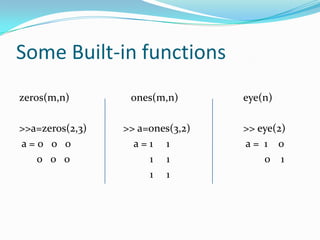
zeros(m,n)        ones(m,n)       eye(n)

>>a=zeros(2,3)   >> a=ones(3,2)   >> eye(2)
a=0 0 0            a=1 1          a= 1 0
   0 0 0              1 1             0 1
                      1 1
Some Built-in functions
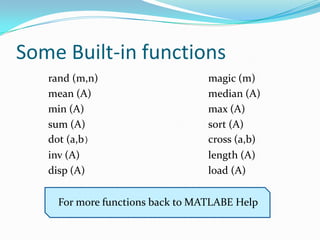
   rand (m,n)                     magic (m)
   mean (A)                       median (A)
   min (A)                        max (A)
   sum (A)                        sort (A)
   dot (a,b)                      cross (a,b)
   inv (A)                        length (A)
   disp (A)                       load (A)

     For more functions back to MATLABE Help
Loops and Conditions
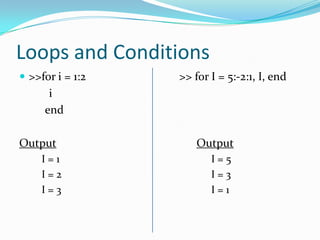
 >>for i = 1:2   >> for I = 5:-2:1, I, end
      i
     end

Output                Output
     I=1                 I=5
     I=2                 I=3
     I=3                 I=1
Loops and Conditions
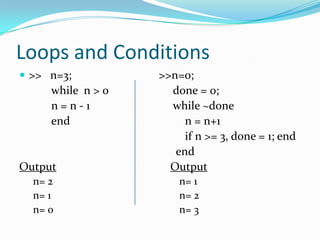
 >> n=3;          >>n=0;
     while n > 0     done = 0;
     n=n-1           while ~done
     end                n = n+1
                        if n >= 3, done = 1; end
                      end
Output               Output
  n= 2                 n= 1
  n= 1                 n= 2
  n= 0                 n= 3
Loops and Conditions
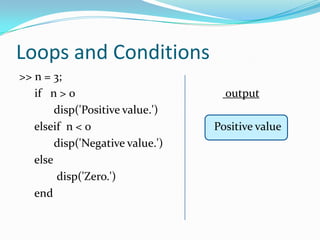
>> n = 3;
   if n > 0                         output
        disp('Positive value.')
   elseif n < 0                   Positive value
        disp('Negative value.')
   else
        disp('Zero.')
   end
Graphics in MATLAB
 As soon as graphs can represented by vectors, can be
 manipulated by MATLAB like a normal vectors

 >> x = [1 2 3 4];
 >> y = [2 4 6 8];
 >>title('Figure 1');
 >>plot(x,y);
Image in MATLAB
 As soon as images can represented by matrices, can be
    manipulated by MATLAB like any other matrix.
   >> x = imreade(' kids.tif ');
   >>[x map] = imreade(' kids.tif ');
   >>imshow(x);
   >>imshow(x , map);
   >>imwrite(x , ' c:img.png ' , 'png');
Image in MATLAB
 To convert between different image types:-
    x=imread(‘cameraman.png’);
    Y=gray2rgb(x);
    Y=rgb2gray(x);
    Y=rgb2ind(x);
    Y=ind2rgb(x);
    Y=ind2gray(x);
    Y=gray2ind(x);
Image in MATLAB
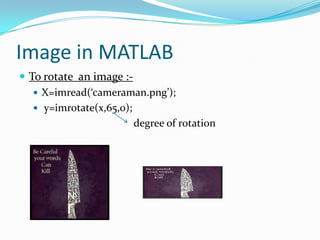
 To rotate an image :-
    X=imread(‘cameraman.png’);
    y=imrotate(x,65,0);
                         degree of rotation
MATLAB Help
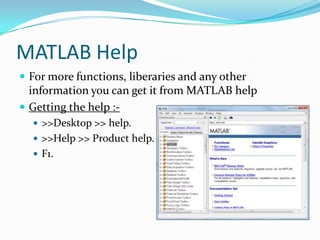
 For more functions, liberaries and any other
  information you can get it from MATLAB help
 Getting the help :-
   >>Desktop >> help.
   >>Help >> Product help.
   F1.

Intro to matlab

  • 1.
    Created by :-Master Team
  • 2.
    Outline  What isMATLAB.  MATLAB Interface  MATLAB as programming language.  Arrays in MATLAB.  Basic operations.  Some Built-in functions.  Loops and Conditions.  Graphics in MATLAB.  Image in MATLAB  MATLAB Help
  • 3.
    What is MATLAB High –level, data structured, technical computing programming language.  Stands for Matrix Laboratory.  The basic data type is the Array (every thing is a matrix)  Scale n=1 is 1 x 1 array.  Vector a = [1 2 3] is 1 x 3 array (1-Dim).  Matrix A = [1 2 3 ; 4 5 6] is 2 x 3 array (2-Dim).  Used in linear algebra, graphic, image, simulation,.. Etc
  • 4.
  • 5.
    MATLAB Interface  Menubar.  Tool bar.  Command window.  Command History.  Current directory.  Workspace.
  • 6.
    MATLAB as programminglanguage  Like any other programming language MATLAB contains variables , functions , loops , conditions ,,, And so on.  As any other programming language , MATLAB can call function of another language , and Also MATLAB ’s functions can be called by any language.
  • 7.
    Arrays in MATLAB >> A = [1 2 3] output is A = 1 2 3  >> A = [1 2 3]; output is null ( ; ) means execute without displaying output
  • 8.
    Arrays in MATLAB Matrix is 2-D array.  Vector is special case of matrix -Vertical vector is m x 1 matrix - Horizontal vector is 1 x n matrix >> A = [1; 2; 3] A= 1 >> A = [1 2 3] A = 1 2 3 2 3  Scale number is special case of vector -scale is 1 x 1 vector >>B = 5
  • 9.
    Basic operations  ^:exponentiation  *: multiplication  /: division  : left division. The operation AB is effectively the same as INV(A)*B, although left division is calculated differently and is much quicker.  +: addition  -: subtraction
  • 10.
    Some Built-in functions zeros(m,n) ones(m,n) eye(n) >>a=zeros(2,3) >> a=ones(3,2) >> eye(2) a=0 0 0 a=1 1 a= 1 0 0 0 0 1 1 0 1 1 1
  • 11.
    Some Built-in functions rand (m,n) magic (m) mean (A) median (A) min (A) max (A) sum (A) sort (A) dot (a,b) cross (a,b) inv (A) length (A) disp (A) load (A) For more functions back to MATLABE Help
  • 12.
    Loops and Conditions >>for i = 1:2 >> for I = 5:-2:1, I, end i end Output Output I=1 I=5 I=2 I=3 I=3 I=1
  • 13.
    Loops and Conditions >> n=3; >>n=0; while n > 0 done = 0; n=n-1 while ~done end n = n+1 if n >= 3, done = 1; end end Output Output n= 2 n= 1 n= 1 n= 2 n= 0 n= 3
  • 14.
    Loops and Conditions >>n = 3; if n > 0 output disp('Positive value.') elseif n < 0 Positive value disp('Negative value.') else disp('Zero.') end
  • 15.
    Graphics in MATLAB As soon as graphs can represented by vectors, can be manipulated by MATLAB like a normal vectors  >> x = [1 2 3 4]; >> y = [2 4 6 8]; >>title('Figure 1'); >>plot(x,y);
  • 16.
    Image in MATLAB As soon as images can represented by matrices, can be manipulated by MATLAB like any other matrix.  >> x = imreade(' kids.tif ');  >>[x map] = imreade(' kids.tif ');  >>imshow(x);  >>imshow(x , map);  >>imwrite(x , ' c:img.png ' , 'png');
  • 17.
    Image in MATLAB To convert between different image types:-  x=imread(‘cameraman.png’);  Y=gray2rgb(x);  Y=rgb2gray(x);  Y=rgb2ind(x);  Y=ind2rgb(x);  Y=ind2gray(x);  Y=gray2ind(x);
  • 18.
    Image in MATLAB To rotate an image :-  X=imread(‘cameraman.png’);  y=imrotate(x,65,0); degree of rotation
  • 19.
    MATLAB Help  Formore functions, liberaries and any other information you can get it from MATLAB help  Getting the help :-  >>Desktop >> help.  >>Help >> Product help.  F1.