Application VirtualizationAmit GatenyoInfrastructure & Security Manager, DarioWindows Server & Security MRD, Microsoft054-2492499Amit.g@dario.co.il
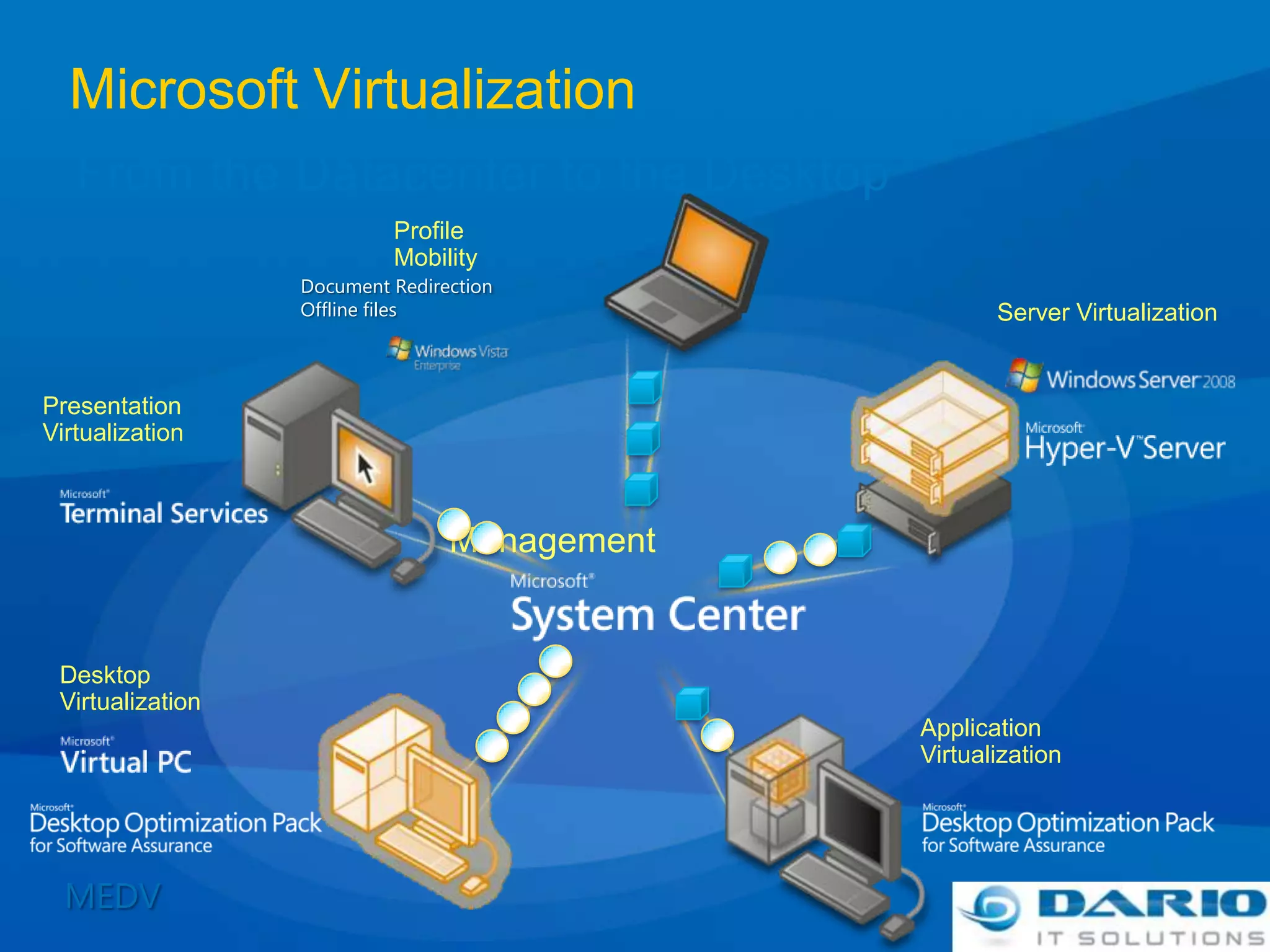
Microsoft VirtualizationFrom the Datacenter to the DesktopProfileMobilityDocument RedirectionOffline filesServer VirtualizationPresentation VirtualizationManagementDesktop VirtualizationApplication VirtualizationMEDV
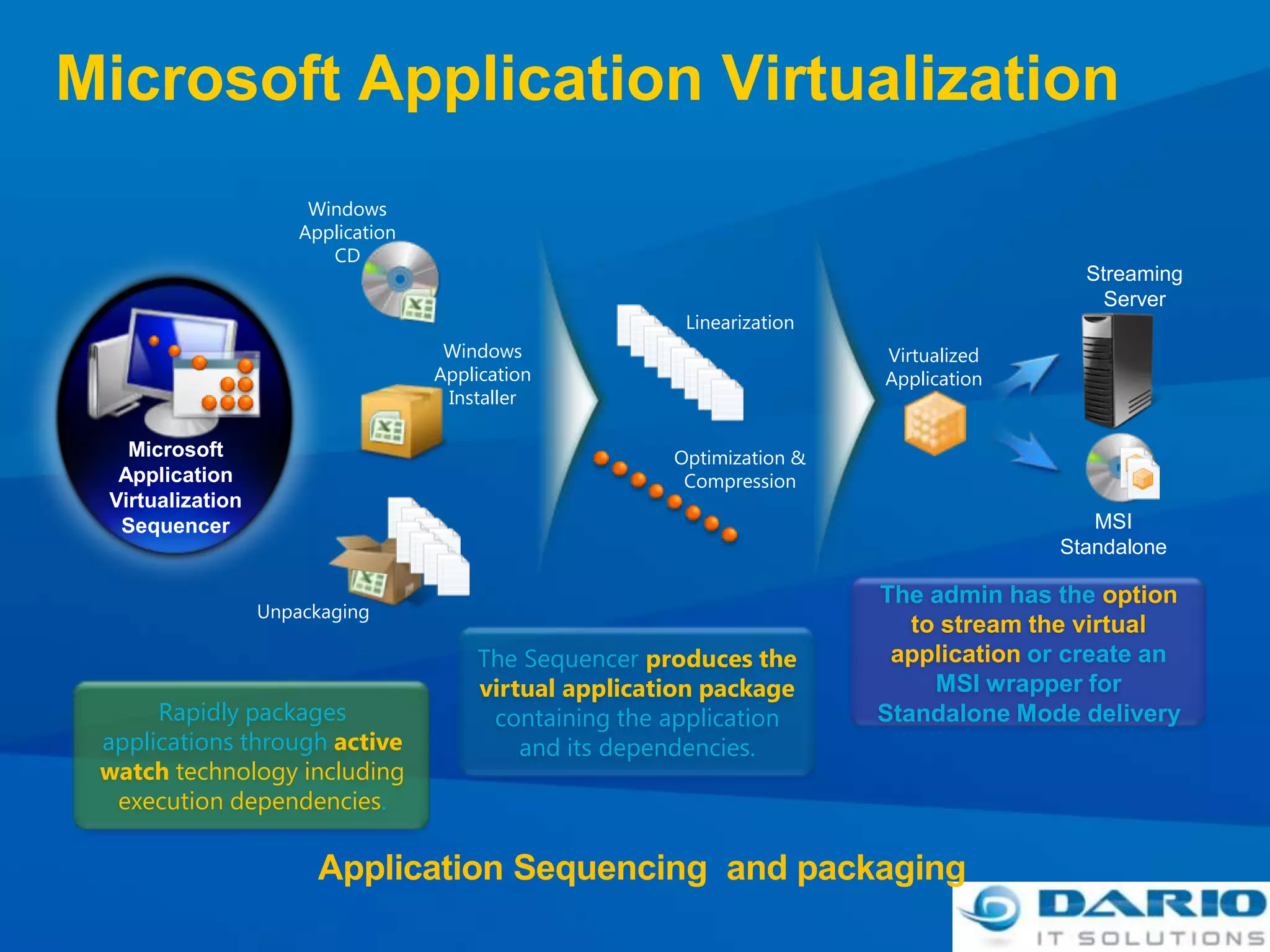
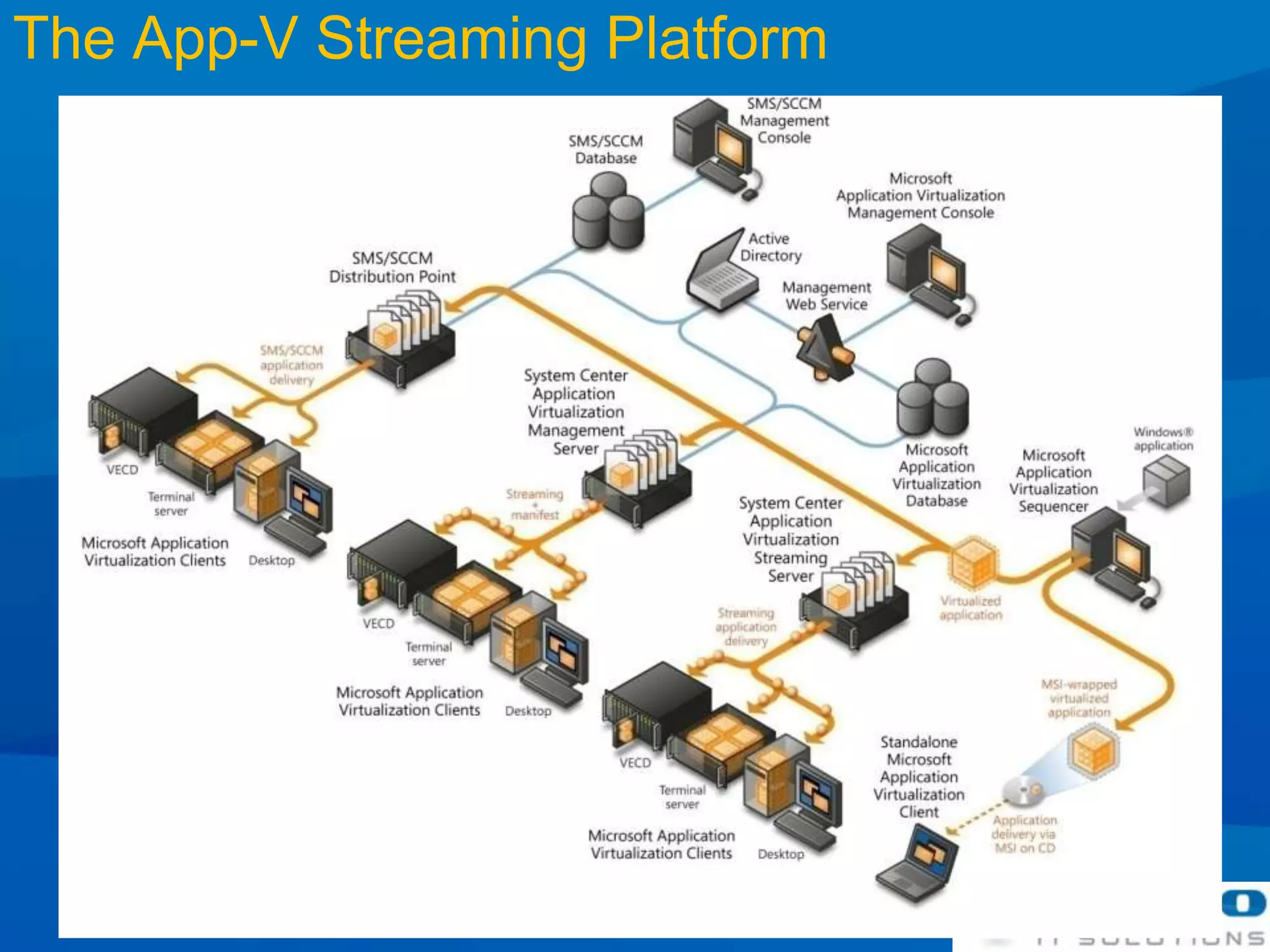
Microsoft Application VirtualizationWindows Application CDStreaming ServerLinearizationWindows Application InstallerVirtualized ApplicationMicrosoft Application Virtualization SequencerOptimization & CompressionMSI StandaloneThe admin has the option to stream the virtual application or create an MSI wrapper for Standalone Mode deliveryUnpackagingThe Sequencer produces the virtual application package containing the application and its dependencies.Rapidly packages applications through active watch technology including execution dependencies.Application Sequencing  and packaging
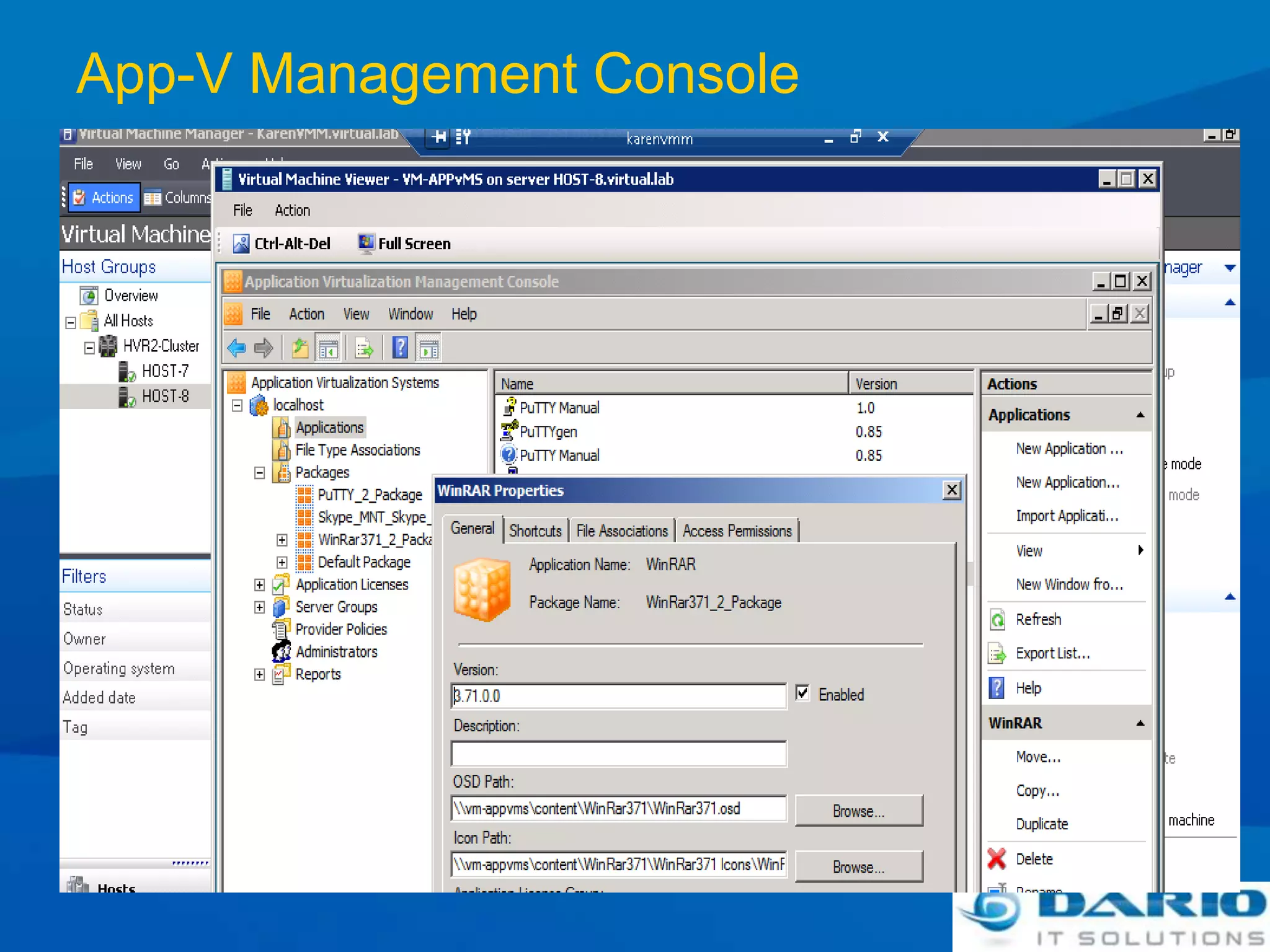
App-V Management Console
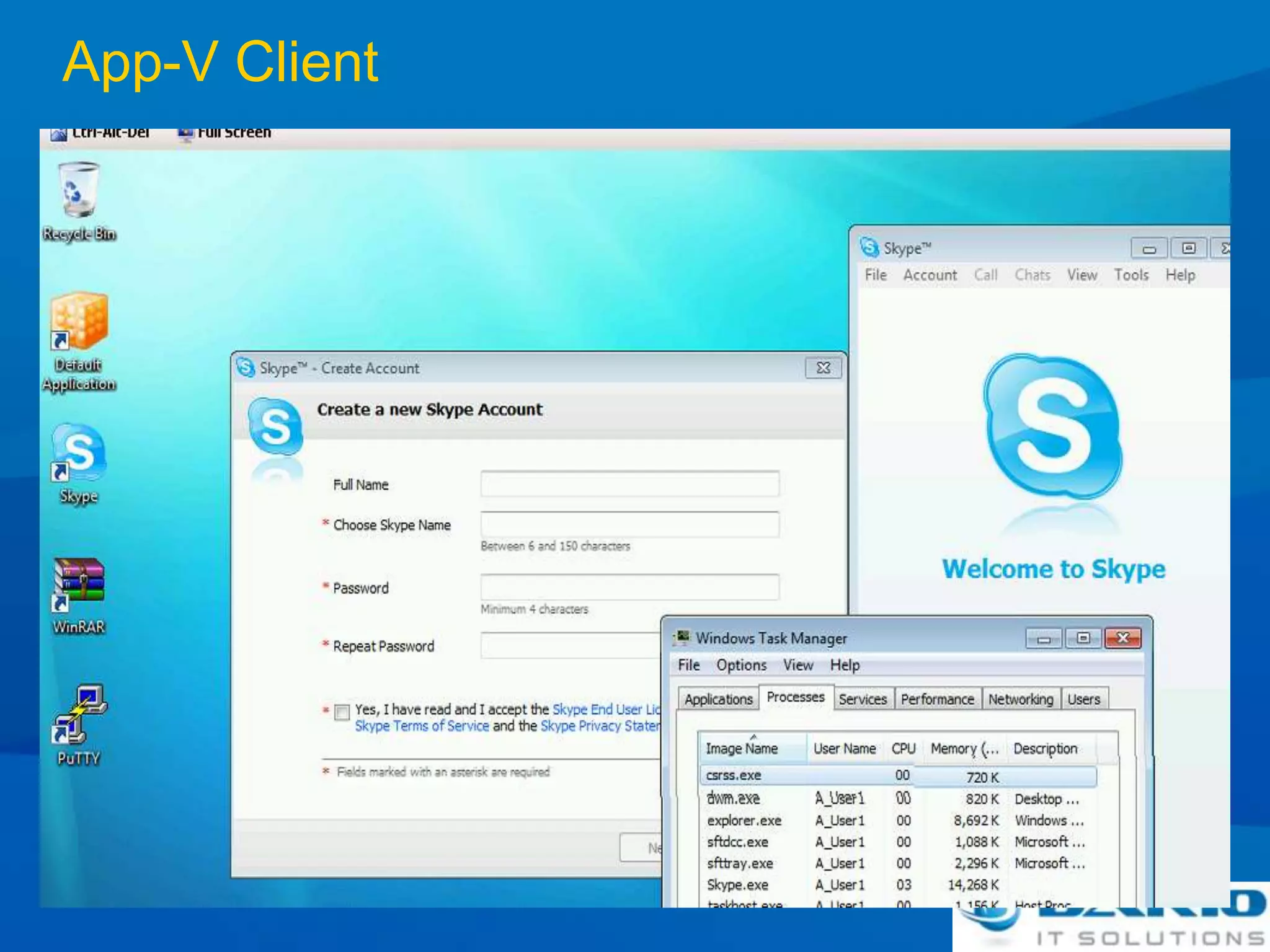
App-V Client
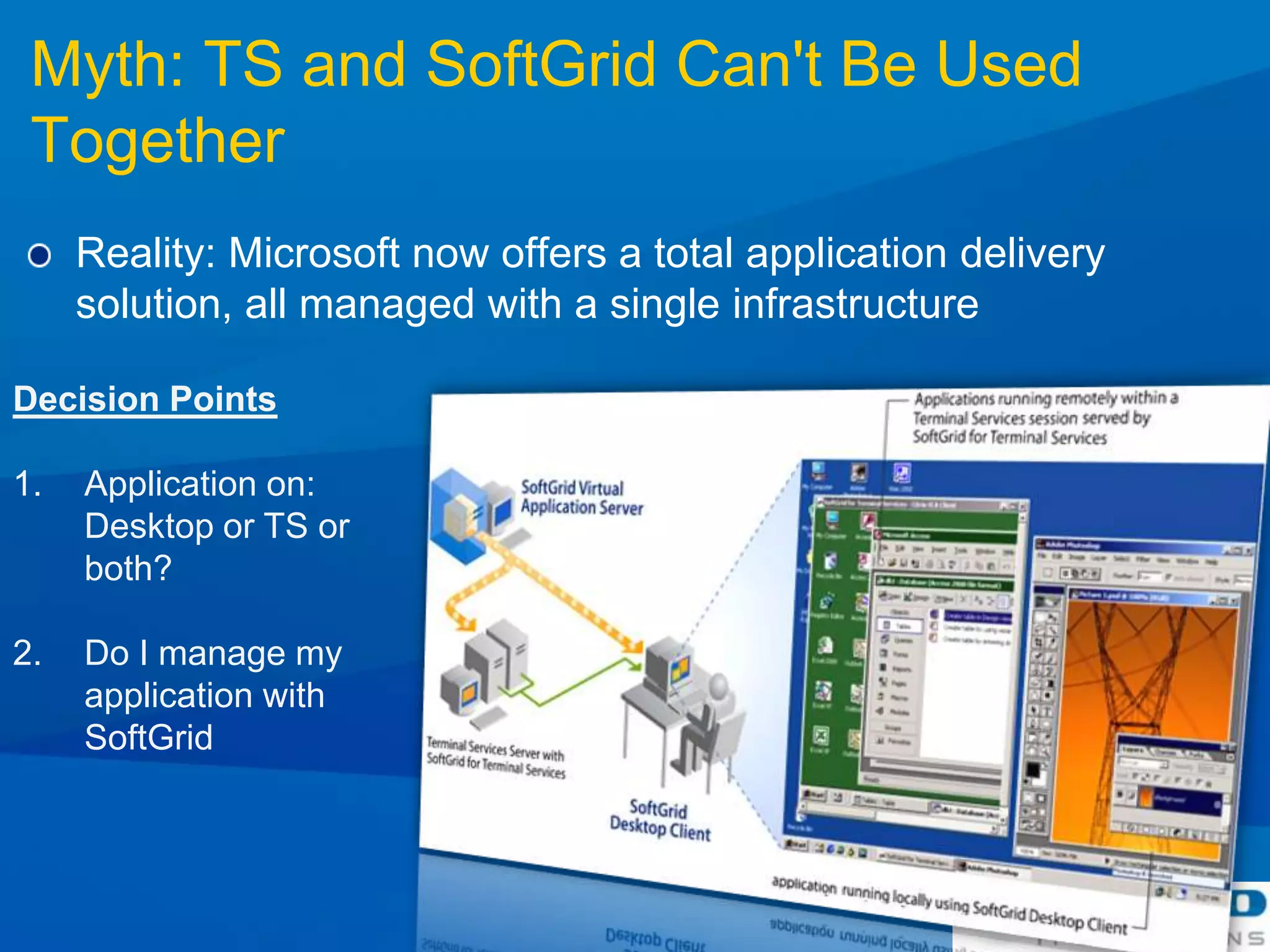
Myth: TS and SoftGrid Can't Be Used TogetherReality: Microsoft now offers a total application delivery solution, all managed with a single infrastructureDecision PointsApplication on:Desktop or TS or both?Do I manage my application with SoftGrid
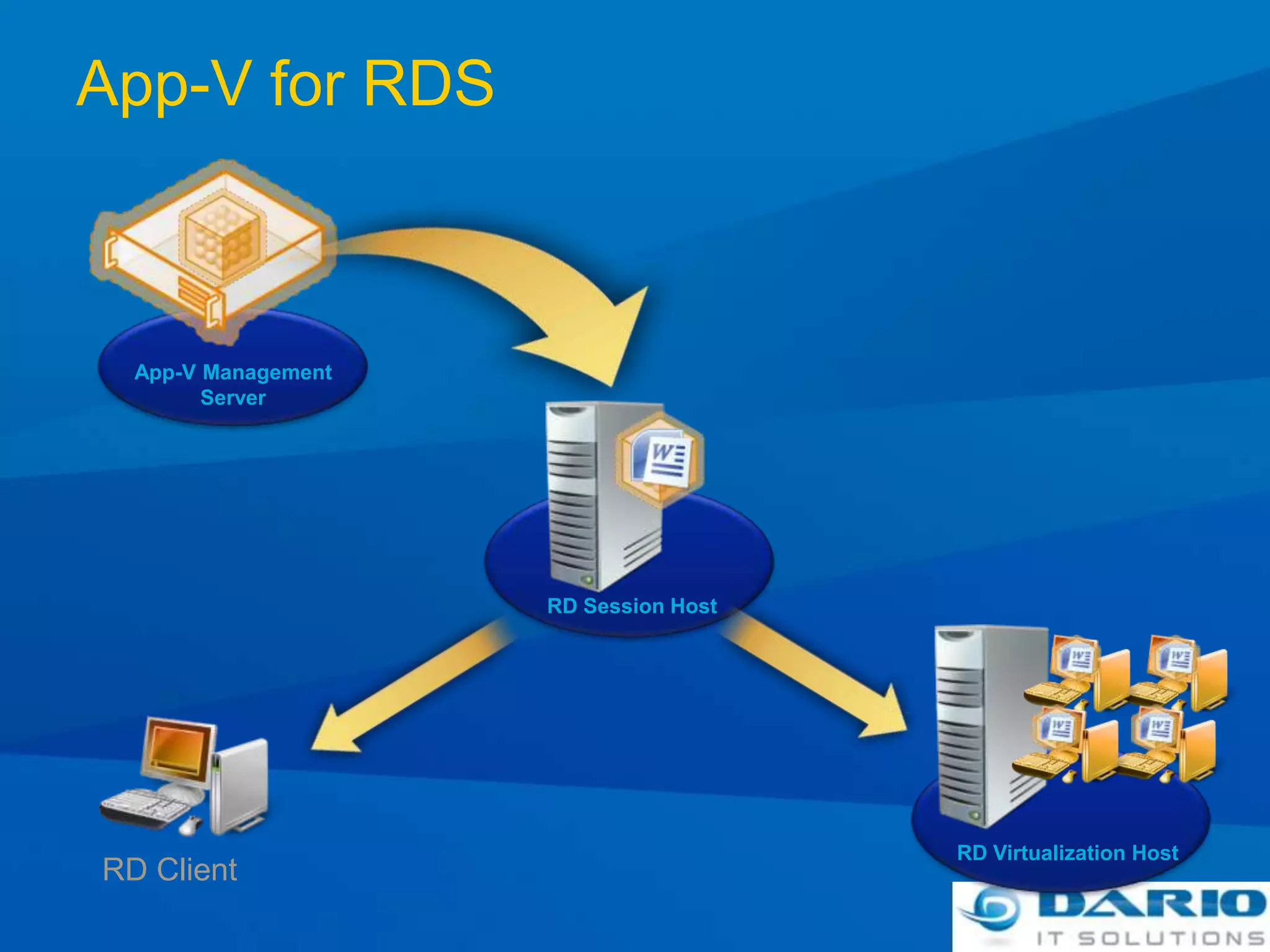
App-V for RDSApp-V ManagementServerRD Session HostRD Virtualization HostRD Client
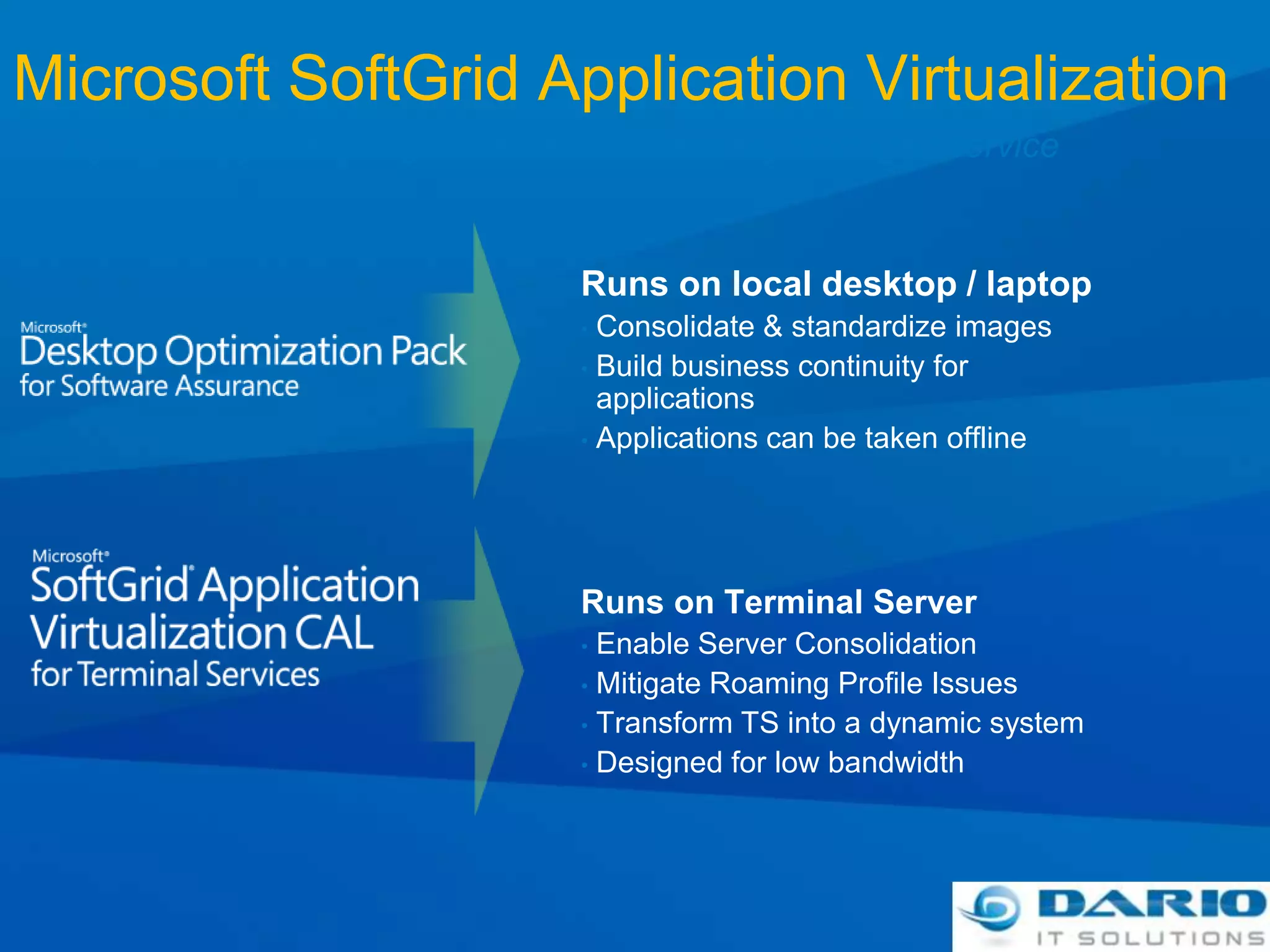
Microsoft SoftGrid Application VirtualizationDynamically streaming software as a centrally managed serviceRuns on local desktop / laptopConsolidate & standardize images
Build business continuity for applications
Applications can be taken offlineRuns on Terminal ServerEnable Server Consolidation
Mitigate Roaming Profile Issues
Transform TS into a dynamic system
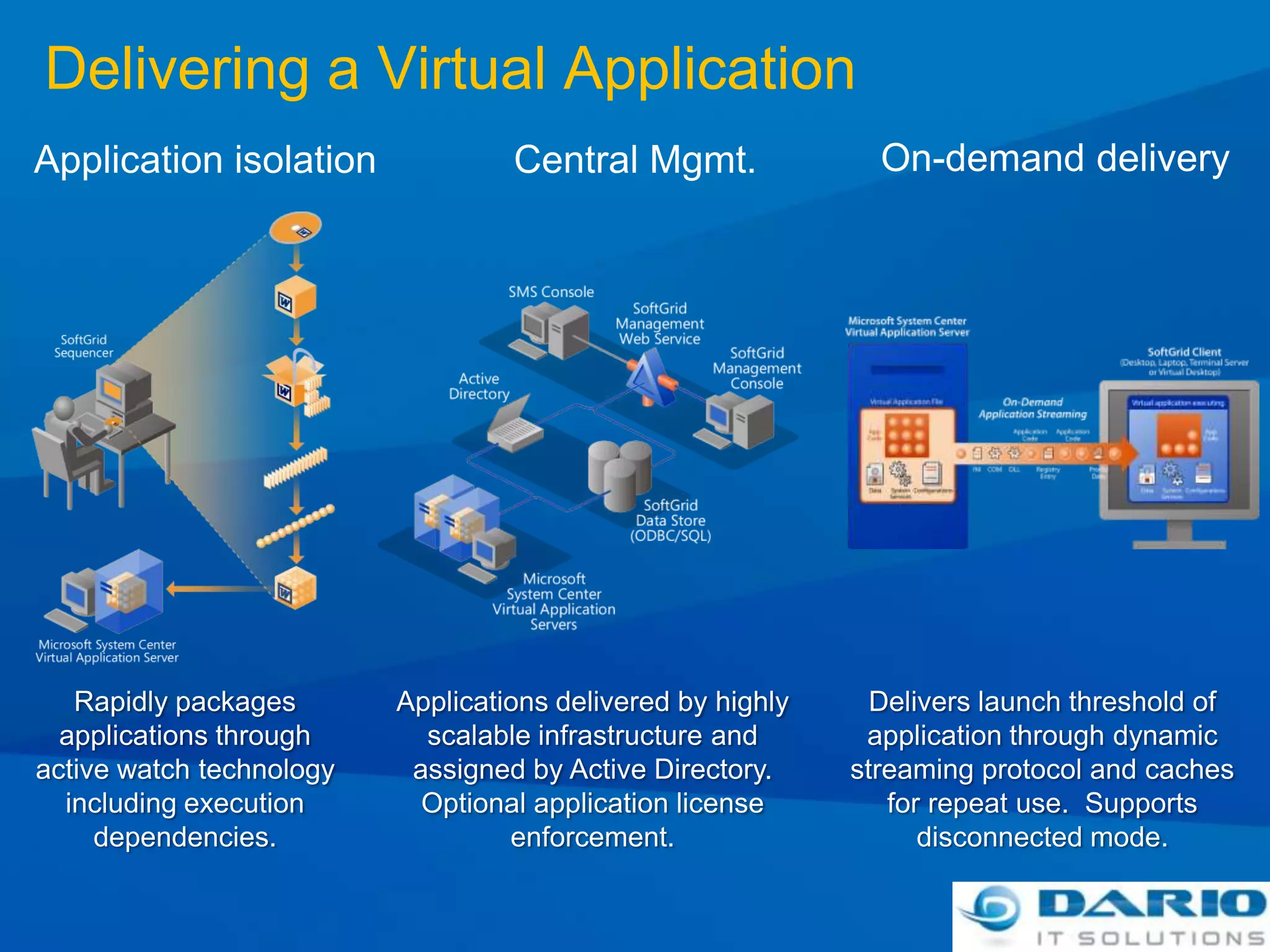
Designed for low bandwidthDelivering a Virtual ApplicationOn-demand deliveryCentral Mgmt.Application isolationRapidly packages applications through active watch technology including execution dependencies.Applications delivered by highly scalable infrastructure and assigned by Active Directory.  Optional application license enforcement.Delivers launch threshold of application through dynamic streaming protocol and caches for repeat use.  Supports disconnected mode.
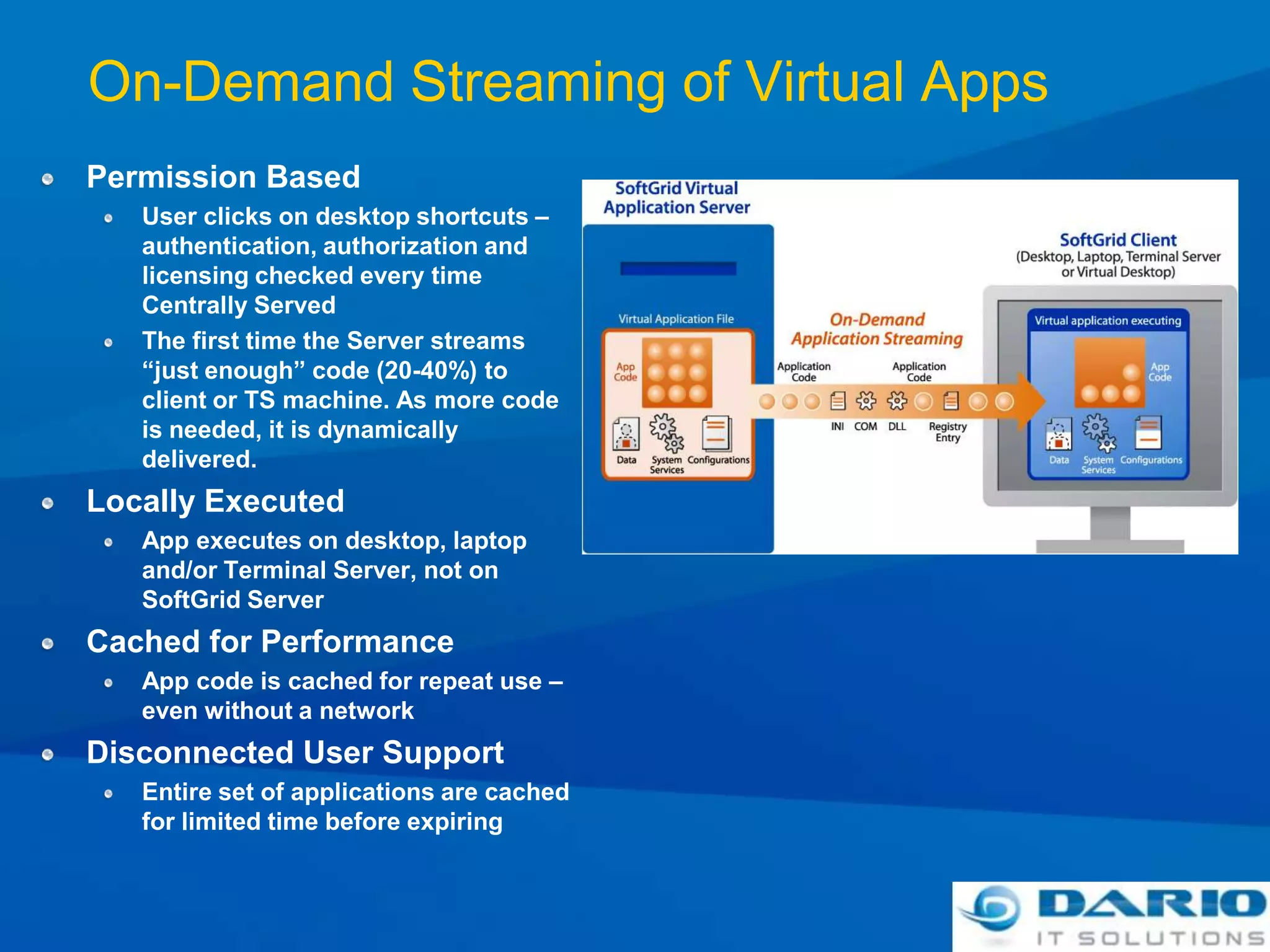
On-Demand Streaming of Virtual AppsPermission BasedUser clicks on desktop shortcuts – authentication, authorization and licensing checked every time Centrally ServedThe first time the Server streams “just enough” code (20-40%) to client or TS machine. As more code is needed, it is dynamically delivered.Locally ExecutedApp executes on desktop, laptop and/or Terminal Server, not on SoftGrid ServerCached for PerformanceApp code is cached for repeat use – even without a networkDisconnected User SupportEntire set of applications are cached for limited time before expiring
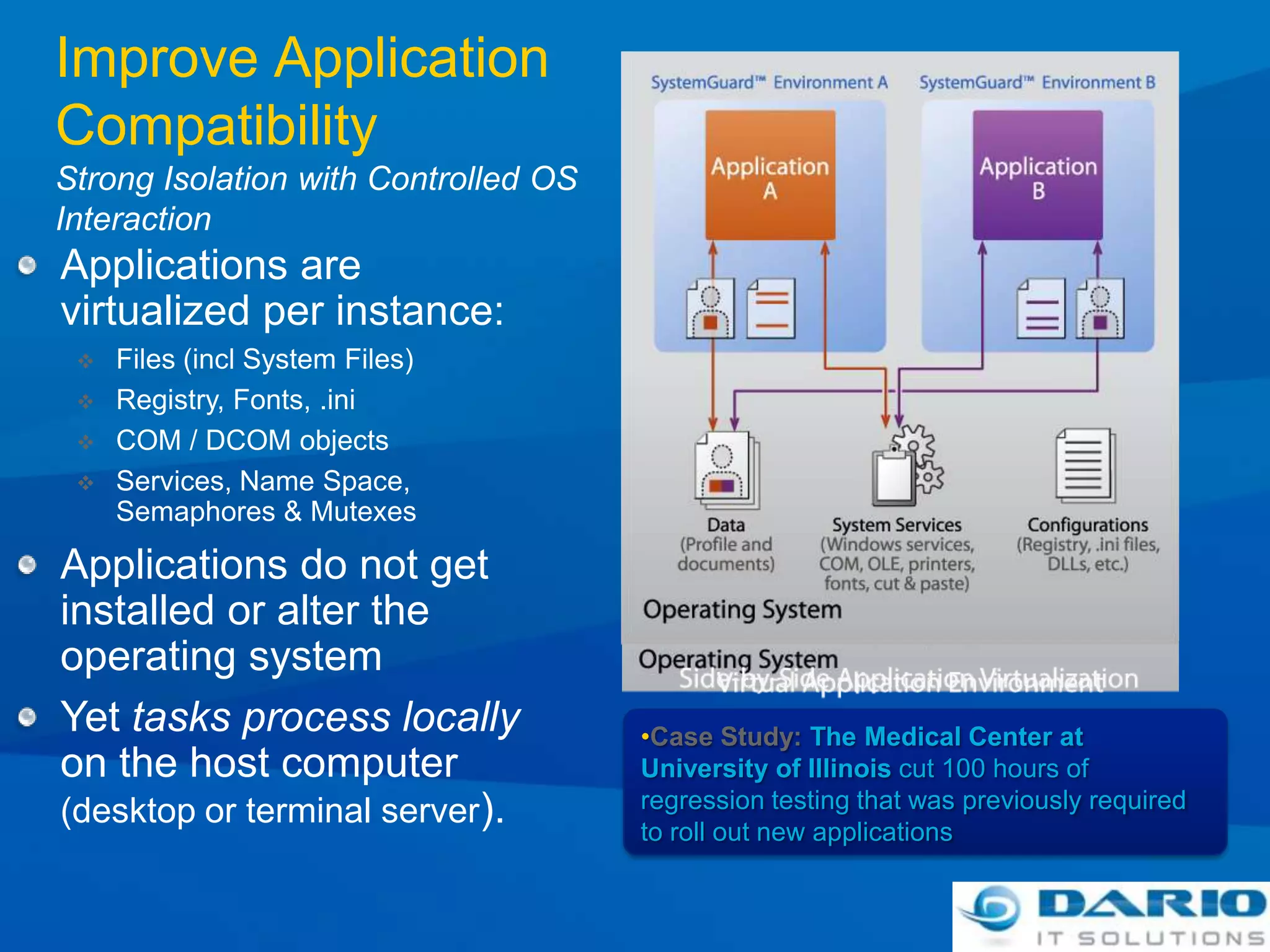
Improve Application CompatibilityStrong Isolation with Controlled OS InteractionApplications are virtualized per instance:Files (incl System Files)
Registry, Fonts, .ini
COM / DCOM objects
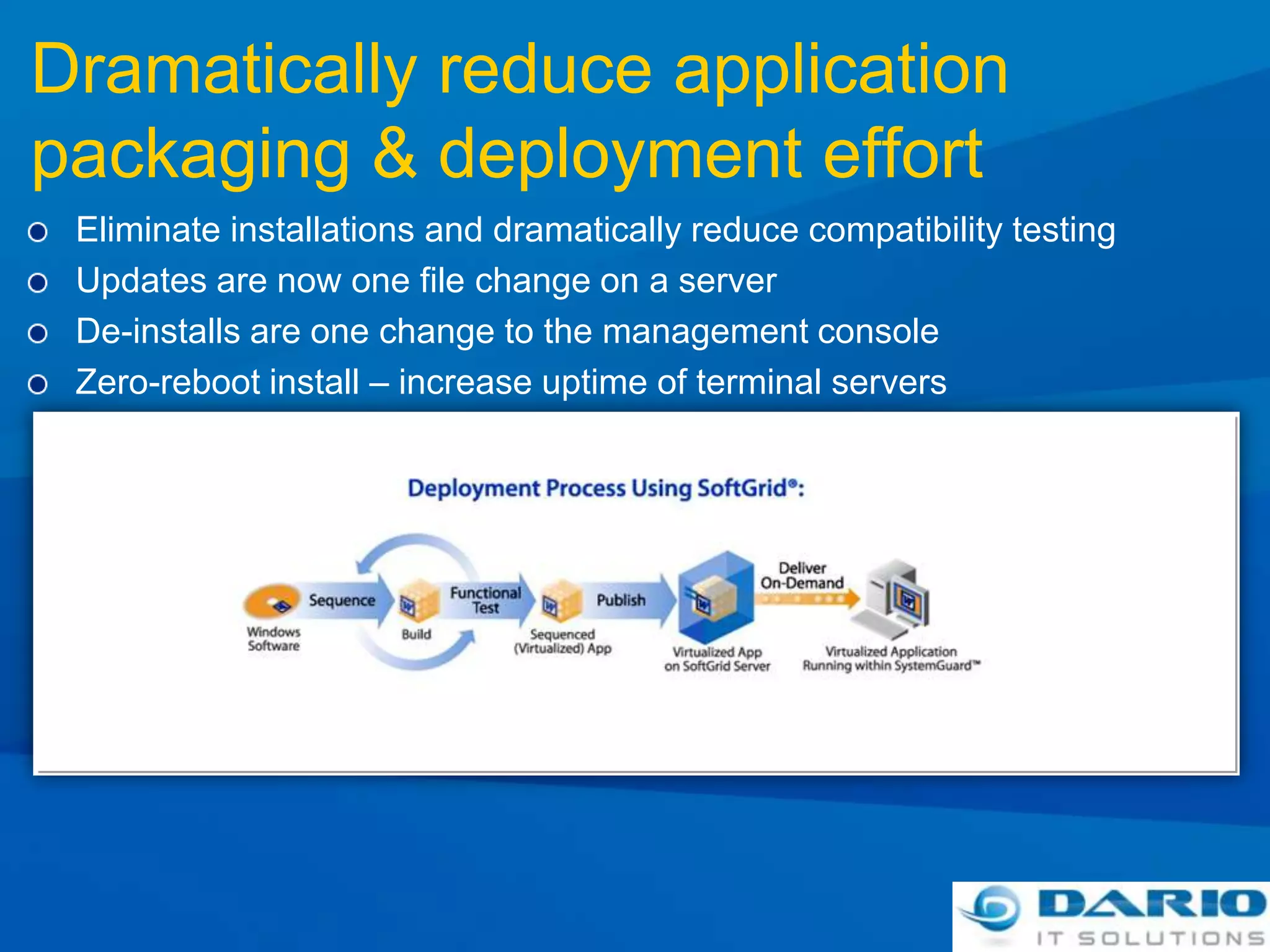
Services, Name Space, Semaphores & MutexesApplications do not get installed or alter the operating systemYet tasks process locally on the host computer (desktop or terminal server).Case Study: The Medical Center at University of Illinois cut 100 hours of regression testing that was previously required to roll out new applicationsDramatically reduce application packaging & deployment effortEliminate installations and dramatically reduce compatibility testingUpdates are now one file change on a serverDe-installs are one change to the management console Zero-reboot install – increase uptime of terminal servers
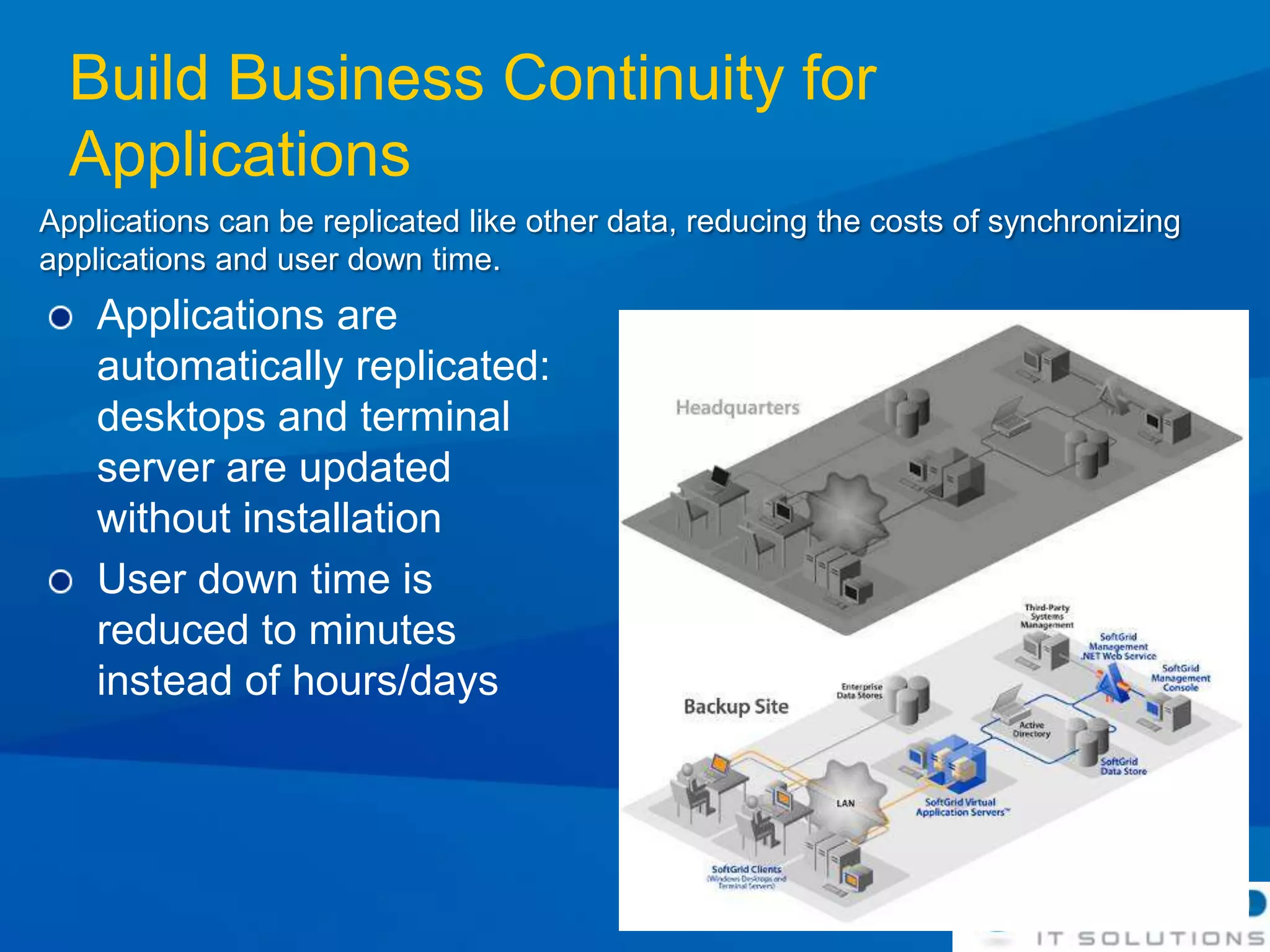
Build Business Continuity for ApplicationsApplications can be replicated like other data, reducing the costs of synchronizing applications and user down time.Applications are automatically replicated: desktops and terminal server are updated without installationUser down time is reduced to minutes instead of hours/days
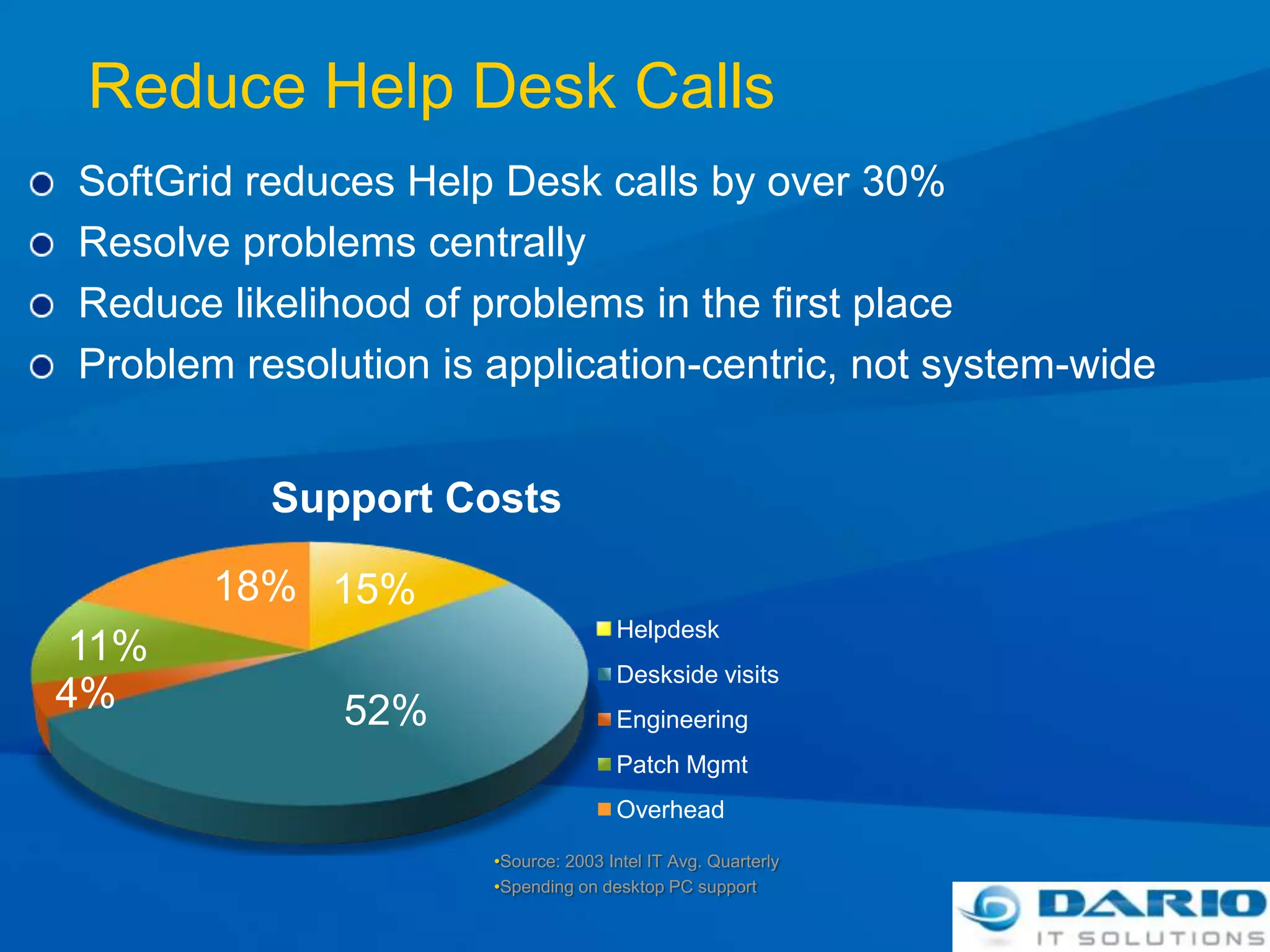
Reduce Help Desk CallsSoftGrid reduces Help Desk calls by over 30%Resolve problems centrallyReduce likelihood of problems in the first placeProblem resolution is application-centric, not system-wideSource: 2003 Intel IT Avg. Quarterly
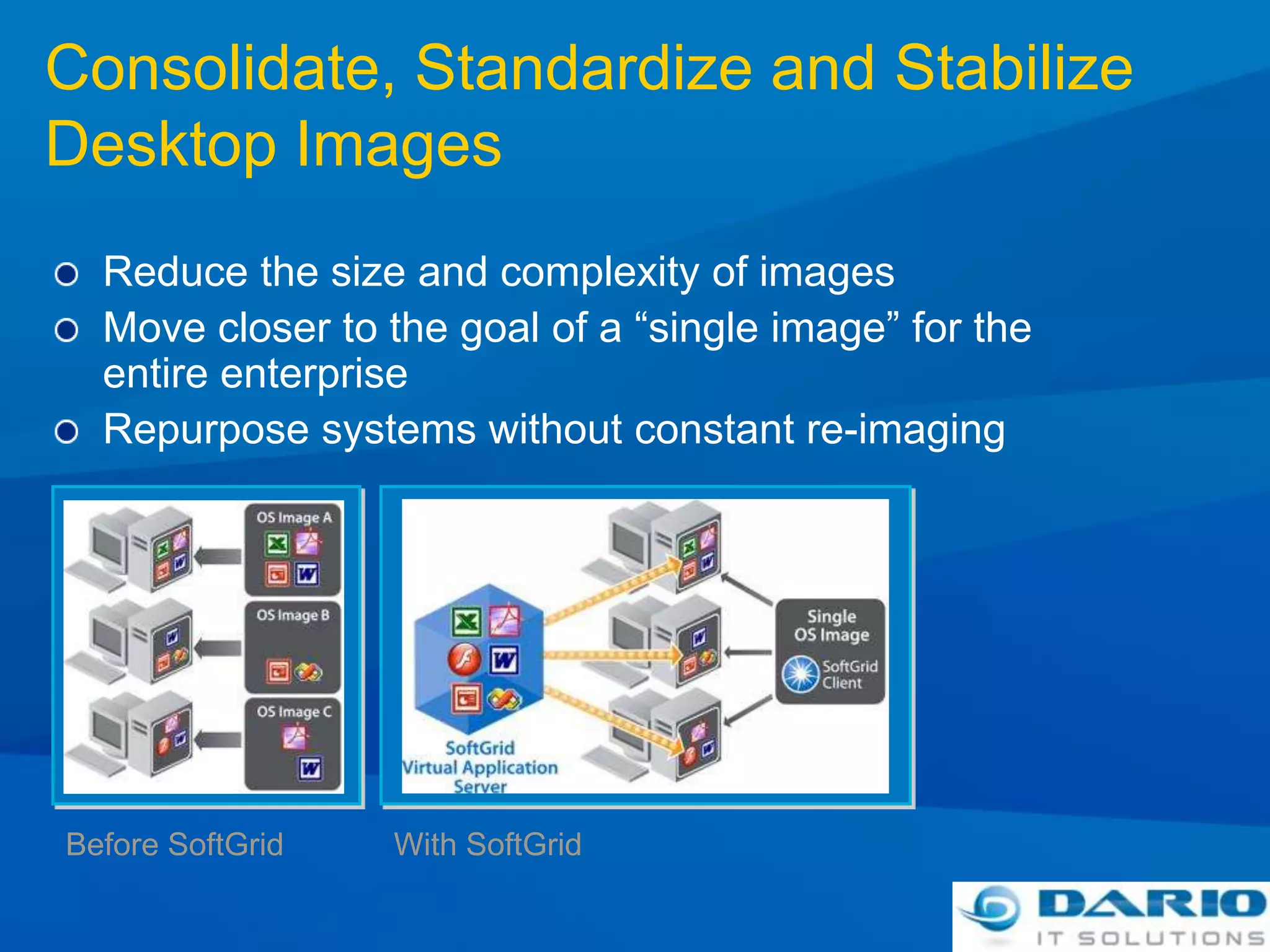
Spending on desktop PC supportConsolidate, Standardize and Stabilize Desktop ImagesReduce the size and complexity of imagesMove closer to the goal of a “single image” for the entire enterpriseRepurpose systems without constant re-imagingBefore SoftGridWith SoftGrid
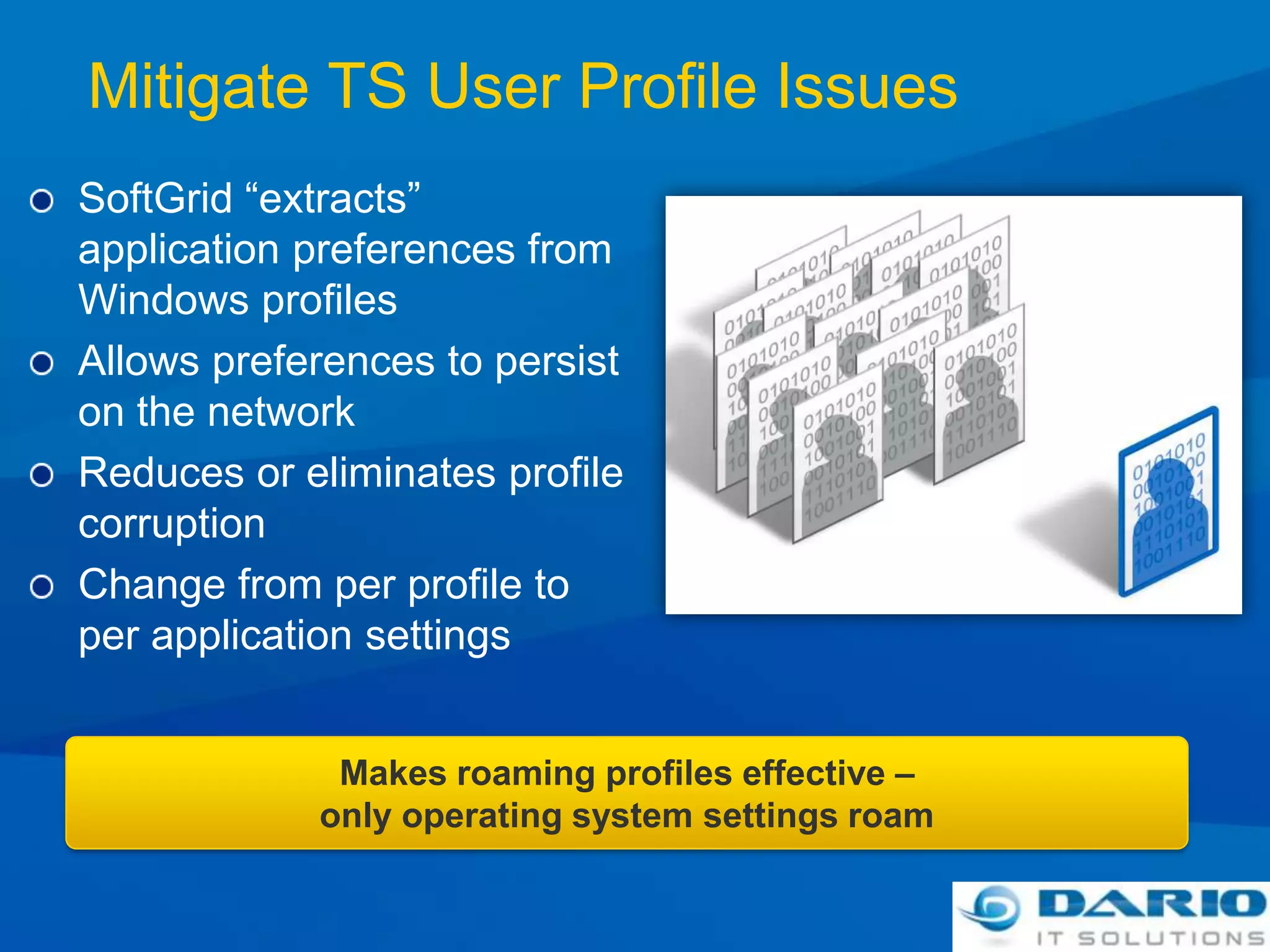
Mitigate TS User Profile IssuesSoftGrid “extracts” application preferences from Windows profilesAllows preferences to persist on the networkReduces or eliminates profile corruptionChange from per profile to per application settingsMakes roaming profiles effective – only operating system settings roam
The App-V Streaming Platform

Application Virtualization

  • 1.
    Application VirtualizationAmit GatenyoInfrastructure& Security Manager, DarioWindows Server & Security MRD, Microsoft054-2492499Amit.g@dario.co.il
  • 2.
    Microsoft VirtualizationFrom theDatacenter to the DesktopProfileMobilityDocument RedirectionOffline filesServer VirtualizationPresentation VirtualizationManagementDesktop VirtualizationApplication VirtualizationMEDV
  • 3.
    Microsoft Application VirtualizationWindowsApplication CDStreaming ServerLinearizationWindows Application InstallerVirtualized ApplicationMicrosoft Application Virtualization SequencerOptimization & CompressionMSI StandaloneThe admin has the option to stream the virtual application or create an MSI wrapper for Standalone Mode deliveryUnpackagingThe Sequencer produces the virtual application package containing the application and its dependencies.Rapidly packages applications through active watch technology including execution dependencies.Application Sequencing and packaging
  • 4.
  • 5.
  • 6.
    Myth: TS andSoftGrid Can't Be Used TogetherReality: Microsoft now offers a total application delivery solution, all managed with a single infrastructureDecision PointsApplication on:Desktop or TS or both?Do I manage my application with SoftGrid
  • 7.
    App-V for RDSApp-VManagementServerRD Session HostRD Virtualization HostRD Client
  • 8.
    Microsoft SoftGrid ApplicationVirtualizationDynamically streaming software as a centrally managed serviceRuns on local desktop / laptopConsolidate & standardize images
  • 9.
  • 10.
    Applications can betaken offlineRuns on Terminal ServerEnable Server Consolidation
  • 11.
  • 12.
    Transform TS intoa dynamic system
  • 13.
    Designed for lowbandwidthDelivering a Virtual ApplicationOn-demand deliveryCentral Mgmt.Application isolationRapidly packages applications through active watch technology including execution dependencies.Applications delivered by highly scalable infrastructure and assigned by Active Directory. Optional application license enforcement.Delivers launch threshold of application through dynamic streaming protocol and caches for repeat use. Supports disconnected mode.
  • 14.
    On-Demand Streaming ofVirtual AppsPermission BasedUser clicks on desktop shortcuts – authentication, authorization and licensing checked every time Centrally ServedThe first time the Server streams “just enough” code (20-40%) to client or TS machine. As more code is needed, it is dynamically delivered.Locally ExecutedApp executes on desktop, laptop and/or Terminal Server, not on SoftGrid ServerCached for PerformanceApp code is cached for repeat use – even without a networkDisconnected User SupportEntire set of applications are cached for limited time before expiring
  • 15.
    Improve Application CompatibilityStrongIsolation with Controlled OS InteractionApplications are virtualized per instance:Files (incl System Files)
  • 16.
  • 17.
    COM / DCOMobjects
  • 18.
    Services, Name Space,Semaphores & MutexesApplications do not get installed or alter the operating systemYet tasks process locally on the host computer (desktop or terminal server).Case Study: The Medical Center at University of Illinois cut 100 hours of regression testing that was previously required to roll out new applicationsDramatically reduce application packaging & deployment effortEliminate installations and dramatically reduce compatibility testingUpdates are now one file change on a serverDe-installs are one change to the management console Zero-reboot install – increase uptime of terminal servers
  • 19.
    Build Business Continuityfor ApplicationsApplications can be replicated like other data, reducing the costs of synchronizing applications and user down time.Applications are automatically replicated: desktops and terminal server are updated without installationUser down time is reduced to minutes instead of hours/days
  • 20.
    Reduce Help DeskCallsSoftGrid reduces Help Desk calls by over 30%Resolve problems centrallyReduce likelihood of problems in the first placeProblem resolution is application-centric, not system-wideSource: 2003 Intel IT Avg. Quarterly
  • 21.
    Spending on desktopPC supportConsolidate, Standardize and Stabilize Desktop ImagesReduce the size and complexity of imagesMove closer to the goal of a “single image” for the entire enterpriseRepurpose systems without constant re-imagingBefore SoftGridWith SoftGrid
  • 22.
    Mitigate TS UserProfile IssuesSoftGrid “extracts” application preferences from Windows profilesAllows preferences to persist on the networkReduces or eliminates profile corruptionChange from per profile to per application settingsMakes roaming profiles effective – only operating system settings roam
  • 23.
  • 24.
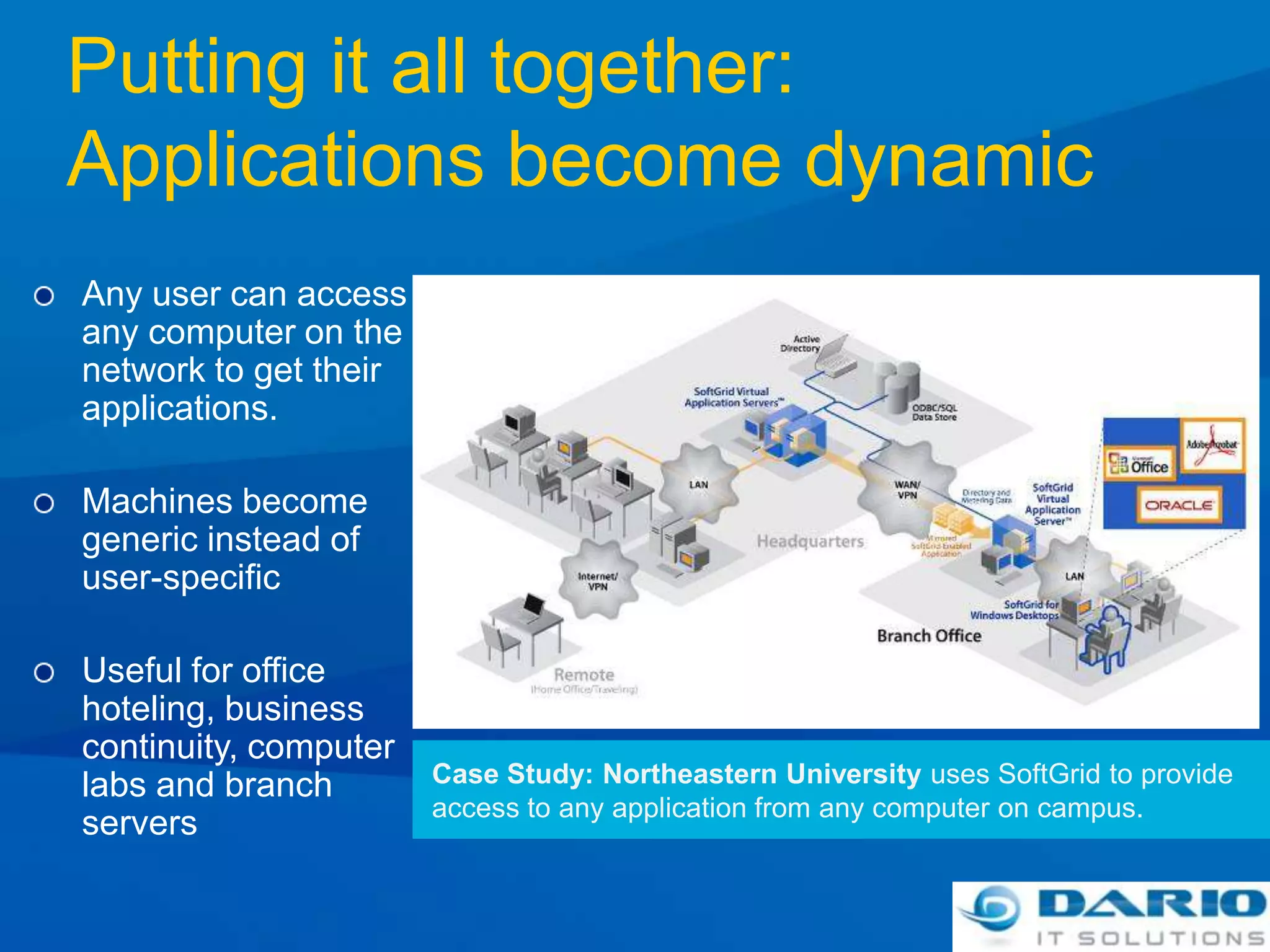
    Putting it alltogether:Applications become dynamicAny user can access any computer on the network to get their applications.Machines become generic instead of user-specific Useful for office hoteling, business continuity, computer labs and branch serversCase Study: Northeastern University uses SoftGrid to provide access to any application from any computer on campus.
  • 25.
    APP-V -Application Virtualization
  • 26.
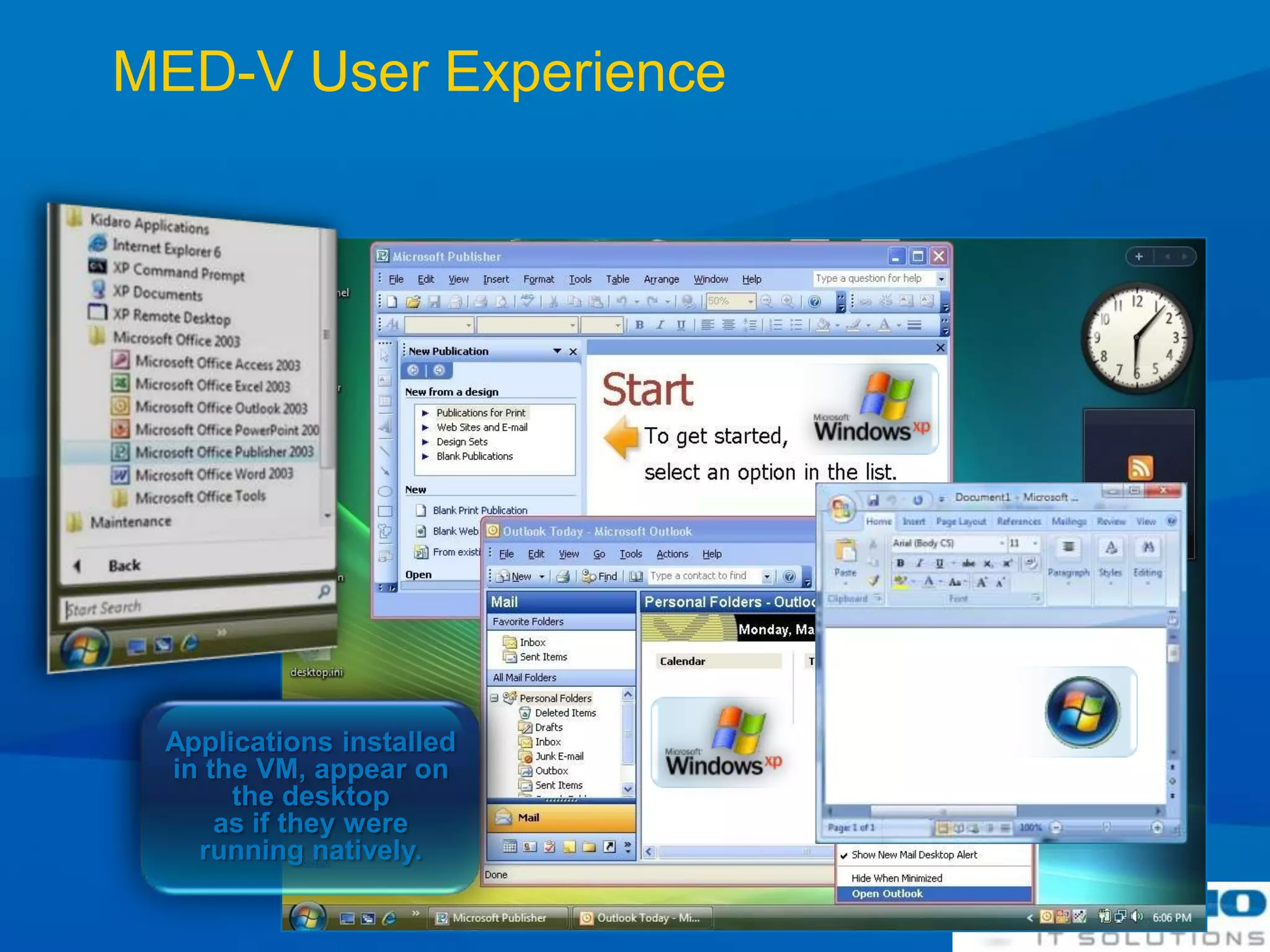
    MED-V User ExperienceApplications installed in the VM, appear on the desktop as if they were running natively.
  • 27.
    Med-V -Desktop Virtualization
  • 28.
    Session SummarySoftGrid forDesktops and SoftGrid for Terminal Services are entirely complimentarySoftGrid improves TS manageability:Improved application compatibilityConsolidate terminal serversMitigate profile issuesReduce time to solutionReduce Help Desk callsSoftGrid for Terminal Services integrates with SoftGrid for desktops / Microsoft Desktop Optimization Pack and Microsoft management tools
  • 29.
    Thank you!Amit GatenyoInfrastructure& Security Manager, DarioWindows Server & Security MRD, Microsoft054-2492499Amit.g@dario.co.il

Editor's Notes

  • #4 Contentious applications, even contentious versions of the same application (Word 2003 and 2007), can often be run on a single workstation without resorting to hardware or OS virtualizationApplications (“bits”) can be delivered (streamed) new, upgraded, and/or patched from a central location to numerous client machinesKey is you get the advantage of the app without having it entirely installed or running installerClient machines need only be baseline (e.g. XP SP1 with .NET) plus App-V client
  • #8 Runs on Remote Desktop Session Host (RDSH)Enable Server ConsolidationMitigate Roaming Profile IssuesTransform RDS into a dynamic systemDesigned for low bandwidthRequires separate App-V for RDS-CALApp-V provides application level virtualization. This separates the applications from the operating system so that they aren’t physically installed. (Registry Settings, Services, and installation files are stored on a virtual file system). Applications are virtualized per instance:Files (incl System Files)Registry, Fonts, .iniCOM / DCOM objectsServices, Name Space, Semaphores & MutexesApplications do not get installed or alter the operating systemYet tasks process locally on the host computer (i.e. the RD Session Host).App-V for RDS provides a management environment to stream applications to RDSH servers, which can be published either directly to the client or to a virtual desktop running on a Remote Desktop Virtualization Host (RDVH).