A Vision for User Centric Computing

Michele Apa - Senior Systems Engineer
mapa@vmware.com

Virtualizzazione e Cloud Computing
18 ottobre 2011 Palazzo Valentini, Roma


                                          © 2009 VMware Inc. All rights reserved
Agenda
    From PC centric to User centric
    The Adoption of a Desktop Virtualization Solution
    VMware View Overview
    • Infrastructure
    • IT Control
    • End User Freedom


2
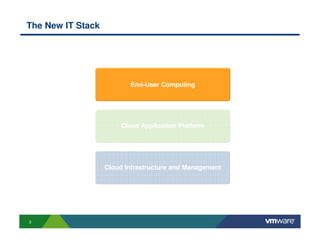
The New IT Stack


                          End-User Computing


                        Cloud Application Platform


                   Cloud Infrastructure and Management


3
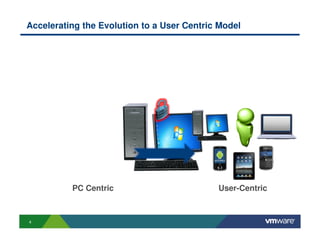
Accelerating the Evolution to a User Centric Model


          PC Centric                        User-Centric


4
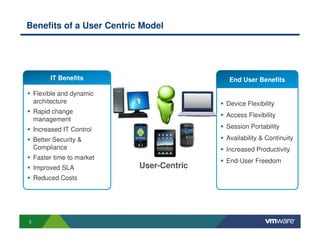
Benefits of a User Centric Model


          IT Benefits                       End User Benefits

    Flexible and dynamic
    architecture                           Device Flexibility
    Rapid change
                                           Access Flexibility
    management
    Increased IT Control                   Session Portability

    Better Security &                      Availability & Continuity
    Compliance                             Increased Productivity
    Faster time to market
                                           End-User Freedom
    Improved SLA            User-Centric
    Reduced Costs


5
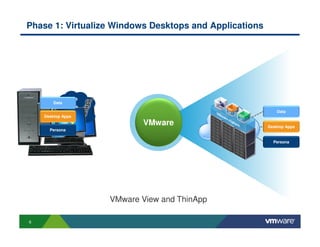
Phase 1: Virtualize Windows Desktops and Applications


                Data
       Data
                Apps
                                                                     Data
               OS
    Desktop Apps
                              VMware             Private Cloud   Desktop Apps
      Persona

                                                                   Persona


                       VMware View and ThinApp

6
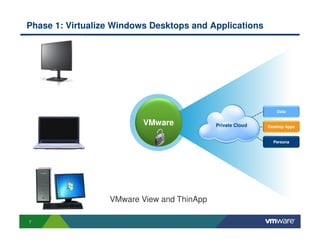
Phase 1: Virtualize Windows Desktops and Applications


                                                                Data
                                               Data
                          VMware            Private Cloud
                                                Apps
                                                            Desktop Apps
                                                OS

                                                              Persona


                  VMware View and ThinApp

7
VMware View Overview


8
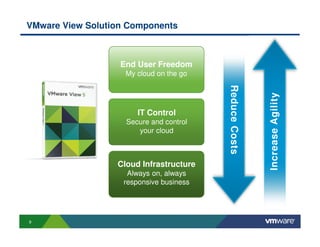
VMware View Solution Components


                   End User Freedom
                    My cloud on the go


                                         Reduce Costs


                                                        Increase Agility
                       IT Control
                    Secure and control
                       your cloud


                  Cloud Infrastructure
                    Always on, always
                   responsive business


9
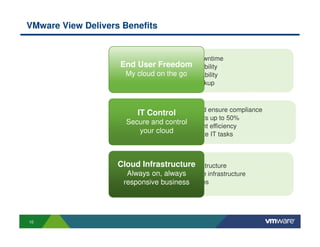
VMware View Delivers Benefits


                        • Reduce end-user downtime
                    End •User Freedom flexibility
                          Increase access
                     My • Better desktop availability
                        cloud on the go
                        • Desktop DR and backup


                         • Increase security and ensure compliance
                         IT Control
                         • Reduce desktop costs up to 50%
                      Secure and control
                         • Desktop management efficiency
                          your cloud
                         • Simplify and automate IT tasks


                    Cloud Infrastructure
                        • Zero downtime infrastructure
                      Always on, always agile infrastructure
                         • Responsive and
                     responsive business
                         • On-demand resources


10
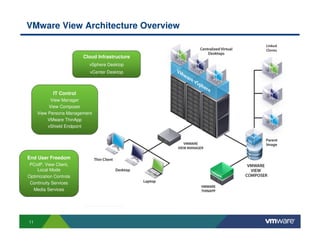
VMware View Architecture Overview


                         Cloud Infrastructure
                           vSphere Desktop
                           vCenter Desktop


            IT Control
           View Manager
          View Composer
     View Persona Management
          VMware ThinApp
          vShield Endpoint


End User Freedom
 PCoIP, View Client,
    Local Mode
Optimization Controls
 Continuity Services
  Media Services


11
Cloud Infrastructure
     Always on, always responsive business


12
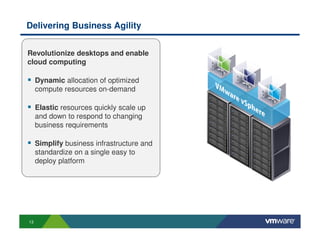
Delivering Business Agility


Revolutionize desktops and enable
cloud computing

     Dynamic allocation of optimized
     compute resources on-demand

     Elastic resources quickly scale up
     and down to respond to changing
     business requirements

     Simplify business infrastructure and
     standardize on a single easy to
     deploy platform


13
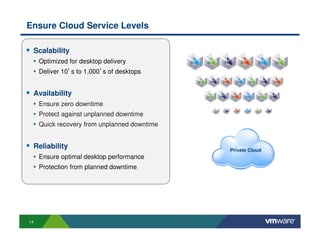
Ensure Cloud Service Levels

 Scalability
 • Optimized for desktop delivery
 • Deliver 10’s to 1,000’s of desktops


 Availability
 • Ensure zero downtime
 • Protect against unplanned downtime
 • Quick recovery from unplanned downtime


 Reliability                                Private Cloud
 • Ensure optimal desktop performance
 • Protection from planned downtime


14
IT Control
     Secure and control your cloud


15
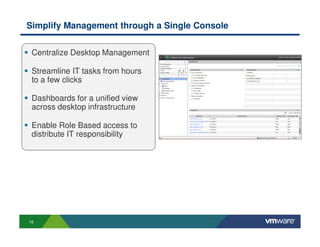
Simplify Management through a Single Console


 Centralize Desktop Management

 Streamline IT tasks from hours
 to a few clicks

 Dashboards for a unified view
 across desktop infrastructure

 Enable Role Based access to
 distribute IT responsibility


16
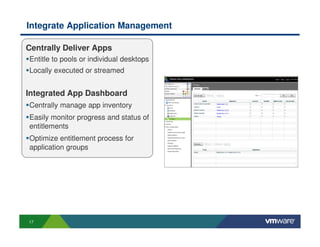
Integrate Application Management

Centrally Deliver Apps
Entitle to pools or individual desktops
Locally executed or streamed


Integrated App Dashboard
Centrally manage app inventory
Easily monitor progress and status of
entitlements
Optimize entitlement process for
application groups


17
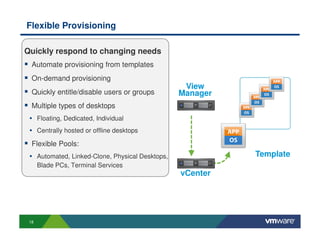
Flexible Provisioning

Quickly respond to changing needs
  Automate provisioning from templates
  On-demand provisioning
                                                  View
  Quickly entitle/disable users or groups        Manager
  Multiple types of desktops
 • Floating, Dedicated, Individual
 • Centrally hosted or offline desktops
  Flexible Pools:
 • Automated, Linked-Clone, Physical Desktops,             Template
      Blade PCs, Terminal Services
                                                 vCenter


 18
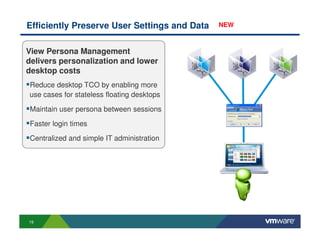
Efficiently Preserve User Settings and Data   NEW


View Persona Management
delivers personalization and lower
desktop costs
Reduce desktop TCO by enabling more
use cases for stateless floating desktops
Maintain user persona between sessions

Faster login times

Centralized and simple IT administration


19
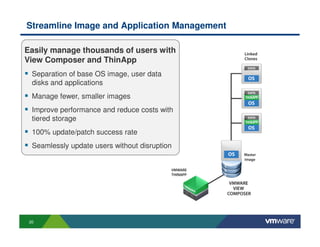
Streamline Image and Application Management

Easily manage thousands of users with
View Composer and ThinApp
  Separation of base OS image, user data
  disks and applications
  Manage fewer, smaller images
  Improve performance and reduce costs with
  tiered storage
  100% update/patch success rate
  Seamlessly update users without disruption


 20
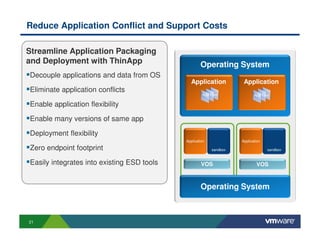
Reduce Application Conflict and Support Costs

Streamline Application Packaging
and Deployment with ThinApp                         Operating System
Decouple applications and data from OS
                                               Application           Application
Eliminate application conflicts
                                                     App Files             App Files

Enable application flexibility

Enable many versions of same app

Deployment flexibility
                                            Application             Application

Zero endpoint footprint                                   sandbox                 sandbox


Easily integrates into existing ESD tools           VOS                     VOS


                                                    Operating System


21
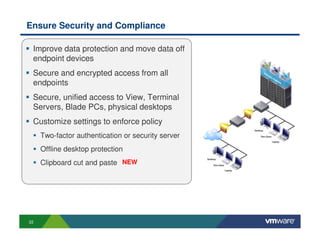
Ensure Security and Compliance

 Improve data protection and move data off
 endpoint devices
 Secure and encrypted access from all
 endpoints
 Secure, unified access to View, Terminal
 Servers, Blade PCs, physical desktops
 Customize settings to enforce policy
     Two-factor authentication or security server
     Offline desktop protection
     Clipboard cut and paste NEW


22
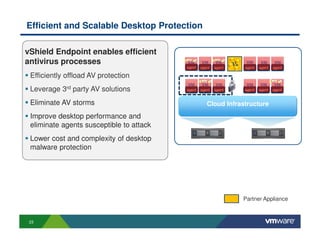
Efficient and Scalable Desktop Protection

vShield Endpoint enables efficient
antivirus processes                                               AV
                                          agent   agent   agent        agent   agent   agent

 Efficiently offload AV protection
 Leverage 3rd party AV solutions          agent   agent   agent        agent   agent   agent


 Eliminate AV storms                                 Cloud Infrastructure
 Improve desktop performance and
 eliminate agents susceptible to attack
 Lower cost and complexity of desktop
 malware protection


                                                                       Partner Appliance


 23
End User Freedom
       My cloud on the go


24
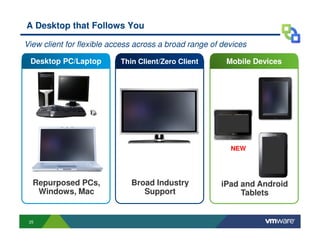
A Desktop that Follows You

View client for flexible access across a broad range of devices

 Desktop PC/Laptop         Thin Client/Zero Client       Mobile Devices


                                                          NEW


  Repurposed PCs,             Broad Industry           iPad and Android
   Windows, Mac                  Support                    Tablets


 25
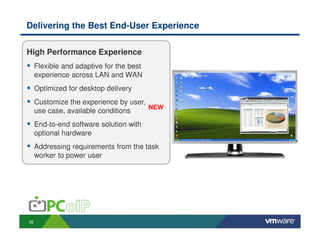
Delivering the Best End-User Experience

High Performance Experience
     Flexible and adaptive for the best
     experience across LAN and WAN
     Optimized for desktop delivery
     Customize the experience by user,
                                       NEW
     use case, available conditions
     End-to-end software solution with
     optional hardware
     Addressing requirements from the task
     worker to power user


26
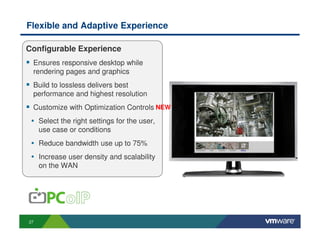
Flexible and Adaptive Experience

Configurable Experience
 Ensures responsive desktop while
 rendering pages and graphics
 Build to lossless delivers best
 performance and highest resolution
 Customize with Optimization Controls NEW
 • Select the right settings for the user,
     use case or conditions
 • Reduce bandwidth use up to 75%
 • Increase user density and scalability
     on the WAN


27
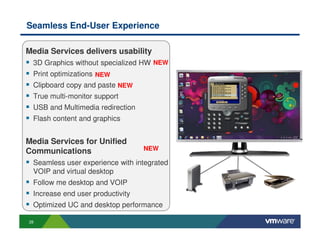
Seamless End-User Experience

Media Services delivers usability
 3D Graphics without specialized HW NEW
 Print optimizations NEW
 Clipboard copy and paste NEW
 True multi-monitor support
 USB and Multimedia redirection
 Flash content and graphics


Media Services for Unified
Communications                    NEW

 Seamless user experience with integrated
 VOIP and virtual desktop
 Follow me desktop and VOIP
 Increase end user productivity
 Optimized UC and desktop performance

28
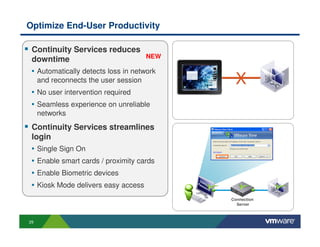
Optimize End-User Productivity

 Continuity Services reduces
                                     NEW
 downtime
 • Automatically detects loss in network
     and reconnects the user session        X
 • No user intervention required
 • Seamless experience on unreliable
     networks
 Continuity Services streamlines
 login
 • Single Sign On
 • Enable smart cards / proximity cards
 • Enable Biometric devices
 • Kiosk Mode delivers easy access
                                           Connection
                                             Server


29
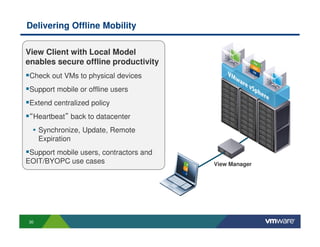
Delivering Offline Mobility

View Client with Local Model
enables secure offline productivity
 Check out VMs to physical devices
 Support mobile or offline users
 Extend centralized policy
 “Heartbeat” back to datacenter
  • Synchronize, Update, Remote
      Expiration
 Support mobile users, contractors and
EOIT/BYOPC use cases                     View Manager


 30
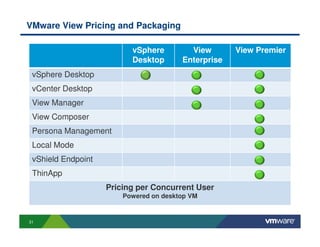
VMware View Pricing and Packaging

                          vSphere         View       View Premier
                          Desktop       Enterprise
 vSphere Desktop
 vCenter Desktop
 View Manager
 View Composer
 Persona Management
 Local Mode
 vShield Endpoint
 ThinApp
                    Pricing per Concurrent User
                        Powered on desktop VM


31
VMware View Next Steps


                        Learn More
           http://www.vmware.com/products/view/

                  Build The Business Case
        http://www.vmware.com/products/view/tco.html

                   Explore The Capabilities
          http://www.vmware.com/go/tryvmwareview

                         Find a partner
              http://partnerlocator.vmware.com


32
THANK YOU


            © 2009 VMware Inc. All rights reserved

V mware view

  • 1.
    A Vision forUser Centric Computing Michele Apa - Senior Systems Engineer mapa@vmware.com Virtualizzazione e Cloud Computing 18 ottobre 2011 Palazzo Valentini, Roma © 2009 VMware Inc. All rights reserved
  • 2.
    Agenda From PC centric to User centric The Adoption of a Desktop Virtualization Solution VMware View Overview • Infrastructure • IT Control • End User Freedom 2
  • 3.
    The New ITStack End-User Computing Cloud Application Platform Cloud Infrastructure and Management 3
  • 4.
    Accelerating the Evolutionto a User Centric Model PC Centric User-Centric 4
  • 5.
    Benefits of aUser Centric Model IT Benefits End User Benefits Flexible and dynamic architecture Device Flexibility Rapid change Access Flexibility management Increased IT Control Session Portability Better Security & Availability & Continuity Compliance Increased Productivity Faster time to market End-User Freedom Improved SLA User-Centric Reduced Costs 5
  • 6.
    Phase 1: VirtualizeWindows Desktops and Applications Data Data Apps Data OS Desktop Apps VMware Private Cloud Desktop Apps Persona Persona VMware View and ThinApp 6
  • 7.
    Phase 1: VirtualizeWindows Desktops and Applications Data Data VMware Private Cloud Apps Desktop Apps OS Persona VMware View and ThinApp 7
  • 8.
  • 9.
    VMware View SolutionComponents End User Freedom My cloud on the go Reduce Costs Increase Agility IT Control Secure and control your cloud Cloud Infrastructure Always on, always responsive business 9
  • 10.
    VMware View DeliversBenefits • Reduce end-user downtime End •User Freedom flexibility Increase access My • Better desktop availability cloud on the go • Desktop DR and backup • Increase security and ensure compliance IT Control • Reduce desktop costs up to 50% Secure and control • Desktop management efficiency your cloud • Simplify and automate IT tasks Cloud Infrastructure • Zero downtime infrastructure Always on, always agile infrastructure • Responsive and responsive business • On-demand resources 10
  • 11.
    VMware View ArchitectureOverview Cloud Infrastructure vSphere Desktop vCenter Desktop IT Control View Manager View Composer View Persona Management VMware ThinApp vShield Endpoint End User Freedom PCoIP, View Client, Local Mode Optimization Controls Continuity Services Media Services 11
  • 12.
    Cloud Infrastructure Always on, always responsive business 12
  • 13.
    Delivering Business Agility Revolutionizedesktops and enable cloud computing Dynamic allocation of optimized compute resources on-demand Elastic resources quickly scale up and down to respond to changing business requirements Simplify business infrastructure and standardize on a single easy to deploy platform 13
  • 14.
    Ensure Cloud ServiceLevels Scalability • Optimized for desktop delivery • Deliver 10’s to 1,000’s of desktops Availability • Ensure zero downtime • Protect against unplanned downtime • Quick recovery from unplanned downtime Reliability Private Cloud • Ensure optimal desktop performance • Protection from planned downtime 14
  • 15.
    IT Control Secure and control your cloud 15
  • 16.
    Simplify Management througha Single Console Centralize Desktop Management Streamline IT tasks from hours to a few clicks Dashboards for a unified view across desktop infrastructure Enable Role Based access to distribute IT responsibility 16
  • 17.
    Integrate Application Management CentrallyDeliver Apps Entitle to pools or individual desktops Locally executed or streamed Integrated App Dashboard Centrally manage app inventory Easily monitor progress and status of entitlements Optimize entitlement process for application groups 17
  • 18.
    Flexible Provisioning Quickly respondto changing needs Automate provisioning from templates On-demand provisioning View Quickly entitle/disable users or groups Manager Multiple types of desktops • Floating, Dedicated, Individual • Centrally hosted or offline desktops Flexible Pools: • Automated, Linked-Clone, Physical Desktops, Template Blade PCs, Terminal Services vCenter 18
  • 19.
    Efficiently Preserve UserSettings and Data NEW View Persona Management delivers personalization and lower desktop costs Reduce desktop TCO by enabling more use cases for stateless floating desktops Maintain user persona between sessions Faster login times Centralized and simple IT administration 19
  • 20.
    Streamline Image andApplication Management Easily manage thousands of users with View Composer and ThinApp Separation of base OS image, user data disks and applications Manage fewer, smaller images Improve performance and reduce costs with tiered storage 100% update/patch success rate Seamlessly update users without disruption 20
  • 21.
    Reduce Application Conflictand Support Costs Streamline Application Packaging and Deployment with ThinApp Operating System Decouple applications and data from OS Application Application Eliminate application conflicts App Files App Files Enable application flexibility Enable many versions of same app Deployment flexibility Application Application Zero endpoint footprint sandbox sandbox Easily integrates into existing ESD tools VOS VOS Operating System 21
  • 22.
    Ensure Security andCompliance Improve data protection and move data off endpoint devices Secure and encrypted access from all endpoints Secure, unified access to View, Terminal Servers, Blade PCs, physical desktops Customize settings to enforce policy Two-factor authentication or security server Offline desktop protection Clipboard cut and paste NEW 22
  • 23.
    Efficient and ScalableDesktop Protection vShield Endpoint enables efficient antivirus processes AV agent agent agent agent agent agent Efficiently offload AV protection Leverage 3rd party AV solutions agent agent agent agent agent agent Eliminate AV storms Cloud Infrastructure Improve desktop performance and eliminate agents susceptible to attack Lower cost and complexity of desktop malware protection Partner Appliance 23
  • 24.
    End User Freedom My cloud on the go 24
  • 25.
    A Desktop thatFollows You View client for flexible access across a broad range of devices Desktop PC/Laptop Thin Client/Zero Client Mobile Devices NEW Repurposed PCs, Broad Industry iPad and Android Windows, Mac Support Tablets 25
  • 26.
    Delivering the BestEnd-User Experience High Performance Experience Flexible and adaptive for the best experience across LAN and WAN Optimized for desktop delivery Customize the experience by user, NEW use case, available conditions End-to-end software solution with optional hardware Addressing requirements from the task worker to power user 26
  • 27.
    Flexible and AdaptiveExperience Configurable Experience Ensures responsive desktop while rendering pages and graphics Build to lossless delivers best performance and highest resolution Customize with Optimization Controls NEW • Select the right settings for the user, use case or conditions • Reduce bandwidth use up to 75% • Increase user density and scalability on the WAN 27
  • 28.
    Seamless End-User Experience MediaServices delivers usability 3D Graphics without specialized HW NEW Print optimizations NEW Clipboard copy and paste NEW True multi-monitor support USB and Multimedia redirection Flash content and graphics Media Services for Unified Communications NEW Seamless user experience with integrated VOIP and virtual desktop Follow me desktop and VOIP Increase end user productivity Optimized UC and desktop performance 28
  • 29.
    Optimize End-User Productivity Continuity Services reduces NEW downtime • Automatically detects loss in network and reconnects the user session X • No user intervention required • Seamless experience on unreliable networks Continuity Services streamlines login • Single Sign On • Enable smart cards / proximity cards • Enable Biometric devices • Kiosk Mode delivers easy access Connection Server 29
  • 30.
    Delivering Offline Mobility ViewClient with Local Model enables secure offline productivity Check out VMs to physical devices Support mobile or offline users Extend centralized policy “Heartbeat” back to datacenter • Synchronize, Update, Remote Expiration Support mobile users, contractors and EOIT/BYOPC use cases View Manager 30
  • 31.
    VMware View Pricingand Packaging vSphere View View Premier Desktop Enterprise vSphere Desktop vCenter Desktop View Manager View Composer Persona Management Local Mode vShield Endpoint ThinApp Pricing per Concurrent User Powered on desktop VM 31
  • 32.
    VMware View NextSteps Learn More http://www.vmware.com/products/view/ Build The Business Case http://www.vmware.com/products/view/tco.html Explore The Capabilities http://www.vmware.com/go/tryvmwareview Find a partner http://partnerlocator.vmware.com 32
  • 33.
    THANK YOU © 2009 VMware Inc. All rights reserved