Application VirtualizationHow much time do you spend installing stand-a-lone or thick client network apps on individual computers?Returning to Sanity
Presentation ObjectivesUnderstand the concept of application virtualization and specifically the Microsoft solution for app virtualizationKnow the costs and licensing involved with purchasing MS Application VirtualizationLearn how MS Application Virtualization  can help your school district deploy applications with out installing themBe aware of the pros and cons of application virtualization
What is Application Virtualization?According to Wikipedia:  “Application virtualization is an umbrella term that describes software technologies that improve portability, manageability and compatibility of applications by encapsulating them from the underlying operating system on which they are executed.  A fully virtualized application is not installed in the traditional sense [1], although it is still executed as if it is.  The application is fooled at runtime into believing that it is directly interfacing with the original operating system and all the resources managed by it, when in reality it is not.  Application virtualization differs from operating system virtualization in that in the latter case, the whole operating system is virtualized rather than only specific applications.“  Ardence is an example of operating system virtualization
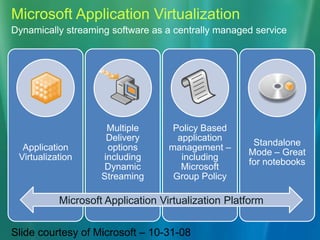
Microsoft Application VirtualizationDynamically streaming software as a centrally managed serviceMicrosoft Application Virtualization PlatformSlide courtesy of Microsoft – 10-31-08
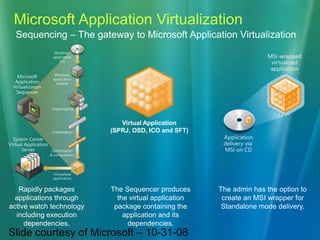
Microsoft Application VirtualizationSequencing – The gateway to Microsoft Application VirtualizationVirtual Application(SPRJ, OSD, ICO and SFT)Rapidly packages applications through active watch technology including execution dependencies.The admin has the option to create an MSI wrapper for Standalone mode delivery. The Sequencer producesthe virtual application package containing the application and its dependencies.Slide courtesy of Microsoft – 10-31-08
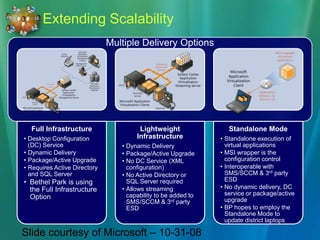
Extending ScalabilityMultiple Delivery OptionsSlide courtesy of Microsoft – 10-31-08
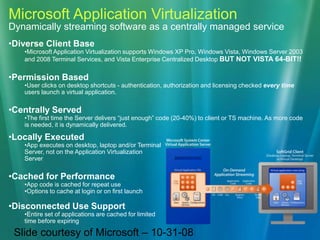
Microsoft Application VirtualizationDynamically streaming software as a centrally managed serviceDiverse Client Base
Microsoft Application Virtualization supports Windows XP Pro, Windows Vista, Windows Server 2003 and 2008 Terminal Services, and Vista Enterprise Centralized Desktop BUT NOT VISTA 64-BIT!!
Permission Based
User clicks on desktop shortcuts - authentication, authorization and licensing checked every time users launch a virtual application.
Centrally Served
The first time the Server delivers “just enough” code (20-40%) to client or TS machine. As more code is needed, it is dynamically delivered.
Locally Executed
App executes on desktop, laptop and/or Terminal Server, not on the Application Virtualization Server
Cached for Performance
App code is cached for repeat use
Options to cache at login or on first launch

App V

  • 1.
    Application VirtualizationHow muchtime do you spend installing stand-a-lone or thick client network apps on individual computers?Returning to Sanity
  • 2.
    Presentation ObjectivesUnderstand theconcept of application virtualization and specifically the Microsoft solution for app virtualizationKnow the costs and licensing involved with purchasing MS Application VirtualizationLearn how MS Application Virtualization can help your school district deploy applications with out installing themBe aware of the pros and cons of application virtualization
  • 3.
    What is ApplicationVirtualization?According to Wikipedia: “Application virtualization is an umbrella term that describes software technologies that improve portability, manageability and compatibility of applications by encapsulating them from the underlying operating system on which they are executed. A fully virtualized application is not installed in the traditional sense [1], although it is still executed as if it is. The application is fooled at runtime into believing that it is directly interfacing with the original operating system and all the resources managed by it, when in reality it is not. Application virtualization differs from operating system virtualization in that in the latter case, the whole operating system is virtualized rather than only specific applications.“ Ardence is an example of operating system virtualization
  • 4.
    Microsoft Application VirtualizationDynamicallystreaming software as a centrally managed serviceMicrosoft Application Virtualization PlatformSlide courtesy of Microsoft – 10-31-08
  • 5.
    Microsoft Application VirtualizationSequencing– The gateway to Microsoft Application VirtualizationVirtual Application(SPRJ, OSD, ICO and SFT)Rapidly packages applications through active watch technology including execution dependencies.The admin has the option to create an MSI wrapper for Standalone mode delivery. The Sequencer producesthe virtual application package containing the application and its dependencies.Slide courtesy of Microsoft – 10-31-08
  • 6.
    Extending ScalabilityMultiple DeliveryOptionsSlide courtesy of Microsoft – 10-31-08
  • 7.
    Microsoft Application VirtualizationDynamicallystreaming software as a centrally managed serviceDiverse Client Base
  • 8.
    Microsoft Application Virtualizationsupports Windows XP Pro, Windows Vista, Windows Server 2003 and 2008 Terminal Services, and Vista Enterprise Centralized Desktop BUT NOT VISTA 64-BIT!!
  • 9.
  • 10.
    User clicks ondesktop shortcuts - authentication, authorization and licensing checked every time users launch a virtual application.
  • 11.
  • 12.
    The first timethe Server delivers “just enough” code (20-40%) to client or TS machine. As more code is needed, it is dynamically delivered.
  • 13.
  • 14.
    App executes ondesktop, laptop and/or Terminal Server, not on the Application Virtualization Server
  • 15.
  • 16.
    App code iscached for repeat use
  • 17.
    Options to cacheat login or on first launch
  • 18.
  • 19.
    Entire set ofapplications are cached for limited time before expiring Slide courtesy of Microsoft – 10-31-08
  • 20.
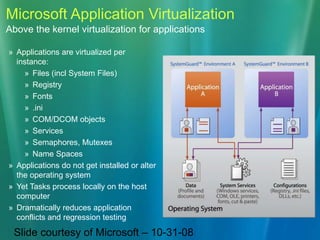
    Microsoft Application VirtualizationAbovethe kernel virtualization for applicationsApplications are virtualized per instance:
  • 21.
  • 22.
  • 23.
  • 24.
  • 25.
  • 26.
  • 27.
  • 28.
  • 29.
    Applications do notget installed or alter the operating system
  • 30.
    Yet Tasks processlocally on the host computer
  • 31.
    Dramatically reduces applicationconflicts and regression testingSlide courtesy of Microsoft – 10-31-08
  • 32.
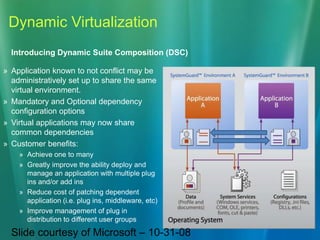
    Dynamic VirtualizationIntroducing DynamicSuite Composition (DSC)Application known to not conflict may be administratively set up to share the same virtual environment.
  • 33.
    Mandatory and Optionaldependency configuration options
  • 34.
    Virtual applications maynow share common dependencies
  • 35.
  • 36.
  • 37.
    Greatly improve theability deploy and manage an application with multiple plug ins and/or add ins
  • 38.
    Reduce cost ofpatching dependent application (i.e. plug ins, middleware, etc)
  • 39.
    Improve management ofplug in distribution to different user groupsSlide courtesy of Microsoft – 10-31-08
  • 40.
    Microsoft Application VirtualizationInterop with SMS 2003/SCCM 2007 and more…Multiple Options for InteroperabilityInteroperability with SMS 2003 R2 and SCCM 2007Streaming capabilities can be added to SMS/SCCM 2007 Distribution pointsSequencer option to create MSI wrapper as control point for virtual applications (System Center Application Virtualization Server is not required)Virtual applications can be inventoried WMI Provider or via Add/Remove Program scanning (MSI option only)Third party ESD systems may also control virtual applications either through script or through MSI wrapper Native Application Virtualization integration coming with SCCM R2Slide courtesy of Microsoft – 10-31-08
  • 41.
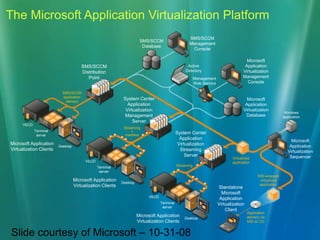
    The Microsoft ApplicationVirtualization PlatformSMS/SCCM Management ConsoleSMS/SCCM DatabaseMicrosoft Application Virtualization Management ConsoleActive DirectorySMS/SCCM Distribution PointManagement Web ServiceSMS/SCCM application deliverySystem Center Application Virtualization Management ServerMicrosoft Application Virtualization DatabaseWindows applicationVECDStreaming+manifestTerminalserverSystem Center Application Virtualization Streaming ServerMicrosoft Application Virtualization SequencerMicrosoft Application Virtualization ClientsDesktopVirtualized applicationVECDStreamingTerminalserverMSI-wrapped virtualized applicationMicrosoft Application Virtualization ClientsDesktopStandaloneMicrosoft Application Virtualization ClientVECDTerminalserverApplication delivery via MSI on CDMicrosoft Application Virtualization ClientsDesktopSlide courtesy of Microsoft – 10-31-08
  • 42.
    Costs and LicensingApp-Vis sold educationally as part of the Microsoft Desktop Optimization Pak (MDOP). Presently it is available via School Agreement and can be added on for approximately $3.50 / desktop (depending on quantity this price may be lower)The MDOP is also included with Windows Vista EnterpriseMDOP is available to customers with volume license agreements. Contact your Microsoft rep for the straight scoop on the best way to license MDOP for your organization
  • 43.
    BTW: Whatelse comes with MDOP?Current components of the MDOP include:Microsoft Application Virtualization Microsoft Asset Inventory Service Microsoft Advanced Group Policy Management Microsoft Diagnostics and Recovery Toolset Microsoft System Center Desktop Error Monitoringhttp://www.microsoft.com/windows/products/windowsvista/enterprise/default.mspx
  • 44.
    How hard isthis to do?Matt – Your on…Matt Johnson, BPSD Application Specialist demonstrates the components of Microsoft Application Virtualization and shows how to sequence an application for virtual deployment
  • 45.
    ProsNo more installingindividual apps to individual workstationsApps can be simultaneously licensed in smaller numbers due to App-V’s license management featuresNon network apps can be deployed on the network via App-VMultiple versions of the same app can be deployed together without fear of conflictVirtual apps do not permanently occupy HD space if you reset them after useBoth test and actual deployments of curricular apps are possible without tying up techniciansTeachers are happier
  • 46.
    ConsEach virtualized appmust be sequenced first – sequencing can be tricky, time consuming and occasionally difficultSome apps cannot be sequenced at all; i.e. Microsoft Office, Adobe Acrobat Standard / ProSome apps should not be sequenced; i.e. CS3 and AutoCADThere is some small amount of management overhead in configuring and maintaining AD access for vitualized appsEach workstation must be running the App-V client – this can be scripted to install at loginAt present the App-V client does not support the 64-bit Vista environment – 64-bit is slated for version 4.5 SP1 mid next yearApp-V is an additional yearly cost
  • 47.
    Q & ASendquestions or thoughts to Ron Reyer or Matt Johnson – this PPT can be downloaded from:The following URL:http://cid-052ae41d022938ee.skydrive.live.com/browse.aspx/TRETC08 has a length of 66 characters and resulted in the following TinyURL which has a length of 25 characters:http://tinyurl.com/6kun5fOr, give your recipients confidence with a preview TinyURLhttp://preview.tinyurl.com/6kun5f
Reyer.ron@bpsd.orgJohnson.matt@bpsd.orgThank you!

Editor's Notes

  • #2 Application virtualization is a cool technology that’s been available for about 4 years. Altiris was my first conceptual introduction to the technology. Although really cool, it was not easily justified at a cost of around $30/client workstation; especially since it was new, untested technology.Meanwhile, in the background a little known company called Softricity was developing the next killer app to be known as SoftGrid. Quietly and methodically Microsoft snatched them from oblivion.
  • #3 Hopefully by the end of this presentation you’ll be excited enough about application virtualization to run out and try it. At the very least you should know that this is one of many technologies that can lighten your load and make your work more predictable and hopefully more fulfilling!
  • #4 The long and short of it is that virtualized apps run on a virtualization layer and the virtualization layer mimics the OS and provides the actual environment for the virtualized app.
  • #13 Bethel Park has a long standing history of purchasing MS software via MS School Agreement. For current SA customers, MDOP is easy to justify. Microsoft is encouraging use of this technology and even for non-SA customers, the call to your MS rep might be worth the time and effort!
  • #14 MDOP is a rapidly evolving toolset – check in often to see what new components they’ve added. Kidaro is the newest feature to make it into MDOP. http://www.microsoft.com/windows/products/windowsvista/enterprise/default.mspx
  • #15 Matt has been the driving force behind prepping and deploying SoftGrid / Microsoft Application Virtualization since our pilot last school year. The learning curve is a bit steep at first but I think we’re sold that the time invested up front is well worth the time saved on the esktop support end.