Lab 1: Hello, Linux!
Advanced Operating Systems

Zubair Nabi
zubair.nabi@itu.edu.pk

January 23, 2013
Unix

• Multi-task, multi-user OS out of Bell Labs in 19691
• Initially in Assembly but later in C (1973)2
• Code recycling!
• Ken Thompson, Dennis Ritchie, Brian Kernighan, Douglas
McIlroy, Michael Lesk and Joe Ossanna
• Branched into BSD (FreeBSD, NetBSD, etc.)

1
2

http://www.youtube.com/watch?v=tc4ROCJYbm0

Dennis M. Ritchie and Ken Thompson. 1974. The UNIX time-sharing system.
Commun. ACM 17, 7 (July 1974), 365-375. DOI=10.1145/361011.361061
Linux
• Linux (circa 1991) is a Unix-clone under FOSS
• Comes in many flavours/distributions (distros): Linux kernel3 +
GUI (optional) + application/software suite
• bash (shell) + GCC + GDB + coreutils
• 600+ distros
• Popular ones: Ubuntu, Fedora, Debian, Gentoo, SUSE, etc.

• Now being used atop desktops, servers, and mobile/embedded
systems

Linus Torvalds: comp.os.minix mailing list (1991-08-25)
I’m doing a (free) operating system (just a hobby, won’t be big and
professional like gnu) for 386(486) AT clones.
3

http://www.kernel.org/
Ubuntu

• Built on top of Debian and developed/distributed by Canonical
Ltd.
• Most popular desktop/laptop distribution
• Applications: LibreOffice, Firefox (web browser), Thunderbird
(email/chat/news), Empathy (IM/VoIP), etc.
• Variants: Ubuntu Deskop, Ubuntu Server, Ubuntu for Phones, etc.
Linux guide(s)

• Introduction to Linux: A Hands on Guide; Achtelt Garrels;
CreateSpace Independent Publishing Platform
Available online:

http://www.tldp.org/LDP/intro-linux/html/
Common commands

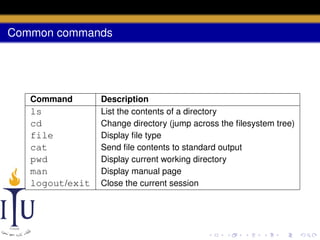
Command

ls
cd
file
cat
pwd
man
logout/exit

Description
List the contents of a directory
Change directory (jump across the filesystem tree)
Display file type
Send file contents to standard output
Display current working directory
Display manual page
Close the current session
Files
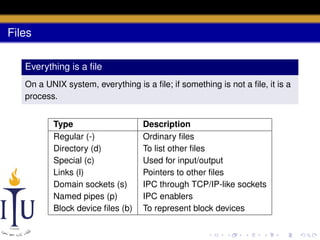
Everything is a file
On a UNIX system, everything is a file; if something is not a file, it is a
process.
Type
Regular (-)
Directory (d)
Special (c)
Links (l)
Domain sockets (s)
Named pipes (p)
Block device files (b)

Description
Ordinary files
To list other files
Used for input/output
Pointers to other files
IPC through TCP/IP-like sockets
IPC enablers
To represent block devices
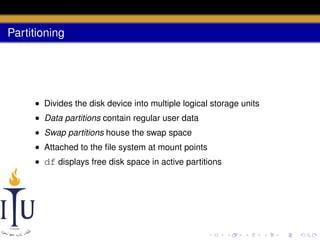
Partitioning

• Divides the disk device into multiple logical storage units
• Data partitions contain regular user data
• Swap partitions house the swap space
• Attached to the file system at mount points
• df displays free disk space in active partitions
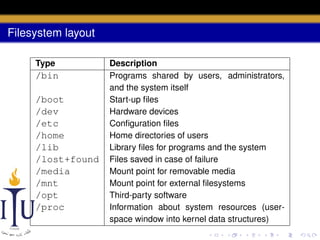
Filesystem layout
Type

/bin
/boot
/dev
/etc
/home
/lib
/lost+found
/media
/mnt
/opt
/proc

Description
Programs shared by users, administrators,
and the system itself
Start-up files
Hardware devices
Configuration files
Home directories of users
Library files for programs and the system
Files saved in case of failure
Mount point for removable media
Mount point for external filesystems
Third-party software
Information about system resources (userspace window into kernel data structures)
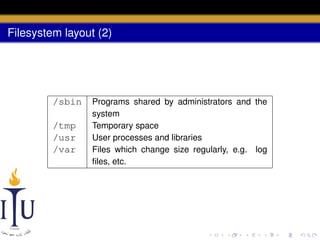
Filesystem layout (2)

/sbin
/tmp
/usr
/var

Programs shared by administrators and the
system
Temporary space
User processes and libraries
Files which change size regularly, e.g. log
files, etc.
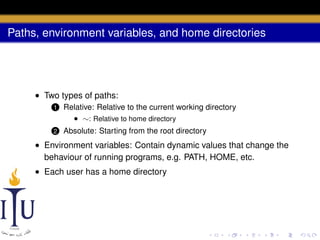
Paths, environment variables, and home directories

• Two types of paths:
1

Relative: Relative to the current working directory
• ∼: Relative to home directory

2

Absolute: Starting from the root directory

• Environment variables: Contain dynamic values that change the
behaviour of running programs, e.g. PATH, HOME, etc.
• Each user has a home directory
Manipulating files/directories

• Create directory: mkdir
• Move file/directory: mv
• Copy file/directory: cp
• Remove file/directory: rm
• Find file/directory: find <path> -name <filename>
Manipulating files and their contents

• Filter results: grep
• Invert: -v
• Display values from the top: head
• Display values from the bottom: tail
• Display unique values: uniq
• Change file permissions: chmod
• Permissions: -, r, w, x (bit masks)
• Permission categories: owner, group, everyone else

• Count number of lines (-l), words (-w), and bytes(-c): wc
Pipes and input/output redirection

• Pipe (|): Redirect standard output to standard input
• Input/output redirection (<>): Redirect standard input or output
to a file
• Appending redirection: << or >>
• Replacing a string in place:

sed -i s/<original_string>/<new_string>/
<file>
• Replacing a string and copying into a new file:

sed s/<original_string>/<new_string>/
<input_file> > <output_file>
Shell scripts

• Shell commands can be put into a file and executed as a script
• A file can be made executable through chmod
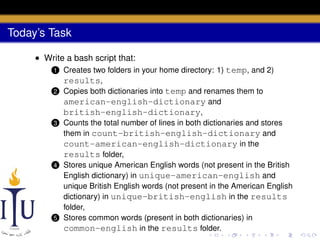
Today’s Task
• Write a bash script that:
1
2

3

4

5

Creates two folders in your home directory: 1) temp, and 2)
results,
Copies both dictionaries into temp and renames them to
american-english-dictionary and
british-english-dictionary,
Counts the total number of lines in both dictionaries and stores
them in count-british-english-dictionary and
count-american-english-dictionary in the
results folder,
Stores unique American English words (not present in the British
English dictionary) in unique-american-english and
unique British English words (not present in the American English
dictionary) in unique-british-english in the results
folder,
Stores common words (present in both dictionaries) in
common-english in the results folder.

AOS Lab 1: Hello, Linux!

  • 1.
    Lab 1: Hello,Linux! Advanced Operating Systems Zubair Nabi zubair.nabi@itu.edu.pk January 23, 2013
  • 2.
    Unix • Multi-task, multi-userOS out of Bell Labs in 19691 • Initially in Assembly but later in C (1973)2 • Code recycling! • Ken Thompson, Dennis Ritchie, Brian Kernighan, Douglas McIlroy, Michael Lesk and Joe Ossanna • Branched into BSD (FreeBSD, NetBSD, etc.) 1 2 http://www.youtube.com/watch?v=tc4ROCJYbm0 Dennis M. Ritchie and Ken Thompson. 1974. The UNIX time-sharing system. Commun. ACM 17, 7 (July 1974), 365-375. DOI=10.1145/361011.361061
  • 3.
    Linux • Linux (circa1991) is a Unix-clone under FOSS • Comes in many flavours/distributions (distros): Linux kernel3 + GUI (optional) + application/software suite • bash (shell) + GCC + GDB + coreutils • 600+ distros • Popular ones: Ubuntu, Fedora, Debian, Gentoo, SUSE, etc. • Now being used atop desktops, servers, and mobile/embedded systems Linus Torvalds: comp.os.minix mailing list (1991-08-25) I’m doing a (free) operating system (just a hobby, won’t be big and professional like gnu) for 386(486) AT clones. 3 http://www.kernel.org/
  • 4.
    Ubuntu • Built ontop of Debian and developed/distributed by Canonical Ltd. • Most popular desktop/laptop distribution • Applications: LibreOffice, Firefox (web browser), Thunderbird (email/chat/news), Empathy (IM/VoIP), etc. • Variants: Ubuntu Deskop, Ubuntu Server, Ubuntu for Phones, etc.
  • 5.
    Linux guide(s) • Introductionto Linux: A Hands on Guide; Achtelt Garrels; CreateSpace Independent Publishing Platform Available online: http://www.tldp.org/LDP/intro-linux/html/
  • 6.
    Common commands Command ls cd file cat pwd man logout/exit Description List thecontents of a directory Change directory (jump across the filesystem tree) Display file type Send file contents to standard output Display current working directory Display manual page Close the current session
  • 7.
    Files Everything is afile On a UNIX system, everything is a file; if something is not a file, it is a process. Type Regular (-) Directory (d) Special (c) Links (l) Domain sockets (s) Named pipes (p) Block device files (b) Description Ordinary files To list other files Used for input/output Pointers to other files IPC through TCP/IP-like sockets IPC enablers To represent block devices
  • 8.
    Partitioning • Divides thedisk device into multiple logical storage units • Data partitions contain regular user data • Swap partitions house the swap space • Attached to the file system at mount points • df displays free disk space in active partitions
  • 9.
    Filesystem layout Type /bin /boot /dev /etc /home /lib /lost+found /media /mnt /opt /proc Description Programs sharedby users, administrators, and the system itself Start-up files Hardware devices Configuration files Home directories of users Library files for programs and the system Files saved in case of failure Mount point for removable media Mount point for external filesystems Third-party software Information about system resources (userspace window into kernel data structures)
  • 10.
    Filesystem layout (2) /sbin /tmp /usr /var Programsshared by administrators and the system Temporary space User processes and libraries Files which change size regularly, e.g. log files, etc.
  • 11.
    Paths, environment variables,and home directories • Two types of paths: 1 Relative: Relative to the current working directory • ∼: Relative to home directory 2 Absolute: Starting from the root directory • Environment variables: Contain dynamic values that change the behaviour of running programs, e.g. PATH, HOME, etc. • Each user has a home directory
  • 12.
    Manipulating files/directories • Createdirectory: mkdir • Move file/directory: mv • Copy file/directory: cp • Remove file/directory: rm • Find file/directory: find <path> -name <filename>
  • 13.
    Manipulating files andtheir contents • Filter results: grep • Invert: -v • Display values from the top: head • Display values from the bottom: tail • Display unique values: uniq • Change file permissions: chmod • Permissions: -, r, w, x (bit masks) • Permission categories: owner, group, everyone else • Count number of lines (-l), words (-w), and bytes(-c): wc
  • 14.
    Pipes and input/outputredirection • Pipe (|): Redirect standard output to standard input • Input/output redirection (<>): Redirect standard input or output to a file • Appending redirection: << or >> • Replacing a string in place: sed -i s/<original_string>/<new_string>/ <file> • Replacing a string and copying into a new file: sed s/<original_string>/<new_string>/ <input_file> > <output_file>
  • 15.
    Shell scripts • Shellcommands can be put into a file and executed as a script • A file can be made executable through chmod
  • 16.
    Today’s Task • Writea bash script that: 1 2 3 4 5 Creates two folders in your home directory: 1) temp, and 2) results, Copies both dictionaries into temp and renames them to american-english-dictionary and british-english-dictionary, Counts the total number of lines in both dictionaries and stores them in count-british-english-dictionary and count-american-english-dictionary in the results folder, Stores unique American English words (not present in the British English dictionary) in unique-american-english and unique British English words (not present in the American English dictionary) in unique-british-english in the results folder, Stores common words (present in both dictionaries) in common-english in the results folder.