Lab 11: Virtualization
Advanced Operating Systems

Zubair Nabi
zubair.nabi@itu.edu.pk

April 17, 2013
Background

• Years ago, IBM used to sell expensive and bulky mainframes
Background

• Years ago, IBM used to sell expensive and bulky mainframes
• They ran into a problem: what if organizations wanted to run
different operating systems on the same machine at the same
time?
Background

• Years ago, IBM used to sell expensive and bulky mainframes
• They ran into a problem: what if organizations wanted to run
different operating systems on the same machine at the same
time?
• For instance, some applications have been developed on one OS
and others on different ones
Background

• Years ago, IBM used to sell expensive and bulky mainframes
• They ran into a problem: what if organizations wanted to run
different operating systems on the same machine at the same
time?
• For instance, some applications have been developed on one OS
and others on different ones

• IBM solved this by adding another level of indirection, called a
virtual memory monitor or hypervisor
Virtual Memory Monitor

• Sits between one or more operating systems and the hardware
Virtual Memory Monitor

• Sits between one or more operating systems and the hardware
• Gives the illusion to each running OS that it has full control over
the hardware (A taste of its own medicine?)
Virtual Memory Monitor

• Sits between one or more operating systems and the hardware
• Gives the illusion to each running OS that it has full control over
the hardware (A taste of its own medicine?)
• Multiplexes the hardware across OSes
Virtual Memory Monitor

• Sits between one or more operating systems and the hardware
• Gives the illusion to each running OS that it has full control over
the hardware (A taste of its own medicine?)
• Multiplexes the hardware across OSes
• In essence, a VMM is an OS for OSes
Advantages

• Server Consolidation
• In many settings, services are run on different machines
Advantages

• Server Consolidation
• In many settings, services are run on different machines
• In some cases, these machines also run different OSes
Advantages

• Server Consolidation
• In many settings, services are run on different machines
• In some cases, these machines also run different OSes
• At the same time, the machines are underutilized
Advantages

• Server Consolidation
•
•
•
•

In many settings, services are run on different machines
In some cases, these machines also run different OSes
At the same time, the machines are underutilized
Virtualization leads to consolidation by multiplexing multiple OSes
over fewer physical servers
Advantages

• Server Consolidation
•
•
•
•

In many settings, services are run on different machines
In some cases, these machines also run different OSes
At the same time, the machines are underutilized
Virtualization leads to consolidation by multiplexing multiple OSes
over fewer physical servers

• Increased Desktop Functionality
• Many users wish to run one operating system
Advantages

• Server Consolidation
•
•
•
•

In many settings, services are run on different machines
In some cases, these machines also run different OSes
At the same time, the machines are underutilized
Virtualization leads to consolidation by multiplexing multiple OSes
over fewer physical servers

• Increased Desktop Functionality
• Many users wish to run one operating system
• But want to have access to native applications on a different OS
platform
Advantages (2)

• Testing and Debugging
• Code is mostly written on one main platform
Advantages (2)

• Testing and Debugging
• Code is mostly written on one main platform
• But developers want to debug and test it on many diverse
platforms
Advantages (2)

• Testing and Debugging
• Code is mostly written on one main platform
• But developers want to debug and test it on many diverse
platforms
• Virtualization enables this by running mutiple OSes over a single
machine
Resurgence

• Resurgence took place in the 90s
Resurgence

• Resurgence took place in the 90s
• Primarily led by Mendel Rosenblum at Stanford
Resurgence

• Resurgence took place in the 90s
• Primarily led by Mendel Rosenblum at Stanford
• Engineered Disco, a VMM for the MIPS processor
Resurgence

• Resurgence took place in the 90s
• Primarily led by Mendel Rosenblum at Stanford
• Engineered Disco, a VMM for the MIPS processor
• Led to VMWare (Total assets of over $8 billion)
Running a VM

• Similar to running an application on top of an OS
Running a VM

• Similar to running an application on top of an OS
• Through limited direct execution
Running a VM

• Similar to running an application on top of an OS
• Through limited direct execution

• Each time a new OS boots atop the VMM, jump to the address of
the first instruction
Running a VM

• Similar to running an application on top of an OS
• Through limited direct execution

• Each time a new OS boots atop the VMM, jump to the address of
the first instruction
• The OS starts executing
Multiplexing the CPU

• Similar to a process context switch but now a VMM performs a
machine switch between different VMs
Multiplexing the CPU

• Similar to a process context switch but now a VMM performs a
machine switch between different VMs
1

The VMM must save the entire state of one OS
Multiplexing the CPU

• Similar to a process context switch but now a VMM performs a
machine switch between different VMs
1

The VMM must save the entire state of one OS
• This state includes registers, PC, and any privileged hardware state
(not applicable to a context switch)
Multiplexing the CPU

• Similar to a process context switch but now a VMM performs a
machine switch between different VMs
1

The VMM must save the entire state of one OS
• This state includes registers, PC, and any privileged hardware state

2

Restore the state of the to-be-run VM

(not applicable to a context switch)
Multiplexing the CPU

• Similar to a process context switch but now a VMM performs a
machine switch between different VMs
1

The VMM must save the entire state of one OS
• This state includes registers, PC, and any privileged hardware state
(not applicable to a context switch)

Restore the state of the to-be-run VM
3 Jump to the PC of the to-be-run VM

2
Multiplexing the CPU

• Similar to a process context switch but now a VMM performs a
machine switch between different VMs
1

The VMM must save the entire state of one OS
• This state includes registers, PC, and any privileged hardware state
(not applicable to a context switch)

Restore the state of the to-be-run VM
3 Jump to the PC of the to-be-run VM
• The PC may be within the OS kernel or within a process

2
Privileged Operations

• Things get more interesting when the running OS tries to perform
some privileged operation
Privileged Operations

• Things get more interesting when the running OS tries to perform
some privileged operation
• For instance, on a system with a software-managed TLB, the OS
uses privileged instructions to update the TLB
Privileged Operations

• Things get more interesting when the running OS tries to perform
some privileged operation
• For instance, on a system with a software-managed TLB, the OS
uses privileged instructions to update the TLB
• In a virtualized environment, the OS cannot be allowed to do this
Privileged Operations

• Things get more interesting when the running OS tries to perform
some privileged operation
• For instance, on a system with a software-managed TLB, the OS
uses privileged instructions to update the TLB
• In a virtualized environment, the OS cannot be allowed to do this
• If it is allowed to do so, the OS will control the underlying machine
rather than the VMM
Privileged Operations

• Things get more interesting when the running OS tries to perform
some privileged operation
• For instance, on a system with a software-managed TLB, the OS
uses privileged instructions to update the TLB
• In a virtualized environment, the OS cannot be allowed to do this
• If it is allowed to do so, the OS will control the underlying machine
rather than the VMM

• The VMM must intercept privileged operations from OSes and
retain control of the machine
System Calls

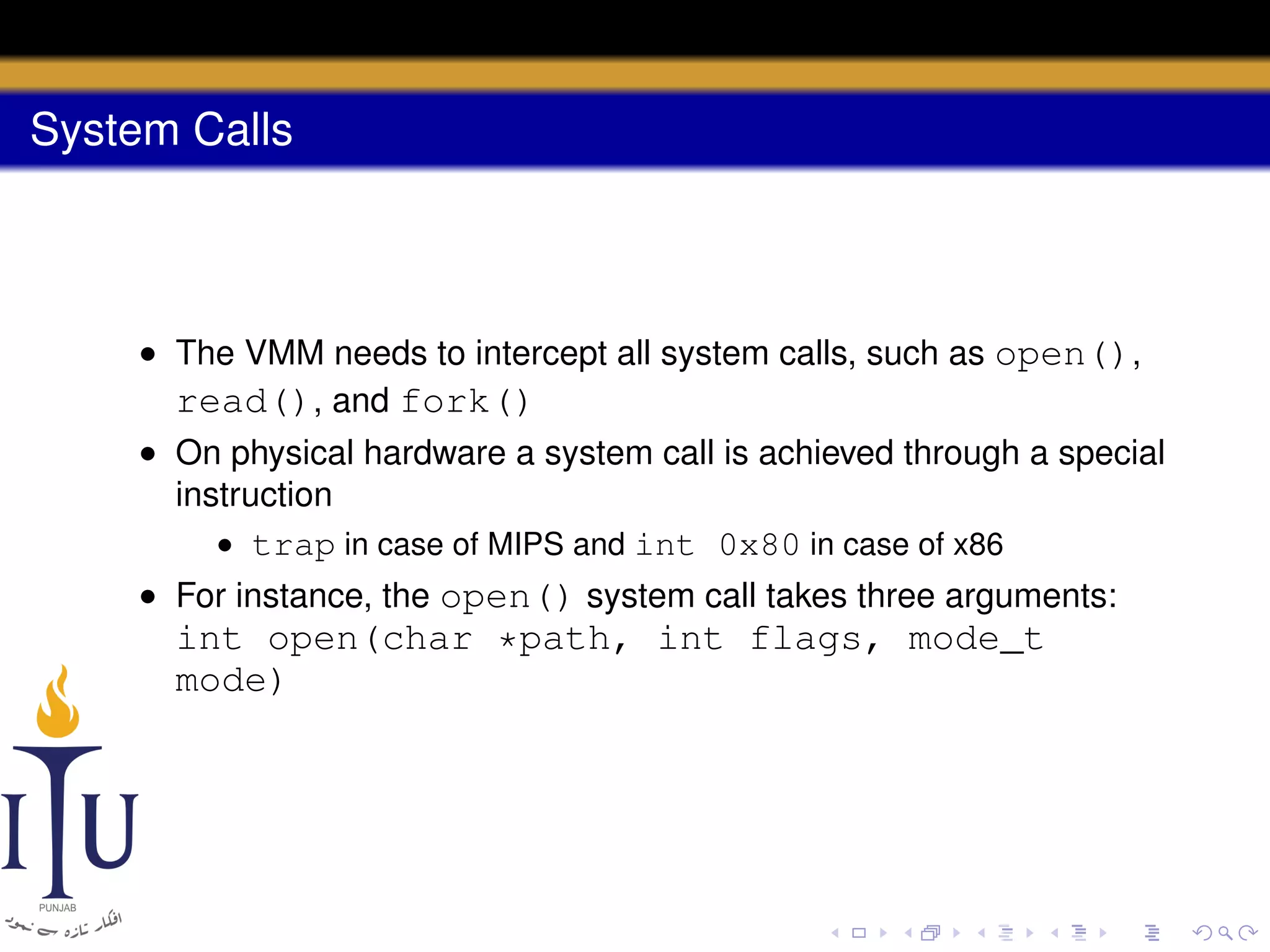
• The VMM needs to intercept all system calls, such as open(),
read(), and fork()
System Calls

• The VMM needs to intercept all system calls, such as open(),
read(), and fork()
• On physical hardware a system call is achieved through a special
instruction
System Calls

• The VMM needs to intercept all system calls, such as open(),
read(), and fork()
• On physical hardware a system call is achieved through a special
instruction
• trap in case of MIPS and int 0x80 in case of x86
System Calls

• The VMM needs to intercept all system calls, such as open(),
read(), and fork()
• On physical hardware a system call is achieved through a special
instruction
• trap in case of MIPS and int 0x80 in case of x86
• For instance, the open() system call takes three arguments:

int open(char *path, int flags, mode_t
mode)
System Calls

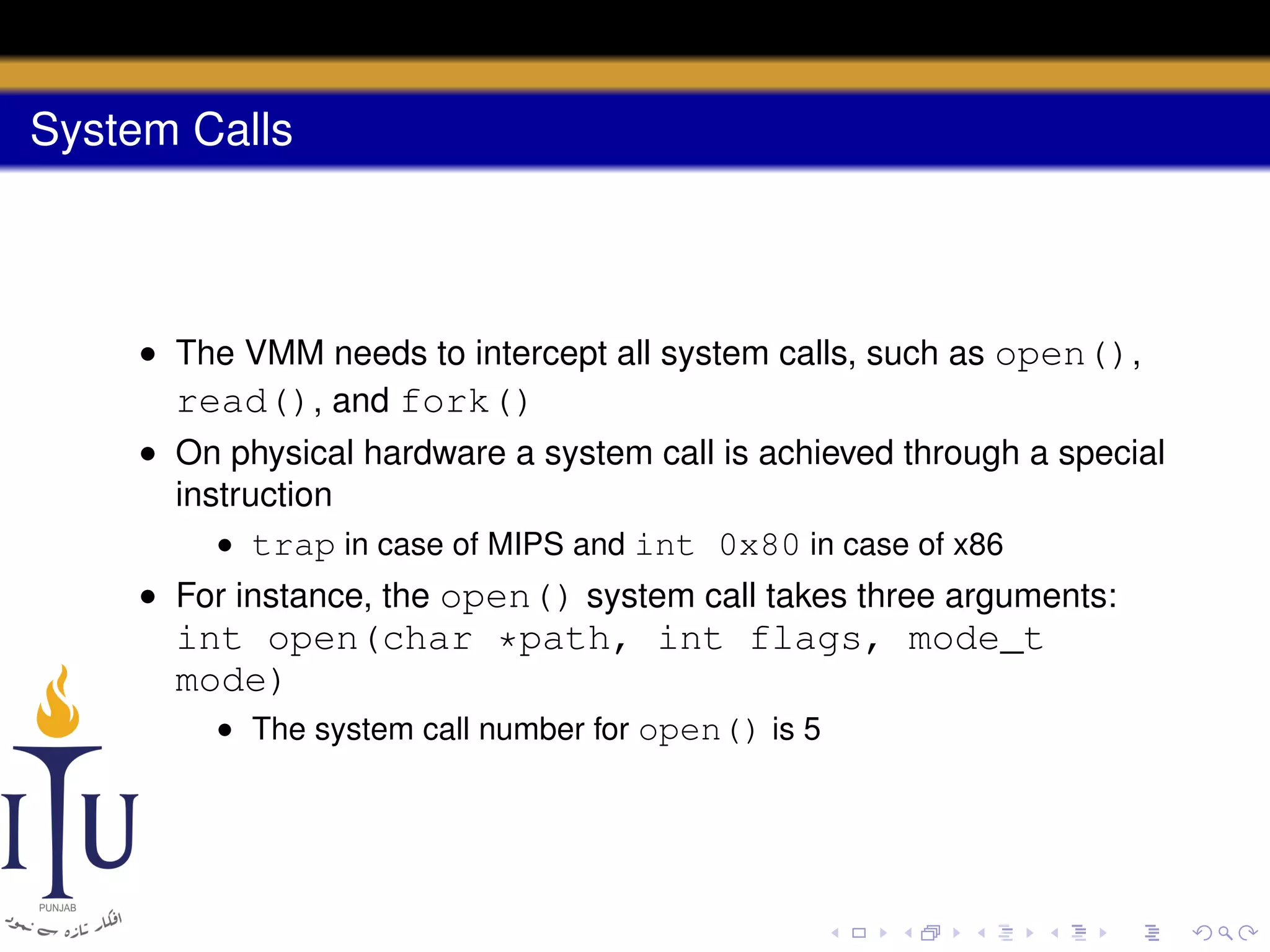
• The VMM needs to intercept all system calls, such as open(),
read(), and fork()
• On physical hardware a system call is achieved through a special
instruction
• trap in case of MIPS and int 0x80 in case of x86
• For instance, the open() system call takes three arguments:

int open(char *path, int flags, mode_t
mode)
• The system call number for open() is 5
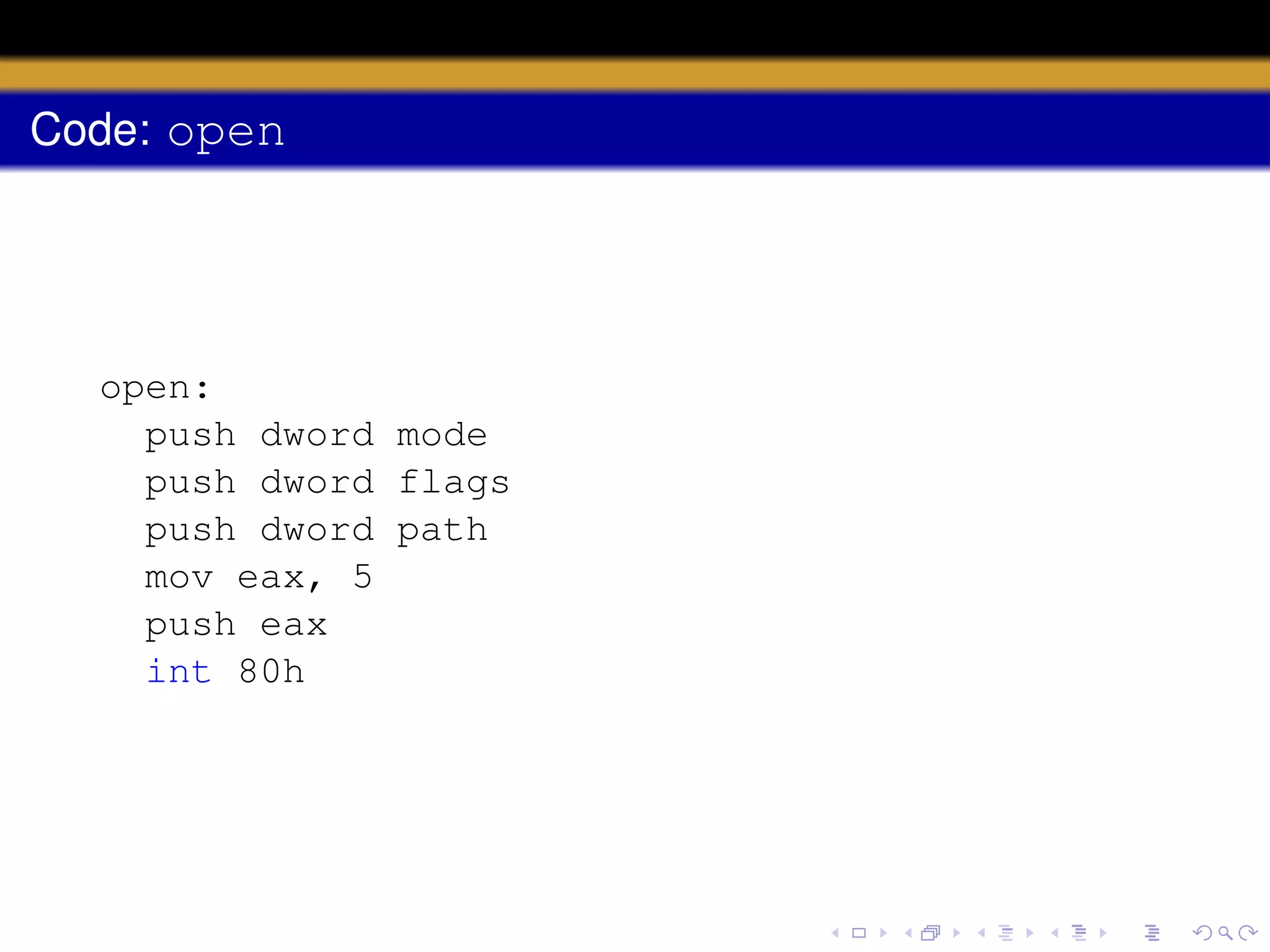
Code: open

open:
push dword mode
push dword flags
push dword path
mov eax, 5
push eax
int 80h
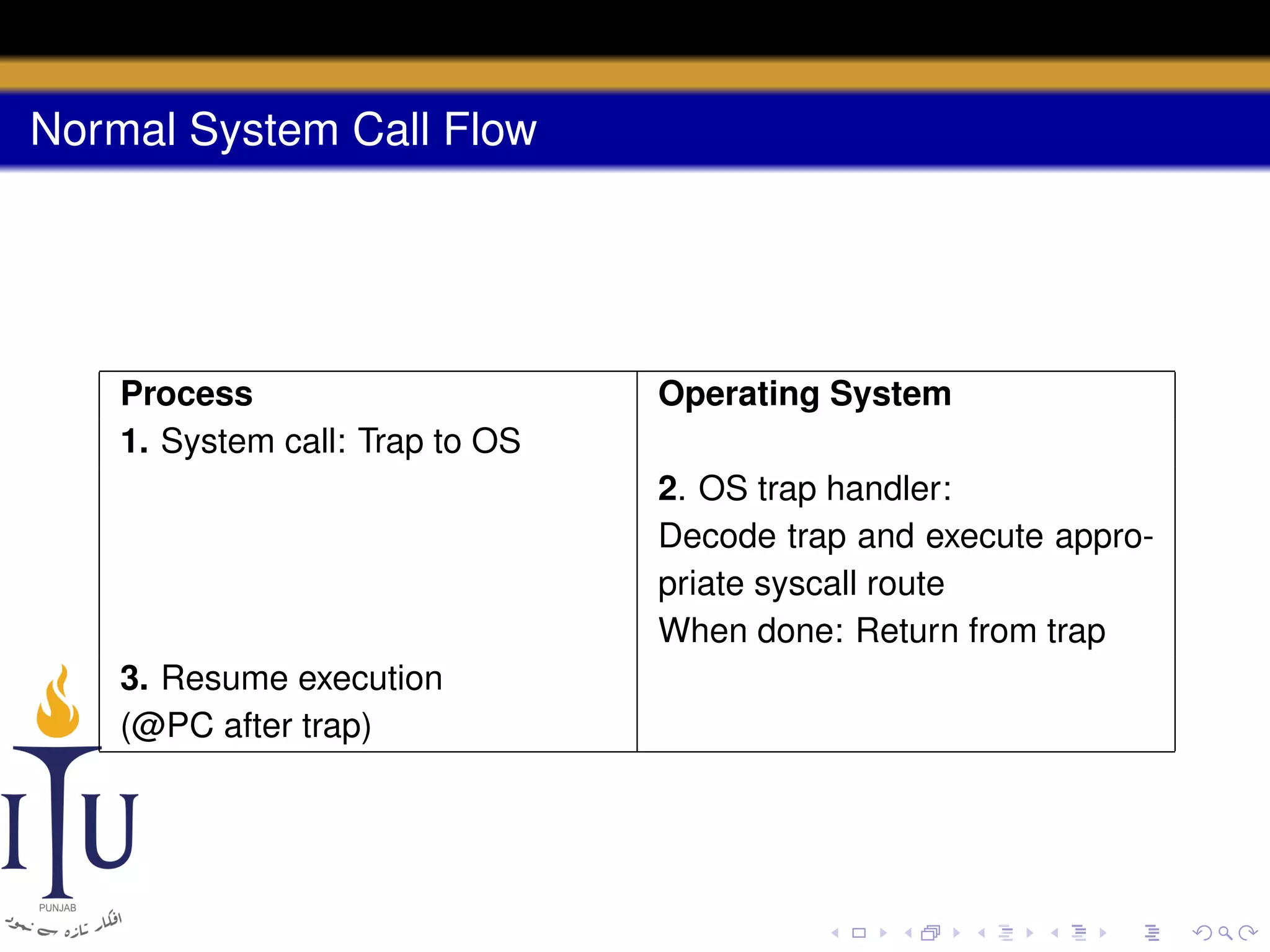
Normal System Call Flow

Process
1. System call: Trap to OS

Operating System
2. OS trap handler:
Decode trap and execute appropriate syscall route
When done: Return from trap

3. Resume execution
(@PC after trap)
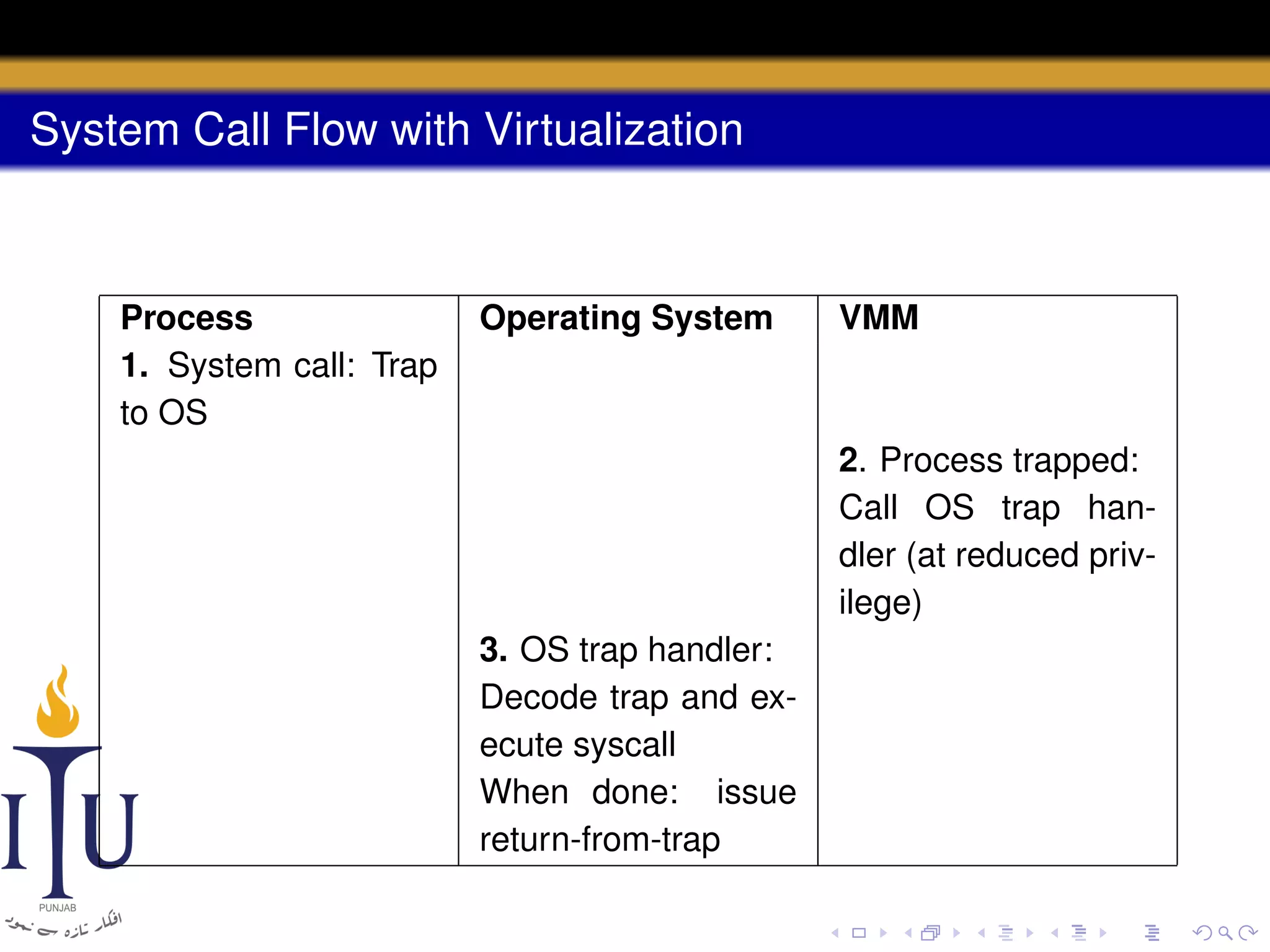
System Call Flow with Virtualization

Process
1. System call: Trap
to OS

Operating System

VMM

2. Process trapped:
Call OS trap handler (at reduced privilege)
3. OS trap handler:
Decode trap and execute syscall
When done: issue
return-from-trap
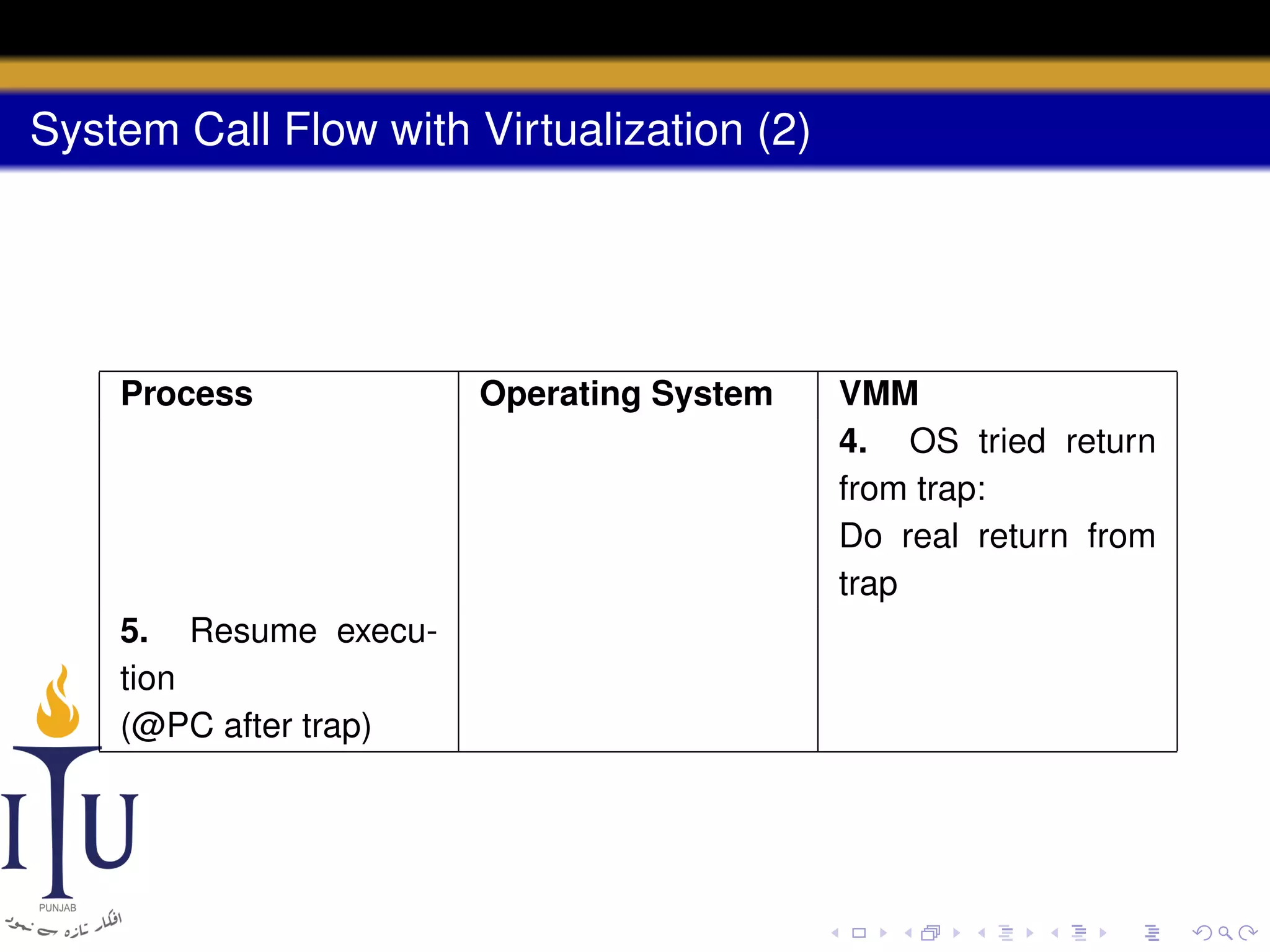
System Call Flow with Virtualization (2)

Process

5. Resume execution
(@PC after trap)

Operating System

VMM
4. OS tried return
from trap:
Do real return from
trap
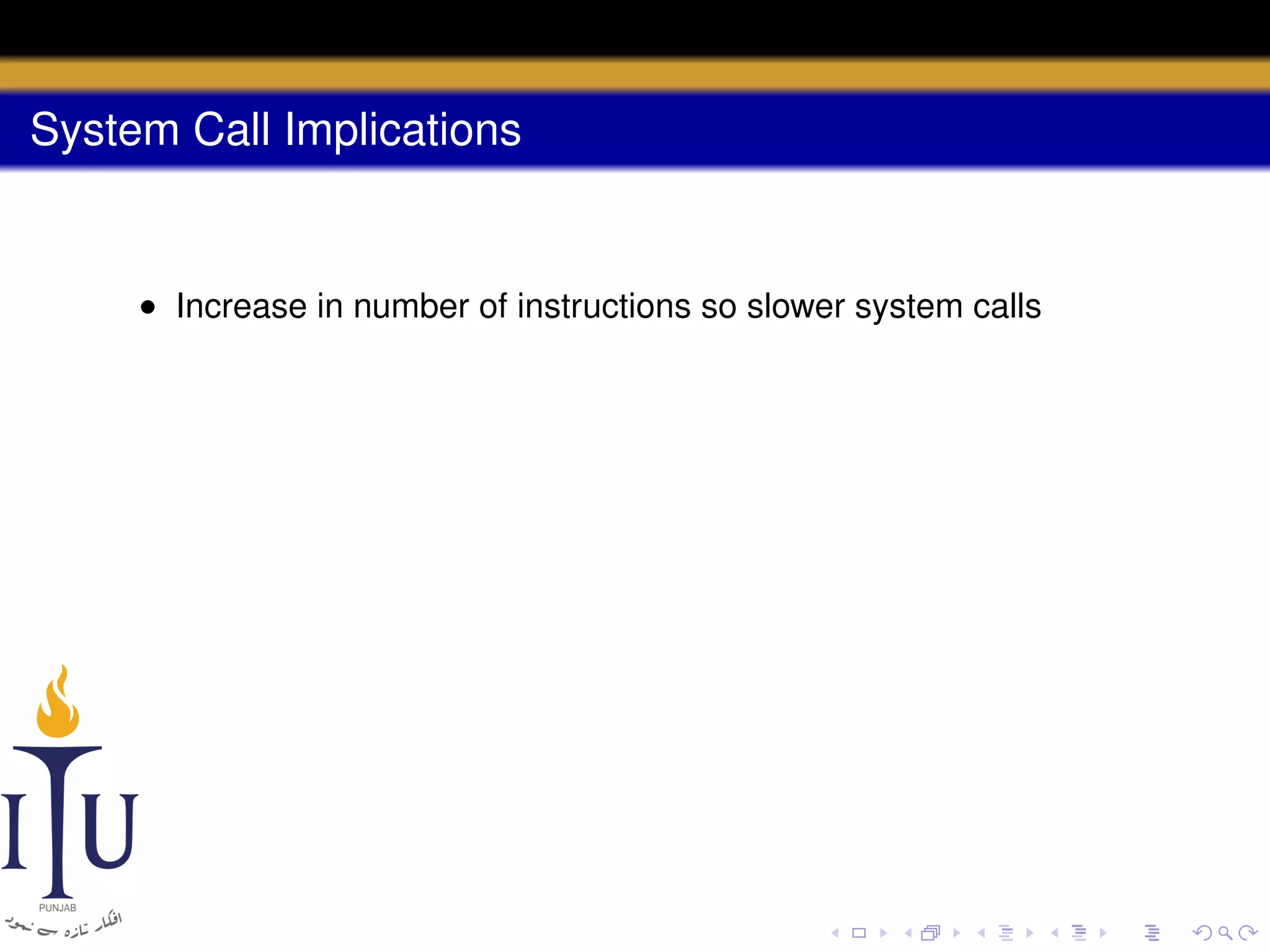
System Call Implications

• Increase in number of instructions so slower system calls
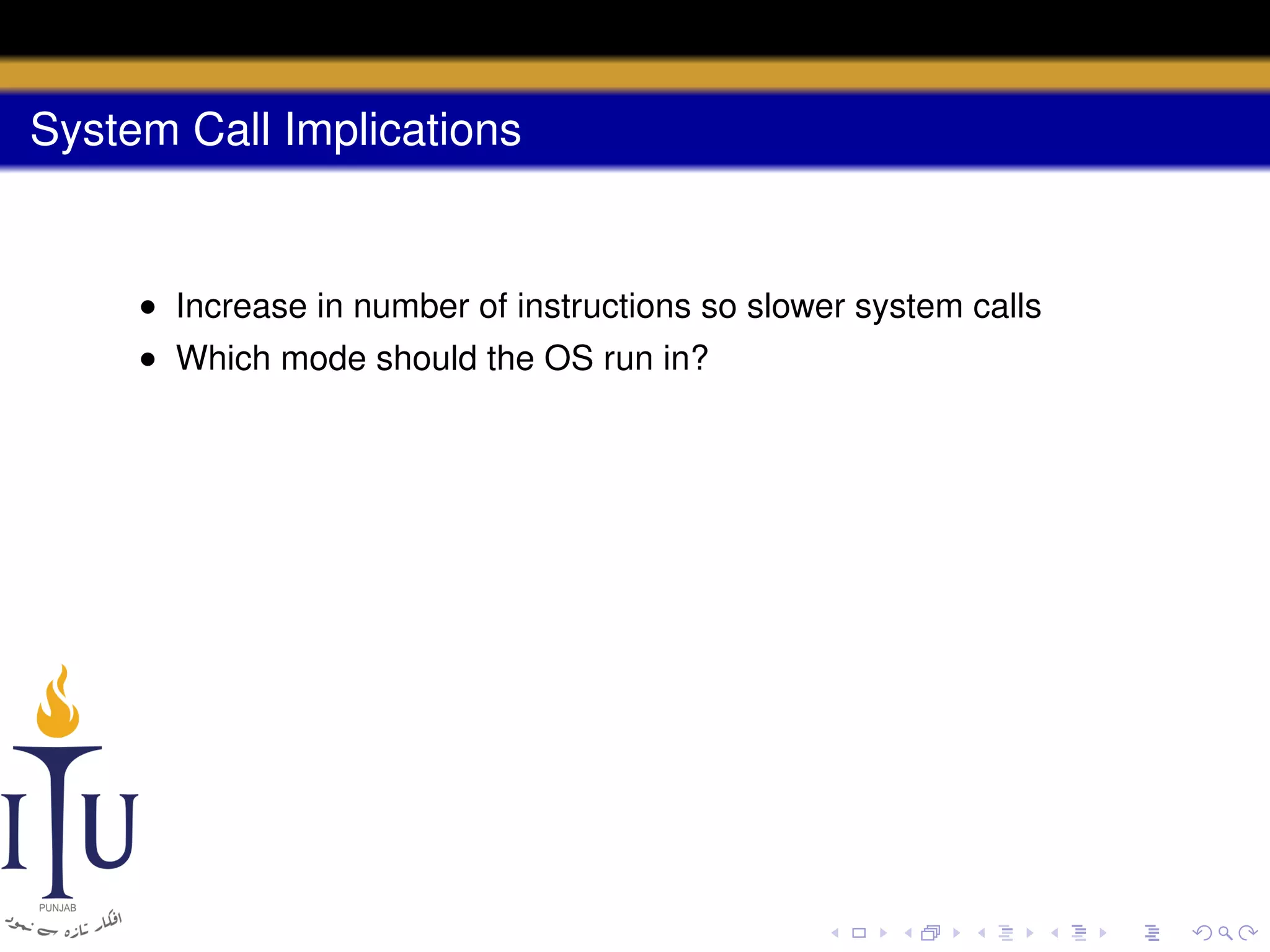
System Call Implications

• Increase in number of instructions so slower system calls
• Which mode should the OS run in?
System Call Implications

• Increase in number of instructions so slower system calls
• Which mode should the OS run in?
• Cannot run in a privileged mode any longer, because it would
have unrestricted access to the hardware!
System Call Implications

• Increase in number of instructions so slower system calls
• Which mode should the OS run in?
• Cannot run in a privileged mode any longer, because it would
have unrestricted access to the hardware!

• In case of MIPS, it would run in the supervisor mode
System Call Implications

• Increase in number of instructions so slower system calls
• Which mode should the OS run in?
• Cannot run in a privileged mode any longer, because it would
have unrestricted access to the hardware!

• In case of MIPS, it would run in the supervisor mode
• No access to privileged instructions but more memory
System Call Implications

• Increase in number of instructions so slower system calls
• Which mode should the OS run in?
• Cannot run in a privileged mode any longer, because it would
have unrestricted access to the hardware!

• In case of MIPS, it would run in the supervisor mode
• No access to privileged instructions but more memory

• In case of x86, the guest OS runs in ring 1 while the VMM runs in
ring 0
System Call Implications

• Increase in number of instructions so slower system calls
• Which mode should the OS run in?
• Cannot run in a privileged mode any longer, because it would
have unrestricted access to the hardware!

• In case of MIPS, it would run in the supervisor mode
• No access to privileged instructions but more memory

• In case of x86, the guest OS runs in ring 1 while the VMM runs in
ring 0
• What if the hardware has no extra modes?
System Call Implications

• Increase in number of instructions so slower system calls
• Which mode should the OS run in?
• Cannot run in a privileged mode any longer, because it would
have unrestricted access to the hardware!

• In case of MIPS, it would run in the supervisor mode
• No access to privileged instructions but more memory

• In case of x86, the guest OS runs in ring 1 while the VMM runs in
ring 0
• What if the hardware has no extra modes?
• The OS runs in user mode and the VMM uses memory protection
(page tables and TLBs) to protect OS data structures
Virtual Memory

• OSes virtualize physical memory to give each process the illusion
of a private address space
Virtual Memory

• OSes virtualize physical memory to give each process the illusion
of a private address space
• In case of virtualization, need to add another layer of virtual
memory
Virtual Memory

• OSes virtualize physical memory to give each process the illusion
of a private address space
• In case of virtualization, need to add another layer of virtual
memory
• The three-tier hierarchy: virtual memory, physical memory, and
machine memory
Virtual Memory

• OSes virtualize physical memory to give each process the illusion
of a private address space
• In case of virtualization, need to add another layer of virtual
memory
• The three-tier hierarchy: virtual memory, physical memory, and
machine memory
• The OS maps virtual-to-physical addresses via its per-process
page tables
Virtual Memory

• OSes virtualize physical memory to give each process the illusion
of a private address space
• In case of virtualization, need to add another layer of virtual
memory
• The three-tier hierarchy: virtual memory, physical memory, and
machine memory
• The OS maps virtual-to-physical addresses via its per-process
page tables
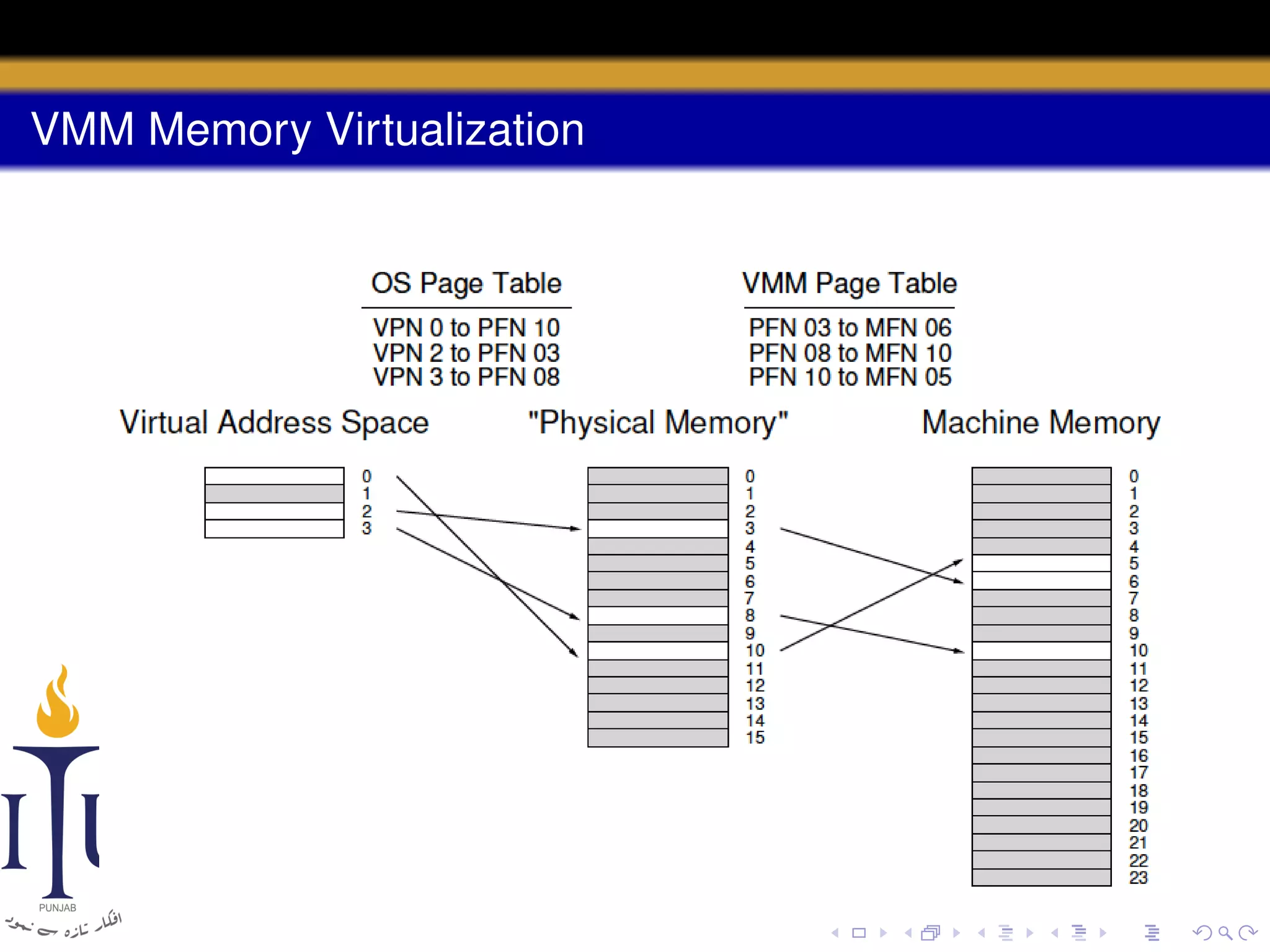
• The VMM maps the resulting physical mappings to underlying
machine addresses via its per-OS page tables
VMM Memory Virtualization
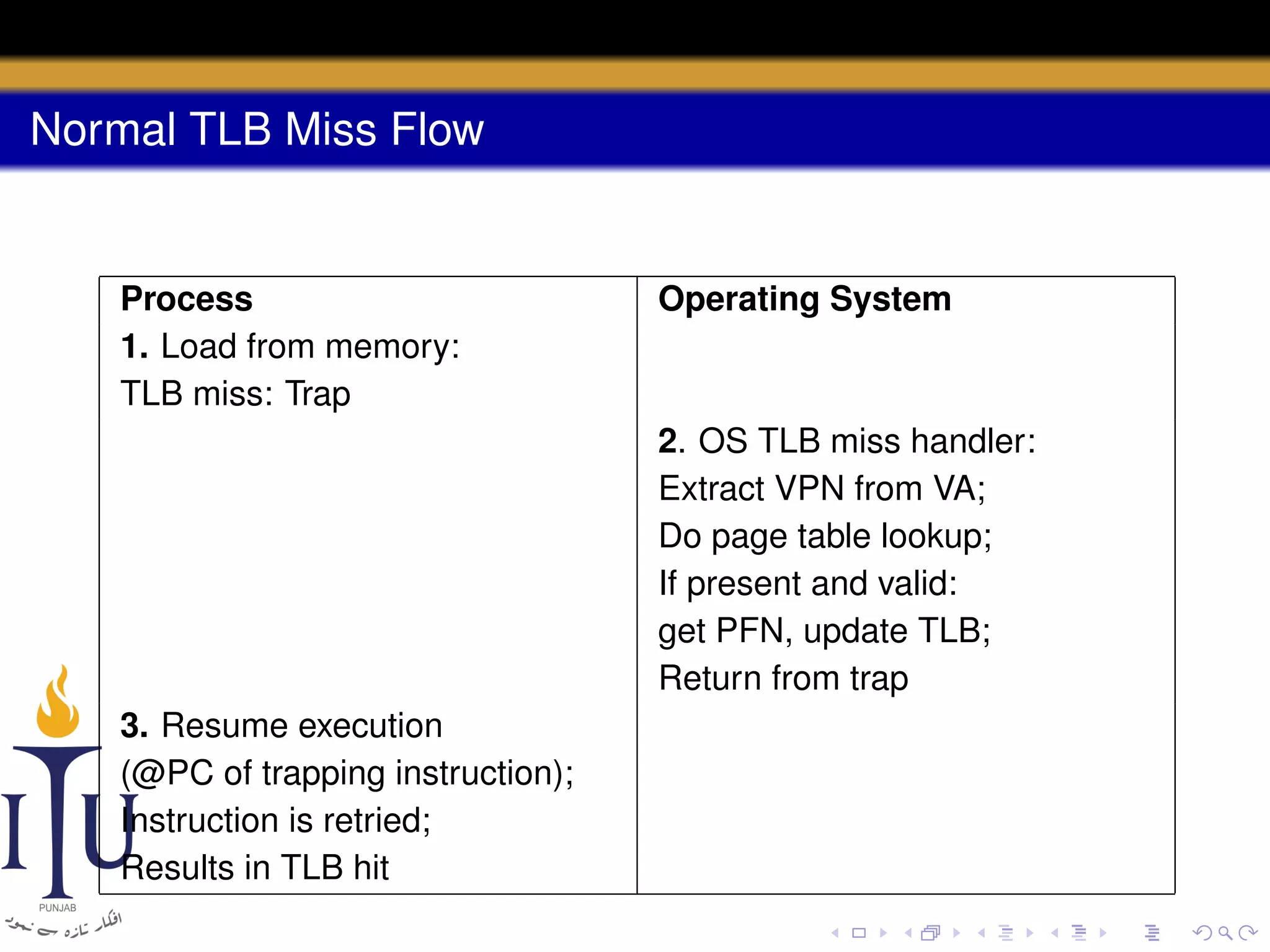
Normal TLB Miss Flow

Process
1. Load from memory:
TLB miss: Trap

Operating System

2. OS TLB miss handler:
Extract VPN from VA;
Do page table lookup;
If present and valid:
get PFN, update TLB;
Return from trap
3. Resume execution
(@PC of trapping instruction);
Instruction is retried;
Results in TLB hit
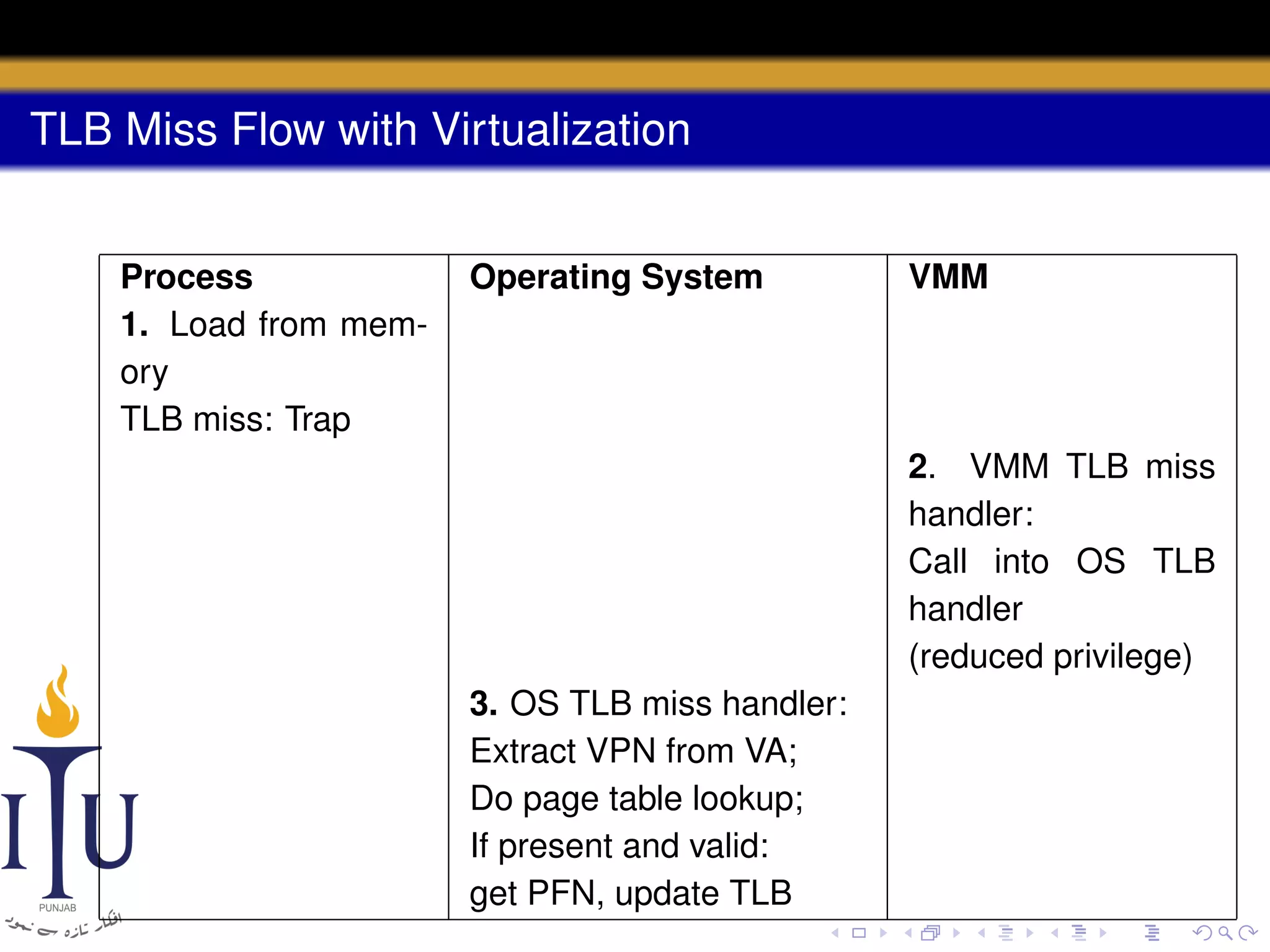
TLB Miss Flow with Virtualization
Process
1. Load from memory
TLB miss: Trap

Operating System

VMM

2. VMM TLB miss
handler:
Call into OS TLB
handler
(reduced privilege)
3. OS TLB miss handler:
Extract VPN from VA;
Do page table lookup;
If present and valid:
get PFN, update TLB
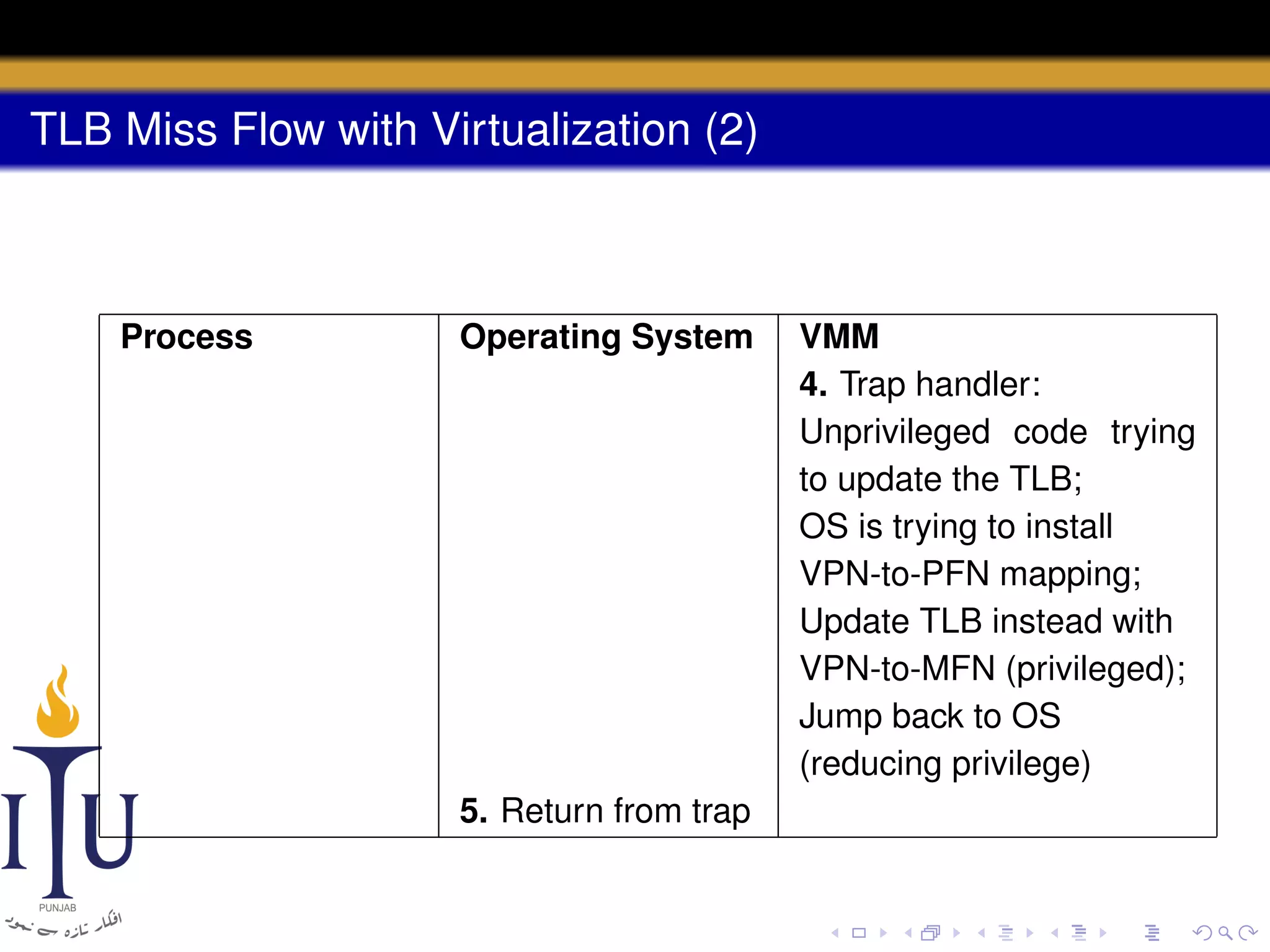
TLB Miss Flow with Virtualization (2)

Process

Operating System

5. Return from trap

VMM
4. Trap handler:
Unprivileged code trying
to update the TLB;
OS is trying to install
VPN-to-PFN mapping;
Update TLB instead with
VPN-to-MFN (privileged);
Jump back to OS
(reducing privilege)
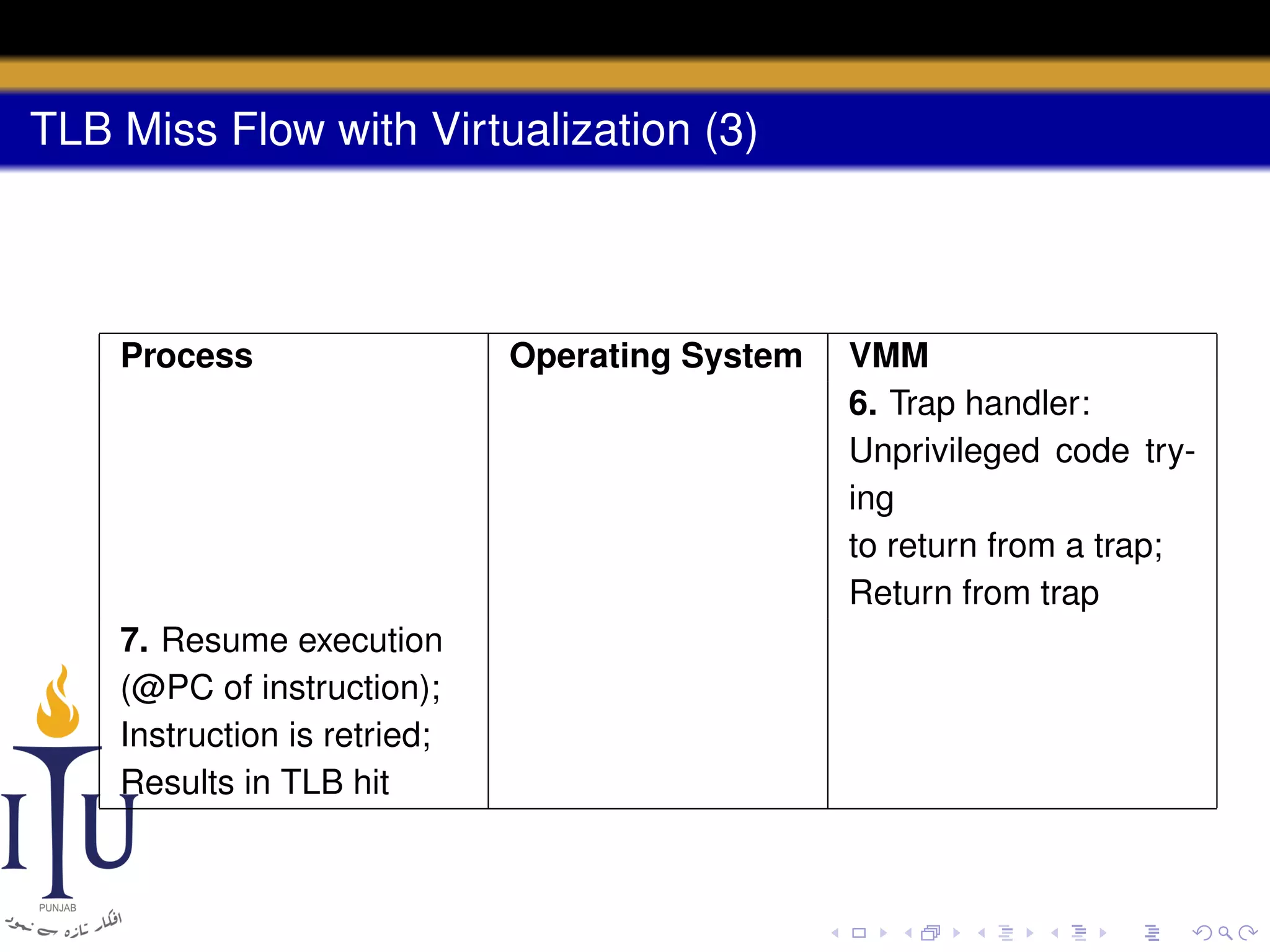
TLB Miss Flow with Virtualization (3)

Process

7. Resume execution
(@PC of instruction);
Instruction is retried;
Results in TLB hit

Operating System

VMM
6. Trap handler:
Unprivileged code trying
to return from a trap;
Return from trap
Virtual Memory Implications

• Similar to system calls, virtualized virtual memory consists of
more instructions and is hence slower
Virtual Memory Implications

• Similar to system calls, virtualized virtual memory consists of
more instructions and is hence slower
• To deal with this overhead, VMMs implement “software TLB”
Virtual Memory Implications

• Similar to system calls, virtualized virtual memory consists of
more instructions and is hence slower
• To deal with this overhead, VMMs implement “software TLB”
• Every virtual-to-physical mapping is recorded by the VMM within
this data structure
Virtual Memory Implications

• Similar to system calls, virtualized virtual memory consists of
more instructions and is hence slower
• To deal with this overhead, VMMs implement “software TLB”
• Every virtual-to-physical mapping is recorded by the VMM within
this data structure
• In case of a TLB miss, the VMM first consults this software TLB
Virtual Memory Implications

• Similar to system calls, virtualized virtual memory consists of
more instructions and is hence slower
• To deal with this overhead, VMMs implement “software TLB”
• Every virtual-to-physical mapping is recorded by the VMM within
this data structure
• In case of a TLB miss, the VMM first consults this software TLB
• If the translation is found, the VMM simply installs the
virtual-to-machine mapping directly into the hardware TLB
Information Gap

• The OS does not know too much about what the application
programs really want
Information Gap

• The OS does not know too much about what the application
programs really want
• Must make general “one-size-fits-all” policies
Information Gap

• The OS does not know too much about what the application
programs really want
• Must make general “one-size-fits-all” policies
• Similarly, the VMM does not know too much about what the OS is
doing or wanting
Information Gap

• The OS does not know too much about what the application
programs really want
• Must make general “one-size-fits-all” policies
• Similarly, the VMM does not know too much about what the OS is
doing or wanting
• This lack of knowledge, is dubbed as the information gap
between the VMM and the OS
Information Gap (2)
• What if the OS is in a busy loop?
Information Gap (2)
• What if the OS is in a busy loop?
• In case of virtualization, if there is another OS which is doing
something useful then the VMM should give it more resources as
opposed to the one which is in a busy loop
Information Gap (2)
• What if the OS is in a busy loop?
• In case of virtualization, if there is another OS which is doing
something useful then the VMM should give it more resources as
opposed to the one which is in a busy loop
• Similarly, pages need to be zeroed before being mapped into a
process’s address space
Information Gap (2)
• What if the OS is in a busy loop?
• In case of virtualization, if there is another OS which is doing
something useful then the VMM should give it more resources as
opposed to the one which is in a busy loop
• Similarly, pages need to be zeroed before being mapped into a
process’s address space
• In case of virtualization, this would be redundantly done twice:
Once by the VMM and then again by the OS
Information Gap (2)
• What if the OS is in a busy loop?
• In case of virtualization, if there is another OS which is doing
something useful then the VMM should give it more resources as
opposed to the one which is in a busy loop
• Similarly, pages need to be zeroed before being mapped into a
process’s address space
• In case of virtualization, this would be redundantly done twice:
Once by the VMM and then again by the OS
• Two solutions exist to this problem:
Information Gap (2)
• What if the OS is in a busy loop?
• In case of virtualization, if there is another OS which is doing
something useful then the VMM should give it more resources as
opposed to the one which is in a busy loop
• Similarly, pages need to be zeroed before being mapped into a
process’s address space
• In case of virtualization, this would be redundantly done twice:
Once by the VMM and then again by the OS
• Two solutions exist to this problem:
1

Implicit information: The OS can implicitly try to figure out the
behaviour of each OS
Information Gap (2)
• What if the OS is in a busy loop?
• In case of virtualization, if there is another OS which is doing
something useful then the VMM should give it more resources as
opposed to the one which is in a busy loop
• Similarly, pages need to be zeroed before being mapped into a
process’s address space
• In case of virtualization, this would be redundantly done twice:
Once by the VMM and then again by the OS
• Two solutions exist to this problem:
Implicit information: The OS can implicitly try to figure out the
behaviour of each OS
2 Paravirtualization: The guest OSes need to be modified to be
made aware of virtualization
1
Today’s task

• Design paravirtualization hooks for xv6
Reading(s)

• Section “Virtual Machine Monitors” from “Operating Systems:
Three Easy Pieces” by Remzi H. Arpaci-Dusseau and Andrea C.
Arpaci-Dusseau. Online: http://pages.cs.wisc.edu/

~remzi/OSTEP/vmm-intro.pdf

AOS Lab 11: Virtualization

  • 1.
    Lab 11: Virtualization AdvancedOperating Systems Zubair Nabi zubair.nabi@itu.edu.pk April 17, 2013
  • 2.
    Background • Years ago,IBM used to sell expensive and bulky mainframes
  • 3.
    Background • Years ago,IBM used to sell expensive and bulky mainframes • They ran into a problem: what if organizations wanted to run different operating systems on the same machine at the same time?
  • 4.
    Background • Years ago,IBM used to sell expensive and bulky mainframes • They ran into a problem: what if organizations wanted to run different operating systems on the same machine at the same time? • For instance, some applications have been developed on one OS and others on different ones
  • 5.
    Background • Years ago,IBM used to sell expensive and bulky mainframes • They ran into a problem: what if organizations wanted to run different operating systems on the same machine at the same time? • For instance, some applications have been developed on one OS and others on different ones • IBM solved this by adding another level of indirection, called a virtual memory monitor or hypervisor
  • 6.
    Virtual Memory Monitor •Sits between one or more operating systems and the hardware
  • 7.
    Virtual Memory Monitor •Sits between one or more operating systems and the hardware • Gives the illusion to each running OS that it has full control over the hardware (A taste of its own medicine?)
  • 8.
    Virtual Memory Monitor •Sits between one or more operating systems and the hardware • Gives the illusion to each running OS that it has full control over the hardware (A taste of its own medicine?) • Multiplexes the hardware across OSes
  • 9.
    Virtual Memory Monitor •Sits between one or more operating systems and the hardware • Gives the illusion to each running OS that it has full control over the hardware (A taste of its own medicine?) • Multiplexes the hardware across OSes • In essence, a VMM is an OS for OSes
  • 10.
    Advantages • Server Consolidation •In many settings, services are run on different machines
  • 11.
    Advantages • Server Consolidation •In many settings, services are run on different machines • In some cases, these machines also run different OSes
  • 12.
    Advantages • Server Consolidation •In many settings, services are run on different machines • In some cases, these machines also run different OSes • At the same time, the machines are underutilized
  • 13.
    Advantages • Server Consolidation • • • • Inmany settings, services are run on different machines In some cases, these machines also run different OSes At the same time, the machines are underutilized Virtualization leads to consolidation by multiplexing multiple OSes over fewer physical servers
  • 14.
    Advantages • Server Consolidation • • • • Inmany settings, services are run on different machines In some cases, these machines also run different OSes At the same time, the machines are underutilized Virtualization leads to consolidation by multiplexing multiple OSes over fewer physical servers • Increased Desktop Functionality • Many users wish to run one operating system
  • 15.
    Advantages • Server Consolidation • • • • Inmany settings, services are run on different machines In some cases, these machines also run different OSes At the same time, the machines are underutilized Virtualization leads to consolidation by multiplexing multiple OSes over fewer physical servers • Increased Desktop Functionality • Many users wish to run one operating system • But want to have access to native applications on a different OS platform
  • 16.
    Advantages (2) • Testingand Debugging • Code is mostly written on one main platform
  • 17.
    Advantages (2) • Testingand Debugging • Code is mostly written on one main platform • But developers want to debug and test it on many diverse platforms
  • 18.
    Advantages (2) • Testingand Debugging • Code is mostly written on one main platform • But developers want to debug and test it on many diverse platforms • Virtualization enables this by running mutiple OSes over a single machine
  • 19.
  • 20.
    Resurgence • Resurgence tookplace in the 90s • Primarily led by Mendel Rosenblum at Stanford
  • 21.
    Resurgence • Resurgence tookplace in the 90s • Primarily led by Mendel Rosenblum at Stanford • Engineered Disco, a VMM for the MIPS processor
  • 22.
    Resurgence • Resurgence tookplace in the 90s • Primarily led by Mendel Rosenblum at Stanford • Engineered Disco, a VMM for the MIPS processor • Led to VMWare (Total assets of over $8 billion)
  • 23.
    Running a VM •Similar to running an application on top of an OS
  • 24.
    Running a VM •Similar to running an application on top of an OS • Through limited direct execution
  • 25.
    Running a VM •Similar to running an application on top of an OS • Through limited direct execution • Each time a new OS boots atop the VMM, jump to the address of the first instruction
  • 26.
    Running a VM •Similar to running an application on top of an OS • Through limited direct execution • Each time a new OS boots atop the VMM, jump to the address of the first instruction • The OS starts executing
  • 27.
    Multiplexing the CPU •Similar to a process context switch but now a VMM performs a machine switch between different VMs
  • 28.
    Multiplexing the CPU •Similar to a process context switch but now a VMM performs a machine switch between different VMs 1 The VMM must save the entire state of one OS
  • 29.
    Multiplexing the CPU •Similar to a process context switch but now a VMM performs a machine switch between different VMs 1 The VMM must save the entire state of one OS • This state includes registers, PC, and any privileged hardware state (not applicable to a context switch)
  • 30.
    Multiplexing the CPU •Similar to a process context switch but now a VMM performs a machine switch between different VMs 1 The VMM must save the entire state of one OS • This state includes registers, PC, and any privileged hardware state 2 Restore the state of the to-be-run VM (not applicable to a context switch)
  • 31.
    Multiplexing the CPU •Similar to a process context switch but now a VMM performs a machine switch between different VMs 1 The VMM must save the entire state of one OS • This state includes registers, PC, and any privileged hardware state (not applicable to a context switch) Restore the state of the to-be-run VM 3 Jump to the PC of the to-be-run VM 2
  • 32.
    Multiplexing the CPU •Similar to a process context switch but now a VMM performs a machine switch between different VMs 1 The VMM must save the entire state of one OS • This state includes registers, PC, and any privileged hardware state (not applicable to a context switch) Restore the state of the to-be-run VM 3 Jump to the PC of the to-be-run VM • The PC may be within the OS kernel or within a process 2
  • 33.
    Privileged Operations • Thingsget more interesting when the running OS tries to perform some privileged operation
  • 34.
    Privileged Operations • Thingsget more interesting when the running OS tries to perform some privileged operation • For instance, on a system with a software-managed TLB, the OS uses privileged instructions to update the TLB
  • 35.
    Privileged Operations • Thingsget more interesting when the running OS tries to perform some privileged operation • For instance, on a system with a software-managed TLB, the OS uses privileged instructions to update the TLB • In a virtualized environment, the OS cannot be allowed to do this
  • 36.
    Privileged Operations • Thingsget more interesting when the running OS tries to perform some privileged operation • For instance, on a system with a software-managed TLB, the OS uses privileged instructions to update the TLB • In a virtualized environment, the OS cannot be allowed to do this • If it is allowed to do so, the OS will control the underlying machine rather than the VMM
  • 37.
    Privileged Operations • Thingsget more interesting when the running OS tries to perform some privileged operation • For instance, on a system with a software-managed TLB, the OS uses privileged instructions to update the TLB • In a virtualized environment, the OS cannot be allowed to do this • If it is allowed to do so, the OS will control the underlying machine rather than the VMM • The VMM must intercept privileged operations from OSes and retain control of the machine
  • 38.
    System Calls • TheVMM needs to intercept all system calls, such as open(), read(), and fork()
  • 39.
    System Calls • TheVMM needs to intercept all system calls, such as open(), read(), and fork() • On physical hardware a system call is achieved through a special instruction
  • 40.
    System Calls • TheVMM needs to intercept all system calls, such as open(), read(), and fork() • On physical hardware a system call is achieved through a special instruction • trap in case of MIPS and int 0x80 in case of x86
  • 41.
    System Calls • TheVMM needs to intercept all system calls, such as open(), read(), and fork() • On physical hardware a system call is achieved through a special instruction • trap in case of MIPS and int 0x80 in case of x86 • For instance, the open() system call takes three arguments: int open(char *path, int flags, mode_t mode)
  • 42.
    System Calls • TheVMM needs to intercept all system calls, such as open(), read(), and fork() • On physical hardware a system call is achieved through a special instruction • trap in case of MIPS and int 0x80 in case of x86 • For instance, the open() system call takes three arguments: int open(char *path, int flags, mode_t mode) • The system call number for open() is 5
  • 43.
    Code: open open: push dwordmode push dword flags push dword path mov eax, 5 push eax int 80h
  • 44.
    Normal System CallFlow Process 1. System call: Trap to OS Operating System 2. OS trap handler: Decode trap and execute appropriate syscall route When done: Return from trap 3. Resume execution (@PC after trap)
  • 45.
    System Call Flowwith Virtualization Process 1. System call: Trap to OS Operating System VMM 2. Process trapped: Call OS trap handler (at reduced privilege) 3. OS trap handler: Decode trap and execute syscall When done: issue return-from-trap
  • 46.
    System Call Flowwith Virtualization (2) Process 5. Resume execution (@PC after trap) Operating System VMM 4. OS tried return from trap: Do real return from trap
  • 47.
    System Call Implications •Increase in number of instructions so slower system calls
  • 48.
    System Call Implications •Increase in number of instructions so slower system calls • Which mode should the OS run in?
  • 49.
    System Call Implications •Increase in number of instructions so slower system calls • Which mode should the OS run in? • Cannot run in a privileged mode any longer, because it would have unrestricted access to the hardware!
  • 50.
    System Call Implications •Increase in number of instructions so slower system calls • Which mode should the OS run in? • Cannot run in a privileged mode any longer, because it would have unrestricted access to the hardware! • In case of MIPS, it would run in the supervisor mode
  • 51.
    System Call Implications •Increase in number of instructions so slower system calls • Which mode should the OS run in? • Cannot run in a privileged mode any longer, because it would have unrestricted access to the hardware! • In case of MIPS, it would run in the supervisor mode • No access to privileged instructions but more memory
  • 52.
    System Call Implications •Increase in number of instructions so slower system calls • Which mode should the OS run in? • Cannot run in a privileged mode any longer, because it would have unrestricted access to the hardware! • In case of MIPS, it would run in the supervisor mode • No access to privileged instructions but more memory • In case of x86, the guest OS runs in ring 1 while the VMM runs in ring 0
  • 53.
    System Call Implications •Increase in number of instructions so slower system calls • Which mode should the OS run in? • Cannot run in a privileged mode any longer, because it would have unrestricted access to the hardware! • In case of MIPS, it would run in the supervisor mode • No access to privileged instructions but more memory • In case of x86, the guest OS runs in ring 1 while the VMM runs in ring 0 • What if the hardware has no extra modes?
  • 54.
    System Call Implications •Increase in number of instructions so slower system calls • Which mode should the OS run in? • Cannot run in a privileged mode any longer, because it would have unrestricted access to the hardware! • In case of MIPS, it would run in the supervisor mode • No access to privileged instructions but more memory • In case of x86, the guest OS runs in ring 1 while the VMM runs in ring 0 • What if the hardware has no extra modes? • The OS runs in user mode and the VMM uses memory protection (page tables and TLBs) to protect OS data structures
  • 55.
    Virtual Memory • OSesvirtualize physical memory to give each process the illusion of a private address space
  • 56.
    Virtual Memory • OSesvirtualize physical memory to give each process the illusion of a private address space • In case of virtualization, need to add another layer of virtual memory
  • 57.
    Virtual Memory • OSesvirtualize physical memory to give each process the illusion of a private address space • In case of virtualization, need to add another layer of virtual memory • The three-tier hierarchy: virtual memory, physical memory, and machine memory
  • 58.
    Virtual Memory • OSesvirtualize physical memory to give each process the illusion of a private address space • In case of virtualization, need to add another layer of virtual memory • The three-tier hierarchy: virtual memory, physical memory, and machine memory • The OS maps virtual-to-physical addresses via its per-process page tables
  • 59.
    Virtual Memory • OSesvirtualize physical memory to give each process the illusion of a private address space • In case of virtualization, need to add another layer of virtual memory • The three-tier hierarchy: virtual memory, physical memory, and machine memory • The OS maps virtual-to-physical addresses via its per-process page tables • The VMM maps the resulting physical mappings to underlying machine addresses via its per-OS page tables
  • 60.
  • 61.
    Normal TLB MissFlow Process 1. Load from memory: TLB miss: Trap Operating System 2. OS TLB miss handler: Extract VPN from VA; Do page table lookup; If present and valid: get PFN, update TLB; Return from trap 3. Resume execution (@PC of trapping instruction); Instruction is retried; Results in TLB hit
  • 62.
    TLB Miss Flowwith Virtualization Process 1. Load from memory TLB miss: Trap Operating System VMM 2. VMM TLB miss handler: Call into OS TLB handler (reduced privilege) 3. OS TLB miss handler: Extract VPN from VA; Do page table lookup; If present and valid: get PFN, update TLB
  • 63.
    TLB Miss Flowwith Virtualization (2) Process Operating System 5. Return from trap VMM 4. Trap handler: Unprivileged code trying to update the TLB; OS is trying to install VPN-to-PFN mapping; Update TLB instead with VPN-to-MFN (privileged); Jump back to OS (reducing privilege)
  • 64.
    TLB Miss Flowwith Virtualization (3) Process 7. Resume execution (@PC of instruction); Instruction is retried; Results in TLB hit Operating System VMM 6. Trap handler: Unprivileged code trying to return from a trap; Return from trap
  • 65.
    Virtual Memory Implications •Similar to system calls, virtualized virtual memory consists of more instructions and is hence slower
  • 66.
    Virtual Memory Implications •Similar to system calls, virtualized virtual memory consists of more instructions and is hence slower • To deal with this overhead, VMMs implement “software TLB”
  • 67.
    Virtual Memory Implications •Similar to system calls, virtualized virtual memory consists of more instructions and is hence slower • To deal with this overhead, VMMs implement “software TLB” • Every virtual-to-physical mapping is recorded by the VMM within this data structure
  • 68.
    Virtual Memory Implications •Similar to system calls, virtualized virtual memory consists of more instructions and is hence slower • To deal with this overhead, VMMs implement “software TLB” • Every virtual-to-physical mapping is recorded by the VMM within this data structure • In case of a TLB miss, the VMM first consults this software TLB
  • 69.
    Virtual Memory Implications •Similar to system calls, virtualized virtual memory consists of more instructions and is hence slower • To deal with this overhead, VMMs implement “software TLB” • Every virtual-to-physical mapping is recorded by the VMM within this data structure • In case of a TLB miss, the VMM first consults this software TLB • If the translation is found, the VMM simply installs the virtual-to-machine mapping directly into the hardware TLB
  • 70.
    Information Gap • TheOS does not know too much about what the application programs really want
  • 71.
    Information Gap • TheOS does not know too much about what the application programs really want • Must make general “one-size-fits-all” policies
  • 72.
    Information Gap • TheOS does not know too much about what the application programs really want • Must make general “one-size-fits-all” policies • Similarly, the VMM does not know too much about what the OS is doing or wanting
  • 73.
    Information Gap • TheOS does not know too much about what the application programs really want • Must make general “one-size-fits-all” policies • Similarly, the VMM does not know too much about what the OS is doing or wanting • This lack of knowledge, is dubbed as the information gap between the VMM and the OS
  • 74.
    Information Gap (2) •What if the OS is in a busy loop?
  • 75.
    Information Gap (2) •What if the OS is in a busy loop? • In case of virtualization, if there is another OS which is doing something useful then the VMM should give it more resources as opposed to the one which is in a busy loop
  • 76.
    Information Gap (2) •What if the OS is in a busy loop? • In case of virtualization, if there is another OS which is doing something useful then the VMM should give it more resources as opposed to the one which is in a busy loop • Similarly, pages need to be zeroed before being mapped into a process’s address space
  • 77.
    Information Gap (2) •What if the OS is in a busy loop? • In case of virtualization, if there is another OS which is doing something useful then the VMM should give it more resources as opposed to the one which is in a busy loop • Similarly, pages need to be zeroed before being mapped into a process’s address space • In case of virtualization, this would be redundantly done twice: Once by the VMM and then again by the OS
  • 78.
    Information Gap (2) •What if the OS is in a busy loop? • In case of virtualization, if there is another OS which is doing something useful then the VMM should give it more resources as opposed to the one which is in a busy loop • Similarly, pages need to be zeroed before being mapped into a process’s address space • In case of virtualization, this would be redundantly done twice: Once by the VMM and then again by the OS • Two solutions exist to this problem:
  • 79.
    Information Gap (2) •What if the OS is in a busy loop? • In case of virtualization, if there is another OS which is doing something useful then the VMM should give it more resources as opposed to the one which is in a busy loop • Similarly, pages need to be zeroed before being mapped into a process’s address space • In case of virtualization, this would be redundantly done twice: Once by the VMM and then again by the OS • Two solutions exist to this problem: 1 Implicit information: The OS can implicitly try to figure out the behaviour of each OS
  • 80.
    Information Gap (2) •What if the OS is in a busy loop? • In case of virtualization, if there is another OS which is doing something useful then the VMM should give it more resources as opposed to the one which is in a busy loop • Similarly, pages need to be zeroed before being mapped into a process’s address space • In case of virtualization, this would be redundantly done twice: Once by the VMM and then again by the OS • Two solutions exist to this problem: Implicit information: The OS can implicitly try to figure out the behaviour of each OS 2 Paravirtualization: The guest OSes need to be modified to be made aware of virtualization 1
  • 81.
    Today’s task • Designparavirtualization hooks for xv6
  • 82.
    Reading(s) • Section “VirtualMachine Monitors” from “Operating Systems: Three Easy Pieces” by Remzi H. Arpaci-Dusseau and Andrea C. Arpaci-Dusseau. Online: http://pages.cs.wisc.edu/ ~remzi/OSTEP/vmm-intro.pdf