
Other UI
Components
Android Training
By Khaled Anaqwa
ScrollView






Layout container for a view hierarchy that can be
scrolled by the user,Allowing it to be larger than
the physical display.
A ScrollView is a FrameLayout, meaning you should
place one child in it containing the entire contents
to scroll; this child may itself be a layout manager
with a complex hierarchy of objects.
A child that is often used is a LinearLayout in a
vertical orientation, presenting a vertical array of
top-level items that the user can scroll through.
 You

should never use a ScrollView with a
ListView,because ListView takes care of its
own vertical scrolling.
 Most importantly, doing this defeats all of
the important optimizations in ListView for
dealing with large lists, since it effectively
forces the ListView to display its entire list
of items to fill up the infinite container
supplied by ScrollView.
 ScrollView

only supports vertical scrolling.
For horizontal scrolling, use
HorizontalScrollView.
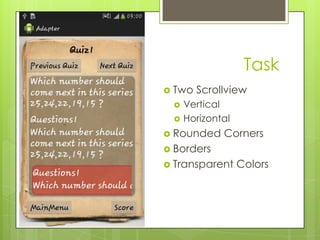
Task
 Two



Scrollview

Vertical
Horizontal

 Rounded

Corners

 Borders

 Transparent

Colors
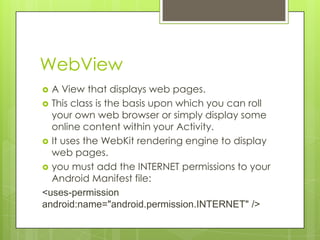
WebView
A View that displays web pages.
 This class is the basis upon which you can roll
your own web browser or simply display some
online content within your Activity.
 It uses the WebKit rendering engine to display
web pages.
 you must add the INTERNET permissions to your
Android Manifest file:
<uses-permission
android:name="android.permission.INTERNET" />

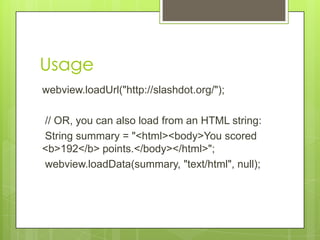
Usage
webview.loadUrl("http://slashdot.org/");
// OR, you can also load from an HTML string:
String summary = "<html><body>You scored
<b>192</b> points.</body></html>";
webview.loadData(summary, "text/html", null);






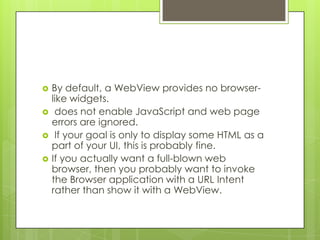
By default, a WebView provides no browserlike widgets.
does not enable JavaScript and web page
errors are ignored.
If your goal is only to display some HTML as a
part of your UI, this is probably fine.
If you actually want a full-blown web
browser, then you probably want to invoke
the Browser application with a URL Intent
rather than show it with a WebView.
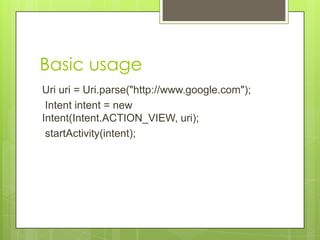
Basic usage
Uri uri = Uri.parse("http://www.google.com");
Intent intent = new
Intent(Intent.ACTION_VIEW, uri);
startActivity(intent);
Building Web Apps in
WebView?
A

common scenario in which using
WebView is helpful is when you want to
provide information in your application
that you might need to update, such as
an end-user agreement or a user guide.
 Within your Android application, you can
create an Activity that contains a
WebView, then use that to display your
document that's hosted online.

Android Training (ScrollView , Horizontal ScrollView WebView)

  • 1.
  • 2.
    ScrollView    Layout container fora view hierarchy that can be scrolled by the user,Allowing it to be larger than the physical display. A ScrollView is a FrameLayout, meaning you should place one child in it containing the entire contents to scroll; this child may itself be a layout manager with a complex hierarchy of objects. A child that is often used is a LinearLayout in a vertical orientation, presenting a vertical array of top-level items that the user can scroll through.
  • 3.
     You should neveruse a ScrollView with a ListView,because ListView takes care of its own vertical scrolling.  Most importantly, doing this defeats all of the important optimizations in ListView for dealing with large lists, since it effectively forces the ListView to display its entire list of items to fill up the infinite container supplied by ScrollView.
  • 4.
     ScrollView only supportsvertical scrolling. For horizontal scrolling, use HorizontalScrollView.
  • 5.
  • 6.
    WebView A View thatdisplays web pages.  This class is the basis upon which you can roll your own web browser or simply display some online content within your Activity.  It uses the WebKit rendering engine to display web pages.  you must add the INTERNET permissions to your Android Manifest file: <uses-permission android:name="android.permission.INTERNET" /> 
  • 7.
    Usage webview.loadUrl("http://slashdot.org/"); // OR, youcan also load from an HTML string: String summary = "<html><body>You scored <b>192</b> points.</body></html>"; webview.loadData(summary, "text/html", null);
  • 8.
        By default, aWebView provides no browserlike widgets. does not enable JavaScript and web page errors are ignored. If your goal is only to display some HTML as a part of your UI, this is probably fine. If you actually want a full-blown web browser, then you probably want to invoke the Browser application with a URL Intent rather than show it with a WebView.
  • 9.
    Basic usage Uri uri= Uri.parse("http://www.google.com"); Intent intent = new Intent(Intent.ACTION_VIEW, uri); startActivity(intent);
  • 10.
    Building Web Appsin WebView? A common scenario in which using WebView is helpful is when you want to provide information in your application that you might need to update, such as an end-user agreement or a user guide.  Within your Android application, you can create an Activity that contains a WebView, then use that to display your document that's hosted online.