AdapterView
& Adapters
Android Training
By Khaled Anaqwa
AdapterView





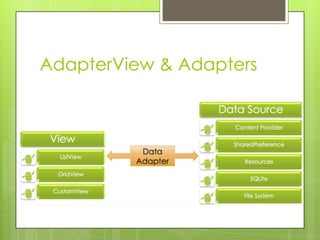
The AdapterView is a ViewGroup subclass
whose child Views are determined by an
Adapter that binds AdapterView object to
data of some type.
Typically you are going to use subsclasses of
AdapterView class instead of using it directly
Example subclasses of AdapterView class




ListView
Spinner
Gallery
Adapter
 You

can populate an AdapterView such
as ListView or GridView by binding the
AdapterView instance to an Adapter,
which retrieves data from an external
source and creates a View that
represents each data entry.
AdapterView & Adapters
So
 The

Adapter provides access to the data
items.
 The Adapter is also responsible for making
a View for each item in the data set.
 Types of Adatpers - they implements
ListAdatper interface




ArrayAdatper
CursorAdatper
There are a few more
Adapter Class Hierarchy
 BaseAdatper

abstract class implements
ListAdapter and SpinnerAdatper
interfaces
 ArrayAdapter and CursorAdapter classes
are subclasses of BaseAdapter class
AdapterView Responsibilities
 Two



main responsibilities of AdapterView

Filling the layout with data (with a help from
Adapter)
Handling user selections - when a user
selects an item, perform some action
 AdapterView.OnItemClickListener
 AdapterView.OnItemLongClickListener
 AdapterView.OnItemSelectedListener
ListActivity








Android-provided class specially designed for
displaying a list of items by binding to a data
source such as an array or Cursor, and exposes
event handlers when the user selects an item.
ListActivity hosts a ListView object that can be
bound through an adatper to different data
sources, typically either an array or a Cursor
holding query results.
setListAdapter(ListAdatper adapter) method
automatically creates ListView object from the
ListAdapter object
Has a default layout that consists of a single, fullscreen list in the center of the screen
Example
 List

of COUNTRIES
 Notice

that this does not load a layout file
for the Activity (which you usually do with
setContentView(int)).
 setListAdapter(ListAdapter) automatically
adds a ListView to fill the entire screen of
the ListActivity.
What is the difference
between a ListView and a
ScrollView ?
Simply
 ScrollView

a host for “static” content and
a ListView a host for “dynamic” content.
Listview
 ListView

is a view group that displays a list
of scrollable items. The list items are
automatically inserted to the list using an
Adapter that pulls content from a source
such as an array or database query and
converts each item result into a view
that's placed into the list.
Spinner
A

view that displays one child at a time
and lets the user pick among them.
 The items in the Spinner come from the
Adapter associated with this view.
Example
 Choose

one of COUNTRIES
In ArrayAdapter


Data updates





The ArrayAdapter class allows to remove all
elements in its underlying data structure with the
clear() method call.
You can then add new elements via the add()
method or a Collection via the addAll() method.
You can also directly modify the underlying data
structure and call the notifyDataSetChanged()
method on the adapter to notify him about the
changes in data.

Android Training (AdapterView & Adapter)

  • 1.
  • 2.
    AdapterView    The AdapterView isa ViewGroup subclass whose child Views are determined by an Adapter that binds AdapterView object to data of some type. Typically you are going to use subsclasses of AdapterView class instead of using it directly Example subclasses of AdapterView class    ListView Spinner Gallery
  • 3.
    Adapter  You can populatean AdapterView such as ListView or GridView by binding the AdapterView instance to an Adapter, which retrieves data from an external source and creates a View that represents each data entry.
  • 4.
  • 5.
    So  The Adapter providesaccess to the data items.  The Adapter is also responsible for making a View for each item in the data set.  Types of Adatpers - they implements ListAdatper interface    ArrayAdatper CursorAdatper There are a few more
  • 6.
    Adapter Class Hierarchy BaseAdatper abstract class implements ListAdapter and SpinnerAdatper interfaces  ArrayAdapter and CursorAdapter classes are subclasses of BaseAdapter class
  • 7.
    AdapterView Responsibilities  Two   mainresponsibilities of AdapterView Filling the layout with data (with a help from Adapter) Handling user selections - when a user selects an item, perform some action  AdapterView.OnItemClickListener  AdapterView.OnItemLongClickListener  AdapterView.OnItemSelectedListener
  • 8.
    ListActivity     Android-provided class speciallydesigned for displaying a list of items by binding to a data source such as an array or Cursor, and exposes event handlers when the user selects an item. ListActivity hosts a ListView object that can be bound through an adatper to different data sources, typically either an array or a Cursor holding query results. setListAdapter(ListAdatper adapter) method automatically creates ListView object from the ListAdapter object Has a default layout that consists of a single, fullscreen list in the center of the screen
  • 9.
  • 10.
     Notice that thisdoes not load a layout file for the Activity (which you usually do with setContentView(int)).  setListAdapter(ListAdapter) automatically adds a ListView to fill the entire screen of the ListActivity.
  • 11.
    What is thedifference between a ListView and a ScrollView ?
  • 12.
    Simply  ScrollView a hostfor “static” content and a ListView a host for “dynamic” content.
  • 13.
    Listview  ListView is aview group that displays a list of scrollable items. The list items are automatically inserted to the list using an Adapter that pulls content from a source such as an array or database query and converts each item result into a view that's placed into the list.
  • 14.
    Spinner A view that displaysone child at a time and lets the user pick among them.  The items in the Spinner come from the Adapter associated with this view.
  • 15.
  • 16.
    In ArrayAdapter  Data updates    TheArrayAdapter class allows to remove all elements in its underlying data structure with the clear() method call. You can then add new elements via the add() method or a Collection via the addAll() method. You can also directly modify the underlying data structure and call the notifyDataSetChanged() method on the adapter to notify him about the changes in data.

Editor's Notes

  • #10 public class HelloListView extends ListActivity { static final String[] COUNTRIES = new String[] { ”Palestine", ”Jordan", ”Sudan", ”Egypt" }; /** Called when the activity is first created. */ @Overridepublic void onCreate(Bundle savedInstanceState) { super.onCreate(savedInstanceState); // Create an adapterArrayAdapter<String> arrayAdapter = new ArrayAdapter<String>( this, // Application contextR.layout.list_item, // layout description for each list item COUNTRIES); // String array of countries defined setListAdapter(arrayAdapter); }}
  • #13 For example, you may use a ScrollView to display a graphical user interface larger then the actual screen. The GUI is static in the sense that its content will never change, and the reason to use a ScrollView is to access all the widgets on the GUI. On the other hand consider the contacts list on your android phone, if you access it you will get a list of contacts, if you delete a contact and reopen it, you will get a different list of contacts. For that reason the ListView displays dynamic content.
  • #16 public class MyAndroidAppActivity extends Activity { private Spinner spinner1; @Override public void onCreate(Bundle savedInstanceState) {super.onCreate(savedInstanceState);setContentView(R.layout.main);static final String[] COUNTRIES = new String[] { ”Palestine", ”Jordan", ”Sudan", ”Egypt" };spinner1 = (Spinner) findViewById(R.id.spinner1);ArrayAdapter<String> dataAdapter = new ArrayAdapter<String>(this,android.R.layout.simple_spinner_item, COUNTRIES );dataAdapter.setDropDownViewResource(android.R.layout.simple_spinner_dropdown_item);spinner.setAdapter(dataAdapter); }}