Hybrid App using WordPress
Haim Michael
June 9th
, 2016
All logos, trademarks and brand names used in this presentation, such as the logo of Google
or any of its products, belong to their respective owners. Haim Michael and LifeMichael
are independent and not related, affiliated or connected neither with Google, TinyURL, Facebook
or any of the companies and the technologies mentioned in this presentation.
LifeMichael.com
Table of Content
LifeMichael.com
● Haim Michael Introduction
● Hybrid Applications Overview
● The WebView Class
● JavaScript Libraries
● JavaScript Calling Java
● Java Calling JavaScript
● Handling The Back Button
● Handling External Links
● Chrome DevTools Debugging
● Other Platforms
● PhoneGap Framework
● Simple Solutions
● Learning Resources
● Questions & Answers
Haim Michael Introduction
● Snowboarding. Learning. Coding. Teaching. More than
18 years of Practical Experience.
LifeMichael.com
Haim Michael Introduction
● Professional Certifications
Zend Certified Engineer in PHP
Certified Java Professional
Certified Java EE Web Component Developer
OMG Certified UML Professional
● MBA (cum laude) from Tel-Aviv University
Information Systems Management
LifeMichael.com
Hybrid Applications Overview
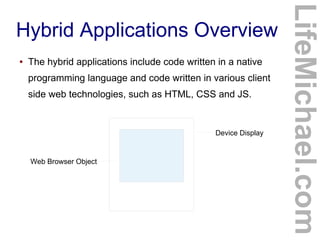
● The hybrid applications include code written in a native
programming language and code written in various client
side web technologies, such as HTML, CSS and JS.
LifeMichael.com
Device Display
Web Browser Object
The Android WebView Class
● Instantiating WebView class we have when developing
for the android platform we will get an object that
functions as a web browser.
● WebView extends View. We can treat the object as any
other view.
● As of Android 4.4, WebView is based on the Chromium
open source project.
● The other mobile platforms have a similar class.
LifeMichael.com
The Android WebView Class
LifeMichael.com
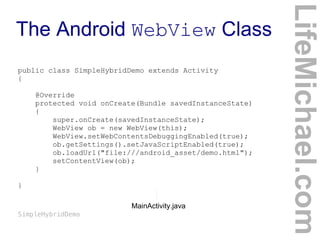
public class SimpleHybridDemo extends Activity
{
@Override
protected void onCreate(Bundle savedInstanceState)
{
super.onCreate(savedInstanceState);
WebView ob = new WebView(this);
WebView.setWebContentsDebuggingEnabled(true);
ob.getSettings().setJavaScriptEnabled(true);
ob.loadUrl("file:///android_asset/demo.html");
setContentView(ob);
}
}
MainActivity.java
SimpleHybridDemo
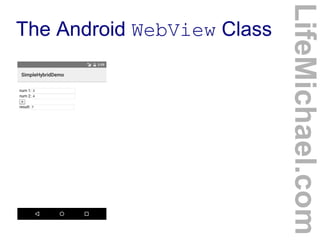
The Android WebView Class
LifeMichael.com
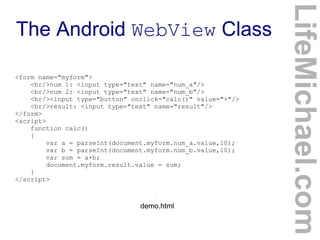
<form name="myform">
<br/>num 1: <input type="text" name="num_a"/>
<br/>num 2: <input type="text" name="num_b"/>
<br/><input type="button" onclick="calc()" value="+"/>
<br/>result: <input type="text" name="result"/>
</form>
<script>
function calc()
{
var a = parseInt(document.myform.num_a.value,10);
var b = parseInt(document.myform.num_b.value,10);
var sum = a+b;
document.myform.result.value = sum;
}
</script>
demo.html
The Android WebView Class
LifeMichael.com
The Android WebView Class
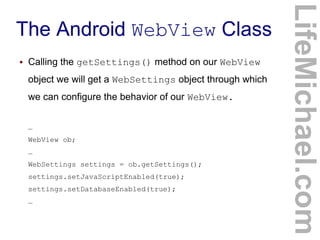
● Calling the getSettings() method on our WebView
object we will get a WebSettings object through which
we can configure the behavior of our WebView.
…
WebView ob;
…
WebSettings settings = ob.getSettings();
settings.setJavaScriptEnabled(true);
settings.setDatabaseEnabled(true);
…
LifeMichael.com
JavaScript Libraries
● There are many JavaScript libraries optimized for touch
screen devices we can use.
LifeMichael.com
JavaScript Libraries
● You can find samples for hybrid applications developed
using SenchaTouch at
http://dev.sencha.com/deploy/touch/examples/
● You can find samples for hybrid applications developed
using jQueryMobile at
http://www.jqmgallery.com
LifeMichael.com
JavaScript Libraries
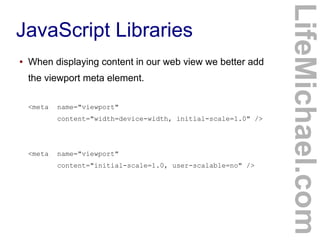
● When displaying content in our web view we better add
the viewport meta element.
<meta name="viewport"
content="width=device-width, initial-scale=1.0" />
<meta name="viewport"
content="initial-scale=1.0, user-scalable=no" />
LifeMichael.com
JavaScript Calling Java
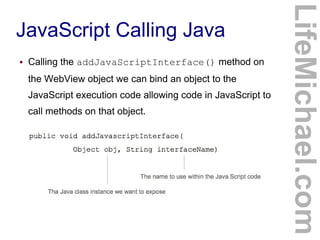
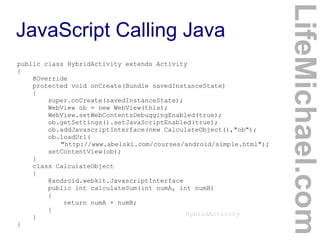
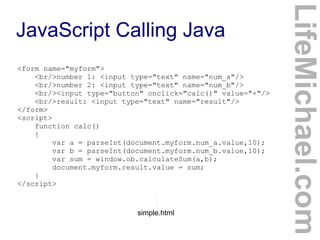
● Calling the addJavaScriptInterface() method on
the WebView object we can bind an object to the
JavaScript execution code allowing code in JavaScript to
call methods on that object.
LifeMichael.com
JavaScript Calling Java
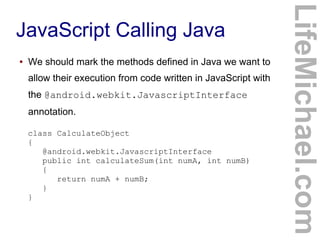
● We should mark the methods defined in Java we want to
allow their execution from code written in JavaScript with
the @android.webkit.JavascriptInterface
annotation.
LifeMichael.com
class CalculateObject
{
@android.webkit.JavascriptInterface
public int calculateSum(int numA, int numB)
{
return numA + numB;
}
}
JavaScript Calling Java
LifeMichael.com
public class HybridActivity extends Activity
{
@Override
protected void onCreate(Bundle savedInstanceState)
{
super.onCreate(savedInstanceState);
WebView ob = new WebView(this);
WebView.setWebContentsDebuggingEnabled(true);
ob.getSettings().setJavaScriptEnabled(true);
ob.addJavascriptInterface(new CalculateObject(),"ob");
ob.loadUrl(
"http://www.abelski.com/courses/android/simple.html");
setContentView(ob);
}
class CalculateObject
{
@android.webkit.JavascriptInterface
public int calculateSum(int numA, int numB)
{
return numA + numB;
}
}
}
HybridActivity
JavaScript Calling Java
LifeMichael.com
<form name="myform">
<br/>number 1: <input type="text" name="num_a"/>
<br/>number 2: <input type="text" name="num_b"/>
<br/><input type="button" onclick="calc()" value="+"/>
<br/>result: <input type="text" name="result"/>
</form>
<script>
function calc()
{
var a = parseInt(document.myform.num_a.value,10);
var b = parseInt(document.myform.num_b.value,10);
var sum = window.ob.calculateSum(a,b);
document.myform.result.value = sum;
}
</script>
simple.html
JavaScript Calling Java
LifeMichael.com
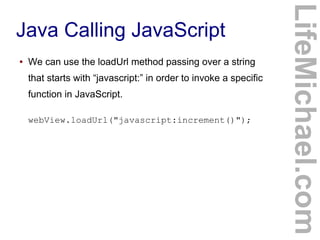
Java Calling JavaScript
● We can use the loadUrl method passing over a string
that starts with “javascript:” in order to invoke a specific
function in JavaScript.
webView.loadUrl("javascript:increment()");
LifeMichael.com
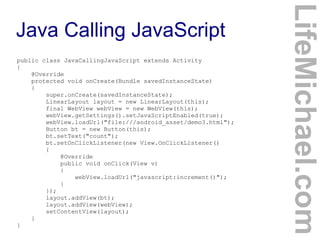
Java Calling JavaScript
LifeMichael.com
public class JavaCallingJavaScript extends Activity
{
@Override
protected void onCreate(Bundle savedInstanceState)
{
super.onCreate(savedInstanceState);
LinearLayout layout = new LinearLayout(this);
final WebView webView = new WebView(this);
webView.getSettings().setJavaScriptEnabled(true);
webView.loadUrl("file:///android_asset/demo3.html");
Button bt = new Button(this);
bt.setText("count");
bt.setOnClickListener(new View.OnClickListener()
{
@Override
public void onClick(View v)
{
webView.loadUrl("javascript:increment()");
}
});
layout.addView(bt);
layout.addView(webView);
setContentView(layout);
}
}
Java Calling JavaScript
LifeMichael.com
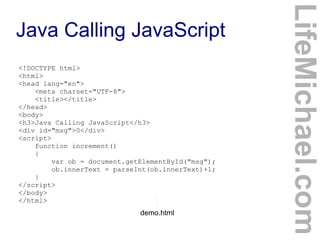
<!DOCTYPE html>
<html>
<head lang="en">
<meta charset="UTF-8">
<title></title>
</head>
<body>
<h3>Java Calling JavaScript</h3>
<div id="msg">0</div>
<script>
function increment()
{
var ob = document.getElementById("msg");
ob.innerText = parseInt(ob.innerText)+1;
}
</script>
</body>
</html>
demo.html
Java Calling JavaScript
LifeMichael.com
Handling The Back Button
LifeMichael.com
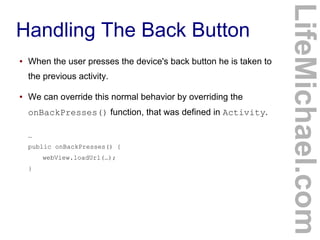
● When the user presses the device's back button he is taken to
the previous activity.
● We can override this normal behavior by overriding the
onBackPresses() function, that was defined in Activity.
…
public onBackPresses() {
webView.loadUrl(…);
}
Handling External Links
LifeMichael.com
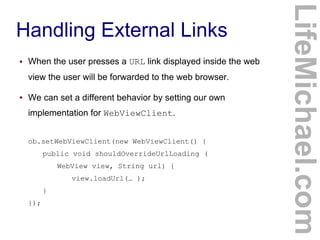
● When the user presses a URL link displayed inside the web
view the user will be forwarded to the web browser.
● We can set a different behavior by setting our own
implementation for WebViewClient.
ob.setWebViewClient(new WebViewClient() {
public void shouldOverrideUrlLoading (
WebView view, String url) {
view.loadUrl(… );
}
});
Handling External Links
LifeMichael.com
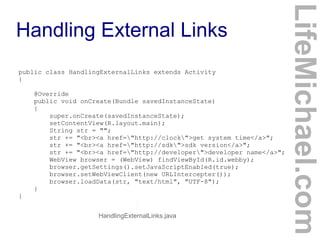
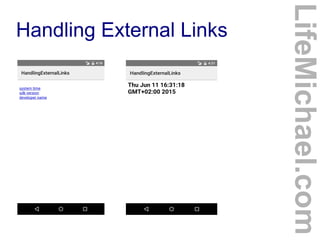
public class HandlingExternalLinks extends Activity
{
@Override
public void onCreate(Bundle savedInstanceState)
{
super.onCreate(savedInstanceState);
setContentView(R.layout.main);
String str = "";
str += "<br><a href="http://clock">get system time</a>";
str += "<br><a href="http://sdk">sdk version</a>";
str += "<br><a href="http://developer">developer name</a>";
WebView browser = (WebView) findViewById(R.id.webby);
browser.getSettings().setJavaScriptEnabled(true);
browser.setWebViewClient(new URLIntercepter());
browser.loadData(str, "text/html", "UTF-8");
}
}
HandlingExternalLinks.java
Handling External Links
LifeMichael.com
HandlingExternalLinks.java
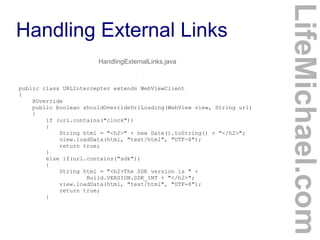
public class URLIntercepter extends WebViewClient
{
@Override
public boolean shouldOverrideUrlLoading(WebView view, String url)
{
if (url.contains("clock"))
{
String html = "<h2>" + new Date().toString() + "</h2>";
view.loadData(html, "text/html", "UTF-8");
return true;
}
else if(url.contains("sdk"))
{
String html = "<h2>The SDK version is " +
Build.VERSION.SDK_INT + "</h2>";
view.loadData(html, "text/html", "UTF-8");
return true;
}
Handling External Links
LifeMichael.com
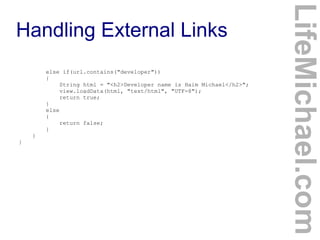
else if(url.contains("developer"))
{
String html = "<h2>Developer name is Haim Michael</h2>";
view.loadData(html, "text/html", "UTF-8");
return true;
}
else
{
return false;
}
}
}
Handling External Links
LifeMichael.com
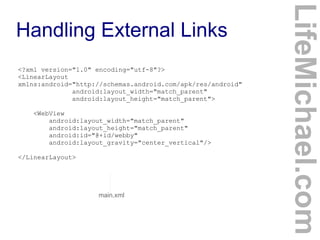
<?xml version="1.0" encoding="utf-8"?>
<LinearLayout
xmlns:android="http://schemas.android.com/apk/res/android"
android:layout_width="match_parent"
android:layout_height="match_parent">
<WebView
android:layout_width="match_parent"
android:layout_height="match_parent"
android:id="@+id/webby"
android:layout_gravity="center_vertical"/>
</LinearLayout>
main.xml
Handling External Links
LifeMichael.com
Chrome DevTools Debugging
LifeMichael.com
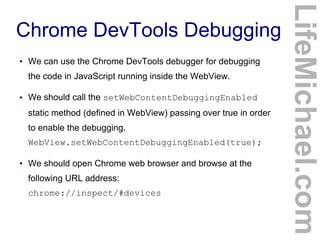
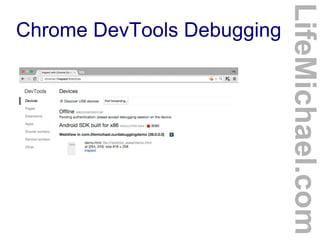
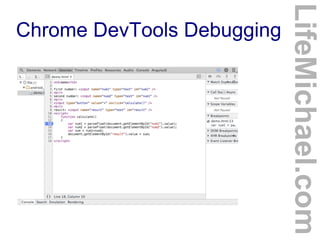
● We can use the Chrome DevTools debugger for debugging
the code in JavaScript running inside the WebView.
● We should call the setWebContentDebuggingEnabled
static method (defined in WebView) passing over true in order
to enable the debugging.
WebView.setWebContentDebuggingEnabled(true);
● We should open Chrome web browser and browse at the
following URL address:
chrome://inspect/#devices
Chrome DevTools Debugging
LifeMichael.com
Chrome DevTools Debugging
LifeMichael.com
Other Platforms
LifeMichael.com
Chrome OS Windows 8+
Electron
electron.atom.io nwjs.ioelectron.atom.io
nwjs.io
qt.io
qt.io
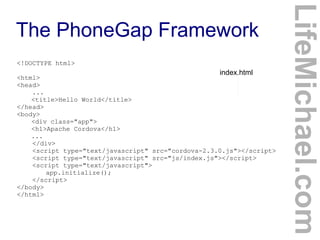
The PhoneGap Framework
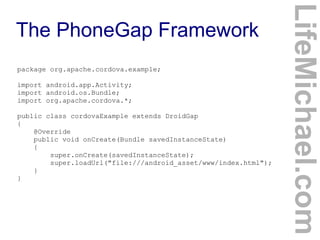
● The PhoneGap framework assists with the
development of hybrid applications for mobile
platforms.The PhoneGap framework includes two
parts. The JavaScript library that includes the
definition of functions that allow using the platform
native capabilities. The native code developed
specifically separately for each and every mobile
platform.
LifeMichael.com
The PhoneGap Framework
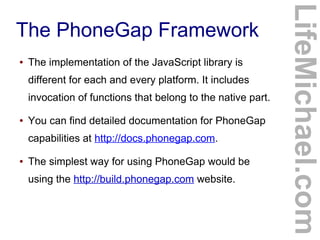
● The implementation of the JavaScript library is
different for each and every platform. It includes
invocation of functions that belong to the native part.
● You can find detailed documentation for PhoneGap
capabilities at http://docs.phonegap.com.
● The simplest way for using PhoneGap would be
using the http://build.phonegap.com website.
LifeMichael.com
The PhoneGap Framework
LifeMichael.com
package org.apache.cordova.example;
import android.app.Activity;
import android.os.Bundle;
import org.apache.cordova.*;
public class cordovaExample extends DroidGap
{
@Override
public void onCreate(Bundle savedInstanceState)
{
super.onCreate(savedInstanceState);
super.loadUrl("file:///android_asset/www/index.html");
}
}
The PhoneGap Framework
LifeMichael.com
<!DOCTYPE html>
<html>
<head>
...
<title>Hello World</title>
</head>
<body>
<div class="app">
<h1>Apache Cordova</h1>
...
</div>
<script type="text/javascript" src="cordova-2.3.0.js"></script>
<script type="text/javascript" src="js/index.js"></script>
<script type="text/javascript">
app.initialize();
</script>
</body>
</html>
index.html
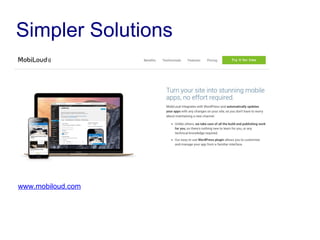
Simpler Solutions
www.wiziapp.com
Simpler Solutions
www.mobiloud.com
Simpler Solutions
www.mobiloud.com
Simpler Solutions
www.reactorapps.io
Learning Resources
● The Android Platform main learning resource is the
http://developer.android.com website.
● You can find my free online course about software
development in my website at http://abelski.lifemichael.com
● Short video clips in hebrew together with short tutorials in
hebrew for learning Java can be found at
http://www.javabook.co.il
LifeMichael.com
Learning Resources
● Short video clips in hebrew together with short tutorials in
hebrew for learning PHP can be found at
http://www.phpbook.co.il
● Short video clips in hebrew together with short tutorials in
hebrew for learning Android development can be found at
http://www.androidbook.co.il
LifeMichael.com
My Coming Courses
Software Engineering in PHP7
http://tinyurl.com/lifemichaelphp
Starts in July 2016
My Coming Courses
HTML5 Cross Platform Mobile Applications
http://tinyurl.com/lifemichaelhtml5
Starts in July 2016
My Coming Courses
Applications Development for Android 7
http://tinyurl.com/lifemichaelandroid
Starts in September 2016
My Coming Courses
140 Academic Hours. 28 Weekly Meetings. Delivered
in Holon Institute of Technology. On Going Project.
Multiple Tiny Projects. All Meetings are Available on
Video. Attractive Price of 6700 Shekels.
tinyurl.com/lifemichaelhitcourses
Questions & Answers
If you enjoyed my seminar please leave me a comment
at http://speakerpedia.com/speakers/life-michael.
Thanks for your time!
Haim.

Hybrid App using WordPress

  • 1.
    Hybrid App usingWordPress Haim Michael June 9th , 2016 All logos, trademarks and brand names used in this presentation, such as the logo of Google or any of its products, belong to their respective owners. Haim Michael and LifeMichael are independent and not related, affiliated or connected neither with Google, TinyURL, Facebook or any of the companies and the technologies mentioned in this presentation. LifeMichael.com
  • 2.
    Table of Content LifeMichael.com ●Haim Michael Introduction ● Hybrid Applications Overview ● The WebView Class ● JavaScript Libraries ● JavaScript Calling Java ● Java Calling JavaScript ● Handling The Back Button ● Handling External Links ● Chrome DevTools Debugging ● Other Platforms ● PhoneGap Framework ● Simple Solutions ● Learning Resources ● Questions & Answers
  • 3.
    Haim Michael Introduction ●Snowboarding. Learning. Coding. Teaching. More than 18 years of Practical Experience. LifeMichael.com
  • 4.
    Haim Michael Introduction ●Professional Certifications Zend Certified Engineer in PHP Certified Java Professional Certified Java EE Web Component Developer OMG Certified UML Professional ● MBA (cum laude) from Tel-Aviv University Information Systems Management LifeMichael.com
  • 5.
    Hybrid Applications Overview ●The hybrid applications include code written in a native programming language and code written in various client side web technologies, such as HTML, CSS and JS. LifeMichael.com Device Display Web Browser Object
  • 6.
    The Android WebViewClass ● Instantiating WebView class we have when developing for the android platform we will get an object that functions as a web browser. ● WebView extends View. We can treat the object as any other view. ● As of Android 4.4, WebView is based on the Chromium open source project. ● The other mobile platforms have a similar class. LifeMichael.com
  • 7.
    The Android WebViewClass LifeMichael.com public class SimpleHybridDemo extends Activity { @Override protected void onCreate(Bundle savedInstanceState) { super.onCreate(savedInstanceState); WebView ob = new WebView(this); WebView.setWebContentsDebuggingEnabled(true); ob.getSettings().setJavaScriptEnabled(true); ob.loadUrl("file:///android_asset/demo.html"); setContentView(ob); } } MainActivity.java SimpleHybridDemo
  • 8.
    The Android WebViewClass LifeMichael.com <form name="myform"> <br/>num 1: <input type="text" name="num_a"/> <br/>num 2: <input type="text" name="num_b"/> <br/><input type="button" onclick="calc()" value="+"/> <br/>result: <input type="text" name="result"/> </form> <script> function calc() { var a = parseInt(document.myform.num_a.value,10); var b = parseInt(document.myform.num_b.value,10); var sum = a+b; document.myform.result.value = sum; } </script> demo.html
  • 9.
    The Android WebViewClass LifeMichael.com
  • 10.
    The Android WebViewClass ● Calling the getSettings() method on our WebView object we will get a WebSettings object through which we can configure the behavior of our WebView. … WebView ob; … WebSettings settings = ob.getSettings(); settings.setJavaScriptEnabled(true); settings.setDatabaseEnabled(true); … LifeMichael.com
  • 11.
    JavaScript Libraries ● Thereare many JavaScript libraries optimized for touch screen devices we can use. LifeMichael.com
  • 12.
    JavaScript Libraries ● Youcan find samples for hybrid applications developed using SenchaTouch at http://dev.sencha.com/deploy/touch/examples/ ● You can find samples for hybrid applications developed using jQueryMobile at http://www.jqmgallery.com LifeMichael.com
  • 13.
    JavaScript Libraries ● Whendisplaying content in our web view we better add the viewport meta element. <meta name="viewport" content="width=device-width, initial-scale=1.0" /> <meta name="viewport" content="initial-scale=1.0, user-scalable=no" /> LifeMichael.com
  • 14.
    JavaScript Calling Java ●Calling the addJavaScriptInterface() method on the WebView object we can bind an object to the JavaScript execution code allowing code in JavaScript to call methods on that object. LifeMichael.com
  • 15.
    JavaScript Calling Java ●We should mark the methods defined in Java we want to allow their execution from code written in JavaScript with the @android.webkit.JavascriptInterface annotation. LifeMichael.com class CalculateObject { @android.webkit.JavascriptInterface public int calculateSum(int numA, int numB) { return numA + numB; } }
  • 16.
    JavaScript Calling Java LifeMichael.com publicclass HybridActivity extends Activity { @Override protected void onCreate(Bundle savedInstanceState) { super.onCreate(savedInstanceState); WebView ob = new WebView(this); WebView.setWebContentsDebuggingEnabled(true); ob.getSettings().setJavaScriptEnabled(true); ob.addJavascriptInterface(new CalculateObject(),"ob"); ob.loadUrl( "http://www.abelski.com/courses/android/simple.html"); setContentView(ob); } class CalculateObject { @android.webkit.JavascriptInterface public int calculateSum(int numA, int numB) { return numA + numB; } } } HybridActivity
  • 17.
    JavaScript Calling Java LifeMichael.com <formname="myform"> <br/>number 1: <input type="text" name="num_a"/> <br/>number 2: <input type="text" name="num_b"/> <br/><input type="button" onclick="calc()" value="+"/> <br/>result: <input type="text" name="result"/> </form> <script> function calc() { var a = parseInt(document.myform.num_a.value,10); var b = parseInt(document.myform.num_b.value,10); var sum = window.ob.calculateSum(a,b); document.myform.result.value = sum; } </script> simple.html
  • 18.
  • 19.
    Java Calling JavaScript ●We can use the loadUrl method passing over a string that starts with “javascript:” in order to invoke a specific function in JavaScript. webView.loadUrl("javascript:increment()"); LifeMichael.com
  • 20.
    Java Calling JavaScript LifeMichael.com publicclass JavaCallingJavaScript extends Activity { @Override protected void onCreate(Bundle savedInstanceState) { super.onCreate(savedInstanceState); LinearLayout layout = new LinearLayout(this); final WebView webView = new WebView(this); webView.getSettings().setJavaScriptEnabled(true); webView.loadUrl("file:///android_asset/demo3.html"); Button bt = new Button(this); bt.setText("count"); bt.setOnClickListener(new View.OnClickListener() { @Override public void onClick(View v) { webView.loadUrl("javascript:increment()"); } }); layout.addView(bt); layout.addView(webView); setContentView(layout); } }
  • 21.
    Java Calling JavaScript LifeMichael.com <!DOCTYPEhtml> <html> <head lang="en"> <meta charset="UTF-8"> <title></title> </head> <body> <h3>Java Calling JavaScript</h3> <div id="msg">0</div> <script> function increment() { var ob = document.getElementById("msg"); ob.innerText = parseInt(ob.innerText)+1; } </script> </body> </html> demo.html
  • 22.
  • 23.
    Handling The BackButton LifeMichael.com ● When the user presses the device's back button he is taken to the previous activity. ● We can override this normal behavior by overriding the onBackPresses() function, that was defined in Activity. … public onBackPresses() { webView.loadUrl(…); }
  • 24.
    Handling External Links LifeMichael.com ●When the user presses a URL link displayed inside the web view the user will be forwarded to the web browser. ● We can set a different behavior by setting our own implementation for WebViewClient. ob.setWebViewClient(new WebViewClient() { public void shouldOverrideUrlLoading ( WebView view, String url) { view.loadUrl(… ); } });
  • 25.
    Handling External Links LifeMichael.com publicclass HandlingExternalLinks extends Activity { @Override public void onCreate(Bundle savedInstanceState) { super.onCreate(savedInstanceState); setContentView(R.layout.main); String str = ""; str += "<br><a href="http://clock">get system time</a>"; str += "<br><a href="http://sdk">sdk version</a>"; str += "<br><a href="http://developer">developer name</a>"; WebView browser = (WebView) findViewById(R.id.webby); browser.getSettings().setJavaScriptEnabled(true); browser.setWebViewClient(new URLIntercepter()); browser.loadData(str, "text/html", "UTF-8"); } } HandlingExternalLinks.java
  • 26.
    Handling External Links LifeMichael.com HandlingExternalLinks.java publicclass URLIntercepter extends WebViewClient { @Override public boolean shouldOverrideUrlLoading(WebView view, String url) { if (url.contains("clock")) { String html = "<h2>" + new Date().toString() + "</h2>"; view.loadData(html, "text/html", "UTF-8"); return true; } else if(url.contains("sdk")) { String html = "<h2>The SDK version is " + Build.VERSION.SDK_INT + "</h2>"; view.loadData(html, "text/html", "UTF-8"); return true; }
  • 27.
    Handling External Links LifeMichael.com elseif(url.contains("developer")) { String html = "<h2>Developer name is Haim Michael</h2>"; view.loadData(html, "text/html", "UTF-8"); return true; } else { return false; } } }
  • 28.
    Handling External Links LifeMichael.com <?xmlversion="1.0" encoding="utf-8"?> <LinearLayout xmlns:android="http://schemas.android.com/apk/res/android" android:layout_width="match_parent" android:layout_height="match_parent"> <WebView android:layout_width="match_parent" android:layout_height="match_parent" android:id="@+id/webby" android:layout_gravity="center_vertical"/> </LinearLayout> main.xml
  • 29.
  • 30.
    Chrome DevTools Debugging LifeMichael.com ●We can use the Chrome DevTools debugger for debugging the code in JavaScript running inside the WebView. ● We should call the setWebContentDebuggingEnabled static method (defined in WebView) passing over true in order to enable the debugging. WebView.setWebContentDebuggingEnabled(true); ● We should open Chrome web browser and browse at the following URL address: chrome://inspect/#devices
  • 31.
  • 32.
  • 33.
    Other Platforms LifeMichael.com Chrome OSWindows 8+ Electron electron.atom.io nwjs.ioelectron.atom.io nwjs.io qt.io qt.io
  • 34.
    The PhoneGap Framework ●The PhoneGap framework assists with the development of hybrid applications for mobile platforms.The PhoneGap framework includes two parts. The JavaScript library that includes the definition of functions that allow using the platform native capabilities. The native code developed specifically separately for each and every mobile platform. LifeMichael.com
  • 35.
    The PhoneGap Framework ●The implementation of the JavaScript library is different for each and every platform. It includes invocation of functions that belong to the native part. ● You can find detailed documentation for PhoneGap capabilities at http://docs.phonegap.com. ● The simplest way for using PhoneGap would be using the http://build.phonegap.com website. LifeMichael.com
  • 36.
    The PhoneGap Framework LifeMichael.com packageorg.apache.cordova.example; import android.app.Activity; import android.os.Bundle; import org.apache.cordova.*; public class cordovaExample extends DroidGap { @Override public void onCreate(Bundle savedInstanceState) { super.onCreate(savedInstanceState); super.loadUrl("file:///android_asset/www/index.html"); } }
  • 37.
    The PhoneGap Framework LifeMichael.com <!DOCTYPEhtml> <html> <head> ... <title>Hello World</title> </head> <body> <div class="app"> <h1>Apache Cordova</h1> ... </div> <script type="text/javascript" src="cordova-2.3.0.js"></script> <script type="text/javascript" src="js/index.js"></script> <script type="text/javascript"> app.initialize(); </script> </body> </html> index.html
  • 38.
  • 39.
  • 40.
  • 41.
  • 42.
    Learning Resources ● TheAndroid Platform main learning resource is the http://developer.android.com website. ● You can find my free online course about software development in my website at http://abelski.lifemichael.com ● Short video clips in hebrew together with short tutorials in hebrew for learning Java can be found at http://www.javabook.co.il LifeMichael.com

  • 43.
    Learning Resources ● Shortvideo clips in hebrew together with short tutorials in hebrew for learning PHP can be found at http://www.phpbook.co.il ● Short video clips in hebrew together with short tutorials in hebrew for learning Android development can be found at http://www.androidbook.co.il LifeMichael.com
  • 44.
    My Coming Courses SoftwareEngineering in PHP7 http://tinyurl.com/lifemichaelphp Starts in July 2016
  • 45.
    My Coming Courses HTML5Cross Platform Mobile Applications http://tinyurl.com/lifemichaelhtml5 Starts in July 2016
  • 46.
    My Coming Courses ApplicationsDevelopment for Android 7 http://tinyurl.com/lifemichaelandroid Starts in September 2016
  • 47.
    My Coming Courses 140Academic Hours. 28 Weekly Meetings. Delivered in Holon Institute of Technology. On Going Project. Multiple Tiny Projects. All Meetings are Available on Video. Attractive Price of 6700 Shekels. tinyurl.com/lifemichaelhitcourses
  • 48.
    Questions & Answers Ifyou enjoyed my seminar please leave me a comment at http://speakerpedia.com/speakers/life-michael. Thanks for your time! Haim.