WHAT 
NOT TO DO 
WITH ASPNET 
Common mistakes to avoid while using 
aspnet for web projects
I .STANDARDS COMPLIANCE 
No Control adapters : 
It's best to use solid adaptive CSS and HTML techniques.
I. STANDARDS COMPLIANCE 
No style values in the control markup: 
Set CSS classes yourself, don't use inline styles. protected void CustomersGridView_RowDataBound(object sender, GridViewRowEventArgs e) 
{ 
if (e.Row.Cells[2].Text == "Unconfirmed") 
{ 
e.Row.CssClass = "CautionRow"; 
} 
}
I. STANDARDS COMPLIANCE 
No page and control callbacks: 
Stick with SignalR, Web API, and JavaScript.
I. STANDARDS COMPLIANCE 
No static browser capability detection: 
Check for features instead of browsers
II. SECURITY 
No Request Validation: 
Validate user input and encode values from users.
II. SECURITY 
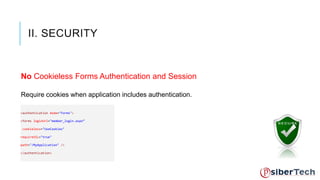
No Cookieless Forms Authentication and Session 
Require cookies when application includes authentication. 
<authentication mode="Forms"> 
<forms loginUrl="member_login.aspx“ 
cookieless="UseCookies" 
requireSSL="true" 
path="/MyApplication" /> 
</authentication>
II. SECURITY 
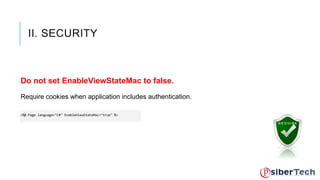
Do not set EnableViewStateMac to false. 
Require cookies when application includes authentication. 
<%@ Page language="C#" EnableViewStateMac="true" %>
II. SECURITY 
Do not depend on Medium Trust: 
Keep Apps in separate App pools.
II. SECURITY 
Do not disable security patches with appsettings: 
Keep Apps in separate App pools.
II. SECURITY 
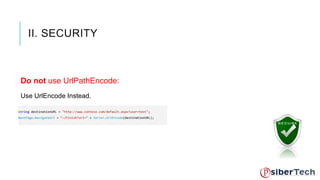
Do not use UrlPathEncode: 
Use UrlEncode Instead. 
string destinationURL = "http://www.contoso.com/default.aspx?user=test"; 
NextPage.NavigateUrl = "~/Finish?url=" + Server.UrlEncode(destinationURL);
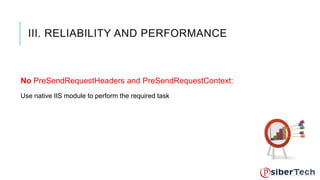
III. RELIABILITY AND PERFORMANCE 
No PreSendRequestHeaders and PreSendRequestContext: 
Use native IIS module to perform the required task
III. RELIABILITY AND PERFORMANCE 
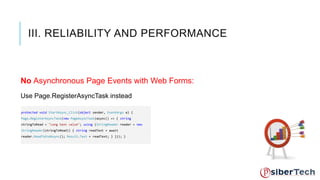
No Asynchronous Page Events with Web Forms: 
Use Page.RegisterAsyncTask instead 
protected void StartAsync_Click(object sender, EventArgs e) { 
Page.RegisterAsyncTask(new PageAsyncTask(async() => { string 
stringToRead = "Long text value"; using (StringReader reader = new 
StringReader(stringToRead)) { string readText = await 
reader.ReadToEndAsync(); Result.Text = readText; } })); }
III. RELIABILITY AND PERFORMANCE 
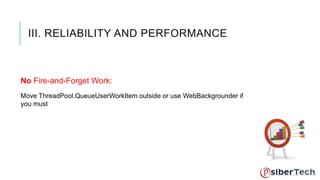
No Fire-and-Forget Work: 
Move ThreadPool.QueueUserWorkItem outside or use WebBackgrounder if 
you must
III. RELIABILITY AND PERFORMANCE 
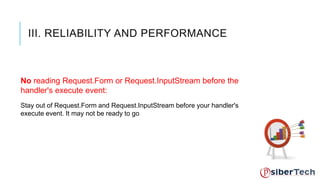
No reading Request.Form or Request.InputStream before the 
handler's execute event: 
Stay out of Request.Form and Request.InputStream before your handler's 
execute event. It may not be ready to go
III. RELIABILITY AND PERFORMANCE 
No Long-running Requests (>110 seconds): 
Use WebSockets or SignalR for connected clients, and use asynchronous 
I/O operations
THANK YOU ! 
WWW.PSIBERTECH.COM.SG

What not to do with ASP NET

  • 1.
    WHAT NOT TODO WITH ASPNET Common mistakes to avoid while using aspnet for web projects
  • 2.
    I .STANDARDS COMPLIANCE No Control adapters : It's best to use solid adaptive CSS and HTML techniques.
  • 3.
    I. STANDARDS COMPLIANCE No style values in the control markup: Set CSS classes yourself, don't use inline styles. protected void CustomersGridView_RowDataBound(object sender, GridViewRowEventArgs e) { if (e.Row.Cells[2].Text == "Unconfirmed") { e.Row.CssClass = "CautionRow"; } }
  • 4.
    I. STANDARDS COMPLIANCE No page and control callbacks: Stick with SignalR, Web API, and JavaScript.
  • 5.
    I. STANDARDS COMPLIANCE No static browser capability detection: Check for features instead of browsers
  • 6.
    II. SECURITY NoRequest Validation: Validate user input and encode values from users.
  • 7.
    II. SECURITY NoCookieless Forms Authentication and Session Require cookies when application includes authentication. <authentication mode="Forms"> <forms loginUrl="member_login.aspx“ cookieless="UseCookies" requireSSL="true" path="/MyApplication" /> </authentication>
  • 8.
    II. SECURITY Donot set EnableViewStateMac to false. Require cookies when application includes authentication. <%@ Page language="C#" EnableViewStateMac="true" %>
  • 9.
    II. SECURITY Donot depend on Medium Trust: Keep Apps in separate App pools.
  • 10.
    II. SECURITY Donot disable security patches with appsettings: Keep Apps in separate App pools.
  • 11.
    II. SECURITY Donot use UrlPathEncode: Use UrlEncode Instead. string destinationURL = "http://www.contoso.com/default.aspx?user=test"; NextPage.NavigateUrl = "~/Finish?url=" + Server.UrlEncode(destinationURL);
  • 12.
    III. RELIABILITY ANDPERFORMANCE No PreSendRequestHeaders and PreSendRequestContext: Use native IIS module to perform the required task
  • 13.
    III. RELIABILITY ANDPERFORMANCE No Asynchronous Page Events with Web Forms: Use Page.RegisterAsyncTask instead protected void StartAsync_Click(object sender, EventArgs e) { Page.RegisterAsyncTask(new PageAsyncTask(async() => { string stringToRead = "Long text value"; using (StringReader reader = new StringReader(stringToRead)) { string readText = await reader.ReadToEndAsync(); Result.Text = readText; } })); }
  • 14.
    III. RELIABILITY ANDPERFORMANCE No Fire-and-Forget Work: Move ThreadPool.QueueUserWorkItem outside or use WebBackgrounder if you must
  • 15.
    III. RELIABILITY ANDPERFORMANCE No reading Request.Form or Request.InputStream before the handler's execute event: Stay out of Request.Form and Request.InputStream before your handler's execute event. It may not be ready to go
  • 16.
    III. RELIABILITY ANDPERFORMANCE No Long-running Requests (>110 seconds): Use WebSockets or SignalR for connected clients, and use asynchronous I/O operations
  • 17.
    THANK YOU ! WWW.PSIBERTECH.COM.SG