Guy Flysher

Google App Engine

(Google App Engine Overview)

Barcamp Phnom Penh 2011


Phnom Penh, Cambodia
About me

● Developer in the Emerging markets team.

● Joined Google in 2007.

● Previously worked on Social graphs,
  Gmail and Google Accounts.

● Currently work on SMS products (Chat SMS, G+ SMS and
  more to come...)

● G+ profile: http://gplus.name/GuyFlysher
Agenda


● Part I: What is App Engine?

● Part II: App Engine Product Usage

● Part III: How to use App Engine
   ○ Hello world example
   ○ App Engine Services
   ○ Code examples
   ○ Demos of non web uses
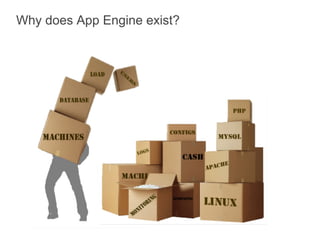
Why does App Engine exist?
App Engine is a full development platform


                       App Engine provides great
      Hosting          tools, APIs & hosting

                          Easy to build

        APIs              Easy to manage

                          Easy to scale

       Tools
Language Runtime Options


           GO
        Experimental       Java
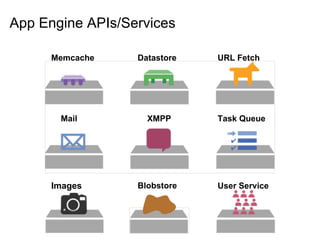
App Engine APIs/Services

      Memcache    Datastore   URL Fetch


       Mail         XMPP      Task Queue


      Images      Blobstore   User Service
Administration Console
Agenda


● Part I: What is App Engine?

● Part II: App Engine Product Usage

● Part III: How to use App Engine
   ○ Hello world example
   ○ App Engine Services
   ○ Code examples
   ○ Demos of non web uses
App Engine - A Larger Number


1,500,000,000+
Page views per
day
Notable App Engine Customers
Royal Wedding - Scalability Success

                    Official blog & live stream apps
                         hosted on App Engine

                    On Wedding day...
                    Blog app served:
                       ● Up to 2k requests per second
                       ● 15 million pageviews
                       ● 5.6 million visitors
                    Live stream app served:
                       ● Up to 32k requests per second
                       ● 37.7 million pageviews
                       ● 13.7 million visitors


                      http://goo.gl/F1SGc
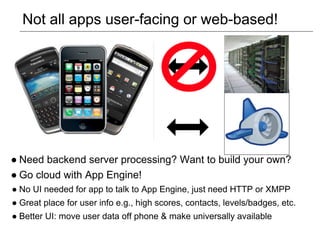
Not all apps user-facing or web-based!


● Need backend server processing? Want to build your own?
● Go cloud with App Engine!
● No UI needed for app to talk to App Engine, just need HTTP or XMPP
● Great place for user info e.g., high scores, contacts, levels/badges, etc.
● Better UI: move user data off phone & make universally available
Agenda


● Part I: What is App Engine?

● Part II: App Engine Product Usage

● Part III: How to use App Engine
   ○ Servlets and JSP files
   ○ Hello world example
   ○ App Engine Services and code examples
   ○ Demos of non web uses
Java HttpServlet

● Abstract class for processing HTTP requests.

● Override its methods for processing various HTTP requests,
  e.g:
    ○ doGet
    ○ doPost
    ○ doHead
    ○ etc

● Part of Java (not App Engine specific)
HttpServlet example

public class Hello_worldServlet extends HttpServlet {

    public void doGet(HttpServletRequest req,
     HttpServletResponse resp) throws IOException {

        String userIp = req.getRemoteAddr();
        resp.setContentType("text/plain");
        resp.getWriter().println("Hello, " + userIp);
    }
}
JSP - JavaServer Pages

● Used to create dynamically generated web pages based on
  HTML.


● A mix of Java and HTML.


● Can be though of as the Java equivalent of PHP.
JSP example

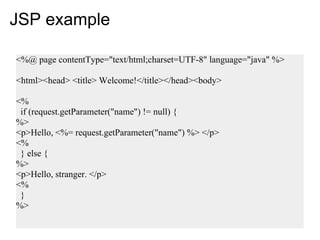
<%@ page contentType="text/html;charset=UTF-8" language="java" %>

<html><head> <title> Welcome!</title></head><body>

<%
 if (request.getParameter("name") != null) {
%>
<p>Hello, <%= request.getParameter("name") %> </p>
<%
 } else {
%>
<p>Hello, stranger. </p>
<%
 }
%>
Hello World Demo

  Deploy from scratch
  (In under 3 minutes)
App Engine setup


                     Servlets and other Java
                     code


                   JSP, html and other static
                   files
App Engine setup


                   Configuration files
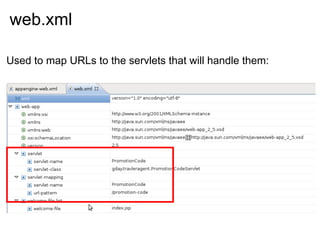
web.xml

Used to map URLs to the servlets that will handle them:
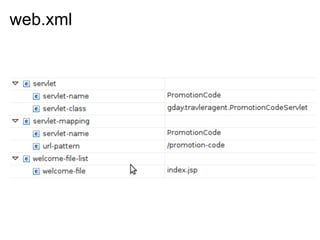
web.xml
web.xml

Used to map URLs to the servlets that will handle them:
App Engine Services

          The User Service
The user system

Building your own user system is a lot of work

 ● Needs to be very secure - destructive result if broken into.

 ● Needs to be very reliable - if it is down your app can't be
   used.

 ● Lots of other services you need to build - a recovery
   mechanism etc.
The Google user system

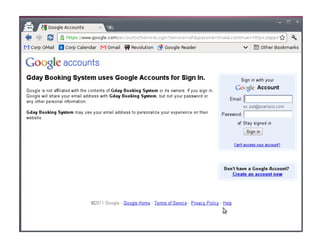
App Engine User Service lets you use Google's user
system for your app.
Benefits:

 ● Users don't need to create a new account to use your app,
   they can use their Google account

 ● Very secure, highly reliable.

 ● Already has recovery mechanisms etc.

 ● Very easy to use!
The User Service

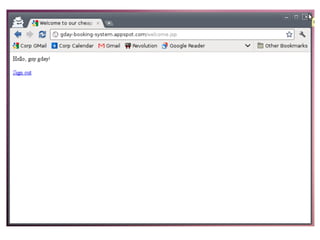
Checking if a user is logged in:
 <%
   UserService userService = UserServiceFactory.getUserService();
   User user = userService.getCurrentUser();
   if (user != null) {
 %>

 <p>Hello, <%= user.getNickname() %> </p>!
 <p>Our records show your email as: <%= user.getEmail() %> </p>

 <%
   } else {
 %>

 <p>Hello! Please log in. </p>

 <%
   }
 %>
The User Service
Creating a sign in/out links
 <%
   UserService userService = UserServiceFactory.getUserService();
   User user = userService.getCurrentUser();
   if (user != null) {
 %>

 <p>Hello, <%= user.getNickname() %>!
 <p> <a href="<%= userService.createLogoutURL(request.getRequestURI()) %>">Sign out </a></p>

 <%
     } else {
 %>
 <p><a href="<%= userService.createLoginURL(request.getRequestURI()) %>">Sign in</a</p>
 ...
App Engine Services

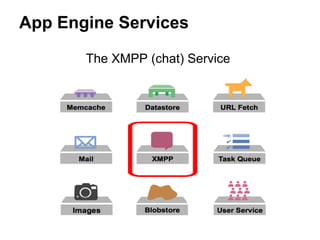
       The XMPP (chat) Service
Sending a chat message
...

JID fromJid = new JID("gday-chat@appspot.com");
JID toJid = new JID("chatty.cathy@gmail.com");
Message msg = new MessageBuilder()
  .withRecipientJids(toJid)
  .withFromJid(fromJid)
  .withBody("Hi there. Is this easy or what?")
  .build();
 XMPPService xmpp = XMPPServiceFactory.getXMPPService();
 SendResponse status = xmpp.sendMessage(msg);
 boolean messageSent =
  (status.getStatusMap().get(toJid) ==
   SendResponse.Status.SUCCESS);

...
App Engine Services

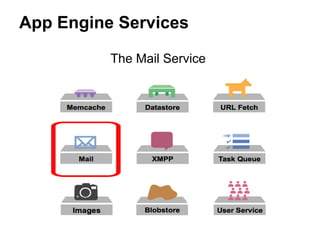
          The Mail Service
Sending an email message
...

Properties props = new Properties();
Session session = Session.getDefaultInstance(props, null);

try {
   Message msg = new MimeMessage(session);
   msg.setFrom(new InternetAddress(
      "anything@my-app-name.appspotmail.com",
      "Guy's App Engine App"));
   msg.addRecipient(Message.RecipientType.TO,
      new InternetAddress("my.client@gmail.com"));
   msg.setSubject("You confirmation email");
   msg.setText("...");
   Transport.send(msg);

} catch (AddressException e) { ... }
  catch (MessagingException e) { ... }
  catch (UnsupportedEncodingException e) { ... }

...
Demos
!
         Q&A
More documentation and information:
 http://code.google.com/appengine
Backup
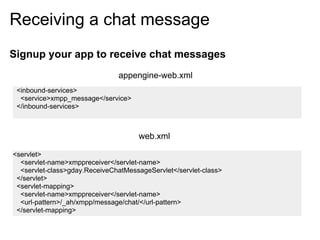
Receiving a chat message
Signup your app to receive chat messages
                               appengine-web.xml
 <inbound-services>
  <service>xmpp_message</service>
 </inbound-services>


                                     web.xml

<servlet>
  <servlet-name>xmppreceiver</servlet-name>
  <servlet-class>gday.ReceiveChatMessageServlet</servlet-class>
 </servlet>
 <servlet-mapping>
  <servlet-name>xmppreceiver</servlet-name>
  <url-pattern>/_ah/xmpp/message/chat/</url-pattern>
 </servlet-mapping>
Receiving a chat message

protected void doPost(HttpServletRequest req,
  HttpServletResponse resp)
  throws ServletException, IOException {

 XMPPService xmpp = XMPPServiceFactory.getXMPPService();
 Message message = xmpp.parseMessage(req);

 JID fromJid = message.getFromJid();
 String body = message.getBody();
 String emailAddress = fromJid.getId().split("/")[0];
 if (body.equalsIgnoreCase("hello")) {
   ...
 return;
 }

 ...

Google App Engine Overview - BarCamp Phnom Penh 2011

  • 1.
    Guy Flysher Google AppEngine (Google App Engine Overview) Barcamp Phnom Penh 2011 Phnom Penh, Cambodia
  • 2.
    About me ● Developerin the Emerging markets team. ● Joined Google in 2007. ● Previously worked on Social graphs, Gmail and Google Accounts. ● Currently work on SMS products (Chat SMS, G+ SMS and more to come...) ● G+ profile: http://gplus.name/GuyFlysher
  • 3.
    Agenda ● Part I:What is App Engine? ● Part II: App Engine Product Usage ● Part III: How to use App Engine ○ Hello world example ○ App Engine Services ○ Code examples ○ Demos of non web uses
  • 4.
    Why does AppEngine exist?
  • 5.
    App Engine isa full development platform App Engine provides great Hosting tools, APIs & hosting Easy to build APIs Easy to manage Easy to scale Tools
  • 6.
    Language Runtime Options GO Experimental Java
  • 7.
    App Engine APIs/Services Memcache Datastore URL Fetch Mail XMPP Task Queue Images Blobstore User Service
  • 8.
  • 9.
    Agenda ● Part I:What is App Engine? ● Part II: App Engine Product Usage ● Part III: How to use App Engine ○ Hello world example ○ App Engine Services ○ Code examples ○ Demos of non web uses
  • 10.
    App Engine -A Larger Number 1,500,000,000+ Page views per day
  • 11.
  • 12.
    Royal Wedding -Scalability Success Official blog & live stream apps hosted on App Engine On Wedding day... Blog app served: ● Up to 2k requests per second ● 15 million pageviews ● 5.6 million visitors Live stream app served: ● Up to 32k requests per second ● 37.7 million pageviews ● 13.7 million visitors http://goo.gl/F1SGc
  • 13.
    Not all appsuser-facing or web-based! ● Need backend server processing? Want to build your own? ● Go cloud with App Engine! ● No UI needed for app to talk to App Engine, just need HTTP or XMPP ● Great place for user info e.g., high scores, contacts, levels/badges, etc. ● Better UI: move user data off phone & make universally available
  • 14.
    Agenda ● Part I:What is App Engine? ● Part II: App Engine Product Usage ● Part III: How to use App Engine ○ Servlets and JSP files ○ Hello world example ○ App Engine Services and code examples ○ Demos of non web uses
  • 15.
    Java HttpServlet ● Abstractclass for processing HTTP requests. ● Override its methods for processing various HTTP requests, e.g: ○ doGet ○ doPost ○ doHead ○ etc ● Part of Java (not App Engine specific)
  • 16.
    HttpServlet example public classHello_worldServlet extends HttpServlet { public void doGet(HttpServletRequest req, HttpServletResponse resp) throws IOException { String userIp = req.getRemoteAddr(); resp.setContentType("text/plain"); resp.getWriter().println("Hello, " + userIp); } }
  • 17.
    JSP - JavaServerPages ● Used to create dynamically generated web pages based on HTML. ● A mix of Java and HTML. ● Can be though of as the Java equivalent of PHP.
  • 18.
    JSP example <%@ pagecontentType="text/html;charset=UTF-8" language="java" %> <html><head> <title> Welcome!</title></head><body> <% if (request.getParameter("name") != null) { %> <p>Hello, <%= request.getParameter("name") %> </p> <% } else { %> <p>Hello, stranger. </p> <% } %>
  • 19.
    Hello World Demo Deploy from scratch (In under 3 minutes)
  • 20.
    App Engine setup Servlets and other Java code JSP, html and other static files
  • 21.
    App Engine setup Configuration files
  • 22.
    web.xml Used to mapURLs to the servlets that will handle them:
  • 23.
  • 24.
    web.xml Used to mapURLs to the servlets that will handle them:
  • 25.
    App Engine Services The User Service
  • 26.
    The user system Buildingyour own user system is a lot of work ● Needs to be very secure - destructive result if broken into. ● Needs to be very reliable - if it is down your app can't be used. ● Lots of other services you need to build - a recovery mechanism etc.
  • 27.
    The Google usersystem App Engine User Service lets you use Google's user system for your app. Benefits: ● Users don't need to create a new account to use your app, they can use their Google account ● Very secure, highly reliable. ● Already has recovery mechanisms etc. ● Very easy to use!
  • 28.
    The User Service Checkingif a user is logged in: <% UserService userService = UserServiceFactory.getUserService(); User user = userService.getCurrentUser(); if (user != null) { %> <p>Hello, <%= user.getNickname() %> </p>! <p>Our records show your email as: <%= user.getEmail() %> </p> <% } else { %> <p>Hello! Please log in. </p> <% } %>
  • 29.
    The User Service Creatinga sign in/out links <% UserService userService = UserServiceFactory.getUserService(); User user = userService.getCurrentUser(); if (user != null) { %> <p>Hello, <%= user.getNickname() %>! <p> <a href="<%= userService.createLogoutURL(request.getRequestURI()) %>">Sign out </a></p> <% } else { %> <p><a href="<%= userService.createLoginURL(request.getRequestURI()) %>">Sign in</a</p> ...
  • 33.
    App Engine Services The XMPP (chat) Service
  • 34.
    Sending a chatmessage ... JID fromJid = new JID("gday-chat@appspot.com"); JID toJid = new JID("chatty.cathy@gmail.com"); Message msg = new MessageBuilder() .withRecipientJids(toJid) .withFromJid(fromJid) .withBody("Hi there. Is this easy or what?") .build(); XMPPService xmpp = XMPPServiceFactory.getXMPPService(); SendResponse status = xmpp.sendMessage(msg); boolean messageSent = (status.getStatusMap().get(toJid) == SendResponse.Status.SUCCESS); ...
  • 35.
    App Engine Services The Mail Service
  • 36.
    Sending an emailmessage ... Properties props = new Properties(); Session session = Session.getDefaultInstance(props, null); try { Message msg = new MimeMessage(session); msg.setFrom(new InternetAddress( "anything@my-app-name.appspotmail.com", "Guy's App Engine App")); msg.addRecipient(Message.RecipientType.TO, new InternetAddress("my.client@gmail.com")); msg.setSubject("You confirmation email"); msg.setText("..."); Transport.send(msg); } catch (AddressException e) { ... } catch (MessagingException e) { ... } catch (UnsupportedEncodingException e) { ... } ...
  • 37.
  • 38.
    ! Q&A More documentation and information: http://code.google.com/appengine
  • 39.
  • 40.
    Receiving a chatmessage Signup your app to receive chat messages appengine-web.xml <inbound-services> <service>xmpp_message</service> </inbound-services> web.xml <servlet> <servlet-name>xmppreceiver</servlet-name> <servlet-class>gday.ReceiveChatMessageServlet</servlet-class> </servlet> <servlet-mapping> <servlet-name>xmppreceiver</servlet-name> <url-pattern>/_ah/xmpp/message/chat/</url-pattern> </servlet-mapping>
  • 41.
    Receiving a chatmessage protected void doPost(HttpServletRequest req, HttpServletResponse resp) throws ServletException, IOException { XMPPService xmpp = XMPPServiceFactory.getXMPPService(); Message message = xmpp.parseMessage(req); JID fromJid = message.getFromJid(); String body = message.getBody(); String emailAddress = fromJid.getId().split("/")[0]; if (body.equalsIgnoreCase("hello")) { ... return; } ...