Presented By : Abhishek Sur
http://www.abhisheksur.com/
Table of Content
 Introduction
 Application Life Cycle
 IIS Request Process
 Application Pool
 Worker Process
 HTTP Handler/Module
 ASP.NET Page Life Cycle
 Page Life Cycle Steps
 Page Life Cycle Events
 Life Cycle for Master Page and User Control
 QA
Introduction
 When Clients request for an aspx page from browser
and lot of stuffs happens in background to produce the
output or sending response to client. This evolves
ASP.NET Page Lifecycle.
 ASP.NET Page Life Cycle is very much important to
know for each and every developer to developed an
ASP.NET Web Application.
 All events, data processing, dynamic control creation,
view state, postback, rendering etc. are depends with
Page Life Cycle.
Application Life Cycle
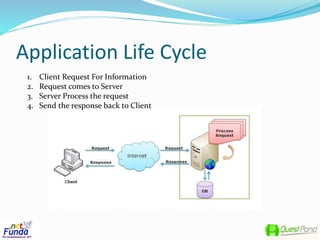
1. Client Request For Information
2. Request comes to Server
3. Server Process the request
4. Send the response back to Client
Application Life Cycle - Contd.
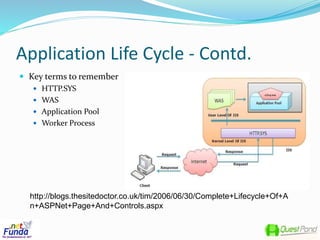
 Key terms to remember
 HTTP.SYS
 WAS
 Application Pool
 Worker Process
http://blogs.thesitedoctor.co.uk/tim/2006/06/30/Complete+Lifecycle+Of+A
n+ASPNet+Page+And+Controls.aspx
Application Life Cycle – Contd.
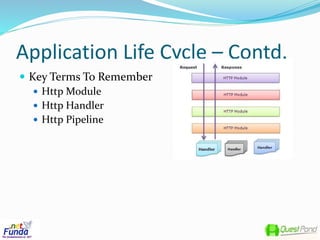
 Key Terms To Remember
 Http Module
 Http Handler
 Http Pipeline
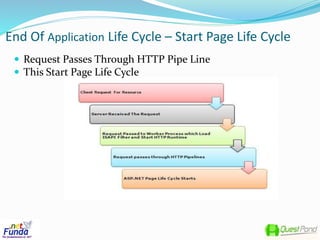
End Of Application Life Cycle – Start Page Life Cycle
 Request Passes Through HTTP Pipe Line
 This Start Page Life Cycle
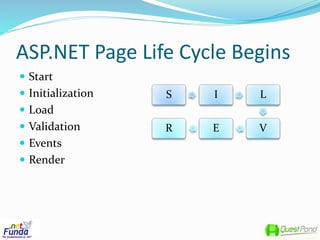
ASP.NET Page Life Cycle Begins
 Start
 Initialization
 Load
 Validation
 Events
 Render
S I L
VER
Page Life Cycle - Start
 Client Request For Resource
 Request Comes To Server (IIS)
 IIS Process the Initial Processing
 Request Passed through HTTP- Pipe Line
 ASP.NET Page Life Cycle Starts
Page Life Cycle - Initialization
 Set Postback properties
 Unique ID for Each Control in the Page
 Themes needs to be initialized
 Dynamic control need to be created
Page Life Cycle - Load
 If the Request is the post back request then it loads
data from View States and Control State
Page Life Cycle - Validation
 Validate the pages Control
 Updates the IsValid property
Page Life Cycle - Events
 This will only fired if the request is an postback event.
 Like, if the post back is happened for an Button Click.
Button Click event will fired.
Page Life Cycle - Render
 Before Rendering All View State data has been set.
 Render() method for all control has been called and
write the out put on output stream.
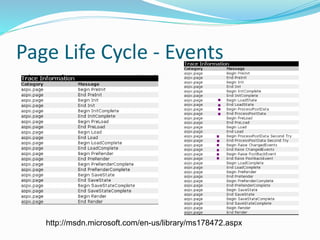
Page Life Cycle - Events
http://msdn.microsoft.com/en-us/library/ms178472.aspx
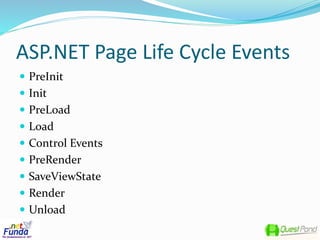
ASP.NET Page Life Cycle Events
 PreInit
 Init
 PreLoad
 Load
 Control Events
 PreRender
 SaveViewState
 Render
 Unload
Page Life Cycle – Events
 PreInit()
 This is the first event which raised in asp.net page lifecycle
 Check for Request is for Post Back or not.
 All dynamic control need to be created
 Theme Change, Master Page Set at runtime
 Init()
 Raised after all controls have been initialized
 Build up a tree of controls from the ASPX file
 Turn on view state monitoring – any changes in control will be
tracked by View State for future.
Page Life Cycle - Events
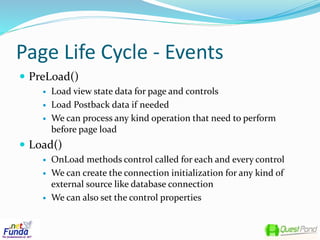
 PreLoad()
 Load view state data for page and controls
 Load Postback data if needed
 We can process any kind operation that need to perform
before page load
 Load()
 OnLoad methods control called for each and every control
 We can create the connection initialization for any kind of
external source like database connection
 We can also set the control properties
Page Life Cycle - Events
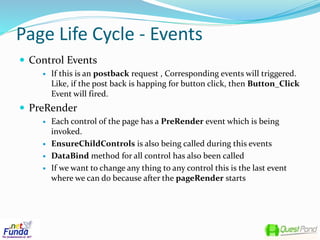
 Control Events
 If this is an postback request , Corresponding events will triggered.
Like, if the post back is happing for button click, then Button_Click
Event will fired.
 PreRender
 Each control of the page has a PreRender event which is being
invoked.
 EnsureChildControls is also being called during this events
 DataBind method for all control has also been called
 If we want to change any thing to any control this is the last event
where we can do because after the pageRender starts
Page Life Cycle - Events
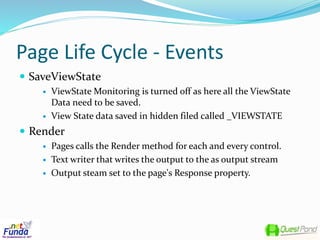
 SaveViewState
 ViewState Monitoring is turned off as here all the ViewState
Data need to be saved.
 View State data saved in hidden filed called _VIEWSTATE
 Render
 Pages calls the Render method for each and every control.
 Text writer that writes the output to the as output stream
 Output steam set to the page's Response property.
Page Life Cycle - Events
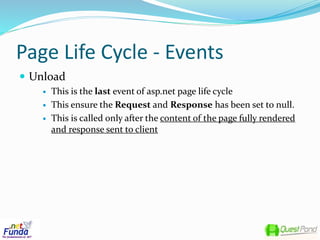
 Unload
 This is the last event of asp.net page life cycle
 This ensure the Request and Response has been set to null.
 This is called only after the content of the page fully rendered
and response sent to client
Page Life Cycle - Master Page and User Controls
 MasterPage gets initialized from the Page class in the init phaze
of page. The content of Masterpage gets loaded side by side as
the page gets loaded.
 User control will be initialized and added to the page and before
page gets initialized
 After page Onload, MasterPage_OnLoad gets called and
UserControl_Onload gets called sequentially.
 Followed by each of Page events, masterPage events gets called
and next Usercontrol events are called.
 During the unload phaze, Usercontrol gets unloaded first and
then masterpage and Page in sequence.
 For further reference refer to :
http://blogs.thesitedoctor.co.uk/tim/2006/06/30/Complete+Life
cycle+Of+An+ASPNet+Page+And+Controls.aspx
Q/A
Thank you

ASP.NET Page Life Cycle

  • 1.
    Presented By :Abhishek Sur http://www.abhisheksur.com/
  • 2.
    Table of Content Introduction  Application Life Cycle  IIS Request Process  Application Pool  Worker Process  HTTP Handler/Module  ASP.NET Page Life Cycle  Page Life Cycle Steps  Page Life Cycle Events  Life Cycle for Master Page and User Control  QA
  • 3.
    Introduction  When Clientsrequest for an aspx page from browser and lot of stuffs happens in background to produce the output or sending response to client. This evolves ASP.NET Page Lifecycle.  ASP.NET Page Life Cycle is very much important to know for each and every developer to developed an ASP.NET Web Application.  All events, data processing, dynamic control creation, view state, postback, rendering etc. are depends with Page Life Cycle.
  • 4.
    Application Life Cycle 1.Client Request For Information 2. Request comes to Server 3. Server Process the request 4. Send the response back to Client
  • 5.
    Application Life Cycle- Contd.  Key terms to remember  HTTP.SYS  WAS  Application Pool  Worker Process http://blogs.thesitedoctor.co.uk/tim/2006/06/30/Complete+Lifecycle+Of+A n+ASPNet+Page+And+Controls.aspx
  • 6.
    Application Life Cycle– Contd.  Key Terms To Remember  Http Module  Http Handler  Http Pipeline
  • 7.
    End Of ApplicationLife Cycle – Start Page Life Cycle  Request Passes Through HTTP Pipe Line  This Start Page Life Cycle
  • 8.
    ASP.NET Page LifeCycle Begins  Start  Initialization  Load  Validation  Events  Render S I L VER
  • 9.
    Page Life Cycle- Start  Client Request For Resource  Request Comes To Server (IIS)  IIS Process the Initial Processing  Request Passed through HTTP- Pipe Line  ASP.NET Page Life Cycle Starts
  • 10.
    Page Life Cycle- Initialization  Set Postback properties  Unique ID for Each Control in the Page  Themes needs to be initialized  Dynamic control need to be created
  • 11.
    Page Life Cycle- Load  If the Request is the post back request then it loads data from View States and Control State
  • 12.
    Page Life Cycle- Validation  Validate the pages Control  Updates the IsValid property
  • 13.
    Page Life Cycle- Events  This will only fired if the request is an postback event.  Like, if the post back is happened for an Button Click. Button Click event will fired.
  • 14.
    Page Life Cycle- Render  Before Rendering All View State data has been set.  Render() method for all control has been called and write the out put on output stream.
  • 15.
    Page Life Cycle- Events http://msdn.microsoft.com/en-us/library/ms178472.aspx
  • 16.
    ASP.NET Page LifeCycle Events  PreInit  Init  PreLoad  Load  Control Events  PreRender  SaveViewState  Render  Unload
  • 17.
    Page Life Cycle– Events  PreInit()  This is the first event which raised in asp.net page lifecycle  Check for Request is for Post Back or not.  All dynamic control need to be created  Theme Change, Master Page Set at runtime  Init()  Raised after all controls have been initialized  Build up a tree of controls from the ASPX file  Turn on view state monitoring – any changes in control will be tracked by View State for future.
  • 18.
    Page Life Cycle- Events  PreLoad()  Load view state data for page and controls  Load Postback data if needed  We can process any kind operation that need to perform before page load  Load()  OnLoad methods control called for each and every control  We can create the connection initialization for any kind of external source like database connection  We can also set the control properties
  • 19.
    Page Life Cycle- Events  Control Events  If this is an postback request , Corresponding events will triggered. Like, if the post back is happing for button click, then Button_Click Event will fired.  PreRender  Each control of the page has a PreRender event which is being invoked.  EnsureChildControls is also being called during this events  DataBind method for all control has also been called  If we want to change any thing to any control this is the last event where we can do because after the pageRender starts
  • 20.
    Page Life Cycle- Events  SaveViewState  ViewState Monitoring is turned off as here all the ViewState Data need to be saved.  View State data saved in hidden filed called _VIEWSTATE  Render  Pages calls the Render method for each and every control.  Text writer that writes the output to the as output stream  Output steam set to the page's Response property.
  • 21.
    Page Life Cycle- Events  Unload  This is the last event of asp.net page life cycle  This ensure the Request and Response has been set to null.  This is called only after the content of the page fully rendered and response sent to client
  • 22.
    Page Life Cycle- Master Page and User Controls  MasterPage gets initialized from the Page class in the init phaze of page. The content of Masterpage gets loaded side by side as the page gets loaded.  User control will be initialized and added to the page and before page gets initialized  After page Onload, MasterPage_OnLoad gets called and UserControl_Onload gets called sequentially.  Followed by each of Page events, masterPage events gets called and next Usercontrol events are called.  During the unload phaze, Usercontrol gets unloaded first and then masterpage and Page in sequence.  For further reference refer to : http://blogs.thesitedoctor.co.uk/tim/2006/06/30/Complete+Life cycle+Of+An+ASPNet+Page+And+Controls.aspx
  • 23.
  • 24.