
Presented by:-Amar Shah 
Roll no:-130973107008
Android 
 Android is a mobile operating 
system (OS) 
 Based on the Linux kernel. 
 Develop In JAVA & C/C++ Programming 
Language
History 
 All Of You Know The History Of Android. 
Let’s Start With TECHNOLOGY Behind 
Android
Content : 
Session Divided into Two part : 
 Android Architecture 
 Practical Application
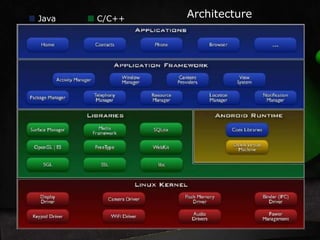
Architecture Java C/C++
Architecture 
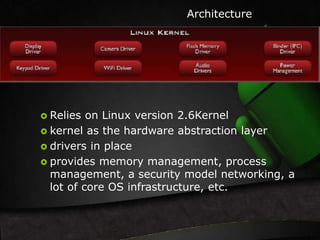
 Relies on Linux version 2.6Kernel 
 kernel as the hardware abstraction layer 
 drivers in place 
 provides memory management, process 
management, a security model networking, a 
lot of core OS infrastructure, etc.
Architecture 
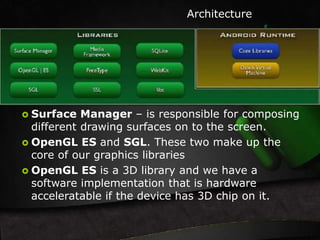
 Surface Manager – is responsible for composing 
different drawing surfaces on to the screen. 
 OpenGL ES and SGL. These two make up the 
core of our graphics libraries 
 OpenGL ES is a 3D library and we have a 
software implementation that is hardware 
acceleratable if the device has 3D chip on it.
Architecture 
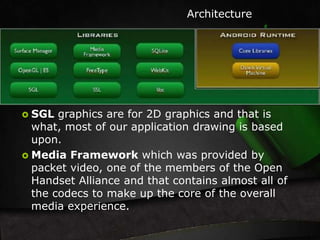
 SGL graphics are for 2D graphics and that is 
what, most of our application drawing is based 
upon. 
 Media Framework which was provided by 
packet video, one of the members of the Open 
Handset Alliance and that contains almost all of 
the codecs to make up the core of the overall 
media experience.
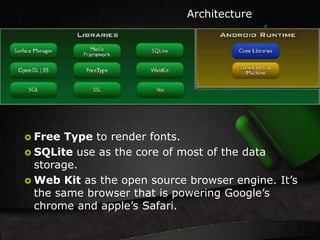
 Free Type to render fonts. 
Architecture 
 SQLite use as the core of most of the data 
storage. 
Web Kit as the open source browser engine. It’s 
the same browser that is powering Google’s 
chrome and apple’s Safari.
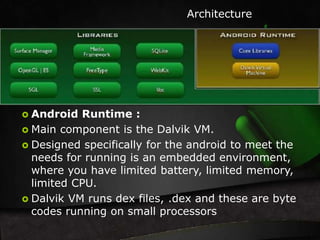
 Android Runtime : 
Architecture 
 Main component is the Dalvik VM. 
 Designed specifically for the android to meet the 
needs for running is an embedded environment, 
where you have limited battery, limited memory, 
limited CPU. 
 Dalvik VM runs dex files, .dex and these are byte 
codes running on small processors
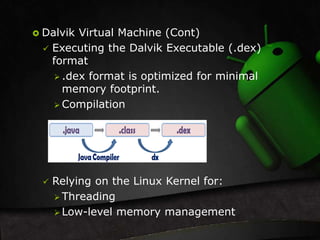
 Dalvik Virtual Machine (Cont) 
 Executing the Dalvik Executable (.dex) 
format 
 .dex format is optimized for minimal 
memory footprint. 
Compilation 
 Relying on the Linux Kernel for: 
 Threading 
Low-level memory management
Architecture 
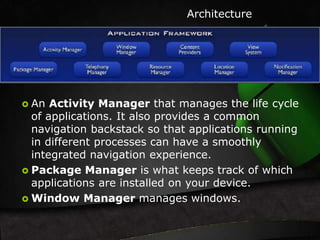
 An Activity Manager that manages the life cycle 
of applications. It also provides a common 
navigation backstack so that applications running 
in different processes can have a smoothly 
integrated navigation experience. 
 Package Manager is what keeps track of which 
applications are installed on your device. 
 Window Manager manages windows.
Architecture 
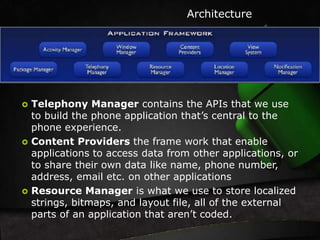
 Telephony Manager contains the APIs that we use 
to build the phone application that’s central to the 
phone experience. 
 Content Providers the frame work that enable 
applications to access data from other applications, or 
to share their own data like name, phone number, 
address, email etc. on other applications 
 Resource Manager is what we use to store localized 
strings, bitmaps, and layout file, all of the external 
parts of an application that aren’t coded.
Architecture 
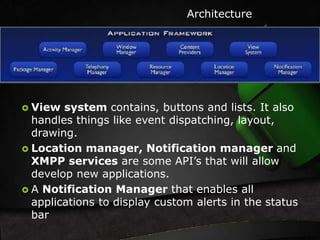
 View system contains, buttons and lists. It also 
handles things like event dispatching, layout, 
drawing. 
 Location manager, Notification manager and 
XMPP services are some API’s that will allow 
develop new applications. 
 A Notification Manager that enables all 
applications to display custom alerts in the status 
bar
Architecture 
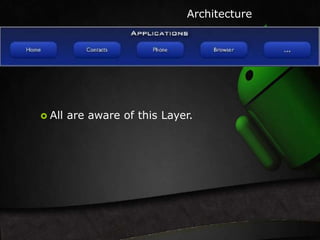
 All are aware of this Layer.
Let's Start 
Application 
Development
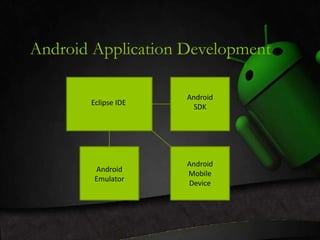
Android Application Development 
Eclipse IDE 
Android 
SDK 
Android 
Emulator 
Android 
Mobile 
Device
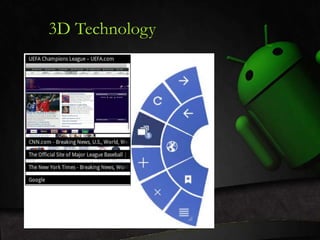
3D Technology
ANY 
QUERIES…
Android Technology

Android Technology

  • 1.
    Presented by:-Amar Shah Roll no:-130973107008
  • 2.
    Android  Androidis a mobile operating system (OS)  Based on the Linux kernel.  Develop In JAVA & C/C++ Programming Language
  • 3.
    History  AllOf You Know The History Of Android. Let’s Start With TECHNOLOGY Behind Android
  • 4.
    Content : SessionDivided into Two part :  Android Architecture  Practical Application
  • 5.
  • 6.
    Architecture  Relieson Linux version 2.6Kernel  kernel as the hardware abstraction layer  drivers in place  provides memory management, process management, a security model networking, a lot of core OS infrastructure, etc.
  • 7.
    Architecture  SurfaceManager – is responsible for composing different drawing surfaces on to the screen.  OpenGL ES and SGL. These two make up the core of our graphics libraries  OpenGL ES is a 3D library and we have a software implementation that is hardware acceleratable if the device has 3D chip on it.
  • 8.
    Architecture  SGLgraphics are for 2D graphics and that is what, most of our application drawing is based upon.  Media Framework which was provided by packet video, one of the members of the Open Handset Alliance and that contains almost all of the codecs to make up the core of the overall media experience.
  • 9.
     Free Typeto render fonts. Architecture  SQLite use as the core of most of the data storage. Web Kit as the open source browser engine. It’s the same browser that is powering Google’s chrome and apple’s Safari.
  • 10.
     Android Runtime: Architecture  Main component is the Dalvik VM.  Designed specifically for the android to meet the needs for running is an embedded environment, where you have limited battery, limited memory, limited CPU.  Dalvik VM runs dex files, .dex and these are byte codes running on small processors
  • 11.
     Dalvik VirtualMachine (Cont)  Executing the Dalvik Executable (.dex) format  .dex format is optimized for minimal memory footprint. Compilation  Relying on the Linux Kernel for:  Threading Low-level memory management
  • 12.
    Architecture  AnActivity Manager that manages the life cycle of applications. It also provides a common navigation backstack so that applications running in different processes can have a smoothly integrated navigation experience.  Package Manager is what keeps track of which applications are installed on your device.  Window Manager manages windows.
  • 13.
    Architecture  TelephonyManager contains the APIs that we use to build the phone application that’s central to the phone experience.  Content Providers the frame work that enable applications to access data from other applications, or to share their own data like name, phone number, address, email etc. on other applications  Resource Manager is what we use to store localized strings, bitmaps, and layout file, all of the external parts of an application that aren’t coded.
  • 14.
    Architecture  Viewsystem contains, buttons and lists. It also handles things like event dispatching, layout, drawing.  Location manager, Notification manager and XMPP services are some API’s that will allow develop new applications.  A Notification Manager that enables all applications to display custom alerts in the status bar
  • 15.
    Architecture  Allare aware of this Layer.
  • 16.
  • 17.
    Android Application Development Eclipse IDE Android SDK Android Emulator Android Mobile Device
  • 19.
  • 20.