Android
Course
Amira Elsayed Ismail
Agenda
• Why Learn Android?
• Prerequisites.
• Android History.
• What is Android?
• Android Architecture.
2
Why Learn Android?
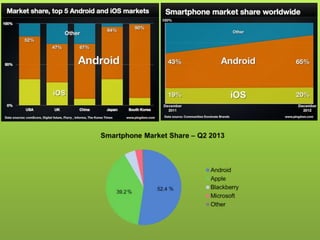
• Run your applications on 59% of the smartphones
worldwide (Jul - 2012).
• Join in 600,000 applications for android (Jul - 2012).
• Not just smartphone, Android OS is being used in,
TVs, Microwaves, Car Tapes. Etc…
• High job success rates.
• Create app sell to market very easily.
Prerequisites
• Object-oriented programming.
• You must understand terms like (Class, Instance,
Method, Superclass and Subclass).
• Installation of Eclipse IDE & Android SDK Tools.
• Install all SDKs preferably (2.1, 2.2 & 4.x).
• An android device. (Optional but highly
recommended).
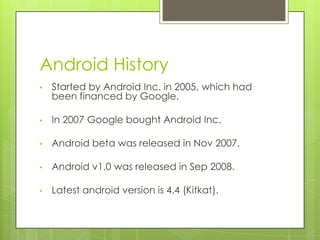
Android History
• Started by Android Inc. in 2005, which had
been financed by Google.
• In 2007 Google bought Android Inc.
• Android beta was released in Nov 2007.
• Android v1.0 was released in Sep 2008.
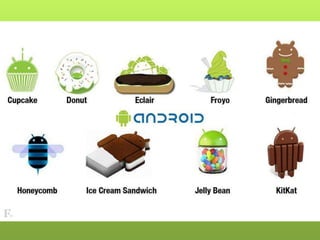
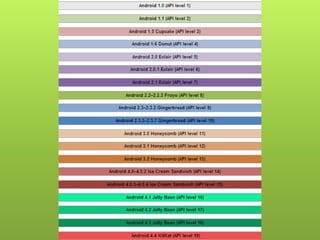
• Latest android version is 4.4 (Kitkat).
What is Android?
 Android is an operating system for mobile
devices such as smartphones and tablet
computers.
 Android has beaten Apple iOS, being the
leading mobile operating system from first
quarter of 2011
Android Architecture
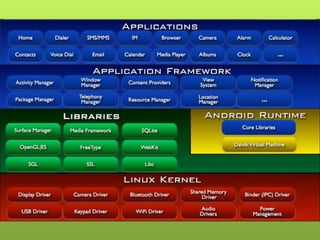
 Android system is composed of following
items:
 Linux Kernel.
 Libraries.
 Applications Framework.
 Applications.
Android Architecture (Cont’d)
 Linux Kernel
 Its customized Linux kernel with a lot more
android specific code to support devices.
 One of the kernel's main function is to
control hardware.
Android Architecture (Cont’d)
 Libraries
 Webkit
 Modern web browser engine used in both
web view as well as native browser.
 Support CSS, Java script, DOM, Ajax etc.
Android Architecture (Cont’d)
 Libraries
 Media framework
 PacketVideo, openCORE platform.
 Support Audio, Video, Still-frame formats.
Android Architecture (Cont’d)
 Libraries
 SQLite
 Self-contained.
 Serverless.
 Zero-configuration.
 SQL Database.
Android Architecture (Cont’d)
 Libraries
 OpenGL|ES(openGL for EmbeddedSystems)
 Standard specification for 2D/3D graphics.
 Can simulate physics.
 Complex 3D scenes can be drawn.
 Used in (Virtual reality, Augmented reality,
Game programming, Scientific visualization and
Flight simulation).
Android Architecture (Cont’d)
 Libraries
 Surface Manager
 Manages access to display subsystem.
 Seamlessly composites graphic layers 2D/3D
layers from different applications.
Android Architecture (Cont’d)
 Libraries
 SGL (Skia graphic library)
 An underlying 2D graphics engine.
 Used to draw text, geometries & images.
Android Architecture (Cont’d)
 Libraries
 SSL (Secure Sockets Layer)
 Cryptographic protocol to provide
information security over internet.
Android Architecture (Cont’d)
 Libraries
 FreeType
 Bitmap and vector font rendering.
Android Architecture (Cont’d)
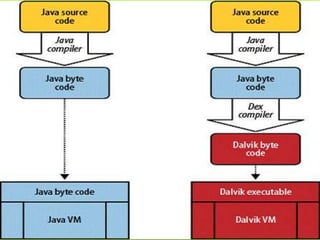
 Android Runtime
 Dalvik Virtual Machine
 Provides application portability and runtime
consistency.
 Runs optimized file format (.dex) and Dalvik
bytecode.
Android Architecture (Cont’d)
 Android Runtime
 Core Libraries
 Data structures
 File Access
 Graphics
 Network Access
 Utilities
Android Architecture (Cont’d)
 Applications Framework
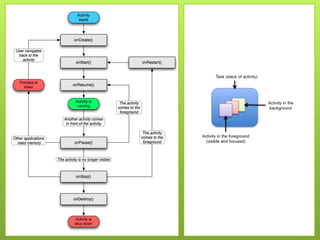
 Activity Manager
 Interact with overall activities running in the
system.
 Manage lifecycle of activities.
 Manage stacking of activities.
Android Architecture (Cont’d)
 Applications Framework
 Window Manager
 Dispatch input events to clients.
 Transition animation.
 Create layout/surfaces (using
SurfaceManager).
Android Architecture (Cont’d)
 Applications Framework
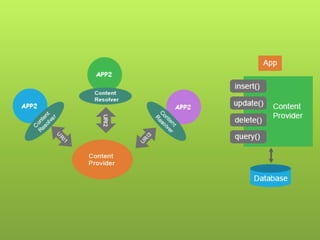
 Content Providers
 Manage access to structured access of data.
 Mainly used for data sharing purposes.
Android Architecture (Cont’d)
 Applications Framework
 View System
 Basic building block for UI components.
 Can be extended to build custom UI
components.
Android Architecture (Cont’d)
 Applications Framework
 Package Manager
 Provides methods for querying and
manipulating installed packages.
Android Architecture (Cont’d)
 Applications Framework
 Telephony Manager
 Provides access to telephony services on
android.
 Can monitor telephone state changes.
Android Architecture (Cont’d)
 Applications Framework
 Location Manager
 Provide access to system location services.
 Able to track location periodically or one-
time.
Android Architecture (Cont’d)
 Applications Framework
 Resource Manager
 Link external resources to native app at build
time.
 Resources may include XML Layouts, Bitmaps,
raw files etc.
Android Architecture (Cont’d)
 Applications Framework
 Notification Manager
 Notify users about events.

Android course1

  • 1.
  • 2.
    Agenda • Why LearnAndroid? • Prerequisites. • Android History. • What is Android? • Android Architecture. 2
  • 3.
    Why Learn Android? •Run your applications on 59% of the smartphones worldwide (Jul - 2012). • Join in 600,000 applications for android (Jul - 2012). • Not just smartphone, Android OS is being used in, TVs, Microwaves, Car Tapes. Etc… • High job success rates. • Create app sell to market very easily.
  • 5.
    Prerequisites • Object-oriented programming. •You must understand terms like (Class, Instance, Method, Superclass and Subclass). • Installation of Eclipse IDE & Android SDK Tools. • Install all SDKs preferably (2.1, 2.2 & 4.x). • An android device. (Optional but highly recommended).
  • 6.
    Android History • Startedby Android Inc. in 2005, which had been financed by Google. • In 2007 Google bought Android Inc. • Android beta was released in Nov 2007. • Android v1.0 was released in Sep 2008. • Latest android version is 4.4 (Kitkat).
  • 9.
    What is Android? Android is an operating system for mobile devices such as smartphones and tablet computers.  Android has beaten Apple iOS, being the leading mobile operating system from first quarter of 2011
  • 10.
    Android Architecture  Androidsystem is composed of following items:  Linux Kernel.  Libraries.  Applications Framework.  Applications.
  • 12.
    Android Architecture (Cont’d) Linux Kernel  Its customized Linux kernel with a lot more android specific code to support devices.  One of the kernel's main function is to control hardware.
  • 13.
    Android Architecture (Cont’d) Libraries  Webkit  Modern web browser engine used in both web view as well as native browser.  Support CSS, Java script, DOM, Ajax etc.
  • 14.
    Android Architecture (Cont’d) Libraries  Media framework  PacketVideo, openCORE platform.  Support Audio, Video, Still-frame formats.
  • 15.
    Android Architecture (Cont’d) Libraries  SQLite  Self-contained.  Serverless.  Zero-configuration.  SQL Database.
  • 16.
    Android Architecture (Cont’d) Libraries  OpenGL|ES(openGL for EmbeddedSystems)  Standard specification for 2D/3D graphics.  Can simulate physics.  Complex 3D scenes can be drawn.  Used in (Virtual reality, Augmented reality, Game programming, Scientific visualization and Flight simulation).
  • 17.
    Android Architecture (Cont’d) Libraries  Surface Manager  Manages access to display subsystem.  Seamlessly composites graphic layers 2D/3D layers from different applications.
  • 18.
    Android Architecture (Cont’d) Libraries  SGL (Skia graphic library)  An underlying 2D graphics engine.  Used to draw text, geometries & images.
  • 19.
    Android Architecture (Cont’d) Libraries  SSL (Secure Sockets Layer)  Cryptographic protocol to provide information security over internet.
  • 20.
    Android Architecture (Cont’d) Libraries  FreeType  Bitmap and vector font rendering.
  • 21.
    Android Architecture (Cont’d) Android Runtime  Dalvik Virtual Machine  Provides application portability and runtime consistency.  Runs optimized file format (.dex) and Dalvik bytecode.
  • 23.
    Android Architecture (Cont’d) Android Runtime  Core Libraries  Data structures  File Access  Graphics  Network Access  Utilities
  • 24.
    Android Architecture (Cont’d) Applications Framework  Activity Manager  Interact with overall activities running in the system.  Manage lifecycle of activities.  Manage stacking of activities.
  • 26.
    Android Architecture (Cont’d) Applications Framework  Window Manager  Dispatch input events to clients.  Transition animation.  Create layout/surfaces (using SurfaceManager).
  • 27.
    Android Architecture (Cont’d) Applications Framework  Content Providers  Manage access to structured access of data.  Mainly used for data sharing purposes.
  • 29.
    Android Architecture (Cont’d) Applications Framework  View System  Basic building block for UI components.  Can be extended to build custom UI components.
  • 30.
    Android Architecture (Cont’d) Applications Framework  Package Manager  Provides methods for querying and manipulating installed packages.
  • 31.
    Android Architecture (Cont’d) Applications Framework  Telephony Manager  Provides access to telephony services on android.  Can monitor telephone state changes.
  • 32.
    Android Architecture (Cont’d) Applications Framework  Location Manager  Provide access to system location services.  Able to track location periodically or one- time.
  • 33.
    Android Architecture (Cont’d) Applications Framework  Resource Manager  Link external resources to native app at build time.  Resources may include XML Layouts, Bitmaps, raw files etc.
  • 34.
    Android Architecture (Cont’d) Applications Framework  Notification Manager  Notify users about events.