ANDROID OPERATING SYSTEM
RENOY REJI
MCA, Christ University
CONTENTS
 What Is Android
 History
 Features
 Google Android
 Bluetooth Technology
 Wi Fi
 3G And 4G
 Commonly Used Packages
 Android Applications
CONTENTS
 Development Process For Android Application
 Building And Running Apps
 Android Architecture
 Versions Of Android OS
 Upcoming Versions
 Types Of Devices
 Advantages
 Disadvantages
 Android Security
WHAT IS ANDROID??
 Android is an open source operating system, created by
Google specifically for use on mobile devices (cell
phones and tablets).
 Linux based (2.6 kernel).
 Android apps can be programmed in C/C++ but most
application development is done in Java (Java access to
C Libraries via JNI (Java Native Interface)).
 Android OS supports Bluetooth, Wi-Fi, and 3G and 4G
networking.
HISTORY
 2005
 Google acquires startup Android Inc. to start Android
platform
 Work on Dalvik, VM begins
 2007
 Open Handset Alliance announced
 Early look at SDK
 2008
 Google sponsors 1st Android Developer Challenge
 T-Mobile G1 announced
 SDK 1.0 released
 Android released open source (Apache License)
 Android Dev Phone 1 released
HISTORY
 2009
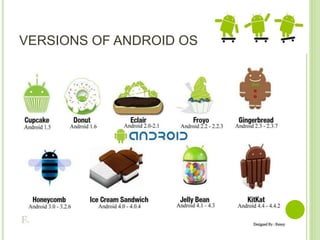
 SDK 1.5 (Cupcake)
 New soft keyboard with “autocomplete” feature
 SDK 1.6 (Donut)
 Support Wide VGA
 SDK 2.0/2.0.1/2.1 (Eclair)
 Revamped UI, browser
 2010
 Nexus One released to the public
 SDK 2.2 (Froyo)
 Flash support, tethering
 SDK 2.3 (Gingerbread)
 UI update, system-wide copy-paste
HISTORY
 2011
 SDK 3.x (Honeycomb)
 Optimized for tablet support
 SDK 4.0 (Ice Cream Sandwich)
 Virtual UI buttons
 2012
 SDK 4.1.1 (Jelly Bean)
 Triple buffered graphics pipeline
FEATURES
 Configuration of the Smartphone Platform
 3G/4G connectivity
 Wi-Fi connectivity
 Bluetooth connectivity
 Accelerometer w/compass
 Ambient light sensor
 Proximity sensor
 GPS
 Gyroscope
GOOGLE ANDROID
 A software stack for mobile devices that
includes
 An operating system
 Middleware
 Key Applications
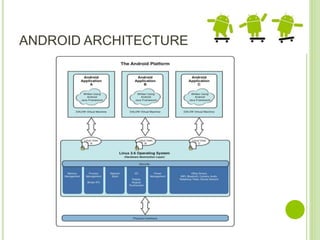
 Uses Linux to provide core system services
 Security
 Memory management
 Process management
 Power management
 Hardware drivers
BLUETOOTH TECHNOLOGY
 Open wireless technology
 Developed by Ericsson (1994)
 Originally supposed to replace wired RS-232
 Short distance via low power, short distance radio
 Allows creation of personal area networks
 Mostly to connect wireless peripheral devices to a host
computer (mice, headsets, microphones, keyboard)
 Can also be used to communicate between two host
computers wirelessly (replace serial cables)
WI-FI
 Used to brand certified products that belong to a
class of wireless local area network based on IEEE
Standard 802.11
 Currently there are 3 versions of 802.11 in common
use:
 B, about 150 feet indoors, 300 ft outdoors
 G, 54 Mbits about 150 feet indoors, 300 ft outdoors
 N, 600 Mbits, about 1.5 miles in open air, uses MIMO
(multiple input and output antennas)
3G AND 4G
 3G – 3rd Generation Network
 Must allow simultaneous use of speech and
data services and provide peak data rate of
200 kbits/sec
 4G – 4th Generation Network
 Provides a comprehensive and secure IP
based solution for IP based telephony, ultra
broadband internet, gaming services and
streamed multimedia.
 Peak data rate of 100 Mbit for high mobility
devices and 1 Gbit for low mobility devices.
COMMONLY USED PACKAGES IN
ANDROID OS
 User interface controls and widgets
 User interface layout
 Secure networking and web browsing
 Structured storage and relational databases
(SQLite RDBMS)
 2D and 3D Graphics SGL and OpenGL
 Audio and visual media support
 Access to optional hardware (GPS)
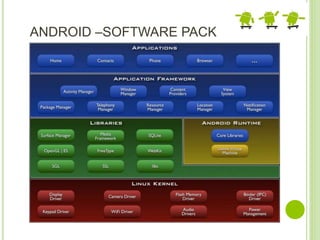
ANDROID –SOFTWARE PACK
ANDROID APPLICATIONS
 Built using Java and new SDK libraries
 No support for some Java libraries like Swing & AWT
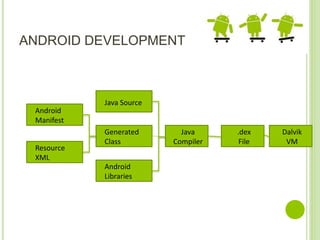
 Java code compiled into Dalvik byte code (.dex)
 Optimized for mobile devices (better memory
management, battery utilization, etc.)
 Dalvik VM runs .dex files
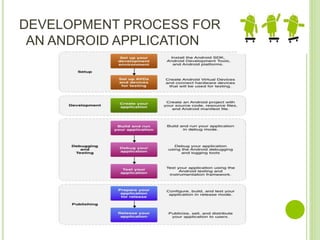
DEVELOPMENT PROCESS FOR
AN ANDROID APPLICATION
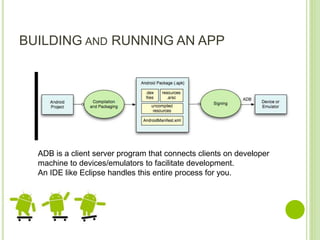
BUILDING AND RUNNING AN APP
ADB is a client server program that connects clients on developer
machine to devices/emulators to facilitate development.
An IDE like Eclipse handles this entire process for you.
APPLICATIONS ON ANDROID
 By default, each app is run in its own Linux
process
 Process started when app’s code needs to be
executed
 Threads can be started to handle time-
consuming operations
 Each process has its own Dalvik VM
 By default, each app is assigned unique
Linux ID
 Permissions are set so app’s files are only
visible to that app
ANDROID ARCHITECTURE
ANDROID APPLICATION
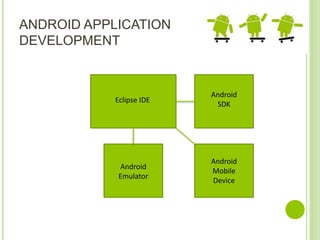
DEVELOPMENT
Eclipse IDE
Android
SDK
Android
Emulator
Android
Mobile
Device
ANDROID DEVELOPMENT
Android
Manifest
Resource
XML
Java Source
Generated
Class
Java
Compiler
Android
Libraries
.dex
File
Dalvik
VM
VERSIONS OF ANDROID OS
UPCOMING VERSIONS
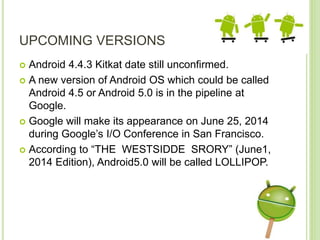
 Android 4.4.3 Kitkat date still unconfirmed.
 A new version of Android OS which could be called
Android 4.5 or Android 5.0 is in the pipeline at
Google.
 Google will make its appearance on June 25, 2014
during Google’s I/O Conference in San Francisco.
 According to “THE WESTSIDDE SRORY” (June1,
2014 Edition), Android5.0 will be called LOLLIPOP.
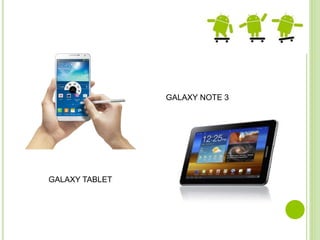
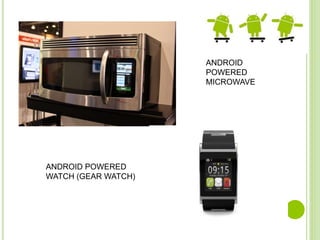
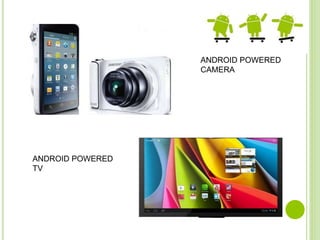
TYPES OF ANDROID DEVICES
GALAXY NOTE 3
GALAXY TABLET
ANDROID
POWERED
MICROWAVE
ANDROID POWERED
WATCH (GEAR WATCH)
ANDROID POWERED
CAMERA
ANDROID POWERED
TV
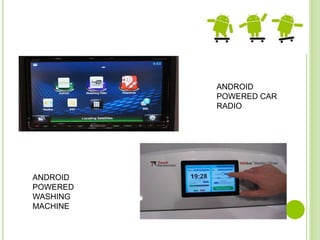
ANDROID
POWERED CAR
RADIO
ANDROID
POWERED
WASHING
MACHINE
ADVANTAGES
 Always with the user
 Typically have Internet access
 Typically GPS enabled
 Typically have accelerometer & compass
 Most have cameras & microphones
 Many apps are free or low-cost
DISADVANTAGES
 Limited screen size
 Limited battery life
 Limited processor speed
 Limited and sometimes slow network access
 Limited or awkward input: soft keyboard, phone
keypad, touch screen, or stylus
 Limited web browser functionality
 Range of platforms & configurations across devices
ANDROID SECURITY
 Relies on security of it’s foundations; Linux, Davlik,
and Java.
 Security Goal: “A central design point of the Android
security architecture is that no application, by
default, has permission to perform any operations
that would adversely impact other applications, the
operating system, or the user.”
ANDROID SECURITY
Application Sandboxes
 All Applications run as their own Linux user.
 Several Inter-Process Communication methods:
 Activities
 Services
 Broadcast Receiver
 Content Provider
 Applications utilize a capability like model to protect
the system and the user.
Android Operating System

Android Operating System

  • 1.
    ANDROID OPERATING SYSTEM RENOYREJI MCA, Christ University
  • 2.
    CONTENTS  What IsAndroid  History  Features  Google Android  Bluetooth Technology  Wi Fi  3G And 4G  Commonly Used Packages  Android Applications
  • 3.
    CONTENTS  Development ProcessFor Android Application  Building And Running Apps  Android Architecture  Versions Of Android OS  Upcoming Versions  Types Of Devices  Advantages  Disadvantages  Android Security
  • 4.
    WHAT IS ANDROID?? Android is an open source operating system, created by Google specifically for use on mobile devices (cell phones and tablets).  Linux based (2.6 kernel).  Android apps can be programmed in C/C++ but most application development is done in Java (Java access to C Libraries via JNI (Java Native Interface)).  Android OS supports Bluetooth, Wi-Fi, and 3G and 4G networking.
  • 5.
    HISTORY  2005  Googleacquires startup Android Inc. to start Android platform  Work on Dalvik, VM begins  2007  Open Handset Alliance announced  Early look at SDK  2008  Google sponsors 1st Android Developer Challenge  T-Mobile G1 announced  SDK 1.0 released  Android released open source (Apache License)  Android Dev Phone 1 released
  • 6.
    HISTORY  2009  SDK1.5 (Cupcake)  New soft keyboard with “autocomplete” feature  SDK 1.6 (Donut)  Support Wide VGA  SDK 2.0/2.0.1/2.1 (Eclair)  Revamped UI, browser  2010  Nexus One released to the public  SDK 2.2 (Froyo)  Flash support, tethering  SDK 2.3 (Gingerbread)  UI update, system-wide copy-paste
  • 7.
    HISTORY  2011  SDK3.x (Honeycomb)  Optimized for tablet support  SDK 4.0 (Ice Cream Sandwich)  Virtual UI buttons  2012  SDK 4.1.1 (Jelly Bean)  Triple buffered graphics pipeline
  • 8.
    FEATURES  Configuration ofthe Smartphone Platform  3G/4G connectivity  Wi-Fi connectivity  Bluetooth connectivity  Accelerometer w/compass  Ambient light sensor  Proximity sensor  GPS  Gyroscope
  • 9.
    GOOGLE ANDROID  Asoftware stack for mobile devices that includes  An operating system  Middleware  Key Applications  Uses Linux to provide core system services  Security  Memory management  Process management  Power management  Hardware drivers
  • 10.
    BLUETOOTH TECHNOLOGY  Openwireless technology  Developed by Ericsson (1994)  Originally supposed to replace wired RS-232  Short distance via low power, short distance radio  Allows creation of personal area networks  Mostly to connect wireless peripheral devices to a host computer (mice, headsets, microphones, keyboard)  Can also be used to communicate between two host computers wirelessly (replace serial cables)
  • 11.
    WI-FI  Used tobrand certified products that belong to a class of wireless local area network based on IEEE Standard 802.11  Currently there are 3 versions of 802.11 in common use:  B, about 150 feet indoors, 300 ft outdoors  G, 54 Mbits about 150 feet indoors, 300 ft outdoors  N, 600 Mbits, about 1.5 miles in open air, uses MIMO (multiple input and output antennas)
  • 12.
    3G AND 4G 3G – 3rd Generation Network  Must allow simultaneous use of speech and data services and provide peak data rate of 200 kbits/sec  4G – 4th Generation Network  Provides a comprehensive and secure IP based solution for IP based telephony, ultra broadband internet, gaming services and streamed multimedia.  Peak data rate of 100 Mbit for high mobility devices and 1 Gbit for low mobility devices.
  • 13.
    COMMONLY USED PACKAGESIN ANDROID OS  User interface controls and widgets  User interface layout  Secure networking and web browsing  Structured storage and relational databases (SQLite RDBMS)  2D and 3D Graphics SGL and OpenGL  Audio and visual media support  Access to optional hardware (GPS)
  • 14.
  • 15.
    ANDROID APPLICATIONS  Builtusing Java and new SDK libraries  No support for some Java libraries like Swing & AWT  Java code compiled into Dalvik byte code (.dex)  Optimized for mobile devices (better memory management, battery utilization, etc.)  Dalvik VM runs .dex files
  • 16.
    DEVELOPMENT PROCESS FOR ANANDROID APPLICATION
  • 17.
    BUILDING AND RUNNINGAN APP ADB is a client server program that connects clients on developer machine to devices/emulators to facilitate development. An IDE like Eclipse handles this entire process for you.
  • 18.
    APPLICATIONS ON ANDROID By default, each app is run in its own Linux process  Process started when app’s code needs to be executed  Threads can be started to handle time- consuming operations  Each process has its own Dalvik VM  By default, each app is assigned unique Linux ID  Permissions are set so app’s files are only visible to that app
  • 19.
  • 20.
  • 21.
  • 22.
  • 23.
    UPCOMING VERSIONS  Android4.4.3 Kitkat date still unconfirmed.  A new version of Android OS which could be called Android 4.5 or Android 5.0 is in the pipeline at Google.  Google will make its appearance on June 25, 2014 during Google’s I/O Conference in San Francisco.  According to “THE WESTSIDDE SRORY” (June1, 2014 Edition), Android5.0 will be called LOLLIPOP.
  • 24.
  • 25.
  • 26.
  • 27.
  • 28.
  • 29.
    ADVANTAGES  Always withthe user  Typically have Internet access  Typically GPS enabled  Typically have accelerometer & compass  Most have cameras & microphones  Many apps are free or low-cost
  • 30.
    DISADVANTAGES  Limited screensize  Limited battery life  Limited processor speed  Limited and sometimes slow network access  Limited or awkward input: soft keyboard, phone keypad, touch screen, or stylus  Limited web browser functionality  Range of platforms & configurations across devices
  • 31.
    ANDROID SECURITY  Relieson security of it’s foundations; Linux, Davlik, and Java.  Security Goal: “A central design point of the Android security architecture is that no application, by default, has permission to perform any operations that would adversely impact other applications, the operating system, or the user.”
  • 32.
    ANDROID SECURITY Application Sandboxes All Applications run as their own Linux user.  Several Inter-Process Communication methods:  Activities  Services  Broadcast Receiver  Content Provider  Applications utilize a capability like model to protect the system and the user.