What is Android
• Software stack for mobile devices/Android software
package and linux based operating system for mobile
devices such as tablet computers and smartphones..
• SDK provides tools and APIs to develop apps
• An API (Application Programming Interface) is a type of
software that helps two different applications
communicate with each other. It's like a middleman that
helps them share information. APIs are an accessible way
to extract and share data within and across organizations.
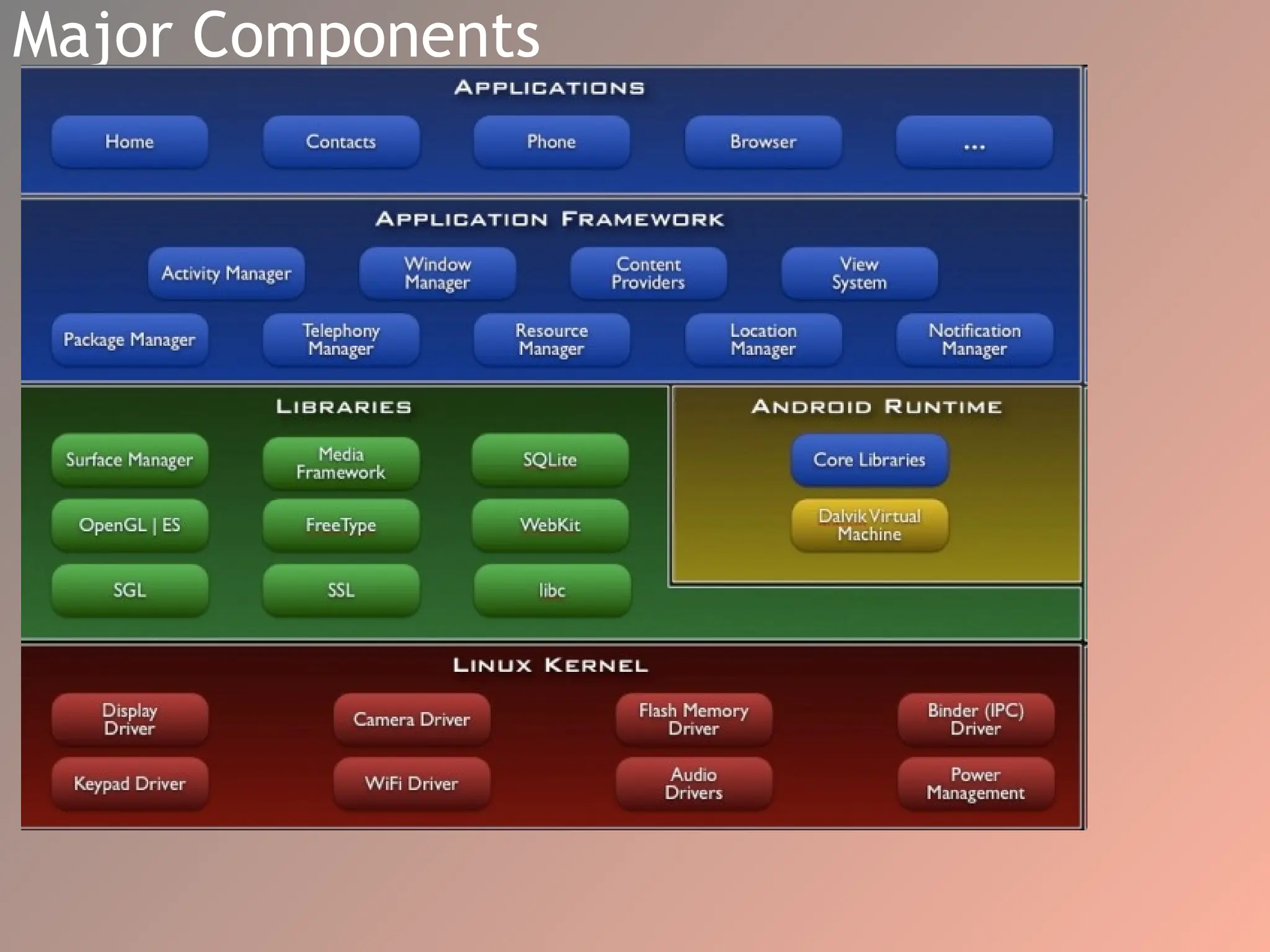
Major Components
Applications
• Applications : On the top of android framework, there are
applications. All applications such as home, contact, settings,
games, browsers are using android framework that uses
android runtime and libraries. Android runtime and native
libraries are using linux kernal.
• When you get a new device, it usually comes with a set of basic
apps that are already installed on it. These apps are built using
a programming language called Java.
• Developers have access to core APIs.Core APIs to build your
own apps
1-Views used to build application / to create the user interface.
Views are like building blocks that you can use to put your app
together.
1)the activity manager is in charge of managing your app's lifecycle.
For example, developers can use the startActivityForResult() method to
launch a new activity and get a result back from it, or they can use the
onPause() and onResume() methods to save and restore the state of
their activities when they are paused or resumed.
2) Window Manager
The Android operating system has a Window Manager that determines
the screen information needed for creating these windows.
This information is provided to the apps and the system as they run.
. Windows are the slots where we can view our app user interface.
The Window Manager helps in delivering a customized app experience. Apps
can fill the complete screen for an immersive experience or share the
screen with other apps. Android enables this by allowing multi-windows for
each app.
3) Location Manager
Most Android devices are equipped with GPS devices that can get user
location using satellite information with high precision, up to a few meters.
App developers can request permission from users to access their location
information and create experiences that make use of this data OR
Programmers can prompt for location permission from the users, deliver
location, and aware experiences. Android provides these features under the
umbrella of the Location-Manager.
4) Telephony Manager
Most Android devices serve a primary role in telephony.Android uses TelephoneManager to combine
hardware and software components to deliver telephony features.
The hardware components include external parts such as the sim card, and device parts such as the
microphone, camera, and speakers.
5)View System
Android provides an easy way for app developers to create common visual components that are needed for
user interaction. These components include widgets like buttons, image holders such as ImageView,
components to display a list of items such as ListView, and many more.
6)Package Manager
Android keeps track of application information
such as installation and uninstallation events,
permissions the app requests, and resource
utilization such as memory consumption.
This information can enable developers to make
their applications to activate or deactivate
functionality depending on new features
presented by companion apps.
7)If your app needs to access data from other apps, you can use
something called content providers to do that. if you wanted to
get data from a weather app, you could use a Content Provider
to access that information.
8)The resource manager is a tool that lets you access things like
text and graphics that are stored on the device. You can use
these resources in your app to make it look and feel the way you
want
9)If you want your app to display alerts or notifications, you can
use something called the notification manager. This is a tool
that lets you create custom alerts and notifications that will
show up on the user's device.
Applications
• API is a software intermediary that allows two applications to
talk to each other. APIs are an accessible way to extract and
share data within and across organizations.
• Content providers are Android's central mechanism that
enables you to access data of other applications. Resource
Manager is a tool window for importing, creating, managing,
and using resources in your app.
• Ships with core set of apps, written in Java
• Developers have access to core APIs
• Views used to build application
• Content providers – access data from other apps
• Resource manager – access to local strings, graphics
• Notification manager – display custom alerts
• Activity manager – manages app lifecycle
• OpenGL is a cross-platform API for rendering 2D and 3D
graphics, which means it can be used on a wide range of
platforms, not just Android. It provides low-level access to
graphics hardware, allowing developers to create high-
performance graphics applications. . It's also used for scientific
simulations, CAD, virtual reality, and many other applications.
• SGL,(SKIA GRAPHIC LIBRARY) on the other hand, is a 2D graphics
library specifically designed for Android. It's built on top of
OpenGL and provides a higher-level API for creating 2D
graphics. It's optimized for mobile devices and provides
features such as anti-aliasing, font rendering, and image
decoding. SGL is commonly used for creating user interfaces,
widgets, and other 2D graphics.
• In summary, while both libraries are used for graphics in
Android development, OpenGL is more versatile and can be
used for both 2D and 3D graphics, while SGL is specifically
designed for 2D graphics and provides higher-level APIs for
creating them.
• SSL (Secure Sockets Layer) is a protocol used
for secure communication over the internet. It
provides encryption of data being transmitted
between two parties, ensuring the privacy and
integrity of the data. SSL is commonly used in
applications that require secure
communication, such as online banking, e-
commerce, and social media
8) Libc
The core of Android contains libraries written in C and C++,
which are low-level languages meant for embedded use that
help in maximizing performance. Libc provides a means to
expose low-level system functionalities such as Threads,
Sockets, IO, and the like to these libraries.
9) Webkit
This is an open-source Browser engine used as a basis to build
browsers. The default Android browser before version 4.4
KitKat uses it for rendering web pages. It enables application
developers to render/display web components in the view-
system by using WebView.
10) Surface Manager
The surface manager is responsible for ensuring the smooth
rendering of application screens. It does this by composing 2D
and 3D graphics for rendering. It further enables this by doing
off-screen buffering.
2) MediaFramework
Android also natively supports popular media codecs, making it
easy for apps created on the Android platform to use/play
multimedia components out of the box/in their apps without
having to worry about compatibility issues .
Codecs: a device or program that compresses data to enable
faster transmission and decompresses received data.
3) SQLite
Android also has an SQLite database that enables applications to
have very fast native database functionality without the need
for third party libraries.
4) Freetype
Android comes with a preinstalled fast and flexible font engine.
This makes it possible for application developers to style
components of their application and deliver a rich experience
that expresses the developer’s intent.
Androiod Runtime
• Android currently uses Android Runtime (ART) to
execute application code. ART is preceded by the
Dalvik Runtime that compiled developer code to Dalvik
Executable files (Dex files This environment is designed
to work well with the processors and memory
constraints of mobile devices, such as smartphones and
tablets..
• The runtime translates code written by programmers
into machine code that does computations and utilizes
android framework components to deliver functionality.
Android hosts multiple applications and system
components that each run in their processes.
Linux kernel
• It is the heart of android architecture that exists at the root
of android architecture. Linux kernel is responsible for
device drivers, power management, memory management,
device management and resource access.
• The Linux kernel is the foundation of the Linux computer
operating system. A kernel is the lowest level of software
that can interface with computer hardware. All Linux
applications and servers also interface with the Linux kernel
Device Drivers
The Linux kernel contain the drivers needed to
make it possible for the operating system to
work with different hardware components. In
the Linux Kernel, drivers are typically
implemented as kernel modules, which are
dynamically loaded into the Kernel when the
corresponding hardware component is detected.
Memory Management
Another responsibility of the Linux Kernel is
memory management. As different applications
run, the Kernel ensures the memory space they
use doesn’t conflict and overwrite each other.
It also helps ensure that all running apps get
adequate memory to function, making sure no
single app takes too much space.
Process Management
Every app in Android runs in a process. The
Kernel is also responsible for managing
processes. This means it’s responsible for
creating, pausing, stopping, shutting, or killing
down processes.
The Kernel enables various functionalities such
as running multiple processes at the same time,
communicating between processes, running
processes in the background, and so on.
Libraries
• C/C++
• Media libraries – Audio, Videos, images
• Surface manager – 2D/3D graphic layers
• Free Type for font support
• SQLite is for database
• Web Kit library is responsible for browser support
• SSL libraries responsible for Internet security etc.
• OpenGL (Open Graphic Library) and SGL (Scalable Graphics Library), used
for creating 2D and 3D graphics. SGL – 2D graphics engine
• LibWebCore – web browser engine
• 3D – hardware or software acceleration
• FreeType – BMP and vector fonts
• SQLite – database engine
Runtime and Kernel
• Includes core set of libraries
• Provides most of core Java libraries
• Each app runs in its own process
• Own instance of the Dalvik Virtual Machine
• Linux 2.6 is used for core system services
• Abstraction layer between HW & SW stacks
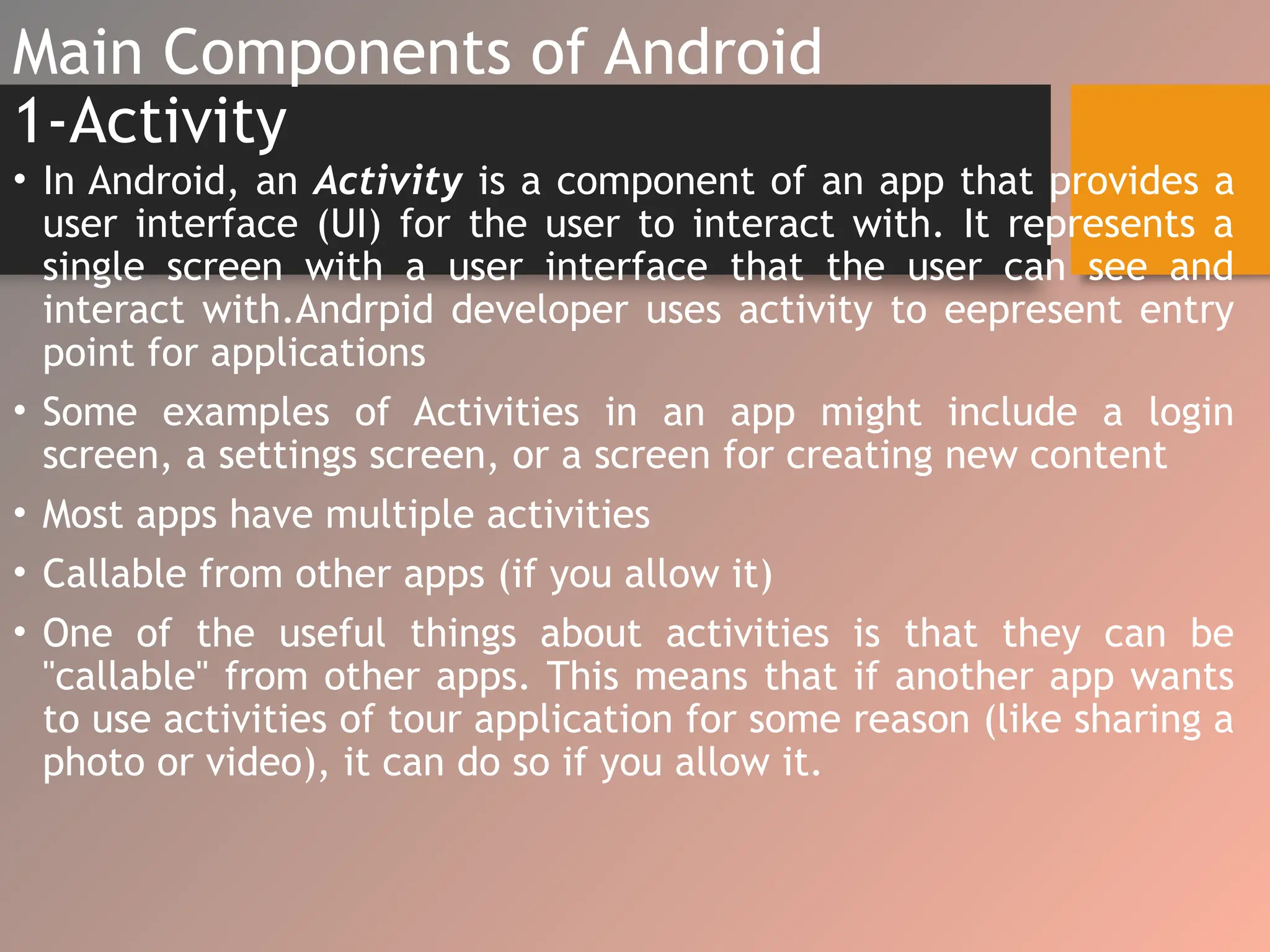
Main Components of Android
1-Activity
• In Android, an Activity is a component of an app that provides a
user interface (UI) for the user to interact with. It represents a
single screen with a user interface that the user can see and
interact with.Andrpid developer uses activity to eepresent entry
point for applications
• Some examples of Activities in an app might include a login
screen, a settings screen, or a screen for creating new content
• Most apps have multiple activities
• Callable from other apps (if you allow it)
• One of the useful things about activities is that they can be
"callable" from other apps. This means that if another app wants
to use activities of tour application for some reason (like sharing a
photo or video), it can do so if you allow it.
2-Service
• No user interface
• Service is a background process that can run
for a long time.
• Started and stopped by activities
3-Content Provider
• A content provider manages access to a central repository of
data.
• A content provider component supplies data from one
application to others on request.
• A provider is part of an Android application, which often
provides its own UI for working with the data.
• Manages shared set of application data
• Data may be shared between apps or be private
• Performs data handling functions
4-Broadcast Receiver
• Broadcast in android is the system-wide events that can occur
when the device starts, when a message is received on the
device or when incoming calls are received, or when a device
goes to airplane mode, etc. When you develop an app, you can
create a BroadcastReceiver component that listens for these
events and then performs some action when they occur.
BroadcastReceiver is similar to "interrupt handler" that jumps
into action whenever a specific event happens.
• View.onClicklistener that happen when user click on view
component
• View.onlongClicklistener that happen when user long click on
view component
• View.ontouchlistener that happen when user touches the view
component
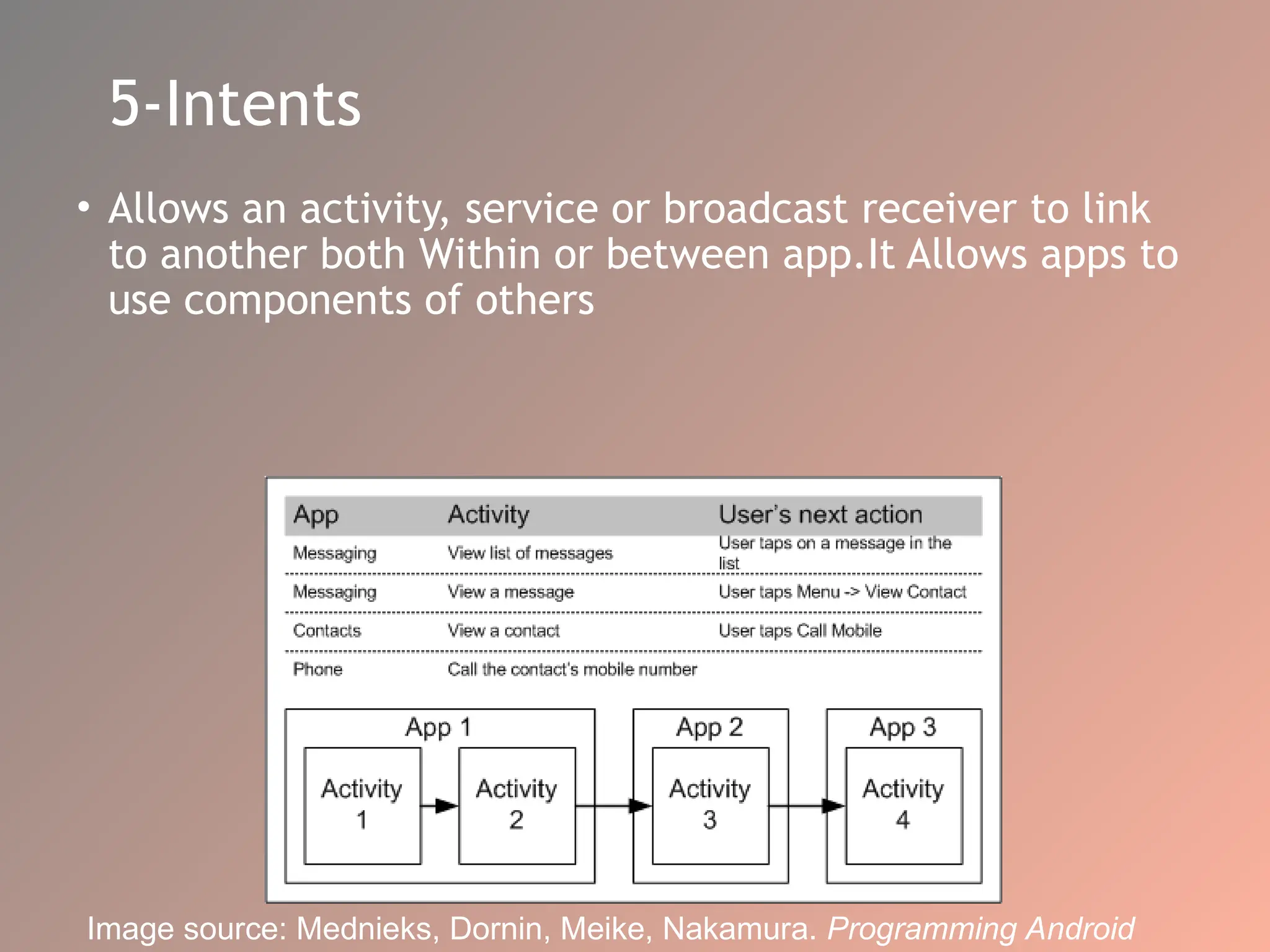
5-Intents
• Allows an activity, service or broadcast receiver to link
to another both Within or between app.It Allows apps to
use components of others
Image source: Mednieks, Dornin, Meike, Nakamura. Programming Android
User Interface Basics
• Basic unit of an Android application is an Activity
• An Activity displays the user interface
• To create the screen/ User Interfaces, we use objects called
View and View Group, which are instances of the View class.
View objects are data structures that store the content and
layout parameters, and control a specific rectangular area on
the screen, where they draw themselves and respond to user
events like touch or clicks.
• Some View objects are known as "widgets", which are special
types of Views that provide common user interface elements
like text fields, buttons, and labels. These widgets help users
interact with the application by providing a visual means of
input and output.
View & ViewGroup
 ViewGroup objects act like containers for View objects in which one or
more Views are grouped together
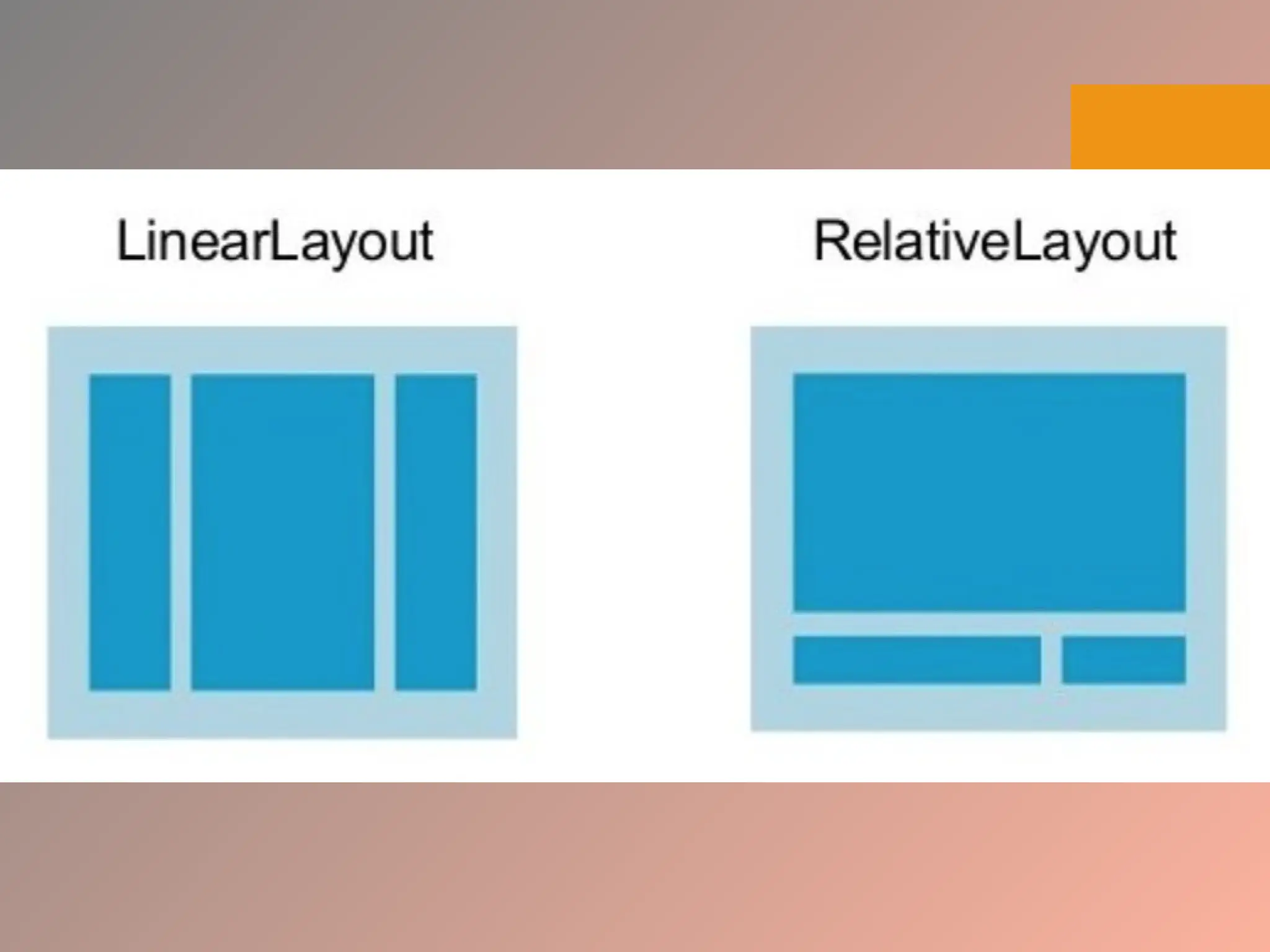
 To arrange Views within a View Group, we use layouts which are
subclasses of View Group. Two common layouts are Linear Layout and
Relative Layout.
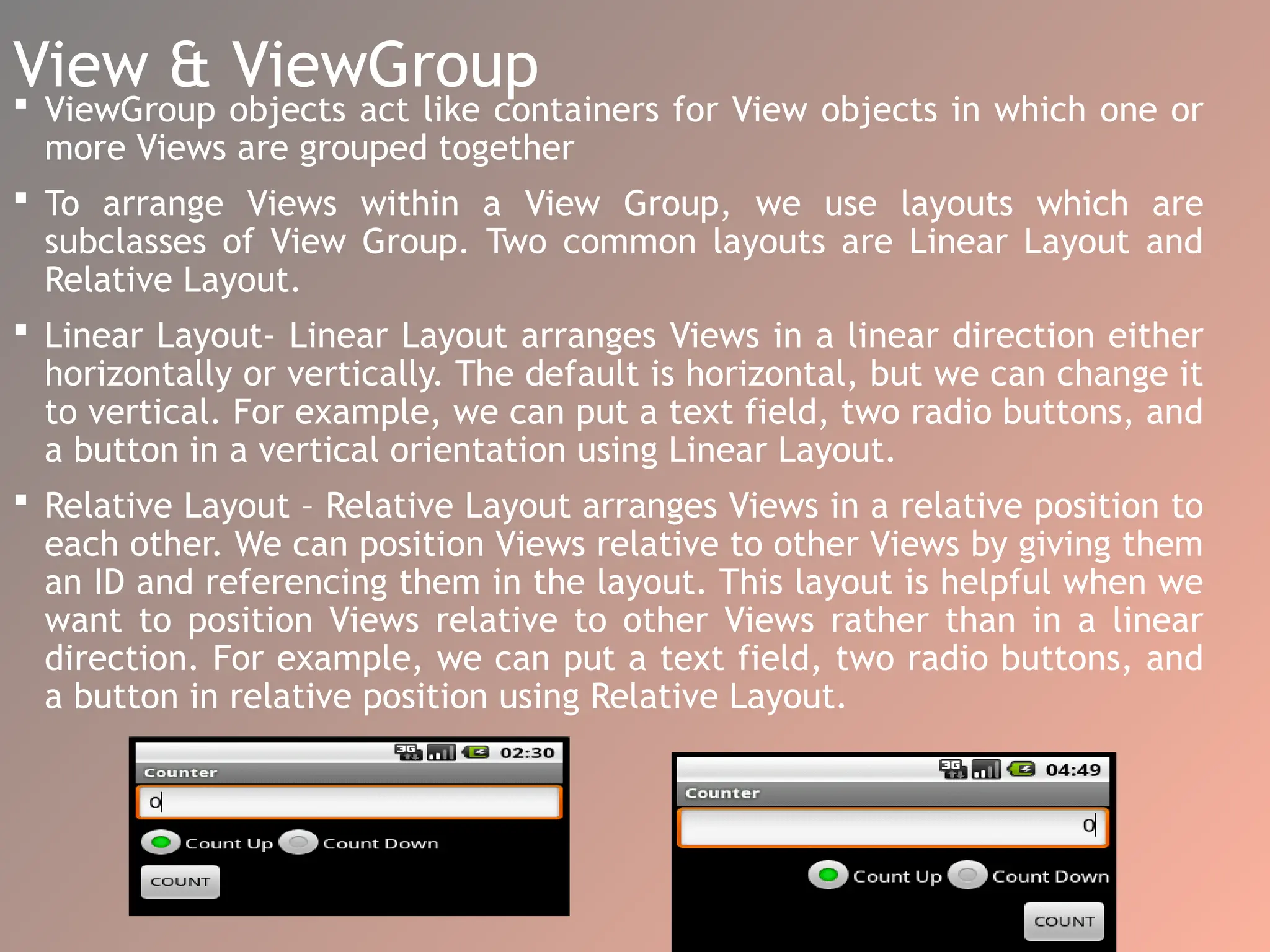
 Linear Layout- Linear Layout arranges Views in a linear direction either
horizontally or vertically. The default is horizontal, but we can change it
to vertical. For example, we can put a text field, two radio buttons, and
a button in a vertical orientation using Linear Layout.
 Relative Layout – Relative Layout arranges Views in a relative position to
each other. We can position Views relative to other Views by giving them
an ID and referencing them in the layout. This layout is helpful when we
want to position Views relative to other Views rather than in a linear
direction. For example, we can put a text field, two radio buttons, and
a button in relative position using Relative Layout.
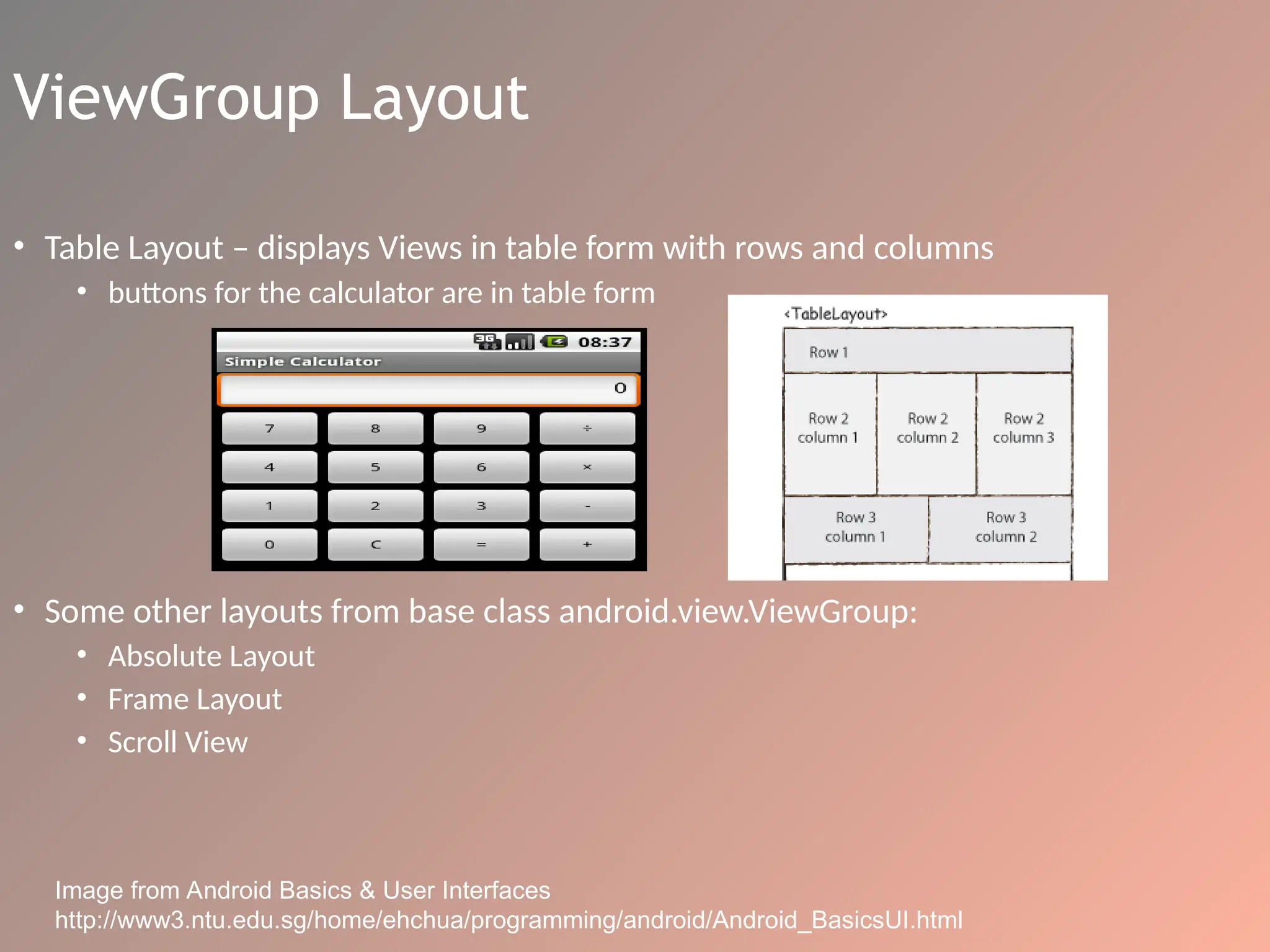
ViewGroup Layout
• Table Layout – displays Views in table form with rows and columns
• buttons for the calculator are in table form
• Some other layouts from base class android.view.ViewGroup:
• Absolute Layout
• Frame Layout
• Scroll View
Image from Android Basics & User Interfaces
http://www3.ntu.edu.sg/home/ehchua/programming/android/Android_BasicsUI.html
Common Attributes
• View and ViewGroup attributes:
• layout_width
• layout_height
• layout_margintop
• layout_marginbottom
• layout_marginleft
• layout_marginright
• layout_x
• layout_y
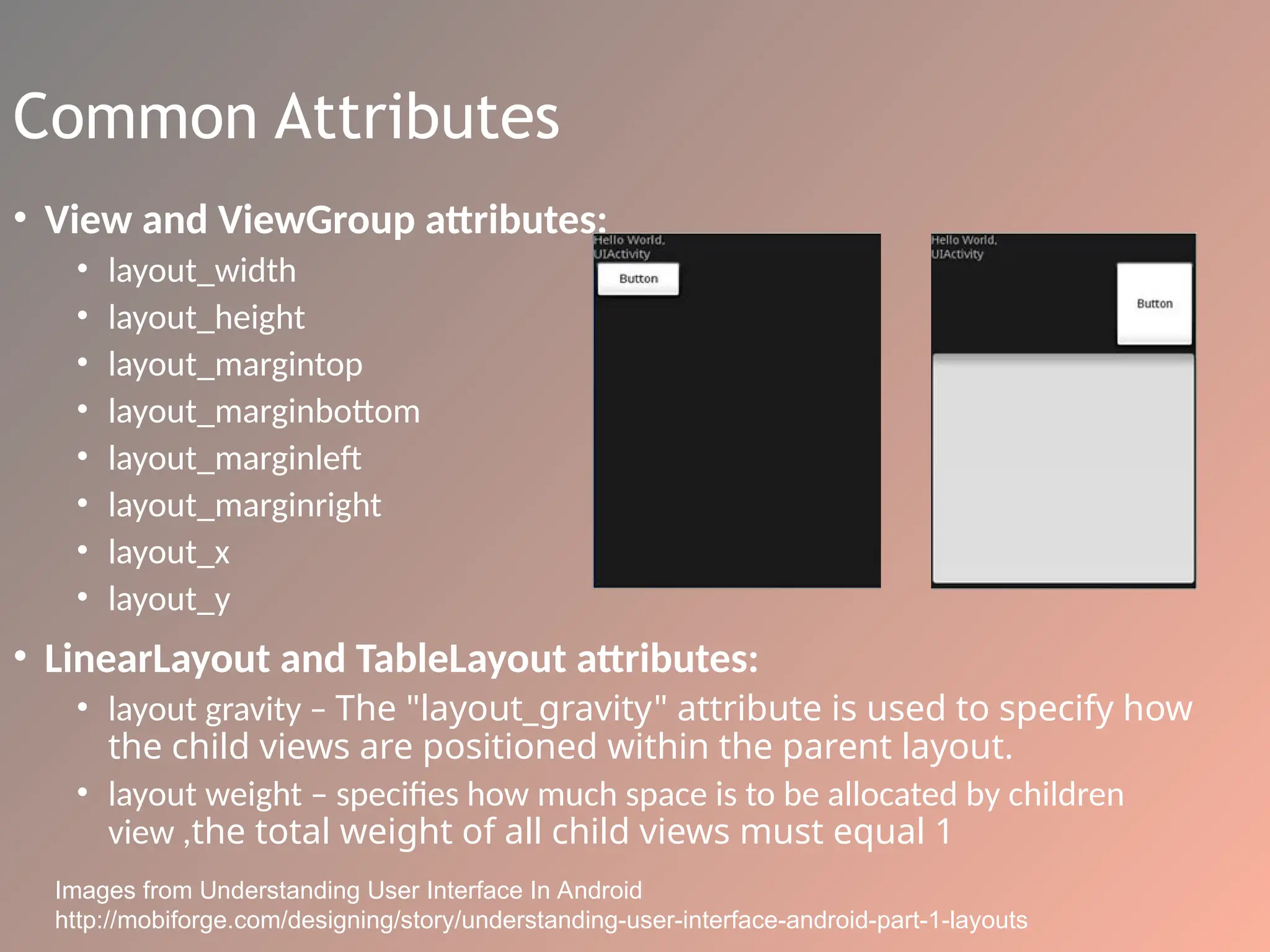
• LinearLayout and TableLayout attributes:
• layout gravity – The "layout_gravity" attribute is used to specify how
the child views are positioned within the parent layout.
• layout weight – specifies how much space is to be allocated by children
view ,the total weight of all child views must equal 1
Images from Understanding User Interface In Android
http://mobiforge.com/designing/story/understanding-user-interface-android-part-1-layouts
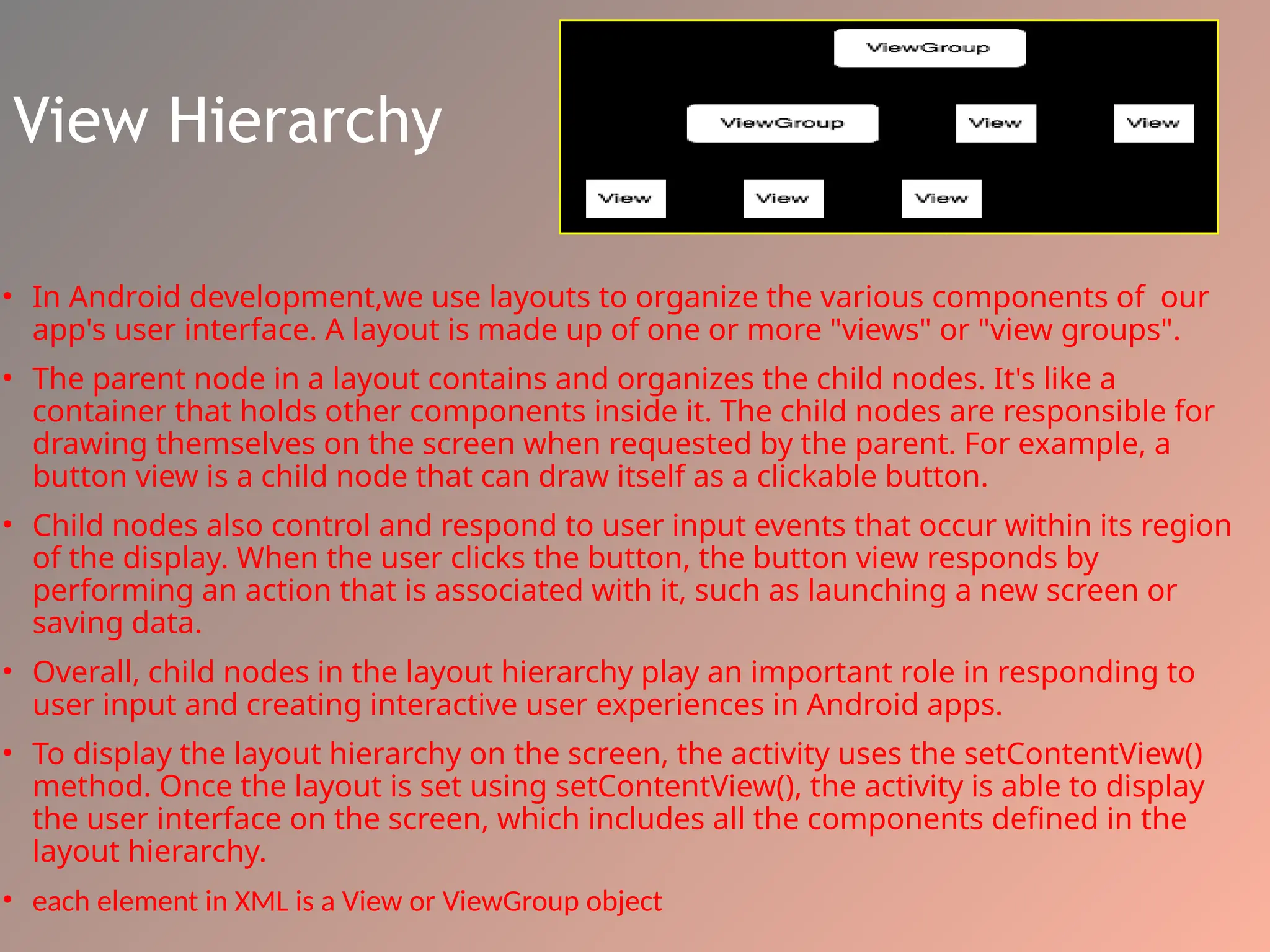
View Hierarchy
• In Android development,we use layouts to organize the various components of our
app's user interface. A layout is made up of one or more "views" or "view groups".
• The parent node in a layout contains and organizes the child nodes. It's like a
container that holds other components inside it. The child nodes are responsible for
drawing themselves on the screen when requested by the parent. For example, a
button view is a child node that can draw itself as a clickable button.
• Child nodes also control and respond to user input events that occur within its region
of the display. When the user clicks the button, the button view responds by
performing an action that is associated with it, such as launching a new screen or
saving data.
• Overall, child nodes in the layout hierarchy play an important role in responding to
user input and creating interactive user experiences in Android apps.
• To display the layout hierarchy on the screen, the activity uses the setContentView()
method. Once the layout is set using setContentView(), the activity is able to display
the user interface on the screen, which includes all the components defined in the
layout hierarchy.
• each element in XML is a View or ViewGroup object
Input Events
• an event is a user interaction with a view component, such as tapping a
button or scrolling a list.
• To detect these events, an event listener is defined and registered with the
view object.
• The View class has a collection of On<SomeEvent>Listener, which are used
to detect and respond to user input events.
View.OnClickListener
View.OnTouchListener
View.OnKeyListener
• OnClickListener: detects when a view component is clicked
• OnLongClickListener: detects when a view component is long-clicked
• OnTouchListener: detects when a touch event occurs on a view component
• Example: OnTouch, when the user touches a defined View object on the
screen
•define View.OnTouchListener
•register the View object with setOnTouchListener()
Types of Application Menus
• Two types of menus
• Options menu – The options menu is typically used to
provide general options for the application while it is
running.
• The user can access the options menu by pressing the
MENU button on their device.
• The options menu usually contains options such as
"Settings", "Help", "About", and "Exit".
• Context menu – typically used for displaying specific
information about an item
• accessed by pressing and hold down on an object
• For example, if the user long-presses on an image, a
context menu might appear that contains options such
as "Save Image", "Share Image", and "Delete Image".
Application Menus
• Options menus allow users quick access to an application’s functions,
preferences and settings
• Structured using a View hierarchy
• define onCreateOptionsMenu()
• define onCreateContentMenu()
• Handle their own events, no need to register event listeners
• Selections handled by methods
• onOptionsItemSelected()
• onContextItemSelected()
• Items for menus can be declared in an XML file like an application layout
Bluetooth
Bluetooth is a wireless communication technology that allows
devices to communicate with each other over short
distances
BluetoothAdapter is an Android class that represents
• Local radio state
• Discover devices
BluetoothServerSocket is a class that listens for incoming
Bluetooth connection requests.
• Receives connection requests
• Returns a BluetoothSocket when connected
BluetoothSocket is an object that represents a connection
between two Bluetooth devices. It provides an InputStream
object for reading data from the connected device, and an
OutputStream object for sending data to the connected
device.
Location
LocationManager locman =
(LocationManager) getSystemService(Context.LOCATION_SERVICE)
Location loc = locman.getLastKnownLocation(String provider)
 NETWORK_PROVIDER
 GPS_PROVIDER
Application Framework
• In Android development, the Android operating system provides a set
of underlying libraries and features that can be accessed by developers
to build Android applications. This set of libraries and features is
collectively known as the Android framework. The Android framework
is exposed to developers through a Java API, which provides a safe and
consistent way to utilize the resources of an Android device.
• Activity Manager:
the activity component is used by applications to present an entry
point for the app.
The Android Activity Manager is a system-level component that is
responsible for managing the lifecycle of activities in an Android app.
It ensures that activities behave in a predictable and consistent
manner during transitions, such as when an activity is launched,
stopped, or destroyed.
the Android system also provides a set of event listeners that
applications can use to listen for system events such as device
rotation, app destruction due to memory shortage, an app being
shifted out of focus, and so on.
Cont..
2) Window Manager
The Android operating system has a Window Manager that
determines the screen information needed for creating
these windows.
This information is provided to the apps and the system as
they run.
. Windows are the slots where we can view our app user
interface.
The Window Manager helps in delivering a customized app
experience. Apps can fill the complete screen for an
immersive experience or share the screen with other apps.
Android enables this by allowing multi-windows for each
app.
Cont..
3) Location Manager
Most Android devices are equipped with GPS devices that can get user
location using satellite information with high precision, up to a few
meters. App developers can request permission from users to access
their location information and create experiences that make use of
this data OR Programmers can prompt for location permission from
the users, deliver location, and aware experiences. Android provides
these features under the umbrella of the Location-Manager.
4) Telephony Manager
Most Android devices serve a primary role in telephony.Android uses
TelephoneManager to combine hardware and software components to
deliver telephony features.
The hardware components include external parts such as the sim
card, and device parts such as the microphone, camera, and
speakers.
Cont..
5) Resource Manager
Android app usually come with more than just code. They also have
other resources such as icons, audio and video files, animations,
text files, and the like.
Android helps in making sure that there is efficient, responsive
access to these resources. It also ensures that the right resources
are delivered to the end-users. For example, the proper language
text files are used when populating fields in the apps.
6) View System
Android provides an easy way for app developers to create common
visual components that are needed for user interaction. These
components include widgets like buttons, image holders such as
ImageView, components to display a list of items such as ListView,
and many more.
Cont..
7) Notification Manager
The Notification Manager is responsible for informing Android users of
application events. It does this by giving users visual, audio or
vibration signals or a combination of them when an event occurs.
These events have external and internal triggers. Android provides a
means for programmers and end-users to fine-tune/for adjustment
the notifications system.
8) Package Manager
Android keeps track of application information such as installation and
uninstallation events, permissions the app requests, and resource
utilization such as memory consumption.
This information can enable developers to make their applications to
activate or deactivate functionality depending on new features
presented by companion apps.
Android Runtime
• Android currently uses Android Runtime (ART) to execute
application code. ART is preceded by the Dalvik Runtime
that compiled developer code to Dalvik Executable files
(Dex files This environment is designed to work well with
the processors and memory constraints of mobile devices,
such as smartphones and tablets..
• The runtime translates code written by programmers into
machine code that does computations and utilizes android
framework components to deliver functionality. Android
hosts multiple applications and system components that
each run in their processes.
Core Libraries
2) MediaFramework
Android also natively supports popular media codecs, making it easy for
apps created on the Android platform to use/play multimedia components
out of the box/in their apps without having to worry about compatibility
issues .
Codecs: a device or program that compresses data to enable faster
transmission and decompresses received data.
3) SQLite
Android also has an SQLite database that enables applications to
have very fast native database functionality without the need for
third party libraries.
4) Freetype
Android comes with a preinstalled fast and flexible font engine. This
makes it possible for application developers to style components of
their application and deliver a rich experience that expresses the
developer’s intent.
Core Libraries
5) OpenGL
Android also comes with the OpenGL graphics system. It’s a C library that
helps Android use hardware components in the real-time rendering of 2D and
3D graphics
Real-time rendering is a field of computer graphics focused on analysing and
producing images in real time. It's commonly used in video games, simulations,
and virtual reality applications.A Wi-Fi 6 router is a type of wireless router
that can send different signals at the same time, allowing it to communicate
with multiple devices in a single transmission. The graphics pipeline is the part
of Android OS which displays the user interface by using the graphics
processor.
6) SSL
Android also comes with an inbuilt security layer to enable secure
communication between applications on Android and other devices such as
servers, other mobile devices, routers 6.
7) SGL
The graphics library is made up of special computer code that is designed to work
really well with Android. It helps make sure that the pictures and graphics on your
device look great and run smoothly. The graphics library is part of a bigger system
called the "Android graphics pipeline."
Core Libraries
8) Libc
The core of Android contains libraries written in C and C++, which are
low-level languages meant for embedded use that help in maximizing
performance. Libc provides a means to expose low-level system
functionalities such as Threads, Sockets, IO, and the like to these
libraries.
9) Webkit
This is an open-source Browser engine used as a basis to build
browsers. The default Android browser before version 4.4 KitKat uses
it for rendering web pages. It enables application developers to
render/display web components in the view-system by using
WebView.
10) Surface Manager
The surface manager is responsible for ensuring the smooth rendering
of application screens. It does this by composing 2D and 3D graphics
for rendering. It further enables this by doing off-screen buffering.
Linux Kernel
With regards to Android, the Kernel is responsible for many foundational
functionalities including but not limited to these:
•Device drivers
•Memory Management
•Process Management
•Let’s expand on some of the functionality:
Device Drivers
The Linux kernel contain the drivers needed to make it possible for the
operating system to work with different hardware components. In the
Linux Kernel, drivers are typically implemented as kernel modules, which
are dynamically loaded into the Kernel when the corresponding hardware
component is detected.
Linux Kernel
Memory Management
Another responsibility of the Linux Kernel is memory management.
As different applications run, the Kernel ensures the memory space
they use doesn’t conflict and overwrite each other.
It also helps ensure that all running apps get adequate memory to
function, making sure no single app takes too much space.
Process Management
Every app in Android runs in a process. The Kernel is also
responsible for managing processes. This means it’s responsible for
creating, pausing, stopping, shutting, or killing down processes.
The Kernel enables various functionalities such as running multiple
processes at the same time, communicating between processes,
running processes in the background, and so on.
References
• https://market.android.com/details?id=zausan.zdevicetest&hl=en
• https://market.android.com/details?id=com.fivasim.androsensor
&hl=en
• http://developer.android.com/reference
• Mednicks, Dornin, Meike, Nakamura, Programming Android
• http://developer.android.com
• http://www3.ntu.edu.sg/home/ehchua/programming/android/Android_
BasicsUI.html
• http://phandroid.com/2011/05/11/10-tips-for-android-ui-design/
• http://eagle.phys.utk.edu/guidry/android/androidUserInterface.html
• Ableson, Sen, King, Ortiz: Android In Action – Third Edition

UPDATED Application fundamentals lec 1 &2.ppt

  • 1.
    What is Android •Software stack for mobile devices/Android software package and linux based operating system for mobile devices such as tablet computers and smartphones.. • SDK provides tools and APIs to develop apps • An API (Application Programming Interface) is a type of software that helps two different applications communicate with each other. It's like a middleman that helps them share information. APIs are an accessible way to extract and share data within and across organizations.
  • 2.
  • 3.
    Applications • Applications :On the top of android framework, there are applications. All applications such as home, contact, settings, games, browsers are using android framework that uses android runtime and libraries. Android runtime and native libraries are using linux kernal. • When you get a new device, it usually comes with a set of basic apps that are already installed on it. These apps are built using a programming language called Java. • Developers have access to core APIs.Core APIs to build your own apps 1-Views used to build application / to create the user interface. Views are like building blocks that you can use to put your app together.
  • 4.
    1)the activity manageris in charge of managing your app's lifecycle. For example, developers can use the startActivityForResult() method to launch a new activity and get a result back from it, or they can use the onPause() and onResume() methods to save and restore the state of their activities when they are paused or resumed. 2) Window Manager The Android operating system has a Window Manager that determines the screen information needed for creating these windows. This information is provided to the apps and the system as they run. . Windows are the slots where we can view our app user interface.
  • 5.
    The Window Managerhelps in delivering a customized app experience. Apps can fill the complete screen for an immersive experience or share the screen with other apps. Android enables this by allowing multi-windows for each app. 3) Location Manager Most Android devices are equipped with GPS devices that can get user location using satellite information with high precision, up to a few meters. App developers can request permission from users to access their location information and create experiences that make use of this data OR Programmers can prompt for location permission from the users, deliver location, and aware experiences. Android provides these features under the umbrella of the Location-Manager.
  • 6.
    4) Telephony Manager MostAndroid devices serve a primary role in telephony.Android uses TelephoneManager to combine hardware and software components to deliver telephony features. The hardware components include external parts such as the sim card, and device parts such as the microphone, camera, and speakers. 5)View System Android provides an easy way for app developers to create common visual components that are needed for user interaction. These components include widgets like buttons, image holders such as ImageView, components to display a list of items such as ListView, and many more.
  • 7.
    6)Package Manager Android keepstrack of application information such as installation and uninstallation events, permissions the app requests, and resource utilization such as memory consumption. This information can enable developers to make their applications to activate or deactivate functionality depending on new features presented by companion apps.
  • 8.
    7)If your appneeds to access data from other apps, you can use something called content providers to do that. if you wanted to get data from a weather app, you could use a Content Provider to access that information. 8)The resource manager is a tool that lets you access things like text and graphics that are stored on the device. You can use these resources in your app to make it look and feel the way you want 9)If you want your app to display alerts or notifications, you can use something called the notification manager. This is a tool that lets you create custom alerts and notifications that will show up on the user's device.
  • 9.
    Applications • API isa software intermediary that allows two applications to talk to each other. APIs are an accessible way to extract and share data within and across organizations. • Content providers are Android's central mechanism that enables you to access data of other applications. Resource Manager is a tool window for importing, creating, managing, and using resources in your app. • Ships with core set of apps, written in Java • Developers have access to core APIs • Views used to build application • Content providers – access data from other apps • Resource manager – access to local strings, graphics • Notification manager – display custom alerts • Activity manager – manages app lifecycle
  • 10.
    • OpenGL isa cross-platform API for rendering 2D and 3D graphics, which means it can be used on a wide range of platforms, not just Android. It provides low-level access to graphics hardware, allowing developers to create high- performance graphics applications. . It's also used for scientific simulations, CAD, virtual reality, and many other applications. • SGL,(SKIA GRAPHIC LIBRARY) on the other hand, is a 2D graphics library specifically designed for Android. It's built on top of OpenGL and provides a higher-level API for creating 2D graphics. It's optimized for mobile devices and provides features such as anti-aliasing, font rendering, and image decoding. SGL is commonly used for creating user interfaces, widgets, and other 2D graphics. • In summary, while both libraries are used for graphics in Android development, OpenGL is more versatile and can be used for both 2D and 3D graphics, while SGL is specifically designed for 2D graphics and provides higher-level APIs for creating them.
  • 11.
    • SSL (SecureSockets Layer) is a protocol used for secure communication over the internet. It provides encryption of data being transmitted between two parties, ensuring the privacy and integrity of the data. SSL is commonly used in applications that require secure communication, such as online banking, e- commerce, and social media
  • 12.
    8) Libc The coreof Android contains libraries written in C and C++, which are low-level languages meant for embedded use that help in maximizing performance. Libc provides a means to expose low-level system functionalities such as Threads, Sockets, IO, and the like to these libraries. 9) Webkit This is an open-source Browser engine used as a basis to build browsers. The default Android browser before version 4.4 KitKat uses it for rendering web pages. It enables application developers to render/display web components in the view- system by using WebView. 10) Surface Manager The surface manager is responsible for ensuring the smooth rendering of application screens. It does this by composing 2D and 3D graphics for rendering. It further enables this by doing off-screen buffering.
  • 13.
    2) MediaFramework Android alsonatively supports popular media codecs, making it easy for apps created on the Android platform to use/play multimedia components out of the box/in their apps without having to worry about compatibility issues . Codecs: a device or program that compresses data to enable faster transmission and decompresses received data. 3) SQLite Android also has an SQLite database that enables applications to have very fast native database functionality without the need for third party libraries. 4) Freetype Android comes with a preinstalled fast and flexible font engine. This makes it possible for application developers to style components of their application and deliver a rich experience that expresses the developer’s intent.
  • 14.
    Androiod Runtime • Androidcurrently uses Android Runtime (ART) to execute application code. ART is preceded by the Dalvik Runtime that compiled developer code to Dalvik Executable files (Dex files This environment is designed to work well with the processors and memory constraints of mobile devices, such as smartphones and tablets.. • The runtime translates code written by programmers into machine code that does computations and utilizes android framework components to deliver functionality. Android hosts multiple applications and system components that each run in their processes.
  • 15.
    Linux kernel • Itis the heart of android architecture that exists at the root of android architecture. Linux kernel is responsible for device drivers, power management, memory management, device management and resource access. • The Linux kernel is the foundation of the Linux computer operating system. A kernel is the lowest level of software that can interface with computer hardware. All Linux applications and servers also interface with the Linux kernel
  • 16.
    Device Drivers The Linuxkernel contain the drivers needed to make it possible for the operating system to work with different hardware components. In the Linux Kernel, drivers are typically implemented as kernel modules, which are dynamically loaded into the Kernel when the corresponding hardware component is detected.
  • 17.
    Memory Management Another responsibilityof the Linux Kernel is memory management. As different applications run, the Kernel ensures the memory space they use doesn’t conflict and overwrite each other. It also helps ensure that all running apps get adequate memory to function, making sure no single app takes too much space.
  • 18.
    Process Management Every appin Android runs in a process. The Kernel is also responsible for managing processes. This means it’s responsible for creating, pausing, stopping, shutting, or killing down processes. The Kernel enables various functionalities such as running multiple processes at the same time, communicating between processes, running processes in the background, and so on.
  • 19.
    Libraries • C/C++ • Medialibraries – Audio, Videos, images • Surface manager – 2D/3D graphic layers • Free Type for font support • SQLite is for database • Web Kit library is responsible for browser support • SSL libraries responsible for Internet security etc. • OpenGL (Open Graphic Library) and SGL (Scalable Graphics Library), used for creating 2D and 3D graphics. SGL – 2D graphics engine • LibWebCore – web browser engine • 3D – hardware or software acceleration • FreeType – BMP and vector fonts • SQLite – database engine
  • 20.
    Runtime and Kernel •Includes core set of libraries • Provides most of core Java libraries • Each app runs in its own process • Own instance of the Dalvik Virtual Machine • Linux 2.6 is used for core system services • Abstraction layer between HW & SW stacks
  • 21.
    Main Components ofAndroid 1-Activity • In Android, an Activity is a component of an app that provides a user interface (UI) for the user to interact with. It represents a single screen with a user interface that the user can see and interact with.Andrpid developer uses activity to eepresent entry point for applications • Some examples of Activities in an app might include a login screen, a settings screen, or a screen for creating new content • Most apps have multiple activities • Callable from other apps (if you allow it) • One of the useful things about activities is that they can be "callable" from other apps. This means that if another app wants to use activities of tour application for some reason (like sharing a photo or video), it can do so if you allow it.
  • 22.
    2-Service • No userinterface • Service is a background process that can run for a long time. • Started and stopped by activities
  • 23.
    3-Content Provider • Acontent provider manages access to a central repository of data. • A content provider component supplies data from one application to others on request. • A provider is part of an Android application, which often provides its own UI for working with the data. • Manages shared set of application data • Data may be shared between apps or be private • Performs data handling functions
  • 24.
    4-Broadcast Receiver • Broadcastin android is the system-wide events that can occur when the device starts, when a message is received on the device or when incoming calls are received, or when a device goes to airplane mode, etc. When you develop an app, you can create a BroadcastReceiver component that listens for these events and then performs some action when they occur. BroadcastReceiver is similar to "interrupt handler" that jumps into action whenever a specific event happens. • View.onClicklistener that happen when user click on view component • View.onlongClicklistener that happen when user long click on view component • View.ontouchlistener that happen when user touches the view component
  • 25.
    5-Intents • Allows anactivity, service or broadcast receiver to link to another both Within or between app.It Allows apps to use components of others Image source: Mednieks, Dornin, Meike, Nakamura. Programming Android
  • 26.
    User Interface Basics •Basic unit of an Android application is an Activity • An Activity displays the user interface • To create the screen/ User Interfaces, we use objects called View and View Group, which are instances of the View class. View objects are data structures that store the content and layout parameters, and control a specific rectangular area on the screen, where they draw themselves and respond to user events like touch or clicks. • Some View objects are known as "widgets", which are special types of Views that provide common user interface elements like text fields, buttons, and labels. These widgets help users interact with the application by providing a visual means of input and output.
  • 27.
    View & ViewGroup ViewGroup objects act like containers for View objects in which one or more Views are grouped together  To arrange Views within a View Group, we use layouts which are subclasses of View Group. Two common layouts are Linear Layout and Relative Layout.  Linear Layout- Linear Layout arranges Views in a linear direction either horizontally or vertically. The default is horizontal, but we can change it to vertical. For example, we can put a text field, two radio buttons, and a button in a vertical orientation using Linear Layout.  Relative Layout – Relative Layout arranges Views in a relative position to each other. We can position Views relative to other Views by giving them an ID and referencing them in the layout. This layout is helpful when we want to position Views relative to other Views rather than in a linear direction. For example, we can put a text field, two radio buttons, and a button in relative position using Relative Layout.
  • 29.
    ViewGroup Layout • TableLayout – displays Views in table form with rows and columns • buttons for the calculator are in table form • Some other layouts from base class android.view.ViewGroup: • Absolute Layout • Frame Layout • Scroll View Image from Android Basics & User Interfaces http://www3.ntu.edu.sg/home/ehchua/programming/android/Android_BasicsUI.html
  • 30.
    Common Attributes • Viewand ViewGroup attributes: • layout_width • layout_height • layout_margintop • layout_marginbottom • layout_marginleft • layout_marginright • layout_x • layout_y • LinearLayout and TableLayout attributes: • layout gravity – The "layout_gravity" attribute is used to specify how the child views are positioned within the parent layout. • layout weight – specifies how much space is to be allocated by children view ,the total weight of all child views must equal 1 Images from Understanding User Interface In Android http://mobiforge.com/designing/story/understanding-user-interface-android-part-1-layouts
  • 31.
    View Hierarchy • InAndroid development,we use layouts to organize the various components of our app's user interface. A layout is made up of one or more "views" or "view groups". • The parent node in a layout contains and organizes the child nodes. It's like a container that holds other components inside it. The child nodes are responsible for drawing themselves on the screen when requested by the parent. For example, a button view is a child node that can draw itself as a clickable button. • Child nodes also control and respond to user input events that occur within its region of the display. When the user clicks the button, the button view responds by performing an action that is associated with it, such as launching a new screen or saving data. • Overall, child nodes in the layout hierarchy play an important role in responding to user input and creating interactive user experiences in Android apps. • To display the layout hierarchy on the screen, the activity uses the setContentView() method. Once the layout is set using setContentView(), the activity is able to display the user interface on the screen, which includes all the components defined in the layout hierarchy. • each element in XML is a View or ViewGroup object
  • 32.
    Input Events • anevent is a user interaction with a view component, such as tapping a button or scrolling a list. • To detect these events, an event listener is defined and registered with the view object. • The View class has a collection of On<SomeEvent>Listener, which are used to detect and respond to user input events. View.OnClickListener View.OnTouchListener View.OnKeyListener • OnClickListener: detects when a view component is clicked • OnLongClickListener: detects when a view component is long-clicked • OnTouchListener: detects when a touch event occurs on a view component • Example: OnTouch, when the user touches a defined View object on the screen •define View.OnTouchListener •register the View object with setOnTouchListener()
  • 33.
    Types of ApplicationMenus • Two types of menus • Options menu – The options menu is typically used to provide general options for the application while it is running. • The user can access the options menu by pressing the MENU button on their device. • The options menu usually contains options such as "Settings", "Help", "About", and "Exit". • Context menu – typically used for displaying specific information about an item • accessed by pressing and hold down on an object • For example, if the user long-presses on an image, a context menu might appear that contains options such as "Save Image", "Share Image", and "Delete Image".
  • 34.
    Application Menus • Optionsmenus allow users quick access to an application’s functions, preferences and settings • Structured using a View hierarchy • define onCreateOptionsMenu() • define onCreateContentMenu() • Handle their own events, no need to register event listeners • Selections handled by methods • onOptionsItemSelected() • onContextItemSelected() • Items for menus can be declared in an XML file like an application layout
  • 35.
    Bluetooth Bluetooth is awireless communication technology that allows devices to communicate with each other over short distances BluetoothAdapter is an Android class that represents • Local radio state • Discover devices BluetoothServerSocket is a class that listens for incoming Bluetooth connection requests. • Receives connection requests • Returns a BluetoothSocket when connected BluetoothSocket is an object that represents a connection between two Bluetooth devices. It provides an InputStream object for reading data from the connected device, and an OutputStream object for sending data to the connected device.
  • 36.
    Location LocationManager locman = (LocationManager)getSystemService(Context.LOCATION_SERVICE) Location loc = locman.getLastKnownLocation(String provider)  NETWORK_PROVIDER  GPS_PROVIDER
  • 37.
    Application Framework • InAndroid development, the Android operating system provides a set of underlying libraries and features that can be accessed by developers to build Android applications. This set of libraries and features is collectively known as the Android framework. The Android framework is exposed to developers through a Java API, which provides a safe and consistent way to utilize the resources of an Android device. • Activity Manager: the activity component is used by applications to present an entry point for the app. The Android Activity Manager is a system-level component that is responsible for managing the lifecycle of activities in an Android app. It ensures that activities behave in a predictable and consistent manner during transitions, such as when an activity is launched, stopped, or destroyed. the Android system also provides a set of event listeners that applications can use to listen for system events such as device rotation, app destruction due to memory shortage, an app being shifted out of focus, and so on.
  • 38.
    Cont.. 2) Window Manager TheAndroid operating system has a Window Manager that determines the screen information needed for creating these windows. This information is provided to the apps and the system as they run. . Windows are the slots where we can view our app user interface. The Window Manager helps in delivering a customized app experience. Apps can fill the complete screen for an immersive experience or share the screen with other apps. Android enables this by allowing multi-windows for each app.
  • 39.
    Cont.. 3) Location Manager MostAndroid devices are equipped with GPS devices that can get user location using satellite information with high precision, up to a few meters. App developers can request permission from users to access their location information and create experiences that make use of this data OR Programmers can prompt for location permission from the users, deliver location, and aware experiences. Android provides these features under the umbrella of the Location-Manager. 4) Telephony Manager Most Android devices serve a primary role in telephony.Android uses TelephoneManager to combine hardware and software components to deliver telephony features. The hardware components include external parts such as the sim card, and device parts such as the microphone, camera, and speakers.
  • 40.
    Cont.. 5) Resource Manager Androidapp usually come with more than just code. They also have other resources such as icons, audio and video files, animations, text files, and the like. Android helps in making sure that there is efficient, responsive access to these resources. It also ensures that the right resources are delivered to the end-users. For example, the proper language text files are used when populating fields in the apps. 6) View System Android provides an easy way for app developers to create common visual components that are needed for user interaction. These components include widgets like buttons, image holders such as ImageView, components to display a list of items such as ListView, and many more.
  • 41.
    Cont.. 7) Notification Manager TheNotification Manager is responsible for informing Android users of application events. It does this by giving users visual, audio or vibration signals or a combination of them when an event occurs. These events have external and internal triggers. Android provides a means for programmers and end-users to fine-tune/for adjustment the notifications system. 8) Package Manager Android keeps track of application information such as installation and uninstallation events, permissions the app requests, and resource utilization such as memory consumption. This information can enable developers to make their applications to activate or deactivate functionality depending on new features presented by companion apps.
  • 42.
    Android Runtime • Androidcurrently uses Android Runtime (ART) to execute application code. ART is preceded by the Dalvik Runtime that compiled developer code to Dalvik Executable files (Dex files This environment is designed to work well with the processors and memory constraints of mobile devices, such as smartphones and tablets.. • The runtime translates code written by programmers into machine code that does computations and utilizes android framework components to deliver functionality. Android hosts multiple applications and system components that each run in their processes.
  • 43.
    Core Libraries 2) MediaFramework Androidalso natively supports popular media codecs, making it easy for apps created on the Android platform to use/play multimedia components out of the box/in their apps without having to worry about compatibility issues . Codecs: a device or program that compresses data to enable faster transmission and decompresses received data. 3) SQLite Android also has an SQLite database that enables applications to have very fast native database functionality without the need for third party libraries. 4) Freetype Android comes with a preinstalled fast and flexible font engine. This makes it possible for application developers to style components of their application and deliver a rich experience that expresses the developer’s intent.
  • 44.
    Core Libraries 5) OpenGL Androidalso comes with the OpenGL graphics system. It’s a C library that helps Android use hardware components in the real-time rendering of 2D and 3D graphics Real-time rendering is a field of computer graphics focused on analysing and producing images in real time. It's commonly used in video games, simulations, and virtual reality applications.A Wi-Fi 6 router is a type of wireless router that can send different signals at the same time, allowing it to communicate with multiple devices in a single transmission. The graphics pipeline is the part of Android OS which displays the user interface by using the graphics processor. 6) SSL Android also comes with an inbuilt security layer to enable secure communication between applications on Android and other devices such as servers, other mobile devices, routers 6. 7) SGL The graphics library is made up of special computer code that is designed to work really well with Android. It helps make sure that the pictures and graphics on your device look great and run smoothly. The graphics library is part of a bigger system called the "Android graphics pipeline."
  • 45.
    Core Libraries 8) Libc Thecore of Android contains libraries written in C and C++, which are low-level languages meant for embedded use that help in maximizing performance. Libc provides a means to expose low-level system functionalities such as Threads, Sockets, IO, and the like to these libraries. 9) Webkit This is an open-source Browser engine used as a basis to build browsers. The default Android browser before version 4.4 KitKat uses it for rendering web pages. It enables application developers to render/display web components in the view-system by using WebView. 10) Surface Manager The surface manager is responsible for ensuring the smooth rendering of application screens. It does this by composing 2D and 3D graphics for rendering. It further enables this by doing off-screen buffering.
  • 46.
    Linux Kernel With regardsto Android, the Kernel is responsible for many foundational functionalities including but not limited to these: •Device drivers •Memory Management •Process Management •Let’s expand on some of the functionality: Device Drivers The Linux kernel contain the drivers needed to make it possible for the operating system to work with different hardware components. In the Linux Kernel, drivers are typically implemented as kernel modules, which are dynamically loaded into the Kernel when the corresponding hardware component is detected.
  • 47.
    Linux Kernel Memory Management Anotherresponsibility of the Linux Kernel is memory management. As different applications run, the Kernel ensures the memory space they use doesn’t conflict and overwrite each other. It also helps ensure that all running apps get adequate memory to function, making sure no single app takes too much space. Process Management Every app in Android runs in a process. The Kernel is also responsible for managing processes. This means it’s responsible for creating, pausing, stopping, shutting, or killing down processes. The Kernel enables various functionalities such as running multiple processes at the same time, communicating between processes, running processes in the background, and so on.
  • 48.
    References • https://market.android.com/details?id=zausan.zdevicetest&hl=en • https://market.android.com/details?id=com.fivasim.androsensor &hl=en •http://developer.android.com/reference • Mednicks, Dornin, Meike, Nakamura, Programming Android • http://developer.android.com • http://www3.ntu.edu.sg/home/ehchua/programming/android/Android_ BasicsUI.html • http://phandroid.com/2011/05/11/10-tips-for-android-ui-design/ • http://eagle.phys.utk.edu/guidry/android/androidUserInterface.html • Ableson, Sen, King, Ortiz: Android In Action – Third Edition

Editor's Notes

  • #2 The Linux kernel is the foundation of the Linux computer operating system. A kernel is the lowest level of software that can interface with computer hardware. All Linux applications and servers also interface with the Linux kernel.
  • #19 Audio /video. SGL stands for "Scalable Graphics Library" and is the graphics subsystem used by Android. SGL is the low-level graphics library implemented in native code that handles rendering. Bitmap formats are best for images that need to have a wide range of color gradations, such as most photographs. Vector formats, on the other hand, are better for images that consist of a few areas of solid color. 
  • #20 Dalvik is a discontinued process virtual machine (VM) in the Android operating system that executes applications written for Android.
  • #24 When any of broadcast action occur it brings the application into action by creating a status bar notification or performing a task.
  • #43 Codecs: a device or program that compresses data to enable faster transmission and decompresses received data.
  • #44 It's commonly used in video games, simulations, and virtual reality applications. A Wi-Fi 6 router is a type of wireless router that can send different signals at the same time, allowing it to communicate with multiple devices in a single transmission. This means that the router can send information to multiple devices at once, which can result in faster and more efficient communication. The graphics pipeline is a part of the Android operating system that is responsible for displaying the user interface using the graphics processor. This involves processing and rendering graphics data in order to create the visual elements of the user interface, such as icons, buttons, and menus. The graphics pipeline is important for ensuring that the user interface is responsive and visually appealing.