James Montemagno
Developer Evangelist, Xamarin
@JamesMontemagno
Sweeten Up Your Android
Apps with Lollipop and
Material Design
Who’s this guy?
James
Montemagno
Developer
Evangelist
james@xamarin.com
http://motz.codes
@JamesMontemagno
Android Lollipop
Android Lollipop Major Features
§  ART Runtime!
§  Material Design!
§  Widgets, Views, and Shadows!
§  Animations!
§  Notifications!
§  Compatibility!
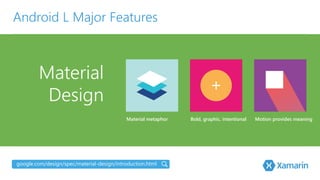
Material

Design
Android L Major Features
google.com/design/spec/material-‐design/introduction.html
Bold, graphic, intentional
Material metaphor
 Motion provides meaning
§  Brand new style for
applications. 
•  Theme.Material
•  Theme.Material.Light
•  Theme.Material.Light.
DarkActionBar
Material Design
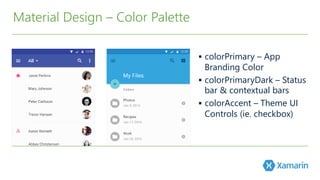
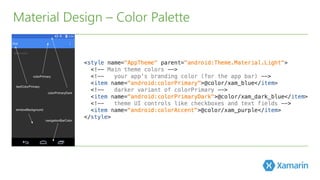
§  colorPrimary – App
Branding Color
§  colorPrimaryDark – Status
bar & contextual bars
§  colorAccent – Theme UI
Controls (﴾ie. checkbox)﴿
Material Design – Color Palette
Let’s
Look
§  AppCompat v21 to the Rescue!!
§  New Themes
§  New Controls
§  New Support Libraries
Lollipop Only?
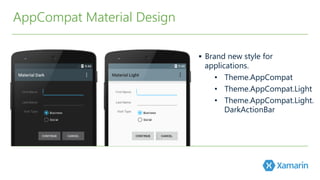
§  Brand new style for
applications. 
•  Theme.AppCompat
•  Theme.AppCompat.Light
•  Theme.AppCompat.Light.
DarkActionBar
AppCompat Material Design
App Compat Material Design – Color Palette
§  Google Design Guidelines
–  http://www.google.com/design/spec/style/color.html#color-‐color-‐palette
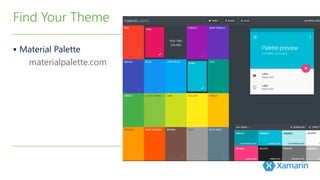
Find Your Theme
§  Material Palette
materialpalette.com
Find Your Theme
§  Also use:
– SupportActionBar
Update Activity
§  Extendable & Customizable
ActionBar
–  Inherits from ActionBar
§  You can have multiple in your
Layout now!
§  Uses the same menu items!
§  Works with AppCompat
Goodbye ActionBar, Hello Toolbar
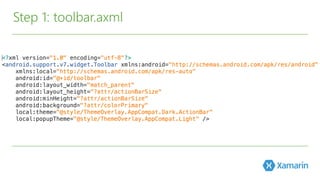
Step 1: toolbar.axml
Step 2: Insert into Activity axml
Step 3: Update ActionBarActivity
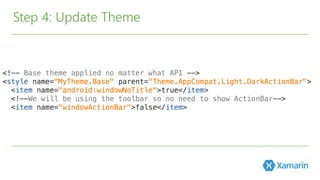
Step 4: Update Theme
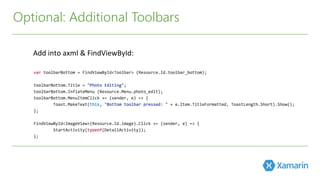
Optional: Additional Toolbars
Add	
  into	
  axml	
  &	
  FindViewById:	
  
Complete!
h6p://developer.xamarin.com/samples/monodroid/Supportv7/AppCompat/Toolbar/	
  
Let’s
Look
Xamarin.Forms?
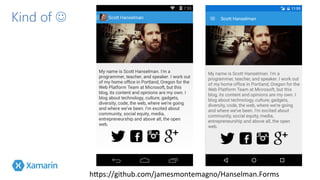
Kind of J 
h6ps://github.com/jamesmontemagno/Hanselman.Forms	
  
Add Style-‐v21
values/styles.xml	
  
values-­‐v21/styles.xml	
  
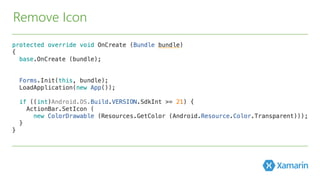
Remove Icon
Update Hamburger Button
MasterDetailPage	
  
-­‐Set	
  Icon	
  to	
  “slideout.png”	
  or	
  whatever	
  you	
  have	
  
named	
  it	
  
-­‐Add	
  default	
  and	
  v21	
  drawables	
  
Let’s
Look
Views and
Shadows
§ Palettes
§ CardView
§ RecyclerView
§ Elevation
Android Lollipop Major Features
§  Extract Prominent
Colors from Image
§  6 Palettes Generated
Generate a color pallet from an image
Material Design –Palettes
https://www.nuget.org/packages/Xamarin.Android.Support.v7.Palette/
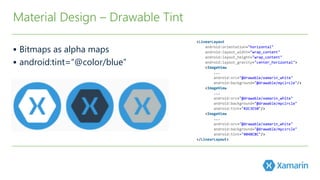
§  Bitmaps as alpha maps
§  android:tint=“@color/blue”
Material Design – Drawable Tint
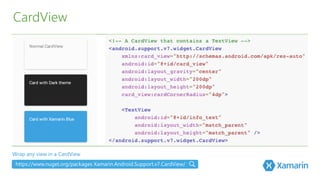
CardView
Wrap any view in a CardView
https://www.nuget.org/packages Xamarin.Android.Support.v7.CardView/
RecyclerView
https://www.nuget.org/packages/Xamarin.Android.Support.v7.RecyclerView/
§  High speed efficient ListView
§  Includes layout manager for positioning items
§  Default animations for common item operations
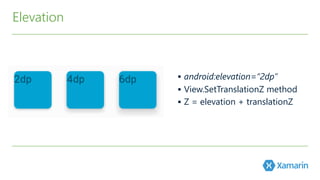
Elevation
§  android:elevation=“2dp”
§  View.SetTranslationZ method
§  Z = elevation + translationZ
Demo
Animations
§ Touch Feedback
§ Reveal
§ Activity Transitions
Android Lollipop Major Features
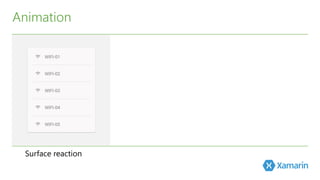
Surface reaction
Animation
Surface reaction
Animation
Material response
Surface reaction
Animation
Material response
 Radial action
§  Default Touch Feedback Animation:
RippleDrawable
§  Set Background to:
•  ?android:attr/
selectableItemBackground
•  ?android:attr/
selectableItemBackgroundBorderless
§  Create custom RippleDrawable using
the ripple element
Animation – Touch Feedback
Animation – Reveal
§  Easily create
clipping circles
§  Custom animations for enter and exit transitions
of activities
•  Enter: How views in the activity enter
•  Exit: How view in activity exit
•  Shared Elements: How views that are shared
between 2 activities animate
Animation – Activity Transitions
Let’s
Look
Notifications
§  Lock Screen Notifications
§  Notifications Metadata 
§  Unified Notifications
Android Lollipop Major Features
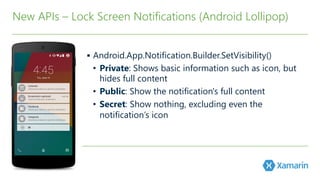
§  Android.App.Notification.Builder.SetVisibility(﴾)﴿ 

•  Private: Shows basic information such as icon, but
hides full content
•  Public: Show the notification's full content
•  Secret: Show nothing, excluding even the
notification’s icon
New APIs – Lock Screen Notifications (﴾Android Lollipop)﴿
§  SetCategory(﴾)﴿: Tells the system how to handle
notifications when the device is in Do not Disturb
§  SetPriority(﴾)﴿: Set to Max or High to appear in a
small floating window if the sound also has a vibration
or sound.
§  AddPerson(﴾)﴿: Add a list of people to notification. 
New APIs – Notifications Metadata (﴾Android Lollipop)﴿
Unified Notifications – Standard and Extended
Compatibility

& More
§  New APIs
§  Android Lollipop Small Features
§  Google Play Services via NuGet
Android Lollipop Major Features
§  Material Theme
•  Only available in Android L
Developer Preview
o  Define theme that inherits from
older theme (﴾like Holo)﴿ in res/
values/styles.xml
o  Define them with same name that
inherits from Material in res/values-‐
v21/styles.xml
o  Set theme as your app’s theme in
manifest file
New APIs – Compatibility
§  Layouts
•  Do not use any of the new XML attributes from
Android L Developer Preview, they will not work
with previous versions of Android.
•  You must provide alternative layouts if you wish
to use them
o  L Preview Layouts: res/layout-‐v21/
o  Alternative Layouts: res/layout/
o  Do avoid duplication of code, define styles in
res/values/
o  Modify the style in res/values-‐v21/ for new APIs
§  UI Widgets
•  Support v7: RecyclerView & CardView
o  Limitations (﴾pre-‐L Preview)﴿:
o  CardView falls back to
programmatic shadows
implementation using additional
padding
o  CardView does not clip its children
that intersect with rounded corners
New APIs – Compatibility
§  Animations
•  Following are Android L Developer Preview ONLY:
o  Activity Transitions
o  Touch feedback
o  Reveal animations
o  Path-‐based animations
§  Camera
•  Enhanced image and
video capturing. Capture
Raw sensor data.
§  Multi-‐networking
•  Dynamically scan for
available network with
specific capability and
automatically connect.
§  BLE Peripheral Mode
•  Apps that connect to devices
such as pedometer or health
monitor and transfer data to
another BLE device.
§  Document-‐Centric Recents
§  Job Scheduler
Android L Small Features
Google Play Services via NuGet
§  Play Game Services: event –based challenges, saved
games, and game profiles 
§  App Indexing API
§  Google Cast: Media tracks for closed captioning
§  Wallet: Save to Wallet, geo-‐fenced in-‐store notifications,
split tender between wallet & card
§  Analytics: Measure product impressions/product clicks
§  Mobile Ads: in-‐app purchase ads
§  Dynamic Security Provider
Views
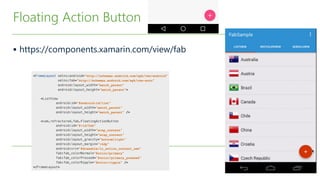
§ Floating Action Button (﴾FAB)﴿
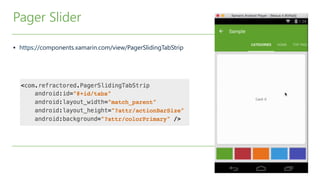
§ Page Slider
Android Lollipop – Not Built In
§  https://components.xamarin.com/view/fab
Floating Action Button
§  https://components.xamarin.com/view/PagerSlidingTabStrip
Pager Slider
Demo
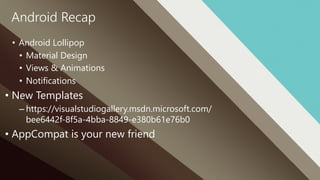
Android Recap
•  Android Lollipop
•  Material Design
•  Views & Animations
•  Notifications
• New Templates
– https://visualstudiogallery.msdn.microsoft.com/
bee6442f-‐8f5a-‐4bba-‐8849-‐e380b61e76b0
• AppCompat is your new friend
§  Intro to AppCompat & Toolbar!
§  http://blog.xamarin.com/android-tips-hello-material-design-v7-appcompat/!
§  http://blog.xamarin.com/android-tips-hello-toolbar-goodbye-action-bar/!
§  Android L Documentation!
§  http://developer.xamarin.com/guides/android/platform_features/android_l/
introduction_to_android_l/!
!
§  Samples!
§  http://developer.xamarin.com/samples/android/!
Resources
James Montemagno
Developer Evangelist, Xamarin
@JamesMontemagno
Thank you!
Q & A

Android Lollipop and Material Design