
Tips, Tricks & Best Practices 
Alen Sunny Stephen | Mobile Front End Developer
What’s new in v7 Support Library 
Material Design 
UI elements that used in material design 
ToolBar 
Generalizes the functionality of ActionBar for use within app layouts. 
ActionBarDrawerToggle 
The menu-to-arrow animation 
SwitchCompat 
Backport of the Switch widget that was added in Android 4.0 
GridLayout 
Support for the GridLayout layout object. 
© RapidValue Solutions
What’s new in v7 Support Library 
CardView 
Material design compatible implementation for displaying data 
RecyclerView 
Flexible list view for providing a limited window into a large data set. 
Palette 
Lets you extract prominent colors from an image. 
SwipeRefreshLayout 
Refresh the contents of a view with a vertical swipe gesture. 
© RapidValue Solutions
UI implementation challenges 
image courtesy : android.com
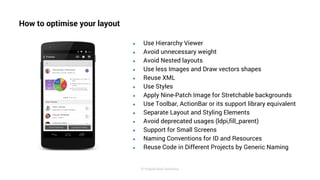
How to optimise your layout 
● Use Hierarchy Viewer 
● Avoid unnecessary weight 
● Avoid Nested layouts 
● Use less Images and Draw vectors shapes 
● Reuse XML 
● Use Styles 
● Apply Nine-Patch Image for Stretchable backgrounds 
● Use Toolbar, ActionBar or its support library equivalent 
● Separate Layout and Styling Elements 
● Avoid deprecated usages (ldpi,fill_parent) 
● Support for Small Screens 
● Naming Conventions for ID and Resources 
● Reuse Code in Different Projects by Generic Naming 
© RapidValue Solutions
Use Hierarchy Viewer
Avoid unnecessary weight 
<RelativeLayout> 
toLeftOf toRightOf 
</RelativeLayout> 
<View 
android:id=”@+id/divider” 
android:centerHorizontal=”true” /> 
© RapidValue Solutions
Avoid Nested layouts 
● Measure: 0.977ms 
● Layout: 0.167ms 
● Draw: 2.717ms 
● Measure : 0.598ms 
● Layout : 0.110ms 
● Draw : 2.146ms
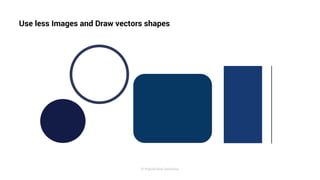
Use less Images and Draw vectors shapes 
© RapidValue Solutions
Reuse XML 
Write XML Layouts as reusable layouts, which will avoid duplicating the same layout with different names. 
Use the <include> Tag 
Use the <merge> Tag 
Use the <fragment> Tag 
© RapidValue Solutions
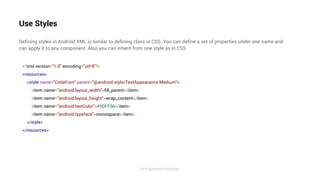
Use Styles 
Defining styles in Android XML is similar to defining class in CSS. You can define a set of properties under one name and 
can apply it to any component. Also you can inherit from one style as in CSS 
<?xml version="1.0" encoding="utf-8"?> 
<resources> 
<style name="CodeFont" parent="@android:style/TextAppearance.Medium"> 
<item name="android:layout_width">fill_parent</item> 
<item name="android:layout_height">wrap_content</item> 
<item name="android:textColor">#00FF00</item> 
<item name="android:typeface">monospace</item> 
</style> 
</resources> 
© RapidValue Solutions
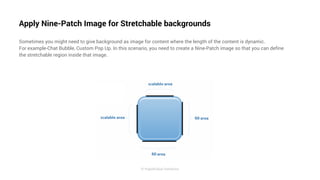
Apply Nine-Patch Image for Stretchable backgrounds 
Sometimes you might need to give background as image for content where the length of the content is dynamic. 
For example-Chat Bubble, Custom Pop Up. In this scenario, you need to create a Nine-Patch image so that you can define 
the stretchable region inside that image. 
© RapidValue Solutions
Use Toolbar, ActionBar or its support library equivalent 
ActionBar 
ActionBar Style Generator made the customization is easy. 
Toolbar 
Generalization of action bars for use within application layouts. 
© RapidValue Solutions
Separate Layout and Styling Elements 
dimens.xml 
To refer all your dimensions from a common xml 
strings.xml 
Separate all hard coded layout strings to another xml. 
colors.xml 
Generalization of action bars for use within application layouts. 
© RapidValue Solutions
Avoid deprecated usages (ldpi,fill_parent) 
ldpi 
No need to use ldpi images in your projects anymore 
fill_parent 
fill_parent is equivalent to match_parent 
use xxhdpi/xxxhdpi 
use xxhdpi for project resources and xxxhdpi quality for app icon 
© RapidValue Solutions
Support for Small Screens 
res/layout/my_layout.xml 
// layout for normal screen size ("default") 
res/layout-large/my_layout.xml 
// layout for large screen size 
res/layout-xlarge/my_layout.xml 
// layout for extra-large screen size 
res/layout-xlarge-land/my_layout.xml // 
layout for extra-large in landscape orientation 
© RapidValue Solutions
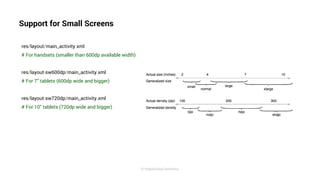
Support for Small Screens 
res/layout/main_activity.xml 
# For handsets (smaller than 600dp available width) 
res/layout-sw600dp/main_activity.xml 
# For 7” tablets (600dp wide and bigger) 
res/layout-sw720dp/main_activity.xml 
# For 10” tablets (720dp wide and bigger) 
© RapidValue Solutions
Naming Conventions for ID and Resources 
For IDs you can follow this format 
login_ed_username 
login_ed_password 
login_btn_submit 
login_txv_forgot_pass 
Login stands for ‘which page’, followed by ‘which component’ and then ‘what it is for’.In general layoutname_component_name. 
This will help you to get a clear idea about the ID and can avoid looking into layout each time. 
For resources you can follow this format 
ic_action_add 
ic_action_location (ActionBar Icons) 
ic_play, ic_save (General Icons) 
ic_tab_music 
ic_tab_more (Tab Icons) 
© RapidValue Solutions
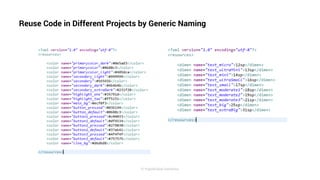
Reuse Code in Different Projects by Generic Naming 
© RapidValue Solutions
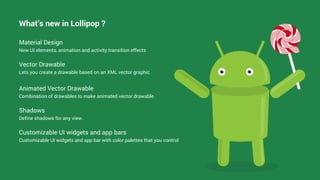
What’s new in Lollipop ? 
Material Design 
New UI elements, animation and activity transition effects 
Vector Drawable 
Lets you create a drawable based on an XML vector graphic 
Animated Vector Drawable 
Combination of drawables to make animated vector drawable 
Shadows 
Define shadows for any view. 
Customizable UI widgets and app bars 
Customizable UI widgets and app bar with color palettes that you control
© RapidValue Solutions

Best Practices for Android UI by RapidValue Solutions

  • 1.
    Tips, Tricks &Best Practices Alen Sunny Stephen | Mobile Front End Developer
  • 2.
    What’s new inv7 Support Library Material Design UI elements that used in material design ToolBar Generalizes the functionality of ActionBar for use within app layouts. ActionBarDrawerToggle The menu-to-arrow animation SwitchCompat Backport of the Switch widget that was added in Android 4.0 GridLayout Support for the GridLayout layout object. © RapidValue Solutions
  • 3.
    What’s new inv7 Support Library CardView Material design compatible implementation for displaying data RecyclerView Flexible list view for providing a limited window into a large data set. Palette Lets you extract prominent colors from an image. SwipeRefreshLayout Refresh the contents of a view with a vertical swipe gesture. © RapidValue Solutions
  • 4.
    UI implementation challenges image courtesy : android.com
  • 5.
    How to optimiseyour layout ● Use Hierarchy Viewer ● Avoid unnecessary weight ● Avoid Nested layouts ● Use less Images and Draw vectors shapes ● Reuse XML ● Use Styles ● Apply Nine-Patch Image for Stretchable backgrounds ● Use Toolbar, ActionBar or its support library equivalent ● Separate Layout and Styling Elements ● Avoid deprecated usages (ldpi,fill_parent) ● Support for Small Screens ● Naming Conventions for ID and Resources ● Reuse Code in Different Projects by Generic Naming © RapidValue Solutions
  • 6.
  • 7.
    Avoid unnecessary weight <RelativeLayout> toLeftOf toRightOf </RelativeLayout> <View android:id=”@+id/divider” android:centerHorizontal=”true” /> © RapidValue Solutions
  • 8.
    Avoid Nested layouts ● Measure: 0.977ms ● Layout: 0.167ms ● Draw: 2.717ms ● Measure : 0.598ms ● Layout : 0.110ms ● Draw : 2.146ms
  • 9.
    Use less Imagesand Draw vectors shapes © RapidValue Solutions
  • 10.
    Reuse XML WriteXML Layouts as reusable layouts, which will avoid duplicating the same layout with different names. Use the <include> Tag Use the <merge> Tag Use the <fragment> Tag © RapidValue Solutions
  • 11.
    Use Styles Definingstyles in Android XML is similar to defining class in CSS. You can define a set of properties under one name and can apply it to any component. Also you can inherit from one style as in CSS <?xml version="1.0" encoding="utf-8"?> <resources> <style name="CodeFont" parent="@android:style/TextAppearance.Medium"> <item name="android:layout_width">fill_parent</item> <item name="android:layout_height">wrap_content</item> <item name="android:textColor">#00FF00</item> <item name="android:typeface">monospace</item> </style> </resources> © RapidValue Solutions
  • 12.
    Apply Nine-Patch Imagefor Stretchable backgrounds Sometimes you might need to give background as image for content where the length of the content is dynamic. For example-Chat Bubble, Custom Pop Up. In this scenario, you need to create a Nine-Patch image so that you can define the stretchable region inside that image. © RapidValue Solutions
  • 13.
    Use Toolbar, ActionBaror its support library equivalent ActionBar ActionBar Style Generator made the customization is easy. Toolbar Generalization of action bars for use within application layouts. © RapidValue Solutions
  • 14.
    Separate Layout andStyling Elements dimens.xml To refer all your dimensions from a common xml strings.xml Separate all hard coded layout strings to another xml. colors.xml Generalization of action bars for use within application layouts. © RapidValue Solutions
  • 15.
    Avoid deprecated usages(ldpi,fill_parent) ldpi No need to use ldpi images in your projects anymore fill_parent fill_parent is equivalent to match_parent use xxhdpi/xxxhdpi use xxhdpi for project resources and xxxhdpi quality for app icon © RapidValue Solutions
  • 16.
    Support for SmallScreens res/layout/my_layout.xml // layout for normal screen size ("default") res/layout-large/my_layout.xml // layout for large screen size res/layout-xlarge/my_layout.xml // layout for extra-large screen size res/layout-xlarge-land/my_layout.xml // layout for extra-large in landscape orientation © RapidValue Solutions
  • 17.
    Support for SmallScreens res/layout/main_activity.xml # For handsets (smaller than 600dp available width) res/layout-sw600dp/main_activity.xml # For 7” tablets (600dp wide and bigger) res/layout-sw720dp/main_activity.xml # For 10” tablets (720dp wide and bigger) © RapidValue Solutions
  • 18.
    Naming Conventions forID and Resources For IDs you can follow this format login_ed_username login_ed_password login_btn_submit login_txv_forgot_pass Login stands for ‘which page’, followed by ‘which component’ and then ‘what it is for’.In general layoutname_component_name. This will help you to get a clear idea about the ID and can avoid looking into layout each time. For resources you can follow this format ic_action_add ic_action_location (ActionBar Icons) ic_play, ic_save (General Icons) ic_tab_music ic_tab_more (Tab Icons) © RapidValue Solutions
  • 19.
    Reuse Code inDifferent Projects by Generic Naming © RapidValue Solutions
  • 20.
    What’s new inLollipop ? Material Design New UI elements, animation and activity transition effects Vector Drawable Lets you create a drawable based on an XML vector graphic Animated Vector Drawable Combination of drawables to make animated vector drawable Shadows Define shadows for any view. Customizable UI widgets and app bars Customizable UI widgets and app bar with color palettes that you control
  • 21.