BASICS OF ANDROID APP
DEVELOPMENT
By Sagar Das
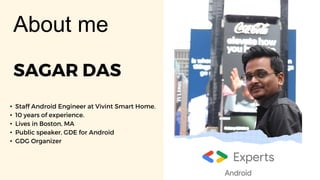
SAGAR DAS
• Staff Android Engineer at Vivint Smart Home.
• 10 years of experience.
• Lives in Boston, MA
• Public speaker, GDE for Android
• GDG Organizer
About me
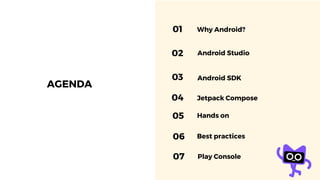
AGENDA
01 Why Android?
02 Android Studio
03 Android SDK
04 Jetpack Compose
05 Hands on
06 Best practices
Play Console
07
• Android is a mobile operating system based on
Linux, primarily for touchscreens
• Developed by Google and the Open Handset Alliance
• World's most popular operating system, powering
billions of devices globally
• Open-source nature allows for customization and
flexibility
ANDROID
01 Open Source
02 Popularity
03 Versatility
Why
matters
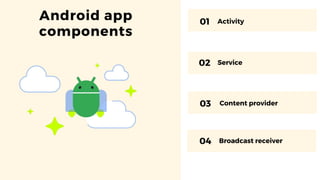
Activity
Service
Android app
components
01
02
03 Content provider
04 Broadcast receiver
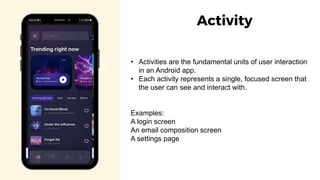
• Activities are the fundamental units of user interaction
in an Android app.
• Each activity represents a single, focused screen that
the user can see and interact with.
Examples:
A login screen
An email composition screen
A settings page
Activity
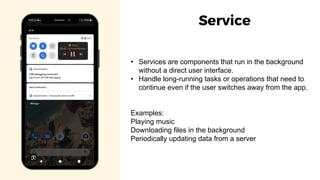
• Services are components that run in the background
without a direct user interface.
• Handle long-running tasks or operations that need to
continue even if the user switches away from the app.
Examples:
Playing music
Downloading files in the background
Periodically updating data from a server
Service
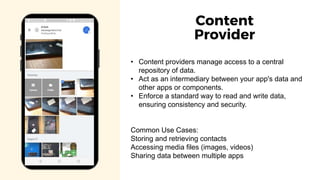
• Content providers manage access to a central
repository of data.
• Act as an intermediary between your app's data and
other apps or components.
• Enforce a standard way to read and write data,
ensuring consistency and security.
Common Use Cases:
Storing and retrieving contacts
Accessing media files (images, videos)
Sharing data between multiple apps
Content
Provider
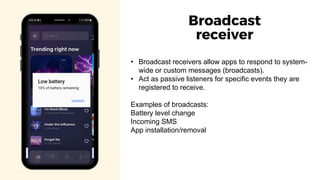
• Broadcast receivers allow apps to respond to system-
wide or custom messages (broadcasts).
• Act as passive listeners for specific events they are
registered to receive.
Examples of broadcasts:
Battery level change
Incoming SMS
App installation/removal
Broadcast
receiver
Android
Studio
Available flavors:
1. Stable
2. Beta
3. Canary
Android Studio is the official IDE
created by Google for Android app
development. It is based on Jetbrains
IDE.
https://developer.android.com/studio
Download
Kotlin
https://kotlinlang.org
• Kotlin is a statically typed programming language
designed for the JVM (Java Virtual Machine).
• Official language for Android development, fully
supported by Google.
• Supports multiplatform.
Kodee – Kotlin’s mascot
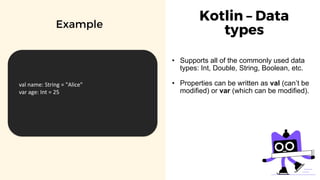
Kotlin – Data
types
• Supports all of the commonly used data
types: Int, Double, String, Boolean, etc.
• Properties can be written as val (can’t be
modified) or var (which can be modified).
Example
val name: String = "Alice"
var age: Int = 25
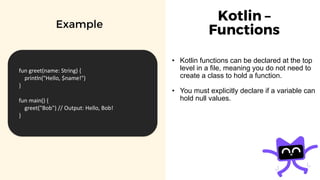
Kotlin –
Functions
• Kotlin functions can be declared at the top
level in a file, meaning you do not need to
create a class to hold a function.
• You must explicitly declare if a variable can
hold null values.
Example
fun greet(name: String) {
println("Hello, $name!")
}
fun main() {
greet("Bob") // Output: Hello, Bob!
}
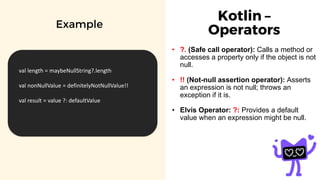
Kotlin –
Operators
• ?. (Safe call operator): Calls a method or
accesses a property only if the object is not
null.
• !! (Not-null assertion operator): Asserts
an expression is not null; throws an
exception if it is.
• Elvis Operator: ?: Provides a default
value when an expression might be null.
Example
val length = maybeNullString?.length
val nonNullValue = definitelyNotNullValue!!
val result = value ?: defaultValue
Material
Design
https://m3.material.io
Google’s design guidelines.
Usually used for Android app
development.
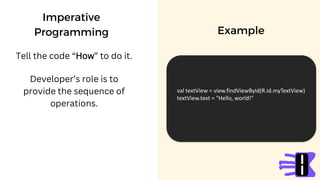
Imperative
Programming
Tell the code “How” to do it.
Example
val textView = view.findViewById(R.id.myTextView)
textView.text = "Hello, world!"
Developer’s role is to
provide the sequence of
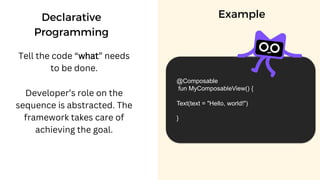
operations.
Declarative
Programming
Tell the code “what” needs
to be done.
Example
@Composable
fun MyComposableView() {
Text(text = "Hello, world!")
}
Developer’s role on the
sequence is abstracted. The
framework takes care of
achieving the goal.
Jetpack
Compose
https://developer.android.co
m/jetpack/compose
A declarative programming
framework for building UI
elements in an Android app.
Why use jetpack Compose?
• Less Code: Declarative style reduces verbosity.
• Faster Development: Real-time previews and
intuitive code updates.
• Improved Maintainability: Clear separation of UI
and logic.
• Modern Approach: Aligned with industry trends
and Google's focus.
LIVE
DEMO
Android Project structure and
navigating the IDE.
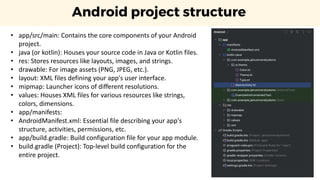
Android project structure
• app/src/main: Contains the core components of your Android
project.
• java (or kotlin): Houses your source code in Java or Kotlin files.
• res: Stores resources like layouts, images, and strings.
• drawable: For image assets (PNG, JPEG, etc.).
• layout: XML files defining your app's user interface.
• mipmap: Launcher icons of different resolutions.
• values: Houses XML files for various resources like strings,
colors, dimensions.
• app/manifests:
• AndroidManifest.xml: Essential file describing your app's
structure, activities, permissions, etc.
• app/build.gradle: Build configuration file for your app module.
• build.gradle (Project): Top-level build configuration for the
entire project.
LIVE
DEMO
Android Virtual Device.
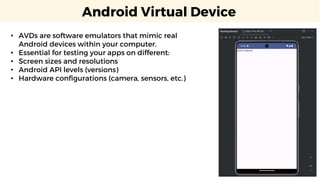
Android Virtual Device
• AVDs are software emulators that mimic real
Android devices within your computer.
• Essential for testing your apps on different:
• Screen sizes and resolutions
• Android API levels (versions)
• Hardware configurations (camera, sensors, etc.)
LIVE
DEMO
Composable Functions
This work is licensed under the Apache 2.0 License
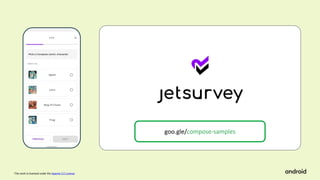
goo.gle/compose-samples
This work is licensed under the Apache 2.0 License
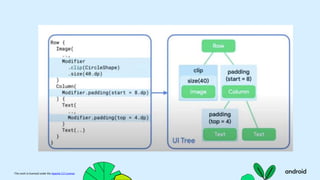
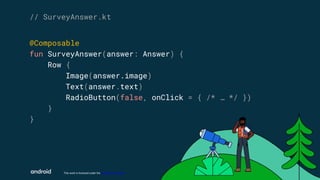
@Composable
fun SurveyAnswer(answer: Answer) {
Row {
Image(answer.image)
Text(answer.text)
RadioButton(false, onClick = { /* … */ })
}
}
// SurveyAnswer.kt
This work is licensed under the Apache 2.0 License
Construct UI by
describing what,
not how.
This work is licensed under the Apache 2.0 License
Architecture patterns solves large
scale problems,
Where as Design patterns solve small
scale problems.
This work is licensed under the Apache 2.0 License
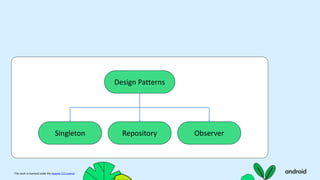
Design Patterns
This work is licensed under the Apache 2.0 License
Design patterns solves problems in
one layer of the app.
This work is licensed under the Apache 2.0 License
Design Patterns
Singleton Repository Observer
This work is licensed under the Apache 2.0 License
Architecture Patterns
This work is licensed under the Apache 2.0 License
Architecture patterns solves
problems in multiple layers of the
app.
This work is licensed under the Apache 2.0 License
Separation of concerns
principle, states that different
parts of a software system
should be responsible for
different things.
This work is licensed under the Apache 2.0 License
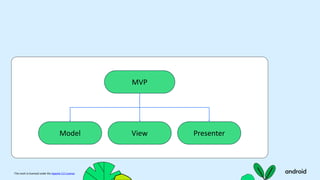
MVP
Model View Presenter
This work is licensed under the Apache 2.0 License
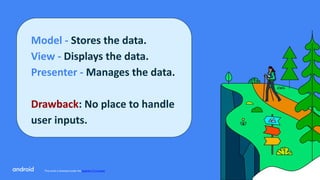
Model - Stores the data.
View - Displays the data.
Presenter - Manages the data.
Drawback: No place to handle
user inputs.
This work is licensed under the Apache 2.0 License
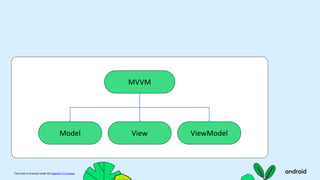
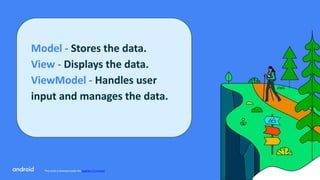
MVVM
Model View ViewModel
This work is licensed under the Apache 2.0 License
Model - Stores the data.
View - Displays the data.
ViewModel - Handles user
input and manages the data.
This work is licensed under the Apache 2.0 License
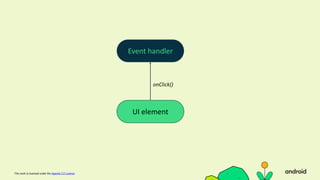
Event handler
UI element
onClick()
This work is licensed under the Apache 2.0 License
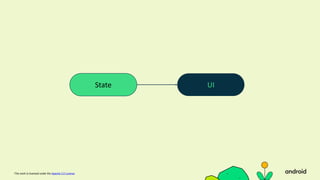
UI
State
This work is licensed under the Apache 2.0 License
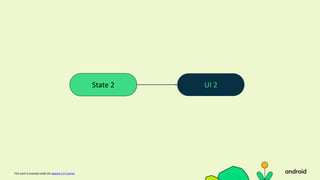
UI 2
State 2
Play Console
• Google Play Console: Developer platform to publish
and manage your apps.
• One-Time Fee: $25 registration fee to create a
developer account.
• App Preparation: Follow Google's guidelines for
content, quality, and security.
• Release Process: Create store listings, upload your
app, and submit for review.
Android open
source
https://source.android.com/docs/setup/download/
REPOS
Open source
https://github.com/android/compose-samples
REPOS
Open source
https://github.com/mozilla-mobile/firefox-android
Best Practices for Performance
• Efficient background tasks: Use threads, coroutines, or WorkManager judiciously
to prevent blocking the main UI thread.
• Focus on accessibility: Design your app to be usable by people with disabilities
(screen readers, large text sizes, etc.)
• Thorough testing: Test on a range of devices and network conditions to ensure a
consistent experience.
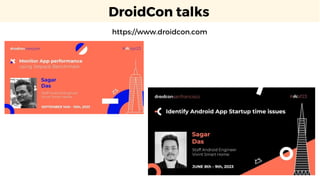
DroidCon talks
https://www.droidcon.com
https://www.linkedin.com/in/
sagar-das-077a4a7b/
THANKS
Feel free to connect on
LinkedIN
https://medium.com/@sagar.das
Performance Engineering
Blogs
GDG BOSTON ANDROID @bostonandroid

Introduction to Android- A session by Sagar Das

  • 1.
    BASICS OF ANDROIDAPP DEVELOPMENT By Sagar Das
  • 2.
    SAGAR DAS • StaffAndroid Engineer at Vivint Smart Home. • 10 years of experience. • Lives in Boston, MA • Public speaker, GDE for Android • GDG Organizer About me
  • 3.
    AGENDA 01 Why Android? 02Android Studio 03 Android SDK 04 Jetpack Compose 05 Hands on 06 Best practices Play Console 07
  • 4.
    • Android isa mobile operating system based on Linux, primarily for touchscreens • Developed by Google and the Open Handset Alliance • World's most popular operating system, powering billions of devices globally • Open-source nature allows for customization and flexibility
  • 5.
    ANDROID 01 Open Source 02Popularity 03 Versatility Why matters
  • 6.
  • 7.
    • Activities arethe fundamental units of user interaction in an Android app. • Each activity represents a single, focused screen that the user can see and interact with. Examples: A login screen An email composition screen A settings page Activity
  • 8.
    • Services arecomponents that run in the background without a direct user interface. • Handle long-running tasks or operations that need to continue even if the user switches away from the app. Examples: Playing music Downloading files in the background Periodically updating data from a server Service
  • 9.
    • Content providersmanage access to a central repository of data. • Act as an intermediary between your app's data and other apps or components. • Enforce a standard way to read and write data, ensuring consistency and security. Common Use Cases: Storing and retrieving contacts Accessing media files (images, videos) Sharing data between multiple apps Content Provider
  • 10.
    • Broadcast receiversallow apps to respond to system- wide or custom messages (broadcasts). • Act as passive listeners for specific events they are registered to receive. Examples of broadcasts: Battery level change Incoming SMS App installation/removal Broadcast receiver
  • 11.
    Android Studio Available flavors: 1. Stable 2.Beta 3. Canary Android Studio is the official IDE created by Google for Android app development. It is based on Jetbrains IDE. https://developer.android.com/studio Download
  • 12.
    Kotlin https://kotlinlang.org • Kotlin isa statically typed programming language designed for the JVM (Java Virtual Machine). • Official language for Android development, fully supported by Google. • Supports multiplatform. Kodee – Kotlin’s mascot
  • 13.
    Kotlin – Data types •Supports all of the commonly used data types: Int, Double, String, Boolean, etc. • Properties can be written as val (can’t be modified) or var (which can be modified). Example val name: String = "Alice" var age: Int = 25
  • 14.
    Kotlin – Functions • Kotlinfunctions can be declared at the top level in a file, meaning you do not need to create a class to hold a function. • You must explicitly declare if a variable can hold null values. Example fun greet(name: String) { println("Hello, $name!") } fun main() { greet("Bob") // Output: Hello, Bob! }
  • 15.
    Kotlin – Operators • ?.(Safe call operator): Calls a method or accesses a property only if the object is not null. • !! (Not-null assertion operator): Asserts an expression is not null; throws an exception if it is. • Elvis Operator: ?: Provides a default value when an expression might be null. Example val length = maybeNullString?.length val nonNullValue = definitelyNotNullValue!! val result = value ?: defaultValue
  • 16.
  • 17.
    Imperative Programming Tell the code“How” to do it. Example val textView = view.findViewById(R.id.myTextView) textView.text = "Hello, world!" Developer’s role is to provide the sequence of operations.
  • 18.
    Declarative Programming Tell the code“what” needs to be done. Example @Composable fun MyComposableView() { Text(text = "Hello, world!") } Developer’s role on the sequence is abstracted. The framework takes care of achieving the goal.
  • 19.
  • 20.
    Why use jetpackCompose? • Less Code: Declarative style reduces verbosity. • Faster Development: Real-time previews and intuitive code updates. • Improved Maintainability: Clear separation of UI and logic. • Modern Approach: Aligned with industry trends and Google's focus.
  • 21.
    LIVE DEMO Android Project structureand navigating the IDE.
  • 22.
    Android project structure •app/src/main: Contains the core components of your Android project. • java (or kotlin): Houses your source code in Java or Kotlin files. • res: Stores resources like layouts, images, and strings. • drawable: For image assets (PNG, JPEG, etc.). • layout: XML files defining your app's user interface. • mipmap: Launcher icons of different resolutions. • values: Houses XML files for various resources like strings, colors, dimensions. • app/manifests: • AndroidManifest.xml: Essential file describing your app's structure, activities, permissions, etc. • app/build.gradle: Build configuration file for your app module. • build.gradle (Project): Top-level build configuration for the entire project.
  • 23.
  • 24.
    Android Virtual Device •AVDs are software emulators that mimic real Android devices within your computer. • Essential for testing your apps on different: • Screen sizes and resolutions • Android API levels (versions) • Hardware configurations (camera, sensors, etc.)
  • 25.
  • 26.
    This work islicensed under the Apache 2.0 License goo.gle/compose-samples
  • 27.
    This work islicensed under the Apache 2.0 License @Composable fun SurveyAnswer(answer: Answer) { Row { Image(answer.image) Text(answer.text) RadioButton(false, onClick = { /* … */ }) } } // SurveyAnswer.kt
  • 28.
    This work islicensed under the Apache 2.0 License Construct UI by describing what, not how.
  • 29.
    This work islicensed under the Apache 2.0 License
  • 30.
    This work islicensed under the Apache 2.0 License
  • 31.
    This work islicensed under the Apache 2.0 License
  • 32.
    This work islicensed under the Apache 2.0 License Architecture patterns solves large scale problems, Where as Design patterns solve small scale problems.
  • 33.
    This work islicensed under the Apache 2.0 License Design Patterns
  • 34.
    This work islicensed under the Apache 2.0 License Design patterns solves problems in one layer of the app.
  • 35.
    This work islicensed under the Apache 2.0 License Design Patterns Singleton Repository Observer
  • 36.
    This work islicensed under the Apache 2.0 License Architecture Patterns
  • 37.
    This work islicensed under the Apache 2.0 License Architecture patterns solves problems in multiple layers of the app.
  • 38.
    This work islicensed under the Apache 2.0 License Separation of concerns principle, states that different parts of a software system should be responsible for different things.
  • 39.
    This work islicensed under the Apache 2.0 License MVP Model View Presenter
  • 40.
    This work islicensed under the Apache 2.0 License Model - Stores the data. View - Displays the data. Presenter - Manages the data. Drawback: No place to handle user inputs.
  • 41.
    This work islicensed under the Apache 2.0 License MVVM Model View ViewModel
  • 42.
    This work islicensed under the Apache 2.0 License Model - Stores the data. View - Displays the data. ViewModel - Handles user input and manages the data.
  • 43.
    This work islicensed under the Apache 2.0 License Event handler UI element onClick()
  • 44.
    This work islicensed under the Apache 2.0 License UI State
  • 45.
    This work islicensed under the Apache 2.0 License UI 2 State 2
  • 46.
    Play Console • GooglePlay Console: Developer platform to publish and manage your apps. • One-Time Fee: $25 registration fee to create a developer account. • App Preparation: Follow Google's guidelines for content, quality, and security. • Release Process: Create store listings, upload your app, and submit for review.
  • 47.
  • 48.
  • 49.
  • 50.
    Best Practices forPerformance • Efficient background tasks: Use threads, coroutines, or WorkManager judiciously to prevent blocking the main UI thread. • Focus on accessibility: Design your app to be usable by people with disabilities (screen readers, large text sizes, etc.) • Thorough testing: Test on a range of devices and network conditions to ensure a consistent experience.
  • 51.
  • 52.
    https://www.linkedin.com/in/ sagar-das-077a4a7b/ THANKS Feel free toconnect on LinkedIN https://medium.com/@sagar.das Performance Engineering Blogs GDG BOSTON ANDROID @bostonandroid

Editor's Notes

  • #4 1.7.2013
  • #5 1.7.2013
  • #8 1.7.2013
  • #9 1.7.2013
  • #10 1.7.2013
  • #11 1.7.2013
  • #12 1.7.2013
  • #13 1.7.2013
  • #14 1.7.2013
  • #15 1.7.2013
  • #16 1.7.2013
  • #17 1.7.2013
  • #18 1.7.2013
  • #19 1.7.2013
  • #20 1.7.2013
  • #21 1.7.2013
  • #23 1.7.2013
  • #25 1.7.2013
  • #27 Let’s see how we can build the single choice question screen of Jetsurvey.
  • #28 Instead of writing this in XML, we would define our elements directly in code—in Kotlin. Doing it this way, we no longer have to jump between XML and code, as the UI would already be declared in code.
  • #29 This is what we mean by ‘what not how’. We are declaring what our UI should look like by providing the necessary state to our UI functions, but we’re not telling Compose how it should render that state. So if State controls the UI, how do we go about updating State to update the UI?
  • #30 To understand how to think about building this in Compose, let’s first look at how we might build this using Views. To simplify things, let’s look at a single component in this screen—a single answer in the survey.
  • #31 To understand how to think about building this in Compose, let’s first look at how we might build this using Views. To simplify things, let’s look at a single component in this screen—a single answer in the survey.
  • #32 To understand how to think about building this in Compose, let’s first look at how we might build this using Views. To simplify things, let’s look at a single component in this screen—a single answer in the survey.
  • #33 Constructing UI by describing what, not how, is a key difference between Compose and Views—it is what makes Compose much more intuitive to work with.
  • #35 Data Layer, UI Layer
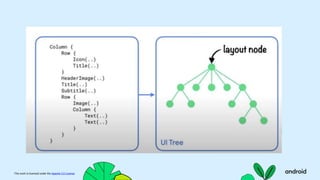
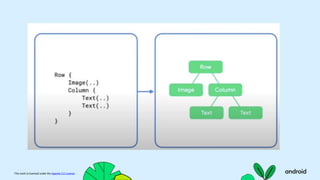
  • #36 This component is composed of an image, some text, and a radio button, all arranged horizontally.
  • #38 Data Layer, UI Layer
  • #39 Data Layer, UI Layer
  • #40 This component is composed of an image, some text, and a radio button, all arranged horizontally.
  • #41 Data Layer, UI Layer
  • #42 This component is composed of an image, some text, and a radio button, all arranged horizontally.
  • #43 Data Layer, UI Layer
  • #44 In Compose, we do that through events. When a user interacts with a UI element, the UI emits an event, such as onClick(), and the event handler can then decide if the UI’s state should be changed.
  • #45 If UI state changes, the functions, or UI elements, that depend on that state will be re-executed. This process of regenerating the UI when state changes is called recomposition.
  • #46 The process of converting state into UI and state changes causing UI to regenerate, is at the core of how Compose works as a UI framework. Let’s revisit our example and update our implementation so that the RadioButton gets toggled when it is clicked.
  • #47 1.7.2013
  • #48 1.7.2013
  • #51 1.7.2013
  • #52 1.7.2013